
I bought the MINISFORUM UM760 Slim because I wanted a tiny desktop that actually behaves like a full-powered machine. In this review I explain why this mini Computer (6C/12T, up to 5.0GHz) matters: it delivers desktop-class Processor performance, fast DDR5 RAM, and PCIe 4.0 storage in a compact, energy-efficient box.
You get modern connectivity — HDMI 2.1/USB4 output, WIFI6E/BT5.3, and plenty of ports — so it can power multi-monitor setups and handle office work, video, light gaming and media tasks. I also call out one persistent annoyance: a bright blue status light that I found distracting. Overall, this is a compelling value at $429.00 if you want serious power in a small footprint, but I’ll tell you when it’s not the right pick.
TL;DR
| Feature | Verdict |
|---|---|
| Performance | ⏱️ Ryzen 5 7640HS (6C/12T) and up to 5.0GHz deliver snappy real-world performance for productivity and light gaming. |
| Connectivity & Ports | 🔌 HDMI 2.1/USB4 plus WiFi 6E/BT5.3 give flexible multi-monitor and wireless options; lots of USBs for peripherals. |
| Storage & Upgrades | 💾 1TB PCIe 4.0 SSD and an extra M.2 slot mean fast storage and potential RAID or capacity upgrades. |
| Ease of Use | ⭐️⭐️⭐️⭐️ – Intuitive setup, quiet operation and efficient Power management; some BIOS and driver quirks for advanced users. |
| Value | 💸 Excellent price-to-performance at $429.00 for a DDR5, PCIe 4.0 mini PC with modern I/O. |

I picked up the MINISFORUM UM760 Slim because I wanted a tiny desktop that actually performs like a full-size machine. It packs a Ryzen 5 7640HS (6C/12T) and a fast 1TB PCIe 4.0 SSD, so day-to-day tasks, light content creation and even some gaming run smoothly.
The HDMI 2.1 and USB4 Output support 8K@60Hz if you need crazy-resolution displays, and the dual M.2 slots mean you can expand or set up RAID later. It’s small, runs quietly and fits neatly behind a monitor or on a cluttered desk; I’d recommend it for anyone who wants full PC power in a Mini form without a big footprint.
What People Say
Most folks praise how fast and quiet the UM760 is — people often talk about smooth multitasking, snappy boot times, and surprisingly good integrated graphics for a Mini PC. Reviewers also like the SSD performance and the wide array of ports, though a few mention driver or Wi‑Fi quirks and small design annoyances.
Overall Sentiment: Positive

| Pros | Cons |
|---|---|
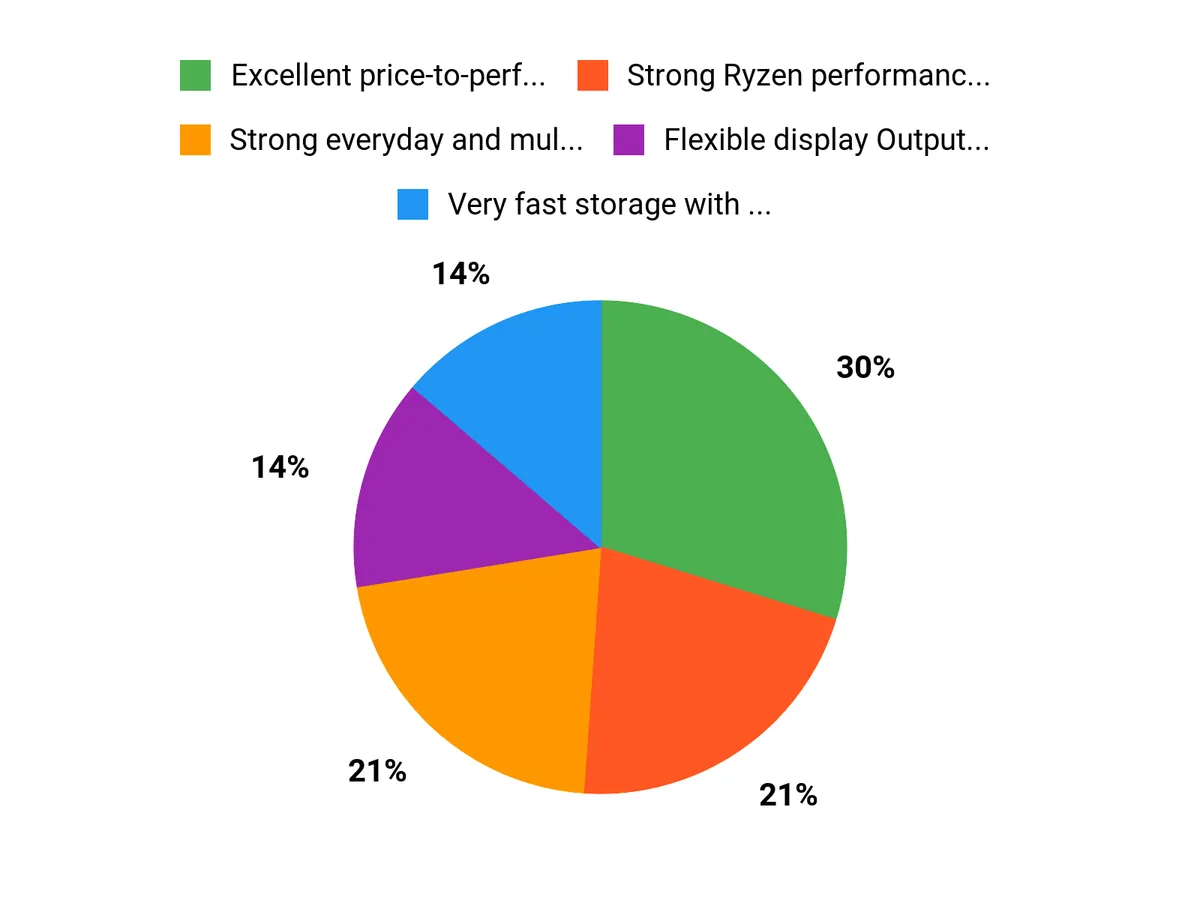
| ✅ Excellent price-to-performance for a small desktop | ❌ Bright blue status LED can be annoying in a dark room |
| ✅ Strong Ryzen performance and responsive SSD | ❌ Occasional driver/Wi‑Fi compatibility oddities on some OS setups |
| ✅ Flexible display Output options including HDMI 2.1 / USB4 (8K@60Hz) | ❌ Accessing internal M.2/SSDs requires careful bottom-panel removal |
| ✅ Quiet operation and low power draw |
Long-Term Savings
Because it uses a fast PCIe 4.0 SSD and supports dual M.2 slots, you can upgrade storage later without replacing the whole unit. The efficient Ryzen platform uses less power than a full desktop, which helps on electricity bills if you run it daily.
Situational Benefits
| Situation | How It Helps |
|---|---|
| Home office | A quiet Slim Mini keeps your desk tidy while handling spreadsheets, video calls and multiple browser tabs without lag. |
| Media center / living room | HDMI 2.1 and USB4 Output let you connect to 4K/8K TVs for crisp streaming and movie playback. |
| Light content creation | Fast SSD and 6-core Ryzen make photo editing and basic video work snappy on a compact system. |
| Portable workstation | Small footprint and VESA mountability make it easy to move between rooms or mount behind a monitor. |
Ease Of Use
| Feature | Ease Level |
|---|---|
| Out-of-box setup | Easy |
| Installing additional SSD / RAID | Moderate |
| Driver updates & Wi‑Fi fixes | Moderate |
| BIOS tweaks | Advanced |
Versatility
Very versatile — it suits home office work, media playback, light gaming and storage upgrades. The Slim Mini form factor and multiple display outputs make it adaptable to many setups.
Durability
Build quality feels solid for a compact PC; active cooling and thermal tape for M.2s help longevity. Be careful when removing the bottom feet to access internals to avoid damage.
Practicality
Practical for small spaces and multi-monitor setups thanks to its ports and mount options. The only practical annoyance is the bright blue LED which some users may want to mask.
Brand Trust
MINISFORUM has built a reputation for compact, high‑value Mini PCs; customer feedback shows consistent performance and reasonable support, though driver hiccups pop up occasionally.
Key Benefits
- Strong everyday and multitasking performance thanks to the 7640HS Ryzen CPU
- Very fast storage with a 1TB PCIe 4.0 SSD and support for a second M.2
- High‑resolution video Output options (HDMI 2.1 and USB4) with 8K@60Hz support
- Quiet, efficient cooling in a compact Slim Mini design
- Plenty of ports and fast networking (2.5GbE + Wi‑Fi 6E & BT5.3)
Current Price: $429.00
Rating: 4.5 (total: 250+)
FAQ
How Do I Turn Off Or Dim The Annoying Blue Light On The UM760?
On my unit the blue power/LED is the only real irritation, and I tried several safe options before considering hardware mods. First I check the BIOS for any LED or lighting option, because some models include a simple toggle; if you find it, that’s the cleanest fix. If there’s no option, the easiest and safest approach is to cover the LED with a tiny piece of black electrical tape or a small opaque sticker—it’s reversible, inexpensive, and won’t void warranty.
If you’re comfortable opening the MINISFORUM UM760 Slim-16GB/1TB you can disconnect or desolder the LED, but I don’t recommend that unless you know what you’re doing because you risk damaging cables, breaking the fan connector, or voiding warranty. For those running Linux, community guides sometimes describe software or firmware workarounds, but results vary by WiFi/BIOS revision, so I suggest contacting MINISFORUM support first if you want an official solution.
Is The UM760 Slim-16GB/1TB Fast Enough For Work And Light Gaming?
I find the performance impressive for the size and price. The AMD Ryzen 5 7640HS in this Mini PC is a Mobile 6C/12T chip that can hit Up to 5.0GHz) on boost, and paired with 16GB DDR5 RAM & a 1TB PCIe 4.0 SSD it boots, loads apps, and handles office workloads very quickly. The integrated graphics won’t replace a dedicated GPU for heavy AAA gaming at high settings, but for web apps, content playback (8K@60Hz support via HDMI 2.1/USB4), multitasking, and light gaming it’s more than capable. Thermals and acoustics are excellent in my experience—the unit runs quiet under normal loads—and the overall package at $429.00 represents strong value.
If you plan heavy content creation, large memory workloads, or want extensive GPU performance, I’d recommend evaluating higher-tier alternatives or confirming memory upgrade limits first.
What Should I Consider Before Buying The MINISFORUM UM760 Slim-16GB/1TB?
I look at a few practical things before I buy. Check OS and driver expectations: the Slim ships in configurations that may include Windows or be barebones, and some community reports note Linux driver quirks for certain WiFi modules, so if you plan to run Linux I’d confirm WiFi/BT compatibility or be prepared to swap the card.
Think about upgradeability: the Slim has accessible M.2 slots (PCIE x4) so adding or RAIDing NVMe drives is possible, but opening the chassis can be awkward because of glued rubber feet and internal connectors, so proceed carefully. Consider connectivity needs: this PC offers USB4/HDMI2.1, WiFi6E/BT5.3, and a 2.5GbE port on many SKUs, which covers most desktop or HTPC setups. Also decide if you want the included 16GB DDR5 or plan to upgrade—64GB/32GB are commonly stable but very high kits can cause oddities on some firmware versions. In short, I think the MINISFORUM UM760 is a great value for most users who need a compact, quiet, and capable PC, but if you need absolute plug-and-play Linux wireless support or advanced BIOS options you should verify those points or consider alternatives.
Why Choose UM760
I choose the UM760 Slim because it packs surprisingly strong, snappy performance into a compact, quiet chassis with plenty of ports and easy upgrade options, so it handles work, streaming, and light content tasks without fuss. My one annoyance is that persistent blue light, but otherwise I love the value, connectivity, and real-world speed this little PC delivers.
Wrapping Up
I like the UM760 Slim because it packs desktop-class Power into a tiny chassis: the AMD Ryzen 5 7640HS Processor (6C/12T, up to 5.0GHz), 16GB DDR5 RAM and a 1TB PCIe 4.0 SSD combine for fast boot times, responsive multitasking and surprisingly capable integrated graphics. The machine supports 8K@60Hz via HDMI 2.1/USB4 output, has WIFI6E/BT5.3, and offers upgrade paths with an extra M.2 slot and PCIe 4.0 storage support.
At $429.00 I found its value hard to beat for office work, media playback and light gaming. The downsides are mostly minor: some users may need to tweak drivers or swap Wi‑Fi hardware for certain Linux setups, the BIOS is basic for power users, and the unit has an annoyingly bright blue status light that can be distracting. If you want a quiet, efficient mini PC with modern connectivity and upgrade potential, the UM760 is a smart choice — just plan for a small hardware or software tweak if the blue light bothers you.
This Roundup is reader-supported. When you click through links we may earn a referral commission on qualifying purchases.



