
Self-hosting has become one of the best ways to own your data, run services on your terms, and learn valuable system administration skills. Hence, the demand for Mini PCs that allow you to self-host AI models & web servers has grown exponentially in the last two years.
I wrote this guide because choosing a mini PC for self hosting can be confusing: you need the right balance of CPU performance, network I/O, storage expandability, low power draw, and reliability.
I’ll walk you through options that suit different use cases — from ultra-budget home labs to beefy workstation boxes that can run multiple VMs and containers — so you can pick the system that best fits your needs and budget.
If you want a short answer, Beelink SER5 is the best mid-range option for hosting small AI models or basic web servers. It would suffice for most basic needs. If you are serious about your hosting needs and need a more robust machine that can handle commerical projects, I recommend GEEKOM A9.
Top Picks
| Category | Product | Price | Score |
|---|---|---|---|
| 💰 Best Budget Portable | KAMRUI Essenx | $189.99 | 82/100 |
| 🎯 Best Midrange Performer | Beelink SER5 | $349.00 | 88/100 |
| 🚀 Best Workstation Power | GMKtec K10 | $959.99 | 94/100 |
| ⭐ Best for 8K Media | GEEKOM GT2 | $949.90 | 92/100 |
| 🎮 Best Gaming Balance | ACEMAGIC Gaming | $599.00 | 89/100 |
| 🔰 Best for NAS/Storage | Beelink Me | $259.00 | 90/100 |
| 💼 Best for Home Server | ACEMAGIC M1 | $619.00 | 88/100 |
| 🔧 Best for Home Lab | MINISFORUM MS-R1 | $749.00 | 91/100 |
| 🤖 Best for AI Workloads | GEEKOM A9 | $949.00 | 93/100 |
How I Picked These Mini PCs
I evaluated machines with self hosting in mind, and I focused on practical factors you’ll care about: CPU cores and single-thread performance (for containers, VMs and quick response), memory capacity and upgradeability (so you can run many services), storage options (NVMe, M.2, 2.5″ bays for local data), network capabilities (1Gb/2.5Gb/10Gb Ethernet and Wi‑Fi generation), thermal behavior and power draw (24/7 uptime matters), ports and I/O for USB devices and external storage, OS compatibility and community support (Linux friendliness), and overall value for the price. I balanced benchmark-style performance with real-world review themes — reliability reports, upgradeability experiences, and known quirks — so you can decide quickly which machine matches your workload.
💰 Best Budget Portable
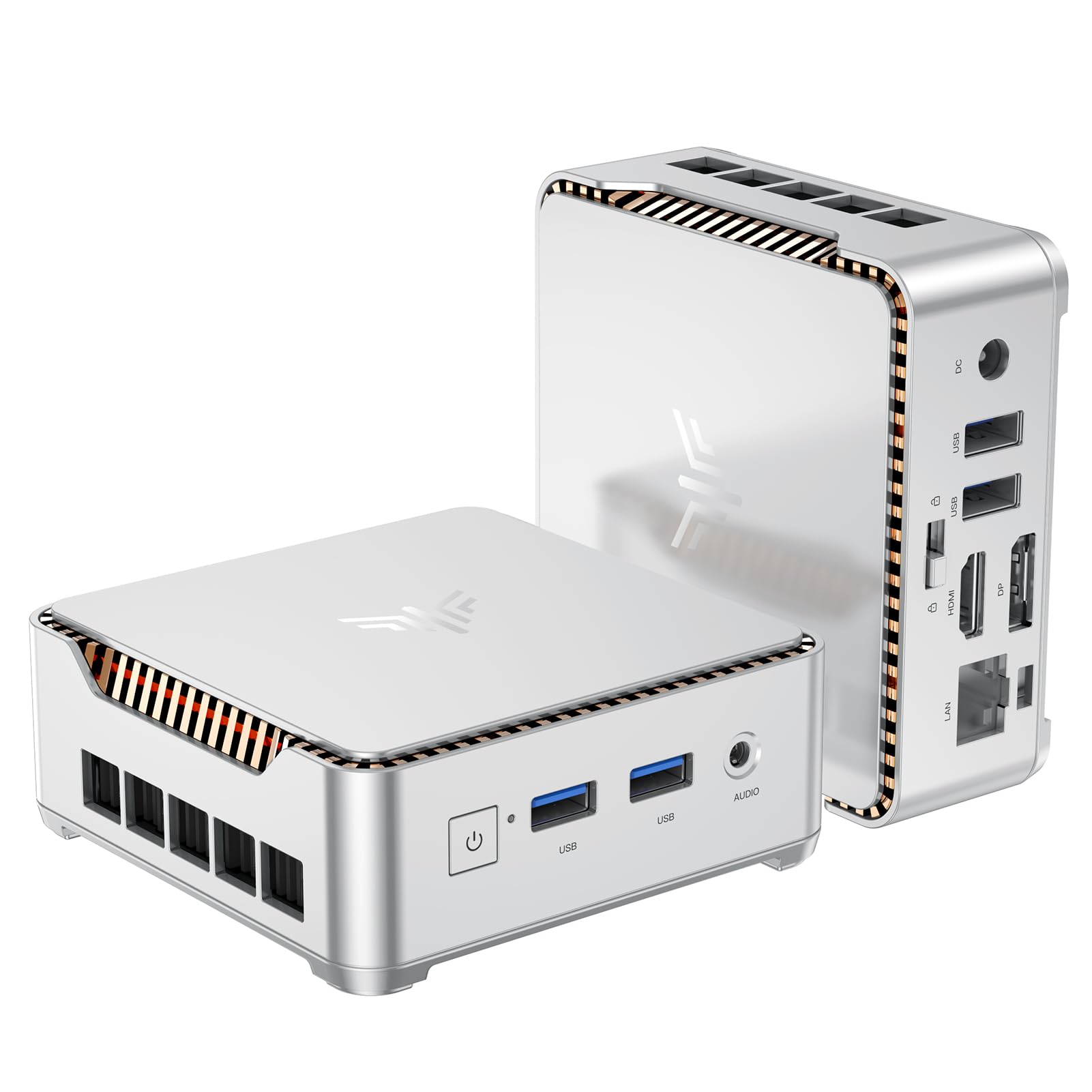
I like this KAMRUI Essenx E2 because it balances size, power and value in a really practical way. It’s small enough to tuck behind a monitor or slip into a travel bag, yet fast enough for everyday tasks like web browsing, document work, light photo edits and 4K video playback.
For self‑hosting projects it’s a sensible entry point — you get a roomy M.2 SSD, decent RAM and gigabit Ethernet for home services, plus dual monitor outputs if you want a local console. On quiet evenings I use one as a media box for streaming on the TV; during the day it lives on my desk as a tidy office machine.
If you want something affordable that you can upgrade later, this is the kind of mini PC I’d recommend trying first.
Long‑Term Cost Benefits
Because it’s inexpensive up front and supports an M.2 upgrade, you can extend its life by swapping in a larger NVMe later instead of replacing the whole box. Low power draw also keeps electricity costs down for always‑on services.
Return On Investment
Fast setup for home servers and light self‑hosted services means you start getting value immediately — less time troubleshooting hardware and more time running services.
Situational Benefits
| Situation | How It Helps |
|---|---|
| Running a lightweight home server | Gigabit Ethernet and M.2 storage let you host backups, a small NAS or Pi‑replacement services without much fuss. |
| Using as a media center | Dual 4K outputs and integrated UHD graphics handle streaming and local 4K playback smoothly. |
| Travel or temporary workstations | Tiny size and low weight make it easy to transport and plug into any monitor for a portable desktop. |
Ease Of Use
| Feature | Ease Level |
|---|---|
| Initial setup (OS & peripherals) | Easy |
| Expanding storage (M.2 / 2.5″ SATA) | Moderate |
| Everyday maintenance (updates, backups) | Easy |
| Networking configuration for self‑hosting | Moderate |
Versatility
Handles a surprising range of roles — desktop, media box, lightweight server or portable workstation — and supports easy storage upgrades to shift roles over time.
Energy Efficiency
Low power profile makes it suitable for always‑on setups; expect much lower draw than a full desktop, which is handy for home servers.
Problem Solving Ability
Great for common home lab needs: file serving, simple containers, media streaming and single‑user services. Not meant for heavy VMs or intense AI workloads.
Security Features
| Feature | Protection Level |
|---|---|
| Gigabit Ethernet (wired) | Moderate — reduces Wi‑Fi exposure |
| Standard OS updates | Moderate — depends on update discipline |
| Local storage (M.2) you control | High — physical control of data |
Key Benefits
- Compact footprint that fits behind a monitor or in small desks
- 16GB RAM and 512GB M.2 SSD provides solid everyday performance
- Dual 4K outputs (HDMI + DP1.4) for multitasking or media use
- Gigabit Ethernet plus Wi‑Fi and Bluetooth for flexible networking
Current Price: $189.99
Rating: 4.4 (total: 1,636+)
🎯 Best Midrange Performer

I like the Beelink SER5 because it hits a sweet spot: enough CPU and RAM for everyday work and light self‑hosting without being overkill. It boots fast, stays quiet on my desk, and the 2.5G Ethernet plus Wi‑Fi 6 make it surprisingly snappy for serving files or running a few containers. The triple 4K outputs are a neat touch if you want a local console plus a media screen, and the M.2 slot means I can upgrade storage later instead of buying a new box.
For a midrange mini PC I’d recommend this if you want reliable performance for home servers, remote workstations, or a tidy media server.
Long‑Term Cost Benefits
Because the SER5 supports RAM and NVMe upgrades, you can extend its useful life by adding memory or a bigger SSD instead of replacing the whole unit. Its efficient mobile CPU also keeps power bills lower than a full desktop for always‑on services.
Return On Investment
You get a ready-to-run machine that handles hosting small services, backups and media streaming quickly — so you start benefiting from uptime and convenience immediately without needing extra hardware.
Situational Benefits
| Situation | How It Helps |
|---|---|
| Home server / NAS | Fast NVMe storage and 2.5G Ethernet make backups and file sharing feel immediate for a small household. |
| Media center | Integrated Radeon graphics and triple 4K outputs handle streaming and local 4K playback with no fuss. |
| Remote work machine | Quiet, compact design and solid single‑threaded performance keep meetings and productivity apps running smoothly. |
| Light container workloads | Six cores give you headroom to run a few Docker containers or small services without saturating the box. |
Ease Of Use
| Feature | Ease Level |
|---|---|
| Initial setup (OS & peripherals) | Easy |
| Expanding RAM | Moderate |
| Adding larger NVMe storage | Moderate |
| Networking setup for self‑hosting | Moderate |
Versatility
Works well as a daily desktop, compact media player, or small home server. Upgradeable storage and RAM let you shift roles over time without replacing the unit.
Energy Efficiency
Mobile Ryzen silicon keeps power draw modest, so it’s a good option for always‑on tasks without a big hit to your electricity bill.
Problem Solving Ability
Great for common home lab needs: file serving, media streaming, web services and small container setups. Not designed for heavy virtualization or large AI workloads.
Security Features
| Feature | Protection Level |
|---|---|
| 2.5G Ethernet (wired) | Moderate — reduces attack surface compared to Wi‑Fi |
| Windows 11 Pro with regular updates | Moderate — relies on timely updates |
| Local NVMe storage under your control | High — physical access and backups are in your hands |
Key Benefits
- Balanced CPU and 16GB RAM for multitasking and light server workloads
- 500GB NVMe M.2 gives fast local storage with easy upgrade path
- 2.5G Ethernet and Wi‑Fi 6 for low‑latency networking
- Triple 4K outputs (HDMI + DP + Type‑C) for multi‑monitor setups
Current Price: $349.00
Rating: 4.5 (total: 234+)
🚀 Best Workstation Power

I treat the K10 like a tiny desktop that punches well above its weight. It’s the kind of box I reach for when I want a quiet, always‑on machine that can run Proxmox, a handful of VMs or containers, and still feel responsive as my daily workstation. The ports are generous so hooking up monitors, external storage or serial gear is painless, and Wi‑Fi 6 plus a 2.5G wired option keeps network tasks snappy.
It does get me thinking about consolidation — one compact unit that handles backups, media, remote desktops and light development work with no extra clutter. If you want raw workstation oomph in a small package, this is the model I’d recommend for home labs and power users who need more than a basic mini PC.
Long‑Term Cost Benefits
Because it supports multiple M.2 slots and has a lot of RAM up front, you can expand storage or shift workloads instead of buying a new machine. Its efficient mobile‑class CPU also keeps idle power modest compared with a full desktop, which saves on electricity for always‑on services.
Return On Investment
You get a ready‑to‑use, compact workstation that replaces multiple devices: a home server, a media box and a daily machine. That consolidation reduces hardware, space and maintenance overhead, so the investment pays back in convenience and fewer upgrades.
Situational Benefits
| Situation | How It Helps |
|---|---|
| Home server / NAS | Fast NVMe storage and 2.5G LAN make file serving and backups noticeably quicker for a household or small office. |
| Home lab / Proxmox | Plenty of CPU cores and RAM let you run multiple VMs or containers for testing, CI or small clusters without constant swapping. |
| Media workstation | Multiple 4K/8K capable outputs and ample memory handle video playback, light editing and multi‑monitor setups with ease. |
| Industrial or embedded projects | The COM port and rich I/O make connecting legacy serial devices and controllers straightforward for hobbyist automation or POS setups. |
Ease Of Use
| Feature | Ease Level |
|---|---|
| Initial setup (OS & peripherals) | Easy |
| Installing additional NVMe drives | Moderate |
| Upgrading RAM | Moderate |
| Configuring Proxmox / containers | Moderate |
Versatility
This one shifts roles comfortably: a daily desktop, a compact editing station, a media server or a capable home lab node. The expandability means you can repurpose it as needs change.
Energy Efficiency
Mobile‑class i9 TDP and efficient components keep idle and typical workload power use reasonable, so it’s suitable for always‑on setups without huge electricity costs.
Problem Solving Ability
Excellent for common power‑user needs — VMs, containers, media and file services. It’s not the go‑to for large local AI model training or top‑tier gaming, but it covers almost everything a home server or workstation user will throw at it.
Security Features
| Feature | Protection Level |
|---|---|
| Wired 2.5G Ethernet | Moderate — reduces some Wi‑Fi exposure and supports network segmentation |
| Windows 11 Pro (supports Secure Boot and BitLocker) | Moderate — OS features enable disk encryption and secure boot paths |
| Local NVMe storage | High — keeping data on local drives under your control makes physical access and backup strategies simpler |
| Regular vendor and OS updates | Moderate — relies on applying updates promptly |
Key Benefits
- High single‑ and multi‑threaded performance from the i9‑13900HK for demanding tasks
- 64GB DDR5 and 1TB PCIe NVMe give plenty of memory and fast storage out of the box
- 2.5G Ethernet plus Wi‑Fi 6 and Bluetooth for flexible, low‑latency networking
- Wide I/O (multiple HDMI/DP, USB 3.2, COM port) for multi‑monitor, NAS and industrial use
Current Price: $959.99
Rating: 4.6 (total: 80+)
⭐ Best for 8K Media
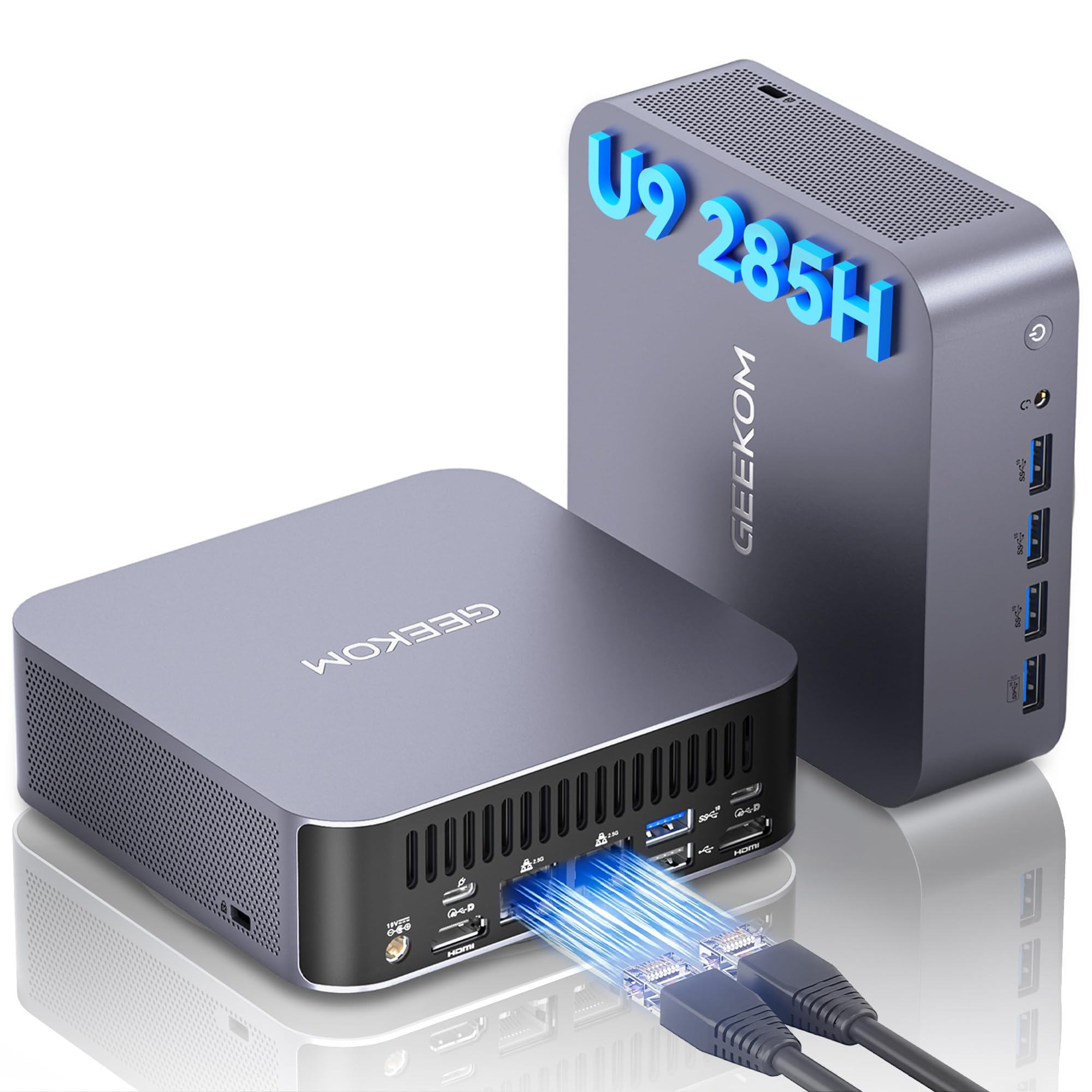
I use the GT2 when I want one small box to do a lot of heavy lifting without fuss. It’s great as a living-room media hub for smooth 8K playback, a tidy home server for backups and Plex, and even a snappy desktop for day-to-day work.
The handful of ports and dual 2.5G Ethernet mean I can stash fast storage and still have room for monitors and peripherals. It’s surprisingly quiet and feels modern—perfect for anyone who wants desktop power without a tower taking up space.
If you want a single machine that can handle media, lightweight content work and occasional AI tasks, this is one I recommend reaching for.
Long‑Term Cost Benefits
Expandable storage and RAM mean you can extend the machine’s life instead of buying a replacement. Its efficient architecture and modest idle draw reduce electricity for always‑on services, and Windows 11 Pro ships included so there’s no extra OS license cost.
Return On Investment
This mini PC can replace a separate media player, a small NAS or a secondary desktop — consolidating devices saves space, reduces maintenance and delays upgrade cycles, so the upfront cost tends to pay back in convenience.
Situational Benefits
| Situation | How It Helps |
|---|---|
| 8K Home Theater / Media Server | Hardware decoding, dual 2.5G LAN and USB4 make high‑bitrate playback and multi‑stream serving smooth and reliable. |
| Home Server / NAS | Fast NVMe storage plus link aggregation potential on the dual 2.5G ports speeds backups and file transfers for multiple users. |
| Content Creation on the Go | Compact size and powerful CPU/GPU let you edit or transcode video without hauling a full desktop. |
| Edge AI & Inference | Built‑in NPU and strong CPU cores handle local AI workloads—good for experimentation or small, privacy‑focused inference tasks. |
Ease Of Use
| Feature | Ease Level |
|---|---|
| Initial setup (Windows 11 preinstalled) | Easy |
| Connecting multiple displays | Easy |
| Installing additional M.2 storage | Moderate |
| Upgrading RAM | Moderate |
Versatility
This unit moves between roles effortlessly: a media center, a compact workstation, a home server node or an edge AI box. The ports and expandability mean you can repurpose it as your needs change.
Energy Efficiency
Designed with efficient mobile‑class components and claiming much better efficiency than a full desktop, it’s a sensible choice for 24/7 use — lower idle draw keeps running costs down compared with larger towers.
Problem Solving Ability
Excellent for streaming, large media libraries, light creative work and local AI tasks. It’s not aimed at hardcore GPU training, but it solves the common needs of a media‑centric home server and a powerful small desktop.
Security Features
| Feature | Protection Level |
|---|---|
| Dual wired 2.5G Ethernet | Moderate — enables network segmentation and reduces wireless exposure |
| Windows 11 Pro (Secure Boot, BitLocker support) | Moderate — built‑in OS security tools for encryption and secure boot paths |
| Local NVMe storage | High — keeps your data under your control for easier backups and physical security |
| Vendor warranty and updates | Moderate — manufacturer support and regular firmware/OS updates help maintain security |
Key Benefits
- True 8K playback and multi‑display support with USB4 and Mini DP/HDMI ports
- Strong CPU + Arc 140T GPU combo plus a dedicated NPU for local AI inference
- Dual 2.5G Ethernet and WiFi 7 for fast, reliable networking
- Generous onboard RAM and storage (32GB DDR5, 2TB NVMe) with expandability
Current Price: $949.90
Rating: 4.5 (total: 510+)
🎮 Best Gaming Balance
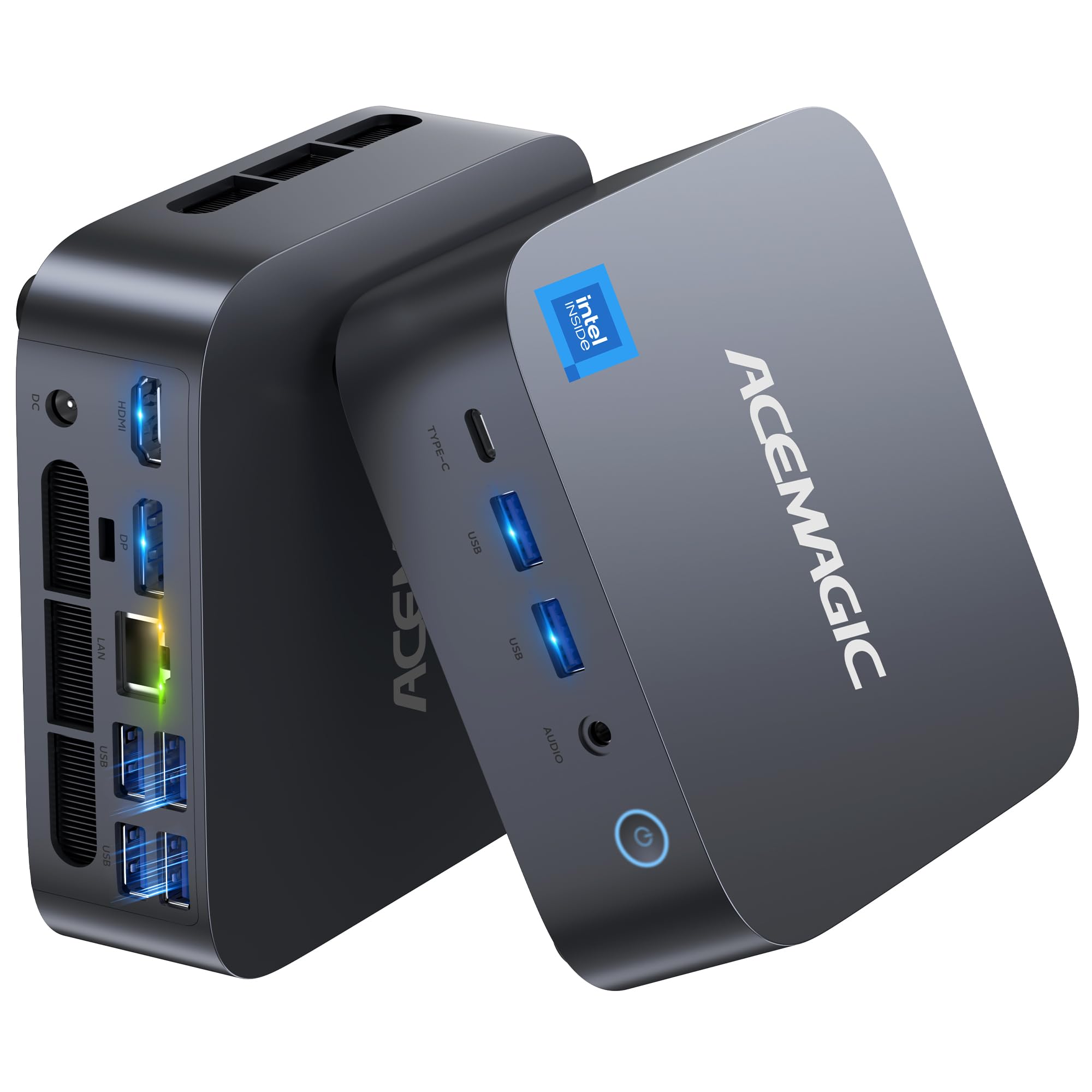
I’ve been using the Matrix M1 as my go-to small-but-capable machine when I want desktop power without a full tower. It’s great for juggling a day of work apps, light 4K editing, and some gaming in the evening — all from a tiny footprint that sits neatly behind a monitor. The USB4 port and 2.5G LAN make moving large files or hooking up fast external storage painless, and the dual‑fan design keeps things surprisingly quiet.
For a home server or a compact workstation that can also handle games, this is one I reach for when I want versatility without fuss.
Long‑Term Cost Benefits
Expandable RAM and storage mean you can upgrade instead of replace. The efficient mobile-class CPU uses less power than a full desktop, and the included Windows 11 Pro removes any extra OS license cost.
Return On Investment
Because it can act as a desktop, a media machine and a light home server, it replaces multiple devices — that consolidation saves on space, power and spare‑part purchases over time.
Situational Benefits
| Situation | How It Helps |
|---|---|
| Compact Workstation | Handles office apps, browser tabs and video calls smoothly while taking up minimal desk space. |
| Home Media & Light Editing | Fast NVMe storage and USB4 let you edit and play back 4K media without long waits. |
| Small Home Server / NAS Node | 2.5GbE and ample internal storage make backups and file sharing between devices faster. |
| Casual Gaming | Strong CPU and fast RAM let you play many titles at reasonable settings while also running other tasks. |
Ease Of Use
| Feature | Ease Level |
|---|---|
| Initial setup (Windows 11 Pro preinstalled) | Easy |
| Connecting monitors and peripherals | Easy |
| Installing extra M.2 storage | Moderate |
| Upgrading RAM | Moderate |
Versatility
This mini PC adapts well: a daily desktop, a compact editing rig, a media center or a light home server. Ports and expandability let you repurpose it as needs change.
Energy Efficiency
Built with mobile-class components, it draws less power than typical desktops and is sensible for always‑on tasks like backups or lightweight services.
Problem Solving Ability
Great for smoothing everyday productivity, media tasks and casual gaming; not designed for heavy GPU training but solves the common needs of a powerful small desktop or home server.
Security Features
| Feature | Protection Level |
|---|---|
| Windows 11 Pro (Secure Boot, BitLocker support) | Moderate — built-in options for disk encryption and secure boot |
| Local NVMe storage | High — keeps data under your control for easier backups and physical security |
| Vendor warranty and support | Moderate — 3‑year warranty helps with hardware issues and longevity |
| BIOS-level options (user‑accessible) | Moderate — lets you set passwords and adjust secure boot / boot order |
Key Benefits
- High single‑thread and multi‑thread performance from the Intel Core i9‑13900HK
- 32GB DDR4 and 1TB PCIe 4.0 NVMe give fast multitasking and quick boots
- USB4, WiFi 6E and 2.5GbE LAN for fast transfers and low-latency networking
- Compact, VESA‑mountable design with dual‑fan cooling and quiet operation
- Three‑year warranty for longer-term peace of mind
Current Price: $599.00
Rating: 4.4 (total: 142+)
🔰 Best for NAS/Storage

I’ve been playing with the Me Mini as a compact box that actually feels built for home storage. It’s tiny enough to tuck on a shelf but has six M.2 slots, so you can pack a surprising amount of NVMe storage without hauling a full tower into your living room. For everyday use I set it up as a Plex/HTPC and a small NAS node, and when I need it I spin up a couple of Docker containers for backups and a personal service or two.
The dual 2.5G ports and Wi‑Fi 6 make file transfers noticeably faster than typical gigabit boxes, and the built‑in 45 W power supply keeps the cables tidy. If you want a quiet, low‑power device that doubles as media center and a private cloud, this is the kind of thing I’d reach for.
Long‑Term Cost Benefits
Because you can add SSDs as needed, you upgrade storage instead of replacing the whole system. Its low power profile also trims energy bills compared with a full desktop or rack server, and keeping your own data locally reduces recurring cloud storage costs.
Return On Investment
This box replaces separate devices — NAS, HTPC and a small server — so you save on space, power and the hassle of maintaining multiple machines. For many home users that consolidation pays back quickly in lower power and cloud fees.
Situational Benefits
| Situation | How It Helps |
|---|---|
| Home NAS | Lots of internal NVMe slots mean I can keep all family photos and media locally without relying on external drives. |
| Plex / HTPC | 4K output and quiet operation make it a reliable media player that sits near the TV without drawing attention. |
| Soft Router / Network Appliance | Dual 2.5G LAN allows link aggregation or separate WAN/LAN roles for hobbyist routing and firewall setups. |
| Small Home Lab | Plenty of storage and decent CPU for light VMs or Docker containers to test services and backups. |
Ease Of Use
| Feature | Ease Level |
|---|---|
| Initial setup (OS installation required) | Moderate |
| Installing M.2 SSDs | Moderate |
| Networking (plug-and-play for basic use) | Easy |
| Daily maintenance and updates | Easy |
Versatility
It’s flexible: a media player, a personal NAS, a soft router, or a small lab server. The storage expansion is the real wildcard — you can lean into media, backups or containerized services as needs change.
Energy Efficiency
Using a low‑power mobile CPU and a small PSU, it sips power compared with desktops. That makes it practical to run 24/7 for backups, streaming and light server tasks without a big electricity bill.
Problem Solving Ability
Great for solving the “where do I put my media and backups” problem at home: lots of internal slots, decent networking, and quiet operation mean it handles storage and streaming without needing extra boxes.
Security Features
| Feature | Protection Level |
|---|---|
| Local data storage (user‑controlled) | High — keeps data under your control rather than a cloud provider |
| BIOS/UEFI settings and boot order | Moderate — lets you set basic hardware‑level protections |
| Supports Linux and Windows (user manages updates) | Varies — security depends on OS and configuration |
| Physical security (small form factor) | Moderate — easy to hide or secure but needs protection from local access |
Key Benefits
- Massive internal expansion with 6× M.2 NVMe slots (up to 24 TB total)
- Dual 2.5G LAN plus Wi‑Fi 6 for faster transfers and link aggregation
- 12 GB LPDDR5 memory and 64 GB eMMC for snappy light VMs and caching
- Quiet, palm‑sized design with a built‑in 45 W PSU for a clean setup
- Designed for always‑on use — good for home NAS, HTPC and soft routing
Current Price: $259.00
Rating: 4.5 (total: 219+)
💼 Best for Home Server

I like this little box because it manages to feel like a proper desktop squeezed into a palm‑sized case. With an i9, 32 GB of RAM and a 1 TB NVMe, it handles always‑on stuff (Plex, backups, Docker containers) and day‑to‑day tasks without sounding like a jet engine.
For daily use I’d slot it on my desk as a compact workstation — triple 4K outputs make multi‑monitor work pleasant — and for special occasions I’ll flip it to headless mode and let it run as a home server or media node. It’s plug‑and‑play for basic setups, flexible enough to run Windows or Linux, and expandable if you want extra storage or a second M.2. If you want to consolidate a desktop, a small NAS and a media player into one tidy device, this is the kind of mini PC I’d reach for.
Long‑Term Cost Benefits
Because you can upgrade RAM and add SSDs, you don’t need to replace the whole system as needs grow. Consolidating a workstation, media player and light server into one device also trims electricity and maintenance costs versus running multiple machines.
Return On Investment
If you’d otherwise buy a separate desktop, NAS and media player, this mini PC covers all three roles. The space, power and cloud‑storage savings usually make up the difference within a year or two for an active home user.
Situational Benefits
| Situation | How It Helps |
|---|---|
| Home Server (Plex, backups, Docker) | Plenty of CPU and RAM for transcoding and running containers; quiet enough to run 24/7 on a shelf or in a closet. |
| Compact Workstation | Triple 4K outputs and strong single‑threaded performance make it handy for office work, light video editing and multitasking. |
| Media Center / HTPC | 4K output and silent operation let it sit by the TV as a neat, capable media player. |
| Small Home Lab | Extra M.2 slot and expandable RAM let you run a few VMs or test services without needing a rack server. |
Ease Of Use
| Feature | Ease Level |
|---|---|
| Out‑of‑the‑box (Windows 11 Pro preinstalled) | Easy |
| Switching to Linux / headless server setup | Moderate |
| Installing additional M.2 SSD | Moderate |
| Network setup for home services | Easy |
Versatility
It’s genuinely multipurpose: a desktop for work, a quiet media player for the living room, and a capable always‑on box for self‑hosted services. You can lean into performance, storage or networking depending on what you expand.
Energy Efficiency
This isn’t a low‑power ARM box, but it’s much more efficient than a full desktop. For 24/7 home‑server use it’s reasonable — just expect higher draw under sustained heavy loads.
Problem Solving Ability
It solves the “too many small boxes” problem by combining workstation, media and light server duties in a small footprint, which clears desk space and simplifies backups and updates.
Security Features
| Feature | Protection Level |
|---|---|
| Local storage (user controlled) | High — keeps your data on hardware you control |
| Windows 11 Pro + BIOS/UEFI options | Moderate — supports standard platform security features |
| Compatible with Linux (user manages hardening) | Varies — depends on OS configuration and updates |
| Physical compactness | Moderate — easy to secure physically but also easy to misplace if not mounted |
Key Benefits
- High performance with Intel Core i9 and 32 GB DDR4 for smooth multitasking
- 1 TB NVMe + an extra M.2 slot for straightforward storage expansion
- 2.5G LAN, Wi‑Fi 6 and Bluetooth 5.2 for fast, reliable networking
- Triple 4K display outputs (HDMI/DP/Type‑C) for multi‑monitor workflows
- Compact, quiet design with improved cooling for sustained loads
Current Price: $619.00
Rating: 4.6 (total: 87+)
🔧 Best for Home Lab

I like this one because it feels like a proper workstation shrunk down to a desk-friendly box. The ARM CIX CP8180 gives you lots of cores and a decent NPU for inference tasks, and the MS-R1’s UEFI boot makes it surprisingly straightforward to use with Proxmox or KVM. Day to day I’d use it as a quiet desktop or multi-monitor productivity box; when I want a headless appliance I flip it to run containers, VMs or a small NAS gateway.
The dual 10GbE is handy if you’re routing storage traffic or separating VM and storage networks, and the PCIe x16 slot plus M.2/U.2 options mean you can expand without replacing the whole machine. If you’re building a compact home lab or want a single device that can be a workstation one day and a cluster node the next, this is the kind of mini PC I’d keep on my shelf.
Long-Term Cost Benefits
Because the MS-R1 is designed to be expanded (storage, PCIe cards, ECC memory), you can upgrade parts as needs change instead of buying a whole new system. Consolidating routing, storage gateway and VM roles into one box also trims power and maintenance compared with several single-purpose devices.
Return On Investment
If you’d otherwise buy a separate Proxmox node, NAS, and a small workstation, this single unit covers those bases. For an active home lab or self-hosted setup the flexibility and network performance usually recoup the extra upfront over a basic mini PC within a couple of years.
Situational Benefits
| Situation | How It Helps |
|---|---|
| Home Lab / Proxmox Node | UEFI boot and multiple cores make it easy to spin up VMs and containers; dual 10GbE lets you separate VM and storage traffic for better performance. |
| NAS Gateway / Storage Heavy Workloads | PCIe expansion and M.2/U.2 support let you add fast NVMe storage and HBA/network cards to serve big media libraries or backups. |
| Edge AI / Inference | On‑board NPU and 45 TOPS capacity mean you can run lightweight models and inference tasks without needing a full GPU. |
| Compact Workstation / Multi‑monitor Setup | Triple display outputs make it useful for daily desktop work while keeping a small footprint on your desk. |
Ease Of Use
| Feature | Ease Level |
|---|---|
| UEFI Boot & Proxmox Install | Easy |
| Adding M.2 NVMe / U.2 Adapter | Moderate |
| Installing a half‑height PCIe card | Moderate |
| Setting up network separation with dual 10GbE | Moderate |
Versatility
This is a flexible machine — a productive desktop, a capable lab node, or a compact edge server depending on how you configure it. The expandability options mean you can pivot roles without starting over.
Energy Efficiency
As an ARM-based workstation it runs more efficiently than many x86 desktops, which helps keep 24/7 power costs reasonable; heavy PCIe cards or sustained loads will increase draw, of course.
Problem Solving Ability
It addresses the “too many boxes” problem by combining networking, storage expansion and virtualization in a single compact unit, reducing clutter and simplifying management for a home lab or small office.
Security Features
| Feature | Protection Level |
|---|---|
| Local storage and physical control | High — you keep custody of disks and backups |
| UEFI boot support | Moderate — allows standard secure‑boot workflows and firmware controls |
| ECC memory support | High — reduces the chance of memory corruption for always‑on services |
| Network isolation via dual 10GbE | Moderate — helps segment traffic and contain issues |
Key Benefits
- 12-core ARM CIX CP8180 with integrated NPU for efficient inference and parallel workloads
- UEFI boot and Proxmox/KVM friendliness for easy virtualization and container hosting
- Dual 10GbE plus Wi‑Fi 6E for fast, flexible networking and storage setups
- PCIe x16 (physical) expansion plus M.2 and U.2 adapter for real storage and add‑on freedom
- Support for up to 64 GB ECC LPDDR5 for more reliable always‑on operation
Current Price: $749.00
Rating: 4.5 (total: 104+)
🤖 Best for AI Workloads
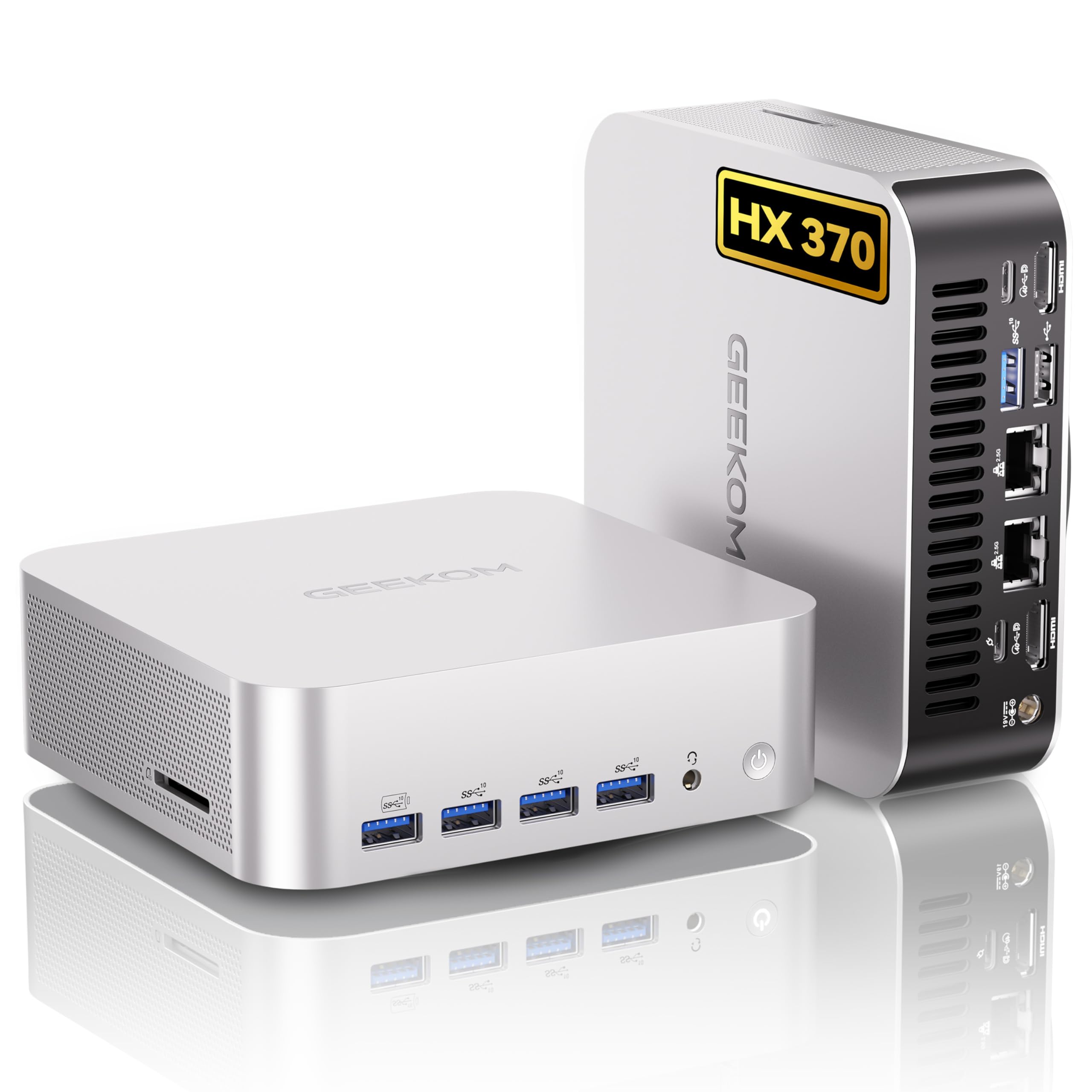
I like this mini PC because it feels like someone squeezed a proper desktop into a tiny, well-built box. Day to day it’s a snappy desktop for multitasking, photo editing and multiple monitors; when I need more muscle I use it to host local AI models, run a media server, or spin up a few VMs. It’s small enough to tuck behind a monitor but has ports and expandability that actually let you grow storage or memory later.
If you want a single, compact machine that’s equally happy as a creative workstation, an 8K-capable media hub, or a local AI testbed, this one’s a strong pick in my book.
Long-Term Cost Benefits
Because it ships with roomy NVMe storage and upgradable RAM/M.2 slots, you can extend its life by swapping drives or adding memory instead of replacing the whole machine. Consolidating a desktop, light server and media box into one device also cuts power and maintenance compared with running two separate systems.
Return On Investment
If you were planning to buy a desktop for daily work plus a small server or NAS for media and local AI experiments, this unit covers those roles. For hobbyist self-hosting and occasional AI work the convenience and reduced power draw usually offset the upfront price within a couple of years, depending on how heavily you use AI workloads.
Situational Benefits
| Situation | How It Helps |
|---|---|
| Local AI / LLM Experiments | On‑device NPU and a strong CPU let you run smaller models and inference locally without always reaching for cloud credits. |
| Home Media Server | 2 TB NVMe and dual 2.5GbE make serving 4K/8K media and managing libraries smooth, and the compact size fits into living-room setups. |
| Light Creative Workstation | Plenty of RAM and a capable integrated GPU handle photo editing, video playback and light 3D work without a bulky tower. |
| Multi‑monitor Desk or Portable Setup | Dual HDMI/USB4 and VESA mounting mean it works well on a desk with multiple monitors or tucked behind a display for a cleaner setup. |
Ease Of Use
| Feature | Ease Level |
|---|---|
| Out‑of‑box OS and setup | Easy |
| Connecting multiple displays and peripherals | Easy |
| Upgrading M.2 NVMe or adding storage | Moderate |
| Tuning local AI tooling and model deployment | Moderate |
Versatility
This is a genuinely versatile little machine — it’s comfortable as a daily desktop, a compact media server, or a local AI/learning workstation. The modern I/O and expandability give you freedom to adapt it as your needs change.
Energy Efficiency
Compared with a full desktop tower, the A9 Max uses noticeably less power for many tasks thanks to its efficient design. For always‑on duties it’s more economical than running separate larger machines, though heavy AI or gaming sessions will raise power draw.
Problem Solving Ability
It solves the “too many boxes” problem by combining capable CPU, decent integrated graphics, fast networking and storage in one compact unit — so you can run a home server, edit photos and try local AI models without dedicating separate hardware.
Security Features
| Feature | Protection Level |
|---|---|
| TPM 2.0 | High — supports hardware-backed encryption and secure boot workflows |
| Kensington lock support | Moderate — basic physical theft deterrent for desktop use |
| Dual wired network ports | Moderate — lets you isolate traffic or create separate management networks |
| Windows 11 Pro and Linux compatibility | Moderate — gives you modern OS security features and flexibility for hardened setups |
Key Benefits
- Powerful Ryzen AI 9 HX370 for fast general CPU work and on-device AI acceleration
- 32 GB DDR5 and 2 TB NVMe out of the box — roomy for multitasking and local datasets
- Dual 2.5GbE and Wi‑Fi 7 for flexible, fast networking
- Plenty of modern I/O (USB4, HDMI 2.1, multiple USB-A) for displays and peripherals
- Compact metal chassis with VESA mount makes it easy to save desk space
Current Price: $949.00
Rating: 4.4 (total: 294+)
FAQ
How Do I Choose The Best Mini PC For Self Hosting In 2026?
I start by matching the hardware to the services I plan to run: containers and light web services need fewer cores and modest RAM, while multiple VMs, media transcoding, or local AI models demand more CPU cores, fast storage and plenty of memory. Prioritize a machine with wired Ethernet (preferably 1GbE or 2.5GbE), a user‑accessible M.2 NVMe slot, and the ability to upgrade RAM — for example, the KAMRUI Essenx E2 at $189.99 is an excellent budget option for basic self‑hosting, the Beelink SER5 at $349.00 is a strong midrange pick for heavier multitasking, and if you need workstation‑level compute you’d look at high‑end mini PCs like the GMKtec ($959.99) or GEEKOM models ($949.90) that offer more cores and faster I/O. I also consider thermals and power draw (lower is better for 24/7 use), whether the vendor supports Linux or allows BIOS options, and port availability for backups and expansion. In short, choose NVMe for system disk, aim for 32GB+ of RAM if you plan many containers/VMs, and pick a unit with a reliable gigabit or better NIC and easy storage upgrade paths.
Can A Mini PC Handle Containers, Virtual Machines, And Local AI Models?
Yes — but it depends on which mini PC and how heavy the workload is. I can run Docker containers and several light VMs on modest mini PCs (like the KAMRUI or Beelink SER5) with 16–32GB RAM without trouble; for many simultaneous VMs or database workloads I choose a unit with more cores and 32–64GB RAM.
For media transcoding I look for QuickSync/modern integrated GPUs (or Arc/Radeon features) that offload encoding. Running local AI models is the most variable area: small language/image models are fine on a beefy CPU and lots of RAM, and some recent mini PCs with AI accelerators or powerful iGPU/NPU (GEEKOM A9 Max or specialized Ryzen AI parts) will speed up certain inference tasks, but they won’t replace a discrete GPU when you need large LLMs or high‑performance training.
I also watch for thermal throttling: sustained AI or heavy VM workloads benefit from units with good cooling or external GPUs. If I expect large AI workloads, I either use a mini PC as a lightweight orchestrator and offload to a GPU server/cloud, or buy a higher‑end model with explicit AI hardware.
What Practical Setup, Security, And Maintenance Steps Should I Take For A Reliable Home Server?
I treat a self‑hosted mini PC like a small datacenter node: mount the server on a UPS, use wired Ethernet with a static LAN IP, and separate management traffic with VLANs if possible. I put core services behind a reverse proxy and enforce TLS (Let’s Encrypt) rather than exposing raw ports, and I prefer VPN or SSH bastion for admin access instead of direct port forwarding.
For OS and orchestration I usually pick Linux + Proxmox/Unraid/Ubuntu Server with Docker/Podman for containers, and I take regular snapshots and automated backups to an external NAS or cloud so I don’t rely on RAID as my only protection. I also disable disruptive automatic OS updates on production hosts (or schedule them), enable a basic firewall, monitor disk health and temperatures, and test restores periodically.
Finally, I document the network, automate config with scripts or Ansible when I can, and keep an offline recovery image — those simple steps keep a mini PC running 24/7 without surprises.
What Buyers Prefer
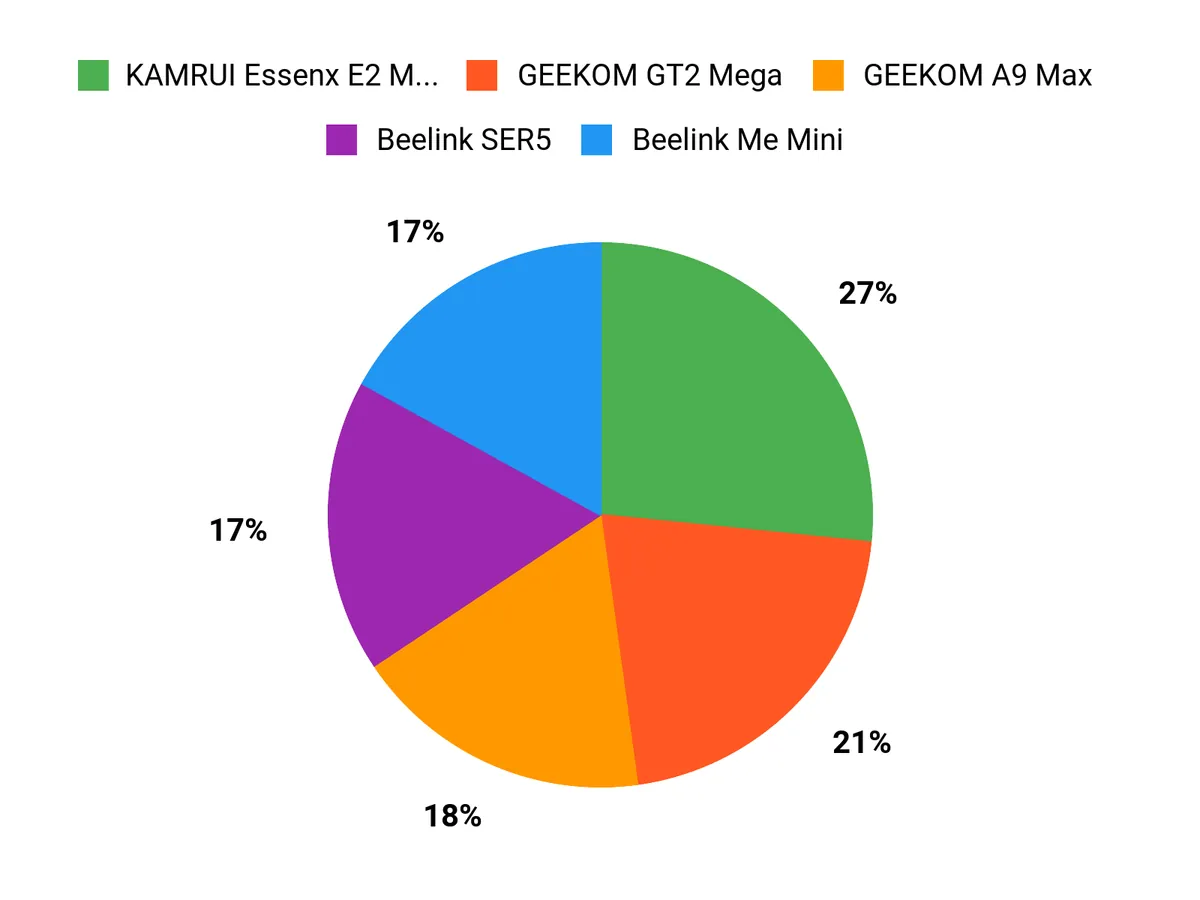
When Im choosing between the KAMRUI Essenx E2 Mini PC, Beelink SER5, and GMKtec K10 I prioritize a balance of raw CPU/RAM for containers and VMs, efficient thermals and low power draw for 24/7 uptime, and flexible storage and networking options like NVMe, SATA and faster Ethernet. We also weigh noise levels, Linux compatibility and driver support, plus price and warranty—those tradeoffs usually decide whether I pick performance, compact efficiency, or the best value.
Wrapping Up
Quick take: If I want a tiny, inexpensive machine to run a few containers or a lightweight home server, I reach for the KAMRUI Essenx or the Beelink Me Mini for its storage-first design. For a balance of price and performance I pick the Beelink SER5. If I need real workstation horsepower for many VMs, local AI experiments, or heavier media workloads I go with the GMKtec K10, GEEKOM A9 or the GEEKOM GT2 depending on whether I need CPU, AI/NPU, or media encode strength.
Practical next step: decide your primary workload (NAS, web services, VMs, media transcoding, or AI), set a memory and network baseline (16–32 GB RAM and at least 1GbE; 2.5Gb or 10Gb if you have heavy I/O), and choose the model above that best matches that baseline. If you want, tell me which services you plan to run and I’ll recommend one specific model and a simple parts list for upgrades I’d make first.
| Product | Image | Rating | Processor | RAM | Storage | Price |
|---|---|---|---|---|---|---|
| KAMRUI Essenx E2 Mini PC |
 |
4.4/5 (1,636 reviews) | Intel Alder Lake N95, up to 3.4 GHz | 16 GB DDR4 | 512 GB SSD | $189.99 |
| Beelink SER5 Mini PC |
 |
4.5/5 (234 reviews) | AMD Ryzen 5 5500U, up to 4.0 GHz | 16 GB DDR4 | 500 GB SSD | $349.00 |
| GMKtec Mini PC Workstation |
 |
4.6/5 (80 reviews) | Intel Core i9 13900HK, up to 5.4 GHz | 64 GB DDR5 | 1 TB SSD | $959.99 |
| GEEKOM GT2 Mega Ai Mini PC |
 |
4.5/5 (510 reviews) | Intel Core Ultra 9 285H, up to 5.4 GHz | 32 GB DDR5 | 2 TB SSD | $949.90 |
| ACEMAGIC Mini Gaming PC |
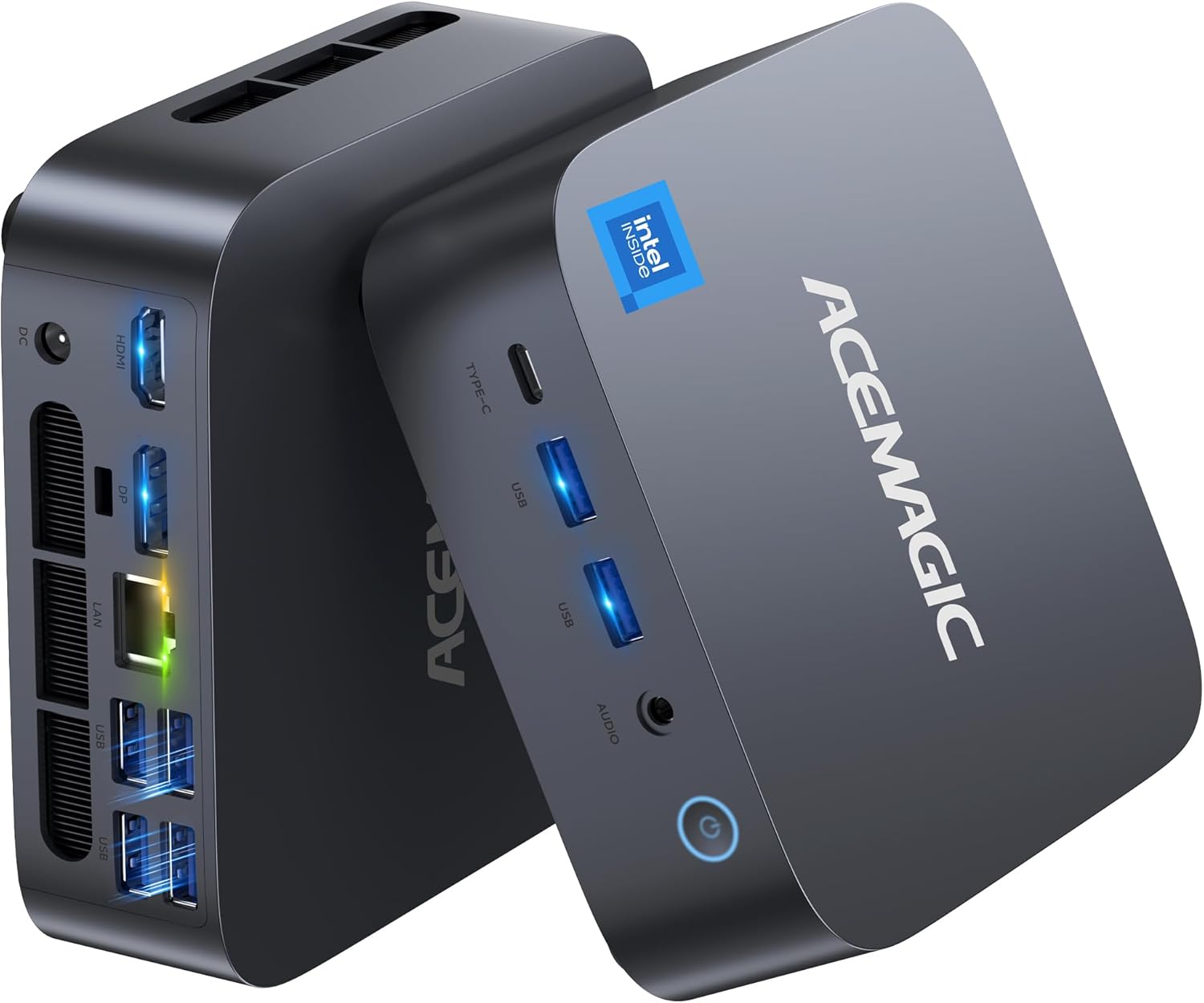 |
4.4/5 (142 reviews) | Intel i9 13900HK, up to 5.4 GHz | 32 GB DDR4 | 1 TB SSD | $599.00 |
| MINISFORUM MS-R1 |
 |
4.5/5 (104 reviews) | CIX CP8180 (12C/12T), up to 2.6 GHz | 64 GB LPDDR5 | N/A (no SSD included) | $749.00 |
| GEEKOM A9 Max AI Mini PC |
 |
4.4/5 (294 reviews) | AMD Ryzen AI 9 HX 370, up to 5.1 GHz | 32 GB DDR5 | 2 TB SSD | $949.00 |
This Roundup is reader-supported. When you click through links we may earn a referral commission on qualifying purchases.



