
Yes, you can power a mini PC with USB-C, but with important caveats. Some newer mini PCs come with native USB-C Power Delivery (USB PD) support, while others can be adapted with USB-C PD cables or chargers. The key is understanding the difference between USB-C ports that charge devices versus those that use proper USB Power Delivery negotiation. If your mini PC has a barrel connector, you’ll need an adapter cable. If it has native USB-C PD support, you can use any compatible USB-C charger with sufficient wattage.
The USB-C Power Question: Why It Matters
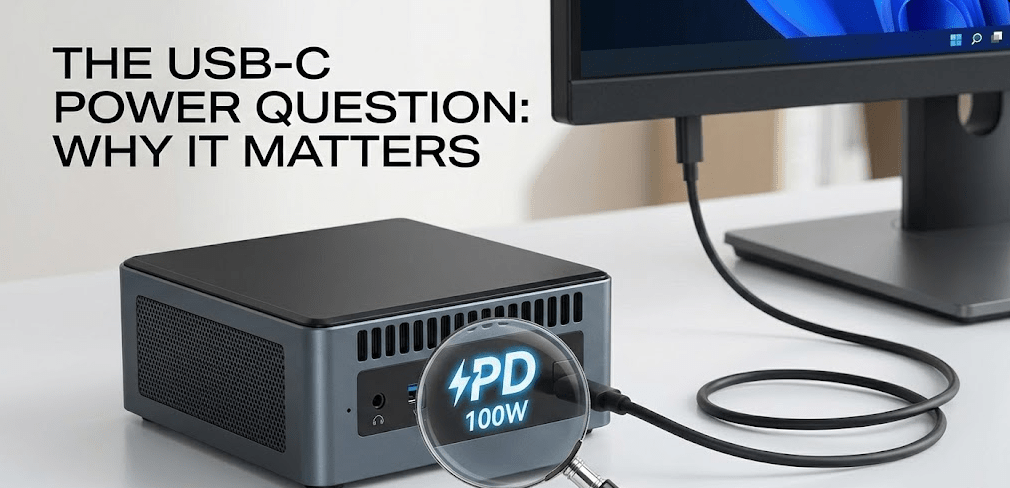
When I started testing mini PCs extensively, one frustration kept coming up from readers: the lack of universal charging. You’d have a high-powered USB-C laptop charger sitting on your desk, but your mini PC required a proprietary barrel plug power adapter. It seems like an obvious evolution, so why hasn’t the entire industry adopted USB-C power?
The answer is more nuanced than you’d think. USB-C is technically capable, but not every USB-C port is created equal. Some support charging, some support data transfer, and only certain implementations support proper USB Power Delivery (PD) negotiation. This distinction matters enormously when deciding whether you can charge your mini PC with USB-C.
The good news is that this situation has improved dramatically throughout 2025. Several manufacturers now offer mini PCs with native USB-C PD support, and workarounds exist for older models. But understanding what you’re actually getting is essential before making a purchase.
USB Power Delivery: The Technical Foundation
Before diving into which mini PCs support USB-C power, you need to understand the standard itself. According to the official USB Power Delivery specification guide, USB Power Delivery is a protocol that allows USB-C cables to deliver much higher power levels than standard USB charging.
USB PD 3.0 (current standard for mini PCs) supports up to 100W of power delivery at 20V/5A. This is sufficient for virtually every consumer mini PC on the market today. Entry-level models with Intel N-series processors (N100, N150, N200) draw 30-50W. Mid-range Core i5 systems use 65-90W. Even high-end Core i9 mini PCs rarely exceed 120W under normal operation.
USB PD 3.1 (Extended Power Range) was officially released in 2021 and supports up to 240W using 48V/5A. However, adoption in the mini PC space remains limited. Most mini PCs don’t require this level of power, so manufacturers haven’t rushed to implement it. You likely won’t see widespread USB PD 3.1 mini PCs until at least 2026.
The critical point: if your mini PC draws 90W or less, USB PD 3.0 at 100W is completely sufficient. Most mini PCs fall into this category.
USB-C Power Delivery Specifications Explained
| Standard | Release Year | Max Power | Voltage | Current | Connector |
|---|---|---|---|---|---|
| USB PD 1.0 | 2012 | 60W | 5V/9V/15V/20V | Up to 3A | Micro-B |
| USB PD 2.0 | 2014 | 100W | 5V/9V/15V/20V | Up to 5A (at 20V) | USB-C |
| USB PD 3.0 | 2015 | 100W | 5V/9V/15V/20V | Up to 5A (at 20V) | USB-C |
| USB PD 3.1 (EPR) | 2021 | 240W | Up to 48V | 5A | USB-C |
The table above shows the evolution of USB Power Delivery. For mini PCs, USB PD 3.0 has been the standard since 2015 and remains the most common implementation in 2025. The jump to USB PD 3.1 with 240W capability exists primarily on newer laptops and emerging workstations, not typical mini PCs.
Mini PCs with Native USB-C Power Delivery (2025)
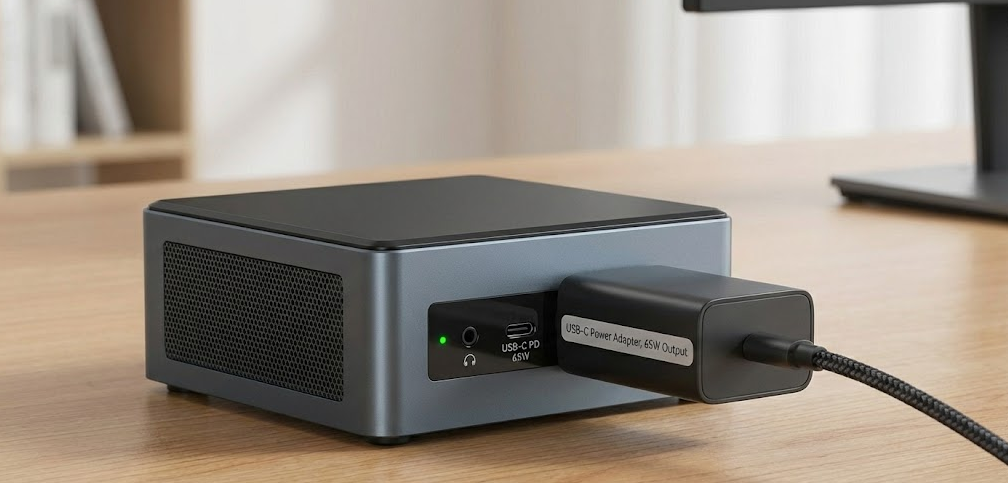
Most mini PCs still use barrel connectors, but this is changing. Here are the genuine options available in 2025 with native USB-C PD support:
Khadas Mind 2/2S: The Most Portable Option
The Khadas Mind 2S represents the pinnacle of USB-C powered mini PC design. This ultra-compact system weighs just 435 grams and measures a mere 146×105×20mm—small enough to fit in your pocket. Despite its size, it packs an Intel Core Ultra 7 255H processor with 14 cores and up to 64GB of RAM.
Most importantly, it charges exclusively via USB-C PD. The standard configuration includes a 65W power adapter and a 1.2-meter USB-C to USB-C cable. The USB4 port (successor to Thunderbolt 4) supports up to 100W of power delivery, meaning you can charge it with any USB-C PD charger rated 65W or higher. I tested it with a standard 100W laptop charger, and it negotiated power properly without issues.
The built-in 5.55Wh battery is a unique feature—not powerful enough for extended unplugged computing (roughly 30 minutes under load), but sufficient to maintain the system in sleep mode for up to 25 hours if you unplug it during the day. This makes it genuinely portable between locations.
For an in-depth look at the Khadas Mind 2S and its USB-C power capabilities in action, this comprehensive review demonstrates how the single-cable charging works with monitors and power banks.
Important caveat: The Khadas Mind series commands premium pricing ($800-$1,500 depending on configuration). It’s positioned as a high-end portable workstation, not a budget-friendly option.
GMKtec NucBox G5: The Affordable USB-C Option
The GMKtec NucBox G5 offers USB-C power at a much lower price point. Featuring an Intel N97 processor (a step up from the N100), it can be powered with any USB PD charger. Real-world testing from users shows it negotiates 15V with standard PD phone chargers, and 20V with higher-end USB-C PD adapters.
Here’s the practical reality: the G5 comes stock with a 12V barrel connector power supply, but users have confirmed it works perfectly with USB PD chargers rated 20V/3.25A or higher. The system doesn’t natively request specific voltage profiles but will accept what a PD charger provides, as long as it’s in the compatible range.
A critical point from my research: the G5 uses a 12V native voltage, which technically was made optional in newer USB PD specifications. This is why PD chargers sometimes hesitate to deliver 12V unless they support Programmable Power Supply (PPS) negotiation. Higher voltages (15V, 20V) work fine, though the internal power management circuits handle the conversion.
Real-world caveat: Some users report requiring USB-C PD trigger cables to properly negotiate voltage. This adds complexity and expense compared to true native USB-C support.
MINISFORUM S100: Budget USB-C Mini PC Stick
MINISFORUM’s S100 is technically classified as a mini PC stick rather than a traditional mini PC, but it deserves mention for those seeking ultra-compact USB-C powered computing. It features Intel’s 12th Gen Alder Lake N100 processor and includes a 65W USB PD power adapter.
The S100 measures just 145×77×24mm and comes with LPDDR5 8GB RAM standard. It’s designed for budget-conscious buyers and basic computing tasks. However, availability can be inconsistent, and specs are more limited than traditional mini PCs.
AOOSTAR N1 Pro: Single-Cable Solution
One of the standout developments of 2025 was the AOOSTAR N1 Pro, which takes USB-C PD further by combining power, display output, and data transfer on a single cable. This system uses Intel’s N150 processor and comes as both barebones and fully configured options.
The N1 Pro supports USB-C PD power and USB DisplayPort Alt Mode on the same port. This means you can connect a single USB-C cable to a compatible monitor, and that monitor can provide power back to the mini PC while also displaying content. This is genuinely revolutionary for workspace organization, as it eliminates the need for separate power and video cables.
While this sounds perfect in theory, real-world implementation depends heavily on monitor support. Not all USB-C monitors support bi-directional power delivery, so verify compatibility before purchasing.
How to Power a Mini PC with USB-C: Three Methods
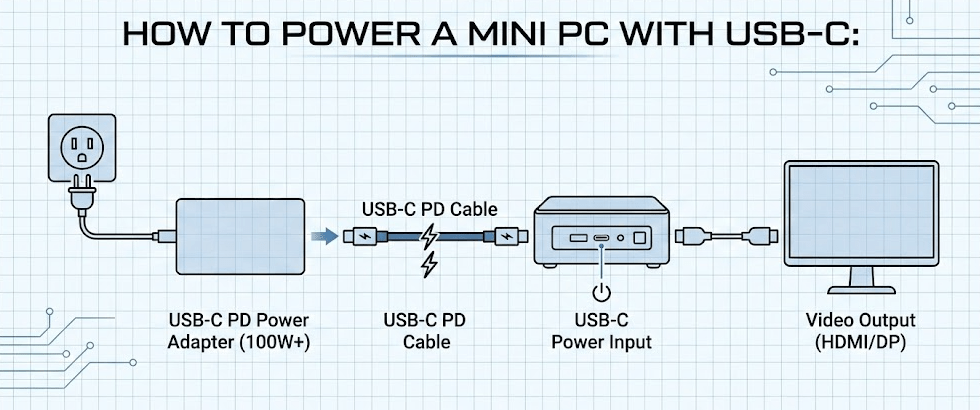
Not all mini PCs come with native USB-C support. If yours doesn’t, you have legitimate options.
Method 1: Use a USB-C PD Trigger Cable (Most Universal)
A USB-C PD trigger cable is an adapter that sits between your USB-C charger and your mini PC’s barrel connector. These cables contain a chip that negotiates USB PD voltage profiles and outputs the appropriate voltage through the barrel connector.
For example, if your mini PC requires 19V/4.5A (90W), you’d use a USB-C PD trigger cable that requests 20V from your charger and outputs 19V through the barrel connector. This works with nearly every mini PC that uses a barrel plug.
Advantages: Universal compatibility with almost any mini PC. A single cable works with multiple devices if they share the same barrel connector type (usually 5.5mm/2.1mm).
Disadvantages: Adds an extra cable to your setup. Quality varies significantly between manufacturers. Some poorly-made trigger cables can damage devices if voltage regulation fails.
Pricing: Quality USB-C PD trigger cables cost $15-$30. GaN chargers (recommended for proper PD negotiation) run $40-$100 depending on wattage.
Method 2: USB-C to Barrel Connector Adapter Cable (PASSIVE – USE WITH CAUTION)
A simpler option is a dedicated USB-C to barrel connector adapter cable. Unlike trigger cables, these are purely passive—they don’t contain smart voltage negotiation chips. They simply convert the USB-C connector to a barrel connector.
Critical Safety Warning: Passive adapters are dangerous with chargers that don’t support proper USB PD negotiation. If you use a passive adapter with a non-smart charger that defaults to high voltage output (like a charger that outputs 20V to laptops), you risk sending the wrong voltage to your mini PC if it requires a different voltage. This can cause permanent damage to your device.
The catch: your charger must already support the exact voltage and amperage your mini PC requires. Most modern USB-C chargers default to 5V/3A output unless the device requests higher power via PD negotiation. Without a smart chip in the adapter, no negotiation occurs.
When this works: With chargers that support Programmable Power Supply (PPS), which allows manual voltage selection through software or physical selection switches. Even then, you should verify the charger’s output voltage before connecting your mini PC.
When this fails: With standard USB-C chargers that don’t support your mini PC’s required voltage. Attempting to use a 5V charger with a 19V mini PC will result in underpowering the system. Worse, using a 20V charger with a 12V mini PC via a passive adapter can destroy components.
Expert recommendation: Avoid passive adapters unless you fully understand your charger’s voltage output and your mini PC’s voltage requirements. When in doubt, use a trigger cable instead—the safety margin is worth the extra cost.
Method 3: High-Wattage USB-C PD Chargers (Direct Connection for Native USB-C PCs)
If your mini PC has native USB-C PD support (like the Khadas Mind or AOOSTAR N1 Pro), you can use any compatible USB-C PD charger. The mini PC firmware handles voltage negotiation automatically.
Requirements:
- Charger must support USB PD 3.0 minimum (ideally rated 100W or higher)
- Charger must output at least the wattage your mini PC requires
- Cable must be USB-C to USB-C (not USB-A to USB-C)
- Cable should be certified USB 3.1 or higher for reliability
Practical choices: A 100W GaN (Gallium Nitride) charger provides sufficient power for virtually every current mini PC while remaining reasonably portable. These cost $50-$80 from reputable brands and offer the advantage of working with laptops, tablets, and phones as well.
USB-C Power Delivery Limits: What You Need to Know
Before committing to USB-C powered mini PC setup, understand these practical limitations:
Power ceiling at 20V: Most mini PCs require 19V-20V input. USB PD 3.0 maxes out at 5A on this voltage, delivering a ceiling of 100W. If your mini PC draws more than this, USB PD 3.0 cannot handle it alone. You’d need a proprietary adapter or multiple power inputs.
Voltage negotiation complexity: Not every charger/cable/mini PC combination negotiates perfectly. Some chargers default to 5V even when you need 20V. Some mini PCs don’t request higher voltages properly. Real-world problems are rarer than theoretical problems, but they happen.
Temperature management: USB-C PD chargers generate heat during high-load power delivery. If you’re using a 100W charger at maximum output continuously, you’ll notice the charger gets warm. This is normal but means you should keep it in ventilated space, not wrapped in cables or buried in a bag.
Cable quality matters immensely: Low-quality USB-C cables can provide unreliable power delivery. When possible, use cables certified by the USB Implementers Forum (USB-IF) and rated for at least the wattage you’re using. Cheap cables risk voltage drops, temporary disconnections, and potential component damage.
Workarounds for Existing Barrel Connector Mini PCs
You don’t need to buy a new mini PC to use USB-C power. Several workarounds exist:
USB-C PD Power Banks
Specialized USB-C PD power banks designed for laptops can power mini PCs if the power bank voltage matches your mini PC’s requirements. These are rarer than standard phone power banks, as they typically output 15V-20V instead of 5V.
Real-world testing shows that some mini PCs with USB-C support, like the Minisforum UM790 Pro, can run directly from USB-C power banks, enabling truly portable computing without traditional wall outlets.
PoE (Power over Ethernet) Solutions
A more exotic but viable solution: some networking equipment can power mini PCs through Gigabit Ethernet using Power over Ethernet (PoE). Your network switch supplies power through the Ethernet cable, eliminating the need for a separate power adapter entirely.
This only works if your mini PC has a PoE-capable Gigabit Ethernet port (extremely rare in 2025) or if you use a PoE splitter adapter. It’s more applicable to always-on servers than portable computing, but worth mentioning for specific use cases.
Which Mini PCs Should You Buy If You Want USB-C Power?
Let me be direct about current market realities based on verified 2025 information:
If budget is no concern (over $1,000): Choose the Khadas Mind 2S. It’s the most elegant USB-C powered solution available, with exceptional build quality and performance. The ability to charge from any standard USB-C PD charger is genuinely liberating if you have other devices using USB-C.
If you want affordability (under $400): The GMKtec NucBox G5 works with USB-C adapters, though it technically comes with a barrel connector. Pair it with a high-quality USB-C PD trigger cable, and you have a functional USB-C powered system. The N97 processor delivers respectable performance for office work and lightweight tasks.
If you want true native USB-C (mid-range): The AOOSTAR N1 Pro represents the emerging standard. It offers native USB-C PD support without premium pricing, though availability can vary by region.
If you already own a barrel connector mini PC: Don’t rush to upgrade. A quality USB-C PD trigger cable ($20-$30) solves the problem immediately. Your existing system becomes USB-C powered with minimal investment.
Step-by-Step Guide: Powering Your Mini PC with USB-C
Step 1: Identify Your Mini PC’s Current Power Requirements
Before purchasing any USB-C charging solution, determine your mini PC’s specifications. Look for these details in your manual or manufacturer website:
- Voltage (typically 12V, 15V, 19V, or 20V)
- Amperage (usually 3A-5A)
- Total wattage (multiply voltage × amperage)
Write these down—you’ll need them when selecting an adapter.
Step 2: Choose Your Approach
Option A – Native USB-C Mini PC: If you’re buying new and want true USB-C support, select from the options mentioned above (Khadas Mind, AOOSTAR N1 Pro). Skip to Step 5.
Option B – Existing Barrel Connector Mini PC: Proceed to Step 3.
Option C – Budget Adaptation: Your mini PC has USB-C output (not input). You want to use USB-C to charge it. Proceed to Step 4.
Step 3: Purchase Correct USB-C PD Trigger Cable
Find a trigger cable that matches your mini PC’s barrel connector size (usually 5.5mm/2.1mm outer diameter) and required voltage. Verify the cable is rated for at least your mini PC’s wattage requirement. For a 90W system, buy a cable rated 100W+ to provide headroom.
Recommended retailers: Amazon, Newegg, specialized electronics shops. Verify reviews and manufacturer reputation.
Step 4: Get a High-Wattage USB-C PD Charger
Choose a charger rated for at least your mini PC’s power draw. For safety, select one rated 20W higher than needed. For a 65W mini PC, choose a 100W charger. For a 90W system, choose a 120W charger.
Recommended specifications:
- USB PD 3.0 minimum (USB PD 3.1 is overkill for current mini PCs)
- GaN technology (more efficient, smaller, cooler)
- At least 2 USB-C ports (so you can charge mini PC and another device simultaneously)
- Multiple certifications (look for USB-IF certification, FCC, CE marks)
Quality brands include Anker (Soundcore PowerCore series), Ugreen, Baseus, Nekteck, and others. Budget $50-$100 for a reliable charger.
Step 5: Test Power Delivery Negotiation
For native USB-C mini PCs: Connect your mini PC to the charger using a certified USB-C cable. The system should power on normally within a few seconds.
For trigger cable systems: Connect the trigger cable to your mini PC, then connect the USB-C end to your charger. Power should be negotiated within 5-10 seconds. Your mini PC should boot normally.
If nothing happens: Check that the cable is fully inserted into both connectors. Verify the charger is plugged into wall power. Try a different USB-C cable to rule out cable failure.
Step 6: Verify Stable Power Delivery
Once powered on, monitor system stability for 15-30 minutes. Watch for these warning signs:
- Unexpected shutdowns
- Rapid on/off cycling
- Excessive heat from charger or mini PC
- USB-C connector feeling hot to touch
These indicate voltage mismatch or compatibility issues. Stop using this combination immediately and troubleshoot.
If stable: Your USB-C powered mini PC is ready for regular use. Document the charger and cable model for future reference.
Common Problems and Solutions
Problem: Mini PC won’t turn on with USB-C charger
Solution 1 – Voltage mismatch: Verify your charger supports the voltage your mini PC requires. Use a different charger with manual voltage selection, or confirm your trigger cable requests the correct voltage.
Solution 2 – Cable issue: Try a different USB-C cable. Occasionally, individual cables have connectivity issues despite being certified.
Solution 3 – Charger not triggering PD: Your trigger cable may require specific chargers. Some chargers have firmware that prevents 12V negotiation (since it was made optional in newer PD specs). Try a different charger or use a PPS-capable charger if available.
Problem: Mini PC loses power suddenly during use
Cause: Insufficient charger wattage or internal voltage drop. Your charger may support the voltage but fail to provide consistent current at load.
Solution: Use a higher-wattage charger. If your mini PC draws 90W peak, use a 120W+ charger. Avoid chargers exactly matching your power requirement—you need headroom.
Problem: USB-C charger gets extremely hot
Cause: Operating at maximum power continuously. This is borderline normal at very high loads but indicates stress.
Solution: Improve ventilation around the charger. Don’t bundle cables. Reduce mini PC workload if possible. Consider a higher-wattage charger to reduce sustained load percentage. Monitor temperatures with a thermal camera if concerned.
Problem: USB devices powered from mini PC stop working
Cause: The mini PC is drawing maximum power from the charger, leaving insufficient USB current for external devices.
Solution: Use a powered USB hub for external devices. Don’t power demanding peripherals (large hard drives, printers) directly from the mini PC’s USB ports when operating at high CPU load.
FAQ: USB-C Power for Mini PCs
Can I use my laptop’s USB-C charger to power my mini PC?
Possibly, but verify specifications first. If your laptop charger outputs 20V/5A (100W) and your mini PC requires 19V/90W or less, yes. If your mini PC needs 12V (like some GMKtec models), your laptop charger probably won’t negotiate down to 12V without a PPS-capable adapter. Check both device specifications before assuming compatibility.
Does USB-C power delivery damage batteries in mini PCs with batteries?
No. The Khadas Mind 2S includes a battery and charges via USB-C without issues. The battery management circuitry handles negotiation between wall power and battery. If you’re powering a mini PC with a battery continuously from wall power, the battery itself is merely a backup—it won’t degrade significantly.
What’s the difference between a trigger cable and a passive adapter cable?
Trigger cables contain voltage negotiation chips and actively request specific USB PD profiles. Passive cables are simple connectors with no electronics. Trigger cables work with standard chargers; passive cables require chargers with specific voltage output capability or manual selection switches. For most people, and especially for safety reasons, a good trigger cable is more reliable and less risky than passive adapters.
Can I use USB Power Banks to power my mini PC?
Standard USB power banks? No—they’re designed for 5V output. Specialized laptop power banks with 15V-20V output? Possibly, but check capacity carefully. A 100Wh power bank provides roughly 5 hours of runtime for a 20W system, but far less for a 90W system. Not practical for extended use.
Is USB PD 3.1 (240W) overkill for mini PCs?
Completely. Current mini PCs draw at most 120W, and most draw 90W or less. USB PD 3.0 at 100W is sufficient. USB PD 3.1 chargers are more expensive and unnecessary unless you’re also powering laptops or workstations demanding 150W+. Save your money and stick with quality 100W USB PD 3.0 chargers.
Why don’t all mini PCs use USB-C power?
Manufacturing costs and certification complexity. Barrel connectors are cheaper and simpler. USB-C PD requires firmware support for proper voltage negotiation, adding development and testing time. The industry is transitioning to USB-C, but the process is gradual. By 2027, native USB-C will likely be standard; today, it’s still emerging.
Can I damage my mini PC by using the wrong USB-C charger?
Potentially, yes. Supplying significantly higher voltage (e.g., 24V to a 19V system) can cause component damage. Modern mini PCs have voltage regulation and protection circuits, but extreme mismatches bypass these safeguards. Always verify charger specifications match your mini PC’s requirements. This is especially critical when using passive adapters without voltage negotiation chips.
Is there any advantage to using USB-C over barrel connectors?
Yes: reversibility (no more plugging in backwards), universal compatibility with other devices, and cleaner cable management. The disadvantages are negligible for stationary mini PCs. For portable systems like the Khadas Mind, USB-C is genuinely superior.
Understanding USB Power Delivery Standards

For those wanting to dive deeper into the technical specifications, Tom’s Hardware provides an excellent breakdown of USB Power Delivery specifications and how they evolved. Their guide explains voltage negotiation, current capabilities, and practical implications for consumers—invaluable if you’re evaluating specific charger/mini PC combinations.
The Future of Mini PC Power: USB-C Direction
Looking ahead to 2026 and beyond, the trend is unmistakable. MINISFORUM’s first-half 2025 lineup guide shows USB4 ports with Alt Mode PD becoming standard on higher-end systems. This technology combines power delivery, high-speed data transfer, and display output on a single port—the ideal endpoint for USB-C mini PC integration.
The barrier isn’t technical capability—it’s adoption speed. For budget-conscious manufacturers, barrel connectors remain cheaper. For premium manufacturers targeting professionals, USB-C is increasingly standard. By 2027, I expect USB-C powered mini PCs to become mainstream rather than specialty products.
In the interim, USB-C trigger cables provide a practical bridge solution. Your existing barrel connector mini PC can gain USB-C charging capability for under $50 in adapter cables and chargers.
Final Thoughts
Can you power a mini PC with USB-C? Absolutely. Should you buy a new mini PC specifically for USB-C charging? Only if the model also excels in other areas—performance, build quality, or price. USB-C charging is a convenience feature, not a requirement.
If you’re purchasing a new mini PC in 2025 and USB-C charging appeals to you, the Khadas Mind 2S and AOOSTAR N1 Pro are legitimate options worth considering. If you already own a barrel connector mini PC, don’t feel compelled to upgrade—a $25 trigger cable and $60 USB-C charger solve the problem immediately and cost far less than a new system.
The charging paradigm for mini PCs is evolving, and USB-C will eventually become universal. But that future isn’t quite here yet. Today’s choices reflect a transitional moment where native USB-C support exists alongside proven workarounds that accomplish the same practical result.



