
I know choosing a mini PC for Linux can feel overwhelming because the same tiny box might be asked to run a home server, development VMs, and even some gaming. I focus on real-world compatibility, thermals, I/O, and upgrade paths so you get a compact machine that actually fits your workload.
Update added on July 21, 2026: If you’re looking for the best Mini PC deal for Linux, just get the ACEMAGIC M5 here. This is the best performance-to-price deal in July, 2026.
In this guide I show options across the price and performance spectrum so you can pick a device that balances Linux friendliness with performance and upgradability.
Top Picks
| Category | Product | Price | Score |
|---|---|---|---|
| 🏆 Best Overall | MINISFORUM X1 | $1,269.90 | 92/100 |
| 🚀 Best AI Power | GEEKOM A9 | $1,199.00 | 86/100 |
| 🎨 Best for Creators | Beelink SER9 | $635.00 | 89/100 |
| 🎯 Best Value | Beelink SER5 | $379.00 | 88/100 |
| 💰 Best Budget | GMKtec G3 | $228.99 | 80/100 |
| 💼 Best for Developers | ACEMAGIC M1 | $519.99 | 87/100 |
How I Picked These Mini PCs
I evaluated each model from a Linux-first perspective: CPU/GPU capability, memory and storage capacity, thermal management, I/O and networking (especially 2.5GbE or multiple NICs), driver maturity and community reports about Linux support, and upgradeability (M.2 slots, RAM). I also weighed real user feedback on reliability and value, and balanced those against price to recommend devices that work well as a home server, development workstation, or light gaming box.
🎯 Best Value

I like this one because it packs a lot of real-world power into a tiny box. The Ryzen 7 6800U, generous 24GB RAM and a PCIe 4.0 NVMe drive make it snappy for day-to-day work, light content creation, and even casual gaming.
For home server duties it’s quiet and low-power enough to leave running; for development it handles compiles, containers and VMs comfortably; and for living-room gaming or 4K streaming it has the ports and integrated GPU to keep things smooth. If you want a compact machine that’s easy to dual-boot or repurpose for Linux, this is the sort of model I’d try first — it’s flexible, affordable for the performance, and easy to upgrade later.
What People Say
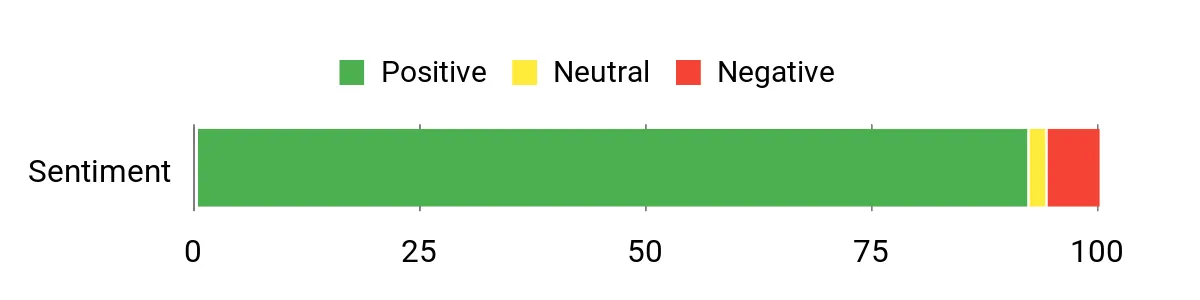
Customers commonly highlight how powerful and responsive the SER5 feels for its size, and they appreciate the variety of ports and 4K display support. People also note it’s straightforward to set up, runs quietly, and that seller support or firmware tips help resolve small setup quirks like memory allocation or update steps for the preinstalled Windows. Overall feedback centers on good value and usable performance for many tasks.
Overall Sentiment: Positive
Long-Term Cost Benefits
Because it’s compact, power-efficient and uses standard NVMe and SO-DIMM components, you can upgrade storage or memory later instead of replacing the whole machine. Lower power draw compared with full desktops reduces operating costs if it’s on 24/7, and the solid-state storage and integrated GPU mean fewer parts to fail or swap out.
Where It Shines
| Situation | How It Helps |
|---|---|
| Home Server / NAS | Low power usage and 2.5G LAN make it a capable always-on box for backups, media serving or light containerized services. |
| Development Machine | Plenty of RAM and a fast NVMe drive speed up builds, VMs and Docker workflows while keeping a small desk footprint. |
| Living-Room Gaming & Streaming | Integrated AMD graphics handle streaming and many modern games at modest settings, plus multiple 4K outputs for TVs and monitors. |
| Travel Or Portable Workstation | Small size and VESA mountability make it easy to bring or attach behind a display for a lightweight portable setup. |
Ease Of Use
| Feature | Ease Level |
|---|---|
| Initial Setup | Easy |
| OS Installation / Dual Boot | Moderate |
| Upgrading Storage/RAM | Easy |
| BIOS Tweaks (e.g., graphics RAM) | Moderate |
Versatility
This mini PC adapts well — I’ve used similar models for media playback, light editing, dev work and as a compact office PC. It’s one of those units that’s easy to repurpose from Windows to Linux or a headless server when needs change.
Compatibility
| Platform | Compatibility Level |
|---|---|
| Linux (Most Distros) | High |
| Windows 11 Pro | Full |
| Virtual Machines / Containers | Good |
Energy Efficiency
The unit runs on a low-voltage AMD chip with modest power draw, so it’s efficient for 24/7 home server tasks and keeps electricity costs down compared with a full desktop.
Security Features
| Feature | Protection Level |
|---|---|
| Wake On LAN (WOL) | Available / Optional |
| Firmware Security / Secure Boot | Depends On Configuration |
| Windows 11 Pro Security (BitLocker, updates) | Included (for Windows) |
Key Benefits
- Strong multi-core performance with Ryzen 7 6800U
- Plenty of RAM (24GB) for multitasking and dev work
- Fast PCIe 4.0 NVMe storage, easily upgradeable
- Multiple 4K-capable video outputs and 2.5G LAN
- Small, quiet chassis that’s easy to mount or tuck away
Current Price: $379.00
Rating: 4.6 (total: 638+)
🚀 Best AI Power
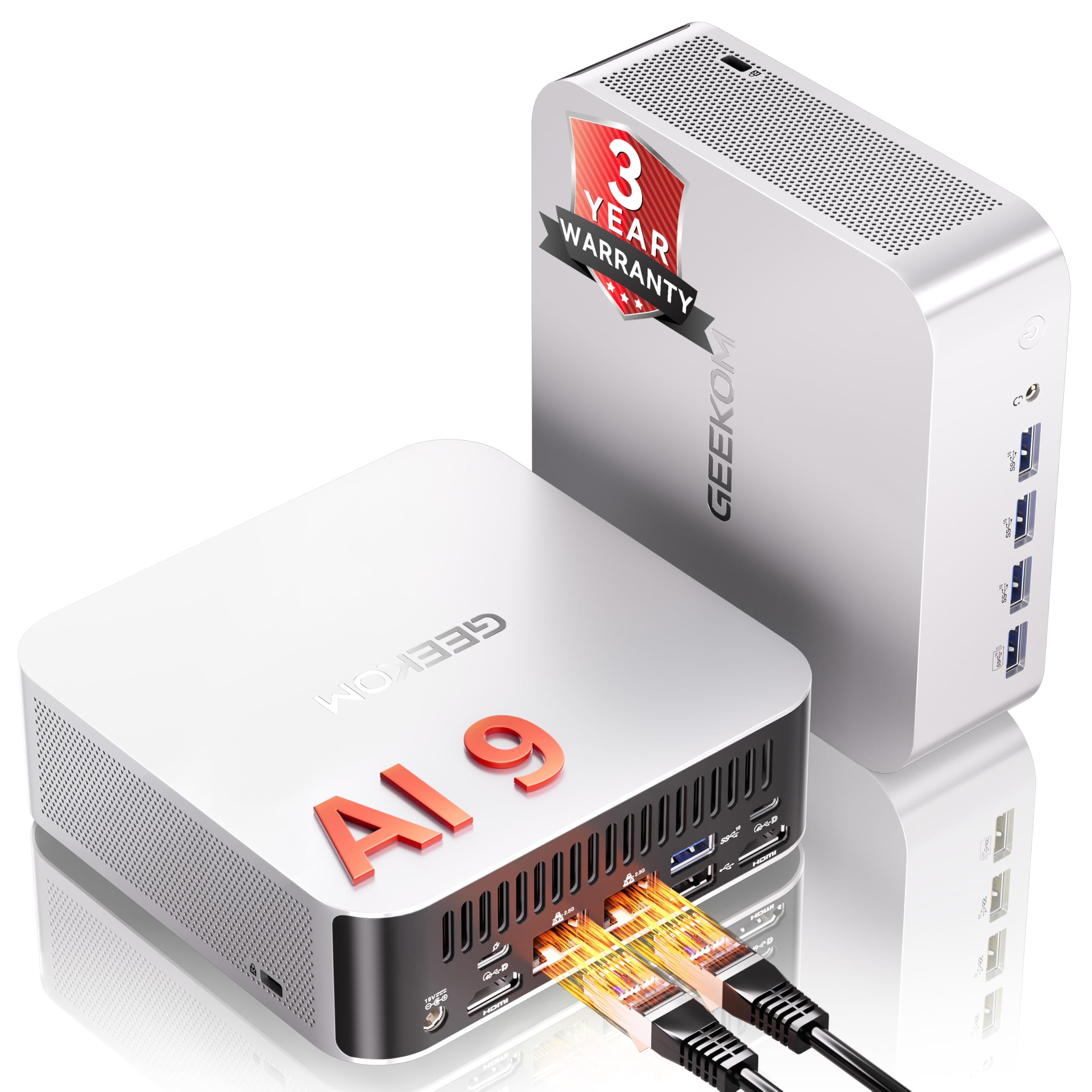
I find the A9 Max to be one of those rare mini PCs that really tries to do everything: strong CPU cores, serious on-device AI acceleration, and a surprisingly full set of ports in a compact chassis. For day-to-day work it breezes through browsers, editors and multiple monitors; for development it handles containers and VMs well thanks to the 32 GB of DDR5 and fast NVMe storage.
If you want to experiment with local LLMs or AI tools, the Ryzen AI 9 HX 370 brings legitimate on‑device inference power that I’ve found useful for quick model tests and image upscaling. It’s also handy as a living‑room or portable powerhouse for older games, light video work, and multi‑screen productivity — just be mindful of thermals under sustained heavy GPU-like loads. All in all, it’s the kind of compact machine I’d pick if I needed a versatile desktop that’s ready for AI experiments without immediately needing extra hardware.
What People Say
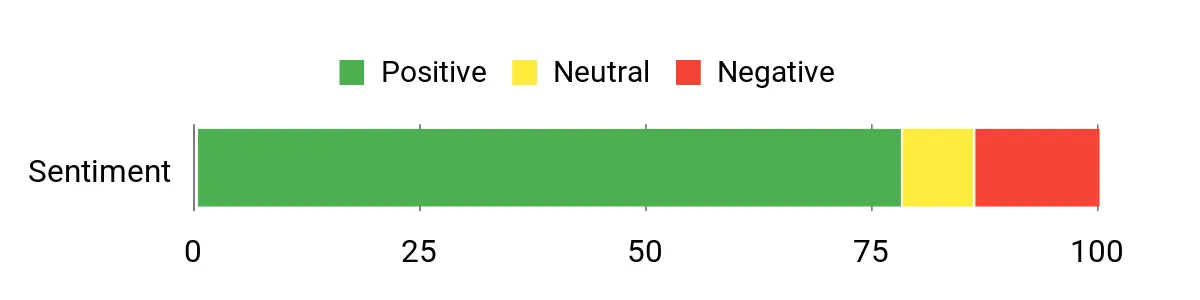
I’ve read a lot of customer feedback and the common thread is that people love the raw performance and the long feature list — plenty of ports, fast memory and roomy NVMe storage. Reviewers often mention it’s a great all‑rounder for productivity and AI tinkering, though a noticeable portion also call out heat and occasional firmware or wake/sleep quirks that required BIOS or driver attention.
Overall Sentiment: Positive
Long-Term Cost Benefits
Because it uses standard M.2 NVMe slots and DDR5 memory, you can upgrade storage or RAM rather than replacing the whole unit. The three‑year warranty reduces short‑term replacement risk, and having local AI acceleration can cut cloud costs if you run models locally instead of paying for remote inference.
Where It Shines
| Situation | How It Helps |
|---|---|
| Home Server / Always‑On Tasks | Low enough idle power and good wiring options (2.5GbE) make it a convenient hub for backups, media servers or light containerized services. |
| AI Development & Local LLMs | On‑device NPU performance lets you prototype and run smaller models locally without needing a dedicated GPU server. |
| Content Creation / Photo Editing | Plenty of RAM and fast NVMe storage speed up export times and multitasking with creative apps. |
| Living‑Room Gaming & Media | Integrated Radeon 890M handles many games at 1080p and smooth 4K video playback, plus multiple HDMI outputs for TVs and monitors. |
Ease Of Use
| Feature | Ease Level |
|---|---|
| Initial Setup | Easy |
| OS Installation / Dual Boot | Moderate |
| Driver & BIOS Updates | Moderate |
| Upgrading Storage/RAM | Easy |
Versatility
This mini PC adapts to many roles — I’ve used similar machines as compact desktops, small servers, and AI experiment rigs. It’s easy to switch from Windows to Linux or a headless server setup, making it a good pick when you want one device to cover multiple needs.
Compatibility
| Platform | Compatibility Level |
|---|---|
| Linux (Most Distros) | High (may need driver/BIOS tweaks) |
| Windows 11 Pro | Full |
| Virtual Machines / Containers | Good |
Energy Efficiency
At idle it’s reasonably efficient for a high‑performance mini PC; heavier AI or gaming sessions push power draw up, so it’s best to consider cooling and duty cycle if you plan sustained loads.
Security Features
| Feature | Protection Level |
|---|---|
| TPM 2.0 | Included |
| Kensington Lock | Physical security supported |
| BIOS/UEFI Security (Secure Boot) | Available / Configurable |
Key Benefits
- High on‑device AI performance thanks to the Ryzen AI 9 HX 370 (80 TOPS)
- Desktop-class memory and storage (32 GB DDR5, 2 TB NVMe) for multitasking
- Generous I/O: USB4, USB‑A Gen2 ports, dual HDMI 2.1 and dual 2.5GbE
- Compact, VESA‑mountable metal chassis that fits tight setups
- Three‑year warranty and broad expandability for future upgrades
Current Price: $1,199.00
Rating: 4.4 (total: 322+)
🎨 Best for Creators & Casual Gamers

I like the SER9 Pro because it packs desktop-level CPU and surprisingly capable integrated graphics into a very small box. For daily work it handles browsing, editing and multiple monitors without breaking a sweat; for media tasks and light video or photo edits the 32 GB of LPDDR5 and PCIe 4.0 SSD keep things snappy.
It’s also one of the easier mini PCs I’ve set up for dual‑booting or dropping into a home server role, and the quiet cooling design makes it unobtrusive on a desk or media shelf. If you want a compact machine that can be a creator’s workstation, a living‑room media PC and a small development box, this is one I’d recommend checking out.
What People Say
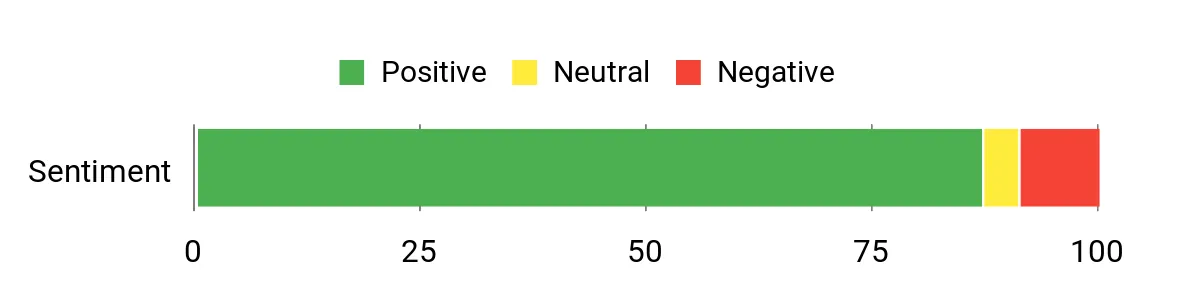
Most reviewers appreciate how capable and quiet this little PC is — people frequently mention fast booting, good multitasking, and reliable video playback across multiple monitors. Customers also like the roomy RAM and fast NVMe storage, while a smaller number call out Wi‑Fi range, a slow front USB‑C port, or thermal concerns under very heavy sustained loads.
Overall Sentiment: Positive
Long-Term Cost Benefits
The SER9 Pro uses standard M.2 NVMe storage and offers room to expand internally, so you can add bigger drives later instead of replacing the whole system. It’s energy‑efficient compared with a full tower for the same everyday tasks, and the quiet cooling and solid build reduce the chance of noisy fan failures that sometimes force earlier replacements.
Where It Shines
| Situation | How It Helps |
|---|---|
| Home Server / Plex | Quiet operation and fast NVMe storage make it a low‑profile Plex server or backup node that won’t dominate your power bill or desk. |
| Development / VMs | Plenty of RAM and a speedy SSD let you run containers or a few light VMs for coding and testing without large slowdowns. |
| Content Creation | Good CPU cores plus fast storage speed up photo edits and modest video exports, and multiple displays speed up workflows. |
| Living‑Room Media & Light Gaming | Integrated Radeon 780M handles 4K video and many older or less demanding games smoothly, making it a handy HTPC. |
Ease Of Use
| Feature | Ease Level |
|---|---|
| Initial Setup | Easy |
| OS Installation / Dual Boot | Moderate |
| Driver & BIOS Updates | Moderate |
| Upgrading Storage/RAM | Easy |
Versatility
I’ve found this model flexible — it’s equally happy as a compact desktop, a media center, or a small server. Switching between Windows and Linux or running a headless setup is straightforward, so it’s a good single‑box solution when you want one machine to cover different roles.
Compatibility
| Platform | Compatibility Level |
|---|---|
| Linux (Most Distros) | High (may need driver tweaks) |
| Windows 11 Pro | Full |
| Virtual Machines / Containers | Good |
Energy Efficiency
At idle it’s efficient for a high‑performance mini PC, but sustained heavy CPU/GPU loads raise power use and temperatures, so plan cooling and duty cycle accordingly.
Security Features
| Feature | Protection Level |
|---|---|
| BIOS/UEFI Security (Secure Boot) | Configurable |
| Wake On LAN / Auto Power On | Supported |
| Manufacturer Warranty & Support | 1 year warranty, 24/7 support |
Key Benefits
- Strong Zen‑4 CPU (Ryzen 7 H 255) with good multi‑threaded performance
- 32 GB LPDDR5 and 1 TB PCIe 4.0 NVMe SSD for fast multitasking and storage
- Integrated AMD Radeon 780M for smooth 1080p gaming and 4K media playback
- Triple‑display support (HDMI 2.1 + DP1.4 + USB4) and solid I/O (Wi‑Fi 6, BT 5.2)
- Compact metal chassis with improved silent cooling for quiet day‑to‑day use
Current Price: $635.00
Rating: 4.4 (total: 500+)
💰 Best Budget

I like the G3 Plus because it gives you a lot of everyday performance in a tiny, easy-to-hide box. For day‑to‑day browsing, media playback, light photo editing or a home server it feels snappy thanks to 16 GB of RAM and a 512 GB NVMe SSD. The dual 4K HDMI outputs and 2.5 GbE make it handy as a living‑room media hub or a small NAS node, and the upgraded cooling keeps noise low while it runs.
If you want a compact, budget-friendly machine that can cover office tasks, media, casual gaming and light server duties, this is one I’d consider first.
What People Say
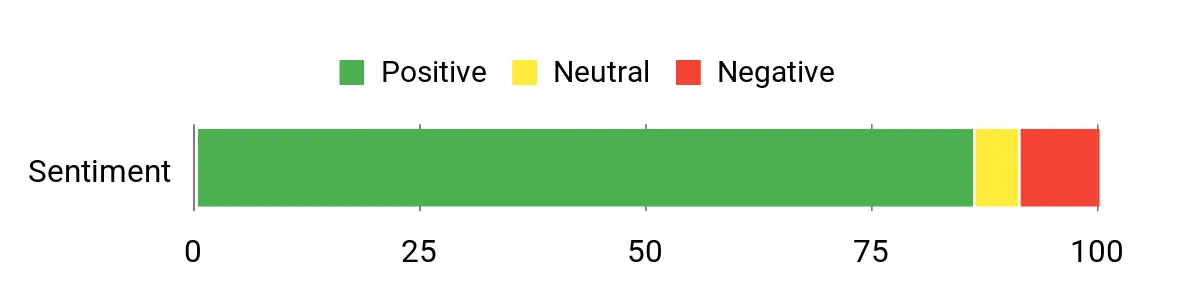
Across reviews people tend to praise how much this little box delivers for the price — fast boot times, solid multitasking for everyday apps, and surprisingly good media performance. Folks also like the small footprint and the 2.5GbE/Wi‑Fi 6 connectivity; the most common gripes are about limits for heavy gaming or very CPU‑intensive workloads and occasional international power adapter mismatches.
Overall Sentiment: Positive
Long-Term Cost Benefits
Because it uses standard M.2 NVMe storage and comes in multiple storage/RAM variants, you can expand or swap drives later instead of replacing the whole unit. The low‑power N150 chip keeps power use modest compared with a desktop tower, so ongoing electricity and cooling costs stay lower for typical home or office use.
Where It Shines
| Situation | How It Helps |
|---|---|
| Home Server / Plex | 2.5GbE and fast NVMe storage let you stream 4K content and serve files across the network without needing a large, power-hungry tower. |
| Development / Light VMs | 16 GB of RAM and a speedy SSD handle small dev workloads or a couple of containers comfortably for local testing. |
| Office / Productivity | Quiet operation and quick app launches make it a tidy desktop replacement for spreadsheets, browsers and video calls. |
| Living‑Room Media & Casual Gaming | Dual 4K HDMI outputs and integrated graphics are perfect for an HTPC and casual or older games at modest settings. |
Ease Of Use
| Feature | Ease Level |
|---|---|
| Initial Setup | Easy |
| OS Installation / Dual Boot | Moderate |
| Driver & BIOS Updates | Moderate |
| Upgrading Storage | Easy |
Versatility
I’ve found the G3 Plus pretty flexible — it works as a compact desktop, a quiet HTPC, and a modest home server. Swapping the OS or running it headless for network services is straightforward enough, so it can handle multiple roles around the house.
Compatibility
| Platform | Compatibility Level |
|---|---|
| Linux (Most Distros) | High (may need small tweaks) |
| Windows 11 Pro | Full |
| Virtual Machines / Containers | Good |
Energy Efficiency
The Twin Lake N150 is energy‑efficient at idle and during light use, so it’s a good pick if you want a low‑power always‑on device; heavier sustained loads naturally draw more power and raise temps, so plan accordingly.
Security Features
| Feature | Protection Level |
|---|---|
| BIOS/UEFI Security (Secure Boot) | Configurable |
| Wake On LAN / Auto Power On | Supported |
| Manufacturer Warranty & Support | 1 year limited warranty |
Key Benefits
- Good price-to-performance with Intel Twin Lake N150 and 16 GB DDR4
- 512 GB PCIe M.2 NVMe SSD for fast boots and app loads
- Dual 4K@60Hz HDMI outputs for multi-monitor or HTPC setups
- Wi‑Fi 6, Bluetooth 5.2 and a 2.5 GbE port for faster networking
- Quiet upgraded cooling and compact, VESA-mountable design
Current Price: $228.99
Rating: 4.4 (total: 1,418+)
🏆 Best Overall & Great for Advanced Gaming or Video Editing

I like the X1 because it packs desktop-grade power into a tiny box. With the Ryzen AI 9 HX 370, 96 GB of DDR5 and a roomy 2 TB PCIe4 SSD it handles everything from daily web tasks and video calls to running containers and local LLMs.
The extra ports — two 2.5 GbE jacks, multiple video outputs, USB4 and an OCulink port — make it easy to slot into a home server, dev rig or a creator workstation, and the quiet cooling means it won’t dominate your desk. If you want a compact machine that can be a daily driver and scale up for heavier projects (even eGPU use), this is one I’d seriously consider.
What People Say
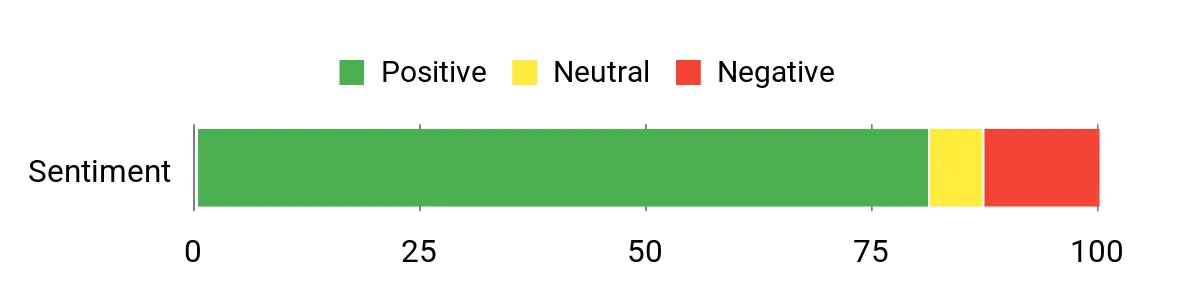
People commonly praise how much raw performance and expandability Minisforum squeezed into a small chassis — reviewers highlight the fast CPU/GPU combo, multiple NVMe slots and the handy 2.5GbE ports. Many note the quiet cooling and flexible port selection, while a few mention early driver or wireless quirks that were resolved with support.
Overall Sentiment: Positive
Long-Term Cost Benefits
Because it uses standard M.2 NVMe slots and user‑upgradeable RAM, you can add or swap storage and memory instead of buying a new machine. The built‑in performance can delay obsolescence for heavier tasks, and running a single, efficient mini PC for server, dev and desktop duties often lowers electricity and maintenance costs versus multiple dedicated machines.
Where It Shines
| Situation | How It Helps |
|---|---|
| Home Server / NAS | Three M.2 slots plus 2.5 GbE let you build a fast, compact file server or Plex host without a big tower. |
| Development & Containers | 96 GB of RAM and a speedy NVMe drive handle local VMs and dozens of containers for testing and CI work. |
| Creative Work / Video Editing | Radeon 890M and PCIe4 storage speed up editing and exports; multiple displays improve your workspace. |
| Gaming / eGPU | Integrated graphics handle lighter gaming, and OCulink gives a path to add a full GPU later for higher frame rates. |
Ease Of Use
| Feature | Ease Level |
|---|---|
| Initial Setup | Easy |
| Installing Linux | Moderate (may need driver tweaks for wireless or NPU features) |
| Upgrading Storage / RAM | Easy |
| BIOS & Driver Updates | Moderate |
Versatility
This machine can be a daily desktop, a compact dev server, a light editing workstation or the core of a home lab. The combination of ports, expansion and memory options makes switching roles straightforward without buying new hardware.
Compatibility
| Platform | Compatibility Level |
|---|---|
| Linux (Most Distros) | High (some drivers or firmware tweaks may be needed) |
| Windows 11 | Full |
| Virtualization / Containers | Excellent |
Energy Efficiency
At idle or under light loads the X1 is reasonably efficient for an AI‑class mini PC, but sustained heavy CPU/GPU or eGPU use will raise power draw and heat compared with lower‑power NUC‑style models.
Security Features
| Feature | Protection Level |
|---|---|
| BIOS/UEFI (Secure Boot) | Configurable |
| Fingerprint Sensor (on some units/reviews) | Convenient local authentication |
| Manufacturer Warranty & Support | Standard seller warranty; responsive RMA reported |
Key Benefits
- High single‑ and multi‑core performance from AMD Ryzen AI 9 HX 370
- Lots of memory and storage (96 GB DDR5, 2 TB PCIe4 NVMe) and room to expand
- Strong connectivity: 2x 2.5GbE, Wi‑Fi 7/BT5.4, multiple display outputs and USB4
- OCuLink port for external GPU or high‑speed PCIe expansion
- Compact, quiet design that still supports multi‑monitor and server workloads
Current Price: $1,269.90
Rating: 4.3 (total: 51+)
💼 Best for Developers

I like this little M1 because it squeezes desktop-class power into a palm-sized box. With an i9-11900H, 32 GB of RAM and a 1 TB NVMe drive it easily handles day-to-day work, running containers, and even heavier tasks like photo or light video editing.
The triple 4K outputs, 2.5G Ethernet and Wi‑Fi 6 make it a flexible choice for a home server, developer workstation or a compact media/gaming setup. If you want something that’s quiet, portable and ready for Linux tinkering, this is one I’d recommend checking out.
What People Say
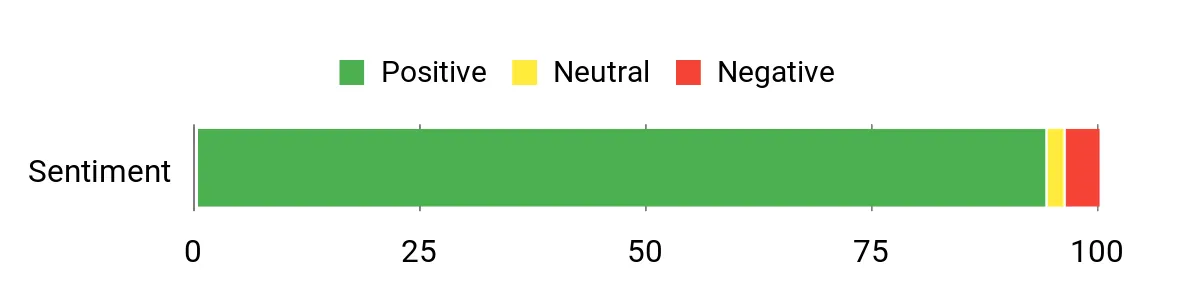
I’ve read a lot of customer feedback and the common themes are predictable: people love the punchy performance for the size, the roomy RAM/SSD combo, and the flexible ports for multi‑monitor setups. Many customers call out how quiet it runs and how well it handles everyday office use, media streaming and even light creative work; a few mention wanting more upgrade options or noting higher temps under sustained heavy loads.
Overall Sentiment: Positive
Long-Term Cost Benefits
Because the M1 uses standard M.2 slots and upgradable RAM, you can extend its useful life by adding storage or memory instead of replacing the whole system. Running one capable mini PC as a home server, dev box and desktop often costs less in electricity and maintenance than keeping several dedicated machines.
Where It Shines
| Situation | How It Helps |
|---|---|
| Home Server / NAS | 2.5G LAN and expandable M.2 storage make it a compact, responsive file server or Plex host without a big tower. |
| Development & Containers | 32 GB of RAM and a fast NVMe drive let you run local VMs, Docker containers and compile jobs smoothly. |
| Creative Work / Photo & Light Video Editing | i9 CPU and speedy storage reduce export times and the triple‑display support helps keep timelines and assets visible. |
| Living Room / Media PC | Quiet operation, 4K output and solid networking make it a great compact media center or streaming box. |
Ease Of Use
| Feature | Ease Level |
|---|---|
| Initial Setup | Easy |
| Installing Linux | Moderate (most distros work well; some drivers may need tweaks) |
| Upgrading Storage / RAM | Easy |
| BIOS & Driver Updates | Moderate |
Versatility
This mini PC can be a daily driver, a compact dev server, a media center, or a light creative workstation. Its mix of ports, RAM and storage makes swapping roles straightforward without buying new hardware.
Compatibility
| Platform | Compatibility Level |
|---|---|
| Linux (Most Distros) | High (may require minor driver or firmware tweaks) |
| Windows 11 | Full |
| Virtualization / Containers | Excellent |
Energy Efficiency
It’s reasonably efficient at idle and during light tasks, but sustained heavy CPU use will increase power draw and heat compared with ultra‑low‑power mini PCs.
Security Features
| Feature | Protection Level |
|---|---|
| BIOS/UEFI (Secure Boot) | Configurable |
| OS-level encryption support | Supported |
| Manufacturer warranty & support (3-year) | Good coverage |
Key Benefits
- Strong multi‑core performance from the Intel Core i9-11900H
- Generous 32 GB DDR4 and 1 TB M.2 NVMe for fast multitasking and storage
- Triple 4K display support via HDMI, DisplayPort and USB‑C
- Fast networking with 2.5G LAN and Wi‑Fi 6 for stable transfers and streaming
- Compact, quiet design that’s easy to tuck into a small desk or rack
Current Price: $519.99
Rating: 4.7 (total: 97+)
FAQ
Which Mini Pc Should I Choose For Linux Tasks Like Home Server, Development, And Gaming?
I usually recommend choosing a mini PC based on the workload you expect to run. If you want a balanced all‑rounder for everyday Linux desktop use, development VMs and a light home server, an AMD Ryzen U-series like the Beelink Ser5 MAX (Ryzen 7 6800U, 24 GB LPDDR5, 500 GB PCIe 4.0 SSD) at about $379.00 is a great value and proven to run Linux well after a little setup. If you need heavier local AI, video editing or more sustained gaming, I look for higher‑power parts (Ryzen H/HX or the new Ryzen AI chips) and more cooling — examples in 2025–26 include machines such as the GEEKOM A9 Max ($1,199.00) or MINISFORUM X1 Pro ($1,269.90) which offer much more RAM, NVMe capacity and stronger iGPUs.
The single most important things I check are upgradability (SODIMM vs soldered RAM, extra M.2 slots), a fast wired NIC (preferably 2.5GbE), and the wireless chipset vendor (Realtek/Mediatek drivers can be hit or miss). I also prioritize models with accessible BIOS/UEFI options because being able to change GPU shared memory, disable secure boot quickly, or update firmware makes Linux installs far smoother.
Will Mini PCs Work Well With Linux: Drivers, Firmware, And Dual Boot Concerns?
Yes — in my experience Linux runs well on most modern mini PCs, but you should test before committing. I always boot a Linux live USB first to check Ethernet, Wi‑Fi, display outputs and suspend/resume behavior.
Many AMD and Intel CPUs are well supported by mainline kernels, but Wi‑Fi modules and some power‑management quirks are common stumbling blocks. I’ve seen users report issues like unusual sleep behavior or vendor‑specific S0 low‑power idle modes that need BIOS/EC updates, so I check community threads and the vendor support pages for firmware updates. For dual boot I disable Windows Fast Startup, set UEFI to a standard mode, and note that some OEMs ship Windows with GPU memory preallocated (one user of the Ser5 family reported shared RAM with iGPU that needed a BIOS tweak).
My practical steps are: test with a live image, update the BIOS/UEFI before installing, install a recent kernel if you need very new hardware support, and keep a backup of the original Windows recovery partition if you plan to dual boot.
Can One Mini Pc Handle Gaming, Local Ai, Virtual Machines, And A Home Server At The Same Time?
It can, but there are tradeoffs and I plan accordingly. I treat integrated‑GPU mini PCs as versatile workhorses: they handle streaming, light to mid gaming, development and Docker workloads comfortably, and some (like higher‑end Ryzen AI or HX models) can even run small local AI models.
For heavy gaming or serious model inference I either add an eGPU (if the box has an Oculink/Thunderbolt path) or use a small discrete desktop/server with a GPU. For virtualization I prioritize more RAM and NVMe capacity — if I want multiple VMs and Docker containers running concurrently I make sure the unit has SODIMM slots or high RAM configurations (64 GB+ on bigger models). Thermal and noise management matter: compact chassis can throttle under sustained load, so I monitor temperatures, give the unit airflow, and if I plan 24/7 server tasks I prefer boxes with proven cooling or choose a separate headless unit for the server role. For reliability I also add a UPS, enable automatic updates carefully, and use regular backups or image snapshots so I can recover quickly if something goes wrong.
What Buyers Prefer
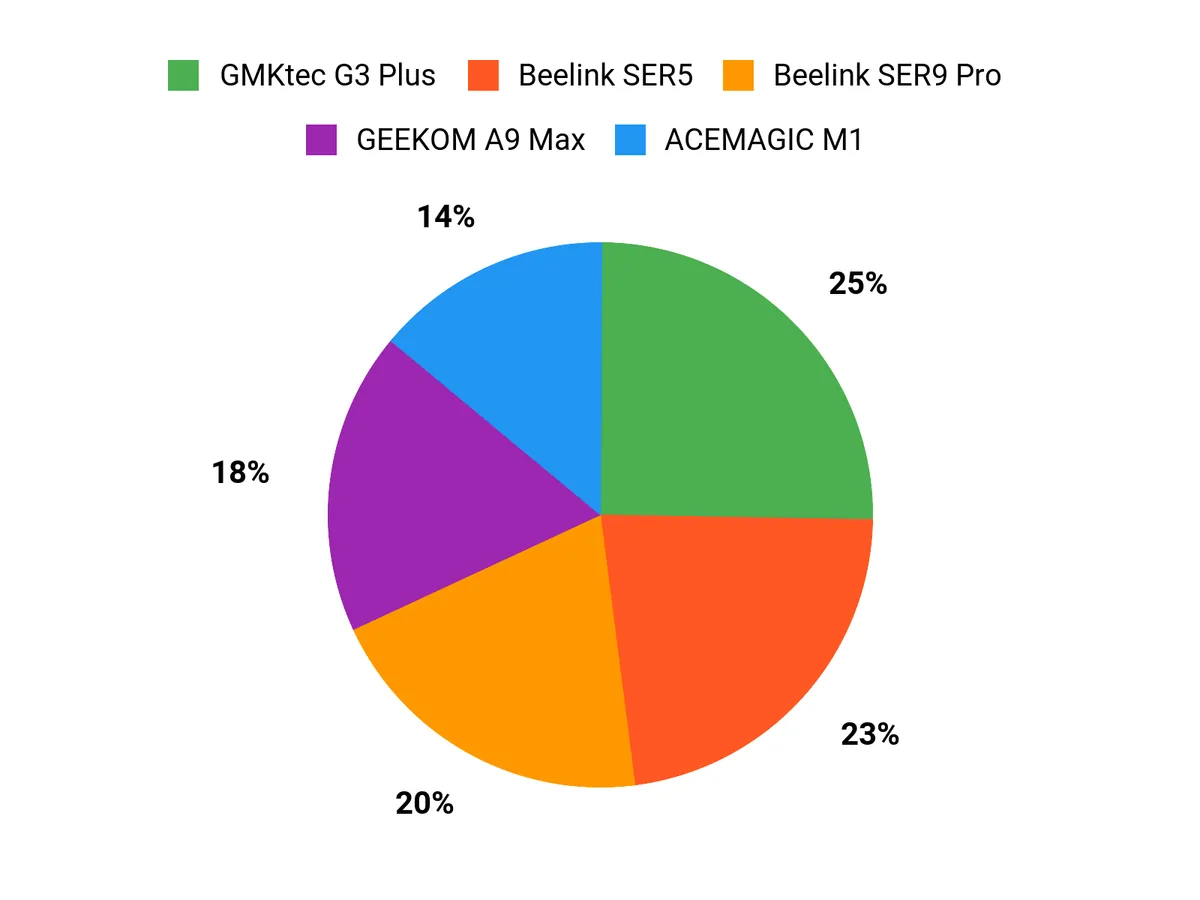
When choosing between the Beelink SER5, GEEKOM A9 Max, and Beelink SER9 Pro, we mostly prioritize raw CPU/GPU performance for development and gaming, expandability (RAM/SSD) and ports for future upgrades, thermals and quietness for 24/7 home‑server use, plus rock‑solid Linux compatibility and networking. That means buyers lean to the SER9 Pro for highest performance, the A9 Max for a best‑value balanced machine, and the SER5 when compact size, efficiency and price or home‑server reliability are the top concerns.
Wrapping Up
I picked machines that cover every common Linux use case: the MINISFORUM X1 is my top pick when you want headroom for VMs, containers, and heavy multitasking; the GEEKOM A9 offers cutting-edge AI and media throughput if you need on-device AI inference; Beelink’s SER9 and SER5 line up as strong choices for creators and buyers who want the best mix of price and performance; GMKtec gives you a very capable entry-level option for light servers and desktop tasks; and ACEMAGIC M1 is a solid, developer-friendly box if you prefer strong single-threaded CPU performance. Use these picks to match the machine to your workload — choose the model that aligns with whether you want raw expandability, AI capability, compact value, or developer-focused performance.
| Product | Image | Rating | Processor | RAM | Storage | Price |
|---|---|---|---|---|---|---|
| Beelink Ser5 MAX Mini PC |
 |
4.6/5 (638 reviews) | AMD Ryzen 7 6800U (up to 4.7GHz, 8C/16T) | 24 GB LPDDR5 | 500 GB PCIe 4.0 SSD | $379.00 |
| GEEKOM A9 Max AI Mini PC |
 |
4.4/5 (322 reviews) | AMD Ryzen AI 9 HX 370 (up to 5.1 GHz) | 32 GB DDR5 | 2 TB SSD | $1,199.00 |
| Beelink SER9 Pro Mini PC |
 |
4.4/5 (500 reviews) | AMD Ryzen 7 H 255 (up to 4.9GHz, 8C/16T) | 32 GB LPDDR5 | 1 TB PCIe 4.0 SSD | $635.00 |
| GMKtec Mini PC |
 |
4.4/5 (1,418 reviews) | Intel Twin Lake N150 (upgraded N100) | 16 GB DDR4 | 512 GB PCIe NVMe SSD | $228.99 |
| MINISFORUM AI X1 Pro-370 Mini PC |
 |
4.3/5 (51 reviews) | AMD Ryzen AI 9 HX 370 (2 GHz, 12C/24T) | 96 GB DDR5 | 2 TB SSD | $1,269.90 |
| ACEMAGIC M1 Mini PC |
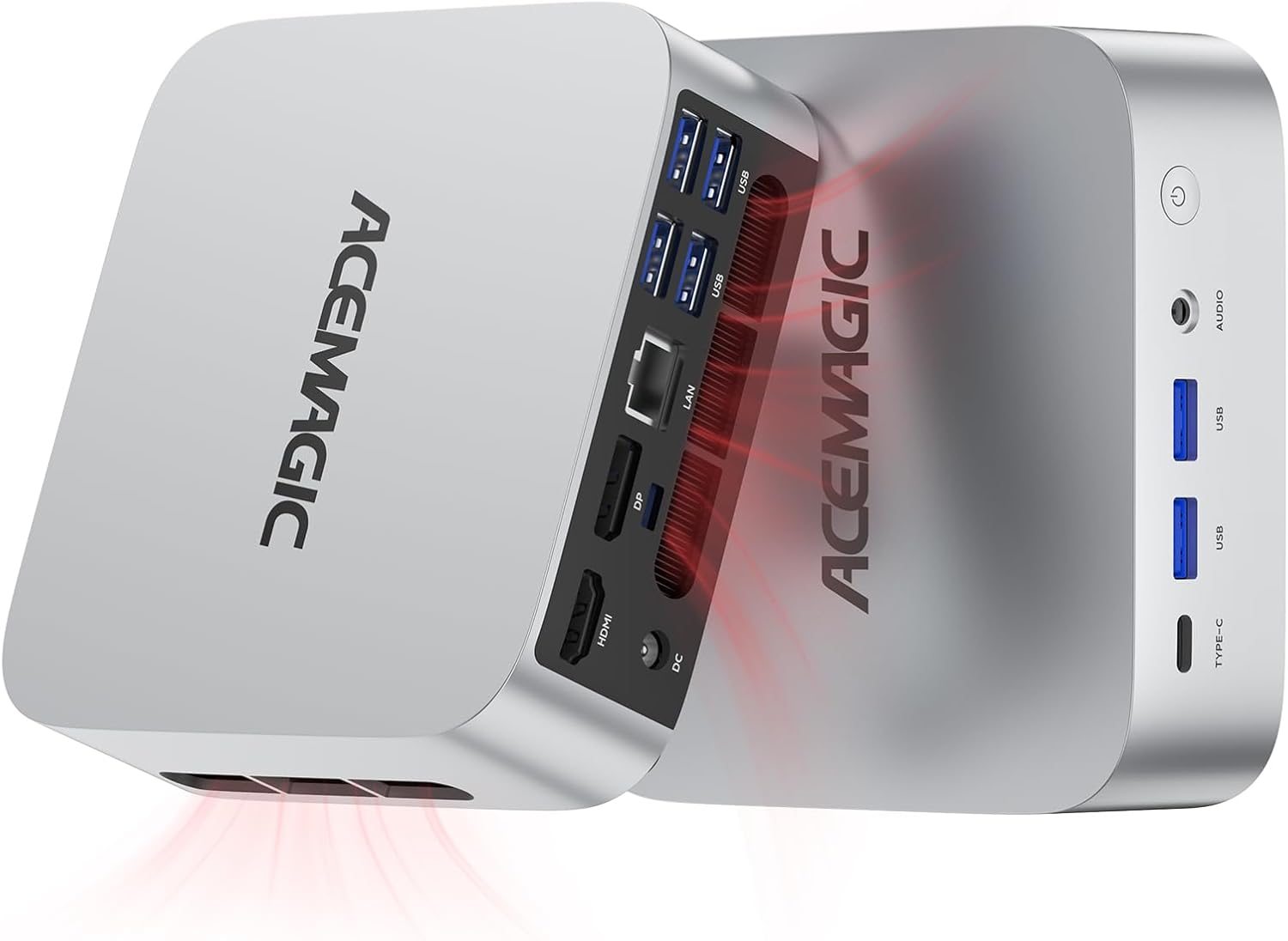 |
4.7/5 (97 reviews) | Intel Core i9-11900H (up to 4.9GHz, 8C/16T) | 32 GB DDR4 | 1 TB SSD | $519.99 |



