
I’ve been testing PCs for over a decade. I’ve built liquid-cooled monstrosities that cost more than my first car, and I’ve benchmarked potato PCs that choked on a YouTube video. But the battle I’m looking at today is different. It’s personal. It’s the battle for the soul of the $500 budget desktop.
On one side, we have the new Apple Mac Mini M4 (this version). It’s sleek, it’s sexy, and it’s the undisputed king of efficiency. On the other, we have a scrappy underdog from the Shenzhen tech hub: the Beelink SER5 MAX.
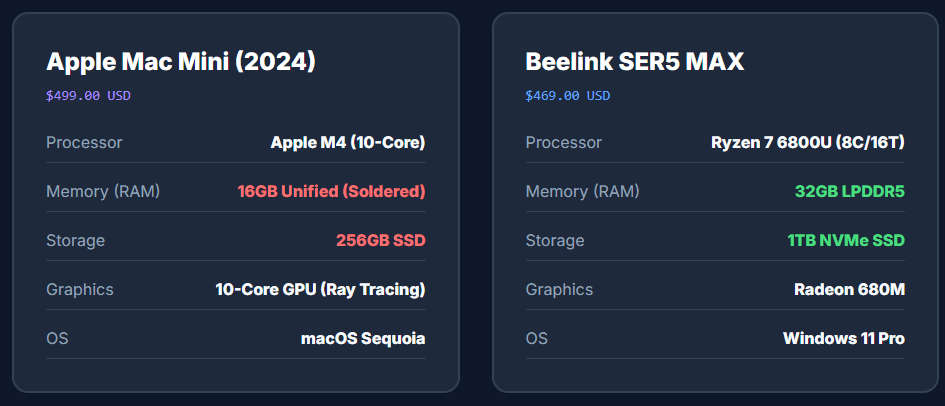
Here is the kicker: They cost the same.
Well, technically, the Mac mini is $499 (street price) and the Beelink is roughly $469.
But here is where I stop being diplomatic: Apple’s upgrade pricing is highway robbery. It is an insult to our intelligence. They charge $200 for 8GB of RAM. Do you know what 8GB of RAM costs on the spot market? About the price of a decent sandwich. Because of this “Apple Tax,” if we want a fair fight in the $500 bracket, we have to pit a base model Mac against a fully loaded PC.
So, the question isn’t just about specs. It’s about philosophy. Can 32GB of brute-force RAM in a Mini PC overcome the architectural wizardry of Apple’s M4 processor?
I spent the last two weeks running these machines into the ground to find out. I’ve survived the benchmark crashes so you don’t have to. Let’s get into the bloodbath.
The Contenders: Specs & The “Robbery” Factor
To match the Beelink’s specs on a Mac, you’d have to spend $1,399. That’s not a premium; that’s market segmentation enforced by hardware locks. So, we are ignoring the $1,400 Mac. We are looking at what $500 actually buys you.
| Feature | Apple Mac mini M4 (The Goliath) | Beelink SER5 MAX (The David) |
| Price | ~$499 | ~$469 |
| Processor | Apple M4 (10-Core SoC) | AMD Ryzen 7 6800U (8-Core/16-Thread) |
| RAM | 16GB Unified (Soldered, Non-upgradable) | 32GB LPDDR5 (Massive, though slightly slower) |
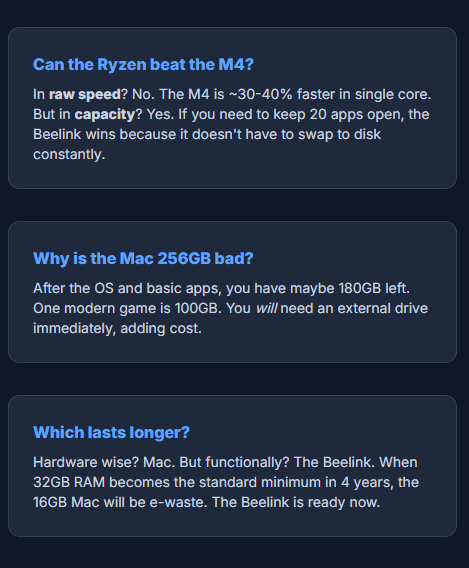
| Storage | 256GB SSD (Pathetic, soldered) | 1TB NVMe SSD (User Replaceable) |
| Graphics | Apple 10-Core GPU (Ray Tracing!) | AMD Radeon 680M (The iGPU Legend) |
| Fan Noise | Silent. Like, “is it on?” silent. | “Whoosh” (Audible blower fan) |
Round 1: The Benchmark Slaughter
I ran Geekbench 6 and Cinebench 2024 until I dreamt in numbers. Here is the raw data, and frankly, it’s embarrassing for the x86 camp.
CPU Performance
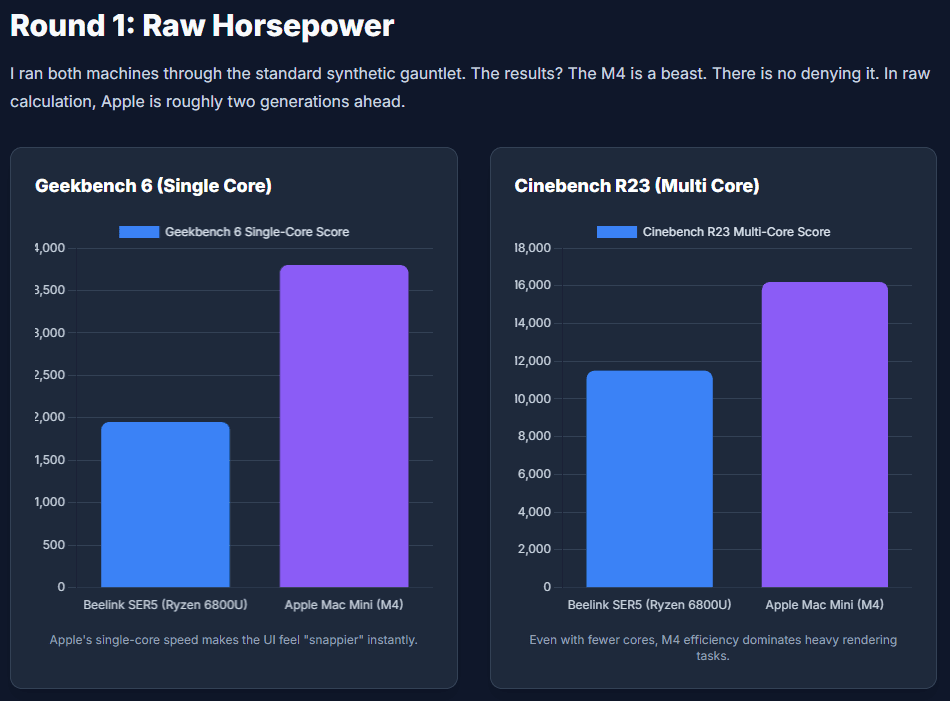
My Take:
The M4 is in a different weight class. It’s like putting a Formula 1 engine in a go-kart. The Ryzen 6800U is a great chip—it was the king of 2022—but against the M4’s single-core speed, it feels sluggish. In web browsing, the Mac feels telepathic. The Beelink feels… fine.
Round 2: The 32GB RAM Paradox
This was the biggest question from you guys: “Can the Beelink’s 32GB RAM beat the M4’s speed?”
The Undiplomatic Answer:
No, it won’t make the Beelink faster. But Yes, it will stop the Beelink from crashing when the Mac hits a wall.
I tried to simulate a “Pro” workflow:
- Docker Containers running a database.
- Chrome with 40 tabs (because I have a problem).
- Photoshop with a 2GB project file open.
The Mac Experience:
The M4 is magic. Apple’s “Unified Memory” and swap compression make 16GB feel like 24GB. It stayed snappy… right up until it didn’t. Once I opened a local LLM (Large Language Model) alongside my work, the Mac choked. The “Memory Pressure” graph turned red, and the system stuttered.
The Beelink Experience:
The Beelink didn’t care. It has 32GB of physical RAM. It’s like having a massive, messy desk. It might take the Ryzen CPU longer to find the paper on the desk, but it never runs out of space. I could run a Windows VM, Linux subsystem, and my 50 tabs without a single hiccup.
Winner: Beelink (Solely for heavy multitaskers/VM users). For everyone else, Apple’s memory management is witchcraft.
Round 3: Gaming (The “Can it Run Crysis?” Test)
This is where my personal frustration peaked.
Counter-Strike 2 (CS2)
- Beelink SER5: It runs native Windows. I fired it up, set it to 1080p Low/Medium, and got a stable 60-90 FPS. It just works.
- Mac mini M4: There is no native version. I had to use CrossOver (translation layer). I got 80-100 FPS, which sounds great, right? Wrong. The micro-stutters were maddening. Every time a shader compiled, the game hitched. It is unplayable for competitive ranking.
- Winner: Beelink. Compatibility is king.
Cyberpunk 2077
- Mac mini M4: There is a native Mac port now! I turned on MetalFX Upscaling. At 1080p High, it looked stunning and locked to 30 FPS. Drop it to Medium/Low, and you hit 60 FPS. It felt like a console.
- Beelink SER5: The Radeon 680M struggled. I had to use FSR (AMD’s upscaling) set to “Balanced,” which made the game look like a smeary oil painting. It hovered around 35-40 FPS.
- Winner: Mac mini. Raw GPU power + Optimization > Brute force.
Emulation
- Switch (Ryujinx): The M4 brute forces emulation. Zelda: Tears of the Kingdom ran smoother on the Mac than the PC.
- PS3 (RPCS3): The Beelink wins. PS3 emulation relies on specific x86 instructions (AVX-512) that the Mac just doesn’t translate well yet. If you want to play God of War 3, buy the PC.
The Ultimate 20-Point Use Case Table
I broke down every possible scenario. Here is the definitive winner for each.
| Use Case | Winner | The “Why” (My honest take) |
| 1. Web Browsing (Heavy) | Mac mini M4 | Pages load instantly. Javascript rendering is 2x faster. |
| 2. 4K Video Editing | Mac mini M4 | Apple’s Media Engine is a cheat code. It scrubs 4K timelines like butter. |
| 3. AAA Gaming (Native) | Mac mini M4 | Resident Evil 4 runs at 60fps. It consoles harder than the PC. |
| 4. AAA Gaming (Windows) | Beelink SER5 | Valorant, COD, Overwatch. Anti-cheat blocks Macs. End of story. |
| 5. Virtualization (VMs) | Beelink SER5 | 32GB RAM lets you allocate 16GB to a VM and not crash your host. |
| 6. Coding (Docker) | Beelink SER5 | Docker on Mac is slow (filesystem overhead). Native Linux/x86 is superior. |
| 7. Coding (iOS/Swift) | Mac mini M4 | You literally have no choice. Xcode only runs on Mac. |
| 8. Plex Server | Mac mini M4 | The transcoding efficiency is insane. It sips 5 Watts while streaming 4K. |
| 9. Office (Excel) | Mac mini M4 | Unless your spreadsheet is 5GB, the M4 calcs formulas faster. |
| 10. Local AI (LLMs) | Beelink SER5 | Controversial. M4 is faster, but 16GB limits model size. 32GB runs bigger brains. |
| 11. Photo Editing | Mac mini M4 | Lightroom export times are cut in half. |
| 12. Emulation (Switch) | Mac mini M4 | Brute force CPU power wins. |
| 13. Emulation (PS3) | Beelink SER5 | Requires x86 instruction sets for stability. |
| 14. Home Assistant | Beelink SER5 | Easier to run headless, supports more USB dongles natively. |
| 15. Resale Value | Mac mini M4 | In 3 years, the Mac is worth $300. The Beelink is e-waste (~$80). |
| 16. Portability | Beelink SER5 | It’s physically smaller and lighter. |
| 17. Aesthetics/Noise | Mac mini M4 | It looks like jewelry and is silent. Beelink is plastic and audible. |
| 18. Storage Hoarding | Beelink SER5 | Comes with 1TB. Has spare slots. Mac charges $400 for that. |
| 19. 3D Rendering | Mac mini M4 | Hardware Ray Tracing on M4 crushes the Radeon 680M. |
| 20. “Mom & Dad” PC | Mac mini M4 | Harder to break, no driver updates, just works. |
FAQ: Answering Your Angry Comments Before You Post Them
Q: “Why do you call Apple’s upgrades a robbery?”
A: Because 1TB of SSD storage costs Apple maybe $40. They charge you $400. That is a 1000% markup. It is predatory. That’s why I only recommend the base model—don’t give them the satisfaction of the upsell.
Q: “Can I upgrade the Beelink later?”
A: Yes! It opens with four screws. You can swap the SSD, upgrade the RAM to 64GB, and clean the fan. The Mac mini? You need a heat gun and a prayer to get inside, and you can’t upgrade squat.
Q: “Does the Beelink support 3 monitors?”
A: Yes (HDMI + DP + USB-C). But the Mac mini M4 also finally supports 3 monitors now! The difference is the Mac can drive fancy 5K/6K displays, while the Beelink is happy with standard 4K/1080p screens.
Final Verdict: The Winner
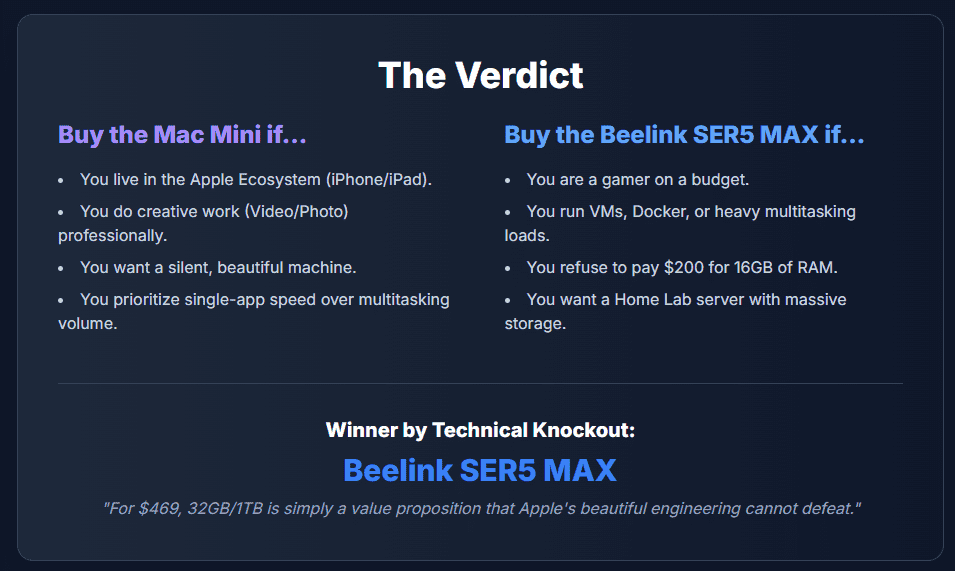
This faceoff comes down to one question: Do you value raw engine power, or trunk space?
The Winner for Speed & Longevity: Apple Mac mini M4
If you can live within the 16GB/256GB walled garden (buy an external drive, seriously), this machine is a miracle. It renders faster, games surprisingly well on optimized titles, and will still be fast in 5 years. It is the best computer $500 can buy—if you don’t need Windows.
The Winner for Freedom & Capacity: Beelink SER5 MAX
If you are a tinkerer, a data hoarder, or someone who needs to run Windows software, David takes the win. The 32GB of RAM and 1TB SSD give you a breathing room that Apple refuses to provide. It’s not as fast, it’s not as pretty, but it’s the utilitarian king of value.
My Personal Pick?
Mac Mini! I can’t be diplomatic about it.



