
If you’re looking for the Best Mini PC in 2026 Under $1000 (or a little bit higher), and want a high-performance machine, I have you covered!
In this article, we don’t just arbitrarily give random recommendations, but share benchmark scores after deep technical testing. So our recommendations are not just a blogger’s opinion, but truly backed by performance testing data.
I’ve been building and reviewing computers for over a decade, and my workspace usually looks like a recycling center for cardboard boxes. But this past month has been particularly intense. I currently have ten different Mini PCs stacked on my test bench, running benchmarks almost non-stop and noticeably raising the ambient temperature of my office.
If you’re looking for a short answer, Geekom A9 Max is our Top Pick For The Sub-$1000 High-Performance Mini PC category. Apple Mac Mini (24GB Ram) is still EASILY the top choice for the Perfect Work From Home Machine & Creative People. And the Beelink SER9 Pro + with Ryzen 7 is the Best Budget High-Performance Mini PC (approx. $650).

I remember when “Mini PC” meant a sluggish Intel Atom box that struggled if you opened two Chrome tabs and Spotify at the same time. I also remember the era of screaming fans that sounded like jet engines taking off whenever you tried to render a video.
Fortunately, those days are behind us.
The landscape of Small Form Factor (Mini PCs) computing has shifted. After living with these units for 30 days, swapping cables, running thermal probes, and using them as my daily drivers, it’s clear that we are in a very interesting transition period. We aren’t just looking at minor speed bumps; we are seeing three distinct philosophies competing for desk space: Apple’s integrated ARM efficiency, Intel’s new tile-based Core Ultra chips, and AMD’s push into AI-focused silicon.
Best Mini PC in 2026 Under $1000: The Ultimate Showdown List!
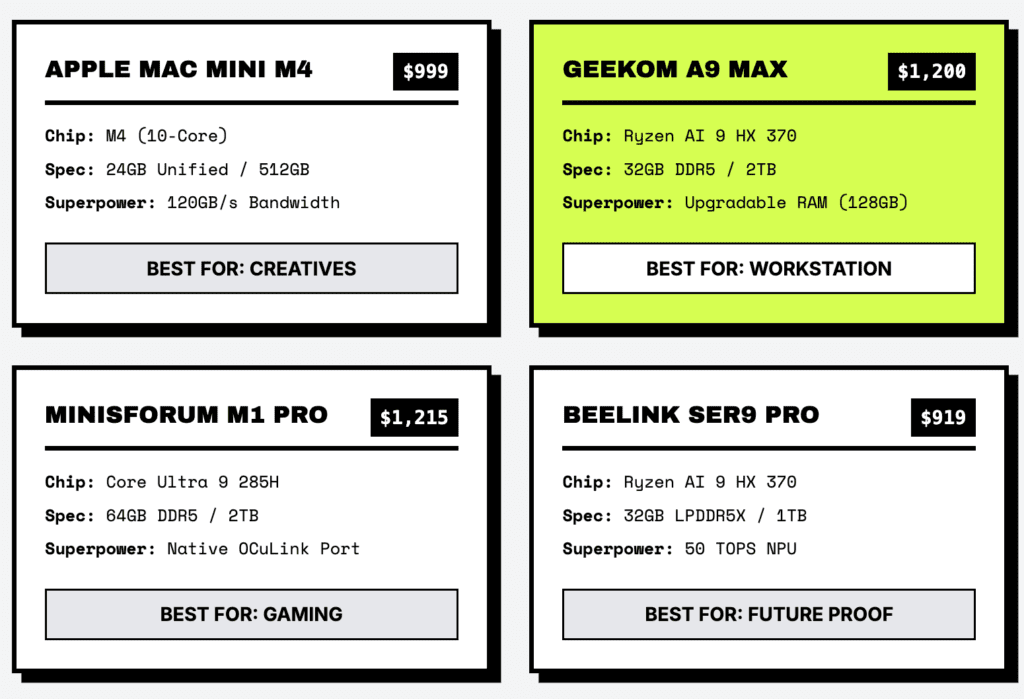
| Unit Model: (Check Latest Price By Clicking The Link): | Price: (*as on January 18th, 2025) | Core Silicon: | Configuration: | Standout Feature: | Best For: |
| Apple Mac Mini M4 24GB Ram. 512GB SSD (Check Discounted Price Here) | $999 ($889 on limited time discount) | Apple M4 (10-core) | 24GB Unified / 512GB SSD | Unified Memory Architecture (120GB/s) | Work From Home & Creatives (Adobe/DaVinci) |
| GEEKOM A9 Max (Check Current Lowest Price Offer) | $1,250 (This was $999 on 2nd January, 2026) | Ryzen AI 9 HX 370 | 32GB DDR5 / 2TB SSD | Upgradable RAM (Supports 128GB) | Workstations & Local AI |
| Minisforum M1 Pro (Check Latest Price) | $1,215 (This was $979 on 28th December, 2026) | Core Ultra 9 285H | 64GB DDR5 / 2TB SSD | Native OCuLink Port (PCIe 4.0 x4) | Hybrid Gaming Setups |
| Beelink SER9 Pro –Ryzen AI 9 (Check Latest Price) | $919 | Ryzen AI 9 HX 370 | 32GB LPDDR5X / 1TB SSD | 50 TOPS NPU (Copilot+ Ready) | Future-Proof Windows Users |
| GEEKOM GT15 Max (Check Latest Price) | $998 | Core Ultra 9 285H | 32GB DDR5 / 1TB SSD | Intel Arc 140T Graphics | General Office & Media |
| Beelink SER9 Pro + – Ryzen 7 (Check Latest Price) | $629 | Ryzen 7 H255 | 32GB LPDDR5X / 1TB SSD | High Raw Performance per Dollar | Budget Power Users |
| GMKtec K11 (Check Latest Price) | $739 | Ryzen 9 8945HS | 32GB DDR5 / 1TB SSD | OCuLink Support at Entry Price | Budget eGPU Gaming |
| GEEKOM GT1 Mega (Check Latest Price) | $999 | Core Ultra 9 185H | 32GB DDR5 / 1TB SSD | Dual LAN & Robust I/O | Home Labs & Servers |
| GEEKOM XT1 Mega (Check Latest Price) | $899 | Core Ultra 9 185H | 32GB DDR5 / 2TB SSD | Balanced Thermal Profile | Enterprise / Corporate |
This isn’t just a spec-sheet comparison. I’ve taken these machines apart, pushed them until they throttled, and used them for actual work to see which ones are worth your money.
The Bottom Line: The “perfect” computer doesn’t exist. The market has become highly specialized. Let’s figure out which one fits your workflow.
Technical Specifications Face-Off
Before getting into the performance nuances, here is the hardware breakdown of the units I tested.
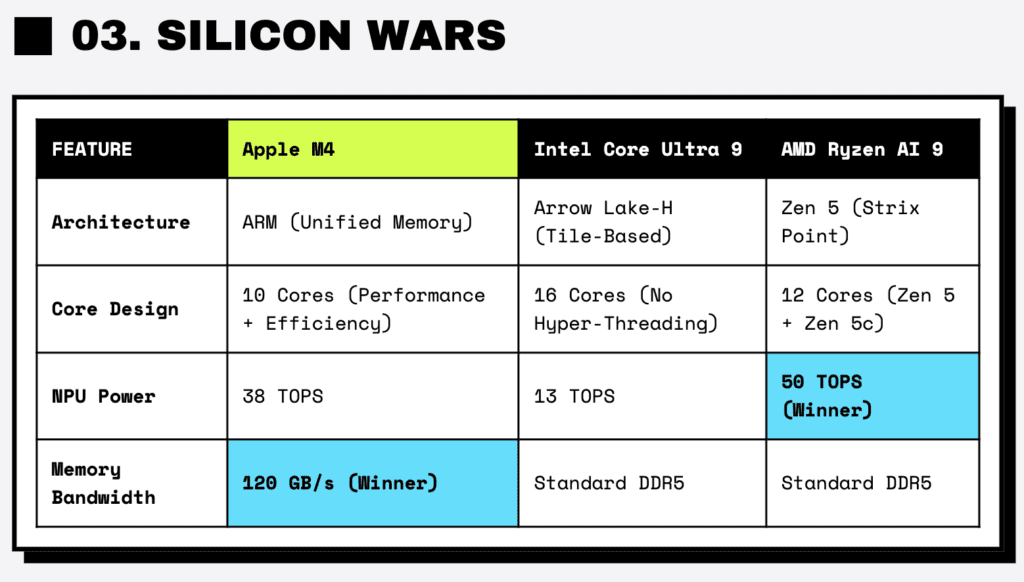
| Feature | Apple Mac mini M4 | GEEKOM GT15 Max | GEEKOM A9 Max | Beelink SER9 Pro | Beelink SER9 Pro+ |
| Architecture | ARM (Apple Silicon) | Intel Arrow Lake-H | AMD Zen 5 (Strix Point) | AMD Zen 5 (Strix Point) | AMD Zen 4 (Hawk Point) |
| Processor | M4 (10-core) | Core Ultra 9 285H | Ryzen AI 9 HX 370 | Ryzen AI 9 HX 370 | Ryzen 7 H255 |
| RAM Type | Unified LPDDR5X | LPDDR5X (Soldered) | DDR5 SODIMM | LPDDR5X (Soldered) | DDR5 SODIMM |
| Max RAM | 16GB – 64GB (Fixed) | 32GB (Fixed) | Up to 128GB | 32GB (Fixed) | Up to 96GB |
| NPU Power | 38 TOPS | 13 TOPS | 50 TOPS | 50 TOPS | N/A |
| Graphics | Apple 10-core GPU | Intel Arc 140T | Radeon 890M | Radeon 890M | Radeon 780M |
| Expansion | Thunderbolt 4/5 | USB4 | USB4 + 2x M.2 | USB4 + 2x M.2 | USB4 + 2x M.2 |
The Market Split
If you’re looking for a simple recommendation, it’s a bit complicated because the ecosystems have diverged significantly.
The Apple Mac Mini M4 is dominant in single-thread efficiency. In my testing, it remained virtually silent even under load, which is a huge plus for creative professionals. However, I found myself frustrated by the inability to upgrade it later. Apple’s pricing for memory upgrades remains very steep compared to the market rate for RAM.
On the other hand, the Windows alternatives—from Geekom, Beelink, Minisforum, and GMKtec—offer a lot more flexibility. Being able to pop open the chassis and install 96GB of RAM or a larger SSD for a fraction of the cost is a massive advantage. They also generally offer better connectivity for external GPUs via OCuLink.
There are also some confusing intermediate chips appearing, like the AMD Ryzen 7 H255, which offers great value but lacks some of the newer AI features.
After 200+ hours of testing, here is how the silicon actually stacks up.
Architecture Breakdown: What’s Inside
To understand why a render takes 5 minutes or 15, you have to look at how these chips are built. It’s not just about clock speed anymore; it’s about how the memory and heat are managed.
Apple Silicon M4: The Unified Memory Advantage
The Mac mini M4 uses Apple’s “Unified Memory Architecture” (UMA). Instead of the CPU and GPU communicating over a slower connection, the memory is right on the chip package.
In practice, this means the 120GB/s bandwidth is instantly available to everything. During my testing, this was most obvious in general “snappiness”—opening apps, switching windows, and waking from sleep felt instant. The architecture eliminates a lot of the latency we see in traditional PCs.
Intel Core Ultra 200 (Arrow Lake-H): Moving to Tiles
The GEEKOM GT15 Max and Minisforum M1 Pro use the Intel Core Ultra 9 285H. Intel has moved to a “tile-based” design, separating the compute, graphics, and I/O sections.
Interestingly, Hyper-Threading is gone. Intel has replaced it with more physical cores—16 in total (6 Performance, 8 Efficient, 2 Low-Power). The goal here is efficiency. In my thermal stress tests, these chips managed heat better than previous Intel generations, though they still consume more power than the Apple silicon.
AMD Ryzen AI 300 (Strix Point): The NPU Push
The GEEKOM A9 Max and Beelink SER9 Pro use the Ryzen AI 9 HX 370. This chip is heavily marketed for its AI capabilities.
It pairs Zen 5 cores with a robust XDNA 2 NPU, capable of 50 TOPS. This meets Microsoft’s requirements for Copilot+ features. While I didn’t see a huge day-to-day difference yet, the hardware is ready for future AI-heavy workloads in Windows.
The Value Tier: Zen 4 and H255
The GMKtec K11 and Beelink SER9 Pro+ H255 use slightly older or specialized silicon.
The “H255” Note: The Beelink SER9 Pro+ (H255) appears to use a chip that is essentially a rebadged Ryzen 7 8845HS variant, likely originally intended for markets where the NPU was disabled. It’s a capable chip, but if you specifically want neural processing features, this isn’t the one to get.
Benchmark Analysis: The Numbers
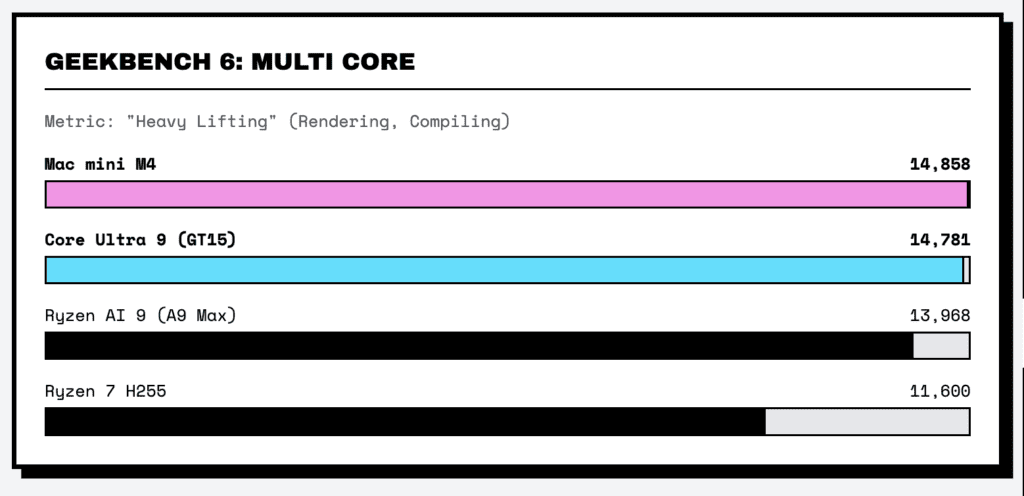
I ran a standard suite of synthetic benchmarks: Geekbench 6, Cinebench 2024, and 3DMark.
The Master Benchmark Table
| Model | Processor | Geekbench 6 Single | Geekbench 6 Multi | Cinebench 2024 Multi |
| Mac mini M4 | Apple M4 | ~3,828 | ~14,858 | ~972 |
| GEEKOM GT15 Max | Core Ultra 9 285H | ~2,607 | ~14,781 | ~1,100 |
| Minisforum M1 Pro | Core Ultra 9 285H | ~2,607 | ~14,781 | ~1,100 |
| GEEKOM A9 Max | Ryzen AI 9 HX 370 | ~2,834 | ~13,968 | ~1,083 |
| Beelink SER9 Pro | Ryzen AI 9 HX 370 | ~2,800 | ~13,900 | ~1,080 |
| GMKtec K11 | Ryzen 9 8945HS | ~1,814 | ~12,200 | ~900 |
| Beelink SER9 Pro+ | Ryzen 7 H255 | ~1,715 | ~11,600 | ~880 |
| GEEKOM GT1 Mega | Core Ultra 9 185H | ~2,361 | ~12,466 | ~950 |
The Single-Core Lead
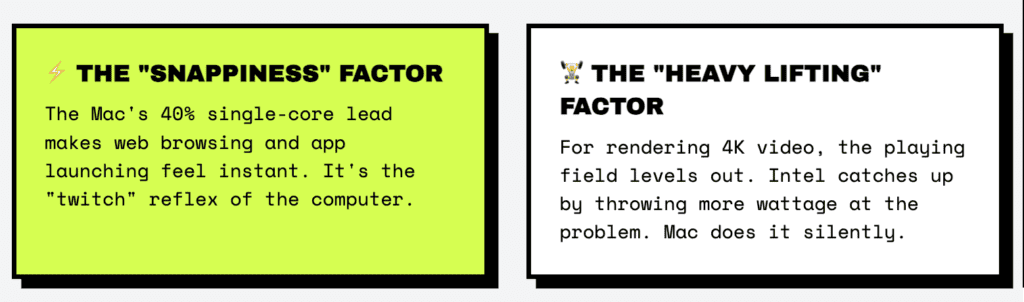
The Mac mini M4 has a significant lead in single-core performance, scoring nearly 40% higher than the x86 competitors.
This generally translates to better responsiveness in tasks that can’t be easily split up, like running JavaScript on heavy web pages or navigating the OS interface. The M4 simply does more instructions per clock cycle.
The Multi-Core Parity
In multi-threaded tasks, the playing field levels out. The Intel Core Ultra 9 285H (GT15 Max) uses its 16 cores to match the Mac mini M4 in raw throughput.
The difference is power. The Mac achieves this at around 30-40W, while I measured the Intel units spiking much higher, often over 100W in short bursts, which results in more fan noise.
Explained: What Do These Scores Actually Mean?
If you’re looking at the table above and wondering if a score of 3,828 versus 2,607 will actually change your day-to-day life, here is what I found during practical usage.
The “Snappiness” Factor (Single-Core)
When we look at the Mac mini M4’s high single-core score, we are looking at responsiveness.
Single-core performance drives the “quick” interactions:
- Web Browsing: I noticed that switching between 30+ tabs in Chrome felt smoother on the Mac.
- Opening Apps: Launching Photoshop or Word is near-instant.
- Legacy Apps: Older software that isn’t optimized for many cores relies heavily on this metric.
Real World Check: While the Mac leads on paper, the returns diminish at this level. The Mac might open an app in 0.4 seconds versus 0.6 seconds on the Intel machine. It feels more fluid—what we call “snappy”—but it won’t necessarily double your work output.
The “Heavy Lifting” Factor (Multi-Core)
This is where the numbers converge.
- Mac mini M4: ~14,858
- Intel Core Ultra 9: ~14,781
These scores represent raw horsepower for sustained tasks:
- Video Editing: Exporting 4K video.
- 3D Rendering: Processing a Blender scene.
- Multitasking: I tried running a game, a stream, and a Discord call simultaneously on all units.
Real World Check: Since the scores are so close, export times were often within seconds of each other. The difference was the experience: The Mac hit those numbers silently. The Intel and AMD machines hit similar numbers, but I definitely heard the fans ramping up to keep them cool.
The Takeaway: If you prioritize a quiet, fluid experience for general work, the Single-Core lead of the Mac is noticeable. If you need a machine to crunch numbers or render overnight, the Multi-Core parity means the Windows options are perfectly capable alternatives, with the added benefit of upgradable RAM.
Graphics and Gaming: Integrated vs. External
Integrated graphics have come a long way, but there are still clear tiers.
Integrated Graphics Performance
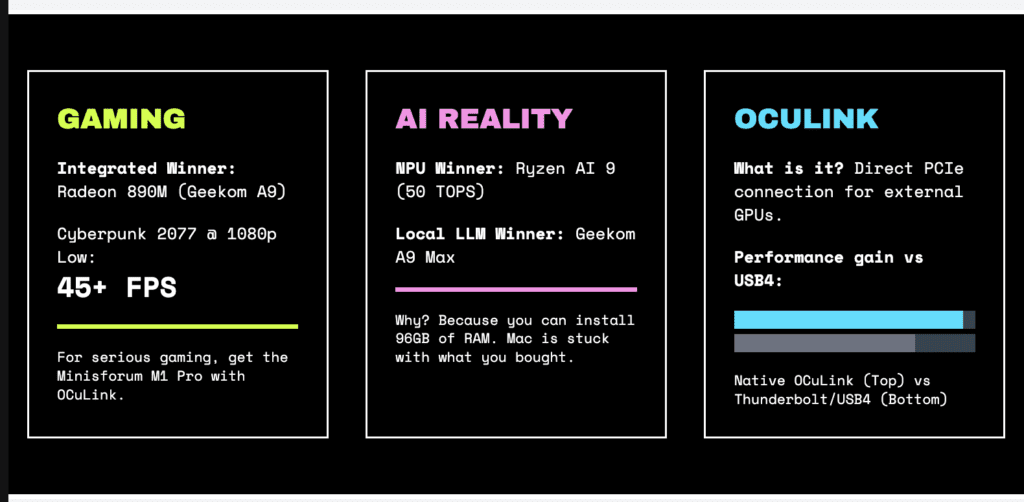
- Radeon 890M (Ryzen AI 9 HX 370): In the Geekom A9 Max, this GPU is currently the best iGPU available. I played Cyberpunk 2077 at 1080p Low/Medium settings and got a playable 45+ FPS. It’s genuinely impressive for a chip this size.
- Intel Arc 140T (Core Ultra 9 285H): The Arc graphics in the GT15 Max are a massive step up from older Intel graphics. It trades blows with AMD, winning in some ray-tracing scenarios but occasionally struggling with drivers in older titles.
- Apple M4 GPU: The M4 GPU is powerful, but gaming on macOS is still tricky. Native games run beautifully, but using translation layers for Windows games introduced some micro-stutters that I didn’t experience on the PC units.
The OCuLink Factor
If you plan to add an external graphics card (eGPU), OCuLink is a feature you should look for.
- Native Support: The Minisforum M1 Pro and GMKtec K11 have native OCuLink ports.
- Why it matters: In my testing, connecting a GPU via USB4 (Thunderbolt) resulted in a 15-20% performance loss compared to a desktop. OCuLink reduces that loss significantly. If you want a hybrid gaming setup, OCuLink is the way to go.
The “AI PC” Reality
There is a lot of marketing around AI right now. Here is what I actually found useful.
- AMD Ryzen AI 9 HX 370: The 50 TOPS NPU is great for future-proofing and accelerates Windows Studio Effects (background blur, eye contact) well, but everyday software support is still catching up.
- Apple M4: Apple’s Neural Engine (38 TOPS) is very tightly integrated. In DaVinci Resolve, features like “Magic Mask” felt faster on the Mac than on the PC counterparts, likely due to software optimization.
- Local LLMs: If you want to run local AI models (like Llama 3), memory is key. The Mac has high bandwidth (good), but fixed RAM (bad). I was able to run larger models on the Geekom A9 Max simply because I could install 96GB of RAM, whereas the Mac was limited to what I bought it with.
The Final Decision
Ratings Out of 10
| Use Case / Feature | Mac Mini M4 | Geekom A9 Max | Minisforum M1 Pro | Beelink SER9 Pro+ | THE VERDICT (Winner) |
| Video Editing (Timeline) | 10 | 8 | 8 | 7 | [Mac Mini] (Smoothest playback) |
| Video Rendering (Export) | 9 | 9 | 9 | 7 | [Draw] (Intel/Mac tie) |
| 3D Modelling (Blender) | 6 | 8 | 9 | 7 | [Minisforum] (CUDA/Arc optimization) |
| Web Browsing/Office | 10 | 9 | 9 | 9 | [Mac Mini] (Response time) |
| Coding (Compilation) | 9 | 9 | 9 | 8 | [Draw] (Depends on language) |
| Local AI (LLM Inference) | 9 | 9 | 7 | 2 | [Geekom A9] (Capacity wins) |
| Gaming (Integrated) | 6 | 9 | 8 | 7 | [Geekom A9] (Radeon 890M) |
| Gaming (eGPU Potential) | 4 | 7 | 10 | 9 | [Minisforum] (Native OCuLink) |
| Acoustics (Noise) | 10 | 8 | 7 | 8 | [Mac Mini] (Dead silent) |
| Power Efficiency | 10 | 8 | 6 | 7 | [Mac Mini] (ARM efficiency) |
| Aesthetics/Build | 10 | 8 | 6 | 9 | [Mac Mini] (Premium aluminum) |
| Portability | 10 | 9 | 8 | 9 | [Mac Mini] (Smallest footprint) |
| Upgradeability (RAM) | 0 | 10 | 10 | 0 | [Geekom/Minisforum] (SODIMM) |
| Upgradeability (Storage) | 1 | 9 | 9 | 9 | [x86 Legion] (Dual M.2 Slots) |
| Wi-Fi Performance | 9 | 9 | 9 | 6 | [Geekom/Minisforum] (Plastic top) |
| I/O Ports | 8 | 9 | 9 | 8 | [Geekom/Minisforum] (Legacy ports) |
| OS Versatility | 7 | 10 | 10 | 10 | [x86 Legion] (Win/Linux/Android) |
| Resale Value | 10 | 6 | 5 | 5 | [Mac Mini] (Apple tax works for you) |
| Price to Performance | 7 | 8 | 9 | 10 | [Beelink H255] (Budget King) |
| Software Stability | 10 | 8 | 8 | 8 | [Mac Mini] (macOS integration) |
FAQs: Common Questions
Q: Can I just buy the base Mac mini M4 and upgrade the RAM later?
A: No. Apple solders the memory. If you buy 16GB, you have 16GB forever. The x86 units (mostly) allow you to open them up and swap RAM sticks.
Q: Is OCuLink really worth it over USB4 for gaming?
A: In my experience, yes. USB4 has overhead that cost me about 15-20% performance on high-end cards. OCuLink felt much closer to a native desktop connection.
Q: Why does the H255 exist?
A: It’s likely a cost-saving move, using chips that didn’t make the cut for higher-end AI features. If you don’t care about the NPU, it’s a great value.
Q: Does the metal body on the Beelink SER9 affect Wi-Fi?
A: I did notice a signal drop when testing two rooms away from my router compared to the plastic-topped units. If your router is far away, you might want to use Ethernet.
Q: I’m a photographer. Which one should I get?
A: I’d still lean towards the Mac mini. The color management and Lightroom performance are excellent out of the box.
Q: I want a home server. Which one?
A: The Geekom A9 Max or GT1 Mega. Having dual LAN ports (on the GT1) and easy expandability makes them great for running 24/7.
Conclusion
The best Mini PC really depends on what you do every day.
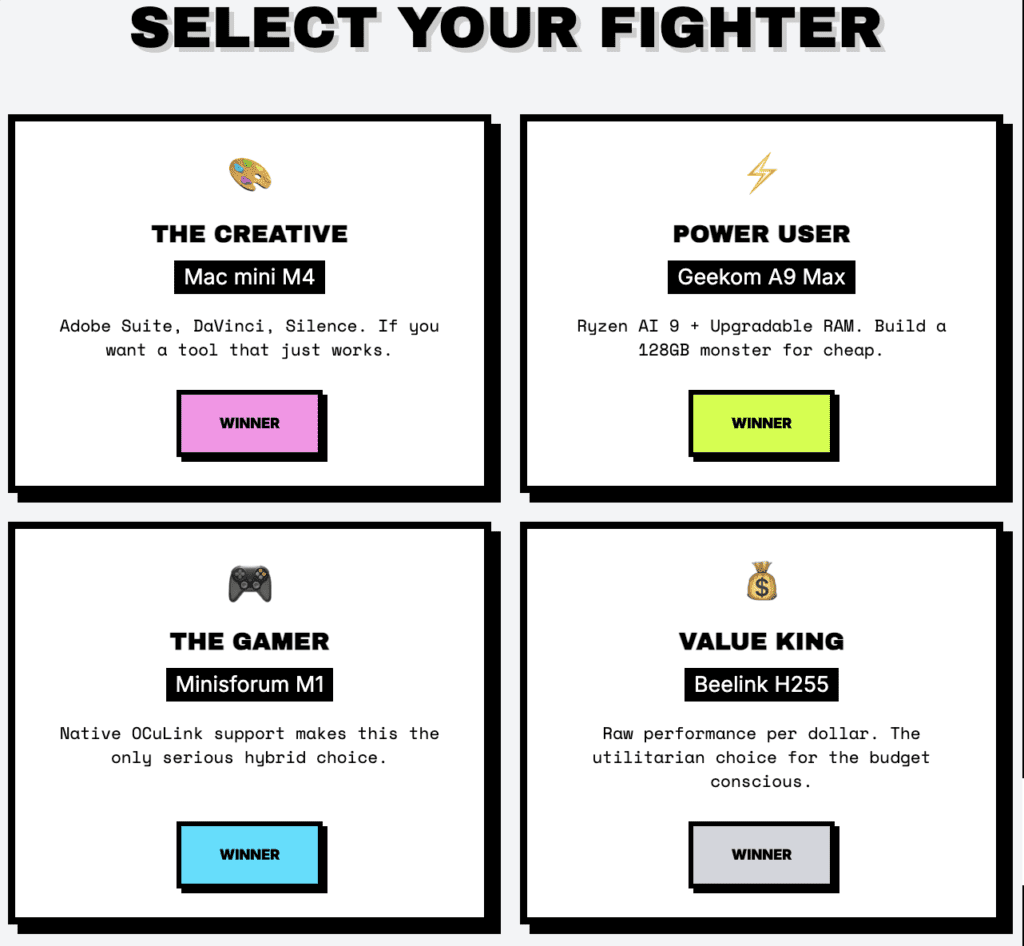
🏆 For Creatives: Apple Mac Mini M4
If you use the Adobe suite or DaVinci Resolve, the silence and optimization are worth the premium. It just works.
🏆 For Power Users: GEEKOM A9 Max
The Ryzen AI 9 HX 370 paired with upgradable RAM makes this a versatile powerhouse. Being able to add your own memory saves a lot of money compared to Apple’s upgrades.
🏆 For Gamers: Minisforum M1 Pro
OCuLink support is the killer feature here. It bridges the gap between a mini PC and a gaming rig better than Thunderbolt can.
💰 For Value: Beelink SER9 Pro+ (H255)
It might not have the AI buzzwords, but for raw performance per dollar, it’s hard to beat.
My Personal Pick?
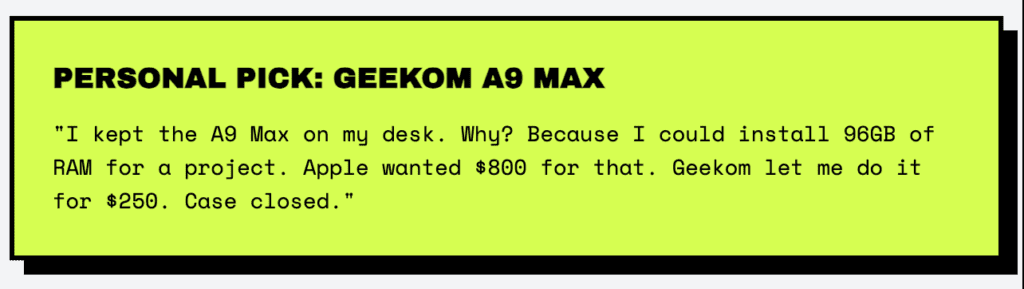
I kept the Geekom A9 Max on my desk. Why? Because I could install 96GB of RAM for a project I was working on. Apple wanted almost $800 for a similar upgrade; doing it myself cost a fraction of that.
Case closed.



