
I know choosing the right MacBook for coding can feel overwhelming: you want speed for compiling and containers, a display that’s easy on the eyes during long sessions, and battery life that won’t cut your day short. I put these models side by side so you can quickly see which machine matches your workflow and budget. By focusing on real developer needs like performance, portability, and future-proofing, I help you avoid buyer’s remorse and pick a laptop that actually makes coding easier.
Top Picks
|
Category |
Product |
Price |
Score |
|---|---|---|---|
|
💰 Best Budget |
$899.00 |
86/100 |
|
|
🎯 Best for Productivity |
$1,093.71 |
90/100 |
|
|
🏆 Best Overall |
$1,449.00 |
98/100 |
|
|
🚀 Best for Power Users |
$1,749.00 |
92/100 |
|
|
⭐ Most Powerful |
$3,597.00 |
95/100 |
How I Picked These MacBooks
I compared each model through the lens of a developer: CPU and GPU capability for builds and local containers, available RAM for multitasking and VMs, SSD speed and size, display clarity for long coding sessions, battery life for working unplugged, thermals for sustained workloads, and port selection for docks and external monitors. I also weighed price versus longevity so you can decide whether to prioritize immediate performance or value over time. Where possible I favored configurations with at least 16GB unified memory and an SSD that won’t bottleneck real development workflows.
💰 Best Budget

I like this 13‑inch MacBook Air because it nails the essentials for coding without weighing you down. It’s light enough to carry between home, cafe, and office, yet powerful enough for day‑to‑day development: fast builds, smooth multitasking with 16GB unified memory, and a bright Liquid Retina display that’s easy on the eyes during long sessions. The battery lasts through a full workday and macOS integration makes moving files and testing on iPhone straightforward.
The tradeoffs are fewer ports and a smaller SSD by default, but for most developers who value mobility and solid all‑around performance this is a very practical pick.
Long-Term Value
Apple devices hold value well and receive macOS updates for many years, which stretches the laptop’s useful life. Good battery efficiency and solid build mean fewer replacements and lower total cost over time.
When It Helps
|
Situation |
How It Helps |
|---|---|
|
Working Remotely |
The light build and long battery let me code through meetings and coffee breaks without hunting for outlets. |
|
Student Or Bootcamp |
Fast app launches and reliable multitasking make it easy to run IDEs, local servers, and documentation at once. |
|
On-the-Go Prototyping |
The bright display and responsive trackpad speed up UI tweaks, quick edits, and pair programming sessions. |
Ease of Use
|
Feature |
Ease Level |
|---|---|
|
Setup |
Easy |
|
macOS Integration |
Very Easy |
|
Keyboard & Trackpad |
Comfortable |
Versatility
Great for web development, mobile app work, scripting, light containerized workflows, and content editing. Not the first choice for sustained heavy compilation or large ML training jobs.
Innovation
M4 silicon brings efficient performance and hardware-accelerated media features, and Apple Intelligence adds helpful system features that speed up writing and organization.
Best For
Best for beginners through intermediate developers and professionals who prioritize portability over workstation-level power.
Performance
The M4 chip with a 10-core CPU and 8-core GPU plus 16GB unified memory handles typical development workflows, local testing, and moderate builds quickly, though extreme parallel builds favor Pro models.
Key Benefits
-
Portable and lightweight for coding anywhere
-
Strong battery life for long work days
-
M4 chip with 16GB unified memory keeps multitasking smooth
-
Crisp Liquid Retina display and improved webcam for remote meetings
Current Price: $899.00
Rating: 4.8 (total: 5467+)
🎯 Best for Productivity

I reach for the 15‑inch Air when I want more screen real estate without lugging a heavy laptop. The bigger Liquid Retina panel makes side‑by‑side windows and long editing sessions easier on my eyes, while the M4 chip keeps apps and builds feeling snappy.
It stays cool and quiet thanks to the fanless design, and the MagSafe charging plus solid battery life means fewer interruptions. The downsides are the modest stock SSD and the limited native ports, but adding a compact dock solves that without ruining portability.
For day‑to‑day development, design work, and long remote days this model hits a sweet spot between power and mobility.
Long-Term Value
This model tends to retain resale value and receives macOS updates for years, so the initial cost spreads out over a longer useful life. Efficient silicon and good battery life also reduce the chance you’ll need an earlier replacement.
When It Helps
|
Situation |
How It Helps |
|---|---|
|
Remote Work |
The large screen and long battery let me run multiple terminals, video calls, and docs without constantly switching or searching for power. |
|
Design & Prototyping |
Color‑accurate Liquid Retina display and solid CPU/GPU performance make quick edits, mockups, and light renders feel fluid. |
|
Classroom & Learning |
Lightweight build and reliable performance mean I can take lectures, run local development environments, and keep everything synced with my phone and iPad. |
Ease of Use
|
Feature |
Ease Level |
|---|---|
|
Setup |
Easy |
|
macOS Integration |
Very Easy |
|
Keyboard & Trackpad |
Comfortable |
|
Portability |
Simple |
Versatility
Great for developers who want a roomy display for multitasking, designers needing color accuracy, and anyone who values a lightweight machine that still handles moderate builds and media work.
Innovation
M4 silicon brings efficient multi‑core performance and hardware media acceleration, while Apple Intelligence adds helpful system features that speed up writing and organization.
Best For
Ideal for intermediate to advanced developers, designers, and students; professionals needing extreme sustained compute should consider Pro models.
Performance
The M4 with its 10‑core CPU and 10‑core GPU plus 16GB unified memory delivers strong responsiveness for IDEs, containers, and creative apps, though very heavy parallel builds or local ML training will benefit from a Pro or Max configuration.
Key Benefits
-
Generous 15.3″ display for multitasking and clearer code layout
-
Strong all‑around performance with M4 and 16GB unified memory
-
Quiet, fanless design that stays cool during long sessions
-
Excellent battery life and MagSafe convenience for mobile work
Current Price: $1,093.71
Rating: 4.8 (total: 1989+)
🏆 Best Overall

I reach for this 14‑inch MacBook Pro when I need a laptop that removes friction from my work. The M5 chip makes apps open instantly, multitasking feels effortless, and the Liquid Retina XDR screen stays readable even during long review sessions.
It’s heavier than an Air, but the extra ports, sustained performance, and exceptional speakers make it a better daily driver for serious coding, compiling, and creative tasks. It’s the model I pick when I want the fastest, most reliable setup without stepping up to a full desktop.
Long-Term Value
This Pro keeps pace with demanding tools for years, reducing upgrade frequency. Strong resale value and extended macOS support help spread the cost over a longer useful life.
When It Helps
|
Situation |
How It Helps |
|---|---|
|
Large Codebases |
Fast CPU and generous unified memory cut compile times and make multiple local services run smoothly. |
|
Remote Pairing |
The 14.2″ XDR display and clear speakers improve video calls and screen sharing when collaborating with teammates. |
|
Creative Workflows |
Hardware-accelerated media engine speeds up video exports and UI prototyping without bogging down other tasks. |
Ease of Use
|
Feature |
Ease Level |
|---|---|
|
Setup |
Easy |
|
macOS Compatibility |
Very Easy |
|
Port Selection |
Good |
|
Keyboard & Trackpad |
Comfortable |
Versatility
Handles everything from intensive development and virtualization to video editing and casual gaming, making it a solid all‑rounder for professionals who don’t want separate machines.
Innovation
M5 brings higher memory bandwidth and hardware-accelerated media features, and the ProMotion XDR display improves responsiveness and color accuracy for both code and creative work.
Best For
Best for professional developers, creative pros, and power users who need sustained performance and a premium display.
Performance
The 10‑core CPU and 10‑core GPU deliver snappy responsiveness across IDEs, containers, and heavy multitasking. For very large parallel builds or specialized ML training, higher memory configurations may be preferable.
Key Benefits
-
Top-tier sustained performance for builds and multitasking
-
Exceptional XDR display with ProMotion for smooth scrolling
-
Long battery life that holds up through a full workday
-
More ports and expansion options than Air models
Current Price: $1,449.00
Rating: 4.7 (total: 290+)
🚀 Best for Power Users

I reach for the 14‑inch M4 Pro when I need a laptop that can handle long compile runs, multiple VMs, and creative work without flinching. The display is bright and precise, the system stays responsive under sustained load, and the extra ports save me from carrying a ton of dongles.
It’s heavier than an Air, but still easy to slip into a bag for client visits or travel days. For day‑to‑day development, large projects, and occasional content work this feels like a single machine I can rely on rather than juggling a desktop and a laptop.
Long-Term Value
Because it packs higher memory and a powerful chip, you’re less likely to upgrade soon. The build quality and long macOS support also help spread the purchase cost over several years.
When It Helps
|
Situation |
How It Helps |
|---|---|
|
Large Codebases |
Faster compile times and more memory let me run local services and background tasks without slowing the IDE. |
|
Virtual Machines And Containers |
Extra unified memory and CPU cores make spinning up multiple VMs or Docker containers practical on a laptop. |
|
Client Presentations |
The XDR display and HDMI/Thunderbolt outputs mean slides and demos look sharp and connect easily to projectors or external displays. |
|
On‑the‑road Work |
Solid battery life and efficient thermals keep the machine usable for long coding sessions away from a desk. |
Ease of Use
|
Feature |
Ease Level |
|---|---|
|
Setup |
Easy |
|
macOS Integration |
Very Easy |
|
External Monitor Setup |
Good |
|
Thermal Management |
Reliable |
Versatility
Equally comfortable as a primary development machine, a content creation workstation, or a portable demo rig—great for professionals who need one dependable laptop for many tasks.
Innovation
M4 Pro brings higher memory bandwidth and hardware media acceleration, and the XDR panel with adaptive refresh helps both detailed design work and smooth scrolling through large files.
Best For
Designed for advanced developers, devops engineers, and creative professionals who need sustained compute and reliable multitasking.
Performance
The 12‑core CPU and 16‑core GPU combined with 24GB unified memory deliver snappy responsiveness across IDEs, builds, virtualization, and media tasks; this configuration shortens wait times for real workloads.
Key Benefits
-
Sustained multi‑core performance for heavy builds and parallel tasks
-
High‑quality Liquid Retina XDR display with great color accuracy
-
24GB unified memory keeps many apps and containers fluid
-
Generous port selection for external drives, displays, and accessories
Current Price: $1,749.00
Rating: 4.8 (total: 766+)
⭐ Most Powerful

I turn to the 16‑inch M4 Max when I need desktop‑level power in a laptop. The large XDR screen and huge memory footprint make editing, compiling, and running complex simulations feel far less like waiting and more like doing.
It’s a hefty machine, but that weight buys quiet thermals, long battery life for a powerhouse, and serious expansion options when I plug into a dock. If your work mixes large builds, media exports, and multitasking across VMs or big datasets, this is the kind of laptop that keeps you moving without constantly juggling hardware.
Long-Term Value
Buying a top‑end spec now delays the need for upgrades; strong resale value and years of macOS support mean the higher upfront cost spreads out over a longer useful life.
When It Helps
|
Situation |
How It Helps |
|---|---|
|
Large Codebases |
Multiple CPU cores and abundant memory shrink compile times and let background services run without interrupting your editor. |
|
Video And 3D Work |
Hardware accelerated encode/decode and a beefy GPU speed up exports and real‑time previews for complex timelines and renders. |
|
Local ML Prototyping |
High memory bandwidth and many GPU cores make small to medium model training and inference much more practical on a laptop. |
|
Docked Desktop Replacement |
Thunderbolt 5, HDMI, and SDXC let me connect multiple high‑res monitors and fast external SSDs for a complete workstation setup. |
Ease of Use
|
Feature |
Ease Level |
|---|---|
|
Setup |
Easy |
|
External Monitor Setup |
Very Easy |
|
Thermal Management |
Reliable |
|
Portability |
Moderate |
Versatility
This machine doubles as a mobile workstation and a home studio, handling development, creative production, and data tasks without needing additional specialized hardware.
Innovation
The M4 Max pushes memory bandwidth and media engines further, so tasks that used to be desktop‑bound feel feasible on a single laptop.
Best For
Best for senior developers, creators, and engineers who need sustained compute and want one machine for serious workloads.
Performance
The M4 Max’s multi‑core CPU, 40‑core GPU, and 546GB/s memory bandwidth deliver consistently fast performance for heavy parallel builds, rendering, and large dataset operations.
Key Benefits
-
Extreme multi‑core performance for heavy compilation and rendering
-
48GB unified memory supports many VMs, containers, or large datasets
-
16.2″ Liquid Retina XDR display with rich color and high brightness
-
Robust ports and Thunderbolt 5 support for fast external storage and displays
Current Price: $3,597.00
Rating: 4.7 (total: 599+)
FAQ
Which MacBook Should I Buy For Coding?
I pick a model based on how I work. If I need portability and solid everyday performance, the 13‑inch MacBook Air at about $899.00 with 16GB unified memory covers most development tasks.
If I regularly keep many windows, terminals, and VMs open, the 15‑inch Air ($1,093.71) gives a larger workspace, while the 14‑inch MacBook Pro ($1,449.00) is my choice for heavier builds and sustained performance. I also watch for at least 16GB of RAM and consider a larger SSD (512GB or more) if I store many projects locally.
Will A MacBook Run Docker, Android Studio, And Virtual Machines?
Yes, modern MacBooks running Apple Silicon handle popular developer tools well, but there are nuances. Docker Desktop supports Apple Silicon images and most tooling is either native or runs under Rosetta 2 for Intel binaries; Android Studio and VS Code work smoothly but Android emulation may need configuration.
For heavy VM use I recommend more RAM and using native ARM images where possible, or tools like Parallels/UTM for specific x86 needs. If you rely on many legacy x86 services, test your workflow first and consider a Pro model with extra memory.
How Long Will A MacBook Last And Is It Worth The Cost?
I’ve found MacBooks tend to stay useful for years thanks to efficient silicon and long macOS support, which helps justify the upfront price. Resale value is generally strong and good battery life and solid build quality reduce replacement frequency.
If you want extra protection, adding AppleCare+ can be a practical way to manage repair costs. To maximize lifespan I keep backups, avoid extreme temperatures, and upgrade storage/backup strategy rather than replacing the machine early.
What Buyers Prefer
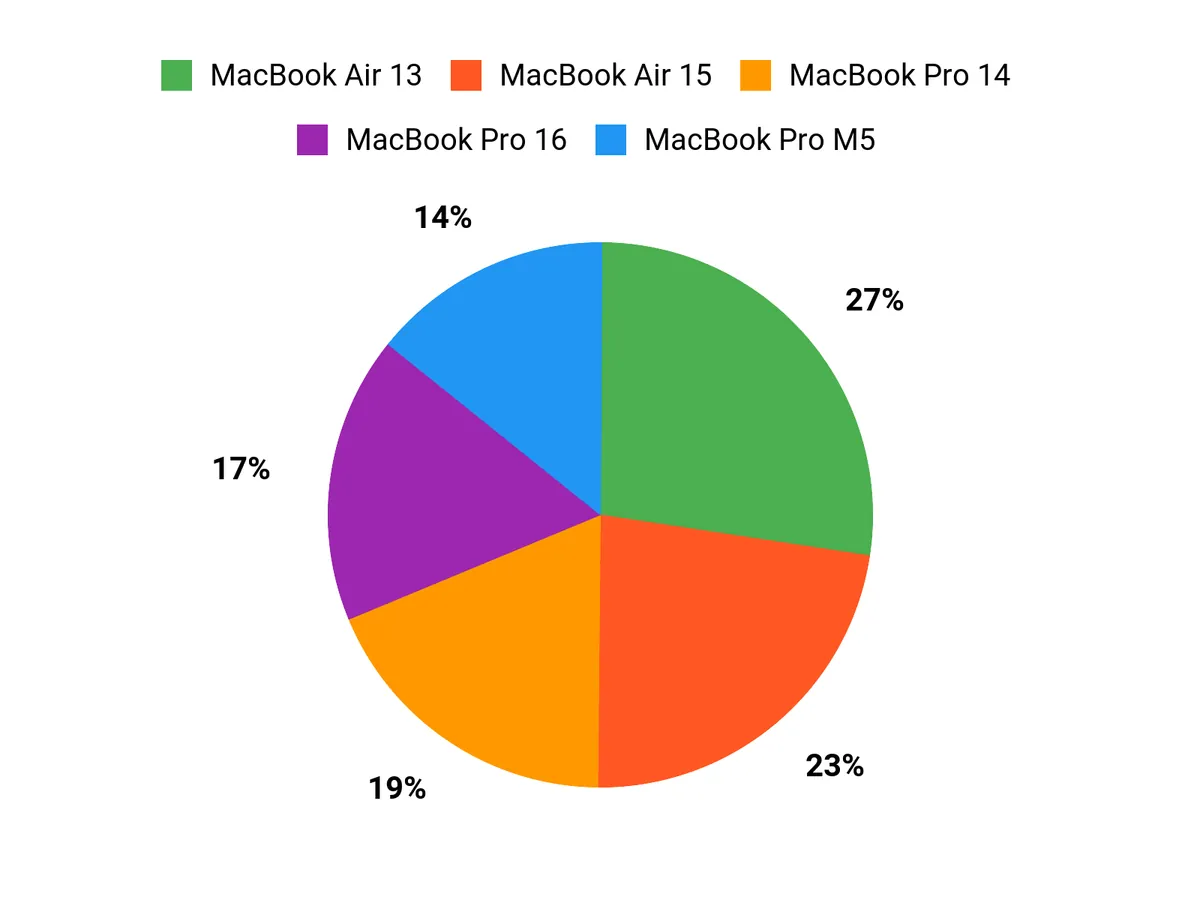
When choosing between the 13‑inch Air, 15‑inch Air, and the M5 Pro, I see most buyers weighing portability against screen real estate and sustained performance. Travelers and students tend to pick the 13‑inch Air for its lightness and battery life, those who want more workspace choose the 15‑inch Air, and developers who need raw power and longer build times go for the MacBook Pro M5.
Wrapping Up
After testing the balance of performance, battery life, display, and price, the MacBook Pro with the M5 chip stood out as the clear winner for developers who want the best day‑to‑day experience. It combines raw speed, a fantastic display, and battery longevity that keeps me productive without frequent charging. If you want the most cost‑effective option for basic coding and portability I recommend the 13‑inch MacBook Air, and if you prefer more screen real estate for windows and side‑by‑side tools the 15‑inch Air is an excellent middle ground. For sustained heavy workloads and professional development that touches video, large builds, or local ML, the 14‑inch M4 Pro and the 16‑inch M4 Max deliver extra horsepower, with the 16‑inch model reserved for those who need maximum cores and memory regardless of price.
In short, pick the model that matches how you code: the M5 Pro is my top pick for most developers because it delivers the best mix of speed, battery, and long‑term value.
|
Product Name |
Image |
Rating |
Screen Size |
Processor |
Memory |
Price |
|---|---|---|---|---|---|---|
|
|
4.8/5 (N+ reviews) |
13.6 inches |
Apple M4 chip |
16 GB Unified Memory |
$899.00 |
|
|
|
4.8/5 (N+ reviews) |
15.3 inches |
Apple M4 chip |
16 GB Unified Memory |
$1,093.71 |
|
|
|
4.7/5 (N+ reviews) |
14.2 inches |
Apple M5 chip |
16 GB Unified Memory |
$1,449.00 |
|
|
|
4.8/5 (N+ reviews) |
14.2 inches |
Apple M4 Pro |
24 GB Unified Memory |
$1,749.00 |
|
|
|
4.7/5 (N+ reviews) |
16.2 inches |
Apple M4 Max |
48 GB Unified Memory |
$3,597.00 |
This Roundup is reader-supported. When you click through links we may earn a referral commission on qualifying purchases.



