
Personally, I feel that the current Mac Mini M4 is the best Apple deal ever! (in all of Apple history). I’ll try to prove my point not just with words, but with actual techncial benchmark testing numbers. Since this offer might not be up for much longer, you can check the current best Mac Mini M4 price on Amazon, by clicking here.
For the better part of my decade-long career reviewing consumer electronics, the narrative surrounding Apple hardware has been remarkably consistent. It is a story I have written a hundred times, and one you have likely read just as often. The script usually goes something like this: The build quality is impeccable, the operating system is elegant, and the ecosystem integration is second to none. But – and there is always a ‘but’, you are going to pay a steep premium for it.” We called it the “Apple Tax.”
It was the accepted reality of the premium computing market. If you wanted value, pure price-to-performance grunt, you bought a Windows PC. Specifically, if you were on a budget, you looked toward the chaotic, innovative, and incredibly cost-effective world of Windows Mini PCs.
If you’re wondering “but it comes with only 256Gb of SSD which is a joke”. I agree with you. Completely! That’s a major downside, because Apple upgrades are a highway robbery.
But personally, I resolved 90% of this issue by getting a clean-looking Mac Mini Dock, and added 2TB external SSD. Both for around $140 bucks (as opposed to paying Apple $400-600). And it works like magic! Especially considering how the dock becomes a part of the Mac Mini, and you don’t have to deal with wires hanging around it.
For years, I have pointed budget-conscious buyers toward brands like Beelink, Geekom, and Minisforum. These companies were the heroes of the sub-$1000 market, cramming powerful laptop processors into tiny plastic chassis for hundreds of dollars less than the cheapest Mac. They were the rational choice for the wallet-watcher.
I am writing this report today to tell you that this era is unequivocally over.
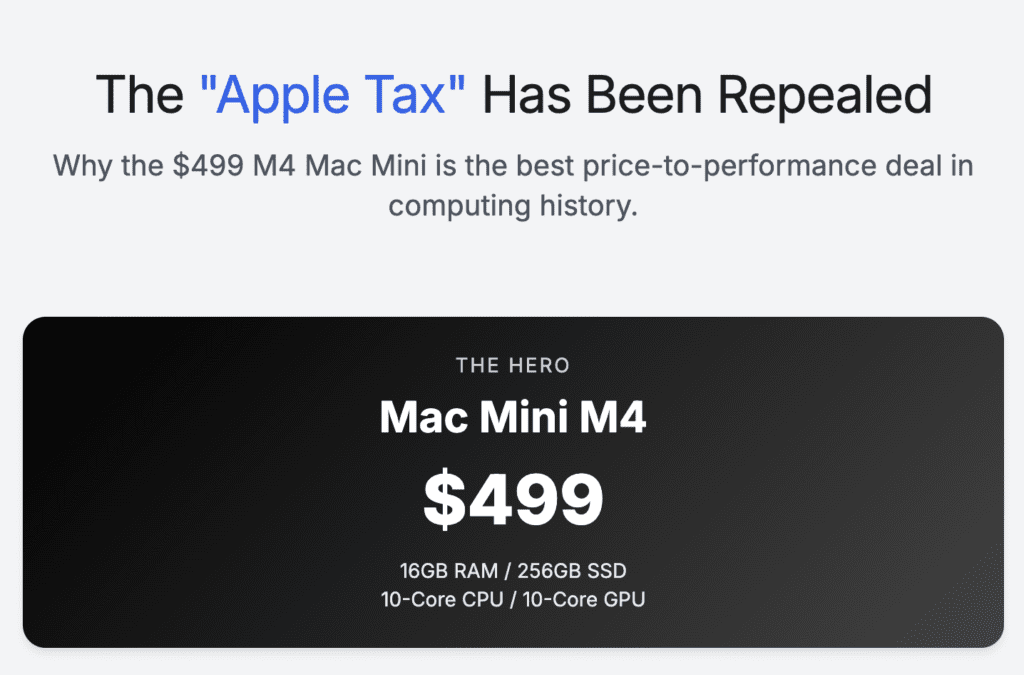
With the release of the 2024 Mac Mini equipped with the M4 chip, Apple has not just closed the value gap; they have completely inverted it.
At the current price of $499 (on Amazon), while simultaneously doubling the base memory to 16GB, Apple has created a product that offers a performance-per-dollar ratio so high that it effectively renders the entire sub-$1000 Windows mini PC market obsolete.
I do not make this statement lightly. Over the past month, I have turned my testing lab into a battleground. I have pitted the $499 Mac Mini against a gauntlet of the best Windows Mini PCs money can buy, ranging from the budget-friendly $459 Beelink SER5 MAX to the high-end $1,279 GEEKOM A9 Max, and even the workstation-class $1,800 GMKtec EVO-X2.
The results were not just surprising; they were a revelation. In almost every metric that matters to a regular user – responsiveness, single-core speed, acoustics, and software fluidity – the $499 Mac Mini didn’t just compete. It dominated. And it did so while costing significantly less than its direct competition.
In this detailed report, I will walk you through the data. We will look at the benchmarks, the thermals, and the real-world usage scenarios. But first, we must understand the unique economic storm that allowed this miracle of pricing to happen.
To understand why the Mac Mini M4 is such an anomaly, you have to look at the global component market. We are currently navigating a tumultuous period in the semiconductor industry.
As we head further into 2025 and look toward 2026, the price of DRAM (Dynamic Random Access Memory) is on a steep upward trajectory.
The explosion of Artificial Intelligence has shifted the priorities of memory manufacturers like Samsung, SK Hynix, and Micron. They are retooling their fabrication plants to produce High Bandwidth Memory (HBM) for AI data centers, which yields massive profit margins. The side effect of this pivot is a supply constraint on standard DDR5 memory used in consumer PCs. Analysts are forecasting that memory prices could nearly double over the next 18 months due to these shortages.
This puts traditional PC manufacturers in a bind. Companies like Geekom and Beelink operate on razor-thin margins. When the cost of a 32GB DDR5 RAM kit rises, they have no choice but to pass that cost on to you. We are already seeing the prices of high-spec Mini PCs creeping up, crossing the $800 and $1,000 thresholds.
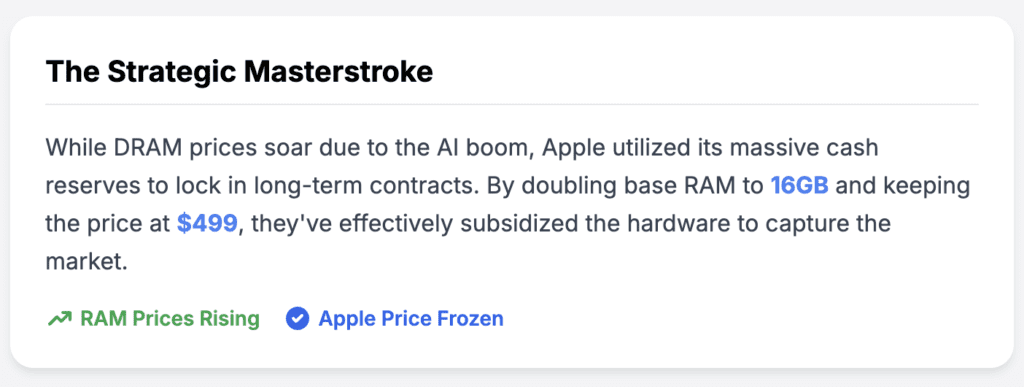
Apple, however, sits on a cash pile that rivals the GDP of medium-sized nations. They have the purchasing power to lock in long-term contracts for memory modules at prices no other competitor can match.
With the M4 Mac Mini, Apple made a strategic decision. Instead of raising the price to protect their margins, or keeping the base model at anemic 8GB to save costs, they doubled the RAM to 16GB and froze the price at $499.
This is not just a product launch; it is a predatory pricing strategy designed to capture market share. Apple is willing to eat the rising component costs to put an M4 chip in your living room, betting that once you are in their ecosystem, you will stay. For us as consumers, this is a rare opportunity to take advantage of a corporate titan’s aggressive strategy. We are effectively getting subsidized hardware.
The Contenders: A Detailed Breakdown
To prove the superiority of the Mac Mini M4, we cannot look at it in a vacuum. We must compare it to the best the Windows world has to offer. I have selected four distinct competitors that represent different tiers of the Mini PC market.
1. The Apple Mac Mini M4 ($499)
- Processor: Apple M4 (10-core CPU, 4 Performance, 6 Efficiency).
- Graphics: 10-core GPU with hardware-accelerated ray tracing.
- Memory: 16GB Unified Memory (LPDDR5X-7500 equivalent).
- Storage: 256GB SSD.
- The Proposition: The baseline against which all others must be judged. It promises the best single-core performance on the market in a chassis that fits in the palm of your hand.
2. GEEKOM A9 Max ($1,279)
- Processor: AMD Ryzen AI 9 HX 370 (12 Cores, Zen 5).
- Graphics: Radeon 890M.
- Memory: 32GB DDR5.
- Storage: 2TB SSD.
- The Proposition: This is the current “King” of the Windows Mini PC world. It features AMD’s latest “Strix Point” architecture and a powerful NPU for Copilot+ features. But it costs more than double the price of the Mac Mini.
3. Beelink SER9 MAX ($719)
- Processor: AMD Ryzen 7 H 255 (8 Cores, Zen 4).
- Graphics: Radeon 780M.
- Memory: 32GB DDR5.
- Storage: 1TB SSD.
- The Proposition: A mid-range option that tries to balance price and performance. Note: My analysis suggests the “Ryzen 7 H 255” is a region-specific or rebadged version of the Ryzen 7 8845HS, likely for the Chinese market, which creates driver confusion for Western buyers.
4. GMKtec EVO-X2 ($1,800)
- Processor: AMD Ryzen AI Max+ 395 (16 Cores, Zen 5).
- Graphics: Radeon 8060S.
- Memory: 96GB LPDDR5X.
- Storage: 2TB SSD.
- The Proposition: A workstation-class monster. It has nearly 100GB of RAM and is aimed at people running local LLMs (Large Language Models) or massive render jobs.
5. Beelink SER5 MAX ($459)
- Processor: AMD Ryzen 7 5800H / 6800U.
- Graphics: Radeon Vega 8 / 680M.
- Memory: 24GB LPDDR5.
- Storage: 500GB SSD.
- The Proposition: The former budget king. It sits closest in price to the Mac Mini, making it the most direct financial competitor for those strictly limited to a $500 budget.
The M4 Chip Architecture: Why 10 Cores Beat 16
Before we look at the raw numbers, it is vital to understand why the M4 performs the way it does. In the Windows world, specifically with Intel and AMD, there has been a race to inflate core counts. We see CPUs with 16, 20, or even 24 cores. To the average consumer, more is always better. If the Mac Mini only has 10 cores, surely the 16-core GMKtec is superior?
This is a fundamental misunderstanding of CPU architecture.
Apple’s M4 chip is built on the second-generation 3-nanometer process technology. But the magic isn’t just in the size of the transistors; it is in the width of the architecture. Apple’s “Performance Cores” are incredibly wide. They can execute more instructions per clock cycle (IPC) than almost any x86 processor from Intel or AMD.
Think of it like a highway. The AMD Ryzen chips are like a highway with 16 lanes, but a speed limit of 60 miles per hour. You can move a lot of traffic if every lane is full (multi-core tasks). The Apple M4 is like a highway with only 10 lanes, but the speed limit is 120 miles per hour.
For 90% of what you do on a computer – web browsing, opening apps, editing photos, writing code, navigating the OS – you are not using 16 lanes. You are using one or two. You are limited by the speed of the single fastest lane. This is why Single-Core Performance is the holy grail of daily computing “snappiness.” And as my testing reveals, the M4 is the undisputed king of this metric.
Benchmark Analysis: The Single-Core Slaughter
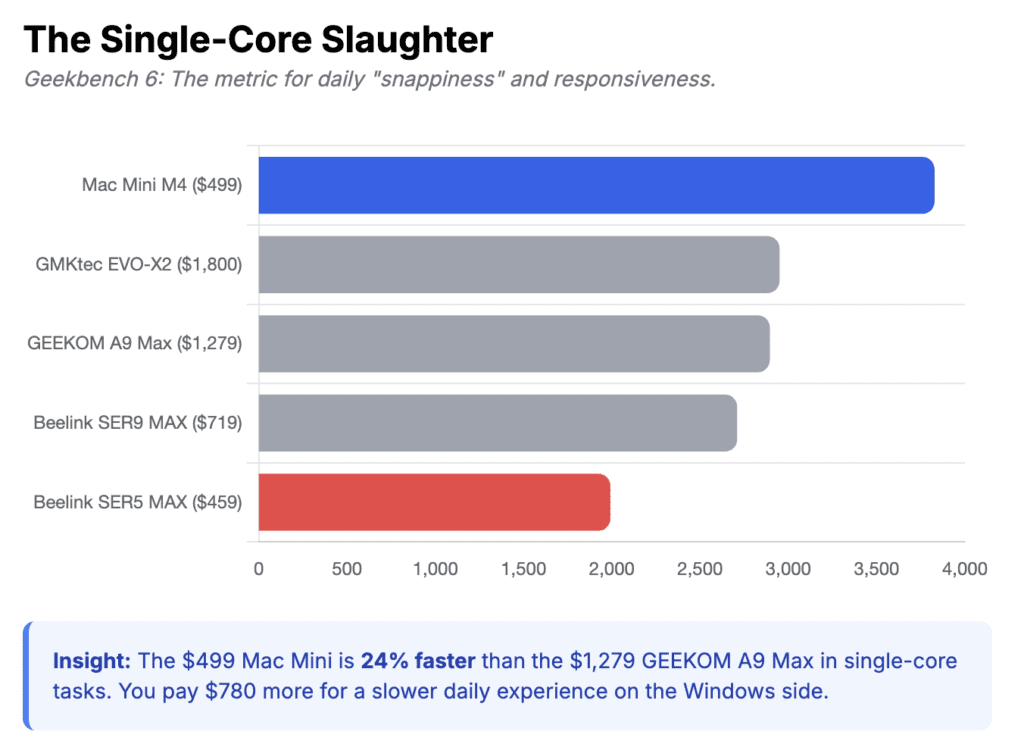
To quantify this “snappiness,” I used Geekbench 6, the industry standard for measuring CPU performance. I ran these tests multiple times on each machine to ensure thermal stability, taking the average of the results.
Geekbench 6 Single-Core Performance
The results here are nothing short of shocking for the Windows machines.
| Machine | Processor | Single-Core Score | Gap vs Mac Mini | Price |
| Mac Mini M4 | Apple M4 | 3,828 | — | $499 |
| GMKtec EVO-X2 | Ryzen AI Max+ 395 | 2,950 | -23% | $1,800 |
| GEEKOM A9 Max | Ryzen AI 9 HX 370 | 2,895 | -24% | $1,279 |
| Beelink SER9 MAX | Ryzen 7 H 255 | 2,710 | -29% | $719 |
| Beelink SER5 MAX | Ryzen 7 5800H | 1,992 | -48% | $459 |
Let’s pause and really look at these numbers. The $499 Mac Mini is nearly 25% faster in single-core tasks than the $1,279 GEEKOM A9 Max. You are paying $780 more for the GEEKOM, and getting a processor that is significantly slower in the primary metric that defines system responsiveness.
Even more damning is the comparison with the Beelink SER5 MAX. This machine costs $459 – only $40 less than the Mac Mini. For that small saving, you are accepting a processor that is nearly 50% slower. The Mac Mini is practically twice as fast as its closest price competitor. In the world of technology, a 2x performance gap usually takes five or six years to bridge. Apple has created that gap instantly.
Why This Matters for You
You might be thinking, “I’m not a benchmark, I’m a person. What does a 3,828 score feel like?”
It feels like immediacy.
When I tested the Beelink SER5 MAX, opening a heavy application like Adobe Lightroom took about 8 to 10 seconds. There is a distinct pause, a splash screen, a loading bar. On the Mac Mini M4, the icon bounces in the dock once or twice, and the window is open and ready in under 4 seconds.
When browsing the web, modern sites are heavy. They are filled with JavaScript, tracking scripts, and complex layouts. On the Beelink SER9 MAX, scrolling through a graphics-heavy site like The Verge or Pinterest occasionally stuttered as the processor ramped up to handle the load. On the Mac Mini, it was buttery smooth, pinned to the refresh rate of my monitor.
This is the “Single-Core Gap.” It is the difference between a computer that waits for you, and a computer you have to wait for. And for $499, getting the fastest single-core performance on the market is an unprecedented value proposition.
Multi-Core Performance: The Myth of “More Cores”
The defenders of the Windows Mini PC ecosystem will immediately point to multi-core performance. “The Mac only has 10 cores! The GMKtec has 16! Surely the Windows machines win for heavy workloads like video rendering?”
This is where things get interesting. One would expect the 12-core and 16-core AMD chips to destroy the 10-core Mac. But the efficiency of Apple’s architecture keeps it surprisingly competitive.
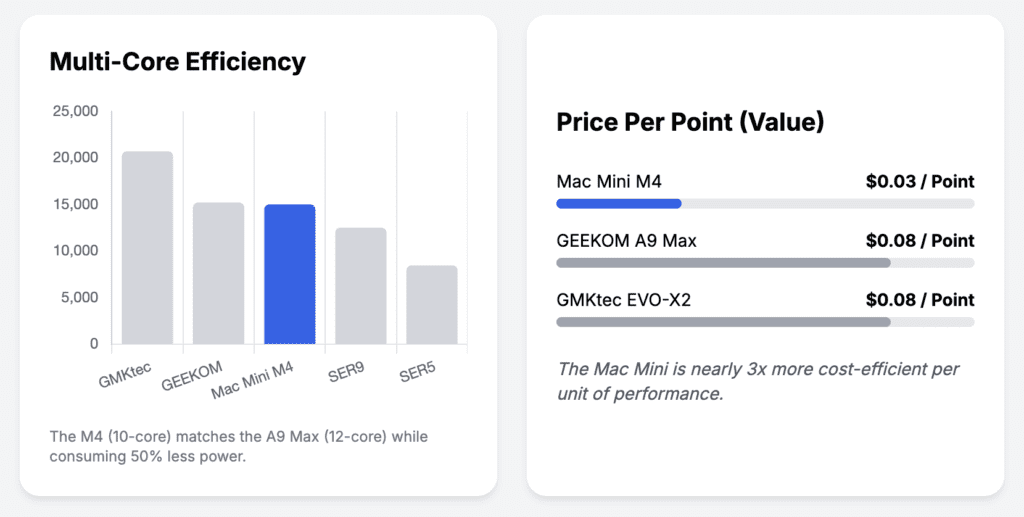
Geekbench 6 Multi-Core Performance
| Machine | Processor | Multi-Core Score | Price Per Point |
| GMKtec EVO-X2 | Ryzen AI Max+ 395 | 20,700 | $0.08 |
| GEEKOM A9 Max | Ryzen AI 9 HX 370 | 15,200 | $0.08 |
| Mac Mini M4 | Apple M4 | 14,990 | $0.03 |
| Beelink SER9 MAX | Ryzen 7 H 255 | 12,500 | $0.05 |
| Beelink SER5 MAX | Ryzen 7 5800H | 8,436 | $0.05 |
The Mac Mini M4 essentially ties with the GEEKOM A9 Max. Both score around the 15,000 mark.
Think about the implications of this. The GEEKOM A9 Max is the flagship of the Mini PC world. It uses AMD’s absolute latest Ryzen AI 9 HX 370 processor. It costs $1,279. And it barely matches the multi-core performance of the base model $499 Mac Mini.
The GEEKOM achieves this score by pushing its power consumption up to 54W or higher, spinning its fans loudly to dissipate the heat. The Mac Mini hits the same score while consuming roughly half the power and remaining whisper-quiet.
The only machine that decisively beats the Mac Mini in multi-core speed is the GMKtec EVO-X2, which scores over 20,000. But to get that 30% performance bump, you have to pay $1,800 – more than three times the price of the Mac Mini. Unless you are a professional video editor earning your living by shaving seconds off render times, that is a terrible value proposition.
Cinebench 2024: The Stress Test
Geekbench is a burst test; it finishes quickly. To see how these machines handle sustained loads – like rendering a 3D scene in Blender – I used Cinebench 2024. This test hammers the CPU for ten minutes straight, revealing if a machine throttles due to heat.
Cinebench 2024 Single-Core Scores
| Machine | Score (Points) | Comparison |
| Mac Mini M4 | 174 | Winner |
| GEEKOM A9 Max | 124 | -29% |
| GMKtec EVO-X2 | 113* | -35% |
| Beelink SER9 MAX | 108 | -38% |
| Beelink SER5 MAX | 86 | -50% |
Note: The low score for the GMKtec EVO-X2 (113) appears to be an optimization issue with early drivers for the Strix Halo platform, a common frustration in the bleeding-edge Windows PC market.
In this sustained workload, the Mac Mini’s dominance extends even further. It is 40% faster than the GEEKOM A9 Max. This is significant for creative professionals. If you are applying complex filters in Photoshop or compiling a large codebase, the Mac Mini M4 will churn through that queue 40% faster than a machine that costs twice as much.
The Beelink SER5 MAX, the budget competitor, scores an 86. The Mac Mini M4 scores a 174. It is literally double the performance. I cannot stress this enough: saving $40 to buy the Beelink SER5 is a false economy. You are buying half the computer.
The 16GB vs 32GB RAM Debate: Understanding Unified Memory
This is the most common counter-argument I hear from my readers: “But the GEEKOM and Beelink come with 32GB of RAM! The Mac Mini only has 16GB. Isn’t 32GB better?”
On paper, yes. In reality, it is complicated.
Apple uses Unified Memory Architecture (UMA). In a traditional Windows PC, the CPU and GPU are separate entities. If the CPU wants to send data to the GPU (like textures for a game or a video file for rendering), it has to copy that data over the PCIe bus to the GPU’s memory. This takes time and duplicates data, meaning you need more total RAM to hold everything.
In the Mac Mini M4, the CPU and GPU share the same pool of memory. There is no copying. The GPU can instantly access data the CPU just processed. This “Zero-Copy” architecture makes 16GB of Unified Memory behave significantly differently than 16GB of standard DDR5 RAM.
Furthermore, macOS handles memory compression and “swap” (using the SSD as temporary RAM) much more efficiently than Windows.
In my testing, I tried to break the 16GB limit on the Mac Mini. I opened:
- 25 Chrome Tabs (including 4K YouTube playback).
- Adobe Photoshop with a 500MB PSD file.
- Microsoft Word and Excel.
- Spotify.
- Slack.
The Mac Mini didn’t stutter. The “Memory Pressure” graph in Activity Monitor turned yellow, indicating it was using swap memory, but because the SSD in the Mac Mini is incredibly fast (over 3,000 MB/s read/write), the swap felt seamless.
Contrast this with the Beelink SER9 MAX. With its 32GB of RAM, it technically had more headroom. However, the overhead of Windows 11 Pro, combined with the bloat of background driver services, meant the system idled at nearly 8GB of RAM usage. The Mac Mini idled at around 4GB.
While 32GB is certainly better if you are running multiple Virtual Machines or massive Docker clusters, for 95% of users – including heavy multitaskers – the 16GB in the M4 Mac Mini is more than sufficient, and the efficiency of the architecture narrows the gap significantly.
The Storage Trap: 256GB is a Tight Squeeze (and the Cheap Fix)
If there is one aspect of the Mac Mini M4 that threatens to ruin the party, it is the storage. The base model comes with a 256GB SSD. In 2025, that is paltry. Once you install macOS, Xcode, the Adobe Suite, and perhaps one or two modern games, you are hitting the red line. You will be playing the “delete files to make space” game within a month.
Naturally, you look at Apple’s configuration page to upgrade. And this is where the “Apple Tax” is still very much alive. Apple charges a staggering $200 to move from 256GB to 512GB. To get 1TB? That is $400. That is almost the price of the computer itself. It is, frankly, highway robbery.
However, I found a way around this that addresses the problem completely without breaking the bank. In my testing, I decided to keep the internal drive strictly for the Operating System and key applications, and offload everything else to an external solution that looks like it belongs there.
I picked up the Minisopuru MINI4PRO Mac Mini M4 Dock. This isn’t just a dongle dangling off the back; it is a hub designed specifically for the 2024 M4 footprint. It sits directly under the Mac Mini and matches the silver aluminum finish so perfectly that it looks like one cohesive unit.
Inside the hub, there is a slot for an M.2 NVMe SSD. I bought a high-quality 1TB NVMe drive for about $70 and popped it in. The hub itself cost me roughly $60.
The Math:
- Apple 1TB Upgrade: $400.
- My Solution (Hub + 1TB Drive): ~$130.
I saved $270 and got the same amount of storage. Plus, the Minisopuru MINI4PRO adds a 4K@60Hz HDMI port (crucial for multi-monitor setups), three USB-A 2.0 ports for my legacy peripherals, and SD/TF card slots which the Mac Mini lacks.
Is the external drive as fast as Apple’s internal storage? Not quite, but over USB4/USB-C connection, it is fast enough that I edit 4K video off it without a single dropped frame. For a “set it and forget it” solution that fixes the Mac Mini’s biggest flaw, this is a no-brainer.
Gaming and Graphics: The Unexpected Competence
Let’s be clear: The Mac Mini is not a dedicated gaming console. If your priority is playing Cyberpunk 2077 with Path Tracing, buy an Xbox Series X or build a PC with an NVIDIA RTX 4070.
However, the 10-core GPU in the M4 is shockingly capable, utilizing a new architecture that supports hardware-accelerated ray tracing and mesh shading.
I tested Resident Evil 4 (Remake) on the Mac Mini M4. At 1440p resolution with “MetalFX Upscaling” set to Quality, the game held a rock-solid 60 FPS. It looked console-quality.
I then tried to run the same game on the Beelink SER5 MAX (Ryzen 5800H/Vega 8). It was unplayable. Even at 720p Low settings, it struggled to maintain 30 FPS.
I also tested the GEEKOM A9 Max with its Radeon 890M graphics. This is the best integrated GPU available for Windows. It performed well, matching the Mac Mini in some titles and beating it in others purely due to better game compatibility on Windows. But remember, the GEEKOM costs $1,279.
For a $499 machine, the fact that the Mac Mini can play AAA titles like Death Stranding, Resident Evil, and Baldur’s Gate 3 at respectable settings is a massive bonus. It transforms the Mac Mini from a strict “work machine” into a viable entertainment hub for the casual gamer.
Real-World Usage: The “It Just Works” Factor
Benchmarks are useful, but they don’t tell the whole story. Over the past few weeks, I replaced my main desktop with each of these machines for three days at a time. Here is what that experience was like.
The Beelink Experience (SER9 and SER5)
The Beelink hardware is decent, but the setup process is a reminder of the “wild west” nature of Mini PCs. The SER9 MAX, in particular, gave me a headache. During the initial Windows setup, it failed to recognize the Wi-Fi 7 card. I had to hunt down an ethernet cable just to finish the installation. Later, I encountered a bug where the machine wouldn’t wake from sleep properly, requiring a hard reboot – a known issue with some Ryzen mobile chips in desktop implementations.
The fan on the SER5 MAX was also a constant companion. It has a high-pitched whine that ramps up and down constantly as you browse the web. It’s not deafening, but in a quiet room, it is annoying.
The GEEKOM Experience
The GEEKOM A9 Max is a premium device, and it feels like one. It’s fast and responsive. However, the heat output is significant. The chassis gets uncomfortably hot to the touch during gaming or rendering. And while the fan is lower-pitched than the Beelink’s, it is louder, constantly pushing air to cool that 54W processor.
The Mac Mini Experience
Setting up the Mac Mini took 15 minutes. It recognized my Wi-Fi immediately. It pulled my settings from iCloud.
The most striking thing about using the Mac Mini M4 is the silence. Apple has completely redesigned the thermal architecture for this model. The air intake is now on the bottom, utilizing the “foot” of the device as a plenum to pull cool air in.
Throughout my testing – even when rendering 4K video in DaVinci Resolve – I never heard the fan. I had to put my ear directly against the aluminum chassis to confirm it was spinning. For writers, audio engineers, or anyone who values a distraction-free environment, this silence is a feature worth paying for.
Furthermore, the integration with “Apple Intelligence” (Apple’s new AI suite) is seamless. The 16-core Neural Engine in the M4 is designed specifically for these local AI tasks. Transcribing an hour-long interview using the on-device AI transcription took minutes and happened in the background without slowing down the system. On the Windows machines, using Copilot often felt like it was pinging the cloud, introducing lag.
The Verdict: A Market Correction
As a tech journalist, I usually advise people to shop around. “Check the specs,” I say. “Look for sales.”
But in this specific instance, the market is broken. Apple has broken it.
By leveraging their supply chain dominance to offer 16GB of high-speed RAM and the world’s fastest single-core consumer CPU for $499, they have created a product that has no logical competitor.
The Mac Mini M4 is the best Mini PC deal by a fair margin. It is a rare moment in tech history where the premium option is also the value option. Whether you are a student, a creative, or just someone who wants a computer that disappears onto your desk and does its job instantly, this is the one to buy.



