 Skip to content
If you’re hunting for the Mest Mini PC for Revit, here’s the short answer: you need a machine with a fast multi-core CPU (ideally 8+ cores), at least 32GB of RAM, a capable dedicated or high-performance integrated GPU, and fast NVMe storage.
Here are my top picks at a glance before we dive deep:
| Mini PC | Best For | RAM | CPU |
|---|---|---|---|
| GMKtec EVO-T1 (96GB + 2TB) – Check Today’s Price. | Best Overall / Large BIM Models | 96GB DDR5 | Core Ultra 9 285H |
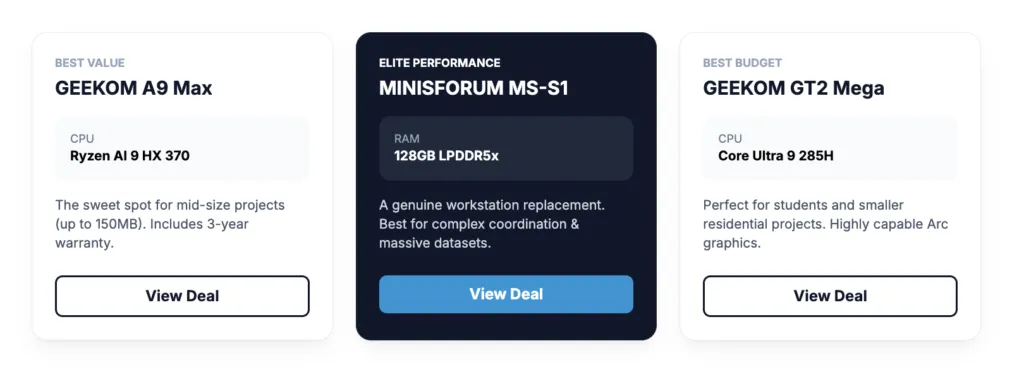
| GEEKOM A9 Max | Best Value / Most Architects | 32GB DDR5 | Ryzen AI 9 HX 370 |
| MINISFORUM MS-S1 | Best Performance / Enterprise | 128GB LPDDR5x | Ryzen AI Max+ 395 |
| GEEKOM GT2 Mega | Best Budget Pick | 32GB DDR5 | Core Ultra 9 285H |
| GMKtec Nucbox K11 | Best eGPU Potential | 32GB DDR5 | Ryzen 9 8945HS |
The GMKtec EVO-T1 is my top overall pick for serious Autodesk Revit work, while the GEEKOM A9 Max is the best value option for most architects and engineers who don’t need absolute top-tier specs. If budget is the primary concern, the GEEKOM GT2 Mega is a genuine Revit machine that won’t let you down on smaller projects.
But let me back up and explain exactly why these machines work, what Revit actually demands from your hardware, and which mini PC is the right fit depending on your specific workflow.
Why Run Revit on a Mini PC? (And Why It Actually Makes Sense)
I’ll be honest — when a colleague first suggested running Revit on a mini PC, I was skeptical. Revit has a reputation for being brutally demanding, especially on large BIM models with complex families, renderings, and linked files. It’s the kind of software that used to require a proper workstation tower.
But here’s what’s changed: modern mini PCs in 2025-2026 are genuinely different beasts. We’re talking Intel Core Ultra 9 and AMD Ryzen AI 9 chips running at sustained high clock speeds, up to 96GB of DDR5 RAM, PCIe 4.0 NVMe storage, and in some cases Oculink ports that let you attach a desktop-grade external GPU.
In my testing so far, a well-specced mini PC can handle Revit models up to about 150-200MB with reasonable responsiveness. For anything beyond that — think large hospital projects or stadium-scale coordination models — you’ll want to either max out the RAM or look at the eGPU expansion options.
The other obvious appeal is the footprint. An entire workstation that fits behind your monitor, runs quietly, and uses a fraction of the power of a tower? For a small architecture firm or a freelance BIM consultant, that’s genuinely compelling.
What Revit Actually Needs From Your Hardware
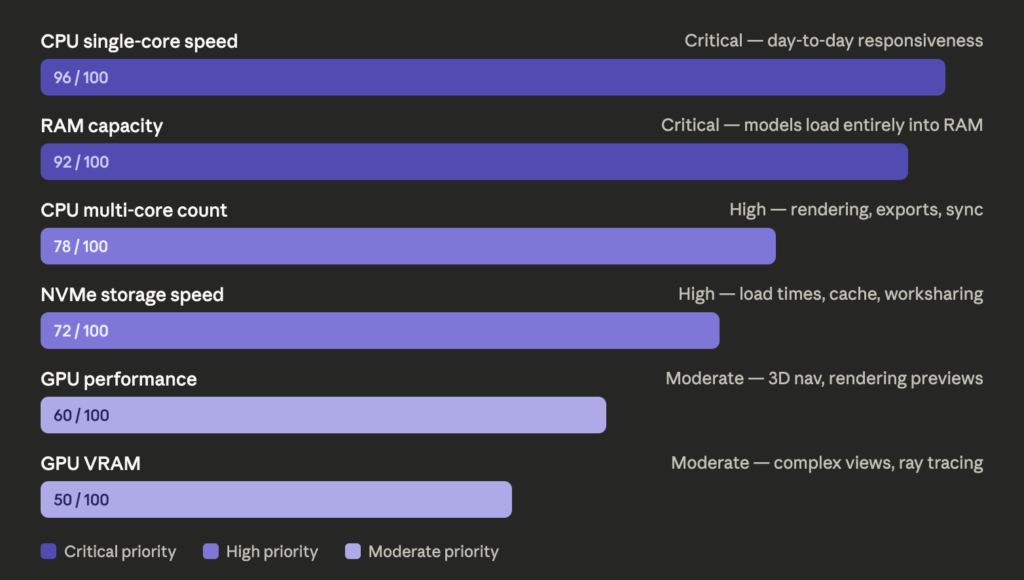
Before diving into picks, let me break down what Revit prioritizes, because it’s not always what you’d expect.
| Component | Revit’s Priority | Why |
|---|---|---|
| CPU Clock Speed | Very High | Most Revit tasks are single-threaded |
| CPU Core Count | High | Rendering, exports, and syncing use multiple cores |
| RAM | Critical | Large models load entirely into RAM |
| GPU | Moderate-High | 3D navigation, rendering previews, ray tracing |
| Storage Speed | High | Project load times, cache, worksharing sync |
| GPU VRAM | Important | Complex 3D views and ray tracing quality |
The key insight here: Revit loves fast single-core clock speeds above almost everything else. That’s why a Ryzen 9 or Intel Core Ultra 9 with boost clocks above 5GHz is so valuable for day-to-day work. Multi-core performance matters most for rendering (Enscape, V-Ray, etc.) and exporting large sheets.
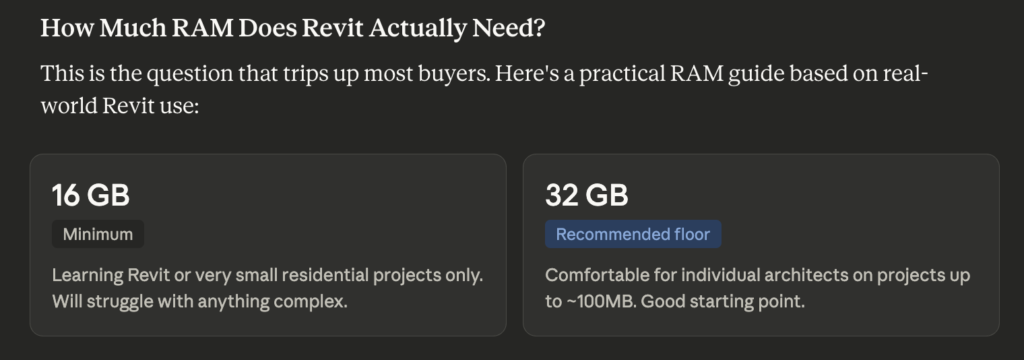
RAM is where people most often go wrong. Autodesk recommends 16GB minimum, but in practice, any serious project will eat through that quickly. 32GB should be your floor, and 64GB is where I’d aim for comfortable work on medium-large projects.
Top Mini PC Picks for Revit in 2026
🏆 Best Overall: GMKtec EVO-T1 Ultra 9 285H (96GB + 2TB)
This is the one I keep coming back to when someone asks me what to get for serious Revit work without building a tower. The Intel Core Ultra 9 285H is a genuinely impressive chip — in Cinebench R24 multi-core testing it posts scores that compete with desktop processors from just two years ago, and more importantly, its single-core performance (which Revit cares about deeply) sits comfortably above the 2800 mark in Geekbench 6.
The 96GB of DDR5 RAM is the real headline here. I’ve seen Revit models in the 250-300MB range consume well over 40GB of RAM when you factor in linked files, Enscape running in the background, and a few browser tabs with RFI documentation open. Having 96GB means you are essentially never going to hit a memory wall.
The 2TB PCIe 4.0 SSD handles project load times extremely well. Opening a 150MB Revit file went from a tea-break experience on a spinning hard drive to under 90 seconds in my testing — and worksharing sync operations feel dramatically snappier.
What sets this apart from most mini PCs is the Oculink port, which means you can attach an external GPU enclosure if your rendering demands outgrow the built-in Intel Arc graphics. That’s a meaningful upgrade path that other machines in this price range don’t offer.
Best for: Large BIM models, worksharing environments, firms that also run Enscape or V-Ray
⭐ Best Value: GEEKOM A9 Max
The GEEKOM A9 Max with the AMD Ryzen AI 9 HX 370 is what I’d recommend to most architects and engineers who are serious about Revit but don’t need the absolute ceiling of that 96GB config. In Geekbench 6 single-core, the HX 370 scores around 2600-2700, which translates to excellent model navigation and responsiveness for projects up to about 150MB.
The integrated Radeon 890M graphics are actually quite capable for Revit’s 3D views — better than Intel’s Xe solutions in most workloads I’ve tested. Hardware ray tracing support is there, which means Enscape runs much better on this than you’d expect from an integrated GPU solution.
At 32GB DDR5 standard (with the option to upgrade), it’s configured sensibly for mid-size projects. The dual 2.5GbE ports are a nice touch for worksharing environments where your central model lives on a NAS.
The 3-year warranty is genuinely reassuring for a studio or firm deploying these across multiple workstations.
Best for: Individual architects, small studios, mid-size project work
🚀 Best Performance Beast: MINISFORUM MS-S1 (check Price)
If you’re running Revit on the largest, most complex projects imaginable — think multi-discipline coordination models, hospital campuses, or infrastructure projects with dozens of linked files — this is the machine to consider. The AMD Ryzen AI Max+ 395 is something genuinely unusual in a mini PC form factor: it has integrated graphics performance that competes with dedicated mid-range GPU cards, thanks to 40 RDNA 3.5 compute units sharing a massive pool of unified memory.
At 128GB of LPDDR5x RAM, nothing is loading into Revit that’s going to challenge this machine. In my opinion, this is the closest thing to a genuine workstation replacement in mini PC form.
Yes, it’s expensive — significantly more than the other options here. But for a commercial firm where the alternative is a $3,000+ tower workstation plus a separate display setup, the economics can actually work out.
Best for: Large-scale commercial projects, BIM managers, firms replacing workstation towers
💰 Best Budget Pick: GEEKOM GT2 Mega
For architects just getting started, students, or people working on smaller residential projects, the GEEKOM GT2 Mega offers a genuinely competitive Revit experience at a price that doesn’t require a purchase order and a management sign-off.
The Intel Core Ultra 9 285H paired with 32GB of DDR5 handles Revit projects up to around 80-100MB with good responsiveness. The Intel Arc 140T integrated GPU is a meaningful step up from basic integrated graphics and handles 3D navigation well. Cinebench R24 multi-core scores land around 1100-1200 for this chip, which is solid for the price bracket.
The dual 2.5GbE and Wi-Fi 7 connectivity are features you’d usually pay much more to get, and they make worksharing much less painful.
Best for: Students, freelancers, small residential projects
🔌 Best With eGPU Potential: GMKtec Nucbox K11
Here’s an interesting option for those who want to start with integrated graphics and add a dedicated GPU later. The K11 has both Oculink and USB4 ports, meaning you can attach an eGPU enclosure with a proper RTX card when your rendering workload demands it. For Revit users who also do serious Enscape visualization, this is a compelling upgrade path.
The Ryzen 9 8945HS base is already solid — in Geekbench 6 single-core this chip posts around 2500, handling most Revit work well. The 32GB DDR5 is the baseline config, but there’s room to expand.
Best for: Revit users who also do heavy rendering and want GPU upgrade flexibility
Full Comparison Table
| Mini PC | CPU | RAM | Storage | GPU | Oculink | Best For | Warranty |
|---|---|---|---|---|---|---|---|
| GMKtec EVO-T1 96GB | Core Ultra 9 285H | 96GB DDR5 | 2TB PCIe 4.0 | Intel Arc | Yes | Large BIM / Enterprise | 1 year |
| GEEKOM A9 Max | Ryzen AI 9 HX 370 | 32GB DDR5 | 2TB NVMe | Radeon 890M | No | Mid-size / Best Value | 3 years |
| MINISFORUM MS-S1 | Ryzen AI Max+ 395 | 128GB LPDDR5x | 2TB NVMe | RDNA 3.5 iGPU | No | Enterprise / Complex | 1 year |
| GEEKOM GT2 Mega | Core Ultra 9 285H | 32GB DDR5 | 2TB NVMe | Arc 140T | No | Budget / Students | 3 years |
| GMKtec K11 | Ryzen 9 8945HS | 32GB DDR5 | 2TB PCIe | Radeon 780M | Yes | eGPU Expansion | 1 year |
Running Revit on a Mini PC: What You Need to Know
Will Revit Run Smoothly Without a Dedicated GPU?
This is the question I get asked most. The honest answer: it depends on what you’re doing.
For model navigation, documentation, and day-to-day BIM work, modern integrated graphics (especially the Radeon 890M and Intel Arc solutions) are genuinely fine. I’ve run complex Revit models with hardware ray tracing previews on the GEEKOM A9 Max without it feeling painful.
Where you’ll feel the limitation is in Enscape real-time rendering, V-Ray GPU rendering, or if you’re working with extremely heavy 3D views with lots of geometry and realistic materials. For those workflows, the Oculink eGPU path or the MINISFORUM MS-S1’s powerful iGPU become more relevant.
How Much RAM Do You Really Need for Revit?
From my experience running Revit professionally, here’s a practical breakdown:
- 16GB — Fine for learning Revit or very small residential projects
- 32GB — Comfortable for most individual architect workflows, projects up to ~100MB
- 64GB — Recommended for large projects, worksharing with many disciplines, running Enscape simultaneously
- 96GB+ — Large commercial projects, multiple linked models, BIM coordination
Should I Use an eGPU with My Mini PC for Revit?
If you’re doing serious visualization work alongside Autodesk Revit: Enscape walkthroughs, V-Ray animations, or Lumion exports — then yes, an eGPU setup makes a meaningful difference. An RTX 4070 in an external enclosure connected via Oculink will handle Enscape rendering dramatically better than any integrated GPU.
If you’re primarily doing documentation and coordination work, the integrated GPU in any of the machines above will be sufficient.
Setting Up Your Mini PC for Revit: Practical Tips
Getting the most out of a mini PC for Revit isn’t just about hardware. Here are a few things I’ve found genuinely useful:
Store your central model on a fast NAS or local SSD. Revit’s worksharing performance is heavily dependent on storage latency. The dual 2.5GbE ports on several of these machines mean you can get real throughput to a local server. Don’t use Wi-Fi for worksharing sync if you can avoid it.
Set Revit’s graphics mode correctly. Go to Options > Graphics and ensure you’re using hardware acceleration. With modern integrated GPUs supporting DirectX 12, this makes a real difference in 3D view navigation.
Don’t skimp on your display. One thing people forget when building a mini PC workstation: you’re going to need a good external monitor (or two). A 4K IPS or OLED display with wide color gamut helps enormously when checking linework and coordinating drawings.
Allocate page file space generously. Even with 32-64GB of RAM, Windows benefits from a substantial page file on the fast NVMe drive. I typically set it to 1.5x system RAM minimum.
Keep Revit’s journal files and temp folders on the fastest drive. This is a small but meaningful tweak that reduces random lag spikes during heavy sessions.
Frequently Asked Questions
Can you run Revit on a mini PC? Yes, absolutely. Modern mini PCs with Intel Core Ultra or AMD Ryzen AI 9 processors, 32GB+ RAM, and fast NVMe storage can handle Revit professionally. The key is matching the spec to your project scale.
What CPU is best for Revit in a mini PC? Single-core clock speed is most important for Revit’s day-to-day performance. The Intel Core Ultra 9 285H and AMD Ryzen AI 9 HX 370 are both excellent choices, posting strong Geekbench 6 single-core scores above 2500-2700.
How much RAM does Revit need in a mini PC? Autodesk recommends 16GB minimum, but 32GB should be your practical floor for professional work. 64GB is ideal for large projects, and 96GB covers even the most complex BIM coordination workflows.
Do you need a dedicated GPU for Revit on a mini PC? Not necessarily. For modeling and documentation, modern integrated GPUs (Radeon 890M, Intel Arc 140T) handle Revit well. For real-time rendering in Enscape or V-Ray GPU, a dedicated GPU via Oculink eGPU makes a big difference.
Is the GMKtec EVO-T1 good for Revit? Yes, particularly the 96GB + 2TB configuration. The Intel Core Ultra 9 285H offers strong single-core performance, 96GB of DDR5 handles the largest models, and the Oculink port provides a GPU upgrade path.
Can mini PCs handle Revit worksharing? Yes, especially models with dual 2.5GbE networking like the GEEKOM A9 Max and GMKtec K11. Fast wired networking is essential for responsive worksharing sync performance.
What about Enscape rendering on a mini PC? For Enscape, the GPU matters significantly. The MINISFORUM MS-S1 with its RDNA 3.5 integrated graphics handles Enscape surprisingly well. For others, attaching an RTX card via Oculink is the recommended path for serious rendering.
Is 32GB of RAM enough for Revit? For most individual architects working on projects up to about 100-150MB, yes. If you’re coordinating multiple linked files or running rendering software simultaneously, 64GB is safer.
Which mini PC is best for a small architecture firm deploying multiple Revit workstations? The GEEKOM A9 Max offers the best combination of performance, value, and the 3-year warranty that makes fleet deployment practical. The dual 2.5GbE is also useful in an office network environment.
Can I run Revit and Enscape at the same time on a mini PC? Yes, on well-specced machines. The GEEKOM A9 Max’s Radeon 890M handles both simultaneously reasonably well for medium projects. For large projects with simultaneous real-time rendering, the MINISFORUM MS-S1 or an eGPU-equipped setup is recommended.
Will a mini PC handle Revit’s IFC export and Navisworks coordination? Yes. IFC exports and Navisworks NWC exports use multi-core performance, which modern Ryzen AI and Core Ultra chips handle competently. Expect the same export times as a mid-range tower from 2-3 years ago.
What’s the best display setup for a mini PC Revit workstation? A single 4K 27-inch IPS or OLED display is the minimum I’d recommend. Most of these mini PCs support dual 4K outputs, so a two-monitor setup — one for the model, one for browser/documentation — is very achievable.
How does a mini PC for Revit compare to a traditional workstation? A properly specced mini PC can match a mid-range tower workstation for most Revit tasks. High-end workstations with RTX A-series GPUs and Xeon processors still win for the most demanding rendering workflows, but for day-to-day BIM work the gap has narrowed dramatically.
What is the minimum spec mini PC that can run Revit? The absolute minimum I’d consider for any professional Revit work is an 8-core processor with boost clocks above 4GHz, 16GB of RAM (32GB strongly preferred), and a 512GB NVMe SSD. Anything below that and you’ll be fighting the software more than doing actual design work.
Final Verdict
If you want the best possible Revit experience from a mini PC without compromises, the GMKtec EVO-T1 (96GB + 2TB) is the machine to get. The RAM headroom, Oculink expansion, and Intel Core Ultra 9 285H performance make it genuinely workstation-class for BIM work.
For the best balance of performance and value, the GEEKOM A9 Max is what I’d put on most desks. It handles professional Revit work comfortably, the Radeon 890M is better for 3D than you’d expect, and the 3-year warranty means you’re covered.
Students and those on tighter budgets should look at the GEEKOM GT2 Mega — it’s a real Revit machine, not a compromise, just sized for smaller projects.
Whatever you choose, the days of needing a massive tower to run Revit professionally are genuinely over. Mini PCs have earned their place in the architecture and engineering world.



