The world of agentic AI is no longer something we just read about in futuristic newsletters. By early 2026, having an autonomous assistant is the standard way to stay productive.
If you’re also considering physical computers for OpenClaw, here’s our list of top recommendations for the Best OpenClaw MiniPCs.
At the center of this movement is OpenClaw (formerly Moltbot & Clawdbot), the open source framework that has changed how we use artificial intelligence. If you are searching for the best OpenClaw hosting or a reliable OpenClaw VPS to keep your agent working 24/7, you are in the right place.
In this guide, I will walk you through the top providers, the one-click tools that make setup a breeze, and the security steps you need to take to stay safe.
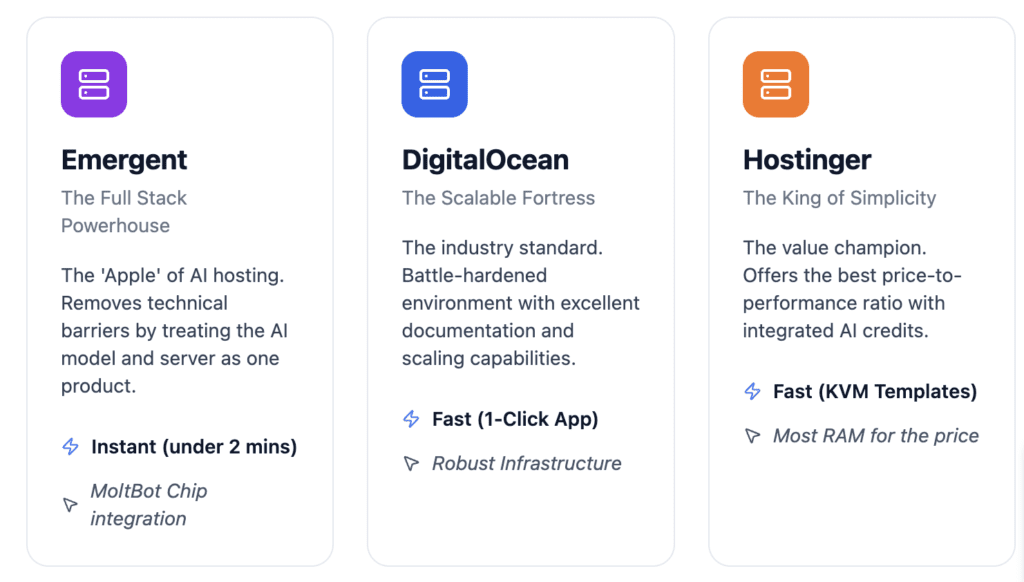
For the most cost-effective option that is both scale-ready & cost effective, HOSTINGER is definitely the best option (check price). Also, if you want ease of use with integrated AI credits so you do not have to manage multiple keys, Hostinger is a fantastic choice.
If you want a full-stack experience that offers even more ease for everything from the server to the AI model keys and with the option to vibecode (prompt) custom installation requirements, Emergent is the gold standard (but you pay for the ease of personalization!).
For developers who need to scale fast and want a battle-hardened environment, DigitalOcean remains the most advanced & popular option. However, it might be slightly more difficult for non-technical people to manage on an ongoing basis, even though they now (mid February, 2026) offer a 1 Click Installation option (so setting up isn’t difficult).
While running OpenClaw on your personal laptop is a good way to start, a VPS is essential for a true 24/7 assistant. A dedicated server gives you a static IP address, which ensures your messaging connections to Telegram or WhatsApp do not break. It also keeps your assistant isolated from your private files, protecting you from the security risks that come with autonomous agents.
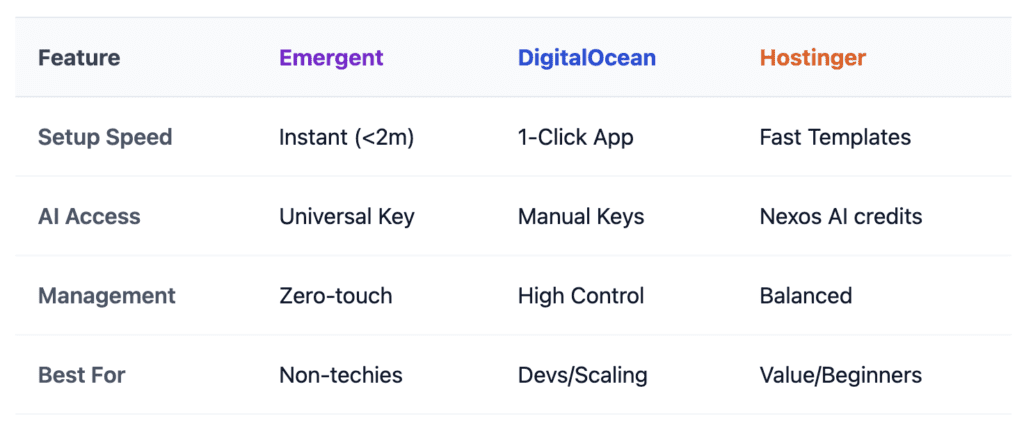
Comparison Table: top openclaw cloud hosting (vps) options
| Feature | Emergent | DigitalOcean | Hostinger |
| Setup Speed | Instant (under 2 mins) | Fast (1-Click App) | Fast (KVM Templates) |
| AI Model Access | Universal Key (Integrated) | Manual API Keys | Nexos AI (Integrated) |
| Management | Zero-touch (SaaS style) | High Control (Technical) | Balanced (AI Dashboard) |
| Best For | Non-technical users | Developers & Scaling | Value-seekers & Beginners |
| Primary Edge | MoltBot Chip integration | Robust Infrastructure | Most RAM for the price |
Emergent: The Apple of AI Hosting
If you want the “it just works” experience, Emergent is the gold standard. By using the MoltBot chip, you bypass the terminal entirely. It is the only provider that truly treats the AI model and the server as a single product. You aren’t just buying a VPS; you’re buying a living instance of OpenClaw that comes pre-negotiated with top-tier LLM providers.
DigitalOcean: The Developer’s Fortress
DigitalOcean remains the “battle-hardened” choice. While they introduced a 1-Click Installation in mid-February 2026, it is still a platform designed for those who might want to SSH into their box and tweak the kernel or scale resources instantly. It is the most “future-proof” if you plan on building a complex network of multiple agents.
My personal Top Choice: Hostinger: The Value Champion with the ease of installation that emergent offers.
Hostinger wins on the price-to-performance metric. For most OpenClaw users, 8GB of RAM is the sweet spot for stability, and Hostinger provides this at a fraction of the cost of premium cloud providers. Their Nexos AI integration bridges the gap perfectly—giving you the ease of Emergent’s credits but on a server you still technically own and control.
Cost Of OpenClaw VPS Hosting:
Running OpenClaw isn’t just about the server; it’s about the “intelligence tax” (tokens) and the convenience fee. Below are the research-backed costs for a standard personal assistant setup (approx. 50–100 interactions per day).
| Cost Component | Hostinger (KVM 2) | Emergent (Standard) | DigitalOcean (Droplet) |
|---|---|---|---|
| Server/Platform | $6.99 / mo | $20.00 / mo | $12.00 – $24.00 / mo |
| AI Model Tokens | $10 – $25 (Nexos AI) | Included (100 credits/mo) | $15 – $40 (Manual Keys) |
| Backups | Included (Weekly) | Included (Automatic) | +$2.40/mo (Optional) |
| Estimated Total | ~$18 – $32 / mo | ~$20 / mo (Flat) | ~$27 – $65 / mo |
Price Analysis:
- Hostinger: The most cost-effective. By 2026, their KVM 2 plan offers 8GB of RAM, which is critical because OpenClaw’s browser automation is memory-intensive. Nexos AI credits are the cheapest way to access Claude 3.5 without an Enterprise plan.
- Emergent: Predictable. The $20 flat fee is a “Netflix-style” model. Great for light users, but heavy users will find credit bundles more expensive than raw API keys.
- DigitalOcean: The premium choice. You are paying for infrastructure stability and the ability to scale up to massive resource tiers instantly if your agent’s workload grows.
The OpenClaw Revolution
I remember back in late 2025 when we were all just starting to experiment with projects like WhatsApp Relay. It felt a bit like the early days of the internet: exciting, slightly chaotic, and full of potential. That project grew into what we now know as OpenClaw, picking up over 181,000 GitHub stars and becoming a staple for anyone serious about automation.
Even with big industry moves like the founder joining OpenAI in February 2026, the project has stayed true to its open source roots. It has evolved into a sophisticated system that can browse the web, run terminal commands, and manage your calendar while you sleep. But as the capabilities grew, so did the need for stable hosting. You cannot run a world class assistant on a device that goes to sleep when you close the lid.
Why a VPS is Your AI Agent’s True Home
When I first set up my own agent, I ran it on my laptop. It worked great until I went to a coffee shop and the internet cut out for a second. My agent missed three important emails and my WhatsApp bridge disconnected. That was the day I moved everything to a VPS.
A cloud server offers 99.9 percent uptime, which is vital for an assistant that is supposed to be proactive. It also offers a layer of protection. Security experts often talk about the lethal trifecta of AI risk: access to private data, exposure to untrusted web content, and the authority to act on your behalf. By running your agent on a VPS, you create a sandbox. Even if the agent is tricked by a malicious prompt online, it is isolated from your personal photos, tax documents, and private passwords.
Emergent: The Full Stack Powerhouse for OpenClaw
One of the most exciting developments in 2026 is the rise of Emergent. This platform has completely changed the game by removing the technical barriers that used to stop people from using autonomous agents. Instead of worrying about dependencies or provisioning servers manually, you can use the MoltBot chip on Emergent to get started in under two minutes.
The MoltBot Experience on Emergent
MoltBot is essentially a preconfigured version of OpenClaw that lives as a chip on the Emergent platform. The setup is remarkably simple. You just head to the home page, select the MoltBot chip, and hit enter. Emergent handles the rest in the background, setting up the runtime on a cloud virtual machine and preparing the environment for you.
What I love about this approach is the Universal Key. You do not have to go out and sign up for five different AI providers. Emergent provides its own recommended keys by default, and you can set your Universal Key to automatically refill when your credit balance gets low. It makes the whole experience feel like using a single, unified app rather than a collection of technical tools.
Advanced Options for Power Users
If you are an advanced user with an Anthropic Max plan, Emergent still has you covered. You can use the Claude CLI on your local machine to generate your own API key and then plug that into the MoltBot interface. This gives you full control over your billing and usage limits while still benefiting from the automated hosting environment Emergent provides.
Just remember that for your MoltBot to stay online 24/7, you need to hit the deploy button. Without deployment, the agent only stays active while your session is open. Once you deploy, your assistant becomes persistent, meaning it can handle scheduled tasks and background monitoring without you ever having to check in.
Best Specialized VPS Providers for OpenClaw
While Emergent is a great all-in-one solution, many of us still prefer to manage our own dedicated VPS instances. Here are the providers that have proven to be the most reliable in 2026.
Hostinger: The King of Simplicity and AI Credits
Hostinger has become a favorite for a lot of people in the community because they have made VPS management feel accessible. Their KVM 2 plan is usually the best starting point, offering 8GB of RAM and a dedicated IP address for a very reasonable price.
The standout feature here is Nexos AI. Much like the Universal Key on Emergent, Nexos AI allows you to buy a bucket of credits directly through your Hostinger dashboard. You can then use those credits to power your OpenClaw agent with models from OpenAI, Anthropic, or Google. It removes the headache of managing multiple monthly subscriptions just to get your agent to think.
DigitalOcean: The Scalable Choice for Technical Founders
For those who want more control and the ability to scale up instantly, DigitalOcean is the industry standard. Their 1 Click Application for OpenClaw in the Marketplace is incredibly well built. It comes security hardened by default, which is a huge plus in 2026.
I have used DigitalOcean for several of my larger projects. Their interface is very intuitive, and if you find your agent is running out of memory because you have added too many complex skills, you can upgrade your Droplet in about sixty seconds. They also provide excellent documentation, which is a lifesaver if you ever need to troubleshoot a custom integration.
xCloud: Truly Managed OpenClaw for Business
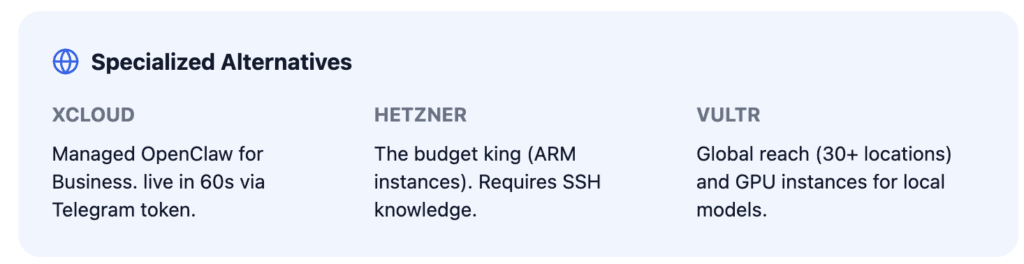
If you are running a business and you just want your assistant to work without you ever seeing a terminal, xCloud is the best option. They offer a fully managed service where their engineers handle the updates, the security patches, and the infrastructure. You can be live in about 60 seconds just by connecting your Telegram bot token.
It is a premium service, and you cannot host other websites on the same server, but the reliability is worth it for professional use. When your business depends on an agent to handle lead triage or customer support, you want the peace of mind that comes with a managed host.
Hetzner and Vultr: High Performance for the Budget Conscious
For the DIY crowd, Hetzner is the budget king of 2026. Their ARM based instances are incredibly cheap and offer fantastic performance. However, there is no one click installer here. You will need to be comfortable using SSH and running scripts yourself.
Vultr is a great middle ground. They have data centers in over 30 locations worldwide, which is perfect if you need low latency for an agent serving a global team. They also offer GPU instances if you want to experiment with running local models like Ollama, though that will definitely increase your monthly bill.
Top One Click Tools to Get You Running in Seconds
If your chosen host does not have a native dashboard button for OpenClaw, do not worry. There are several community tools that make installation just as easy.
The Official Installer Script
The most reliable way to install OpenClaw on any fresh Ubuntu server is the official script. You just run a single curl command from the official website, and it walks you through the entire onboarding process. It checks your system requirements, installs the necessary software, and even helps you set up your first messaging channel. It is a very polished experience.
FlashPanel and ClawHost
FlashPanel is a server management tool that added a dedicated OpenClaw Manager in February 2026. It gives you a beautiful web interface to start, stop, and update your agent. It even has a built in log viewer so you can see exactly what your agent is doing in real time.
ClawHost is an open source project specifically designed for people using providers like Hetzner. You give it your API key, and it handles the server provisioning, the firewall setup, and the SSL certificates for you. It turns a manual 40 minute process into a 90 second automated one.
Understanding the Technical Blueprint: RAM, CPU, and Storage
OpenClaw is more resource intensive than a standard website. Because it often runs a headless browser to scrape data or interact with web apps, you need to make sure your VPS has the right specs.
RAM is the Most Important Factor
Do not try to run OpenClaw on a server with less than 2GB of RAM. It will likely crash during the setup process. For a smooth experience, 4GB is the recommended minimum, especially if you want your agent to perform web automation. If you are a power user running multiple agents at once, you should aim for 8GB or more.
CPU and Storage
While the AI models do the heavy thinking, your local CPU still handles the logic and integrations. A server with 2 vCPU cores is usually enough for most people. For storage, NVMe is a must. OpenClaw stores its memory in local files, and having fast storage makes your agent feel much more responsive and alert.
Security in the Wild West of 2026
We cannot ignore the security side of things. Because these agents have the power to run commands and access accounts, they are high value targets for attackers.
First, never run your agent as a root user. Most modern one click templates, like those from DigitalOcean and Hostinger, set up a restricted user by default. Second, keep your firewall tight. You should only have the necessary ports open, such as port 18789 for the web dashboard.
A great tip for 2026 is to use a private network tool like Tailscale. This allows you to access your agent dashboard securely from anywhere without ever exposing it to the public internet. It is like having a private tunnel directly to your assistant.
The Cost of Intelligence: Tokens and Hosting
Running OpenClaw has two main costs: the server and the AI tokens. Most VPS plans will run you between 5 and 25 per month. The tokens are where the variable costs come in.
If you use a service like Emergent or Hostinger Nexos AI, you pay for credits as you go. For a typical user, this usually ends up being between 10 and 30 per month. If you are doing heavy research or running hundreds of tasks a day, those costs can climb. I always recommend starting with a smaller model like Gemini 1.5 Flash or GPT-4o-mini for routine tasks to keep your costs low, then switching to a high power model like Claude 3.5 Opus only when you need deep reasoning.
OpenClaw Hosting & Setup FAQs
What are the minimum server requirements for hosting OpenClaw? To host OpenClaw reliably, you need a VPS with at least 2GB of RAM (4GB is generally considered sufficient for most basic workflows, and 8GB is what I am personally comfortable with), 2 vCPU cores, and 20GB of NVMe storage. Servers with less than 2GB RAM often crash during headless browser operations.
Is it better to host OpenClaw on an ARM or x86 server? ARM-based instances (like those from Hetzner or AWS Graviton) offer better price-to-performance. However, x86 is more compatible with older custom “Skills.” For 99% of users, ARM is the 2026 standard for cost efficiency.
Does OpenClaw require a dedicated IP address for hosting? Yes. A dedicated IP ensures that your integrations with Telegram, WhatsApp, and API providers remain stable and are not flagged as “spam” due to shared neighbor activity on a common IP.
How do I migrate my OpenClaw agent from local hosting to a VPS? You can migrate by zipping your /data folder and moving it to the VPS via SCP. Once uploaded, run the openclaw-import command to re-link your database and memory files to the new cloud instance.
What is the best hosting region for low-latency OpenClaw agents? Choose a data center closest to your physical location. If you are using a WhatsApp bridge, choose a region closest to where your WhatsApp account was registered to avoid connection resets.
Can I host OpenClaw on a shared hosting plan? No. OpenClaw requires root access and the ability to run persistent background processes (Node.js/Docker), which are not supported on standard shared hosting environments.
How do I set up a custom domain for my OpenClaw dashboard? Point an A record from your domain registrar to your VPS IP address. Then, use a reverse proxy like Nginx or a community tool like FlashPanel to manage SSL certificates via Let’s Encrypt.
Is Docker required for hosting OpenClaw? While not strictly mandatory, Docker is highly recommended for security. It sandboxes the agent’s shell access, ensuring it cannot damage your host OS if it executes a malicious command.
What is the recommended OS for an OpenClaw VPS? Ubuntu 24.04 LTS is the gold standard for OpenClaw. Most one-click installers and community scripts are optimized specifically for this distribution.
How do I secure my OpenClaw hosting dashboard? First, change the default port (18789). Second, implement an IP whitelist in your firewall. Third, use a VPN or Tailscale so the dashboard is never exposed to the public internet.
What happened to Moltbot and Clawdbot? They are the same project! Following trademark disputes in late 2025 and a major rebranding in early 2026, the project officially settled on OpenClaw. Any legacy Moltbot tutorial will still work.
Which AI model is best for OpenClaw right now? Claude 3.5 Sonnet is the current favorite for tool-use and coding. GPT-4o-mini is the preferred choice for high-volume tasks where cost-saving is the priority.
Can OpenClaw access my bank account? Only if you explicitly provide it with a “Skill” and the required API keys or bank auth tokens. By default, it has no access to external financial accounts.
Does OpenClaw work on Windows? Natively, it is built for Linux. On Windows, you must use WSL2, but for a 24/7 assistant, a Linux VPS is significantly more stable and resource-efficient.
What is the “MoltBot Chip”? It is an exclusive feature on the Emergent platform that allows for “vibe coding”—configuring your entire agent through a natural language interface instead of manual config files.
Can I run multiple agents on one VPS? Yes, provided you scale your RAM accordingly. Each additional active agent instance typically requires 1–2GB of additional RAM to handle its independent browser sessions.
How do I update OpenClaw? On standard VPS installs, run /opt/update-openclaw.sh. For Emergent users, updates are handled automatically in the background without downtime.
What is the “Universal Key” feature? Found in Emergent and Hostinger, it allows you to maintain one credit balance that automatically routes to OpenAI, Anthropic, or Google, eliminating the need for multiple subscriptions.
Can I connect OpenClaw to my WhatsApp? Yes, via the WhatsApp Relay method. A VPS is essential here to keep the session alive; otherwise, you would have to re-scan the QR code every time your computer restarts.
How much bandwidth does an OpenClaw agent consume? Typically less than 5GB per month for text-based tasks. However, if your agent is performing heavy web scraping or video analysis, consumption can spike to 50GB+.
Conclusion and Final Verdict
Choosing the right home for your OpenClaw agent in 2026 depends on your goals.
If you want the most seamless, integrated experience, go with Emergent and the MoltBot chip. It is the fastest path to a working assistant. If you want a traditional VPS with easy AI model access, Hostinger is the winner for beginners. For developers and tech founders who need to scale, DigitalOcean remains the top choice. And for those who want a completely hands off, professional setup, xCloud is the way to go.
Whatever path you choose, moving your agent to the cloud is the single best thing you can do for your productivity. It turns a cool piece of software into a reliable, 24/7 teammate that is always there when you need it. Just remember to stay secure, keep your keys private, and enjoy the future of automation.