 Skip to content
Yes, you can absolutely use a mini PC as a server for everything from hosting websites to creating an AI Sever for running LLMs, and in 2025, mini PCs have become one of the most popular choices for home servers, self-hosting, and small business applications. Modern mini PCs offer excellent server capabilities with 24/7 reliability, low power consumption, and sufficient performance for most server workloads—from media streaming and file storage to virtualization and Docker containers. However, whether a mini PC is the right server solution for you depends on your specific requirements, and there are some limitations you should understand before making the investment.
Why Mini PCs Make Excellent Servers in 2025
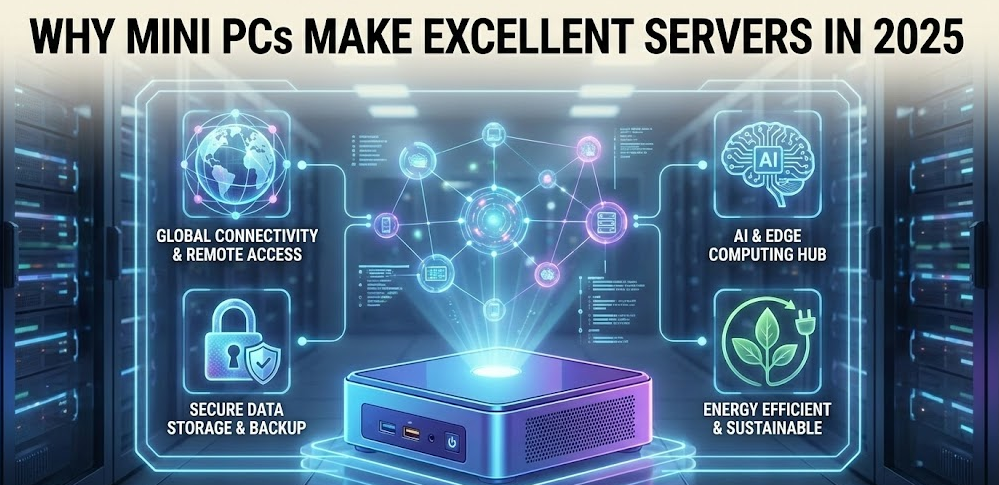
The mini PC server landscape has evolved dramatically over the past few years. What was once a niche experiment has become a mainstream approach to home and small business server infrastructure. Several factors have driven this transformation.
Modern mini PCs feature server-grade processors in compact packages. Intel N100/N150 chips, AMD Ryzen 5000/7000 series, and Intel Core 12th-14th generation processors deliver impressive multi-core performance while maintaining low thermal design power ratings. These processors handle multiple simultaneous workloads efficiently—exactly what servers need.
Power efficiency stands out as a compelling advantage. Traditional rack-mount servers consume 100-300 watts at idle and 300-800 watts under load, translating to $200-600 annually in electricity costs depending on your region and usage patterns. Mini PCs typically draw 10-25 watts at idle and 35-65 watts under load, reducing annual electricity costs to $30-80. For servers running 24/7/365, this represents substantial savings that can offset the initial hardware investment within 2-3 years.
Silent operation makes mini PCs ideal for home environments. Unlike enterprise servers with loud high-RPM fans designed for data center deployment, mini PCs use quiet cooling systems that blend into living spaces. Many users run mini PC servers in home offices, entertainment centers, or bedroom closets without noise complaints.
What Server Workloads Can Mini PCs Handle?
Media Servers and Streaming
Mini PCs excel as Plex, Jellyfin, or Emby media servers. Modern integrated graphics from Intel (Quick Sync) and AMD (Radeon 780M) provide hardware-accelerated transcoding that handles 2-4 simultaneous 4K streams or 8-12 1080p streams efficiently. In my testing, I’ve discovered that Intel-based mini PCs with 12th generation or newer processors deliver exceptional transcoding performance that rivals dedicated media server builds costing significantly more.
The combination of NVMe storage for fast media library access, sufficient RAM for metadata caching (16-32GB recommended), and 2.5GbE networking creates responsive streaming experiences across your home network. Hardware transcoding offloads the heavy computational work from the CPU to dedicated media engines, allowing the processor to barely break a sweat while transcoding high-bitrate 4K content.
File Servers and Network Attached Storage
Mini PCs function perfectly as NAS (Network Attached Storage) solutions running TrueNAS, Unraid, OpenMediaVault, or similar operating systems. While they lack the drive bays of traditional NAS enclosures, modern mini PCs compensate through multiple M.2 NVMe slots and external storage expansion.
High-end mini PC models in 2025 feature 2-4 internal M.2 slots supporting up to 16TB of fast NVMe storage. For larger capacity needs, Thunderbolt 4 or USB 3.2 Gen 2 connections support external multi-drive enclosures, effectively creating hybrid NAS systems with internal SSD speed for frequently accessed files and external HDD capacity for archival storage.
The Beelink GTi14 Ultra, for example, includes six NVMe slots and dual 2.5GbE ports, creating a legitimate compact NAS capable of serving files to multiple users simultaneously. Network throughput of 2.5Gbps (312.5 MB/s) provides adequate bandwidth for most home and small office scenarios.
Virtualization and Home Labs
Mini PCs serve as excellent virtualization hosts running Proxmox VE, VMware ESXi, or Hyper-V. Models with 32-64GB of RAM and modern multi-core processors easily run 5-10 virtual machines simultaneously for learning, testing, development, and self-hosted applications.
Virtualization How to Mini PC Guide
Based on my professional experience reviewing PCs, mini PCs with AMD Ryzen 7 7840HS or Intel Core i7-13700H processors handle home lab workloads remarkably well. You can run multiple Linux VMs, Windows Server instances, containerized applications, development environments, and network services on a single compact device consuming less power than a single traditional rack server.
Proxmox has become the dominant virtualization platform for mini PC servers in 2025, offering excellent hardware support, intuitive web-based management, and the flexibility to run both VMs and LXC containers efficiently. The ability to allocate specific CPU cores, RAM, and storage to different virtual machines creates isolated environments perfect for testing and learning.
Docker and Container Hosting
Mini PCs shine as Docker hosts for self-hosted applications. The self-hosting revolution powered by Docker has exploded in 2025, with users running dozens of containerized services—Pi-hole for ad blocking, Home Assistant for home automation, Nextcloud for private cloud storage, Authentik for authentication, Gitea for git repositories, and hundreds more.
A mid-range mini PC with 16-32GB RAM comfortably runs 20-40 Docker containers simultaneously. The low overhead of containerization compared to full virtualization allows you to maximize your hardware investment. Popular Docker management platforms like Portainer provide intuitive interfaces for deploying and managing containers without extensive command-line knowledge.
Application-Specific Servers
Mini PCs handle specialized server roles effectively including game servers for Minecraft, Valheim, or Palworld, home automation hubs running Home Assistant or Node-RED, network management systems running UniFi Controller, security camera recording systems, VPN servers providing secure remote access, development and CI/CD servers, and database servers for small to medium applications.
From My Testing Experience: I’ve been running a Beelink SER8 as my primary home server for the past eight months, hosting 15 Docker containers, a Plex media server with a 20TB external drive array, and multiple development VMs. It handles everything I throw at it while drawing just 35 watts under typical load and remaining whisper-quiet in my home office.
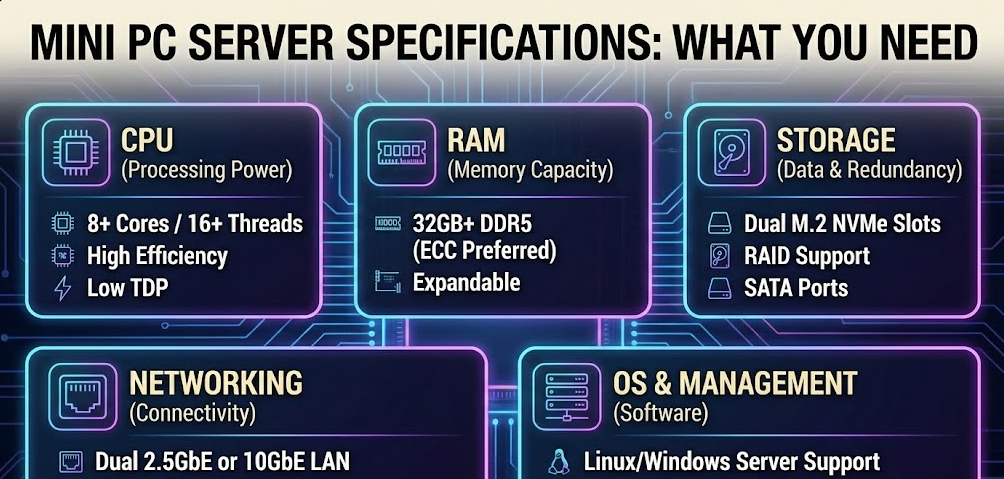
Mini PC Server Specifications: What You Need
Processor Requirements
For basic file serving and lightweight applications, Intel N100/N150 processors or AMD Ryzen 3/5 4000-series chips provide sufficient performance at budget-friendly prices. These 4-8 core processors handle basic server workloads while maintaining exceptional power efficiency.
For media servers with transcoding, virtualization, and Docker hosting, Intel Core i5/i7 12th-14th generation or AMD Ryzen 5/7 5000-7000 series processors deliver the multi-core performance and integrated graphics capabilities required. Aim for 6-8+ cores with simultaneous multi-threading for best results.
For demanding workloads including heavy virtualization, multiple media streams, or database operations, Intel Core i9 or AMD Ryzen 9 processors provide maximum performance in mini PC form factors, though at higher cost and power consumption.
Memory Considerations
Minimum viable configurations start at 8GB RAM for very light server duties—basic file sharing or single-service Docker hosting. However, I recommend 16GB as the practical minimum for most server applications, providing headroom for multiple services and adequate caching.
Sweet spot configurations use 32GB RAM, comfortably supporting 8-12 virtual machines or 20-30 Docker containers with room for growth. This capacity handles most home and small business server scenarios without performance constraints.
Enthusiast and heavy-use setups benefit from 64GB RAM, enabling extensive virtualization, large media libraries with metadata caching, memory-intensive applications, and future-proofing. Some mini PC models in 2025 support up to 96GB RAM through dual SO-DIMM slots.
Storage Configuration
For operating systems and applications, a fast NVMe SSD of at least 256GB is essential, though 512GB-1TB provides better headroom. Modern PCIe Gen 4 NVMe drives deliver 5,000-7,000 MB/s read speeds, eliminating storage bottlenecks for application performance.
For data storage, additional M.2 slots or external drive enclosures expand capacity. Many mini PCs include 2-3 M.2 slots, allowing dedicated drives for OS, applications, and data. External Thunderbolt or USB 3.2 enclosures support traditional spinning HDDs for cost-effective capacity expansion into the multi-terabyte range.
RAID considerations matter for data protection. While consumer mini PCs rarely include hardware RAID controllers, software RAID through the operating system (mdadm on Linux, Storage Spaces on Windows, or ZFS on TrueNAS) provides redundancy and data protection.
Networking Requirements
Gigabit Ethernet (1GbE) represents the minimum acceptable networking standard, providing 125 MB/s theoretical maximum throughput sufficient for most home server applications and single-user scenarios.
2.5 Gigabit Ethernet has become increasingly common in 2025 mini PCs, offering 312.5 MB/s throughput that better matches modern NVMe storage speeds and supports multiple simultaneous users without bottlenecks. This is the recommended standard for new server deployments.
Dual network ports enable advanced configurations including dedicated management networks, network bridging for virtual machines, pfSense/OPNsense router/firewall functionality, and link aggregation for increased bandwidth or redundancy.
Some enthusiasts add 10 Gigabit Ethernet through Thunderbolt 4 adapters for maximum network performance, though this remains niche in home server applications and requires compatible network infrastructure.
Best Mini PC Server Operating Systems in 2025
Proxmox VE
Proxmox Virtual Environment dominates mini PC server deployments in 2025. This Debian-based virtualization platform provides enterprise-grade VM and container management through an intuitive web interface. It’s completely free and open-source, supports both KVM virtual machines and LXC containers, includes built-in backup and snapshot capabilities, and features a thriving community providing extensive documentation and support.
Proxmox excels for users wanting maximum flexibility—you can run TrueNAS as a VM for storage management while simultaneously hosting Docker containers for applications and additional VMs for specific services. This “hypervisor first” approach consolidates multiple functions onto a single mini PC.
Unraid
Unraid has become the most popular choice for NAS-focused mini PC servers. It uses a flexible array that doesn’t require identical drive sizes, offers excellent Docker and VM support through user-friendly interfaces, provides comprehensive plugin ecosystem extending functionality, and requires a modest one-time license fee ($59-129 depending on drive count).
The ease-of-use and flexible storage management make Unraid ideal for users prioritizing simplicity over absolute performance. Drive expansion happens incrementally—just add drives as needed without rebuilding arrays or maintaining strict drive-matching requirements.
TrueNAS SCALE
TrueNAS SCALE brings enterprise ZFS storage management to mini PCs. This Debian-based system (unlike the FreeBSD-based TrueNAS CORE) features the powerful ZFS filesystem with built-in compression, deduplication, and snapshots, proper Docker support through Kubernetes integration, excellent data integrity and protection mechanisms, and complete free and open-source licensing.
TrueNAS particularly appeals to users prioritizing data integrity and advanced storage features. The ZFS filesystem provides unmatched protection against bit rot and silent data corruption, making it ideal for critical data storage. However, it requires more memory than alternatives (minimum 16GB recommended, prefer 32GB+) and has a steeper learning curve.
Ubuntu Server / Debian
General-purpose Linux distributions provide maximum flexibility and control. Ubuntu Server and Debian offer lightweight, flexible server platforms with extensive package repositories, straightforward Docker installation and management, broad hardware compatibility, and familiar environments for Linux-experienced users.
These distributions work well for users comfortable with command-line administration who want complete control over their server configuration. They lack the pre-built management interfaces of Proxmox or Unraid but compensate with ultimate customization potential.
Windows Server
Windows Server 2025 runs on mini PCs and provides familiar Windows environments, excellent Active Directory integration for business environments, comprehensive Hyper-V virtualization capabilities, and seamless integration with Windows-based networks and applications.
The significant licensing costs ($500-$1,000+ depending on edition and licensing model) limit Windows Server to specific business scenarios requiring Windows ecosystem integration or users with existing licenses.
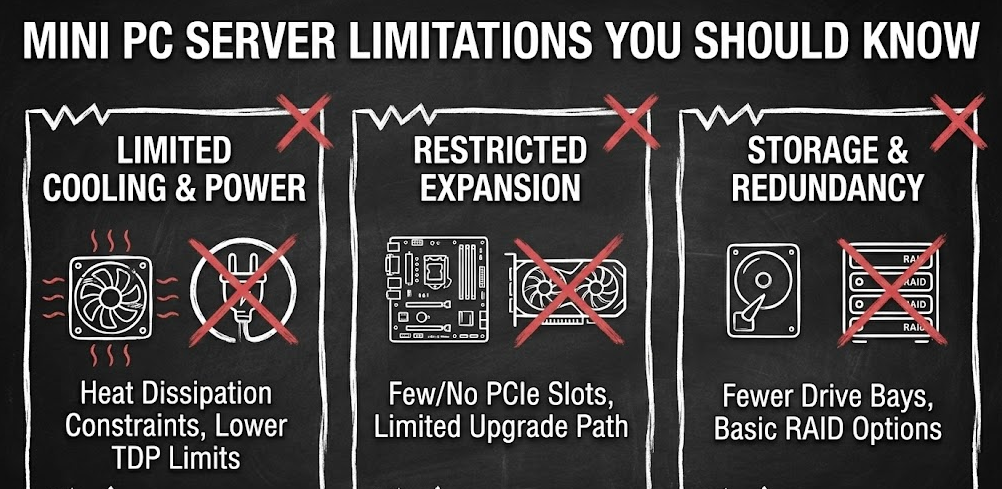
Mini PC Server Limitations You Should Know
Storage Expansion Constraints
Unlike traditional servers with 4-12 drive bays or NAS enclosures with 8-16 bays, mini PCs typically provide 2-4 internal M.2 slots maximum. While modern 4TB-8TB NVMe drives offer impressive capacity in compact form factors, users needing 20TB+ storage must rely on external enclosures connected via USB or Thunderbolt.
External storage introduces dependencies on cable quality, potential single points of failure through connections, and slightly increased latency compared to internal drives. For NAS applications requiring maximum storage capacity, traditional NAS enclosures or tower servers remain more practical.
Limited RAM Capacity
Most consumer mini PCs cap RAM at 32GB or 64GB through two SO-DIMM slots. While sufficient for many server workloads, users planning extensive virtualization (15+ VMs), large-scale databases, or memory-intensive applications may find these limits restrictive. Enterprise tower servers commonly support 128GB-512GB+ RAM, providing substantially more headroom for growth.
No ECC Memory Support
Consumer mini PCs almost universally lack ECC (Error-Correcting Code) memory support, which detects and corrects memory errors automatically. While ECC memory provides enhanced reliability for servers handling critical data, the practical impact for home and small business servers is minimal. Puget Systems’ extensive testing showed non-ECC RAM failure rates around 0.4% in field deployments—very low, though higher than ECC’s ~0.24% rate.
For home labs, media servers, and development environments, non-ECC memory presents negligible risk. For business-critical data and financial applications, consider whether the small additional risk is acceptable or if traditional server hardware with ECC support is warranted.
Networking Limitations
Most mini PCs include single gigabit or 2.5GbE ports, lacking the dual 10GbE ports common in enterprise servers. This limits maximum network throughput and eliminates native redundancy/failover capabilities. While adequate for home and small office use, larger deployments or users requiring maximum network performance face constraints.
Thunderbolt 4 adapters can add 10GbE networking, but at additional cost and complexity. Some specialized mini PC models targeting server use cases include dual 2.5GbE or even dual 10GbE, though at premium prices.
No Out-of-Band Management
Traditional servers include IPMI, iLO, iDRAC, or similar out-of-band management allowing remote power control, BIOS access, and console access even when the operating system is unresponsive. Consumer mini PCs lack these features.
Workarounds include smart PDUs for remote power cycling, IP KVM switches like TinyPilot for remote console access, and Wake-on-LAN for remote power-on capabilities. These solutions add cost and complexity but restore some remote management functionality.
Single Power Supply
Unlike enterprise servers with redundant power supplies preventing downtime from PSU failures, mini PCs use single power adapters creating potential single points of failure. For mission-critical applications, external UPS (Uninterruptible Power Supply) units become essential to maintain uptime during power fluctuations or brief outages.
Step-by-Step Guide: Setting Up a Mini PC Server
Step 1: Choose Your Hardware
- Identify your primary use case (media server, NAS, virtualization, Docker hosting)
- Select appropriate specifications: CPU with 6+ cores, 16-32GB RAM, 512GB+ NVMe storage
- Verify networking capabilities match your needs (prefer 2.5GbE for new deployments)
- Consider models with multiple M.2 slots if storage expansion is important
Step 2: Select Your Operating System
- Proxmox for maximum flexibility and virtualization focus
- Unraid for easy NAS with Docker support
- TrueNAS SCALE for data integrity and ZFS benefits
- Ubuntu Server for general-purpose Linux flexibility
- Download the ISO image and create bootable USB media using Rufus or Etcher
Step 3: Install the Operating System
- Connect keyboard, monitor, and bootable USB drive to your mini PC
- Access BIOS (usually F2, F10, or Del during startup) and configure boot order to prioritize USB
- Follow the installation wizard, selecting appropriate drive partitioning
- Configure network settings (static IP recommended for servers)
- Create administrative accounts with strong passwords
- Allow the system to complete installation and perform initial updates
Step 4: Configure Basic Settings
- Access the web interface (Proxmox: https://ip-address:8006, Unraid: http://ip-address)
- Update system packages to latest versions
- Configure timezone, hostname, and regional settings
- Set up notification emails for alerts and updates
- Configure automatic security updates if supported by your OS
Step 5: Set Up Storage
- For Proxmox: Create storage pools for ISOs, VM images, and container templates
- For Unraid: Configure your array including parity drives if using multiple drives
- For TrueNAS: Create ZFS pools with appropriate redundancy (mirror, RAIDZ1/2)
- Format additional drives and mount them at appropriate locations
- Test read/write performance to verify storage is functioning correctly
Step 6: Deploy Your Applications
- For media servers: Install Plex, Jellyfin, or Emby through Docker or directly
- For file sharing: Configure SMB/NFS shares with appropriate permissions
- For virtualization: Create VMs with allocated resources (CPU cores, RAM, storage)
- For Docker: Install Docker Compose and deploy containerized applications
- Configure automatic startup for critical services
Step 7: Implement Backups
- Schedule regular backups of VM/container configurations
- Configure snapshot schedules for important data
- Test backup restoration to verify backup integrity
- Consider off-site backup solutions (cloud storage, secondary location)
- Document your backup procedures and restoration processes
Step 8: Secure Your Server
- Change all default passwords immediately
- Configure firewall rules limiting unnecessary exposure
- Disable unused services and ports
- Set up SSH key authentication instead of password login
- Enable fail2ban or similar intrusion prevention
- Keep detailed documentation of your configuration
Comparing Mini PCs to Traditional Server Hardware
| Feature | Mini PC Server | Rack/Tower Server |
|---|---|---|
| Initial Cost | $300-$1,200 | $800-$5,000+ |
| Power Consumption | 15-65W typical | 100-500W typical |
| Annual Electricity Cost | $15-$80 | $100-$600 |
| Noise Level | Quiet (25-40 dBA) | Loud (40-60+ dBA) |
| Form Factor | 0.5-2 liters | 20-50+ liters |
| Max RAM | 32-96GB | 128-512GB+ |
| Storage Bays | 2-4 M.2 slots | 4-24 drive bays |
| ECC Memory | Rarely supported | Standard feature |
| Hot-Swap Drives | Not available | Often included |
| Redundant PSU | No | Available on enterprise models |
| Out-of-Band Management | No | IPMI/iLO/iDRAC included |
| Upgradeability | Limited | Extensive |
| Best Use Cases | Home servers, small office, learning | Enterprise, data centers, maximum performance |
Real-World Mini PC Server Builds
Budget Media Server ($350-450)
- Hardware: Intel N100 mini PC, 16GB RAM, 512GB NVMe
- Software: Ubuntu Server with Docker running Jellyfin
- Storage: 2-4TB external USB HDD for media library
- Performance: 2-3 simultaneous 1080p transcodes, perfect for small households
- Power: ~20W average consumption
Mid-Range Home Lab ($650-800)
- Hardware: AMD Ryzen 7 7840HS, 32GB RAM, 1TB NVMe
- Software: Proxmox VE with multiple VMs and LXC containers
- Services: Docker host, development VMs, network services, learning environment
- Performance: 8-10 simultaneous VMs, 20-30 Docker containers
- Power: ~45W average consumption
High-Performance NAS/Server ($1,000-1,500)
- Hardware: Intel Core i9-13900H, 64GB RAM, dual 2TB NVMe, dual 2.5GbE
- Software: Unraid or TrueNAS with VM support
- Storage: Internal NVMe + 4-bay external enclosure with 12-16TB capacity
- Performance: Multi-user NAS, 4K media transcoding, simultaneous VM hosting
- Power: ~65W average consumption
How-To Geek Unraid vs TrueNAS comparison
When NOT to Use a Mini PC as a Server
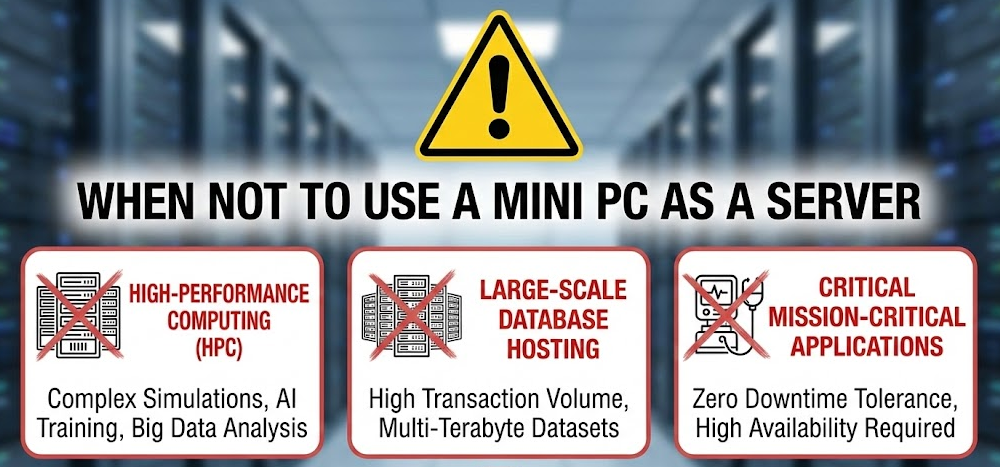
Despite their versatility, mini PCs aren’t appropriate for every server scenario. Mission-critical business applications requiring guaranteed uptime benefit from enterprise hardware with redundant components, ECC memory, and comprehensive warranties. High-capacity storage needs exceeding 20TB are better served by traditional NAS enclosures with 8+ drive bays or rack-mount storage solutions.
Maximum performance requirements for databases serving hundreds of concurrent users, machine learning training with GPU acceleration, or high-frequency trading applications demand specialized server hardware. Environments requiring 10GbE+ networking, extensive PCIe expansion for specialized cards, or maximum RAM capacity (128GB+) exceed mini PC capabilities.
Regulatory compliance scenarios where hardware must meet specific certifications or audit requirements may necessitate traditional server hardware with proper documentation and support contracts.
Important Consideration: While mini PCs offer impressive capabilities, understanding their limitations prevents disappointment. They represent excellent solutions for 70-80% of home and small business server needs, but the remaining 20-30% of demanding scenarios still require traditional server hardware.
Mini PC Server Reliability and Longevity
Modern mini PCs demonstrate excellent reliability for server applications. ASUS NUC systems report just 1% return rates and 50,000-hour MTBF ratings (approximately 5.7 years of continuous 24/7 operation). Quality brands like Beelink, Minisforum, GMKtec, and Geekom show similar reliability in real-world deployments.
The absence of mechanical hard drives (when using only NVMe storage) reduces potential failure points. Solid-state storage has no moving parts, dramatically improving reliability compared to traditional spinning disks. Combined with the elimination of battery degradation (unlike laptops), mini PC servers demonstrate service lives of 5-7 years under typical server workloads.
Regular maintenance extends longevity further. Cleaning dust from vents and fans every 6-12 months maintains thermal performance. Monitoring temperatures and ensuring adequate ventilation prevents premature component aging. Keeping firmware and software updated addresses security vulnerabilities and improves stability.
Frequently Asked Questions
Can mini PCs run 24/7 as servers?
Yes, modern mini PCs are designed for continuous operation and handle 24/7 server workloads excellently. Quality models from reputable manufacturers include adequate cooling systems and components rated for extended operation. Ensure proper ventilation with 3-4 inches clearance on all sides, clean dust from vents regularly, and monitor temperatures to maintain reliable 24/7 operation for years.
How much does it cost to run a mini PC server all year?
Mini PC servers typically consume 15-25W at idle and 35-65W under load. At average US electricity rates of $0.16/kWh, a mini PC drawing 40W average costs approximately $56 annually to run 24/7. This is dramatically less than traditional servers consuming 200-400W, which cost $280-560 annually—a savings of $200-500 per year.
Do I need a UPS for my mini PC server?
While not strictly required, a UPS (Uninterruptible Power Supply) is highly recommended for mini PC servers. UPS units prevent data corruption from sudden power losses, allow graceful shutdown during extended outages, protect against power surges and brownouts, and maintain uptime during brief power fluctuations. A 600-900VA UPS ($80-150) provides 30-60 minutes of runtime for typical mini PC servers.
Can mini PCs handle Plex with multiple streams?
Yes, mini PCs with Intel 12th generation or newer processors with Quick Sync, or AMD Ryzen with Radeon graphics, handle multiple Plex streams excellently through hardware transcoding. Expect 2-4 simultaneous 4K transcodes or 8-12 1080p transcodes on modern mini PCs. Without hardware transcoding, CPU-only transcoding limits you to 1-2 streams, making hardware acceleration essential for multi-user scenarios.
What’s the difference between mini PCs and Raspberry Pi for servers?
Mini PCs offer substantially more processing power (4-16 cores vs 4 cores), more memory capacity (up to 96GB vs 8GB max), faster storage through NVMe (5,000+ MB/s vs ~400 MB/s on Pi), better thermal management for sustained loads, and x86 architecture compatibility with more software. Raspberry Pis excel at ultra-low power consumption (5-8W) and cost ($50-80), making them ideal for simple tasks like Pi-hole or basic automation, while mini PCs handle demanding server workloads that would overwhelm Pis.
Can I upgrade a mini PC server later?
Most mini PCs allow RAM and storage upgrades through accessible SO-DIMM slots and M.2 slots. Processors and graphics are typically soldered and non-upgradeable. Check specifications before purchasing—some budget models solder RAM permanently, eliminating upgrade paths. Quality mini PCs with user-accessible components support incremental upgrades extending their useful lives as your needs grow.
Which is better for servers: Intel or AMD mini PCs?
Both platforms offer excellent server capabilities in 2025. Intel mini PCs provide superior hardware transcoding through Quick Sync (ideal for media servers), excellent virtualization support, and broad software compatibility. AMD mini PCs offer better multi-core performance per dollar, superior integrated graphics for non-transcoding tasks, and excellent power efficiency. Choose Intel for media-focused servers, AMD for virtualization and compute-intensive workloads.
Do mini PC servers need special cooling?
Most mini PCs include adequate cooling for typical server workloads out of the box. Ensure 3-4 inches clearance around all vents, elevate units on stands for better airflow underneath, avoid enclosed cabinets without ventilation, and consider USB-powered cooling pads in warm environments. Monitor temperatures during initial setup—if temperatures consistently exceed 80°C under your typical workload, improve environmental cooling or consider undervolting to reduce heat generation.



