Skip to content
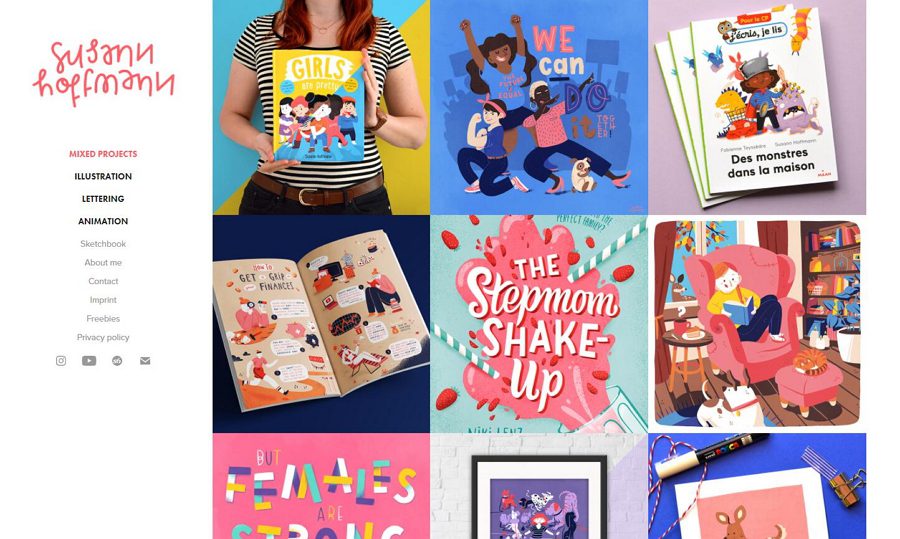
Building an effective artist website requires balancing visual presentation with discoverability and sales functionality. Squarespace remains the top choice for visual artists in 2026, offering stunning design templates built on the Fluid Engine, intuitive editors, and built-in eCommerce for $16-49/month, while WordPress provides superior SEO performance and unlimited customization for artists prioritizing Google visibility ($5-25/month hosting + $0-249 theme). The build process involves selecting a platform matching your technical comfort level, choosing portfolio-optimized templates, uploading 12-25 of your strongest works (protected with AI-safety tools like Glaze or Nightshade) organized by medium or theme, implementing SEO fundamentals including AI-generated alt text, and integrating sales tools if monetizing directly. Alternative platforms include Wix ($17-35/month) for drag-and-drop ease, Shopify ($39-399/month) for artists selling high volumes of prints or products, and specialized creative platforms like Portfoliobox (free-$13.95/month) or Format ($12-40/month) designed specifically for portfolios with built-in client proofing and galleries.
Choosing the Right Platform for Your Artist Website
Squarespace: Best for visual artists prioritizing design
Squarespace dominates artist portfolios for good reason—its professionally designed layouts built on the Fluid Engine showcase artwork beautifully without technical expertise. The platform’s visual editor allows complete customization of layouts, typography, and spacing while maintaining mobile responsiveness automatically.
Strengths: Stunning design system with Fluid Engine allowing drag-and-drop flexibility, all-in-one solution including hosting and domain, excellent image galleries with lightbox and slideshow options, integrated blogging and eCommerce, strong customer support.
Weaknesses: Less flexible than WordPress for advanced customization, moderate SEO capabilities compared to WordPress, monthly subscription required ($16-49/month), limited third-party app integrations.
Best for: Painters, illustrators, sculptors, mixed media artists, photographers who want beautiful presentation without technical complexity.
WordPress: Best for SEO and long-term growth
WordPress delivers the strongest SEO performance of any platform, crucial for artists building careers through organic search traffic. When collectors search “contemporary abstract painter [city]” or “ceramic artist near me,” WordPress sites consistently rank higher than alternatives.
The platform’s open architecture supports unlimited customization through thousands of themes and plugins. Want client login areas? Custom gallery layouts? Email marketing integration? Appointment booking? WordPress handles everything through its ecosystem.
Strengths: Superior SEO rankings driving organic traffic, unlimited customization flexibility, lowest long-term costs ($60-300/year after initial setup), vast theme and plugin selection, complete content ownership and portability.
Weaknesses: Steeper learning curve than drag-and-drop builders, requires separate hosting purchase, more time-intensive initial setup (4-8 hours vs 2-3 hours for Squarespace).
Best for: Artists treating art as a business, those prioritizing Google visibility, artists with technical skills or willing to learn, multi-disciplinary artists needing complex websites.
Wix: Best for ease of use and creative flexibility
Wix’s drag-and-drop editor provides ultimate design freedom without coding. Place elements anywhere, customize every detail, and see changes in real-time. The platform’s AI website builder can generate a complete portfolio in minutes based on your preferences.
Strengths: Extremely user-friendly interface, complete design freedom with drag-and-drop, 800+ templates including artist-specific designs, robust app marketplace for extending functionality, free plan available (with Wix branding).
Weaknesses: Weaker SEO performance than WordPress or Squarespace, cannot switch templates after choosing without rebuilding, slower page loading speeds affecting user experience.
Best for: Artists wanting maximum creative control over layouts, beginners uncomfortable with technical aspects, artists prioritizing quick setup over SEO.
Shopify: Best for artists selling high volumes
Shopify excels at eCommerce specifically. If your primary goal is selling prints, originals, merchandise, or commissions rather than portfolio presentation, Shopify’s robust sales tools justify the higher cost.
Strengths: Most powerful eCommerce features (inventory management, abandoned cart recovery, multi-channel sales), POS integration for in-person sales at galleries or markets, extensive sales analytics, global payment processing.
Weaknesses: Higher monthly cost ($39-399/month), primarily sales-focused rather than portfolio-focused, overkill for artists not actively selling, steeper learning curve for advanced features.
Best for: Artists generating significant income through online sales, print-on-demand businesses, artists selling at physical markets alongside online, galleries representing multiple artists.
Specialized platforms: Portfoliobox, Format, Cargo
Platforms built specifically for creative portfolios offer middle ground between ease and power:
- Portfoliobox (free-$13.95/month): Hundreds of customizable templates, gallery-focused tools, CV templates, integrated appointment booking, invoicing for commissions. Best for emerging artists on tight budgets.
- Format ($12-40/month): Premium design templates favored by editorial and fashion artists, client proofing galleries, strong portfolio presentation, integrated eCommerce. Best for high-end commercial artists.
- Cargo ($13-26/month): Minimalist design aesthetic, ultra-customizable layouts, no templates (blank canvas approach), favored by conceptual and digital artists. Best for artists with specific design visions.
Pro Tip: “Before committing to any platform, build a free trial or demo account on your top 2-3 choices and upload 5-10 actual artworks. Test the user experience from visitor perspective: How quickly do pages load? How does the gallery function on mobile? Does the navigation make sense? Many platforms look great in marketing materials but frustrate in actual use. Spending 2 hours testing prevents committing to a year-long subscription for a platform that doesn’t suit your workflow.”
Platform Comparison for Artist Websites
| Platform | Monthly Cost | SEO Power | Design Flexibility | eCommerce | Learning Curve |
|---|---|---|---|---|---|
| Squarespace | $16-49 | Good | High | Built-in | Easy |
| WordPress | $5-25 (hosting) | Excellent | Unlimited | Via plugins | Moderate |
| Wix | $17-35 | Fair | Very High | Built-in | Very Easy |
| Shopify | $39-399 | Good | Moderate | Excellent | Moderate |
| Portfoliobox | Free-$13.95 | Fair | Moderate | Built-in | Easy |
| Format | $12-40 | Good | High | Built-in | Easy |
| Cargo | $13-26 | Fair | Very High | Limited | Moderate |
WordPress wins for artists treating art as a business and prioritizing SEO. Squarespace wins for artists wanting stunning design without technical complexity. Shopify wins for sales-focused artists.
Step-by-Step: Building Your Artist Website on WordPress

Step 1: Choose WordPress hosting and domain
Select managed WordPress hosting optimized for performance:
- Budget: Hostinger ($5-10/month) – Fast, beginner-friendly, includes free domain
- Mid-range: Bluehost ($10-15/month) – WordPress.org recommended, good support
- Premium: SiteGround ($15-25/month) – Superior speed and security
Choose a domain name: yourname.com (personal brand) or yourartstudio.com (business focus). Avoid hyphens, numbers, or confusing spellings.
Step 2: Install a WordPress theme for artists
Navigate to Appearance → Themes → Add New in WordPress dashboard.
Top free WordPress themes for artists (2026):
- OceanWP: Multipurpose with portfolio demos, gallery layouts, WooCommerce compatible
- Sydney: Fullscreen homepage options, parallax scrolling, portfolio sections
- Neve: Lightweight and fast-loading, works with Elementor page builder
- Zakra: Modern minimalist design, portfolio templates, mobile-optimized
Top premium WordPress themes for artists (2026):
- Divi ($89/year theme-only or $249 lifetime): Visual drag-and-drop builder, unlimited layouts, massive customization. The $249 lifetime plan offers best long-term value.
- Indigo ($69 one-time): Modular design, beautiful portfolio layouts, artist-specific features
- Ozark ($59 one-time): Minimalist aesthetic showcasing artwork, simple setup
- Billey ($79 one-time): Creative portfolio focus, parallax effects, modern animations
Install and activate your chosen theme. Import demo content if available, then customize with your branding, colors, and content.
Step 3: Add essential plugins for artists
WordPress extends functionality through plugins:
Gallery and portfolio plugins:
- Envira Gallery ($99.50/year): Responsive galleries, lightbox, watermarking, social sharing
- Modula ($39-199/year): Speed-optimized, custom layouts, hover effects, EXIF data
- NextGEN Gallery (free/$99+/year): Comprehensive features, slideshows, albums
SEO plugins:
- Rank Math (free/$59+/year): Complete SEO toolkit, schema markup, keyword tracking
- Yoast SEO (free/$99/year): Industry standard, content analysis, XML sitemaps
- AI-powered alt text: Use ChatGPT Vision or Claude to analyze artwork images and generate descriptive, SEO-optimized alt text automatically instead of writing manually for hundreds of images
eCommerce plugins (if selling):
- WooCommerce (free): Full eCommerce platform for selling originals, prints, or digital downloads
- Easy Digital Downloads (free/$99+/year): Specialized for digital art sales
Performance plugins:
- WP Rocket ($59-299/year): Caching, lazy loading, speed optimization
- ShortPixel (free/100 images monthly, $4.99+/month): Image compression
Contact form:
- WPForms (free/$49.50+/year): Contact forms, commission inquiry forms, payment integration
Install via Plugins → Add New, search by name, install, and activate.
Step 4: Curate your portfolio strategically
How many artworks to include: 12-25 pieces for general portfolios; 20-40 for established artists with diverse bodies of work; 8-15 per series/medium for multi-disciplinary artists organizing by category.
Selection criteria:
- Technical mastery: Work demonstrating your highest skill level
- Conceptual strength: Pieces with clear artistic vision and meaning
- Style consistency: Cohesive aesthetic showing recognizable voice
- Recent work: Primarily last 1-3 years unless older work is significantly stronger
What to exclude:
- Student work or early experiments (unless applying to schools showing growth)
- Derivative work too similar to famous artists
- Unfinished pieces or studies
- Work you’re no longer proud of or that doesn’t represent current direction
Organization approaches:
- By medium: Paintings, Sculptures, Drawings, Mixed Media
- By theme: Landscapes, Portraits, Abstract, Still Life
- By series: Chronological bodies of work exploring unified concepts
- By size/format: Large-scale installations, small works, commissions
Clear organization helps visitors navigate and understand your artistic practice.
Step 5: Photograph and protect your artwork
Online portfolios live or die by image quality. Poor photos undermine even exceptional art.
Equipment needed:
- DSLR or mirrorless camera (smartphone acceptable if high-quality, well-lit)
- Tripod for stability
- Neutral backdrop (white, grey, or black seamless paper/foam board)
- Even lighting (natural indirect light or photography lights)
- Grey card for color accuracy
Photography guidelines:
- Shoot in RAW format for maximum editing flexibility
- Keep camera perfectly parallel to artwork to avoid distortion
- Use gridlines to align edges precisely
- Capture in consistent lighting conditions for color accuracy
- Leave small border around artwork for cropping flexibility
- Take reference shots with color checker for editing accuracy
Editing requirements:
- Correct white balance for accurate colors
- Crop precisely to artwork edges
- Adjust exposure and contrast for screen viewing
- Export at 2000-3000px on longest edge for web display
- Compress to 200-500KB file sizes (balance quality and loading speed)
- Save in sRGB color space for web compatibility
Protecting your work from AI (2026 standard practice): Before uploading web-resolution images to your website, run them through Glaze (free, developed by University of Chicago) or Nightshade (also free) to protect against AI style mimicry. These tools subtly alter pixel data in ways invisible to human eyes but prevent AI models from accurately learning and replicating your artistic style. This has become standard practice in 2026 as visual artists respond to unauthorized AI training on their work. Export protected images and upload those to your website instead of unprotected originals.
Professional photography is non-negotiable for serious artist websites. Consider hiring a professional art photographer for initial portfolio if photography isn’t your strength.
Step 6: Create essential website pages
Homepage: Feature your strongest 3-6 artworks in a slider or grid, brief introduction (1-2 sentences), clear navigation to portfolio and about sections. Let artwork dominate—avoid clutter.
Portfolio/Gallery page: Organized galleries by medium, theme, or series. Include piece titles, dimensions, medium, and year. Optional: prices, availability status, detailed descriptions.
About page: Artist statement (100-200 words on your artistic practice and vision), biography (education, exhibitions, awards, publications), professional photo of yourself, contact information or link to contact page.
Artist Statement tips:
- Explain your creative process and conceptual interests
- Describe themes, materials, or techniques central to your work
- Write in first person, present tense
- Avoid overly academic jargon—be authentic
- 100-200 words maximum for website (longer statements for grant applications)
- 2026 workflow: Use ChatGPT Vision or Claude to analyze 3-5 representative artworks, describe your process, and ask the AI to generate draft artist statement language. Edit for authenticity and voice, but AI tools dramatically speed up generating the “art speak” many artists struggle with.
CV/Resume page (optional but recommended for professional artists): Education, solo exhibitions, group exhibitions, awards and grants, publications and press, collections (where your work resides), artist residencies.
Contact page: Contact form, email address, social media links (Instagram for reach, Cara for community protection), optional phone number, studio location if accepting visitors.
Note on social platforms (2026): Many visual artists now prioritize Cara (the anti-AI platform built specifically for artists) as their primary portfolio social link due to better image protection and artist-friendly policies. Instagram remains valuable for reach, but the artist community increasingly migrates to Cara to avoid AI scraping of their work for model training.
Blog page (highly recommended for SEO): Write about your creative process, studio updates, exhibition announcements, art world topics. Blogging improves SEO significantly and builds audience connection.
Shop page (if selling): Product listings for originals, limited edition prints, merchandise. Integrate WooCommerce or link to external platforms like Etsy or Saatchi Art.
Step 7: Optimize for SEO
Search engine optimization helps collectors, curators, and galleries discover your work organically.
Image SEO:
- Use descriptive filenames before uploading (abstract-oil-painting-blue-red.jpg not IMG_4782.jpg)
- Add detailed alt text to every image using AI assistance: Upload artwork images to ChatGPT Vision or Claude and ask “Generate SEO-optimized alt text for this artwork including medium, style, colors, and composition. “Example output: “Large abstract oil painting with bold blue and red brushstrokes, 48×36 inches“
- Compress images to 200-500KB for fast loading
- Include artwork title, medium, dimensions in captions
Keyword research and implementation:
- Research keywords collectors might use: “[medium] artist [city]”, “buy [style] art online”, “contemporary [subject] paintings”
- Target one primary keyword per page
- Include keywords naturally in page titles, headings, first paragraph, image alt text
- Example: “Contemporary Abstract Painter in Brooklyn | [Your Name]”
Technical SEO:
- Install Rank Math or Yoast SEO plugin
- Create XML sitemap (auto-generated by SEO plugins)
- Submit sitemap to Google Search Console
- Ensure mobile responsiveness (60%+ of traffic comes from phones)
- Improve site speed with caching and image optimization
- Create clean URL structure (/portfolio/paintings not /page?id=473)
Content SEO:
- Blog regularly about creative process, exhibitions, art topics (2-4 posts monthly)
- Write 300-500 word minimum per blog post
- Link internally between related pages and artworks
- Earn backlinks from galleries, art blogs, press features, directories
Step 8: Integrate eCommerce (if selling directly)
For selling original artwork:
- Use WooCommerce with product pages for each piece
- Include high-quality images from multiple angles
- List dimensions, medium, year, framing status, shipping details
- Set pricing competitively based on size, medium, your exhibition record
- Offer secure payment processing (Stripe, PayPal)
- Calculate shipping carefully (original art shipping is expensive)
For selling prints:
- Use print-on-demand services (Printful, Printify) that integrate with WooCommerce
- No inventory management—prints produced when ordered
- Offer multiple sizes and formats (framed, unframed, canvas, metal)
- Typical pricing: 40-60% markup over production/shipping costs
For digital downloads:
- Use Easy Digital Downloads plugin
- Sell high-resolution digital files, wallpapers, coloring pages
- Instant delivery after purchase
- Lower price points ($5-25 typical for digital art)
Alternative: Link to external sales platforms:
- Etsy (handmade/craft focus, $0.20 listing fee + 6.5% transaction fee)
- Saatchi Art (curated contemporary art, 40% commission)
- Society6 (prints and products, 10% artist commission)
- Redbubble (print-on-demand merchandise, 10-20% commission)
Many artists maintain portfolios on their own websites while selling through established marketplaces with built-in traffic.
Building an Artist Website on Squarespace (Simplified Approach)
Step 1: Sign up and choose a starting layout
Visit squarespace.com, start a free trial, and understand the current system:
Understanding Squarespace 7.1 & Fluid Engine: Unlike the older Squarespace 7.0 system with specific templates (Bedford, Skye, Ortega, Maru), Squarespace now uses a single flexible Fluid Engine system. All templates share the same features—the “template” is just a starting layout that you can completely customize.
Choose a starting layout from the “Art & Design” category:
- Reseda: Masonry grid layout ideal for varied artwork sizes
- Noll: Full-screen image focus perfect for large-scale work
- Sactown: Clean portfolio grid with strong typography
- Alameda: Story-driven layout integrating text and imagery
The key advantage of Fluid Engine: you can drag-and-drop elements anywhere on the page, resize images precisely, and customize layouts far beyond what the starting template suggests. You’re not locked into any structure.
Step 2: Customize design
Use Squarespace’s visual editor to:
- Upload your logo or customize site title with your name
- Adjust color palette to complement artwork (neutral backgrounds work best)
- Select typography that’s readable and professional
- Configure homepage layout using Fluid Engine (hero images, grid, slideshow)
- Set navigation structure (Portfolio, About, Contact, Shop)
Step 3: Add portfolio content
Create gallery pages for each category:
- Click Pages → Add Page → Gallery
- Upload images (drag-and-drop interface)
- Choose gallery style (grid, slideshow, carousel, stacked)
- Add titles, descriptions, and metadata to each image
- Organize into albums or series if needed
Squarespace automatically optimizes images for web and mobile display.
Step 4: Write essential pages
Use Squarespace’s page templates for About, Contact, and additional content pages. The platform includes built-in contact forms, map integration, and social media linking.
For artist statements, use AI assistance: Upload 3-5 representative artworks to ChatGPT Vision or Claude, describe your process briefly, and ask for draft artist statement language. Edit for authenticity.
Step 5: Set up eCommerce (optional)
Enable Commerce in Settings, add products, configure payment processors (Stripe, PayPal, Apple Pay), set tax rates and shipping options. Squarespace handles inventory management, order processing, and customer communications.
Step 6: Configure SEO settings
For each page:
- Edit SEO title and description
- Add descriptive alt text to images (use AI tools for efficiency)
- Create clean URL slugs
- Enable SSL certificate (automatic with Squarespace)
- Submit sitemap to Google Search Console
Step 7: Launch and promote
Remove password protection, connect custom domain, and publish. Squarespace includes built-in analytics to track visitor behavior.
Selling Your Art Online: Platform Options

Beyond your own website, consider selling through established marketplaces:
Saatchi Art: Curated contemporary art platform with 90,000+ artists. 40% commission. Best for emerging and mid-career contemporary artists seeking collector audience. Application required.
Artfinder: Global marketplace for independent artists. 40-45% commission. Free to join. Strong for European artists and collectors.
Etsy: Handmade and art marketplace. $0.20/listing + 6.5% transaction fee + 3% payment processing. Best for prints, craft-oriented work, accessible price points ($50-500).
Society6: Print-on-demand for art on products (prints, phone cases, pillows). No upfront costs, 10% commission on default pricing (artists can set markup). Passive income with no inventory.
Redbubble: Similar to Society6, print-on-demand merchandise. Free to use, 10-20% commission. Good for graphic artists and illustrators.
UGallery: Curated original art only. $5 application fee + 50% commission. Selective (acceptance rate ~10%). Best for established artists with exhibition records.
Fine Art America: Open marketplace for prints and products. No fees to join, artists set markup, commission-free above base pricing. Good for photographers and digital artists.
Most successful artists use a multi-channel approach: own website as portfolio hub + 1-2 marketplaces for sales reach.
Common Artist Website Mistakes to Avoid
Mistake 1: Too many artworks diluting quality
Showing 50+ pieces weakens portfolios. Curators and collectors judge by your weakest work. A tight 15-piece portfolio of exceptional work beats 50 mixed-quality pieces every time.
Mistake 2: Poor quality images
Blurry, poorly lit, or color-inaccurate photos destroy credibility. Invest in proper photography or hire a professional. Your website is often the first impression—make it count.
Mistake 3: Uploading unprotected images in 2026
Failing to use Glaze or Nightshade before uploading allows AI models to scrape and learn your style without permission. Protect your intellectual property with these free tools—it takes 5 minutes per batch.
Mistake 4: Overly complex navigation
Visitors should reach your portfolio in 1-2 clicks. Avoid nested menus, confusing categories, or excessive pages. Simplicity wins.
Mistake 5: Neglecting mobile optimization
60%+ of traffic comes from phones. If your site breaks on mobile, loads slowly, or requires pinching/zooming, you’re losing most potential collectors. Test exhaustively on phones and tablets.
Mistake 6: Missing or weak artist statement
“I’m passionate about art” says nothing. Use AI tools to help generate professional art language, then edit for your authentic voice. Specificity about your practice, materials, and concepts matters.
Mistake 7: No social media links or outdated platform choices
In 2026, prioritize Cara alongside or instead of Instagram for protecting your work from AI scraping. The artist community has shifted significantly toward Cara for portfolio sharing.
Mistake 8: Outdated portfolio
Showing work from 5+ years ago when your style has evolved confuses visitors about your current practice. Update portfolios every 6-12 months, removing older work as you create stronger pieces.
FAQ: Artist Websites
Do I need a website if I have Instagram and Cara?
Yes. Social platforms limit reach through algorithms and you don’t own your audience (platforms can delete accounts). Websites establish professional credibility, improve Google visibility, and give you complete control. Use Instagram and Cara to drive traffic to your website, not replace it.
What is Glaze/Nightshade and why should I use it?
Glaze and Nightshade are free tools developed to protect artists from AI style mimicry. They add imperceptible changes to image pixels that prevent AI models from accurately learning your artistic style. In 2026, this is standard practice as artists respond to unauthorized AI training. Download from University of Chicago’s SAND Lab.
Should I use AI to write my artist statement?
Use AI (ChatGPT Vision, Claude) to generate draft language and overcome “art speak” barriers, but always edit heavily for authenticity. AI helps articulate concepts in professional language; you provide the authentic voice and specific details about your practice. Never use AI-generated text without personalization.
How much should I charge for my art?
Pricing formula: (Materials cost + hourly rate × hours worked) × 2 for wholesale, × 3-4 for retail. Compare similar artists’ pricing in your region and exhibition level. Galleries typically take 40-50% commission, factor this into pricing. Consistency matters—don’t drastically change prices based on buyer.
Should I show prices on my website?
Pros: Transparency builds trust, filters unqualified buyers, saves time on inquiries. Cons: Might discourage price-flexible collectors, reduces negotiation room, some high-end galleries prefer price-on-request. Consider showing price ranges (“Starting at $500”) or “Inquire for pricing” depending on your market positioning.
How often should I update my portfolio?
Review quarterly, update when you complete work significantly better than what’s currently shown. Remove older pieces that no longer represent your skill level. Active updates signal to visitors and Google that you’re currently creating.
Should Instagram or Cara be my primary platform?
In 2026, many artists prioritize Cara for portfolio sharing due to AI protection policies. Use Instagram for broader reach and discovery, Cara for community and portfolio protection. Maintain both and link from your website.
How do I drive traffic to my website?
SEO optimization, social media linking (Instagram bio, Cara profile, posts), email signature, business cards, exhibition materials, artist directories (Artsy, Artwork Archive), press features, gallery websites, blog content marketing. Consistent work across channels compounds over time.
The Bottom Line: Invest in Your Online Presence
Your website is your digital studio—the primary space where collectors, curators, and galleries experience your work. Squarespace offers the fastest path to a beautiful portfolio with its Fluid Engine system for artists prioritizing aesthetics over technical control, while WordPress delivers superior long-term value through SEO performance and unlimited growth potential for artists building professional careers.
The platform matters less than execution. A thoughtfully curated 15-piece portfolio with exceptional photography, AI protection (Glaze/Nightshade), clear navigation, and mobile optimization on any platform outperforms a 50-piece portfolio with poor images and confusing organization on the “best” platform. Start with ruthless curation—only include work you’re genuinely proud of and that represents your current artistic direction.
Professional photography and AI protection are non-negotiable in 2026. Blurry phone photos undermine exceptional art, and unprotected images allow AI models to learn your style without permission. Invest in learning photography basics or hiring a professional art photographer, and spend the 5-10 minutes per batch running images through Glaze before uploading.
The 2026 workflow improvements—AI assistance for artist statements and alt text generation, AI protection tools, and artist-friendly platforms like Cara—make professional portfolio building more accessible than ever while protecting your intellectual property. Leverage these tools strategically: AI helps overcome technical barriers (writing, SEO), but your authentic artistic voice and protected imagery remain central to building a successful online presence.
For artists selling online, a multi-channel approach works best: maintain your website as your portfolio hub and professional presence while selling through 1-2 established marketplaces (Saatchi Art, Etsy, Society6) that provide built-in traffic. Your website establishes credibility and captures search traffic; marketplaces provide immediate access to collector audiences.