Skip to content

Choosing a web hosting service comes down to four decisions made in the right order: what type of site you are building, how much traffic you expect, how technical you are comfortable being, and what your honest budget is including renewal pricing (not just the introductory rate). The hosting type you need flows from those four answers. Most personal sites and small businesses start on shared hosting. Growing sites move to VPS or cloud. Stores with serious traffic need managed hosting or dedicated servers. This guide walks through every hosting type, every critical factor, pricing realities, red flags to avoid, and a provider comparison — so you make the right decision with full information.
Step 1: Know What You’re Actually Building
Before looking at a single hosting plan, get clear on your site’s category. The type of site you are building determines which features matter and which hosting tier you actually need.
| Site Type | Description | Starting Tier |
|---|---|---|
| Personal blog or portfolio | Low traffic, simple content, occasional updates | Shared hosting |
| Small business website | Contact forms, service pages, moderate traffic | Shared or managed WordPress |
| E-commerce store | Product pages, payments, inventory, checkout | Managed WordPress / VPS |
| News or content site | High volume of content, regular traffic spikes | VPS or cloud |
| SaaS application | Custom code, databases, API, unpredictable load | Cloud or VPS (unmanaged) |
| Large enterprise site | Thousands of daily transactions, strict security | Dedicated or managed cloud |
| Agency or developer | Multiple client sites under one account | Reseller or cloud |
As Elementor’s 2025 web hosting guide emphasizes, knowing your site category before shopping prevents the two most common mistakes: overspending on resources you do not need and underspending on resources you do.
Step 2: Understand Every Hosting Type

What it is: Your website shares a physical server with dozens to hundreds of other websites. All sites on that server draw from the same pool of CPU, RAM, and storage.
Best for: New websites, personal blogs, small business brochure sites, portfolio sites with under 10,000 monthly visitors.
Strengths: Cheapest entry price (typically $1.99 to $7.99/month introductory), no server management required, includes cPanel or a proprietary dashboard, one-click WordPress install, beginner-friendly.
Weaknesses: Performance is affected by neighboring sites (“noisy neighbor” effect). Resources are capped and shared. Not suitable for sustained high traffic or resource-intensive applications. Limited or no ability to install custom software.
Upgrade trigger: When your site reaches 10,000 to 30,000 monthly visitors consistently, or when you notice regular slowdowns during traffic peaks.
VPS Hosting (Virtual Private Server)
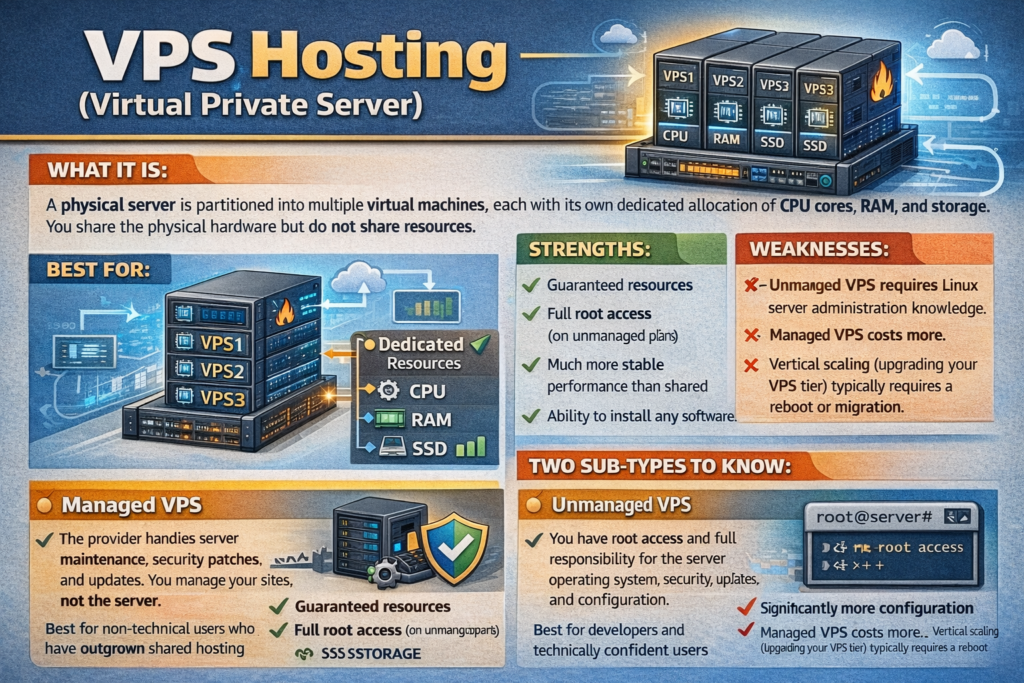
What it is: A physical server is partitioned into multiple virtual machines, each with its own dedicated allocation of CPU cores, RAM, and storage. You share the physical hardware but do not share resources.
Best for: Growing sites between 10,000 and 100,000 monthly visitors, developers who need custom software or root access, e-commerce stores that have outgrown shared hosting, any site that needs consistent performance regardless of what other users on the server are doing.
Strengths: Guaranteed resources, full root access (on unmanaged plans), much more stable performance than shared, ability to install any software, significantly more configuration flexibility.
Weaknesses: Unmanaged VPS requires Linux server administration knowledge. Managed VPS costs more. Vertical scaling (upgrading your VPS tier) typically requires a reboot or migration.
Two sub-types to know:
- Managed VPS: The provider handles server maintenance, security patches, and updates. You manage your sites, not the server. Best for non-technical users who have outgrown shared hosting
- Unmanaged VPS: You have root access and full responsibility for the server operating system, security, updates, and configuration. Best for developers and technically confident users
Dedicated Hosting
What it is: You rent an entire physical server exclusively for your website. No resource sharing of any kind.
Best for: Enterprise websites, high-traffic e-commerce stores processing thousands of daily transactions, applications with strict data isolation or compliance requirements, sites exceeding 100,000 monthly visitors.
Strengths: Maximum performance, complete resource isolation, highest security baseline, full hardware control.
Weaknesses: Most expensive option ($80 to $500+/month). Requires server administration expertise or a managed plan. Overkill for the vast majority of websites. Scaling requires physical hardware changes or migration.
Cloud Hosting
What it is: Your website runs across a distributed network of servers rather than a single machine. Resources scale dynamically based on demand.
Best for: Websites with unpredictable or spiky traffic, SaaS applications requiring high availability, global sites needing multi-region deployment, startups expecting rapid growth.
Strengths: Scales automatically, high redundancy (if one server fails, others compensate), pay-as-you-go pricing models with providers like AWS, Google Cloud, and DigitalOcean, excellent global performance through multi-region deployment.
Weaknesses: Pay-as-you-go pricing can produce unexpected bills if traffic spikes. Requires more technical setup on raw cloud platforms. Managed cloud layers (Cloudways, etc.) simplify this but add cost.
Key distinction: There are two cloud hosting tiers:
- Raw cloud platforms (AWS, Google Cloud, DigitalOcean, Vultr, Linode): Maximum flexibility and power, but require technical setup and management. Built for developers and DevOps teams
- Managed cloud platforms (Cloudways, Kinsta, WP Engine): A management layer on top of raw cloud infrastructure, giving you cloud performance with a user-friendly interface. Best for non-technical users who need cloud-level performance
Managed WordPress Hosting
What it is: Hosting specifically optimized for WordPress, where the provider handles WordPress core updates, plugin updates, security scanning, daily backups, staging environments, and performance optimization automatically.
Best for: WordPress sites of any size where the owner wants to focus on content rather than server management. Particularly valuable for e-commerce WooCommerce stores and high-traffic WordPress sites.
Strengths: WordPress-specific performance tuning, automatic updates and backups, built-in staging environments, WordPress-expert support teams, one-click restores.
Weaknesses: More expensive than generic shared hosting ($20 to $70+/month for serious plans). Usually restricts you to WordPress only. Some providers restrict certain plugins for security or compatibility reasons.
Leading providers in 2026: Kinsta, WP Engine, Elementor Hosting, Flywheel, Pressable
Reseller Hosting
What it is: You purchase hosting resources in bulk and resell them to your own clients under your own brand.
Best for: Web designers, developers, and digital agencies managing multiple client websites who want to consolidate billing and support under one account.
Strengths: Consolidated billing, white-label branding options, easy client management through WHM (Web Host Manager), often cheaper per site than buying individual plans.
Weaknesses: You become first-line support for your clients. Not appropriate for individual site owners.
Step 3: The 10 Factors That Actually Determine Hosting Quality
Factor 1: Uptime — The Non-Negotiable Baseline
Uptime is the percentage of time your website is accessible to visitors. The industry standard you should demand is 99.9% or higher. As TD Web Services’ 2025 hosting checklist notes, the gold standard is 99.99%, which translates to less than 5 minutes of downtime per month. Every 0.1% of downtime below 99.9% equals roughly 8.7 hours of inaccessibility per year. For a business website, that directly means lost revenue and damaged credibility.
What uptime percentages mean in real time:
| Uptime % | Downtime Per Year | Downtime Per Month |
|---|---|---|
| 99.99% | 52 minutes | 4.4 minutes |
| 99.9% | 8.7 hours | 43.8 minutes |
| 99.5% | 43.8 hours | 3.65 hours |
| 99% | 87.6 hours | 7.3 hours |
Always look for independent third-party uptime monitoring data, not just the provider’s own claimed percentage. Tools like UptimeRobot reports published in independent reviews are more reliable than marketing copy.
Factor 2: Speed — What the Numbers Mean for Your Site
Page speed directly affects user experience, search engine rankings, and conversion rates. Google uses Core Web Vitals as a ranking signal, and slow hosting is one of the most common reasons for poor Core Web Vitals scores.
The key speed metric to look for in hosting reviews is Time to First Byte (TTFB) — the time between a browser requesting a page and receiving the first byte of data from the server. According to tested real-world data published in 2025:
| Host | TTFB | US/EU Load Time | Uptime |
|---|---|---|---|
| SiteGround | ~400ms | Under 1s / 1.1-1.5s | 99.996% |
| Hostinger | ~400ms | 0.8-1.1s / 1.1s | 99.97-99.99% |
| Bluehost | 400-500ms | 1.25s / 1.67s | 99.98% |
| GreenGeeks | ~400ms | 1.2-1.6s / 1.8-2.2s | 99.96-99.99% |
| DreamHost | 450-530ms | 1.4-1.8s / 1.8-2.3s | 99.96-99.97% |
Technologies to look for that signal fast hosting:
- NVMe SSD storage (faster than standard SSD for random read/write operations)
- LiteSpeed web server (significantly faster than Apache for WordPress)
- HTTP/3 support (improved connection efficiency)
- Built-in CDN (content delivery network delivers assets from servers geographically close to the visitor)
- Server-side caching (reduces PHP and database processing on each request)
Factor 3: Server Location
The physical location of the server matters significantly for latency. A visitor loading your site from Sydney, Australia on a server in New York will experience noticeably higher load times than a visitor in New York.
What to do: Choose a host with a data center in the same geographic region as the majority of your visitors. If your audience is global, look for hosts that offer CDN integration or multiple data center locations.
Most major hosts offer server locations in the US, UK/Europe, Singapore/Asia-Pacific, and Australia at minimum. Hosts with wider geographic coverage give you more flexibility as your audience grows.
Factor 4: Security Features
Security is not an add-on — it is a baseline requirement. At minimum, every hosting plan in 2026 should include:
- Free SSL certificate: HTTPS is mandatory for Google ranking and browser trust indicators. Any host charging extra for SSL in 2026 is charging for something that should be standard
- Automatic daily backups: With at minimum 7-day retention, ideally 30 days
- Malware scanning: Active scanning, not just reactive cleanup
- DDoS protection: Especially important for e-commerce and any site with public traffic
- Web Application Firewall (WAF): Filters malicious requests before they reach your site
- Two-factor authentication on your hosting account login
Premium hosts like SiteGround include their own proprietary WAF and proactive malware monitoring. Budget hosts may include only SSL and basic backups, leaving you to supplement with security plugins.
Factor 5: Customer Support Quality
When something breaks on your website, the speed and quality of support is the difference between a 10-minute fix and a 4-hour ordeal. Support quality varies enormously between hosts.
What good support looks like:
- 24/7 availability across at minimum live chat and ticket
- Technical staff who can answer server-level questions (not just reset passwords and send knowledge base links)
- Sub-5-minute live chat response times
- Phone support as an option for complex issues
Red flags:
- Support only available during business hours on shared plans
- No phone support option
- AI chatbot as the first and only support contact
- Response times measured in hours on live chat
How to test support before buying: Most major hosts allow you to open a pre-sales chat without having an account. Test the response time and quality of the answer to a specific technical question. This is the single most revealing thing you can do before committing to a host.
Factor 6: Pricing Realities — Introductory vs. Renewal Rates
This is where more buyers get burned than almost any other factor. Web hosting pricing is deliberately structured around low introductory rates that increase sharply at renewal.
Real-world renewal pricing examples from 2025 data:
| Host | Introductory Price | Renewal Price | Increase |
|---|---|---|---|
| SiteGround StartUp | $2.99/mo | $17.99/mo | 6x |
| SiteGround GrowBig | $4.99/mo | $29.99/mo | 6x |
| Hostinger Premium | $2.99/mo | Moderate increase | 2-3x |
| DreamHost Shared | $2.59/mo | More stable pricing | ~1.5-2x |
The correct way to evaluate hosting price:
- Look up the renewal rate, not the introductory rate
- Calculate the actual annual cost at renewal pricing
- Compare hosts on renewal pricing rather than promotional pricing
- Decide whether a 1-year or multi-year commitment makes sense for your situation — longer terms lock in lower rates but require more upfront commitment
DreamHost is notable for more stable pricing between introductory and renewal rates, which makes it a better value over a multi-year period even if its introductory rate is not the lowest.
Factor 7: Scalability
Your site today is not your site in three years. The hosting provider you choose should offer a clear upgrade path from shared to VPS to dedicated or cloud without requiring a complete migration to a new company.
What to look for:
- Clear plan tiers with documented resource differences
- One-click or assisted upgrades between plans
- VPS and dedicated options available if you outgrow shared hosting
- Migration assistance if you do need to move between tiers
Avoid hosts that only offer shared hosting with no upgrade path. Getting locked into a provider that cannot scale with you means a painful migration at exactly the moment your site is busiest.
Factor 8: Control Panel and Ease of Use
The control panel is your day-to-day interface for managing files, databases, email, domains, and software installations. The two most common options are:
cPanel: The industry standard for decades. Well-documented, widely understood, and supported by thousands of tutorials. If you ever hire a developer or get help from a community, cPanel knowledge is universal. Many budget and mid-range hosts use cPanel. Note: SiteGround moved away from cPanel to a custom interface after cPanel’s 2019 price hike.
Custom dashboards: Hosts like SiteGround, Kinsta, and WP Engine have built their own control panels. These are often cleaner and more user-friendly than cPanel but have steeper learning curves if you are coming from cPanel experience, and fewer third-party tutorials.
For beginners, either option works. For developers or users who have existing cPanel experience, a cPanel-based host reduces the learning curve.
Factor 9: Email Hosting
Many hosts include email hosting as part of their plans (professional email addresses at your domain like ([email protected]). This matters for small businesses and professionals who want email at their custom domain without paying separately for Google Workspace or Microsoft 365.
Check before buying:
- Does the plan include email accounts? How many?
- What is the storage allocation per email account?
- Does the host provide webmail access?
- Are email accounts included in the renewal price or is it an add-on?
Some budget hosts provide generous email hosting. Others have reduced or eliminated included email accounts in favor of upselling Google Workspace integrations. Read the plan details carefully.
Factor 10: Backup Policy
Backups are your insurance policy. The right backup policy means the difference between restoring your site in 10 minutes and rebuilding it from scratch.
What a good backup policy looks like:
- Automated daily backups, not just weekly
- At least 7-day backup retention (30-day is better)
- One-click restore directly from your control panel
- Backups stored on separate infrastructure from your main files (so a server failure does not wipe both your site and your backups simultaneously)
- No additional charge for restoring from backup
Red flags:
- Backups only available as a paid add-on
- Backup restoration requires opening a support ticket and waiting (rather than being self-service)
- Backups stored on the same server as your website
Step 4: The Hosting Decision Framework
Use this framework to narrow your choice systematically:
Question 1: How much traffic do you expect?
- Under 10,000 monthly visitors: Start with shared hosting
- 10,000 to 100,000 monthly visitors: VPS or managed WordPress
- Over 100,000 monthly visitors: Dedicated or cloud
Question 2: Are you using WordPress?
- Yes, and you want simplicity: Managed WordPress hosting
- Yes, and you are cost-sensitive: Quality shared hosting with WordPress optimization
- No (custom app, other CMS): VPS or cloud depending on traffic
Question 3: How technical are you?
- Non-technical: Managed shared or managed WordPress hosting
- Intermediate: Managed VPS or managed cloud
- Developer-level: Unmanaged VPS, raw cloud platforms (DigitalOcean, Linode, Vultr)
Question 4: What is your real budget?
- Under $5/month: Shared hosting (Hostinger, DreamHost)
- $5 to $20/month: Quality shared or entry managed WordPress
- $20 to $50/month: Managed VPS or mid-tier managed WordPress
- $50 to $150/month: High-performance managed WordPress or entry dedicated
- $150+/month: Dedicated server or enterprise cloud
Question 5: Are you e-commerce?
- Small WooCommerce: Managed WordPress hosting
- Medium to large store: Dedicated or high-performance cloud
- Shopify: Shopify’s own hosting infrastructure handles this for you
Provider Comparison: Who to Actually Consider in 2026
This is not an exhaustive list, but it covers the most independently reviewed and tested providers across every category:
| Provider | Best For | Type | Starting Price | Notable Strength |
|---|---|---|---|---|
| Hostinger | Budget beginners | Shared / Cloud | $1.99/mo | Lowest price, fast Asian/EU performance |
| SiteGround | Quality shared, reliability | Shared / Cloud | $2.99/mo | Google Cloud backend, expert support |
| DreamHost | Stable pricing, long-term value | Shared / VPS | $2.59/mo | Consistent renewal pricing, privacy focus |
| Bluehost | WordPress beginners | Shared / WordPress | $1.99/mo | WordPress.org recommended, 24/7 support |
| Kinsta | High-performance WordPress | Managed WordPress | $35/mo | Google Cloud, elite WordPress performance |
| WP Engine | Enterprise WordPress | Managed WordPress | $25/mo | Staging, Genesis themes, scale |
| Cloudways | Developer-friendly managed cloud | Managed Cloud | $14/mo | Choice of cloud provider, per-app billing |
| DigitalOcean | Developers and startups | Cloud VPS | $6/mo | Clean UI, excellent documentation |
| IONOS | Budget value | Shared / VPS | $1/mo | Extremely competitive introductory pricing |
| Liquid Web | Managed VPS and dedicated | Managed VPS | $3.50/mo | Premium support, enterprise reliability |
| InMotion | Small business | Shared / VPS | $2.29/mo | Strong support, US-based data centers |
| GreenGeeks | Eco-conscious buyers | Shared | $2.95/mo | 300% renewable energy, LiteSpeed NVMe |
Red Flags to Avoid When Choosing a Host

Not all hosting providers are created equal. These are warning signs that a host is likely to disappoint:
Unlimited everything claims: No server has truly unlimited storage, bandwidth, or resources. “Unlimited” plans always have acceptable use policy clauses that restrict high-resource users. A host advertising unlimited resources without explaining the actual resource caps is hiding the real limits in fine print.
Artificially low introductory pricing: A $0.99/month introductory plan that renews at $15.99/month is not a deal. Calculate the total cost over two or three years before comparing plans.
No clear refund or money-back guarantee: Reputable hosts offer a 30-day money-back guarantee minimum. Hosts that do not offer this are less confident in their own product.
Opaque data center locations: If a host will not tell you where their servers are physically located, that is a significant red flag for latency planning and data sovereignty compliance.
No independent uptime history: If you cannot find third-party monitored uptime data for the host — either in independent reviews or community monitoring tools — you are relying entirely on their own claims.
Email support only, no live chat: For a service you depend on for your website’s availability, a response window of 24 to 48 hours by email is not acceptable support for production sites.
Charging extra for SSL: Free SSL (Let’s Encrypt) is standard practice across the industry. Any host charging for basic SSL in 2026 is extracting money for a commodity.
| Factor | Shared | VPS | Dedicated | Cloud |
|---|---|---|---|---|
| Price | $2 to $15/mo | $10 to $80/mo | $80 to $500+/mo | $6 to $200+/mo |
| Performance | Low to medium | Medium to high | Maximum | High, scalable |
| Resource sharing | Yes | Partial | No | No |
| Technical skill needed | None | Medium (unmanaged) | High | Medium to high |
| Scalability | Manual plan upgrade | Manual plan upgrade | Hardware change | Instant auto-scale |
| Best traffic range | Under 30K/mo | 10K to 100K/mo | 100K+/mo | Any, esp. spiky |
| Custom software | No | Yes | Yes | Yes |
| Security isolation | Low | Medium | High | High |
The Pre-Purchase Checklist
Before committing to any hosting provider, work through this checklist:
- Identified your site type and expected traffic
- Determined which hosting type is appropriate
- Looked up the renewal price, not just the introductory price
- Verified uptime from a third-party review source (not provider’s own claims)
- Confirmed the data center location matches your primary audience geography
- Tested live chat support with a pre-sales technical question
- Confirmed daily backups with self-service restore are included
- Verified free SSL is included at no extra charge
- Read the cancellation and refund policy
- Confirmed a clear upgrade path exists if your site grows
Frequently Asked Questions
What is the best web hosting for beginners in 2026?
For most beginners building their first WordPress site, Hostinger and SiteGround are the two most consistently recommended options across independent testing. Hostinger offers the lowest entry price with competitive performance. SiteGround costs slightly more but delivers more consistent uptime (99.996% in documented testing) and higher quality support with faster response times. Bluehost is a widely recommended option as the official WordPress.org suggested host, though its performance benchmarks trail SiteGround and Hostinger in independent tests.
How much should I pay for web hosting?
For a new personal blog or small business site, $2 to $5/month at the introductory rate is appropriate. Factor in that the renewal rate is typically 2 to 6 times higher, so calculate the 2-year total cost before deciding. For managed WordPress hosting with automatic updates and staging, $20 to $40/month is realistic. For VPS hosting, $10 to $30/month covers most growing sites. Never make a decision based solely on the first-term price.
What is the difference between web hosting and a domain name?
A domain name is your website’s address (example: yoursite.com). Web hosting is the server where your website’s files actually live. You need both. They can be purchased from the same company or different companies — there is no technical requirement to use the same provider for both. Many hosts offer a free domain for the first year as part of a hosting plan.
What uptime should I demand from a web host?
A minimum of 99.9% uptime, with 99.99% being the gold standard. At 99.9% uptime, your site can be down up to 43.8 minutes per month. At 99.99%, that drops to 4.4 minutes per month. For an e-commerce site or any site generating revenue, even short periods of downtime cost money. Verify uptime claims through independent review sites that publish monitored data, not just the host’s own SLA documentation.
Do I need managed WordPress hosting or will shared hosting work?
Shared hosting with WordPress works perfectly well for new sites and low-traffic blogs. The case for managed WordPress hosting becomes compelling when: your site earns revenue and downtime is costly, you do not want to manage WordPress updates and security yourself, you need staging environments for development, or your traffic consistently exceeds 20,000 to 30,000 monthly visitors. Managed WordPress is more expensive but trades money for time and peace of mind.
What is a CDN and do I need one?
A Content Delivery Network (CDN) is a global network of servers that stores cached copies of your website’s static assets (images, CSS, JavaScript) and delivers them to visitors from the server closest to their location. This dramatically reduces load times for visitors geographically distant from your host’s data center. In 2026, CDN integration is increasingly standard on quality hosting plans. If your host does not include it, Cloudflare’s free tier provides a capable CDN that works with any host.
What is the difference between bandwidth and storage?
Storage is the amount of space available for your website files, images, databases, and email. Bandwidth (or data transfer) is the amount of data your site can transfer to visitors per month. Most modern shared hosting plans offer enough of both for small to medium sites. Where bandwidth caps matter more is on budget VPS plans and any site with heavy video or downloadable file content.
Should I choose Windows or Linux hosting?
Linux hosting is the default and correct choice for the overwhelming majority of websites including all WordPress sites. Linux is more stable, more secure, more widely supported, and typically cheaper than Windows hosting. Windows hosting is only necessary if your site is built on Microsoft-specific technologies like ASP.NET or if it requires a Microsoft SQL Server database. If those terms do not mean anything to you, choose Linux.
Can I switch web hosting providers after my site is live?
Yes. Migrating a website between hosts is a standard operation. Most reputable hosts offer free migration assistance. The process typically involves: exporting your database, transferring your files, updating DNS settings, and verifying the new site works before cancelling the old host. WordPress sites migrate easily with free plugins like All-in-One WP Migration or Duplicator. Plan for a 24 to 72 hour DNS propagation window where both old and new hosts should remain active.
What is the difference between shared hosting and VPS?
On shared hosting, your site shares a server’s CPU, RAM, and storage with many other sites. On VPS, a physical server is divided into virtual machines, and your VPS gets its own dedicated slice of CPU and RAM that other users cannot touch. VPS is more expensive but delivers consistent performance regardless of what neighboring users are doing — which is the primary weakness of shared hosting.
Is free hosting ever a good idea?
For learning and experimentation, free hosting services like GitHub Pages (static sites) or Netlify’s free tier (static/Jamstack sites) are legitimate and widely used. For any real business or professional site, free hosting is not appropriate: it typically includes forced advertising on your site, severely limited resources, no custom domain, unreliable uptime, and no support. The $2 to $3/month difference between free and paid hosting is one of the lowest-value trade-offs in web development.
What hosting do I need for an online store?
For a WooCommerce store (WordPress-based), managed WordPress hosting from Kinsta, WP Engine, or Elementor Hosting provides the performance, security, and reliability that e-commerce requires. For a Shopify store, Shopify’s own cloud infrastructure handles hosting entirely. For a custom e-commerce application, a VPS or cloud server gives you the control and resources to handle payment processing securely. Whatever platform you choose, e-commerce sites should have SSL, daily backups, and 99.9%+ uptime guarantees as non-negotiable requirements.
What is a money-back guarantee and should I look for it?
A money-back guarantee is a refund policy allowing you to cancel and receive a full refund within a defined window (typically 30 days) if you are unsatisfied. It is a meaningful signal of a provider’s confidence in their service. Always look for a minimum 30-day money-back guarantee, and read the fine print: some guarantees exclude domain registration fees, and some only apply to the first billing period rather than renewals.
Bottom Line
Choosing a web hosting service is not about finding the cheapest introductory rate or the provider with the most features listed on their homepage. It is about matching the right type of hosting to your actual site requirements, verifying performance and uptime through independent data rather than marketing claims, understanding what you are actually paying at renewal, and confirming the support infrastructure will be there when you need it. Start with shared hosting if you are new, move to VPS or managed WordPress when traffic and revenue justify it, and always keep renewal pricing in your decision alongside the introductory rate. For a fast visual comparison of the most popular hosting types and which one fits different website scenarios, This beginner-friendly web hosting guide on YouTube covers the key differences clearly in under 10 minutes.