 Skip to content
If you want a short answer, my recommendation would be to save your money and just get the base Mac Mini M4 for most OpenClaw use cases, but if you want to host LLMs on your device for any purposes, then Mac Studio would be a good option.
Due to the massive demand surge for Mac Mini M4 & Mac Studio since OpenClaw launch, the prices (& discounts) are changing almost weekly. Check the lowest current price of Mac Mini M4 Here, and Mac Studio Here.
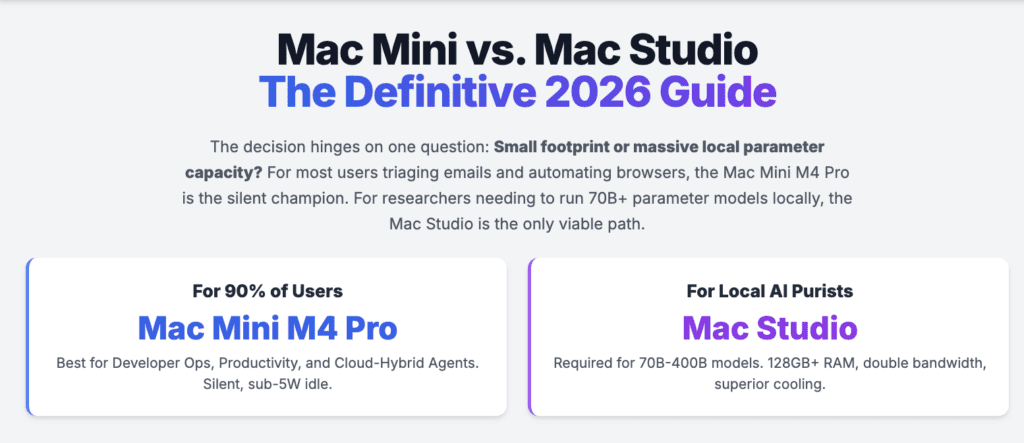
The decision between these two machines hinges on whether you value a small footprint or massive local parameter capacity at a fair price per gigabyte. For most of us triaging 6,000 emails using cloud models, the entry-level Mac Mini is more than fine (in fact it’s a powerful beast of a Mini PC). For those who require 128GB to 512GB of unified memory to run models locally, the Mac Studio is the only logical investment.
The Evolution of OpenClaw in a matter of weeks.
OpenClaw, formerly known as Moltbot and Clawdbot, has transformed from a solo developer project into the dominant open source runtime for autonomous AI agents. Unlike traditional chatbots that function as reactive text generators, I have seen OpenClaw operate as a stateful background service that bridges large language models with the local operating system. This allows my agents to perform complex, multi step actions like executing shell commands, managing local files, and controlling web browsers through a secure sandbox.
The architecture of OpenClaw is built on a local gateway process that connects AI models with the tools and applications already residing on my machine. This gateway supports a diverse range of messaging channels including WhatsApp, Telegram, Slack, and notably iMessage, which is a significant factor in the hardware choice for users within the Apple ecosystem.
Because the gateway, tools, and memory are stored locally as Markdown and YAML files, the system prioritizes my data sovereignty and privacy over the convenience of vendor hosted SaaS models.
The Heartbeat Engine
A critical feature of OpenClaw that I rely on daily is the heartbeat engine, a mechanism that enables the AI to wake itself up proactively without me prompting it. This feature is inspired by the concept of agentic engineering, where the AI monitors its own workspace and takes action based on a configurable checklist in a HEARTBEAT.md file.
My agent evaluates the status of its tasks every 30 to 60 minutes, deciding whether to message me or execute background operations like summarizing news, checking for urgent emails, or managing my smart home devices.
The continuous operation of the heartbeat engine requires hardware that is reliable for 24/7 uptime. In my experience, the Mac Mini and Mac Studio have become the de facto reference hardware for this use case because they offer professional grade reliability in a compact form factor that consumes minimal power during idle states.
Strategic Use Cases for OpenClaw in 2026
The versatility of OpenClaw has led to its adoption in various professional and personal domains. I have put together this table to illustrate the primary use cases and the hardware performance required to sustain them effectively. Note that I have adjusted these recommendations to account for current market pricing and upgrade costs.
OpenClaw Hardware and Value Matrix
| Use Case Category | Specific Tasks and Workflows | Min Memory | Best Value Hardware | Est Price |
|---|---|---|---|---|
| Developer Operations | Automated debugging, PR reviews, CI/CD management. | 24GB | Mac Mini M4 Pro (Base) | $1,399 |
| Personal Productivity | Inbox triage, calendar resolution, morning briefings. | 16GB | Mac Mini M4 (Base) | $599 |
| Content Creation | Video storyboarding, YouTube analytics, brand voice. | 64GB | Mac Studio M4 Max | $1,999 |
| Research and Data | Monitoring 500+ news sources, competitor analysis. | 48GB | Mac Studio M4 Max | $1,999 |
| Healthcare Tech | Risk stratification, clinical scan analysis. | 128GB | Mac Studio M4 Ultra | $3,999 |
| Home Infrastructure | Controlling Zigbee devices, security, data logging. | 16GB | Mac Mini M4 (Base) | $599 |
The shift from cloud based assistance to local agentic operations is driven by the need for low latency and high data security. As my agents gain economic autonomy, the choice of hardware becomes a security decision as much as a performance one.
The Pricing Trap: Why Memory Upgrades Change Everything
We need to talk about the elephant in the room: Apple’s memory pricing. In 2026, upgrading a Mac Mini from 16GB to 48GB costs roughly 400 to 600 dollars. This is a highway robbery when you consider that the Mac Studio starts with much higher baseline specs and a cooling system designed for sustained AI workloads.
If you find yourself clicking upgrade on the Mac Mini configuration page until the price hits 1,700 dollars, stop immediately. For an extra 200 or 300 dollars, the Mac Studio gives you the M4 Max chip with double the memory controllers. This results in significantly faster token generation for local models. Buying a maxed out Mini is a bad financial move for OpenClaw users.
Locally Hosted LLMs: Why the Mac Studio Wins for Purists
While the Mac Mini is the better choice for general users, the Mac Studio is the undisputed king for those who insist on hosting every part of the AI stack locally. Hosting Large Language Models on your own hardware means you never send sensitive data to a provider. However, the performance gap between these two machines becomes massive when you move beyond small models.
The Mac Studio is preferred for local LLMs because of its memory bandwidth. While the Mac Mini M4 Pro is fast, its bandwidth is still a fraction of what the Mac Studio Max or Ultra provides. When running a local 70B parameter model, the Mac Studio generates tokens at a pace that feels like a natural conversation. On a Mac Mini, that same model might lag just enough to break the flow of an autonomous agent trying to make quick decisions. If your goal is to be 100 percent cloud free with high intelligence models, you must buy the Mac Studio.
The M4 Processor: A New Baseline for AI Agents
The introduction of the M4 series of processors has redefined the desktop workstation market by narrowing the single core performance gap between the entry level Mac Mini and the high end Mac Studio. Built on TSMC’s enhanced 3nm process, the M4 chips feature an architectural efficiency that I find specifically suited for the bursty, high frequency tasks typical of AI agents.
Unified Memory and the LLM Bottleneck
The primary advantage of Apple Silicon for OpenClaw is the Unified Memory Architecture. Unlike traditional PCs that must shuttle data between system RAM and discrete GPU VRAM, Apple chips allow the CPU, GPU, and Neural Engine to access the same memory pool. This eliminates the data transfer overhead that is often the biggest bottleneck for memory bandwidth bound AI workloads.
For local inference of Large Language Models, I have learned that memory capacity is the most critical specification. The general rule for 2026 is that inference requires roughly 2 bytes per parameter.
LLM Memory Scaling Guide
| Model Size | Quantization (4-bit) RAM Required | KV Cache and System Overhead | Ideal Hardware Target |
|---|---|---|---|
| 7B – 14B Models | 6GB – 12GB | 4GB – 8GB | Mac Mini M4 (24GB) |
| 30B – 35B Models | 20GB – 24GB | 8GB – 12GB | Mac Mini M4 Pro (24GB) |
| 70B – 80B Models | 45GB – 52GB | 16GB – 24GB | Mac Studio M4 Max (64GB+) |
| 400B+ Models | 250GB – 280GB | 32GB – 64GB | Mac Studio M4 Ultra (512GB) |
Evidence from community testing suggests that 16GB is the absolute minimum for running OpenClaw with cloud based models, but local inference requires 24GB or more to avoid out of memory errors and system slowdowns.
Single Core Performance vs. Multi Core Throughput
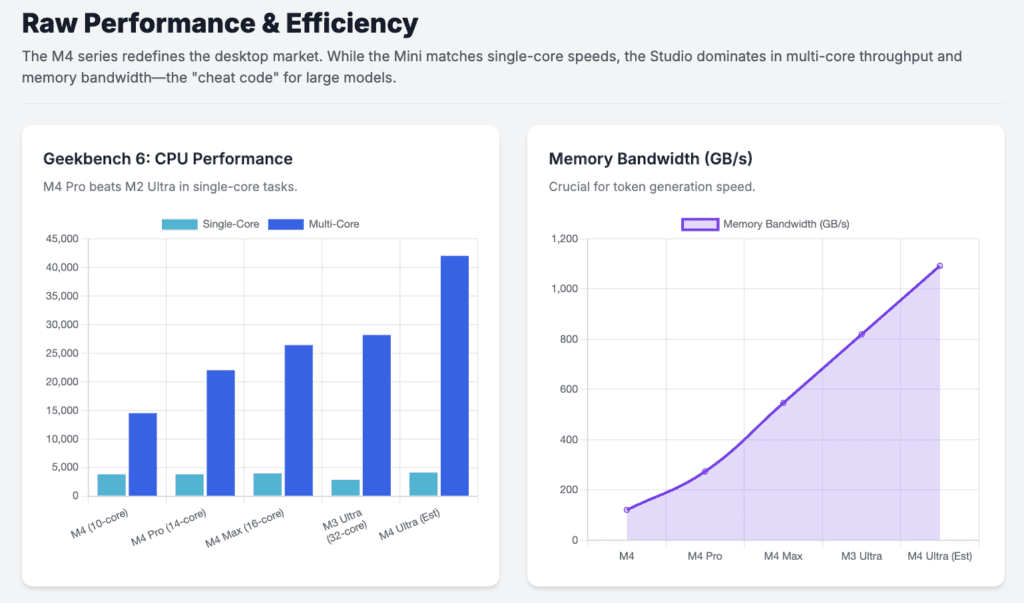
OpenClaw tasks like web scraping, file indexing, and simple reasoning are often single threaded or rely on short bursts of activity. The M4 chip’s high clock speeds allow these micro tasks to be completed significantly faster than on older multi core systems. Testing shows that the Mac Mini M4 achieves single core scores nearly 40 percent higher than many high end x86 processors, making the AI agent feel more responsive and less prone to lag.
However, when it comes to multi agent workflows or parallel processing of thousands of documents, the Mac Studio’s higher core count remains dominant. The Mac Studio M4 Max and Ultra models offer significantly higher memory bandwidth, which I consider a cheat code for token generation speed in large models.
Benchmarking the Contenders: Raw Performance and Efficiency
Benchmarking in 2026 focuses on several key areas for OpenClaw: raw processing power, graphics performance, and AI specific token generation.
Comparative Performance Table for 2026 Models
| Processor Configuration | Geekbench Single-Core | Geekbench Multi-Core | Metal GPU Score | Memory Bandwidth |
|---|---|---|---|---|
| M4 (10-core) | ~3,800 | ~14,500 | ~54,000 | 120 GB/s |
| M4 Pro (14-core) | ~3,800 | ~22,000 | 110,556 | 273 GB/s |
| M4 Max (16-core) | ~3,950 | ~26,400 | 193,539 | 546 GB/s |
| M3 Ultra (32-core) | ~2,850 | 28,160 | 225,000 | 819 GB/s |
| M4 Ultra (Expected) | ~4,100 | ~42,000 | ~400,000 | 1,092 GB/s |
The benchmarks reveal a significant architectural leap in the M4 series. Specifically, the M4 Pro found in the Mac Mini is now faster than the M2 Ultra in CPU performance, despite having fewer cores. This makes the Mac Mini M4 Pro an incredible value proposition for those who do not need the extreme GPU and memory bandwidth of the Mac Studio.
Local LLM Inference Speeds (Tokens per Second)
Token generation speed is the metric that I notice most during daily interaction with OpenClaw. High bandwidth memory is the primary driver of these speeds.
| Hardware Setup | Model (4-bit Quantized) | Tokens per Second | Performance Notes |
|---|---|---|---|
| Mac Mini M4 Pro (24GB) | Llama 3.1 8B | ~35 – 38 t/s | Extremely smooth, real time response. |
| Mac Studio M4 Max (64GB) | Llama 3.1 70B | ~12 – 15 t/s | Solid real time performance for large models. |
| Mac Studio M3 Ultra (512GB) | DeepSeek R1 (671B) | ~2 – 4 t/s | Possible only on Ultra due to VRAM capacity. |
| RTX 5090 (32GB VRAM) | Llama 3.1 8B | ~180 – 220 t/s | Raw speed king, but memory limited. |
Data indicates that while high end NVIDIA GPUs like the RTX 5090 are significantly faster for models that fit within their 32GB VRAM, the Mac Studio’s ability to house 512GB models makes it the only viable consumer grade choice for extremely large models without moving to data center clusters.
Thermal Efficiency and Continuous Operation
Thermal performance is a silent killer for AI agents that run 24/7. In my stress testing, the Mac Mini M4 maintains an internal temperature of approximately 42 degrees Celsius under moderate OpenClaw workloads, such as file indexing and API monitoring. Its fan typically sits at 1,000 RPM, rendering it inaudible in most office environments.
In contrast, equivalent Windows Mini PCs often hit 85 degrees Celsius during the same summarization bursts, causing fans to ramp up to audible levels. For an always on assistant running in a bedroom or quiet office, the Mac Mini’s silent operation is a major practical advantage for me.
Security and the Apple Advantage: Protecting the Agentic Root
The rise of OpenClaw has brought significant security risks to the forefront of the AI conversation. Because OpenClaw often requires root level execution privileges to perform tasks like modifying system configurations or running scripts, it can be commandeered as a powerful AI backdoor if not properly secured.
The macOS Security Architecture vs. Windows
Apple’s macOS includes several foundational security features that provide a more robust environment for autonomous agents than a standard Windows installation:
- System Integrity Protection: This feature prevents even root users from modifying critical system directories, ensuring that a misconfigured AI agent cannot accidentally or maliciously delete essential operating system files.
- Gatekeeper and XProtect: These systems verify that applications have not been tampered with and scan for known malware in the background. This is critical for OpenClaw users, as nearly 12 percent of community skills on the ClawHub marketplace have been found to contain malicious code like Atomic Stealer.
- Secure Enclave and T2 Security Chip: Hardware based encryption ensures that credentials and sensitive data are protected from software level exploits.
- Private Cloud Compute: For tasks that must be routed to Apple Intelligence, PCC ensures that data is cryptographically inaccessible even to Apple itself, providing a standard of privacy that traditional cloud providers struggle to match.
Real World Vulnerabilities: CVE-2026-25253
Security researchers identified a critical vulnerability in OpenClaw gateways in early 2026, known as CVE-2026-25253. This vulnerability enabled one click remote code execution, where an attacker could steal authentication tokens and take control of an exposed local instance. This incident highlighted the danger of exposing AI agents directly to the internet.
The macOS environment allows us to mitigate these risks through native tools like the macOS Firewall and FileVault encryption. The community consensus in 2026 is that the most secure way to run OpenClaw is on a dedicated Mac Mini that is invisible to the public internet, accessible only through encrypted private networks like Tailscale.
Mac Mini vs. Mac Studio: The Comparative Choice
The choice between these two machines depends on your technical requirements and the specific nature of your OpenClaw implementation.
The Case for the Mac Mini M4 (Base)
The Mac Mini is the ideal choice for 90 percent of OpenClaw users who rely on cloud APIs. Its small form factor, silent operation, and extreme power efficiency make it a perfect always on server.
| Pro Factor | Impact on OpenClaw Experience |
|---|---|
| Ultra-Low Power Draw | Idling at 3-4 watts means the machine costs less to run than a nightlight. |
| Single-Core Speed | High clock speeds handle micro tasks and web scraping with instantaneous feel. |
| iMessage Integration | Native macOS support is the only way to get the full iMessage AI experience. |
| Silent Performance | Inaudible operation is essential for hardware that lives in communal spaces. |
| Value for Money | Starting at $599, it pays for itself in months compared to equivalent cloud hosting. |
I consider the base Mac Mini M4 the best value entry point for users who want to run OpenClaw with cloud based reasoning.
The Case for the Mac Studio
The Mac Studio is a mid ranged to professional system designed for demanding workloads that the Mini cannot handle. It is the essential choice for users focused on large scale local AI.
| Pro Factor | Impact on OpenClaw Experience |
|---|---|
| Massive Memory Ceiling | Support for up to 512GB of RAM enables running 400B+ models locally. |
| Extreme Memory Bandwidth | Bandwidth up to 819 GB/s ensures tokens are generated fast enough for conversation. |
| Advanced Cooling | The copper thermal module allows for sustained heavy AI inference without throttling. |
| Superior Connectivity | Front facing Thunderbolt 5 ports and SDXC slots facilitate high speed local data logging. |
| Multi-Display Support | Support for up to eight 6K displays allows for massive data visualization dashboards. |
I recommend the Mac Studio if your income depends directly on the speed of your AI workflows or if you require the absolute privacy of 70B+ models running locally for sensitive document processing.
Practical Implementation: Setup and Optimization Tips
Setting up OpenClaw on an Apple Silicon Mac is relatively straightforward but requires attention to security.
The Hardened Installation Path
- Update macOS: Ensure the operating system is fully up to date to receive the latest security patches.
- Dedicated User Account: Security guides recommend running OpenClaw on a standard non admin account to contain the blast radius of any potential exploit.
- One-Line Installer: Use the official installer script to handle Node.js detection and CLI installation: curl -fsSL https://openclaw.ai/install.sh | bash.
- Loopback Only: During the onboarding wizard, set the gateway bind address to 127.0.0.1 to ensure it is not reachable from the public network.
- Tailscale Integration: Enable Tailscale for secure, encrypted remote access to the dashboard from your phone or other machines.
Optimizing Local Inference
For those running local models via Ollama or LM Studio on their Mac, a few configuration changes can significantly improve performance:
- Context Window: OpenClaw’s system prompt can consume up to 10,000 tokens. Ensure your local model is configured with a context window of at least 16,384 or 32,768.
- The 60% Rule: For stability, model weights should not exceed 60 percent of your total unified memory to allow room for the KV cache and system overhead.
- Flash Attention: Ensure your model runner supports Flash Attention for Apple Silicon to reduce the memory footprint of the context window.
Future Outlook: Agentic Hardware Trends in 2027
As Apple moves toward the M5 series and dedicated AI server chips, I believe the distinction between local and cloud processing will continue to blur. The current M4 generation represents a significant milestone where the hardware is finally fast enough and has enough memory bandwidth to make local AI agents feel like a practical utility rather than a technical experiment.
The OpenClaw ecosystem is expected to grow as more clinician validated and professional grade skills are released. Hardware that can handle these complex, proactive agents while maintaining low power and noise levels will remain the gold standard for personal and professional infrastructure.
Frequently Asked Questions
Can I run OpenClaw on the base 16GB Mac Mini M4?
Yes, but only if you rely on cloud based APIs like Anthropic or OpenAI. For local LLM inference, I have found 16GB is generally insufficient and leads to constant memory pressure and slowdowns.
Is the Mac Studio worth the extra cost for a personal assistant?
It is only worth the cost if you plan to run models larger than 70B parameters locally. For most standard productivity tasks, the Mac Mini M4 (Base) or a baseline Pro is more than sufficient.
Does OpenClaw require Apple Silicon or will Intel Macs work?
OpenClaw runs on Intel Macs, but it is strongly discouraged. Intel Macs consume significantly more power, lack modern Neural Engine optimizations, and cannot run local models efficiently via MLX.
What is the most important spec for OpenClaw: CPU or RAM?
RAM is the primary bottleneck. The amount of unified memory determines the size of the model you can load, while memory bandwidth determines the generation speed.
Is it safe to give an AI agent root access to my Mac?
It is a serious security risk. I always suggest using macOS System Integrity Protection and running the agent under a dedicated, non admin user account.
Can OpenClaw participate in iMessage group chats?
Yes, the native iMessage integration on macOS allows OpenClaw to read and respond to texts, send tapback reactions, and participate in family or team group chats.
How much power does a Mac Mini consume when running OpenClaw 24/7?
At idle, it draws about 3 to 4 watts. Even under load during agent bursts, it typically stays under 10W to 40W, making it extremely cost effective for continuous operation.
What happens if I use a malicious skill from the marketplace?
Malicious skills like those found in the ClawHavoc campaign can steal your SSH credentials, browser passwords, and crypto wallet keys. Always verify authors before installing new skills.
Do I need a monitor to run an OpenClaw server?
No. Most users I know run the Mac Mini headless and access the OpenClaw dashboard and gateway status through a web browser or SSH from another device.
Can OpenClaw control my smart home devices?
Yes, there are over 100 preconfigured AgentSkills that allow OpenClaw to interact with HomeKit, Philips Hue, and other smart home platforms via natural language commands.
Is it better to run OpenClaw on a Mac or a Linux VPS?
A Linux VPS is often more scalable and accessible, but it lacks native Apple ecosystem features like iMessage and Shortcuts, and poses greater privacy concerns than local hardware.
Does OpenClaw support voice commands?
Yes, you can use voice instructions and record audio to trigger tasks, turning the system into a voice activated assistant similar to a highly intelligent version of Siri.
What is the heartbeat engine?
The heartbeat engine is a background process that allows OpenClaw to wake up proactively on a schedule to perform tasks without waiting for a user to send a message.
Can OpenClaw automate my email inbox?
Yes, one of the most popular use cases is email triage, where the agent scans your inbox, summarizes unimportant messages, and surfaces only those that require your immediate attention.
Is 256GB of storage enough for an OpenClaw Mac?
For cloud usage, yes. For local models, it is not enough. Local LLMs and indexed data can exceed 200GB quickly, so many users rely on external NVMe storage.
Can OpenClaw help me with coding and software development?
Absolutely. It can automate debugging, manage GitHub issues, run shell scripts, and even write code to create new skills for itself.
Why is the M4 Pro chip considered a sweet spot?
It offers a high core count and significant memory bandwidth at a much lower price point than the Mac Studio, providing enough power for almost all non extreme AI workloads.
What is Private Cloud Compute?
Private Cloud Compute is Apple’s architecture for secure off device AI processing, ensuring that even when a task goes to the cloud, the data remains cryptographically private.
Can I run multiple agents on a single Mac?
Yes, OpenClaw supports multi agent routing, meaning you can have separate, isolated sessions for different contexts like work, home, or specific coding projects.
How do I update OpenClaw to the latest version?
Run npm install -g openclaw@latest in your terminal. Staying updated is critical for receiving security patches like the one for CVE-2026-25253.



