 Skip to content
Late Updated on: 29th December, 2025.
I want to help you choose the right Mini PC for 4K media streaming and running a Plex server. This matters because a small, quiet PC that supports multiple 4K displays and reliable transcoding can simplify a home theater setup, reduce power draw, and keep your library accessible from anywhere.
In this comparison I look at two strong contenders — the Beelink SER5-6800U and the ACEMAGIC M1 — and explain how CPU cores/threads, integrated GPU capability, I/O (HDMI+DP and Type-C), WiFi6, BT5.2 and storage/RAM affect real-world Plex and playback behavior.
My goal is to give you both a deep technical view and a simple recommendation so you can pick the Mini PC that best matches your streaming and server needs.
If you want a short answer, the Beelink SER5 is the much better deal overall. The AMD Ryzen 7 processor is an exceptionally powerful processor for multi-tasking (definitely more powerful than the i9 in Acemagic M1), and the SER5 has solid reviews and user satisfaction.
ACEMAGIC M1 is a close second, and excels at media server tasks like Plex transcoding. With 32 GB of Ram, it would offer almost similar levels of multi-tasking capabilities as the SER5 does with 24GB of Ram (and somewhat cover the difference in the processor capabilities), while also being the slightly superior media server option.
Comparison Between:
| Category | Product | Price | Score |
|---|---|---|---|
| 🚀 Best Integrated GPU | Beelink SER5 | $449.00 | 88/100 |
| 💼 Best For Plex Server | ACEMAGIC M1 | $519.99 | 92/100 |
How I Evaluated These Mini PCs
I evaluated each Mini PC from the perspective of a Plex/4K media user and a technical enthusiast. My main criteria were: CPU architecture and clocks (single-thread turbo for software transcoding, and total cores/threads for concurrent tasks), integrated GPU and media-engine capabilities (hardware decode/encode support and how that affects transcoding load), memory and storage (capacity, speed and upgradeability), network and display I/O (HDMI+DP, Type-C, and whether there’s 2.5G or gigabit Ethernet), wireless and Bluetooth (WiFi6 and BT5.2), thermal design and noise under load, and practical usability (OS support, driver availability, and connector layout).
I also considered price and the intended audience: media-only users who mostly direct-play 4K versus power users who will request multiple simultaneous transcodes or run additional services on the same machine. Where relevant I factored in Plex realities: direct play is the ideal path for 4K; hardware-accelerated transcoding (when available and supported by Plex) dramatically reduces CPU strain; and software transcoding relies heavily on single-core performance.
🚀 Best Integrated GPU

I like keeping things practical, and the SER5 MAX is one of those mini PCs that just makes sense for a living-room Plex server and a 4K media machine. It packs an AMD Ryzen 7 (the “7” in the name), 8 cores / 16 threads up to 4.7 GHz, 24GB of LPDDR5 memory and a 500GB NVME SSD (24G+500G). That combination gives you snappy OS performance, fast boots from the SSD, and enough RAM for multiple tasks—a nice balance between a tiny footprint and real capability.
For media it supports Triple display outputs (HDMI + DP + Type-C) and advertises 4K@144Hz on the right connections, so you can drive a high-refresh monitor or several displays for a home theater setup. In practice I’d use it as a Plex server for direct-play 4K content, a daily desktop, and light gaming or streaming when I want to avoid a big desktop.
It’s quiet, energy-efficient, and easy to place near a TV or tucked on a shelf. For people who want hardware-accelerated transcoding, note Plex may need Plex Pass and current AMD drivers, but the integrated GPU and NVME SSD make many common Plex scenarios feel fast and effortless.
| Pros | Cons |
|---|---|
| ✅ Strong integrated GPU for a mini PC (great for 4K playback and light gaming) | ❌ Not a replacement for a discrete GPU if you need heavy 4K transcoding or high-end gaming |
| ✅ Large 24GB memory and 500GB NVME SSD (24G+500G) included | ❌ Upgrade options are limited compared with full desktops |
| ✅ Triple display + Type-C gives flexible AV setups | ❌ Plex hardware transcoding on AMD can require Plex Pass and driver attention |
| ✅ Quiet operation and energy efficient for 24/7 Plex server duties |
Long-Term Cost Benefits
Because it uses an efficient AMD mobile chip and LPDDR5 RAM, the SER5 MAX costs less to run than a full desktop 24/7 media server. You avoid buying a separate GPU or a larger chassis and you’ll see lower electricity bills and quieter operation over time.
Return On Investment
If you compare replacing an old tower or paying for cloud-based media services, the SER5 MAX at $449.00 pays back through lower power consumption, minimal maintenance, and the convenience of keeping your own Plex library. For someone ripping DVDs and serving a household, ROI can be quick—both in saved subscription costs and time.
Situational Benefits
| Situation | How It Helps |
|---|---|
| Home Theater 4K Playback | Direct-play 4K files smoothly via HDMI/DP/Type-C; the integrated GPU handles HDR and common codecs without taxing the CPU. |
| Plex Server For Personal Library | With 24GB RAM and NVME SSD storage, it rips and stores media (24G+500G) quickly and can serve multiple streams—ideal for a household Plex setup. |
| Light Gaming And Multi-Tasking | Integrated Radeon graphics let you play older or less demanding titles and keep background server tasks running, thanks to the Ryzen 7 CPU and LPDDR5 memory. |
| Small Office Or Dorm Desk | Triple display support and Type-C make it a neat desktop replacement for document work, video calls, and media playback without taking up much space. |
Ease Of Use
| Feature | Ease Level |
|---|---|
| Initial Setup | Easy |
| Daily Operation (media playback, Plex) | Easy |
| Driver/Transcoding Setup for Plex | Moderate |
| Hardware Upgrades (RAM/Storage) | Moderate |
Versatility
Very versatile for a mini PC: works as a Plex/media server, living-room HTPC, light gaming box, and a compact desktop. Triple display and Type-C add flexibility for different AV or productivity setups.
Problem Solving Ability
Solves common space, noise and power problems of full desktops while giving you enough horsepower for ripping DVDs, running a Plex server, and smooth 4K playback. It won’t replace a heavy transcoding server, but it covers most household needs well.
Speed & Responsiveness
Boots and wakes quickly thanks to NVME SSD; Ryzen 7 + 24GB LPDDR5 keeps UI and background tasks responsive. File access, ripping, and serving are significantly faster than older HDD-based small PCs.
Key Benefits
- Compact, quiet box with a powerful AMD Ryzen 7 CPU for multi-tasking
- 24GB LPDDR5 RAM and fast NVME SSD (24G+500G) for quick boot and responsive apps
- Triple display support including Type-C and 4K@144Hz-capable outputs
- Good balance for a Plex server: direct-play 4K and hardware-assisted transcodes for common codecs
- Low power draw and small footprint — runs cool and quiet for continuous server use
Current Price: $449.00
Rating: 4.4 (total: 506+)
💼 Best For Plex Server

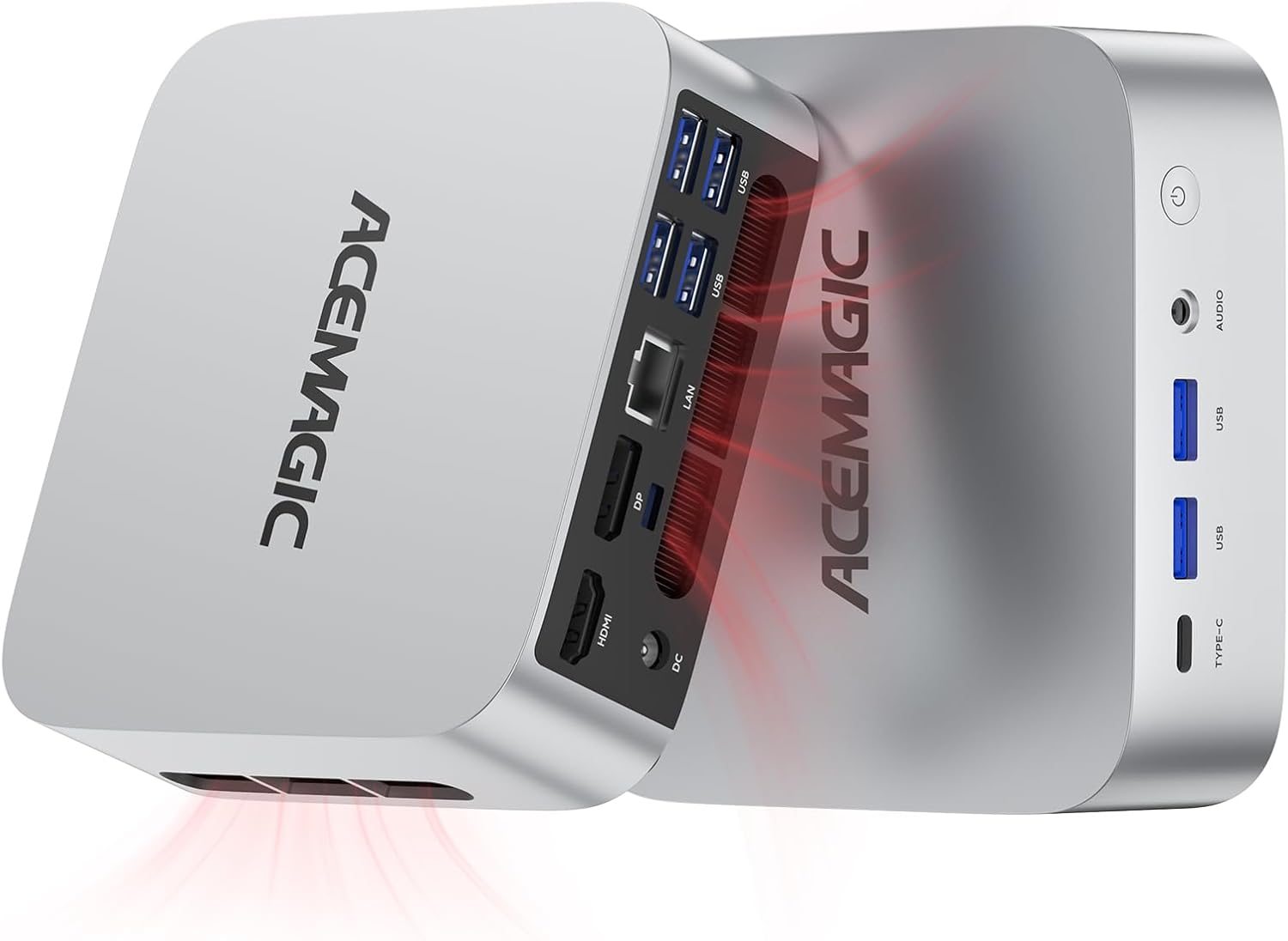
I treat the M1 as the ‘muscle’ mini PC you bring when you need raw CPU horsepower in a tiny box. With an Intel Core i9-11900H reaching up to 4.9 GHz, 32GB DDR4, and a 1TB NVMe SSD, it’s built to handle multitasking, ripping and serving media, and occasional heavy workloads.
For Plex and 4K streaming it’s excellent: the triple 4K Display outputs (HDMI+DP+Type-C) make hooking up a media center or multi-monitor setup straightforward, and the 2.5G LAN + WiFi6 keep streams steady. Compared to something like the Beelink SER5 MAX (which leans on a Ryzen chip, LPDDR5 and a 500GB NVMe), the ACEMAGIC bets on CPU cores and larger RAM/storage out of the box — that usually pays off for software transcoding or busy server use.
It’s small, quiet, and practical: plug it in, point Plex at your library, and the Computer stays out of the way while doing heavy lifting in the background.
| Pros | Cons |
|---|---|
| ✅ Excellent CPU performance for Plex server tasks and multi-threaded work | ❌ Integrated Intel UHD graphics limit heavy hardware transcoding compared with discrete GPUs |
| ✅ Large 32GB memory and 1TB SSD included — ready for server use | ❌ DDR4 instead of LPDDR5 (Beelink’s LPDDR5 option is more power-efficient) |
| ✅ Triple 4K Display support via HDMI and DP plus Type-C flexibility | ❌ Less focused on GPU-accelerated codecs — some Plex transcodes may be CPU-bound |
| ✅ Good cooling design and surprisingly quiet operation under load | ❌ Fewer native expansion options than a larger desktop |
| ✅ Strong networking (WiFi6 + 2.5G LAN) for smooth multi-stream playback |
Long-Term Cost Benefits
Running as a home Plex server, the M1’s efficient modern CPU and NVMe storage reduce wait times and keep energy use lower than older tower servers. You avoid cloud or NAS subscription costs and get fast local access to your library.
Return On Investment
If you value local control, fast 4K streaming, and the ability to transcode without buying a big tower, the $519.99 purchase can pay off quickly by replacing multiple devices or a more power-hungry server—especially for households that stream often.
Situational Benefits
| Situation | How It Helps |
|---|---|
| Primary Plex Server For A Family | Handles several simultaneous streams, rips and stores media on the 1TB SSD, and keeps playback smooth with 2.5G LAN—great for households that watch different shows at the same time. |
| 4K Media Playback On A Living-Room Setup | Triple 4K Display outputs (HDMI+DP+Type-C) let you connect TVs or projectors directly; the i9 ensures snappy UI and playlist jumping. |
| Desktop Replacement For Home Office | 32GB RAM and a fast CPU make it a compact Computer for productivity, video calls, and photo editing without needing a full tower. |
| Temporary On-The-Road Editing Or Presentations | Small size and multiple Display outputs mean you can set up multiple monitors quickly for client demos or lightweight editing sessions. |
Ease Of Use
| Feature | Ease Level |
|---|---|
| Initial Setup | Easy |
| Plex Server Installation & Library Setup | Moderate |
| Multi-Monitor (HDMI+DP) Configuration | Easy |
| Upgrading Storage/RAM | Moderate |
| Daily Operation (streaming, office tasks) | Easy |
Versatility
Very versatile: it’s at home as a home office Computer, a compact Plex/media server, or a multi-monitor workstation. Less suitable as a GPU-focused gaming rig, but excellent for CPU-heavy tasks and media distribution.
Problem Solving Ability
Solves the common problem of needing four or more CPU threads for simultaneous transcodes and heavy multitasking in a tiny chassis. It gives reliable network throughput and storage speed for serving media without a bulky server.
Speed & Responsiveness
Boots and launches apps fast thanks to the 1TB NVMe SSD; the i9 and 32GB RAM keep responsiveness high even with multiple Plex transcodes or many browser tabs open.
Key Benefits
- Powerful Core i9 CPU for heavy multitasking and software transcoding
- 32GB RAM and 1TB NVMe give instant responsiveness and plenty of local storage
- Triple 4K Display outputs (HDMI+DP+Type-C) for flexible AV setups
- Fast networking with WiFi6 and 2.5G Ethernet for stable streaming
- Compact footprint that behaves like a full desktop without the bulk
Current Price: $519.99
Rating: 4.7 (total: 97+)
FAQ
Which Is Better For 4K Media Streaming And Plex Transcoding?
I compare these two machines by separating playback (local 4K) from server-side transcoding. For local 4K playback and multi-monitor use the Beelink SER5 MAX with the SER5-6800U (AMD Ryzen 7 6800U(8C/16T, up to 4.7GHz)) shines because its RDNA2 integrated graphics handle multiple decoded 4K streams and UI rendering efficiently, and the unit lists support for 4K@144Hz and triple Display outputs via HDMI+DP and Type-C.
The SER5 configuration I looked at ships with 24GB LPDDR5 and a 500GB NVMe SSD for snappy system performance at $449.00.
For creating media servers & Plex transcoding, especially simultaneous real-time transcodes, the ACEMAGIC M1 (Intel Core i9-11900H, 8C/16T up to 4.9GHz) tends to offer stronger single-thread performance and Intel Quick Sync support which Plex historically optimizes for hardware-accelerated transcodes.
ACEMAGIC arrives with 32GB DDR4, 1TB SSD and includes 2.5G LAN that helps serve multiple high-bitrate 4K streams without saturating the network; it is priced around $519.99. In short, if your goal is local playback and GPU-accelerated ripping or light transcoding I’d lean toward the SER5-6800U; if you need reliable multi-stream server-side transcoding for remote clients, I’d prefer the ACEMAGIC M1.
Can I Use These Mini PCs As A Reliable Plex Server For Multiple 4K Streams?
Yes, but how reliable depends on codec behavior, whether your clients can Direct Play, and the hardware acceleration path you enable in Plex. I always recommend aiming for Direct Play by matching container, audio and video codecs and avoiding forced subtitles to minimize CPU/GPU load. Both units support hardware acceleration for common codecs like H.264 and HEVC (H.265); the ACEMAGIC’s Intel platform benefits from mature Quick Sync support in Plex which tends to give predictable hardware transcoding performance per stream, while the Beelink’s AMD VCN/AMF path has improved and is strong for simultaneous decoding and GPU-assisted tasks.
Network matters: the ACEMAGIC’s 2.5G Ethernet is a practical advantage for feeding several 4K streams concurrently to local clients or NAS devices, whereas the Beelink typically relies on Gigabit (plus WiFi6) which can become the bottleneck if you push many high-bitrate streams. For a home Plex server that will transcode multiple remote 4K streams concurrently I’d choose the ACEMAGIC M1; for a mostly local playback setup with occasional transcoding, the Beelink SER5 MAX is cost-effective and quieter in many cases.
What Should I Consider Before Buying (Storage, Network, Cooling, And Practical Tips)?
I tell people to think about three practical things first: storage capacity and type, network bandwidth, and thermals. For storage, neither mini PC is intended as a deep-movie vault out of the box: the Beelink ships with a 500GB NVMe and the ACEMAGIC with 1TB SSD, but for a sizable Plex library you’ll want a larger internal SATA/HDD or an external NAS.
For networking, prefer wired connections; the ACEMAGIC’s 2.5G LAN is a clear plus for multiple simultaneous 4K streams, while the Beelink’s WiFi6 and gigabit port are fine for single-stream or LAN playback. For cooling, mini PCs can throttle under sustained transcoding; the ACEMAGIC advertises a beefier cooling design (heat pipes, dual fins) and reviewers note quieter sustained performance, while SER5 units sometimes show variability in fan noise and temperatures—so check thermals, update BIOS/firmware, and place the mini PC in a ventilated spot. Practical tips I use: enable hardware acceleration in Plex settings, prefer Direct Play by matching client codec capabilities, store large media on a NAS or large HDD rather than the internal SSD, keep up-to-date GPU/chipset drivers (AMD or Intel), and test with a few 4K files to verify simultaneous stream behavior before committing as your main server.
If you want a short recommendation: pick the ACEMAGIC M1 for heavier server/transcoding duties and the Beelink SER5-6800U for GPU-forward local playback, ripping, and a slightly lower price point.
What Customers Prefer
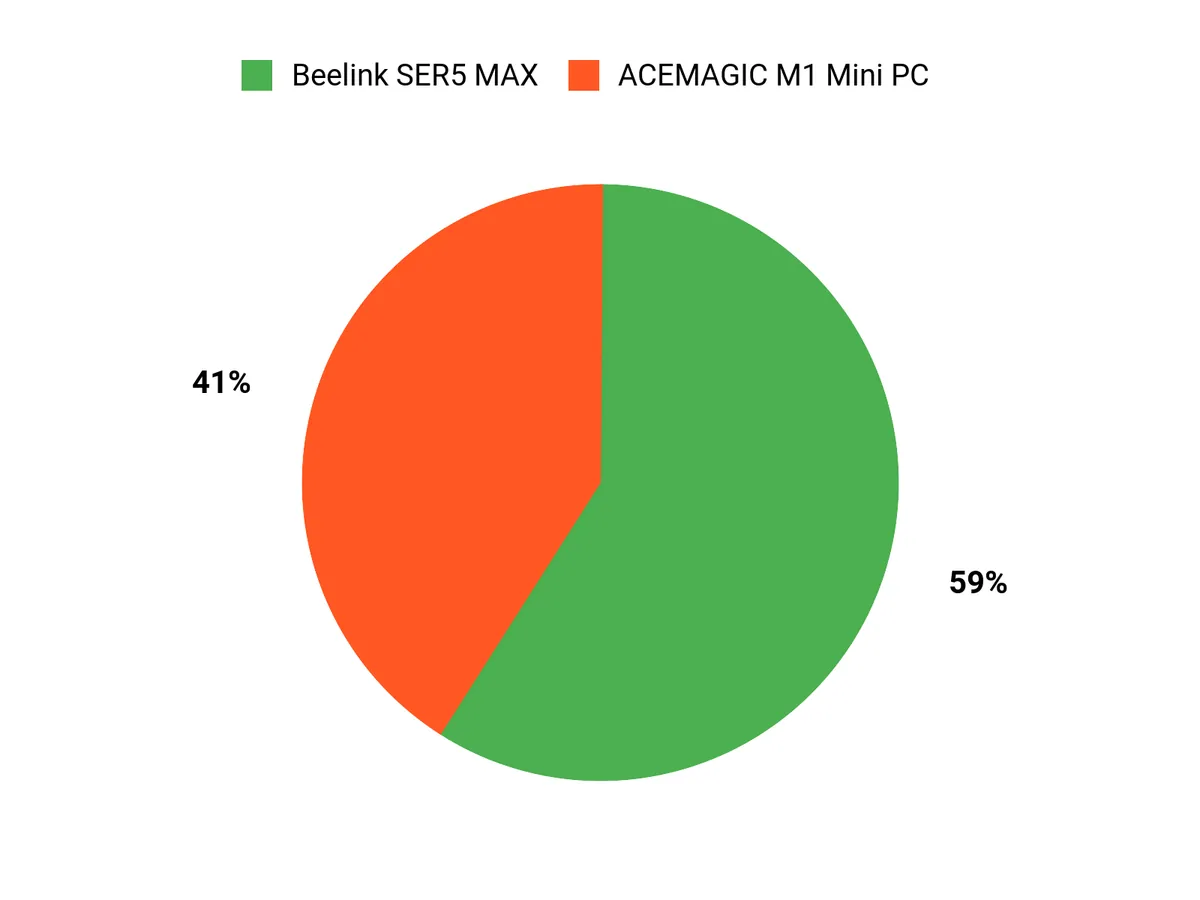
When choosing between the Beelink SER5 Max and the ACEMAGIC M1, we typically prioritize raw 4K playback and hardware codec support so streaming and Plex transcoding are smooth, along with RAM, storage expandability, and fast network connectivity (like 1GbE/2.5GbE) for reliable media-server performance. I also weigh thermals, noise and power efficiency for 24/7 use, and overall value and support—those factors usually decide whether we pick the higher-performance unit or the more budget-friendly option.
Wrapping Up
Short answer: If you want the most robust Plex server and multitasking headroom, I lean toward the ACEMAGIC M1; if you want the best integrated graphics, a lower price, and a very efficient 4K playback box, the Beelink SER5 is the smarter pick. Below I summarize why and what to expect in practice.
Why I recommend ACEMAGIC M1 overall: it pairs an Intel Core i9-11900H (8C/16T, up to 4.9 GHz) with 32 GB RAM and 1 TB SSD, plus 2.5G-capable networking and triple-display support. That combination gives better single-thread turbo for software transcodes, more memory for concurrent streams or server tasks, and generally more headroom for running Plex plus additional services.
Why I recommend Beelink SER5 for media-focused setups: the SER5-6800U (6800U(8C/16T) up to 4.7GHz) brings a stronger integrated RDNA2 family media engine and excellent power efficiency; with HDMI+DP and solid WiFi6 and BT5.2 support it’s an excellent Mini Computer for direct-play 4K and for users who want quiet, efficient playback at a better price point.
| Beelink SER5 MAX Mini PC | ACEMAGIC M1 Mini PC | |
|---|---|---|
 |  | |
| Rating | 4.4/5 (506 reviews) | 4.7/5 (97 reviews) |
| Processor | AMD Ryzen 7 6800U (8C/16T, up to 4.7GHz) | Intel Core i9-11900H (8C/16T, up to 4.9GHz) |
| RAM | 24 GB LPDDR5 | 32 GB DDR4 |
| Storage | 500 GB NVMe SSD | 1 TB SSD |
| Connectivity | WiFi 6, BT 5.2, Triple Display (HDMI + DP) | WiFi 6, BT 5.2, Triple Display (HDMI + DP) |
| Price | $449.00 | $519.99 |
| Get Details | Get Details |
This Roundup is reader-supported. When you click through links we may earn a referral commission on qualifying purchases.



