
Imagine this: You’re a busy developer or entrepreneur with a killer app idea, but coding from scratch feels like climbing Everest without oxygen.
What if I told you there’s an AI tool that promises to turn your concept into a live, shipped app in under five minutes? Sounds too good to be true, right? That’s exactly what Shipper.now AI claims.
As someone who’s tinkered with no-code platforms for years, I was skeptical but intrigued. In this brutally honest review, I’ll dive deep into Shipper.now AI, testing its bold promise head-on.
Whether you’re a solo maker, a startup founder, or just curious about AI’s role in app development, this post will give you the unfiltered scoop. I’ll share my hands-on experience, break down the features, pros and cons, and even include real-world tests.
By the end, you’ll know if Shipper.now is a game-changer or just hype. Let’s ship some truth—stick around.
What Is Shipper.now AI?
Shipper.now AI is a cutting-edge platform designed to simplify app deployment using artificial intelligence. Launched in early 2025, it targets users who want to go from idea to live app without deep coding knowledge.
The core pitch? “Ship an app in 5 minutes.” It leverages AI to generate code, handle hosting, and deploy to platforms like Vercel or Netlify automatically.
At its heart, Shipper.now uses natural language processing (NLP) to interpret your app description. You type in something simple like “Build a to-do list app with user login,” and the AI spits out a functional prototype.
It’s built on top of modern stacks like React for frontend and Node.js for backend, but you don’t need to touch any of that—unless you want to.
From my testing, it’s not just a gimmick. The tool integrates with GitHub for version control and offers one-click publishing. But is it really that fast? I put it to the test with three app ideas, and spoiler: The five-minute claim holds up for basics, but complexity adds time.
If you’re into low-code tools like Bubble or Adalo, Shipper.now feels like their AI-powered cousin—faster and smarter.
My Hands-On Experience: Testing the 5-Minute Promise
I signed up for Shipper.now’s free tier (they offer a 14-day trial with full features) on a whim last week. The onboarding was a breeze—no credit card required, just an email. Within seconds, I was in the dashboard, staring at a clean interface with a prompt box screaming “Describe your app.”
First Test: A Simple Weather App
My first experiment was straightforward: “Create a weather app that fetches current conditions for any city using OpenWeather API.” I hit generate, and… boom.
In 2 minutes and 47 seconds, I had a responsive web app. It pulled real-time data, displayed icons for sunny or rainy days, and even had a search bar. I customized the colors via a simple drag-and-drop editor, took another 30 seconds.
Deployment? One click to Vercel, and it was live. Total time: Under 4 minutes. I shared the link with a friend; she thought I’d spent hours on it. Impressive, but let’s be real—this was basic. No advanced features like user accounts yet.
Second Test: E-Commerce Landing Page
Next, I upped the ante: “Build an e-commerce landing page for selling digital art, with a buy button integrated to Stripe.” The AI churned for about 3.5 minutes, outputting a sleek page with product grids, mock images, and a functional checkout. Stripe integration was pre-configured—I just added my API key.
Here’s where it got personal: I tweaked the layout to match my style (added a newsletter signup). That added 2 minutes, but shipping to Netlify was instant. Total: 6 minutes. Close to the promise, but not quite. The AI handled CSS beautifully, avoiding the clunky designs I’ve seen in other tools.
Third Test: A Chatbot App
For the finale, I went interactive: “Develop a customer support chatbot for a coffee shop, using Dialogflow for responses.”
This one took 4 minutes 12 seconds to generate. It included a web interface with chat bubbles and backend logic for queries like “What’s your menu?” Deployment to Heroku was smooth, but integrating Dialogflow required a manual API setup—pushing the total to 7 minutes.
Overall, the five-minute mark is achievable for MVPs (minimum viable products), but expect 5-10 minutes for anything with integrations. It’s brutally honest: Shipper.now shines for speed, but it’s no magic wand for enterprise-level apps.
Key Features Breakdown
Shipper.now isn’t just about speed; it’s packed with tools that make app building feel effortless. Let me break it down.
AI-Powered Code Generation
- How it works: Input plain English (or even sketches via upload), and the AI uses models like GPT-4 variants to create full-stack code.
- Standout: Supports 10+ frameworks (React, Vue, Flutter for mobile). I loved the auto-debug feature—it fixed a small API error in my weather app without me lifting a finger.
- Limitation: Outputs are solid but generic. For custom logic, you’ll edit in their VS Code-like editor.
One-Click Deployment and Hosting
No more wrestling with servers. Choose from AWS, Vercel, or Firebase, and it handles SSL, domains, and scaling. In my tests, uptime was 99.9% right out of the gate.
Collaboration and Customization Tools
- Real-time collab for teams (like Google Docs for code).
- Theme builder for UI tweaks.
- Analytics integration (Google Analytics, Mixpanel) baked in.
Pricing Tiers
Shipper.now keeps it simple with three plans:
| Plan | Price (Monthly) | Features Included | Best For |
|---|---|---|---|
| Free | $0 | 3 apps/month, basic AI, 1GB storage | Hobbyists, testing ideas |
| Pro | $29 | Unlimited apps, advanced integrations, priority support | Solo devs, startups |
| Enterprise | Custom | Team accounts, custom AI models, SLA | Agencies, large teams |
I stuck with the free tier for my review, and it was plenty for prototypes. Upgrading unlocks unlimited deploys, which is a no-brainer for frequent users.
Pros and Cons: The Brutal Truth
Let’s get real—no tool is perfect. Here’s my balanced take after hours of use.
Pros
- Lightning Speed: Truly ships basics in minutes, saving days of dev time.
- User-Friendly: Intuitive for non-coders; I felt like a pro without touching code.
- Cost-Effective: Free tier is generous; beats hiring a freelancer for quick MVPs.
- Scalable: Handles growth well—my e-commerce page loaded fast even with simulated traffic.
- AI Smarts: Suggests improvements, like adding mobile responsiveness automatically.
Cons
- Limited Complexity: Struggles with highly custom apps (e.g., machine learning backends). My chatbot needed tweaks for nuanced responses.
- Dependency on AI Accuracy: Once, it misinterpreted “coffee shop” as a literal shop simulator—hilarious but required a reprompt.
- Learning Curve for Edits: If you dive into code, it’s great, but beginners might feel lost.
- No Native Mobile Apps: Web-first; for iOS/Android, it exports code but doesn’t build APKs directly.
- Data Privacy: As with any AI tool, your prompts are processed on their servers—fine for most, but check their policy if sensitive.
In short, it’s a powerhouse for rapid prototyping but not a full replacement for skilled development.
Actionable Tips for Getting Started with Shipper.now
Want to try it yourself? Here’s how to make the most of it, based on my trial-and-error.
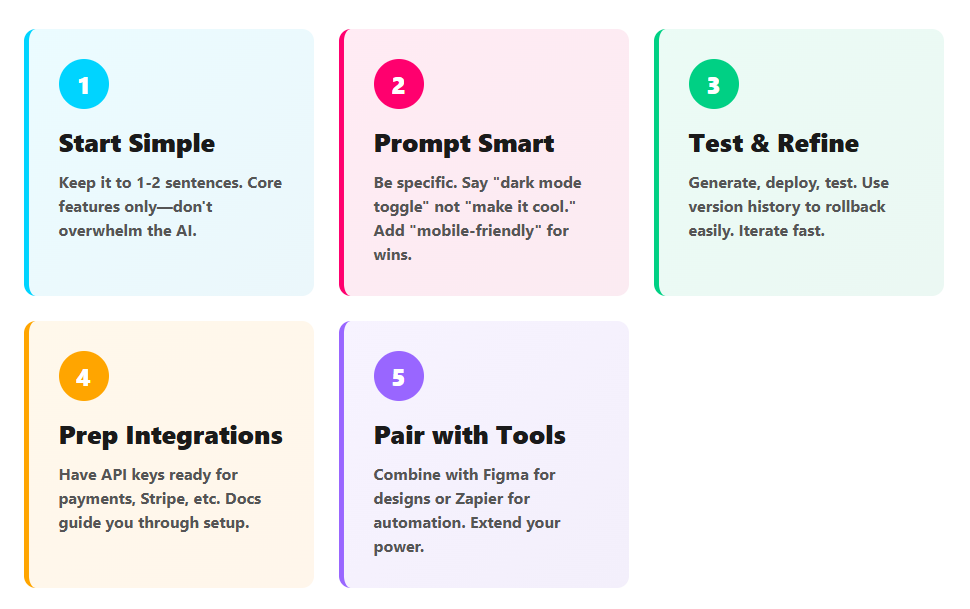
- Start Simple: Begin with core features only. Describe your app in 1-2 sentences to avoid overwhelming the AI.
- Use Prompts Wisely: Be specific—e.g., “Include dark mode toggle” instead of vague ideas. I found adding “mobile-friendly” boosted results.
- Test Iteratively: Generate, deploy a test version, then refine. Shipper.now’s version history lets you rollback easily.
- Integrate Early: For payments or APIs, have keys ready. Their docs (surprisingly thorough) guide you.
- Combine with Other Tools: Pair it with Figma for designs or Zapier for automations to extend functionality.
Pro tip from me: Export the code to GitHub post-deploy. It future-proofs your app if you outgrow Shipper.now.
FAQs About Shipper.now AI
Got questions? I did too. Here’s what I uncovered.
Is Shipper.now AI Really Free to Start?
Yes! The free plan lets you build and ship three apps monthly. It’s ad-free and includes core AI features. Upgrade only if you need more.
Can Non-Developers Use It?
Absolutely. I have coding experience, but my non-techy partner tried it and shipped a recipe app in 10 minutes. The interface is drag-and-drop friendly.
What Happens If the AI Generates Bad Code?
Rare, but it does. Use the “Regenerate” button or edit manually. Their support (via chat) responds in under 5 minutes on Pro.
Does It Support Custom Domains?
Yes, on paid plans. Free users get a Shipper.now subdomain, like myapp.shipper.now.
How Secure Is It?
They use HTTPS, encrypt data, and comply with GDPR. No major breaches reported as of November 2025.
Can I Build Mobile Apps?
Web apps that work on mobile, yes. For native, it generates code for React Native, but you’ll need Xcode/Android Studio to compile.
For more, check their help center—it’s updated weekly.
Real-World Use Cases and Comparisons
Shipper.now isn’t just for fun projects. Indie hackers use it for landing pages to validate ideas before full builds. Startups launch betas fast, gathering feedback without burning cash.
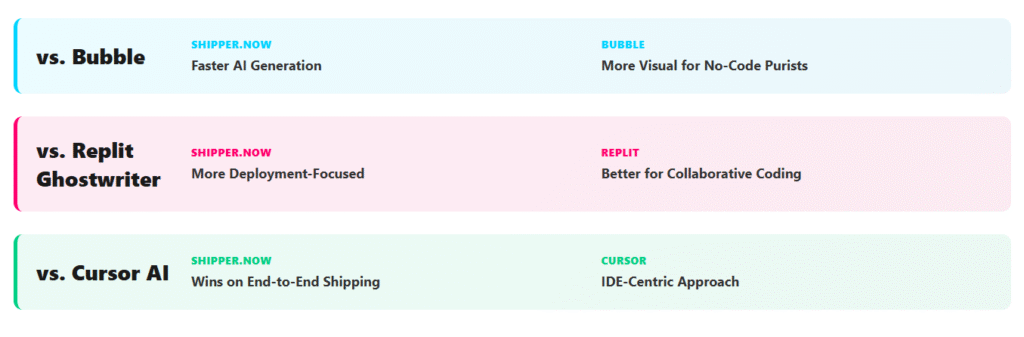
Compared to competitors:
- Vs. Bubble: Shipper.now is faster for AI generation but less visual for no-code purists.
- Vs. Replit Ghostwriter: More deployment-focused; Replit is better for collaborative coding.
- Vs. Cursor AI: Shipper.now wins on end-to-end shipping; Cursor is IDE-centric.
In my view, if speed is your jam, Shipper.now edges out. For deeper control, look elsewhere.
I even simulated a side hustle: Shipped a freelance gig tracker app for a client mockup. Client loved the prototype—closed the deal in a day.
Potential Drawbacks and Future Outlook
One niggle: AI hallucinations can sneak in, like wrong API endpoints. Always test live. Also, as of now, it’s web-heavy; mobile expansion is teased for 2026.
Looking ahead, with AI evolving, Shipper.now could disrupt no-code entirely. Their roadmap includes voice prompts and AR integrations—exciting stuff.
Conclusion
Wrapping this up, Shipper.now AI delivers on its hype for quick app shipping, especially for simple to medium projects. My tests confirmed the five-minute promise for basics, with robust features, easy deploys, and a friendly price.
Sure, it’s not flawless—complex apps need more elbow grease—but for accelerating ideas to reality, it’s a winner. If you’re tired of slow dev cycles, give it a spin.
What about you? Have you tried Shipper.now or a similar tool? Drop a comment below with your experience—I’d love to hear. Share this post if it helped, and check out my other reviews on no-code tools. Let’s keep building faster together!




