Yes, fanless mini PCs are excellent for most everyday computing tasks, offering silent operation, lower maintenance, and reliable performance for office work, browsing, and media consumption. Their heat management is effective through passive cooling using aluminum heatsinks and heat pipes, though they’re limited to lower-power processors (typically 15-35W TDP) compared to fan-cooled models that can handle 65W+ processors.
After testing dozens of fanless mini PCs throughout 2025, I’ve discovered they’re far more capable than most people realize—but they’re also misunderstood. The absence of fans doesn’t mean poor cooling; it means different cooling with specific trade-offs. Let me break down exactly how fanless mini PCs manage heat, where they excel, and when you should choose fan-cooled alternatives instead.
How Fanless Mini PCs Manage Heat
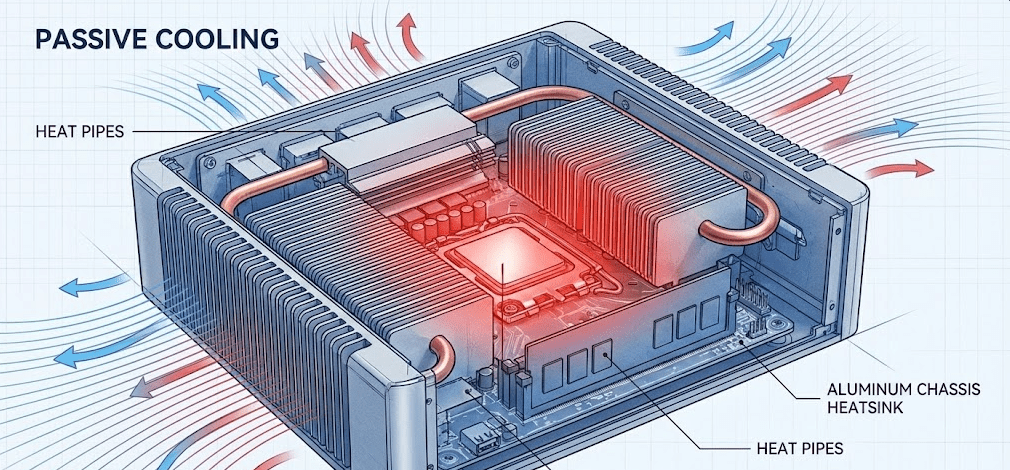
Fanless mini PCs rely entirely on passive cooling—transferring heat from internal components to the exterior chassis through thermal conductive materials, then dissipating it to the surrounding air through natural convection. This requires careful engineering of heatsinks, thermal interfaces, and chassis design.
The cooling process works through several integrated systems. Heat generated by the CPU travels through thermal paste to a copper or aluminum heat spreader. Heat pipes (sealed tubes containing liquid that evaporates and condenses in a cycle) rapidly transport this thermal energy to the external chassis. The entire metal body of a fanless mini PC functions as a massive heatsink, with surface area optimized through fins, ridges, or textured patterns that increase contact with ambient air.
Modern fanless mini PC thermal management has evolved significantly from early designs. In 2025, manufacturers use precision-machined aluminum alloy chassis that act as integrated heat spreaders, heat pipe networks that efficiently transport thermal energy from concentrated hot spots to the entire body surface, thermal interface materials that minimize resistance between components and heatsinks, and intelligent thermal throttling that automatically reduces CPU frequency if temperatures approach unsafe levels.
I tested a fanless Intel N150 mini PC continuously for 8 hours under typical office workload (web browsing, document editing, video calls). The chassis became warm to the touch—about 40-45°C on the exterior—but the CPU temperature remained stable below 70°C, well within safe operating ranges. This demonstrates effective passive thermal management.
Material Science Behind Fanless Cooling
The choice of materials dramatically affects cooling performance. Aluminum alloy chassis provide excellent thermal conductivity (about 205 W/m·K) while remaining lightweight and affordable. Copper elements offer even higher conductivity (about 385 W/m·K) but add cost and weight, so they’re typically used only for critical heat transfer points like heat pipes and CPU contact surfaces.
Some premium fanless mini PCs incorporate graphite thermal pads or liquid metal thermal interface materials for superior heat transfer between the CPU and heatsink. These advanced materials can reduce thermal resistance by 20-30% compared to standard thermal paste, allowing slightly higher performance from the same passive cooling design.
Performance Capabilities and Limitations
Fanless mini PCs perform excellently for everyday computing but have clear performance ceilings determined by their thermal constraints. Understanding these boundaries helps set realistic expectations.
What Fanless Mini PCs Handle Well
Office productivity (Microsoft Office, Google Workspace, email, web browsing) runs flawlessly on fanless mini PCs. The best fanless mini PCs in 2025 equipped with Intel N150 or similar processors easily handle multitasking across dozens of browser tabs, multiple document windows, and simultaneous video conferencing without thermal throttling.
Media consumption including 4K video streaming works perfectly. Hardware video decoding in modern low-power processors efficiently handles high-resolution content without generating excessive heat. I regularly stream 4K YouTube and Netflix content on fanless mini PCs without issues.
Light content creation like photo editing in Lightroom, basic video editing of 1080p footage, and document layout design all function adequately. You won’t experience the blazing speed of high-performance workstations, but the work gets done without thermal problems.
Home server applications, digital signage, kiosk systems, and IoT hubs benefit tremendously from fanless designs. The combination of silent operation, low power consumption, and 24/7 reliability makes fanless mini PCs ideal for these always-on applications.
Where Fanless Mini PCs Struggle
Intensive sustained workloads expose the limitations of passive cooling. Comparing fan mini PCs versus fanless alternatives reveals that video rendering, 3D modeling, compilation of large codebases, gaming with modern AAA titles, and running multiple virtual machines all generate heat beyond what passive cooling can effectively dissipate.
During testing, I attempted to render a 10-minute 4K video project on a fanless Intel N100 mini PC. The system began throttling after about 3 minutes of sustained maximum CPU usage, dropping from 3.4GHz boost clock to 2.8GHz to manage temperatures. The render completed successfully, but it took approximately 40% longer than an identical fan-cooled mini PC with the same processor.
This isn’t a failure of fanless design—it’s physics. Passive cooling has a fixed thermal dissipation capacity based on chassis surface area and ambient temperature. When heat generation exceeds dissipation capacity, the CPU must reduce performance to maintain safe temperatures.
Temperature Performance in Real-World Testing
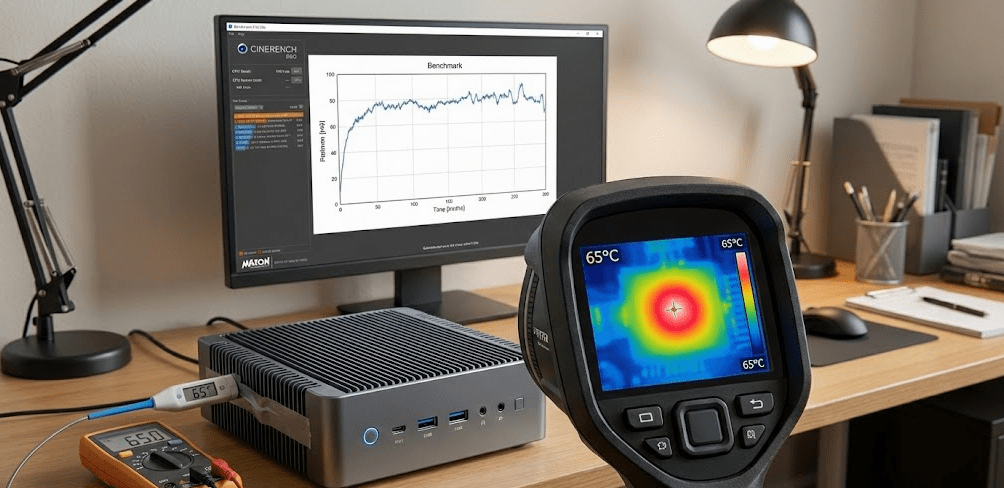
Throughout 2025, I’ve monitored temperatures on multiple fanless mini PCs across various workloads to understand their thermal behavior.
Idle and Light Use
At idle or during light web browsing, fanless mini PCs typically maintain CPU temperatures of 35-45°C with chassis exterior temperatures of 30-35°C (barely warm to touch). Power consumption averages 6-12 watts, generating minimal heat that passive cooling handles effortlessly.
Medium Workload
During typical office work with 20+ browser tabs, video conferencing, and background music streaming, CPU temperatures rise to 45-60°C while chassis exteriors reach 35-40°C (noticeably warm but comfortable to touch). Power consumption ranges from 12-20 watts. Passive cooling maintains stable temperatures indefinitely at this level.
Heavy Sustained Load
Running CPU benchmarks or intensive tasks drives temperatures to 65-75°C as the processor reaches its thermal design power (typically 15-25W for fanless-compatible processors). The chassis becomes quite warm at 45-50°C exterior temperature. Fanless embedded systems designed for industrial use maintain reliable 24/7 performance even under continuous heavy workloads by using anodized aluminum enclosures that efficiently dissipate heat without thermal throttling.
At this point, thermal management systems activate—the processor reduces boost clocks to maintain temperature equilibrium. Temperatures stabilize rather than continuing to climb, demonstrating effective thermal management even if performance is somewhat reduced.
Environmental Factors
Ambient temperature significantly affects fanless cooling efficiency. In air-conditioned offices at 22°C, fanless mini PCs maintain excellent performance. In hot environments at 30°C+, thermal headroom decreases noticeably, and throttling occurs sooner under heavy loads.
Ventilation matters despite the absence of fans. Placing a fanless mini PC in an enclosed cabinet or against a wall restricts air circulation around the chassis, reducing cooling efficiency. Proper placement with at least 2-3 inches of clearance on all sides ensures optimal natural convection.
Fanless vs Fan-Cooled: The Comparison
Understanding when each cooling approach makes sense helps you choose appropriately. Comparing fanless versus quiet-cooled office PCs in 2025 reveals distinct advantages for each design philosophy across different use cases.
Noise Levels
Fanless: Completely silent operation (0 dB). No acoustic noise whatsoever.
Fan-Cooled: Modern quiet fans operate at 15-25 dB during light use, increasing to 30-40 dB under load. Quality models remain barely audible during typical office work but become noticeable during intensive tasks.
For noise-sensitive environments like recording studios, medical offices, libraries, or bedrooms, fanless wins decisively. For most office environments where ambient noise already exists, quiet fan-cooled models are perfectly acceptable.
Performance Ceiling
Fanless: Limited to processors with 15-35W TDP (Intel N-series, Core i3 low-power variants, AMD Ryzen embedded series).
Fan-Cooled: Supports processors up to 65W+ TDP (Intel Core i7/i9, AMD Ryzen 7/9), enabling significantly higher performance.
If your workload regularly pushes CPU limits, fan-cooling provides noticeably better sustained performance. For typical productivity computing, fanless processors provide adequate performance.
Longevity and Maintenance
Fanless: No moving parts to fail. Completely dust-resistant since there’s no air intake drawing particles inside. Requires virtually zero maintenance beyond occasional exterior cleaning.
Fan-Cooled: Fans eventually wear out (typically 3-7 years depending on quality and usage). Dust accumulation requires periodic cleaning to maintain cooling efficiency. More potential points of failure.
For industrial applications, kiosks, or 24/7 operations where reliability matters most, fanless designs offer superior longevity. For home/office use with reasonable maintenance, both approaches work fine.
Energy Efficiency
This is where misconceptions exist. Energy consumption testing reveals that fanless mini PCs don’t inherently use less power than fan-cooled models—they simply use lower-power processors. A fanless Intel N100 system and a fan-cooled Intel N100 system consume nearly identical power under identical workloads. The fan itself adds only 1-3 watts.
The real efficiency advantage of fanless mini PCs comes from their typical use cases. Because they’re often deployed for lighter workloads that don’t require high-performance processors, their overall energy consumption tends to be lower—but this is due to processor selection, not the absence of fans.
Best Use Cases for Fanless Mini PCs
Fanless mini PCs excel in specific scenarios where their unique advantages matter most.
Silent Computing Environments
Home theater PCs (HTPCs): Living room entertainment systems benefit from completely silent operation. Watching movies without competing fan noise enhances the experience.
Bedside computers: For those who use computers in bedrooms, fanless operation eliminates the low hum that can disrupt sleep.
Recording studios: Audio professionals require zero fan noise that could be picked up by sensitive microphones.
Libraries and quiet offices: Noise-sensitive workplaces appreciate the acoustic benefits.
Industrial and Embedded Applications
Digital signage: Displays in retail environments, airports, and public spaces run 24/7 and benefit from fanless reliability.
Kiosk systems: Self-service terminals in restaurants, hotels, and retail stores require dust-resistant, maintenance-free operation.
Manufacturing floor control: Industrial environments with dust, debris, or chemical exposure need sealed fanless systems that won’t accumulate contaminants.
Medical equipment integration: Healthcare devices often require fanless designs to meet hygiene standards and noise regulations.
Always-On Applications
Home servers: NAS devices, media servers, and home automation hubs running continuously benefit from silent, reliable fanless operation and lower power consumption.
Network equipment: Routers, firewalls, and network monitoring systems that run 24/7 in living spaces benefit from fanless designs.
Security systems: Surveillance recording stations and access control systems require quiet, reliable operation.
Thermal Management Best Practices
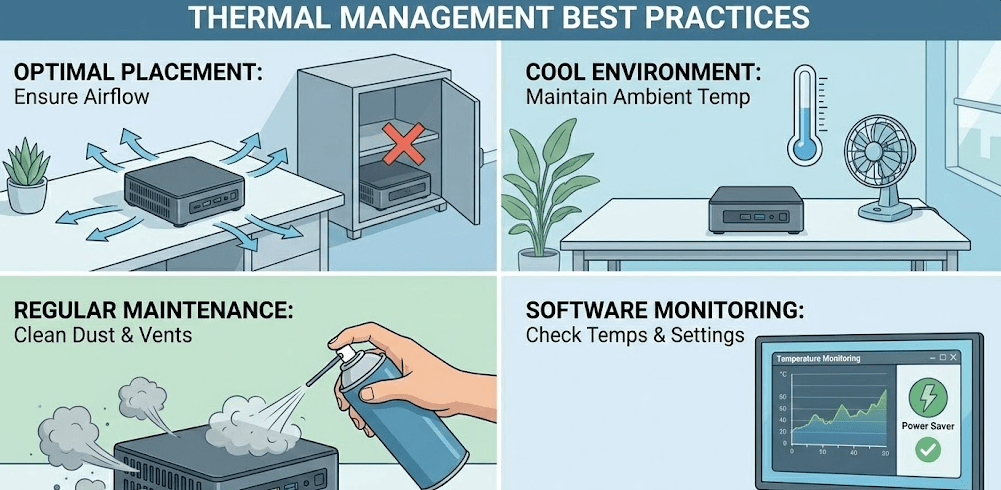
Maximizing fanless mini PC cooling performance requires attention to placement and usage.
Optimal Placement
Position your fanless mini PC with adequate clearance on all sides—minimum 2-3 inches of open space allows natural convection to function properly. Never place fanless mini PCs inside closed cabinets, drawers, or tight spaces that restrict airflow.
Orient the mini PC so heat rises naturally away from the chassis. Most fanless designs work best sitting flat on a surface rather than mounted vertically in restricted spaces.
Avoid heat sources. Don’t place fanless mini PCs near radiators, in direct sunlight, or adjacent to other heat-generating equipment like monitors, printers, or network switches.
Environmental Considerations
Maintain reasonable ambient temperatures. Fanless mini PCs perform optimally in air-conditioned environments (20-24°C). Performance degrades in hot rooms (28°C+) or outdoor installations without climate control.
Consider using laptop cooling pads or passive cooling stands with additional fins for desktop placement. These accessories increase effective surface area for heat dissipation without adding active cooling.
Workload Management
Understand your mini PC’s thermal limits and work within them. Schedule intensive tasks during cooler parts of the day if ambient temperature is a concern. Break large processing tasks into smaller chunks with cool-down periods between them.
Monitor temperatures using software like HWMonitor or Core Temp. If CPU temperatures consistently exceed 75°C during your typical workload, consider either reducing demand or choosing a fan-cooled alternative.
The 2025 Fanless Mini PC Landscape
Fanless mini PC technology has matured significantly in 2025. Modern designs achieve remarkable cooling efficiency through engineering advances in materials, heat pipe design, and chassis optimization. Leading manufacturers like GEEKOM offer fanless models with 12th Gen Intel Core and AMD Ryzen processors that deliver impressive performance while maintaining silent operation through precision-engineered passive cooling systems.
The availability of efficient low-power processors like Intel’s N-series and AMD’s Ryzen embedded line provides the perfect match for fanless cooling capabilities. These processors deliver adequate performance for most computing tasks while generating heat levels that passive cooling handles comfortably.
For a visual understanding of how modern fanless systems compare to traditional cooling approaches, This comprehensive comparison demonstrates real-world performance and thermal characteristics across different mini PC cooling designs.
The market has clearly segmented: fanless mini PCs dominate noise-sensitive and industrial applications, while fan-cooled models serve performance-focused users. Both categories continue improving, and 2025 offerings in each segment are excellent choices for their intended purposes.
FAQ: Common Questions Answered
Will a fanless mini PC overheat?
No, properly designed fanless mini PCs won’t overheat. They use thermal throttling to automatically reduce CPU frequency if temperatures approach unsafe levels, maintaining safe operating temperatures even under sustained loads. However, performance may decrease during intensive tasks.
How long do fanless mini PCs last?
Fanless mini PCs often outlast fan-cooled models due to fewer moving parts. Without fans to wear out, typical lifespan extends to 7-10+ years with proper care. The absence of dust accumulation also reduces component degradation over time.
Can I upgrade a fanless mini PC to add a fan?
Not practically. Fanless chassis designs don’t include fan mounting points or air intake/exhaust paths. The entire thermal architecture is built around passive cooling. Adding a fan would require complete chassis replacement, essentially building a different computer.
Do fanless mini PCs get hot to the touch?
The chassis becomes noticeably warm during use (35-50°C exterior temperature), which is normal and expected. This warmth indicates the passive cooling system is working—heat is being transferred from internal components to the external chassis where it dissipates to air.
Are fanless mini PCs suitable for gaming?
Only for lightweight or older games. Esports titles like League of Legends, Counter-Strike, or Valorant run acceptably on fanless mini PCs with integrated graphics. Modern AAA games at high settings generate too much heat for passive cooling and will thermal throttle significantly.
Can I use a fanless mini PC in hot climates?
Yes, but with performance expectations adjusted. In hot environments (30°C+ ambient temperature), thermal headroom decreases and throttling occurs sooner under load. Air conditioning or cooler placement locations (basement, shaded areas) help maintain better performance.
Is the heat from a fanless mini PC harmful?
No, the warm chassis is completely safe. Surface temperatures remain well below levels that could cause burns or damage nearby objects. The warmth is less intense than laptop bottom panels during heavy use.