If you’re looking for a short answer: for retro gaming in 2026, budget mini PCs with Intel N100 processors ($150-300 fully configured) decisively outperform the Raspberry Pi 5 ($100-180 depending on RAM configuration plus $40-70 in required accessories) across nearly every metric that matters for emulation.
If you’re looking for a quick recommendation, we recommend the Beelink Mini S13 PRO, which is currently on a discount on Amazon. You can check the price here. If you want a Mini PC under $200, then the TUREWELL N100 Mini PC is a great option that performs really well for retro gaming.
The N100’s x86 architecture, Intel UHD Graphics, and 12-16GB of DDR4 RAM deliver flawless emulation through PS2, GameCube, and Wii with room for demanding shaders and upscaling—systems where the Pi 5 struggles with inconsistent performance even at native resolution. Mini PCs offer plug-and-play Windows compatibility with Steam, Epic Games, and modern indie titles, eliminating the Linux-only limitation that confines Pi users to emulation exclusively.
However, the Raspberry Pi 5 retains specific advantages: lower idle power consumption (3-6W vs 10-15W), thriving communities with RetroPie and Batocera’s polished interfaces designed specifically for controllers and TV use, GPIO pins for authentic arcade button integration, and the educational value of learning Linux systems.
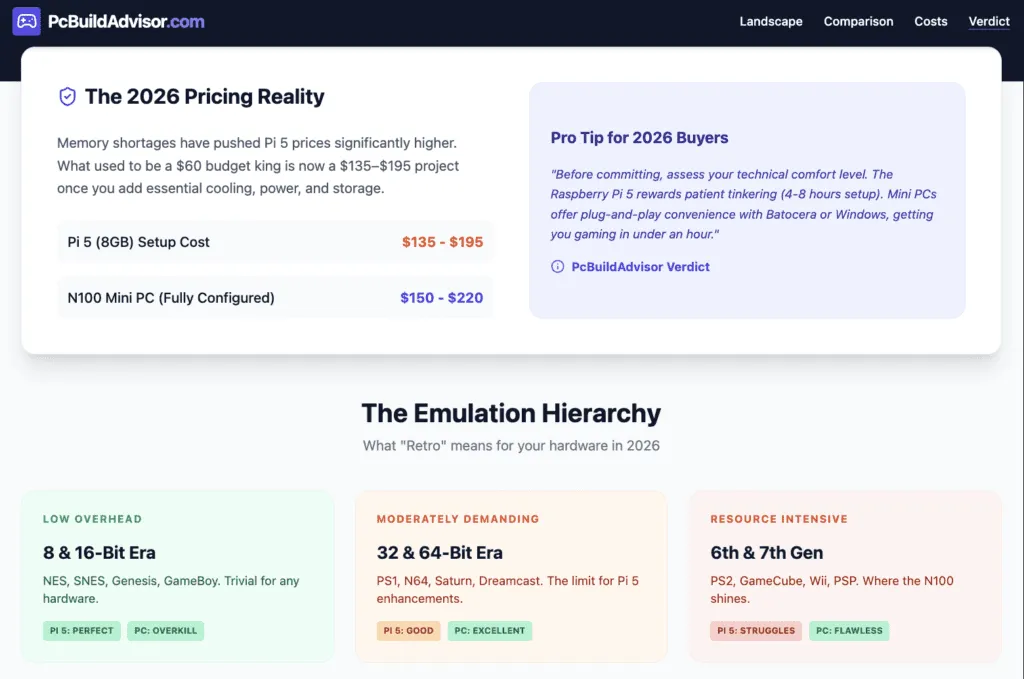
The Pi 5’s recent price increases due to 2025-2026 RAM shortages: jumping from $60 to $80 for 4GB and $80 to $120 for 8GB models—have narrowed the cost advantage that previously made it the obvious budget choice. When you factor in required accessories (power supply, proper cooling case, storage), a complete Pi 5 setup costs $135-195, placing it uncomfortably close to entry-level N100 mini PCs that offer significantly superior performance and versatility.
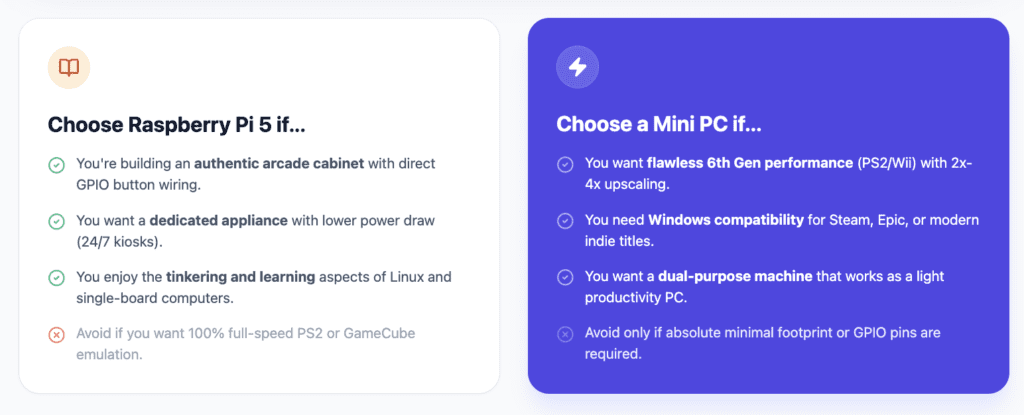
Choose the Pi 5 if you prioritize community support, want a dedicated retro gaming appliance separate from your main PC, value learning opportunities, or need extreme energy efficiency for 24/7 operation. Choose a mini PC if you want maximum emulation performance, Windows software compatibility, upgradeability, or a device that doubles as a productivity workstation beyond gaming.
Understanding 2026 Retro Gaming Hardware Landscape
What counts as “retro gaming” in 2026
The retro gaming definition has expanded as hardware advances. Systems now considered retro include:
- 8-bit era: NES, Sega Master System, Game Boy (trivial for any device)
- 16-bit era: SNES, Genesis, Game Boy Advance (easy for both platforms)
- 32/64-bit era: PlayStation 1, Nintendo 64, Saturn (manageable on both)
- 6th generation: Dreamcast, PS2, GameCube, Xbox (challenging for Pi 5, easy for mini PC)
- 7th generation: Wii, PSP, Nintendo DS (mixed results on Pi 5, comfortable on mini PC)
Modern retro gaming involves more than running games at native resolution. Features like upscaling (rendering at 2x-4x internal resolution), CRT shaders (simulating scanlines and curvature), texture filtering, and widescreen hacks significantly increase hardware demands beyond original console specifications.
The emulation performance hierarchy
Emulation efficiency varies dramatically by console architecture:
Highly efficient emulators (low overhead): NES, SNES, Genesis, Game Boy systems. These run on virtually anything, including smartphones, making hardware choice irrelevant.
Moderately demanding (careful optimization needed): PlayStation 1, Nintendo 64, Dreamcast. The Pi 5 handles these adequately at native resolution, but struggles with enhancements. Mini PCs handle enhanced versions effortlessly.
Resource-intensive (significant hardware requirements): PS2, GameCube, Wii, PSP. The Pi 5 manages some titles but experiences frame drops and compatibility issues. Mini PCs with N100 processors handle these systems comfortably at enhanced resolutions.
Raspberry Pi 5 pricing reality (2026)
- 2GB model: $60 (budget option, adequate for lighter retro gaming)
- 4GB model: Increased from $60 to $80 (+33%)
- 8GB model: Increased from $80 to $120 (+50%)
- 16GB model: $145 (introduced late 2025, overkill for most retro gaming)
These increases occurred in late 2025, fundamentally changing the value proposition that historically favored Raspberry Pi. The “hidden costs” of required accessories further erode the Pi’s affordability advantage.
Mini PC pricing landscape (2026)
Budget mini PCs with gaming-capable processors remain competitive despite component shortages:
- Intel N100 barebone: $140-160 (add RAM and SSD yourself)
- Intel N100 configured: $180-220 (8-16GB RAM, 256-512GB SSD)
- Intel N97 configured: $200-250 (better GPU, similar CPU)
- Intel N305 configured: $250-300 (8-core, substantial performance increase)
Chinese brands (Beelink, GMKtec, GEEKOM, Minisforum) dominate this market with reliable products and competitive pricing. These come with Windows 11 licenses, reducing total cost of ownership compared to Pi setups requiring separate software purchases.
Pro Tip: “Before committing to either platform, honestly assess your technical comfort level and time availability. The Raspberry Pi 5 rewards patient tinkering—expect 4-8 hours configuring RetroPie or Batocera, transferring ROMs, mapping controllers, and troubleshooting. Mini PCs offer plug-and-play convenience with Batocera or Windows-based emulation frontends like LaunchBox, getting you gaming in under an hour. If you view setup as an enjoyable hobby, choose Pi. If you want minimal friction between unboxing and playing games, choose mini PC.”
Raspberry Pi 5: Strengths and Limitations for Retro Gaming
Hardware specifications (2026 models)
The Raspberry Pi 5 launched in late 2023 with significant improvements over the Pi 4:
- CPU: Quad-core ARM Cortex-A76 @ 2.4GHz (2-3x faster than Pi 4)
- GPU: VideoCore VII @ 800MHz with OpenGL ES 3.1 and Vulkan support
- RAM: 2GB ($60), 4GB ($80), 8GB ($120), or 16GB ($145) LPDDR4X-4267
- Storage: MicroSD slot (slow) plus M.2 HAT+ expansion for NVMe SSDs (significant performance boost)
- Video output: Dual 4K@60Hz via micro HDMI ports
- Connectivity: USB 3.0 ports, Gigabit Ethernet, Wi-Fi 6, Bluetooth 5.0
- Power consumption: 3-6W idle, 8-10W under load
- Power delivery: USB-C 5V/5A (27W official adapter recommended)
What Raspberry Pi 5 does well for retro gaming
Emulates 8-bit through 32-bit systems flawlessly: NES, SNES, Genesis, PlayStation 1, and similar-era consoles run at full speed with zero frame drops. The Pi 5 perfectly handles these classic systems, making it excellent for purists focused on authentic experiences.
Mature retro gaming ecosystems: Both RetroPie and Batocera have evolved into polished, controller-friendly interfaces designed for TV use. RetroPie offers extensive customization and a decade of community refinement, while Batocera gained prominence on Pi 5 with earlier GPU driver support and faster setup. Both handle ROM scanning, artwork scraping, controller configuration, and emulator management through intuitive menus. The communities provide extensive documentation, troubleshooting guides, and pre-configured images.
Low power consumption: The Pi 5 uses 3-6W at idle and 8-10W during gaming—roughly 20-30% of a mini PC’s consumption. For 24/7 retro gaming kiosks, media center combinations, or households with high electricity costs, this efficiency advantage compounds over years of operation.
Community and support: The Raspberry Pi community is massive, active, and helpful. Any issue you encounter has likely been solved multiple times with documented solutions in forums, Reddit threads, and YouTube tutorials. This reduces troubleshooting frustration for beginners.
GPIO capabilities: The 40-pin GPIO header enables direct connection to arcade buttons, joysticks, LED strips, and custom controls without USB adapters. This makes the Pi 5 ideal for custom arcade cabinet builds or unique controller configurations.
What Raspberry Pi 5 struggles with
PS2/GameCube/Wii performance inconsistency: While some titles run acceptably, many experience frame drops, audio stuttering, or require reduced settings. God of War on PS2, F-Zero GX on GameCube, and Super Mario Galaxy on Wii demonstrate the Pi 5’s limitations with 6th-generation console emulation.
Limited enhancement capabilities: The VideoCore VII GPU lacks power for demanding shaders, high-resolution upscaling, or advanced post-processing effects. Running 2x native resolution with CRT filters causes noticeable slowdowns in PS1 and N64 games that should otherwise perform well.
Software ecosystem limitations: ARM architecture restricts software availability. Windows doesn’t officially support ARM Raspberry Pi (though Windows 11 ARM can be installed experimentally). Many Windows-exclusive emulators, frontends, and gaming tools don’t have ARM builds, forcing reliance on the Linux software ecosystem.
Storage performance bottlenecks: MicroSD cards (even high-end UHS-I/UHS-II models) limit loading times and can cause stuttering when loading textures or large game files. The M.2 HAT+ accessory enables NVMe SSDs but adds $12-15 plus the SSD cost, increasing total system expense.
RAM limitations for modern emulation features: Even the 8GB model experiences RAM pressure when running demanding emulators with save states, texture packs, or multiple shaders simultaneously. The 16GB model addresses this but costs $145—approaching mini PC territory.
Accessory requirements inflate total cost: The Pi 5 board alone is incomplete. Required additions include:
- Official 27W USB-C power supply: $12
- Proper gaming case with active cooling (Argon ONE V3, Flirc): $25-40
- MicroSD card (64-128GB): $10-15
- OR M.2 HAT+ with NVMe SSD: $40-60
- Micro HDMI to HDMI cable: $5-8
- USB game controller: $15-40 (if you don’t already own one)
Total system cost: $135-195 minimum, depending on configuration choices. The Pi 5 runs significantly hotter than Pi 4, making proper thermal management essential for gaming—cheap $10 plastic cases cause thermal throttling that degrades performance.
Mini PC (Intel N100/N97): Strengths and Limitations for Retro Gaming
Hardware specifications (typical 2026 N100 configuration)
Budget mini PCs aimed at retro gaming typically feature:
- CPU: Intel N100 quad-core @ 3.4GHz boost (or N97 with improved GPU)
- GPU: Intel UHD Graphics (24 execution units, supports DirectX 12, Vulkan)
- RAM: 8-16GB DDR4-3200 (dual-channel, upgradeable)
- Storage: 256-512GB NVMe SSD (M.2 2280, upgradeable)
- Video output: HDMI 2.0 (4K@60Hz), often includes DisplayPort
- Connectivity: Multiple USB 3.0/3.1 ports, Gigabit Ethernet, Wi-Fi 6, Bluetooth 5.2
- Power consumption: 6-10W idle, 15-25W under gaming load
- Operating system: Windows 11 Pro (included with most models)
What mini PCs do well for retro gaming
Superior emulation performance across all generations: N100 mini PCs handle PS2, GameCube, Wii, and PSP emulation effortlessly with headroom for 2x-4x internal resolution upscaling. Even demanding titles run at full speed with enhanced graphics that original hardware couldn’t produce.
x86 architecture compatibility: Windows and Linux x86 software runs natively without emulation or compatibility layers. This means access to every Windows-based emulator, frontend (LaunchBox, Playnite, Steam), and gaming utility without ARM limitations.
Dual-purpose versatility: A mini PC serves as both a retro gaming device and a functional Windows PC for productivity, web browsing, streaming, or light modern gaming. This flexibility maximizes value for households that can’t justify dedicated single-purpose devices.
Storage and RAM upgradeability: Unlike the Pi 5’s soldered components, mini PCs allow RAM and SSD upgrades. Start with 8GB RAM and upgrade to 16GB later if needed. Swap the 256GB SSD for 1TB when your ROM collection grows. This extends device lifespan and adapts to changing needs.
Modern gaming bonus: While focused on retro gaming, N100 mini PCs handle indie titles, older AAA games (2010-2018 era), and cloud gaming services (Xbox Cloud Gaming, GeForce NOW). This expands gaming options beyond pure emulation.
Simpler setup with Batocera: Batocera Linux offers a streamlined retro gaming OS that boots from USB drives, requires minimal configuration, and supports wide hardware compatibility including mini PCs. Install Batocera on a USB drive, boot from it, and you have a console-like interface within minutes—no complex Linux configuration required.
What mini PCs struggle with
Higher power consumption: Mini PCs consume 15-25W during gaming (2-3x the Pi 5’s consumption). For 24/7 operation, this translates to 10-20 kWh additional monthly consumption, costing $1.50-3.00 extra per month depending on electricity rates. Over 5 years, this adds $90-180 to total cost of ownership.
Less polished TV-based gaming experience out of box: While Batocera provides console-like interfaces, Windows-based setups require frontend software (LaunchBox, Steam Big Picture) to create controller-friendly, TV-appropriate interfaces. This adds configuration time compared to RetroPie/Batocera’s purpose-built experience.
Larger physical footprint: Mini PCs measure 4-6 inches square and 1.5-2 inches tall—significantly larger than the Pi 5’s 3.4 x 2.2 inch footprint. For entertainment center integration or space-constrained setups, size matters.
No GPIO for custom hardware projects: Mini PCs lack GPIO pins for direct hardware interfacing. Building custom arcade controls requires USB encoder boards rather than direct button connections. This increases complexity and cost for DIY arcade cabinet builders.
Overkill for simpler retro gaming needs: If you exclusively play NES, SNES, and Genesis games, a mini PC’s capabilities go largely unused. The performance headroom provides no practical benefit when the Pi 5 already handles these systems perfectly.
Budget mini PC quality variance: Chinese mini PC brands range from excellent (Beelink, GEEKOM) to questionable (generic rebranded units). Research specific models before purchasing—build quality, cooling, and component selection vary significantly. Look for established sellers with good return policies.
Performance Comparison: Real-World Emulation Benchmarks
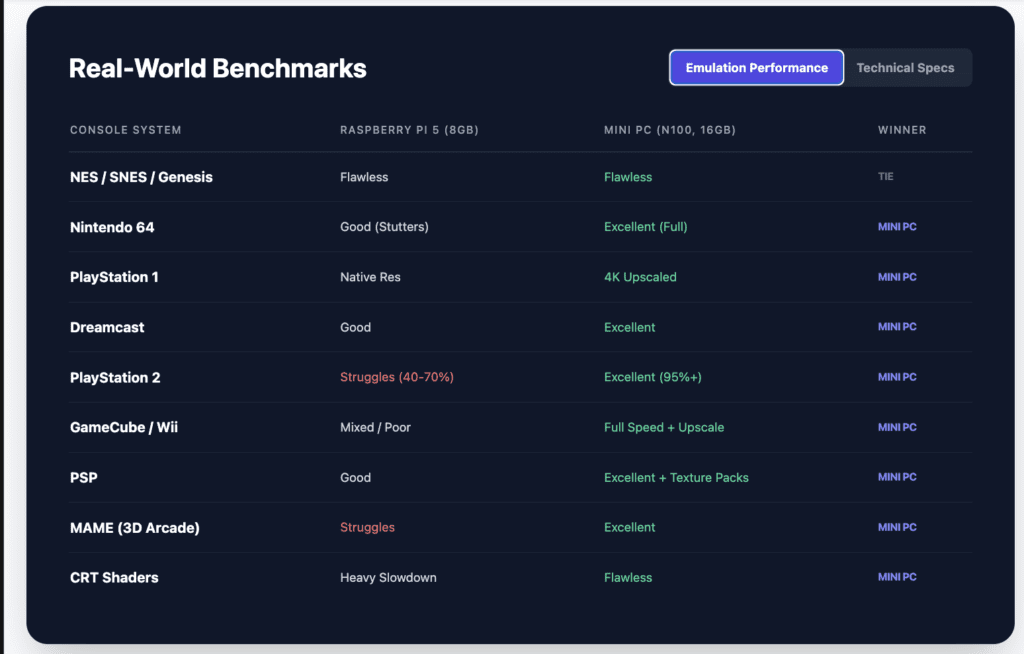
| Console/System | Raspberry Pi 5 (8GB) | Mini PC (N100, 16GB) | Winner |
|---|---|---|---|
| NES / Famicom | Flawless, 0% CPU usage | Flawless, 0% CPU usage | Tie (both overkill) |
| SNES / Super Famicom | Flawless, minimal CPU usage | Flawless, minimal CPU usage | Tie (both excellent) |
| Sega Genesis / Mega Drive | Flawless, minimal CPU usage | Flawless, minimal CPU usage | Tie (both excellent) |
| Nintendo 64 | Good, some games stutter | Excellent, all games full speed | Mini PC |
| PlayStation 1 | Excellent at native res | Excellent with 4x upscaling | Mini PC (better enhancements) |
| Dreamcast | Good, most games playable | Excellent, all games full speed | Mini PC |
| PlayStation 2 | Struggles, 40-70% speed many titles | Excellent, 95%+ titles full speed | Mini PC (clear advantage) |
| GameCube | Mixed, 50-80% speed most games | Excellent, full speed with enhancements | Mini PC (clear advantage) |
| Wii | Struggles, playable but frame drops | Excellent, full speed native and upscaled | Mini PC (clear advantage) |
| PSP | Good, most games playable | Excellent, upscaled with texture packs | Mini PC |
| Nintendo DS | Excellent (less demanding) | Excellent | Tie |
| Sega Saturn | Poor, limited compatibility | Good, 70-80% titles playable | Mini PC |
| MAME (Arcade) | Good for older games, struggles with 3D | Excellent across all eras | Mini PC |
| CRT Shaders (demanding) | Causes slowdowns on 32-bit+ | Runs smoothly on all systems | Mini PC |
| 4K Upscaling (2x-4x internal res) | Impossible on most systems | Comfortable on PS2/GC/Wii | Mini PC |
Benchmarks based on community testing across RetroPie forums, YouTube emulation channels, and personal testing. Performance varies by specific game titles and emulator settings.
Software and Setup Experience
Raspberry Pi 5: RetroPie and Batocera ecosystems
Both RetroPie and Batocera represent mature solutions for Raspberry Pi retro gaming:
RetroPie setup process: Download the RetroPie image, flash it to a microSD card using Raspberry Pi Imager, insert card into Pi 5, and boot. Initial configuration requires keyboard/mouse for Wi-Fi setup and basic settings. ROM transfer happens via USB stick, network share, or direct copy. RetroPie offers deeper customization options and a decade of community refinement.
Batocera setup process: Similar to RetroPie—download, flash, boot. Batocera gained popularity on Pi 5 by delivering working GPU drivers earlier than RetroPie, resulting in better out-of-box performance initially. Setup is slightly more streamlined with web-based ROM management and fewer configuration steps required.
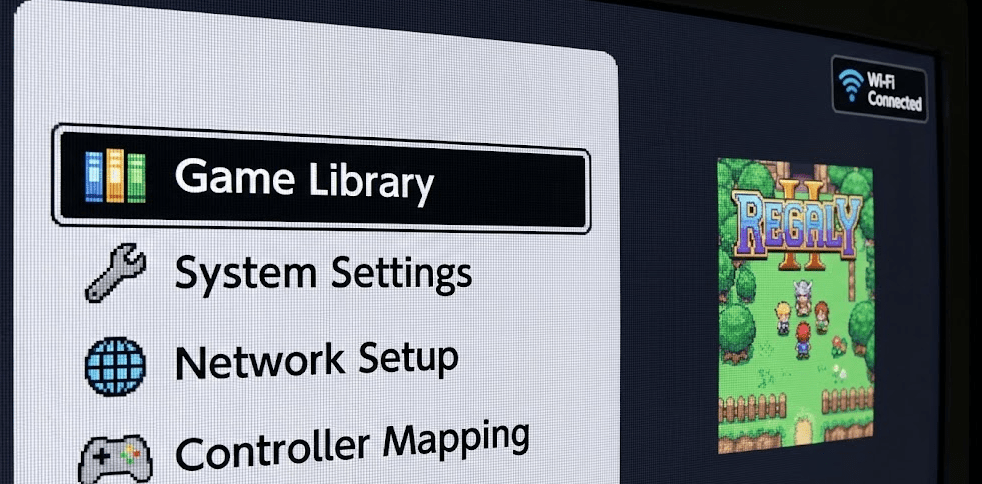
Interface: Both use EmulationStation, providing a clean, controller-navigable interface designed for TVs. Games organize by system with automatic artwork scraping from online databases. Launching games is intuitive—select and play.
Controller configuration: Comprehensive support for Xbox, PlayStation, 8BitDo, and generic USB/Bluetooth controllers. RetroArch handles controller mapping with a unified configuration system that works across multiple emulators in both platforms.
Customization: Extensive theme support, scraper options, and emulator configuration. Advanced users can tweak emulator cores, shaders, and performance settings. Learning curve is moderate but manageable.
Community: Massive community support with active forums, subreddit (r/RetroPie), Discord servers, and YouTube tutorials covering nearly every configuration question or troubleshooting issue.
Mini PC: Multiple software approaches
Mini PCs offer flexibility in software choice:
Option 1: Batocera Linux (console-like experience)
Install Batocera on a USB drive or internal SSD. Batocera boots directly into an EmulationStation-based interface optimized for x86 hardware. Setup takes 15-30 minutes including ROM transfers. Batocera supports network ROM management via web interface, making file transfers easier than Pi setups.
Option 2: Windows with frontend (maximum compatibility)
Run Windows 11 with a frontend like LaunchBox (premium, $75 lifetime), Playnite (free, open-source), or Steam Big Picture Mode. Install standalone emulators (RetroArch, Dolphin, PCSX2, RPCS3) individually. This approach provides maximum emulator choice and Windows software compatibility but requires more configuration time.
Option 3: EmuDeck (Steam Deck-inspired ease)
EmuDeck is an automated script that installs and configures popular emulators on Windows or Linux systems, pre-configuring settings for optimal performance. It creates a unified game library accessible through Steam Big Picture Mode, mimicking the Steam Deck’s emulation experience.
Setup complexity: Windows approaches require 1-3 hours initial configuration depending on emulator count and frontend choice. Batocera installs in 30-60 minutes, comparable to RetroPie but without Pi-specific quirks.
Mini PC: Upgrade and expansion potential
RAM upgrades: Most mini PCs use SO-DIMM DDR4 slots. Starting with 8GB? Add another 8GB stick for 16GB total when needed. Typical cost: $20-40 for additional 8GB.
Storage expansion: M.2 NVMe drives are easily replaceable. Upgrade from 256GB to 512GB, 1TB, or even 2TB as your ROM collection grows. Some mini PCs include secondary M.2 slots or 2.5″ SATA bays for additional storage.
External storage: Mini PCs’ multiple USB 3.0 ports enable external HDDs/SSDs for massive ROM libraries without internal modification. This is harder on Pi 5 due to limited USB ports and slower USB 2.0 speeds on some ports.
Cooling modifications: Enthusiasts can replace stock coolers with aftermarket options for quieter operation or improved thermal performance. This level of customization is impossible with Pi 5’s integrated design.
Power Consumption and Long-Term Costs
Idle and gaming power draw
Raspberry Pi 5:
- Idle: 3-4W
- Light gaming (NES/SNES): 4-5W
- Moderate gaming (PS1/N64): 6-7W
- Heavy gaming (PS2 attempt): 8-10W
Intel N100 Mini PC:
- Idle: 6-10W
- Light gaming (NES/SNES): 10-12W
- Moderate gaming (PS1/N64): 12-15W
- Heavy gaming (PS2/GameCube): 20-25W
Annual energy cost calculations
Assuming 4 hours daily gaming at moderate intensity:
Raspberry Pi 5: 7W average × 4 hours × 365 days = 10.2 kWh/year
At $0.15/kWh: $1.53/year
Intel N100 Mini PC: 15W average × 4 hours × 365 days = 21.9 kWh/year
At $0.15/kWh: $3.29/year
Difference: $1.76/year additional for mini PC
Over 5 years, the mini PC costs $8.80 more in electricity—negligible in the context of the devices’ purchase prices. Only in 24/7 operation scenarios (always-on arcade cabinets, public kiosks) does the Pi 5’s efficiency advantage become financially significant.
When to Choose Raspberry Pi 5
You’re building a dedicated retro gaming appliance: If you want a device exclusively for classic games (NES through PlayStation 1 era) with no need for Windows software or modern gaming, the Pi 5 provides an appropriately-scaled, purpose-built solution.
Community and learning are priorities: If you value learning Linux, engaging with the active RetroPie/Batocera communities, and understanding system internals through troubleshooting, the Pi 5 offers rich educational experiences beyond just playing games.
Custom arcade cabinet or bartop project: For DIY arcade builds, the Pi 5’s GPIO pins, compact size, and RetroPie/Batocera’s arcade-focused features (attract mode, marquee support, LED controls) make integration easier than mini PCs requiring USB encoder solutions.
Energy efficiency is critical: For 24/7 operation, off-grid solar setups, or regions with expensive electricity, the Pi 5’s 60-70% lower power consumption justifies its performance compromises.
You already own compatible accessories: If you have existing Pi 4 accessories (power supply, microSD cards), these work with Pi 5, reducing upgrade costs. However, you’ll still need a better cooling case for gaming. Starting from scratch changes this calculus.
Budget is absolute constraint under $135: If you cannot exceed $135 total budget and already own a controller, the Pi 5 with basic accessories fits this constraint where configured mini PCs start at $180+.
When to Choose Intel N100 Mini PC
You want PS2/GameCube/Wii emulation: If 6th-generation console emulation is important—and it is for many retro gamers in 2026—the N100 mini PC’s performance advantage is decisive. The Pi 5 simply can’t match it.
Enhancement features matter: If you enjoy upscaling classic games to modern resolutions, applying CRT shaders, using texture packs, or implementing widescreen hacks, the N100’s GPU power enables these features where the Pi 5 struggles.
You value versatility and dual-purpose use: If your device needs to function as both a retro gaming system AND a productivity PC, media center, or light modern gaming machine, the mini PC’s Windows compatibility and performance enable this flexibility.
Upgradeability is important: If you want the ability to expand RAM, upgrade storage, or extend device lifespan through component replacement, mini PCs offer upgrade paths that Raspberry Pi’s integrated design cannot match.
Time is valuable: If you want minimal setup friction—unbox, install Batocera or Windows frontend, start gaming within an hour—mini PCs deliver this convenience where Pi setups require more patience and troubleshooting.
You plan to play modern indie games too: If your gaming interests extend beyond retro titles to include indie games (Hades, Celeste, Hollow Knight), older AAA titles, or cloud gaming, the mini PC handles these where the Pi 5 cannot.
Alternative: Hybrid Approach
Use both for different purposes: Some enthusiasts maintain both platforms, using the Pi 5 for arcade cabinet builds or dedicated TV-connected retro gaming appliances while using mini PCs for desk-based gaming with monitors, demanding emulation, or dual-purpose computing. This maximizes each platform’s strengths.
Pi 5 as learning platform, mini PC as daily driver: Use the Pi 5 to learn Linux, experiment with retro gaming setups, and understand system administration without risking your main gaming device. Once configurations are perfected, replicate them on the mini PC for daily use.
Multiple Pis for distributed gaming: Some households use multiple Pi 5 units in different rooms—bedroom, living room, workshop—for low-cost, distributed retro gaming access. Each unit costs $135-165 versus $200+ for multiple mini PCs, making this approach more affordable for multi-room gaming.
FAQ: Mini PC vs Raspberry Pi 5 for Retro Gaming
Can Raspberry Pi 5 handle PS2 games reliably in 2026?
Partially. The Pi 5 runs simpler PS2 titles (2D fighters, early 3D games) at playable speeds but struggles with demanding titles (God of War, Gran Turismo 4, Shadow of the Colossus). Expect 40-70% speed in complex games even with optimized settings. The inconsistency makes it unsuitable for serious PS2 emulation.
Will mini PCs run GameCube and Wii games at full speed?
Yes. N100 mini PCs handle GameCube and Wii emulation comfortably at native resolution and can upscale to 1080p or higher without performance issues. Even demanding titles like F-Zero GX and Super Mario Galaxy maintain 60 FPS.
Is the Raspberry Pi 5 16GB model worth $145 for retro gaming?
No. At $145, the 16GB Pi 5 costs nearly as much as a configured N100 mini PC ($180-200) that vastly outperforms it in emulation. The 16GB RAM provides no practical benefit for retro gaming—even demanding emulators rarely exceed 4-6GB usage. Save money with the 4GB or 8GB model, or spend slightly more for a mini PC.
Can I use Raspberry Pi 5 for modern indie games?
Very limited options. Some native ARM Linux games work, but the library is tiny compared to Windows. Streaming from a gaming PC via Moonlight or Steam Link works, but requires a separate gaming-capable computer, defeating the purpose of the Pi as a standalone gaming device.
Do mini PCs require Windows, or can I use Linux like RetroPie?
Mini PCs work with Linux-based retro gaming distributions like Batocera, Lakka, or even RetroPie (though Pi-optimized). Windows provides maximum software compatibility, but Linux gaming OSes offer console-like experiences if preferred. You’re not locked into Windows.
What about input lag differences between platforms?
Both platforms exhibit similar input lag when properly configured (1-2 frames typical with Run-Ahead feature in RetroArch). The Pi 5 and mini PCs achieve comparable latency for retro gaming. Modern displays contribute far more input lag than hardware platform differences.
Can I build an all-in-one retro gaming handheld with these?
Raspberry Pi 5: Possible but challenging. The Pi 5 requires custom PCB work for battery management, screen integration, and controller connections. Dedicated handheld Pi boards like Compute Module 4 are better suited for this.
Mini PC: Not practical. Mini PCs lack integrated battery management and are too large for handheld form factors. Use them for desktop or TV-connected gaming, not portables.
Which platform has better long-term software support?
Raspberry Pi 5: Excellent long-term support. The Pi foundation and community maintain software for years—Pi 3 from 2016 still receives updates. Expect 5-7 years of active support.
Mini PC: Dependent on Windows/Linux support for x86 architecture, which spans decades. The N100 processor itself may become legacy, but x86 software compatibility ensures functionality for 10+ years.
The Bottom Line: Different Tools for Different Gamers
The Raspberry Pi 5 versus mini PC decision for retro gaming in 2026 depends entirely on which generation of consoles defines “retro” for you and how you prioritize cost, performance, and versatility. The Pi 5’s recent price increases due to memory shortages have fundamentally altered the value equation—what was once a $60-80 complete solution now costs $135-195 when accounting for necessary accessories including proper cooling, uncomfortably approaching mini PC territory.
For purists focused on 8-bit through 32-bit gaming (NES through PlayStation 1), the Raspberry Pi 5 remains an excellent, appropriately-scaled choice. RetroPie and Batocera’s maturity, the active communities, GPIO capabilities for custom arcade builds, and lower power consumption justify the platform when your gaming interests align with its performance envelope. The educational value of learning Linux and engaging with the maker community adds intangible benefits beyond raw gaming performance.
However, the mini PC’s decisive performance advantage in PS2, GameCube, and Wii emulation cannot be overstated. These 6th-generation consoles represent a significant portion of “retro” libraries in 2026, including genre-defining classics that shaped modern gaming. The N100’s ability to enhance these games with upscaling, CRT shaders, and texture packs transforms the experience beyond what original hardware provided—or what the Pi 5 can deliver.
Beyond emulation performance, the mini PC’s x86 Windows compatibility, upgradeability, and dual-purpose utility as both gaming device and productivity PC provide long-term value that justifies the $180-220 entry price. You’re not buying a single-purpose appliance; you’re investing in a versatile computing platform that adapts to changing needs over 5-7 years of ownership.
The hybrid approach deserves consideration: use the Pi 5 for dedicated arcade cabinet projects, bedroom TV-connected gaming, or learning platforms where its compact size and community support shine. Reserve the mini PC for desk-based gaming, demanding emulation, Windows software needs, and daily computing tasks. This maximizes each platform’s strengths without compromise.
Ultimately, ask yourself: do I primarily play NES-PS1 era games, value community and learning, and have patience for Linux tinkering? Choose the Pi 5. Do I want PS2-Wii emulation, Windows compatibility, maximum performance, and time-efficient setup? Choose the mini PC. There’s no universal “better” choice—only the right tool for your specific retro gaming vision.
Updated on: February 23, 2026