
Looking for the Best Mini PC for Ollama? I know hosting Ollama can feel intimidating, so I put together this guide to save you time and avoid mistakes.
Running models locally gives you full control over privacy, latency, and cost predictability, and the right mini PC can make experiments and deployments far smoother.
Here, I focus on systems that balance CPU/GPU inference power, memory, storage speed, and connectivity so you can pick a machine that actually fits your workload and budget.
Top Picks
|
Category |
Product |
Price |
Score |
|---|---|---|---|
|
🏆 Best Workstation – Beast Machine for Commercial AI & LLM Deployment |
$2,959.00 |
100/100 |
|
|
🎯 Best For Developers |
$1,499.00 |
97/100 |
|
|
🚀 Best For Creative Work |
$1,999.99 |
96/100 |
|
|
💰 Best Value – AI & Gaming |
$959.99 |
92/100 |
|
|
🔰 Best Balanced AI |
$1,179.00 |
97/100 |
|
|
🎨 Best Current Deal – Budget Option |
(Curently in Launch Discount) |
$799.99 (Today: $599) |
94/100 |
How I Picked These Mini PCs
I evaluated each system with the needs of local LLM hosting in mind, focusing on the features that directly impact model performance and developer experience.
I prioritized CPU and GPU capability for inference, looking at core counts, clock speed, AI accelerators and discrete GPU options because those determine how fast models run and how many concurrent requests you can serve. Memory and storage are the next critical items, so I favored systems with abundant RAM and fast NVMe PCIe lanes to host weights and swap without bottlenecks.
Connectivity and expandability matter for real deployments, so I considered ethernet speeds, PCIe slots and USB4 for accelerators, and I also weighted thermals and power delivery since sustained inference can be demanding. Finally, I balanced price and ecosystem factors like OS support and driver maturity so you get something that works with Ollama, Docker, and common inference toolchains.
🏆 Best Workstation
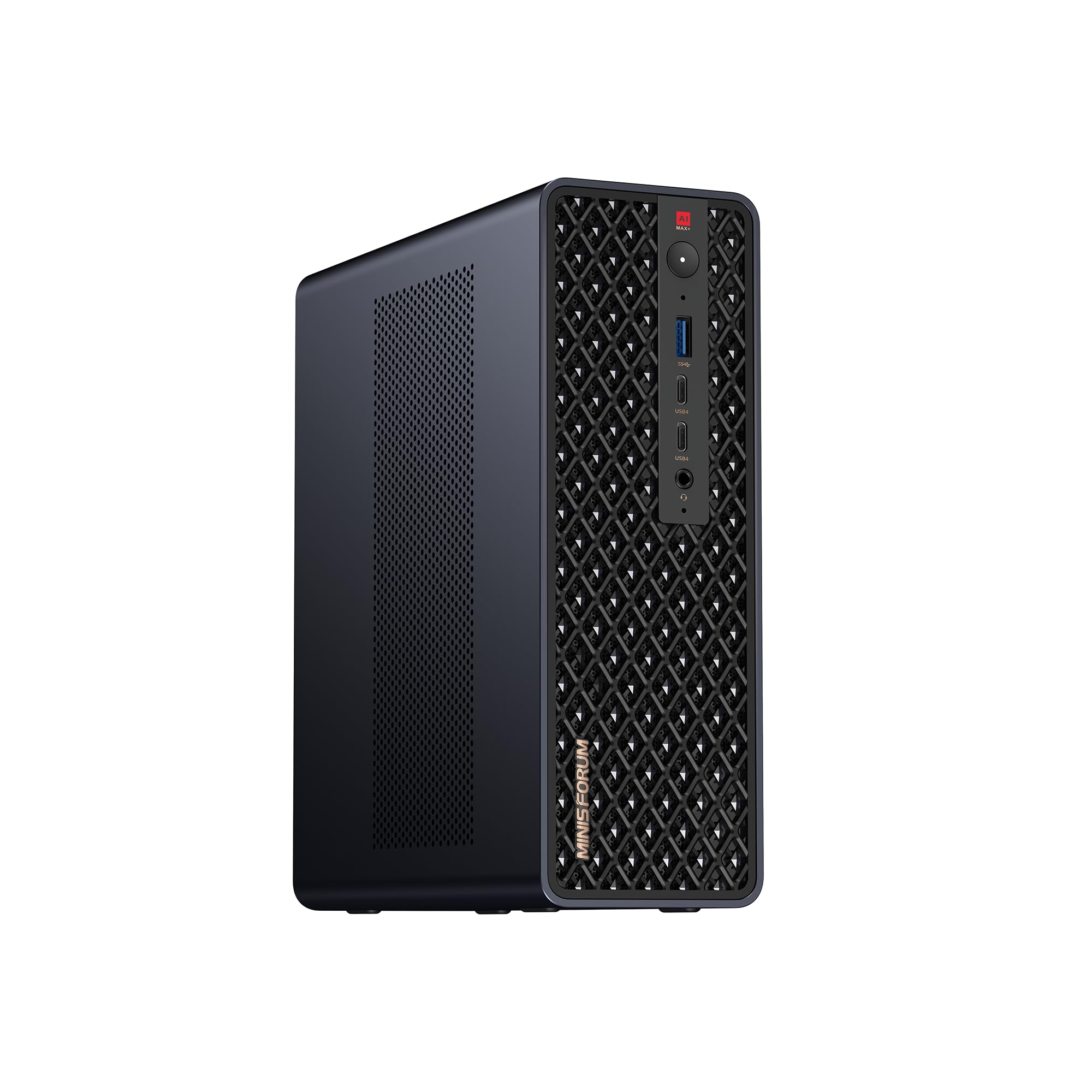
I treat this as the go-to machine when I need raw local compute without hauling a full desktop. It pairs a high-clock Ryzen AI Max+ processor with lots of memory and fast NVMe storage, and the dual 10GbE plus USB4 V2 make it easy to slot into a home lab or small office.
For me that means hosting Ollama models, running inference with minimal latency, and keeping multiple services on the same box. It also works as a surprisingly portable gaming or creative workstation if I want to move it between locations, and I appreciate that it’s designed with expandability in mind so I can add a card or swap drives as needs change.
If you want a small machine that behaves like a full desktop for local LLM hosting, this is the one I reach for.
Long-Term Cost Benefits
Running models locally on a powerful mini PC like this reduces ongoing cloud inference bills and data transfer costs, and its upgrade-friendly design lets me extend usable life by adding newer GPUs or drives rather than replacing the whole system.
When It Helps
|
Situation |
How It Helps |
|---|---|
|
Hosting Ollama and Local LLMs |
Large RAM and NVMe storage let me load big models and serve low-latency responses for single- or multi-user setups. |
|
Edge or On-Prem Inference |
Dual 10GbE and robust cooling keep inference stable and responsive in small office or edge deployments. |
|
Portable Creative Workstation |
High CPU/GPU performance handles video editing or model training tasks when I need a compact but capable rig. |
|
Development And Testing |
Plenty of memory and PCIe expandability make it easy to spin up Docker containers, test models, and iterate quickly. |
Ease Of Use
|
Feature |
Ease Level |
|---|---|
|
Initial Setup |
Moderate (wired mouse may be needed for first-time setup) |
|
Software Compatibility |
Moderate (Linux and Windows supported, drivers required for some features) |
|
Hardware Upgrades |
Easy (accessible PCIe slot and M.2 bays) |
|
Daily Management |
Easy (stable network and performance for 24/7 use) |
Versatility
This box covers many roles: an on-prem inference server for Ollama, a developer workstation, and a small creative machine. Its mix of CPU, GPU, memory and expansion options means I can adapt it as projects change.
Practicality
Physically compact but functionally large, it fits on a desk or rack and removes the need to balance between cloud costs and local control. I can plug it into my NAS, route traffic over 10GbE, and keep models private on site.
Energy Efficiency
This is a high-performance mini PC with a 320W PSU, so it draws more power than ultra-low-power NUC-style systems. For sustained inference it’s efficient for the performance offered, but not optimized for ultra-low-energy always-on tasks.
Speed & Response
With a 5.1 GHz CPU and RDNA3.5 GPU plus fast NVMe storage, response times for local inference are very low compared with cloud roundtrips, making it ideal for interactive use and latency-sensitive apps.
Key Benefits
-
128GB RAM to hold large models in memory
-
Dual 10GbE and USB4 V2 for fast network and peripheral throughput
-
PCIe x16 slot and dual M.2 for easy expansion
-
High single-core and multi-core performance for inference
Current Price: $2,959.00
Rating: 5.0 (total: 10+)
🎯 Best For Developers

I reach for the IT15 when I want a small machine that feels like a proper workstation. It boots quickly, connects to multiple monitors without fuss, and stays whisper-quiet during long coding sessions or model testing. For Ollama hosting it gives me enough CPU cores, solid integrated GPU performance, and roomy NVMe storage so I can run development stacks locally and still keep a responsive desktop.
It’s the sort of box I move between desks, plug into extra monitors, or use for video edits when I need a compact but capable rig.
Long-Term Cost Benefits
Using the IT15 for local inference cuts down on cloud compute bills and egress charges. Its solid-state storage and modern CPU mean fewer upgrades early on, and its small footprint lowers desk and facility costs compared with a full tower.
When It Helps
|
Situation |
How It Helps |
|---|---|
|
Local Ollama Development |
Plenty of RAM and fast NVMe let me load models and iterate quickly without constant swapping to disk. |
|
Multi-Monitor Workstation |
Support for multiple high-resolution displays makes it easy to spread terminals, logs and model dashboards across screens. |
|
Quiet Home Office |
Low noise profile keeps meetings and recording sessions distraction-free while background processes run. |
|
Light GPU Acceleration |
Intel Arc 140T speeds up workloads like compilation, some model inference paths, and media tasks compared with integrated-only systems. |
Ease Of Use
|
Feature |
Ease Level |
|---|---|
|
Initial Setup |
Easy (straightforward Windows setup and WiFi connection) |
|
Daily Use |
Easy (responsive and quiet under normal loads) |
|
Driver & OS Support |
Moderate (may need driver updates for optimal GPU support) |
|
Hardware Expansion |
Moderate (limited internal upgrade paths compared with towers) |
Versatility
The IT15 works as a developer machine, a small inference server for light models, and a media workstation. I can swap between tasks without feeling constrained by the form factor.
Practicality
Its small size and quiet operation make it practical for desks, meeting rooms, or a compact home lab. I don’t need a separate desktop for development and light media work.
Energy Efficiency
The IT15 balances performance and power draw well; it’s not the lowest-power device but it stays efficient for its class, especially compared with full desktop towers.
Speed & Response
With a 5.4 GHz-capable Intel Ultra 9 and fast NVMe, interactive tasks and small-model inference feel snappy, which is great for iterative development and testing.
Key Benefits
-
Compact form factor with desktop-grade performance
-
32GB DDR5 and 2TB NVMe for smooth multitasking and model storage
-
Intel Arc 140T handles light GPU-accelerated workloads
-
Very quiet operation for home or shared workspaces
Current Price: $1,499.00
Rating: 4.5 (total: 250+)
🚀 Best For Creative Work

I reach for the M1A when I need a compact machine that can handle video edits, model experimentation, and occasional gaming without dragging out a tower. It pairs a mobile i9 chip with a discrete ARC A770 GPU, plenty of RAM and a fast NVMe drive, so day-to-day work feels responsive and rendering or inference jobs finish faster than on typical small PCs.
It’s not the quietest choice for ultra-quiet rooms, but it gives me desktop-class performance in a package I can tuck under a monitor or move between desks.
Long-Term Cost Benefits
Investing in a powerful mini PC like this reduces the need for frequent cloud GPU rentals for creative workloads and lets me keep sensitive projects local, lowering recurring costs and data exposure.
When It Helps
|
Situation |
How It Helps |
|---|---|
|
Video Editing |
The discrete GPU and fast NVMe make timeline scrubbing and render exports noticeably quicker than integrated-only mini PCs. |
|
Local Model Inference |
GPU acceleration and ample RAM let me run smaller LLMs locally with reduced latency compared to CPU-only systems. |
|
Multi-Display Workflows |
Support for several high-resolution monitors keeps timelines, previews and tools visible without juggling windows. |
|
Portable Power User |
It’s compact enough to move between workspaces while still offering near-desktop performance for demanding tasks. |
Ease Of Use
|
Feature |
Ease Level |
|---|---|
|
Initial Setup |
Moderate (standard Windows setup, may need driver updates) |
|
Daily Use |
Easy (responsive and straightforward for creative apps) |
|
Software Compatibility |
Moderate (some creative or ML tools may need GPU driver tweaks) |
|
Hardware Upgrades |
Moderate (limited internal space but accessible storage) |
Versatility
This machine handles a wide range of tasks: content creation, local LLM inference, coding and light gaming. It’s flexible enough to be my go-to compact workstation when I need GPU power without a full tower.
Practicality
It fits on a small desk or shelf and connects easily to modern peripherals. For someone who needs performance in a small footprint, it balances portability and capability well.
Energy Efficiency
As a performance-oriented mini PC it uses more power than ultra-low-power models, but it’s reasonably efficient for the level of CPU and GPU performance it delivers.
Speed & Response
With a high-end mobile i9 and a dedicated ARC A770, interactive tasks and GPU-accelerated inference feel quick and responsive, cutting down wait times during creative or development loops.
Key Benefits
-
Discrete ARC A770 GPU for GPU-accelerated workflows
-
Intel Core i9-13900HK delivers strong single- and multi-core performance
-
1TB PCIe4 NVMe and 32GB DDR5 for fast storage and multitasking
-
Multiple high-resolution display support for creative setups
Current Price: $1,999.99
Rating: 4.3 (total: 314+)
💰 Best Value Gaming

I like the EVO-X1 when I want strong GPU-like performance without the price of a full desktop. It feels built for gaming but translates well to local LLM hosting: plenty of memory, a speedy NVMe drive, and a Ryzen AI chip that keeps interactive tasks responsive.
It’s compact enough to sit on a desk and robust enough to handle gaming sessions, model inference for smaller LLMs, and everyday creative tasks. If you want a friendly balance of power and value, this is a machine I’d consider first.
Long-Term Cost Benefits
Buying a capable mini PC like this reduces the need for frequent cloud GPU time for development and casual inference, and its upgrade-friendly M.2 slots let me extend storage without replacing the whole system.
When It Helps
|
Situation |
How It Helps |
|---|---|
|
Local Ollama Hosting |
Good RAM and a fast NVMe let me run small to medium models locally with acceptable latency for testing and personal use. |
|
Casual Gaming |
Radeon 890M and the Ryzen chip deliver enjoyable frame rates for many modern titles at modest settings. |
|
Multi-Monitor Productivity |
Support for multiple high-resolution displays makes it easy to run dashboards, terminals and model outputs side by side. |
|
Portable Desk Setup |
Compact footprint and light weight make it simple to move between rooms or to a friend’s place for collaborative work. |
Ease Of Use
|
Feature |
Ease Level |
|---|---|
|
Initial Setup |
Easy (standard setup and quick boots) |
|
Daily Operation |
Easy (responsive under typical loads) |
|
Thermals & Noise |
Moderate (fans can ramp under heavy load) |
|
Upgrades |
Moderate (M.2 slots accessible, internal space limited) |
Versatility
This unit comfortably wears multiple hats: a gaming rig, a compact creative workstation and a local inference box for smaller models. It’s flexible for hobbyists and small teams who need varied workloads in one small system.
Practicality
The EVO-X1 fits well on a desk or shelf, offers useful ports for peripherals, and avoids the bulk of a tower while still providing meaningful performance for day-to-day tasks.
Energy Efficiency
It’s more power-hungry than ultra-low-power mini PCs but efficient relative to its performance class; expect higher draw during sustained gaming or inference runs.
Speed & Response
With a 5.1 GHz-capable Ryzen AI core and fast PCIe 4.0 storage, interactive tasks feel snappy and short inference jobs complete quickly, reducing iteration time during development.
Key Benefits
-
Ryzen AI 9 HX-370 delivers solid multi-core throughput
-
Radeon 890M offers strong integrated GPU performance for gaming and acceleration
-
32GB LPDDR5X and 1TB PCIe 4.0 NVMe for smooth multitasking and storage
-
Triple-display support and USB4/Oculink for flexible connectivity
Current Price: $959.99
Rating: 4.5 (total: 2+)
🔰 Best Balanced AI

I reach for the X1 Pro when I want a machine that can do a bit of everything without fuss. It blends a fast Ryzen AI core with a capable Radeon GPU and modern connectivity, so hosting Ollama models, running multi-monitor workflows, and doing occasional gaming all feel natural on one small box. It’s compact enough for a desk or small rack, fairly quiet under normal use, and gives me room to grow with fast NVMe storage and decent memory headroom.
For someone who wants a reliable daily driver that doubles as a local inference host, this is a very practical choice.
Long-Term Cost Benefits
Using the X1 Pro for local inference reduces recurring cloud GPU costs and egress fees, and its upgrade-friendly storage and RAM options help extend the machine’s useful life instead of forcing a full replacement.
When It Helps
|
Situation |
How It Helps |
|---|---|
|
Personal Ollama Server |
Enough memory and fast NVMe let me host small to medium models locally for low-latency responses. |
|
Always-On Home Lab |
Good network throughput and stable thermals make it suitable for continuous running without constant intervention. |
|
Content Creation |
GPU-assisted tasks and quick storage speeds speed up rendering and export times for short projects. |
|
Everyday Workstation |
Responsive desktop performance supports browsing, coding, and multitasking alongside inference jobs. |
Ease Of Use
|
Feature |
Ease Level |
|---|---|
|
Initial Setup |
Easy (plug-and-play for most users) |
|
OS & Drivers |
Moderate (may need occasional driver updates for best GPU support) |
|
Upgrades |
Moderate (M.2 bays and RAM options accessible but limited by chassis) |
|
Daily Management |
Easy (stable performance and reliable networking) |
Versatility
The X1 Pro is equally comfortable as a local inference host, a compact creative workstation, or a multi-monitor productivity machine, so I don’t have to buy separate devices for different tasks.
Practicality
It’s practical for small offices and home setups: compact footprint, good port selection, and enough performance to replace a larger desktop for many workloads.
Energy Efficiency
This model balances performance with reasonable power use; it’s not the lowest-power option but it delivers efficient performance for 24/7 or on-demand inference.
Speed & Response
With a 5.1 GHz-capable Ryzen AI core and fast NVMe storage, interactive tasks and short inference runs feel snappy, which helps speed up development and iteration.
Key Benefits
-
Balanced CPU and GPU performance for inference and media tasks
-
High-speed PCIe 4.0 NVMe storage for fast model loads
-
Dual 2.5GbE and Wi‑Fi 7 for stable networked deployments
-
Compact form factor that fits a desk or home lab
Current Price: $1,179.00
Rating: 4.8 (total: 9+)
🎨 Best Budget
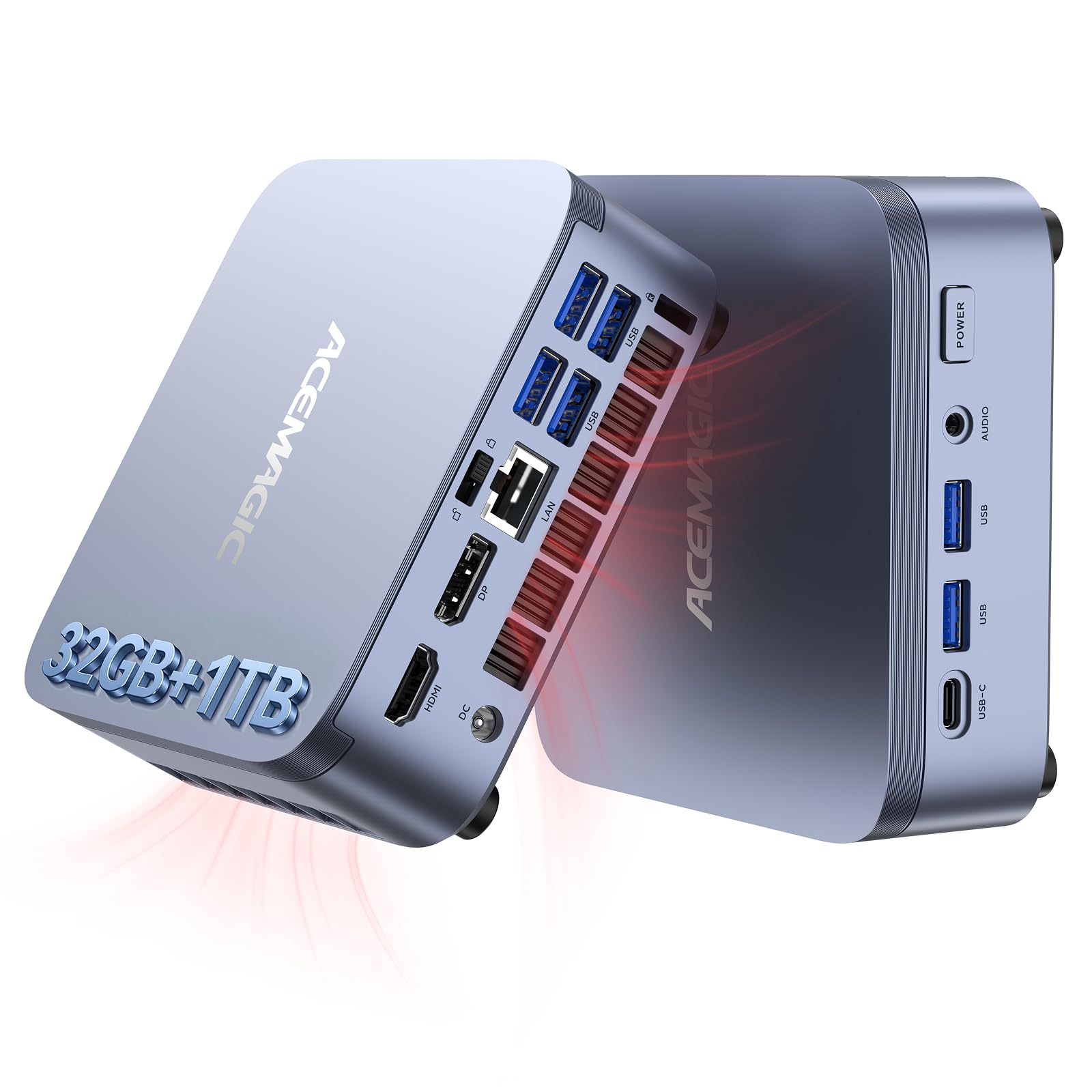
I reach for the M5 when I need a compact, affordable machine that handles everyday work and light development without fuss. It boots quickly, supports common productivity apps, and has enough RAM and NVMe storage to keep workflows smooth.
For Ollama or small local LLM experiments it’s a sensible entry point: it won’t replace a heavy-duty inference server, but it’s capable for testing, smaller models, and edge deployments where power and space matter. It’s also handy as an HTPC or classroom machine because it’s small, relatively quiet, and easy to move between rooms.
Long-Term Cost Benefits
Choosing the M5 lets me run many development tasks locally instead of paying for cloud time. Its solid-state storage and upgradeable memory keep it useful longer, which spreads the initial cost over years.
When It Helps
|
Situation |
How It Helps |
|---|---|
|
Home Office |
Compact size and solid performance give a responsive desktop experience without taking up much space. |
|
Student Or Learning Lab |
Affordable price and capable specs let me run coding environments, notebooks, and lightweight model experiments. |
|
Light Local LLM Hosting |
Enough RAM and fast NVMe allow testing and running smaller models locally with reasonable latency. |
|
Media And HTPC |
Reliable playback and multiple ports make it a convenient small media machine for living rooms or meeting rooms. |
Ease Of Use
|
Feature |
Ease Level |
|---|---|
|
Initial Setup |
Easy (Windows 11 Pro preinstalled and straightforward) |
|
Daily Use |
Easy (responsive for standard tasks and multitasking) |
|
Driver & OS Support |
Moderate (occasional driver updates may be needed) |
|
Hardware Upgrades |
Moderate (some upgrade paths but limited internal space) |
Versatility
The M5 works as a budget workstation, a compact media PC, and a testbed for smaller local models, making it a flexible choice for personal labs or shared spaces.
Practicality
It’s practical for desks, classrooms, and small offices where space and budget are constraints; plug-and-play readiness keeps setup time minimal.
Energy Efficiency
Designed for balanced performance at modest power levels, it uses less energy than full towers but more than ultra-low-power compact devices.
Speed & Response
For everyday apps and smaller inference jobs the M5 feels snappy thanks to SSD storage and abundant RAM; expect longer runtimes for larger LLMs.
Key Benefits
-
32GB RAM and 1TB SSD for responsive multitasking and model storage
-
Compact footprint that fits small desks or media shelves
-
Windows 11 Pro preinstalled for straightforward setup
-
Plenty of USB ports and Type-C for peripherals and external drives
Current Price: $799.99
Rating: (total: +)
FAQ
Do I Need A GPU To Run Ollama Locally?
It depends on the models you plan to run. I can host small to medium models on a capable CPU, but for large models or faster inference a GPU makes a big difference because it accelerates matrix-heavy workloads. If you’re starting out, try CPU-first or smaller quantized models and then add a machine with a discrete GPU when you need lower latency or higher concurrency.
A practical tip I use is to test with a lightweight model locally, then move to a GPU system only when the slowdown becomes a bottleneck.
How Much RAM And Storage Should I Buy?
Memory is one of the most important factors for local LLM hosting. For casual experiments I find 32GB workable, for comfortable multi-model use 64GB is a good baseline, and 128GB is ideal if you plan to keep larger models in memory.
Fast NVMe storage matters too because it speeds model load times and swap; I prefer drives with PCIe 4.0 performance. If budget is a concern, balance RAM and NVMe capacity—spending on memory first usually gives the best real-world improvement.
Is Hosting Locally Cheaper Than The Cloud?
It can be, but context matters. A one-time purchase like a $2,959.00 MINI PC can eliminate recurring cloud GPU bills for a heavy local user, while cheaper minis around $799.99 make sense for light development.
I always compare expected cloud hours and data egress costs to the upfront hardware cost plus electricity and maintenance. For short projects or bursty workloads the cloud often wins; for steady, frequent use or privacy-sensitive data I usually find a local machine pays back over time.
What Buyers Prefer
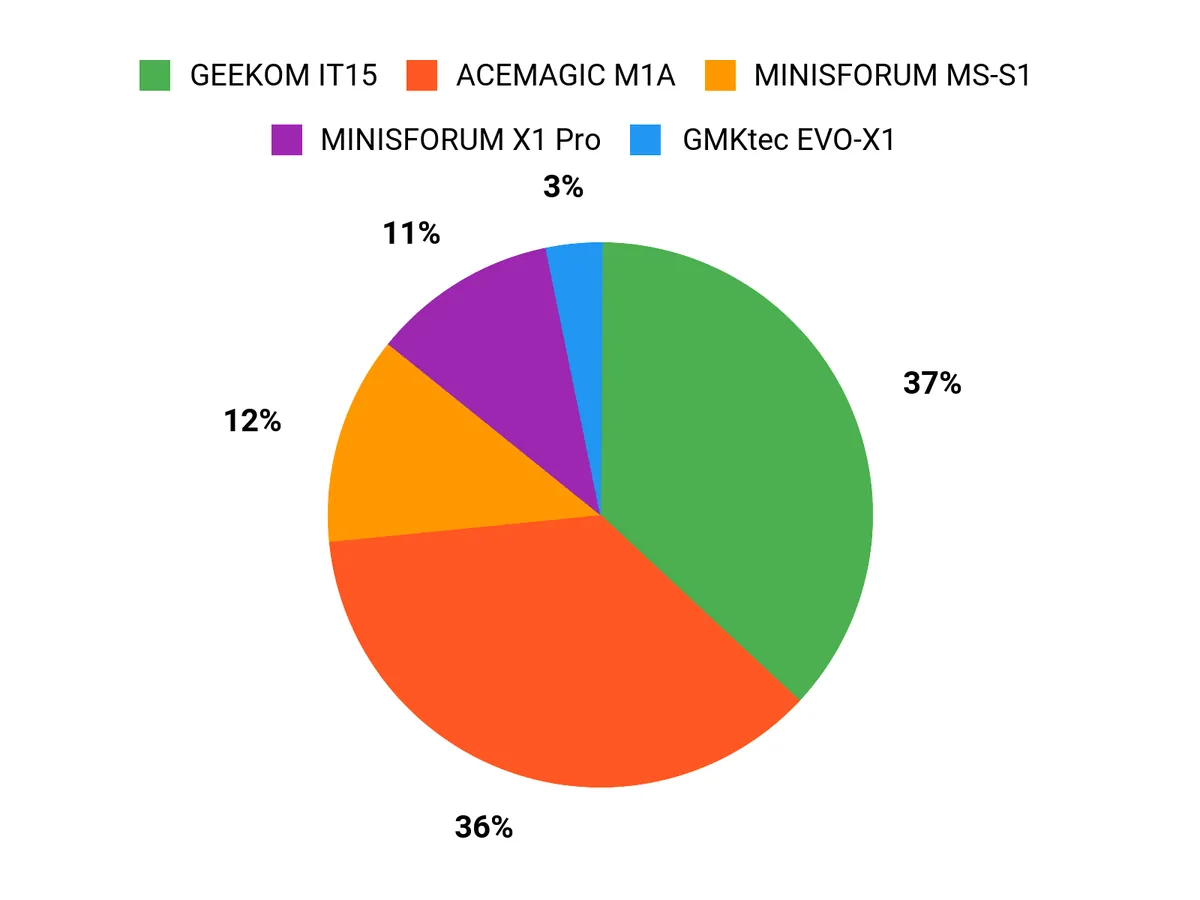
When choosing between the MINISFORUM MS-S1, GEEKOM IT15 and ACEMAGIC M1A, I see buyers prioritize raw on-prem compute and expandability for heavy Ollama inference with the MS-S1, a compact quiet developer workstation with easy setup for the IT15, or a GPU-focused creative machine for accelerated inference and media work with the M1A. We also weigh memory and storage capacity, network options like 10GbE or Wi‑Fi 7, and budget, and those factors usually tip the decision.
Wrapping Up
If I had to pick one machine for serious, on-prem Ollama hosting and future-proofing, the MINISFORUM MS-S1 offers the highest sustained compute and connectivity for demanding workloads and enterprise-style local inference. For developers who want a smaller, quiet machine that still runs heavy workloads well, the GEEKOM IT15 is an excellent compromise of CPU power and daily usability. Creators and users who need discrete GPU performance for model acceleration will find the ACEMAGIC M1A a strong option, while the GMKtec EVO-X1 delivers surprisingly good GPU-like performance at a lower price.
The MINISFORUM X1 Pro is the most balanced choice if you want high memory and solid all-around performance, and the ACEMAGIC M5 gives you the most affordable entry point to run smaller models locally. Pick based on the models you plan to host, how many concurrent users you expect, and whether you need upgrade paths like PCIe accelerators or 10GbE networking.
|
Product Name |
Image |
Rating |
Processor |
RAM |
Storage |
Graphics |
Price |
|---|---|---|---|---|---|---|---|
|
|
5.0/5 (10 reviews) |
AMD Ryzen AI Max+ 395 (5.1 GHz) |
128 GB LPDDR5x |
2 TB SSD |
RDNA3.5 GPU |
$2,959.00 |
|
|
|
4.5/5 (250 reviews) |
Intel Ultra 9 285H (5.4 GHz) |
32 GB DDR5 |
2 TB SSD |
Intel Arc 140T |
$1,499.00 |
|
|
|
4.3/5 (314 reviews) |
Intel Core i9-13900HK (2.6 GHz) |
32 GB DDR5 |
1 TB PCIe 4 SSD |
Intel ARC A770 |
$1,999.99 |
|
|
|
4.5/5 (2 reviews) |
AMD Ryzen AI 9 HX-370 (5.1 GHz) |
32 GB DDR5 |
1 TB PCIe 4.0 SSD |
Radeon 890M |
$959.99 |
|
|
|
4.8/5 (9 reviews) |
AMD Ryzen AI 9 HX370 (5.1 GHz) |
128 GB DDR5 |
1 TB PCIe 4.0 SSD |
AMD Radeon 890M |
$1,179.00 |
|
|
|
N/A |
Core i5-14500HX (2.6 GHz) |
32 GB DDR4 |
1 TB SSD |
Integrated Intel UHD Graphics |
$799.99 |
This Roundup is reader-supported. When you click through links we may earn a referral commission on qualifying purchases.



