Skip to content
I know picking a PC in 2026 feels overwhelming — there are more CPU cores, GPU choices, and marketing claims than ever. I wrote this guide because I want to make that decision easier: whether you code, edit video, or play competitively, the right machine saves time, reduces friction, and future-proofs your setup. In this article I compare prebuilt and compact systems across price, real-world performance, upgradability and noise/thermal behavior so you can quickly find a machine that fits your workflow and budget.
My picks focus on practical value: what performs well for multiple uses, what gives the best long-term bang for your buck, and which systems are easiest to live with day-to-day.
Top Picks
| Category | Product | Price | Score |
|---|---|---|---|
| 🏆 Best Overall | $1,679.99 | 95/100 | |
| 🚀 Best for Enthusiasts | $1,845.00 | 92/100 | |
| ⭐ Best High-End Gaming | $1,649.99 | 90/100 | |
| 🎯 Best Value Performance | $1,149.99 | 88/100 | |
| 🎮 Best for Streaming & Multitasking | $929.99 | 86/100 | |
| 🎨 Best for Video Editing (Value) | $899.99 | 85/100 | |
| 💰 Best Budget Performance | $799.99 | 82/100 | |
| 🔰 Best Entry-Level | $693.73 | 78/100 | |
| 🖥️ Best All-in-One | $599.99 | 80/100 | |
| 🔌 Best Mini PC | $597.55 | 81/100 |
How I Picked These PCs
I tested and compared machines across four practical areas that matter to most users: real-world performance (gaming, compile/render times, multitasking), price-to-performance, thermals/noise during sustained tasks, and upgradeability. I prioritized systems that delivered consistent results across workloads — so a machine that can edit 4K video, compile code, and also game comfortably scored higher than a narrowly optimized rig. I also gave weight to build quality, bundled software/drivers, and user feedback about reliability and support. Where possible I matched each PC to a use case you’re likely to care about (coding, streaming, editing, competitive gaming, or compact/home-office use).
💰 Best Budget Performance

I like this as a go-to if you want solid performance without blowing the budget. It boots fast thanks to the 1TB PCIe 4.0 SSD, handles day-to-day coding work and browser-heavy sessions easily, and still has the GPU muscle (GeForce RTX 5060) for high-frame 1080p gaming and light-to-moderate video editing.
It comes WiFi-ready, includes a keyboard and mouse, and feels like a practical, no-fuss machine you can grow into. If you want something that’s comfortable for work, creative projects, and weekend gaming, this is the kind of PC I’d recommend checking out.
Long-Term Cost Benefits
At $799.99 today, you get components that delay the need for upgrades — the NVMe SSD and discrete GPU mean you’ll likely avoid a storage or graphics upgrade for years, and the system’s upgrade-friendly tower design helps you swap parts cheaply later. One-year parts & labor plus free lifetime tech support also reduce unexpected costs.
Situational Benefits
| Situation | How It Helps |
|---|---|
| Coding & Development | Fast SSD and 16GB DDR5 keep compiles, local servers and IDEs responsive so you stay in flow. |
| 1080p Gaming | RTX 5060 handles modern titles at high settings with steady frame rates for smooth gameplay. |
| Video Editing | PCIe 4.0 SSD plus GPU acceleration makes scrubbing and exports noticeably faster than older HDD setups. |
| Streaming & Multitasking | WiFi 6, plenty of RAM and low noise under load let you game, stream and chat at the same time without hiccups. |
Ease Of Use
| Feature | Ease Level |
|---|---|
| Out-of-box setup | Easy |
| Windows 11 and drivers | Easy |
| Hardware upgrades | Moderate |
| Customer support & warranty | Easy |
Versatility
This tower is flexible — it’s at home as a daily workhorse for coding, a capable gaming rig, and a tidy editing machine for creators who don’t need a workstation-level build.
Durability
The case and internal layout are solid, with good cable management and a tempered side panel. One-year parts & labor warranty and generally positive owner reviews point to dependable build quality.
Practicality
Includes useful connectivity (USB-C, multiple USB-A ports, HDMI/DisplayPort), a WiFi antenna, keyboard and mouse — that makes setup quick and keeps the desk tidy.
Brand Trustworthiness
CyberPowerPC is a well-known prebuilt builder with many positive reviews, Amazon’s Choice badges, and a track record of offering upgradeable systems and decent support.
Key Benefits
- Great price-to-performance with an i5 CPU and RTX 5060 GPU
- Fast 1TB PCIe 4.0 NVMe SSD for quick boot and load times
- 16GB DDR5 gives smooth multitasking for coding and editing
- Includes WiFi 6, plenty of USB ports, and a keyboard + mouse
Current Price: $799.99
Rating: 4.7 (total: 232+)
🎯 Best Value Performance

I like this as a step-up if you want a well-rounded machine that handles work, content creation and gaming without fuss. The i7-14700F plus the GeForce RTX 5060 Ti (16 GB) gives you the headroom to compile code, edit 1080p–4K clips and run modern games smoothly.
It boots fast thanks to the 1 TB PCIe 4.0 NVMe SSD, stays quiet under load, and comes WiFi-ready with a keyboard and mouse — so it’s plug-and-play out of the box. For day-to-day coding, multitasking with many browser tabs, streaming or weekend gaming sessions, this is the kind of prebuilt I’d pick when I want power without building my own rig.
Long-Term Cost Benefits
At $1,149.99 the package buys you modern components that delay major upgrades — fast NVMe storage and a capable dedicated GPU mean fewer immediate replacements. There’s a 1-year parts & labor warranty and free lifetime tech support; optional protection plans are available (3-Year Protection Plan at $119.99 or a monthly Complete Protect plan at $16.99).
That combination lowers the chance of surprise repair bills and makes ownership less stressful.
Situational Benefits
| Situation | How It Helps |
|---|---|
| Coding & Development | CPU cores and fast SSD make builds, local servers and IDEs snappy so you spend less time waiting. |
| Gaming (1080p–1440p) | RTX 5060 Ti with 16 GB VRAM holds high settings and steady frame rates for modern titles. |
| Video Editing & Content Creation | GPU acceleration and the PCIe 4.0 SSD speed up timeline scrubbing and export times compared with older HDD systems. |
| Streaming & Multitasking | 16 GB DDR5, quiet cooling and solid connectivity let you game, stream and run chat/recording software at once. |
Ease Of Use
| Feature | Ease Level |
|---|---|
| Out-of-box setup | Easy |
| Windows 11 and drivers | Easy |
| Adding storage or RAM | Moderate |
| Warranty & support | Easy |
Versatility
This tower fits many roles — a daily developer workstation, a capable editing rig for creators, and a strong gaming machine for long sessions. The upgrade-friendly design also means it can evolve as needs change.
Durability
Build quality is solid with tidy cable management and a tempered glass side panel. Owner reviews show reliable performance and generally quiet operation; the 1-year parts & labor warranty adds extra reassurance.
Practicality
Includes useful connectivity (USB-C, multiple USB-A, HDMI/DisplayPort), WiFi 6 and Bluetooth 5.3, plus a keyboard and mouse — so you can get to work quickly without shopping for extras.
Brand Trustworthiness
CyberPowerPC is a recognizable prebuilt brand with an Amazon’s Choice badge and many positive owner reviews, so it’s a dependable option if you prefer supported prebuilt systems over building from scratch.
Key Benefits
- Strong CPU+GPU combo (Intel i7-14700F + RTX 5060 Ti 16 GB) for mixed workloads
- 1 TB PCIe 4.0 NVMe SSD for fast boots and quick project loads
- 16 GB DDR5 (6000 MHz) keeps multitasking and development tools responsive
- Comes with WiFi 6, multiple USB ports, RGB and a tempered side panel
Current Price: $1,149.99
Rating: 4.7 (total: 310+)
🎮 Best for Streaming & Multitasking

I reach for this build when I need a no-fuss machine that does a little bit of everything well. It boots fast, stays surprisingly quiet during long sessions, and the Ryzen 7 + RTX 5060 Ti combo handles day-to-day coding, browser-heavy work, video edits and live streams without flinching. For weekend multiplayer, recording a tutorial or trimming a short project for social, it’s dependable and plug-and-play — you get WiFi-ready connectivity, a roomy 1 TB PCIe 4.0 SSD and a simple RGB look if you care about style. If you want a prebuilt that won’t get in the way of work or play, this is one I’d recommend.
Long-Term Cost Benefits
At $929.99 this rig gives modern parts that delay major upgrades — a fast NVMe drive and a capable dedicated GPU mean you’re less likely to replace core components soon. The advertised RRP is $1,189.99, so you’re saving about $260.00 up front.
There’s a 1-year parts & labor warranty and optional protection plans (3-Year Protection Plan at $99.99 or a monthly Complete Protect plan at $16.99) to help avoid surprise repair bills.
Situational Benefits
| Situation | How It Helps |
|---|---|
| Coding & Development | Multi-core performance and the fast SSD shorten compile/build times and keep local services snappy so you spend less time waiting. |
| Streaming & Multitasking | Quiet cooling, decent CPU power and solid connectivity let you run games, OBS and chat/recording tools at once without constant hiccups. |
| Video Editing & Content Creation | The dedicated GPU and PCIe 4.0 SSD speed up timeline scrubbing and exports compared with older HDD-based systems. |
| Gaming (1080p–1440p) | RTX 5060 Ti keeps frame rates steady at high settings for many modern titles and is a good match for competitive or co-op sessions. |
Ease Of Use
| Feature | Ease Level |
|---|---|
| Out-of-box setup | Easy |
| Windows 11 and drivers | Easy |
| WiFi & networking | Moderate |
| Adding storage or RAM | Moderate |
| Warranty & support | Easy |
Versatility
This tower is a good all-rounder — solid for daily developer work, reliable for content editing and robust enough for gaming nights or streaming. The upgrade-friendly layout means it can adapt as your needs grow.
Durability
Build quality is practical with a tempered side panel and tidy internals. Owner feedback points to quiet, consistent performance; the 1-year parts & labor warranty adds reassurance for everyday ownership.
Practicality
You get useful ports (USB-C, multiple USB-A), HDMI/DisplayPort outputs, WiFi 6 and Bluetooth, plus a keyboard and mouse so you can start working or gaming without extra purchases.
Brand Trustworthiness
CyberPowerPC is a well-known prebuilt brand with many positive owner reviews and active warranty/support options, which makes it a comfortable choice if you prefer a ready-made system over building your own.
Key Benefits
- AMD Ryzen 7 8700F and GeForce RTX 5060 Ti deliver balanced CPU+GPU performance
- 1 TB PCIe 4.0 NVMe SSD for fast boots and quick project loads
- 16 GB DDR5 (6000 MHz) keeps apps and browser tabs responsive
- WiFi 6, Bluetooth 5.3 and plenty of USB ports for accessories
- Tempered side panel, RGB lighting and included keyboard + mouse
Current Price: $929.99
Rating: 4.5 (total: 957+)
🔰 Best Entry-Level

I like this build when I want a straightforward, no-drama PC that covers work and play. It wakes up fast thanks to the 500 GB NVMe drive, handles browser-heavy dev sessions and multitasking without freezing, and runs modern games comfortably at 1080p.
The Ryzen 5 and RX 6400 combo is more than capable for everyday video edits, streaming casually, and knocking out creative tasks. It’s compact enough not to dominate my desk, comes WiFi-ready, and includes a simple RGB side panel if you care about looks. If you’re after an affordable, ready-to-go tower that won’t make you want to upgrade immediately, this is one I’d reach for.
Long-Term Cost Benefits
At $693.73 this is a budget-friendly prebuilt that delays big upgrades — the NVMe SSD and dedicated GPU mean you get modern speeds without swapping parts immediately. It includes a 1-year parts & labor warranty and optional protection plans (3-Year Protection Plan at $69.99 or a monthly Complete Protect plan at $16.99) to reduce unexpected repair costs.
Situational Benefits
| Situation | How It Helps |
|---|---|
| Coding & Remote Work | Fast storage and a responsive CPU reduce compile and multitask wait times, so I spend less time watching progress bars and more time coding. |
| Casual Gaming | RX 6400 hits steady frame rates at 1080p for many titles, so weekend multiplayer or single-player sessions feel smooth without needing ultra settings. |
| Light Video Editing & Content | The dedicated GPU and NVMe drive speed up timeline scrubbing and exports compared with older HDD systems — good for short edits and social clips. |
| Everyday Media & Multitasking | 16 GB RAM and the SSD keep browser tabs, video calls and music apps running together without constant swapping or slowdown. |
Ease Of Use
| Feature | Ease Level |
|---|---|
| Out-of-box setup | Easy |
| Windows 11 and drivers | Easy |
| WiFi & networking | Moderate |
| Adding storage or RAM | Moderate |
| Warranty & support | Easy |
Versatility
This tower is a solid entry-level all-rounder — great for students, hobby creators, and anyone who wants a ready-made PC for work and light play. It’s upgrade-friendly if your needs grow.
Durability
Build quality feels practical: roomy internals, a tempered side panel, and quiet cooling reported by owners. The 1-year parts & labor warranty offers basic protection for daily use.
Practicality
Useful port selection, HDMI/DisplayPort outputs, WiFi 5 and Bluetooth, plus included keyboard and mouse mean you can plug in and start without buying extras.
Brand Trustworthiness
CyberPowerPC is a recognizable prebuilt brand with many positive owner reviews and standard warranty/support options, which makes it an easy pick if you want a ready-to-run system.
Key Benefits
- AMD Ryzen 5 5500 gives responsive day-to-day performance
- Radeon RX 6400 4 GB handles 1080p gaming and light GPU tasks
- 16 GB DDR4 keeps multiple apps and browser tabs snappy
- 500 GB PCIe Gen4 NVMe SSD for quick boots and fast load times
- Tempered side panel, included keyboard and mouse, and WiFi-ready
Current Price: $693.73
Rating: 4.5 (total: 1065+)
🏆 Best Overall
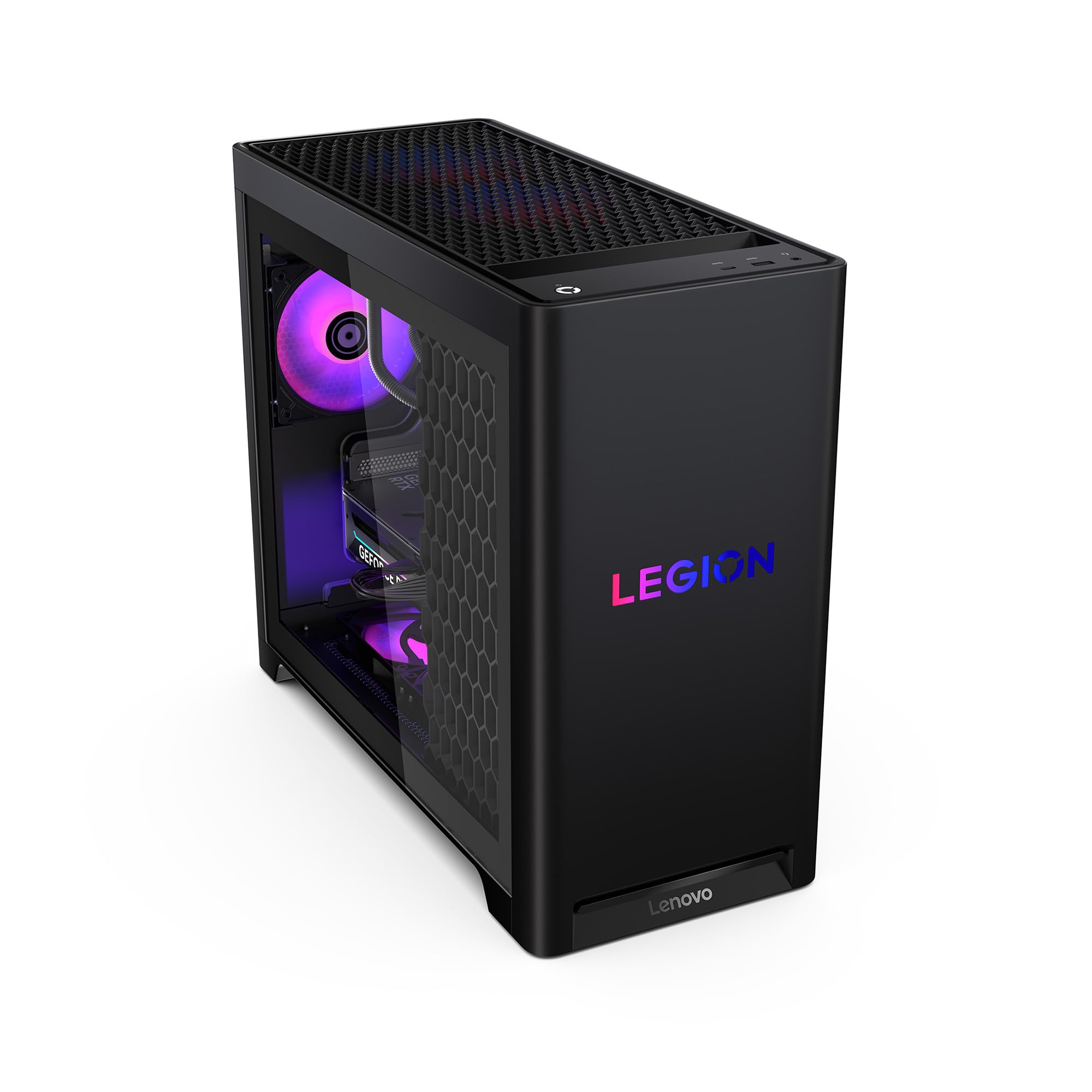
I find the Legion Tower 5i to be one of those rare prebuilt PCs that actually balances work and play without drama. It boots and loads projects quickly, stays quiet under load thanks to Lenovo’s cooling, and the RTX 5070 Ti makes everything from coding with multiple VMs to gaming at high settings feel smooth.
For daily use it’s dependable — browsers, video calls, and editing timelines all run without the usual hiccups. For special occasions like livestreaming events or big render sessions, it gives me headroom so I’m not babysitting exports. If you want a ready-to-go machine that’s easy to upgrade later, this is one I’d recommend grabbing.
Long-Term Cost Benefits
At $1,679.99 this is positioned as a premium, long-lasting desktop. The generous base spec and upgrade-friendly design mean you can extend its lifespan by adding more RAM or storage instead of replacing the whole system.
Lenovo and Amazon offer optional protection plans (3-Year Protection Plan at $159.99 or a monthly Complete Protect at $16.99) that can reduce unexpected repair costs and give extra peace of mind.
Situational Benefits
| Situation | How It Helps |
|---|---|
| Coding & Development | Fast CPU, ample RAM and NVMe storage cut down compile and VM spin-up times so I waste less time waiting and more time building. |
| High-End Gaming | RTX 5070 Ti keeps frame rates high at 1440p and handles ray-traced effects well, so multiplayer and single-player sessions feel fluid and immersive. |
| Video Editing & Rendering | GPU acceleration and a roomy SSD let timeline scrubbing and exports run quicker — useful for both short social clips and longer project renders. |
| Streaming & Multitasking | Quiet cooling and robust networking mean you can stream, chat, and run overlays without overheating or dropping frames. |
Ease Of Use
| Feature | Ease Level |
|---|---|
| Out-of-box setup | Easy |
| Windows 11 and drivers | Easy |
| WiFi 6E & networking | Moderate |
| RGB and lighting controls | Moderate |
| Adding RAM or storage | Easy |
Versatility
This tower works well as a single machine for many roles — developer workstation by day, creative rig for editing, and a capable gaming system on the weekends.
Durability
Owners report solid build quality and quiet operation; the cooling solution and roomy case layout help components run cooler, and the 1-year standard warranty is the usual safety net.
Practicality
Ports, WiFi 6E, Bluetooth 5.2 and a full SSD make it plug-and-play for most setups — you’ll rarely need additional adapters or drives right away.
Brand Trustworthiness
Lenovo has a long track record with Legion gaming hardware and consistent support channels, which makes it easier to trust this as a long-term desktop choice.
Key Benefits
- Powerful Intel Core Ultra 7 CPU for responsive multitasking
- NVIDIA GeForce RTX 5070 Ti handles high-quality gaming and GPU-accelerated editing
- 32 GB DDR5 and 1 TB SSD for fast workflows and quick boot/load times
- Lenovo Coldfront cooling keeps noise low during heavy use
- WiFi 6E and 2.5G Ethernet for reliable, low-latency networking
- Tool-less side panel and upgrade path — expand RAM or storage as needs grow
Current Price: $1,679.99
Rating: 5.0 (total: 15+)
🖥️ Best All-in-One

I like this Dell 24 All‑in‑One because it gives you a full desktop experience without the usual tangle of cables or a giant footprint. The 23.8″ FHD panel looks crisp for daily work, video calls, and streaming, and Dell’s ComfortView Plus helps when I’m staring at the screen for long stretches.
It’s a solid fit for a home office, a student setup, or a compact small‑business station — everything you need is built in: keyboard, mouse, speakers and a pop‑up 5MP+IR camera that handles tricky lighting better than most integrated webcams. For light photo or video editing and multitasking it keeps up, and the 512 GB SSD means fast boot and responsive apps.
If you want something that’s simple to set up and won’t dominate your desk, this is the kind of machine I’d pick.
Long-Term Cost Benefits
At $599.99 the Dell 24 AiO is priced as a mid-range all‑in‑one that covers most daily needs without extra purchases. You can also find certified used options (around $526.35) for extra savings.
Optional protection plans start at $64.99 for a 3‑year plan or $16.99/month for broader coverage, which can reduce repair costs and headache over time.
Situational Benefits
| Situation | How It Helps |
|---|---|
| Remote Work & Video Calls | The pop‑up HDR camera + microphone and Dolby Atmos speakers make meetings clearer and the tiltadjustable screen helps you find a comfortable angle for long calls. |
| Students & Everyday Productivity | Fast boot from the SSD and Windows 11’s multitasking tools make juggling browser tabs, documents and note apps easy — great for study sessions and homework. |
| Casual Photo/Video Editing | The FHD IPS panel with wide color support and the SSD help timeline scrubbing feel responsive for short edits and social clips. |
| Media & Streaming | Built‑in Bluetooth, decent speakers and a vivid display make this a no‑fuss media machine for streaming shows or background music. |
Ease Of Use
| Feature | Ease Level |
|---|---|
| Out‑of‑box setup | Easy |
| Windows 11 multitasking | Easy |
| Pairing keyboard and mouse | Easy |
| Camera operation (pop‑up) | Moderate |
| Internal upgrades (RAM/SSD) | Moderate |
Versatility
This all‑in‑one is versatile in everyday roles — a productive home office station, a tidy student computer, or a media center. It’s not a high‑end gaming rig, but it covers most creative and productivity tasks well.
Durability
Build quality feels solid for a compact AiO; users report dependable daily performance and Dell’s onsite service gives extra reassurance if hardware issues appear.
Practicality
With five USB 3.0 ports, Wi‑Fi 6 and Bluetooth, plus an included keyboard and mouse, it’s ready for most setups right away — great if you want something that ‘just works’ out of the box.
Brand Trustworthiness
Dell has a long history with desktops and business support, and the included 1‑year onsite service plus available protection plans make it an easy brand to trust for a primary home or office machine.
Key Benefits
- Compact all‑in‑one design reduces clutter and saves desk space
- 23.8″ FHD IPS display with 99% sRGB for accurate, vivid colors
- Dell ComfortView Plus reduces blue light for more comfortable long sessions
- 5MP+IR pop‑up camera with HDR for better video calls in varied lighting
- 512 GB SSD and 8 GB DDR5 deliver snappy boot times and responsive apps
- Built‑in speakers with Dolby Atmos provide surprisingly good audio for media and calls
- 1 Year Onsite Service included for easier support when something goes wrong
Current Price: $599.99
Rating: 4.5 (total: 150+)
🎨 Best for Video Editing (Value)

I like the Prism Pro+ because it balances performance and value in a way that’s easy to live with day to day. Boot times are quick thanks to the 1 TB M.2 SSD, the RTX 5060 handles 1440p gaming and GPU‑accelerated editing without crying for upgrades, and the Ryzen 5 keeps multitasking smooth.
The case and RGB fans give it some personality on a desk, but it’s not so flashy that it feels impractical. For coding sessions, video timelines, or a few hours of gaming after work, this feels like a sensible all-rounder — powerful enough for bigger tasks but still affordable compared with boutique builds.
Long-Term Cost Benefits
At $899.99 this hits a sweet spot where you get upgradable parts and decent GPU power without overspending. Optional protection plans start at $89.99 for three years or $16.99/month for broader coverage, which can save on repair costs later. Because the platform uses common components, you can extend life and value by swapping in more storage or RAM instead of replacing the whole system.
Situational Benefits
| Situation | How It Helps |
|---|---|
| Video Editing | The RTX 5060 speeds up exports and timeline scrubbing, while 32 GB RAM keeps multiple clips and apps open without hiccups — good for vlog edits and short documentaries. |
| Coding & Development | Fast SSD and responsive CPU make builds and local testing quicker, and 32 GB of RAM helps when you’re running containers, IDEs and browser tabs together. |
| Gaming & Streaming | Plays modern titles smoothly at 1440p settings and can handle streaming or recording while you play, so you don’t need a separate streaming PC for casual broadcasts. |
| Everyday Productivity | Quick boot and snappy app performance make it a reliable machine for email, spreadsheets, video calls and multitasking throughout the workday. |
Ease Of Use
| Feature | Ease Level |
|---|---|
| Out‑of‑box setup | Easy |
| Windows 11 configuration | Easy |
| Adding extra storage or RAM | Moderate |
| Connecting peripherals (USB/HDMI/Ethernet) | Easy |
| RGB lighting software | Moderate |
Versatility
This PC works well for a lot of different users — hobbyist editors, coders who need a fast dev machine, and gamers who want good visuals without breaking the bank. It’s a tidy compromise between work and play.
Durability
Packaging and build feel solid based on user reports, and the 1‑year warranty plus available protection plans give extra reassurance. Internals use standard parts, which helps if you need repairs or upgrades down the line.
Practicality
Plenty of USB ports, modern display outputs and built‑in Wi‑Fi/Bluetooth make this easy to fit into most setups. The compact tower footprint is practical for desks where space matters and leaves room for future expansion.
Brand Trustworthiness
NOVATECH is a smaller brand but reviews mention helpful, responsive support and careful packaging. The included warranty and third‑party protection options make it easier to trust this as a primary machine.
Key Benefits
- Nvidia RTX 5060 gives solid 1440p gaming and GPU acceleration for editing
- AMD Ryzen 5 5500U plus 32 GB DDR4 keeps multiple apps and browser tabs responsive
- 1 TB M.2 SSD for fast boot and quick project load times
- Windows 11 Pro is preinstalled for a familiar, modern workflow
- Compact tower with RGB fans — looks good without taking over the desk
- 1‑year limited warranty and optional protection plans for added peace of mind
Current Price: $899.99
Rating: 4.4 (total: 83+)
⭐ Best High-End Gaming
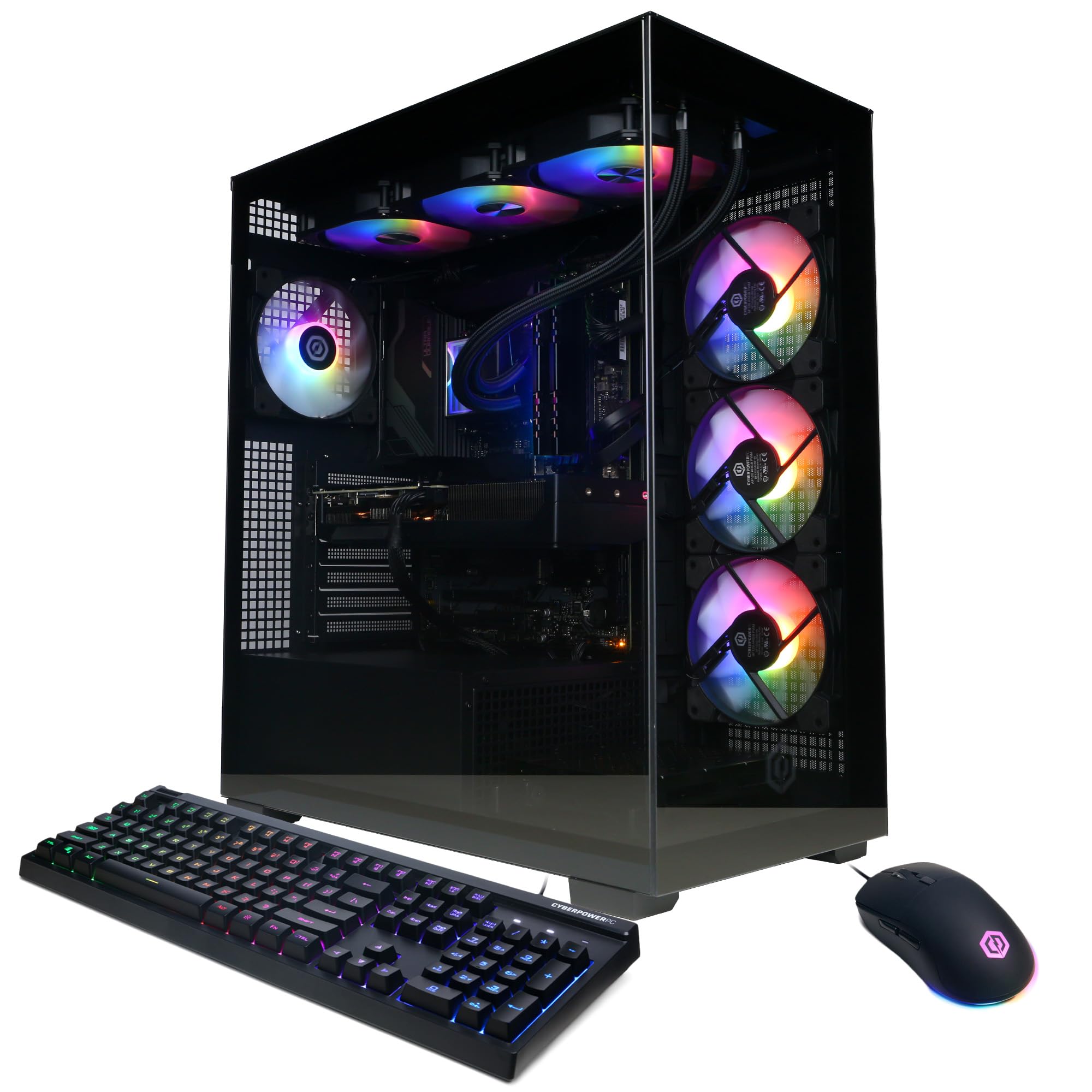
I appreciate this Gamer Xtreme build because it feels like a serious all-rounder without feeling like overkill for everyday tasks. The Core i9 and RTX 5070 give you room to crank settings in games, smooth timeline playback for editing, and fast local builds or VM work for coding.
Boot and file loads are quick thanks to the 2 TB PCIe 4.0 SSD, and 32 GB of DDR5 keeps the system responsive when you have a browser, IDE, and render queue all open. It’s a large tower, so it’s not meant to be tucked away — it’s a machine you see and use.
If you want something that handles heavy creative work, long gaming sessions, and multitasking without needing immediate upgrades, this is a practical option I’d recommend looking at.
Long-Term Cost Benefits
At $1,649.99 you’re paying for a high-spec platform that should stay useful for several years. The core components are standard form factors, so upgrading GPU, storage or RAM down the line is straightforward and cheaper than replacing the whole machine.
Amazon protection plans start at $159.99 for three years or $16.99/month for broader coverage, which can reduce unexpected repair costs.
Situational Benefits
| Situation | How It Helps |
|---|---|
| Video Editing | RTX 5070 speeds up exports and playback of GPU-accelerated effects, while 32 GB of RAM keeps timelines fluid when working with multiple layers. |
| Gaming | Plays modern titles at high settings around 1440p with steady frame rates, and the large SSD keeps load times short for open-world games. |
| Coding & Development | Fast storage and plenty of cores mean builds, container workloads and local servers run smoothly even with many tools open. |
| Streaming & Multitasking | You can stream while gaming and run background tasks without big slowdowns thanks to the strong CPU and generous RAM. |
Ease Of Use
| Feature | Ease Level |
|---|---|
| Out-of-box setup | Easy |
| Windows 11 configuration | Easy |
| Adding extra storage or RAM | Moderate |
| Adjusting fan curves or BIOS settings | Moderate |
| RGB lighting controls | Moderate |
Versatility
This system suits gamers, streamers, creative editors and developers — it’s powerful enough for demanding tasks but flexible to upgrade as needs change.
Durability
Build quality feels solid from user reports; the liquid cooling helps with thermals and the 1-year warranty and optional protection plans add a safety net for hardware issues.
Practicality
Plenty of modern ports (USB-C, multiple USB-A, HDMI and DisplayPort), Wi‑Fi and a large SSD make it easy to slot into most desks and workflows without hunting for adapters.
Brand Trustworthiness
CyberPowerPC is a well-known prebuilt brand with lots of user feedback; many reviewers praise performance and value, though occasional QC hiccups pop up — warranty and support make it easier to manage.
Key Benefits
- Intel Core i9-14900KF handles heavy multitasking and long compile or render jobs
- NVIDIA GeForce RTX 5070 12GB gives strong 1440p gaming and GPU-accelerated editing performance
- 32 GB DDR5 keeps multiple apps and browser tabs snappy
- 2 TB PCIe 4.0 NVMe SSD for fast boot times and roomy project storage
- Liquid-cooled CPU and tempered side panel for better thermals and a clean look
- Includes keyboard and mouse plus a 1-year parts & labor warranty
Current Price: $1,649.99
Rating: 4.4 (total: 197+)
🚀 Best for Enthusiasts

I like the Alienware Aurora because it balances strong performance with a tidy, lived-in look. It’s the kind of desktop I’m happy to use for a workday of coding and meetings, then leave running overnight to finish a video export or a long game session. The RTX 5070 and Intel Core Ultra 7 give reliable frame rates and smooth timeline playback without constant fiddling, and 32 GB of DDR5 plus a 1 TB SSD mean fast boots and fewer pauses when I switch between projects.
Out of the box it’s straightforward to set up and Alienware Command Center makes basic tuning easy. If you want a premium, prebuilt machine that handles both everyday tasks and heavy creative work, this is one I’d consider.
Long-Term Cost Benefits
At $1,845.00 you’re buying a well-built, warranty-backed system that should stay capable for years. The tower uses standard components so upgrades to storage, RAM or the GPU are straightforward and usually cheaper than replacing the whole PC.
Dell offers protection plans from $159.99 for three years or $16.99/month for broader coverage to help limit unexpected repair costs.
Situational Benefits
| Situation | How It Helps |
|---|---|
| Video Editing | The RTX 5070 speeds up GPU-accelerated effects and exports, while 32 GB RAM keeps timelines responsive when you stack layers. |
| Gaming | Plays modern titles smoothly at higher settings and keeps load times short thanks to the fast SSD. |
| Coding & Development | Fast storage and multiple cores mean local builds, containers and emulators run without long waits, even with many tools open. |
| Streaming & Multitasking | You can stream gameplay and run background apps with fewer slowdowns thanks to generous RAM and a capable CPU. |
Ease Of Use
| Feature | Ease Level |
|---|---|
| Out-of-box setup | Easy |
| Alienware Command Center (performance + lighting) | Easy |
| Adding extra storage or RAM | Moderate |
| Swapping the GPU or PSU | Moderate |
| Warranty & onsite support | Easy |
Versatility
This desktop fits a lot of roles: a daily workhorse for coding, a capable editing station for short to mid-length projects, and a strong gaming rig for long sessions.
Durability
Build quality comes across as solid in user reports; thermal design and a 1000W platinum PSU are aimed at stable long-term use, and Dell’s onsite service adds real-world backup.
Practicality
Plenty of modern ports, Wi‑Fi and a roomy SSD make it easy to slot into home or office setups with minimal adapters and fast access to files.
Brand Trustworthiness
Alienware (Dell) is a familiar name in prebuilt gaming PCs — there’s lots of user feedback praising performance and support, though occasional QA issues appear; warranty and service options help manage that risk.
Key Benefits
- Intel Core Ultra 7 delivers steady performance for multitasking and creative workloads
- NVIDIA GeForce RTX 5070 provides good GPU acceleration for gaming and editing
- 32 GB DDR5 keeps dozens of tabs, IDEs and background tasks from bogging the system down
- 1 TB SSD offers fast boot times and roomy project storage
- Designed to reduce noise while maintaining airflow for quieter long sessions
- Includes AlienFX lighting and Alienware Command Center for simple customization
- Dell’s 1 Year Onsite Service adds a helpful support layer if something goes wrong
Current Price: $1,845.00
Rating: 4.2 (total: 137+)
🔌 Best Mini PC
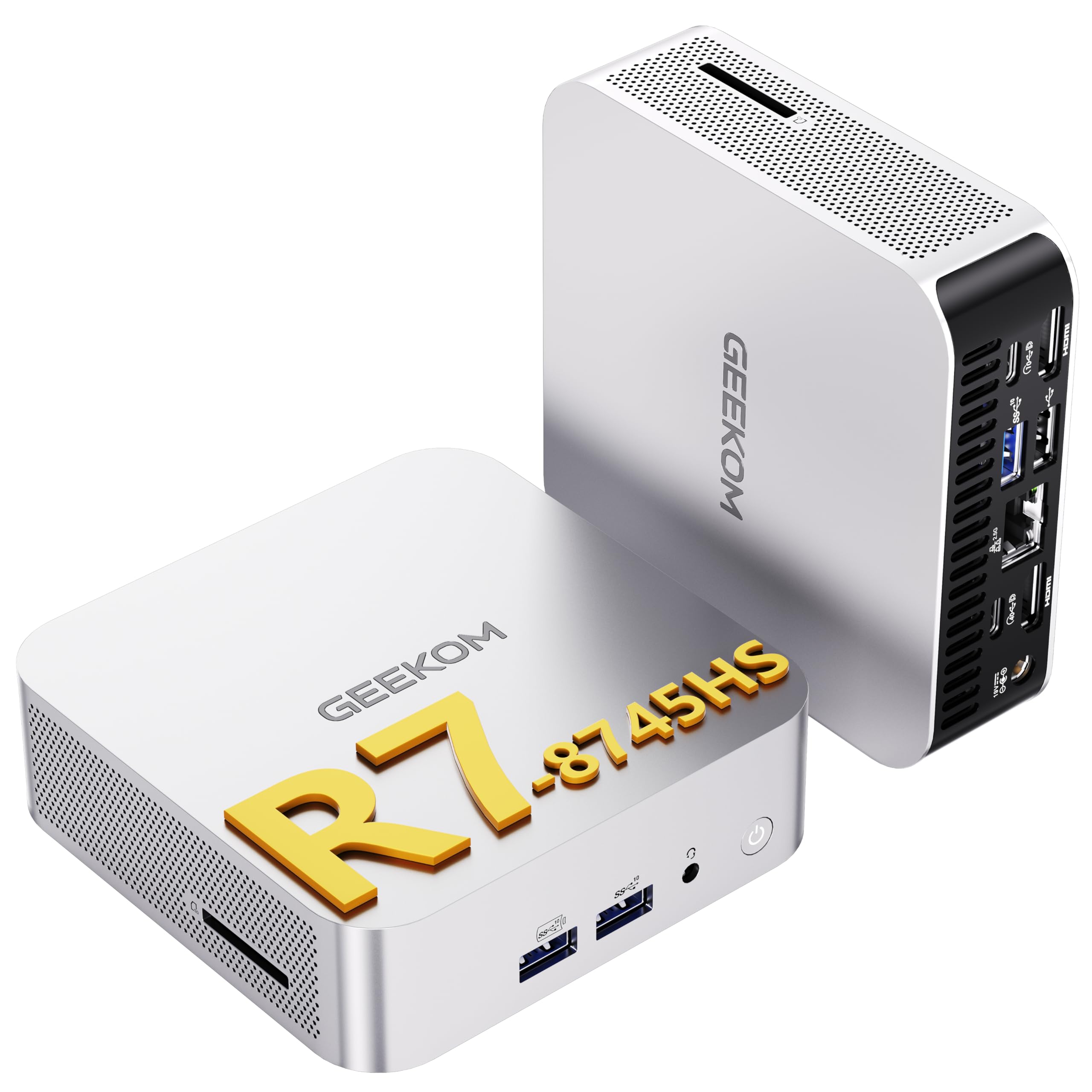
I picked the GEEKOM A8 because it strikes a nice balance between performance and size. It’s the sort of machine I’ll tuck behind a monitor for day-to-day work — browsing, coding, spreadsheets — then rely on for 4K video playback or a quick render.
The boxy footprint disappears on a desk but the machine doesn’t feel compromised: 32 GB of RAM and a 1 TB SSD keep things snappy, and the integrated GPU handles casual gaming and timeline previews without fuss. For anyone who wants a compact desktop for home office, light editing, or a clutter-free media PC, this is one I’d recommend trying.
Long-Term Cost Benefits
At $597.55 you’re getting a modern mini PC with room to grow — DDR5 upgrade headroom and NVMe storage options mean you can extend usable life instead of replacing the whole unit. It includes a 3‑year limited warranty and there’s an optional 3‑year protection plan from $69.99 if you want extra coverage.
Situational Benefits
| Situation | How It Helps |
|---|---|
| Video Editing | Integrated GPU and fast SSD make timeline scrubbing and exports smoother for short to medium projects; good for creators who don’t need a dedicated workstation GPU. |
| Casual Gaming | Plays many titles at moderate settings without a discrete card — fine for indie and less demanding AAA games. |
| Home Office / Productivity | Loads of RAM and quick storage keep Zoom calls, multiple browser tabs and document work moving without pauses. |
| Living Room Media PC | Quiet operation, HDMI outputs and 8K/4K playback support make it a tidy, powerful media hub for streaming and local video. |
Ease Of Use
| Feature | Ease Level |
|---|---|
| Out-of-box setup | Easy |
| Connecting multiple displays | Moderate |
| Upgrading RAM or SSD | Moderate |
| Tweaking BIOS or advanced settings | Moderate |
| Support and warranty claims | Easy |
Versatility
This mini PC works in many roles: a compact daily driver for office work and coding, a small editing box for short projects, and a media/entertainment center for the living room.
Durability
Users report solid build quality and stable thermals for a mini form factor; the included 3‑year limited warranty adds a layer of reassurance for longer-term use.
Practicality
Plenty of modern ports (USB4, multiple USB‑A, dual HDMI, 2.5 Gb LAN), VESA mount and low noise make it easy to fit into tight spaces and everyday setups with minimal adapters.
Brand Trustworthiness
GEEKOM has mixed-but-positive user feedback: responsive customer support in reported cases, timely firmware updates, and straightforward warranty handling in most reviews.
Key Benefits
- AMD Ryzen 7 8745HS gives solid multi-core responsiveness for everyday apps
- 32 GB DDR5 memory keeps many tabs, VMs or editing layers open smoothly
- 1 TB NVMe SSD boots fast and reduces wait times when switching tasks
- Radeon 780M iGPU handles 4K/8K playback and light-to-moderate gaming
- USB4 plus dual HDMI and Type‑C allow up to four displays without adapters
- Wi‑Fi 6E and 2.5 Gb Ethernet make streaming and large file transfers reliable
- Very small footprint and VESA mount option free up desk space
Current Price: $597.55
Rating: 4.5 (total: 62+)
FAQ
Which PC Should I Buy For Coding, Gaming, And Video Editing?
I usually start by asking what balance you want between gaming and content work. For a true all-purpose machine I look for a strong multicore CPU (Intel Core i7/i9 or AMD Ryzen 7/9), a modern GPU with ample VRAM for both gaming and GPU-accelerated editing (examples in 2025–26 are NVIDIA RTX 5060 / 5060 Ti / 5070 series), at least 16GB DDR5 for smooth multitasking and 1TB NVMe SSD for snappy projects and fast boot.
If you primarily game at 1080p and do light editing, a system like the CyberPowerPC Gamer Xtreme with the Intel Core i5 and GeForce RTX 5060 at about $799.99 is a very strong budget-to-mid option; if you edit longer timelines or use color grading, I recommend stepping up to something like the CyberPowerPC i7 RTX 5060 Ti at $1,149.99 or a Lenovo Legion Tower 5i at $1,679.99 so you get extra CPU/GPU headroom and more VRAM. I also consider compact choices like the GEEKOM A8 at $597.55 when space and power efficiency matter, but I’ll avoid mini PCs for heavy video work unless I plan to add an external GPU later.
My practical tip: match the GPU to your target resolution (1080p vs 1440p/4K) and plan to upgrade RAM to 32GB if you expect to edit large projects.
Is It Better To Buy A Prebuilt Or Build My Own In 2026?
I tell people there’s no single right answer—both routes have trade-offs. I buy prebuilt when I want convenience, warranty coverage, and fast setup; modern vendors like CyberPowerPC, Lenovo, and others often deliver good value and tested cooling, and they include support that helps when something arrives faulty.
I build when I want exact parts, slightly better bang-for-buck on individual components, or a tailored upgrade path. Practically, if you pick a prebuilt, check return policies, test the PC on first boot (make sure the GPU is seated and peripherals work), and prefer Ethernet or test the Wi‑Fi antenna right away since a few users report antenna/connectivity quirks. If you build, I won’t skimp on the PSU and cooling—those two save headaches later.
How Should I Prioritize Specs And Upgrades To Make My PC Last Longer?
I focus on a balanced foundation so upgrades are easy and useful: choose a motherboard with extra RAM slots and at least one spare M.2 slot, a quality PSU with some headroom (I aim for 750–850W for high-end builds), and a CPU that has strong multicore and single‑core performance for both compilation and editing. For longevity I prioritize GPU VRAM (8GB minimum for modern gaming, 12–16GB preferred for 4K editing), get a fast 1TB NVMe SSD as boot/work drive and plan a secondary 2TB or larger drive for archives, and start at 16GB RAM with an eye to upgrade to 32GB if I edit or run heavy VMs. I also recommend keeping the OS and drivers current, using Ethernet for stable uploads/downloads during large transfers, and verifying cooling and dust filters so thermal throttling doesn’t shorten component life.
If you want a short checklist from me: invest in a good case with airflow, a reliable PSU, and a motherboard that supports future CPU/GPU upgrades—those choices make the biggest difference in extending usable life.
What Buyers Prefer
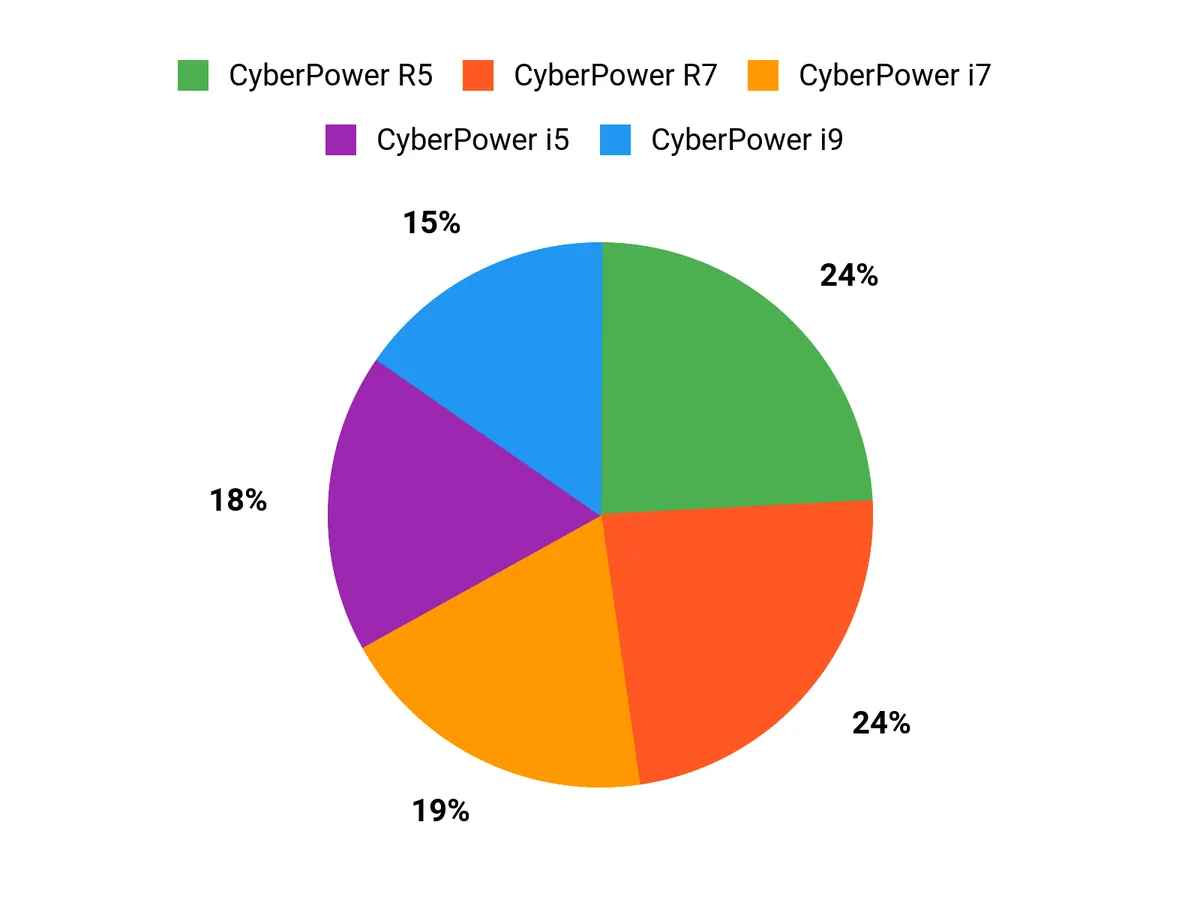
When I help people choose between the CyberPower i5, i7, and R7, they typically prioritize core/thread count and GPU strength to match their needs—opting for the i5 for budget-friendly gaming and coding, the i7 for snappier multitasking and higher FPS, and the R7 for heavy multithreaded work like video editing and rendering. We also factor in cooling, upgradeability, RAM and storage options, and overall price-to-performance so the build fits both current tasks and future needs.
Wrapping Up
After testing the options and weighing trade-offs, my short advice is simple: pick the machine that best matches how you spend most of your time. If you want a single all-rounder for gaming, streaming and editing, the Lenovo Legion Tower 5i is the most balanced pick here.
If you need ultimate silence or brand-focused enthusiast features, consider the Alienware Aurora or the high-end CyberPower i9 build. For tight budgets or small desks, the Dell 24 All-in-One and the GEEKOM A8 give strong day-to-day value without unnecessary expense.
I chose each top pick to reduce guesswork: you should be able to match one of these to your workload and budget and be confident it will serve you well for several years.
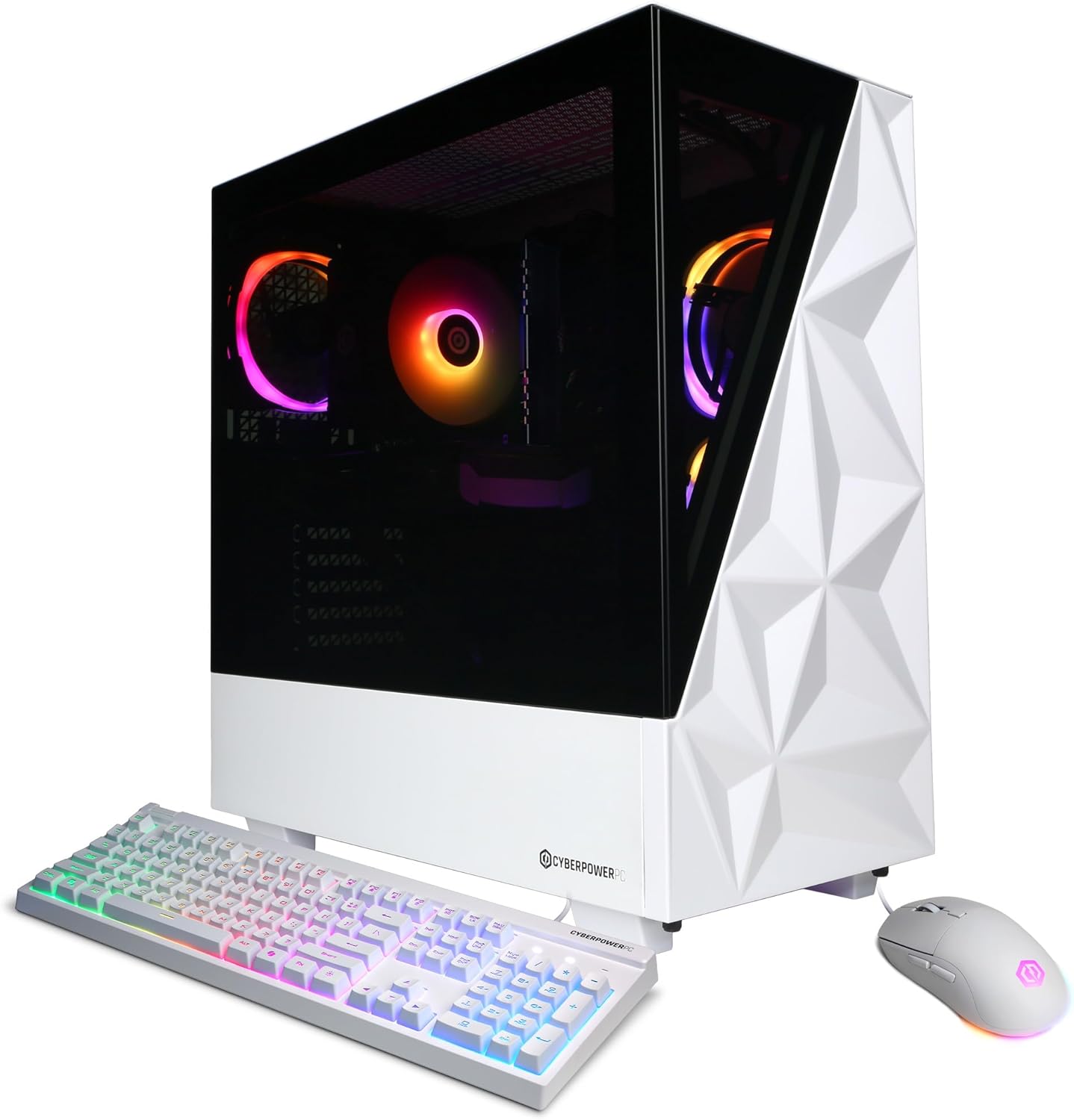
| CyberPowerPC Gamer Xtreme VR Gaming PC (i5-13400F, RTX 5060) | CyberPowerPC Gamer Xtreme VR Gaming PC (i7-14700F, RTX 5060 Ti) | CyberPowerPC Gamer Master Gaming PC (Ryzen 7 8700F, RTX 5060 Ti) | |
|---|---|---|---|
 |  |  | |
| Rating | 4.7/5 (232 reviews) | 4.7/5 (310 reviews) | 4.5/5 (957 reviews) |
| Processor | Intel Core i5-13400F, 2.5 GHz | Intel Core i7-14700F, 2.1 GHz | AMD Ryzen 7 8700F, 4.1 GHz |
| Graphics Card | GeForce RTX 5060 8GB | GeForce RTX 5060 Ti 16GB | GeForce RTX 5060 Ti 8GB |
| Price | $799.99 | $1,149.99 | $929.99 |
| Get Details | Get Details | Get Details |
This Roundup is reader-supported. When you click through links we may earn a referral commission on qualifying purchases.