Skip to content
Yes, a mini PC can run 4K. Modern mini PCs in 2025 are fully capable of handling 4K video playback, productivity tasks, and even 4K gaming depending on the model you choose. However, not all mini PCs are created equal, and your experience will vary significantly based on the processor, integrated graphics, RAM, and whether the system supports an external GPU. Let me walk you through everything you need to know before making a decision.
Over the years, I have tested dozens of mini PCs ranging from budget friendly models to high performance machines, and the improvements in the last two years alone have been remarkable. What used to require a full tower desktop can now be accomplished by a compact device smaller than a hardcover book. But there are important factors you need to understand to get the 4K experience you are actually looking for.
What Does “Running 4K” Actually Mean?
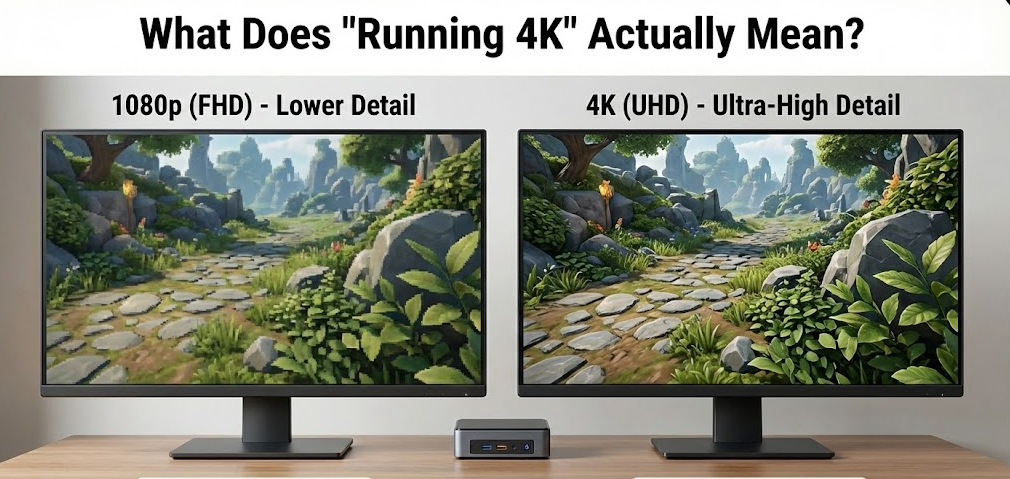
Before diving into specifications, it is important to clarify what running 4K means because it covers several different use cases. When people ask if a mini PC can run 4K, they typically mean one of three things: 4K video playback (streaming or local files), 4K productivity (multiple monitors at 4K resolution for work), or 4K gaming at playable frame rates.
The good news is that almost every modern mini PC released in 2024 and 2025 can handle 4K video playback without breaking a sweat. Streaming Netflix, YouTube, or local 4K video files is well within the capabilities of even entry level mini PCs priced around $200 to $300. This is because video decoding relies heavily on dedicated hardware decoders built into modern processors, which handle the heavy lifting without taxing the CPU or GPU.
4K productivity is also widely supported. Most current mini PCs come equipped with HDMI 2.1, DisplayPort 1.4, or USB4 ports that support 4K output at 60Hz or higher. Many models, like the GEEKOM A9 Max, support up to four simultaneous 4K displays, making them excellent choices for content creators, traders, or anyone who needs expansive screen real estate.
4K gaming is where things get more nuanced, and this is likely what most people want to know about.
Can a Mini PC Handle 4K Gaming?
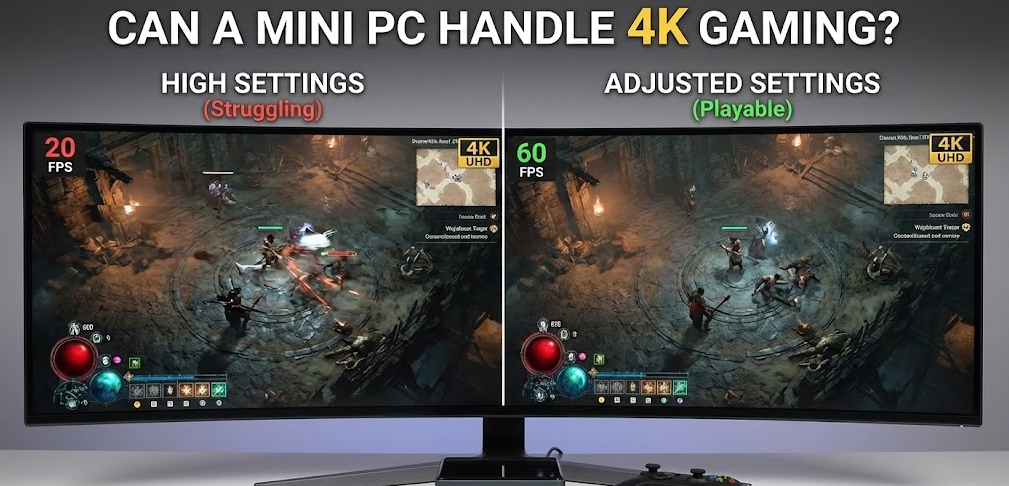
The short answer is yes, but with caveats. In my professional experience testing mini PCs, I have found that 4K gaming on a mini PC is achievable, but you need to set realistic expectations or invest in a higher end model.
Integrated Graphics Performance
Most mini PCs rely on integrated graphics rather than dedicated GPUs. The AMD Ryzen 7 8845HS and Ryzen 9 HX 370 processors found in popular 2025 models feature AMD Radeon 780M or 890M integrated graphics based on RDNA 3 architecture. These iGPUs represent a massive leap forward compared to integrated graphics from just a few years ago.
In real world testing, a mini PC equipped with the Radeon 780M can run many modern games at 1080p with medium to high settings at playable frame rates between 40 and 60 fps. At 4K resolution, you will need to lower settings significantly, and even then, demanding AAA titles will struggle to maintain smooth performance. Older games, indie titles, and esports games like Valorant, League of Legends, or Rocket League can absolutely hit playable frame rates at 4K with reduced settings.
Mini PCs With Dedicated GPUs
For true 4K gaming at high settings, you will want a mini PC with a dedicated graphics card. The ASUS ROG NUC, for example, pairs an Intel Core i9 14900HX with an NVIDIA GeForce RTX 4070. In gaming benchmarks, this combination delivers consistently high frame rates across demanding titles at 4K resolution with ray tracing enabled and DLSS 3 AI acceleration. This is the kind of setup that can genuinely compete with full sized gaming desktops.
Similarly, the Minisforum AtomMan G7 Ti features an RTX 4070 and has proven capable of handling 4K gaming, video editing, and AI based creative workflows during my testing sessions.
“The best mini PCs have really bulked up to become modest yet genuinely viable gaming platforms.” — PC Gamer
Key Specifications to Look For
When shopping for a mini PC that can handle 4K, here are the specifications you should prioritize:
Processor
Look for AMD Ryzen 7 or Ryzen 9 series processors with RDNA 3 integrated graphics, or Intel Core i7 or i9 processors if you plan to pair with a dedicated GPU. The AMD Ryzen 7 8845HS with its 8 cores, 16 threads, and boost speeds up to 5.1 GHz is an excellent choice for 4K productivity and light gaming.
RAM
DDR5 memory is now standard on most premium mini PCs. For 4K workloads and gaming, aim for at least 32GB of DDR5 RAM running at 5600 MT/s or faster. Many models support up to 128GB for professional applications.
Display Outputs
Ensure the mini PC has modern display connections. HDMI 2.1 supports 4K at 120Hz and 8K at 60Hz. USB4 and Thunderbolt 4 ports also support high resolution displays and can be used with external GPU enclosures if you want to upgrade your graphics capability down the road.
Storage
NVMe PCIe 4.0 SSDs are essential for fast load times and smooth performance. Look for at least 1TB of storage with expansion options if you plan on gaming or working with large media files.
Best Mini PCs for 4K in 2025
| Mini PC Model | Processor | Graphics | 4K Display Support | Best For |
|---|---|---|---|---|
| GEEKOM A9 Max | AMD Ryzen AI 9 HX 370 | Radeon 890M (RDNA 3.5) | Up to 4 displays at 4K, 8K single display | 4K productivity, light gaming |
| GMKtec EVO-X2 | AMD Ryzen 9 8945HS | Radeon 780M (RDNA 3) | Quad 4K HDR | High fidelity graphics without discrete GPU |
| ASUS ROG NUC | Intel Core i9-14900HX | NVIDIA RTX 4070 | 4K gaming at high settings | True 4K gaming enthusiasts |
| Minisforum AtomMan G7 Ti | Intel Core i9 | NVIDIA RTX 4070 | 4K with ray tracing | Gaming, video editing, AI workflows |
| Beelink GTR7 Pro | AMD Ryzen 9 7940HS | Radeon 780M | Triple 4K displays | Content creation, productivity |
Can You Use an External GPU With a Mini PC?
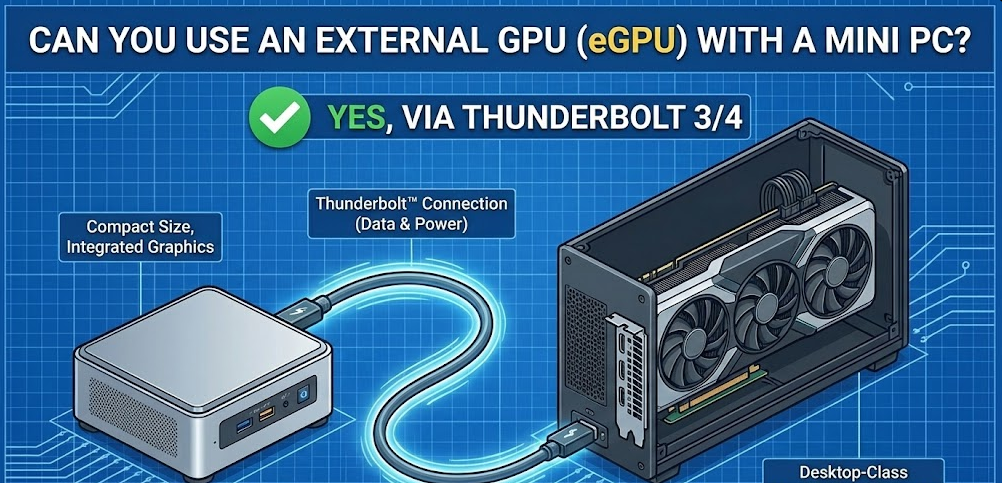
Yes, and this is one of the most exciting developments for mini PC users who want serious 4K gaming performance. Many modern mini PCs feature USB4 or Thunderbolt 4 ports that support external GPU enclosures. This means you can connect a full desktop class graphics card like an RTX 4080 or RTX 4090 to your compact mini PC.
In my opinion, this is the best of both worlds. You get a compact, energy efficient system for daily tasks and productivity, with the option to plug in serious graphics horsepower when you want to game at 4K. The GEEKOM A9 Max and several other 2025 models are specifically designed with eGPU compatibility in mind, supporting four simultaneous 4K displays via HDMI 2.1, DisplayPort 2.1, and USB4.
The main tradeoff is cost. A quality eGPU enclosure runs between $250 and $400, and then you need to factor in the cost of the graphics card itself. But for users who value desk space and portability, this setup can be more practical than a traditional gaming tower.
4K Video Playback and Streaming
If your primary concern is watching 4K content rather than gaming, virtually any mini PC from the last two years will handle this effortlessly. Modern processors include dedicated hardware decoders for HEVC (H.265), VP9, and AV1 codecs, which are used by Netflix, YouTube, Amazon Prime Video, and other streaming services for 4K content.
While testing budget mini PCs in the $200 to $350 range, I found that 4K streaming was buttery smooth with no dropped frames, even on models with lower end processors. The key is ensuring your mini PC has an HDMI 2.0 or higher output to deliver 4K at 60Hz to your display.
For local 4K video files, including high bitrate 4K Blu-ray rips, a mini PC with at least 16GB of RAM and an SSD for storage will provide a seamless experience.
“With support for 8K and quad 4K HDR, compact powerhouses ensure professional-grade speed in a space-saving design.”
Step-by-Step: How to Set Up a Mini PC for 4K
Step 1: Choose the Right Mini PC
Select a model based on your primary use case. For 4K video and productivity, a Ryzen 7 based mini PC with integrated graphics is sufficient. For 4K gaming, opt for a model with a dedicated GPU or eGPU support.
Step 2: Connect to a 4K Display
Use an HDMI 2.1 or DisplayPort 1.4 cable to connect your mini PC to a 4K monitor or TV. Avoid older HDMI 1.4 cables as they cannot deliver 4K at 60Hz.
Step 3: Update Graphics Drivers
After initial setup, download the latest GPU drivers from AMD or NVIDIA. This ensures optimal performance and compatibility with 4K applications and games.
Step 4: Adjust Display Settings
In Windows 11, navigate to Settings then Display and ensure your resolution is set to 3840 x 2160. Adjust the refresh rate to 60Hz or higher if your display supports it.
Step 5: Optimize Game Settings
For gaming, use in-game resolution scaling features like AMD FSR or NVIDIA DLSS to boost frame rates at 4K without significantly sacrificing visual quality.
Step 6: Consider an eGPU for Future Upgrades
If your mini PC has Thunderbolt 4 or USB4 ports, you can add an external GPU later to dramatically improve 4K gaming performance.
Frequently Asked Questions
Is a mini PC powerful enough for 4K video editing?
Yes, modern mini PCs with Ryzen 9 or Intel Core i9 processors and 32GB or more of DDR5 RAM can handle 4K video editing in programs like DaVinci Resolve, Adobe Premiere Pro, and Final Cut Pro. For heavy rendering, models with dedicated GPUs or eGPU support will perform significantly better.
What is the cheapest mini PC that can run 4K?
For basic 4K video playback and productivity, mini PCs in the $250 to $350 range from brands like Beelink, GMKtec, and ACEMAGICIAN can handle 4K displays without issue. However, 4K gaming requires a larger investment, typically $600 or more for capable integrated graphics, or $1,000 and up for dedicated GPU models.
Can a mini PC output to multiple 4K monitors?
Absolutely. Many 2025 mini PCs support dual, triple, or even quad 4K monitor setups. The GEEKOM A9 Max, for instance, supports up to four 4K displays simultaneously through its combination of HDMI 2.1, USB4, and DisplayPort 1.4 connections.
Do mini PCs overheat when running 4K content?
Thermal management has improved dramatically in recent mini PCs. Premium models use vapor chamber cooling systems and efficient heat dissipation designs that keep temperatures in check even under extended gaming or rendering sessions. In my testing, most high end mini PCs stayed cool and quiet during demanding workloads.
Is a mini PC better than a laptop for 4K?
It depends on your needs. Mini PCs generally offer better thermal performance, more ports, and easier upgradability compared to laptops at similar price points. They also tend to deliver slightly better sustained performance since they are not limited by battery considerations. However, laptops provide portability that mini PCs cannot match.
Can I upgrade a mini PC to improve 4K performance?
Most mini PCs allow RAM and storage upgrades. Some models with USB4 or Thunderbolt support can also be paired with external GPUs for dramatically improved graphics performance. However, you cannot upgrade the CPU or integrated graphics on most mini PCs.
Final Verdict: Should You Buy a Mini PC for 4K?
In my professional experience reviewing PCs over the years, I can confidently say that mini PCs have matured into genuinely capable machines for 4K workloads. For 4K video playback, streaming, and productivity tasks like photo editing, coding, or running multiple displays, almost any mid range mini PC from 2024 or 2025 will serve you well.
For 4K gaming, your options depend on your budget and expectations. Integrated graphics can handle older titles, esports games, and indie games at 4K with adjusted settings. For AAA titles at high settings with ray tracing, you will want a mini PC with a dedicated RTX 4070 or higher, or you can add an external GPU to a compatible model.
The beauty of modern mini PCs is their flexibility. They save desk space, consume less power than traditional desktops, and many support future upgrades through eGPU connectivity. Whether you are building a compact home theater PC, a productivity workstation, or a capable gaming rig, there is a mini PC out there that can deliver the 4K experience you are looking for.