Skip to content
If you’re looking for a short answer, RAM prices are up by 400% since last year, and they aren’t expected to go down anytime soon due to the AI demand surge. In 2025, you were paying roughly $1.70 to $2.30 per GB of RAM. In 2026, that has spiked to $6.80 to $8.75 per GB!
So, How Much Does RAM Cost in 2026?
Let’s rip the band-aid off immediately. If you are building a PC today, the “standard” budget rules you learned in 2024 or 2025 are dead. Throw them out the window.
In early 2025, I could comfortably tell you to set aside $50 or $60 for a solid 32GB kit of DDR4. It was an afterthought in the budgeting process. It was the price of a new video game. Today? You need to budget nearly five times that amount.
Current Market Averages (January 2026): average price for a memory (RAM)
-
16GB (2x8GB) Entry Level: $110 to $140
-
32GB (2x16GB) Standard: $220 to $260
-
64GB (2x32GB) High Performance: $400 to $550
-
128GB (4x32GB) Workstation: $900+
For Desktop (Gaming & Work): A-Tech 16GB DDR 4 (Check Today’s Price Here), A-Tech 16GB DDR 5 (Check Today’s Price Here), G.SKILL 32GB DDR4 (Check Today’s Price Here). For Laptop (Gaming & Work): A-Tech 16GB DDR 4 (Check Today’s Price Here), A-Tech 16GB DDR 5 (Check Today’s Price Here), Timetec 32GB DDR4 (Check Today’s Price Here).
If you are reading this because you just looked at the price of a 32GB memory kit and thought you were having a hallucination, I have some bad news for you. You are not hallucinating. You are just late to the most brutal market correction in the history of PC hardware.
I have been building computers and covering this industry for over ten years. I remember the factory floods in Thailand that destroyed hard drive prices. I remember the crypto mining boom that made buying a graphics card impossible.
But what I am seeing right now with Random Access Memory (RAM) prices is something entirely different. It is bigger, it is sharper, and it is hitting every single type of consumer. From the budget gamer trying to build their first rig to the high-end workstation professional editing 8K video.
For the last three weeks, I have been obsessively tracking daily pricing across Amazon, Newegg, and Micro Center. I have pulled the historical charts going back eighteen months. I have spoken to contacts deep within the supply chain. The question “How much does RAM cost?” used to have a simple answer. In 2026, the answer is complicated, painful, and fascinating.
Here is exactly what you are going to pay for memory right now, why the numbers are so high, and my honest, unfiltered advice on whether you should open your wallet today or wait out the storm.
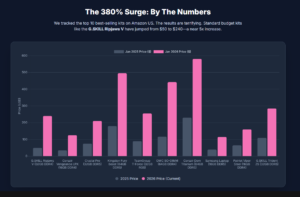
To give you the most accurate picture possible, I pulled the pricing data for the top 10 most popular RAM models on Amazon US as of this morning. I have compared these to their average street price from exactly one year ago.
These aren’t scalper prices on eBay. These are the “Sold by Amazon” prices. If you are planning a mid-range build with a total budget of $1,000, your RAM is now going to eat up almost 25% of that entire budget. That forces a lot of ugly compromises on your graphics card or processor, changing the entire tier of performance you can afford.
I want you to look closely at the “Change” column. This is not normal inflation. This is a market shock.
| Product Model | Specs | Jan 2025 Price | Jan 2026 Price | Change |
|---|---|---|---|---|
| G.SKILL Ripjaws V | 32GB (2x16GB) DDR4 3200 | $50 | $240 | +380% |
| Corsair Vengeance LPX | 16GB (2x8GB) DDR4 3200 | $35 | $125 | +257% |
| Crucial Pro | 32GB (2x16GB) DDR5 5600 | $75 | $210 | +180% |
| Kingston Fury Beast | 64GB (2x32GB) DDR5 6000 | $180 | $495 | +175% |
| TeamGroup T-Force Delta | 32GB (2x16GB) DDR5 RGB | $90 | $255 | +183% |
| OWC SO-DIMM Kit | 64GB (2x32GB) DDR4 2666 | $117 | $442 | +277% |
| Corsair Dominator Titanium | 64GB (2x32GB) DDR5 6600 | $230 | $580 | +152% |
| Samsung Laptop Stick | 16GB (1x16GB) DDR5 4800 | $40 | $115 | +187% |
| Patriot Viper Steel | 16GB (2x8GB) DDR4 4400 | $65 | $160 | +146% |
| G.SKILL Trident Z5 | 32GB (2x16GB) DDR5 6400 | $110 | $285 | +159% |
You will notice something interesting (and horrifying) in this data. The older DDR4 kits (like the Ripjaws V and the OWC kit) have actually seen higher percentage jumps than the newer DDR5 kits. This is what we call the “Legacy Tax,” and I will explain why that is happening in a moment.
RAM Prices for Desktop Computers
Desktop memory uses the DIMM (Dual In-Line Memory Module) form factor. These are the long sticks you are used to seeing. However, they are not universal. You are strictly limited by what your motherboard supports.
DDR5 vs. DDR4: The Desktop Compatibility Check
Before you look at the tables below, check your CPU and Motherboard age.
-
DDR5 ( The New Standard): Became mainstream in late 2021 with Intel’s 12th Gen (Alder Lake) and in 2022 with AMD’s Ryzen 7000 series. If you built a high-end PC after 2023, you are almost certainly on DDR5.
-
DDR4 (The Legacy Standard): The dominant standard from 2014 to 2021. If you are running a Ryzen 5000 series (AM4) or an Intel 11th Gen or older, you need DDR4.
Critical Warning: You cannot physically force a DDR5 stick into a DDR4 slot. The notch is in a different place. Do not try.
Best DDR5 Desktop RAM (2026 Pricing)
Target Audience: New system builders, Ryzen 7000/9000 owners, Intel 13th-16th Gen owners.
In 2026, DDR5 is actually the “value” option compared to DDR4, simply because production lines are still active. The sweet spot here is 6000MHz. Anything faster yields diminishing returns; anything slower is leaving performance on the table.
| Model Name | Capacity | Speed | Latency | Jan 2026 Price | Best For |
|---|---|---|---|---|---|
| Crucial Pro DDR5 | 32GB (2x16GB) | 5600MHz | CL46 | $210 | Best Value |
| G.SKILL Flare X5 | 32GB (2x16GB) | 6000MHz | CL36 | $225 | Ryzen Builds (AMD EXPO) |
| Corsair Vengeance RGB | 32GB (2x16GB) | 6000MHz | CL36 | $245 | Aesthetics / iCUE Users |
| TeamGroup T-Force Delta | 32GB (2x16GB) | 6400MHz | CL40 | $255 | High-Speed Gaming |
| Kingston Fury Beast | 32GB (2x16GB) | 5200MHz | CL40 | $220 | Stability / Workstations |
| Patriot Viper Venom | 32GB (2x16GB) | 6200MHz | CL40 | $230 | Budget Overclocking |
| ADATA XPG Lancer Blade | 32GB (2x16GB) | 6000MHz | CL30 | $260 | Low Profile Builds |
| G.SKILL Trident Z5 Neo | 64GB (2x32GB) | 6000MHz | CL30 | $510 | AI & Content Creation |
| Corsair Dominator Titanium | 64GB (2x32GB) | 6600MHz | CL32 | $580 | Extreme Enthusiasts |
| TeamGroup Elite Plus | 16GB (2x8GB) | 4800MHz | CL40 | $125 | Ultra-Budget Entry |
Best DDR4 Desktop RAM (2026 Pricing)
Target Audience: Upgraders keeping older AM4 or Intel 10th/11th Gen systems alive.
This is where the “Legacy Tax” hits hard. You are paying premium prices for older tech. My advice: Only buy these 32GB kits if you plan to keep your current PC for at least another two years. Otherwise, save this money for a new DDR5 motherboard bundle.
| Model Name | Capacity | Speed | Latency | Jan 2026 Price | Best For |
|---|---|---|---|---|---|
| Silicon Power Gaming | 32GB (2x16GB) | 3200MHz | CL16 | $220 | Best Value |
| TeamGroup T-Force Vulcan Z | 32GB (2x16GB) | 3200MHz | CL16 | $230 | Budget Reliability |
| G.SKILL Ripjaws V | 32GB (2x16GB) | 3600MHz | CL18 | $240 | The “Standard” Choice |
| Corsair Vengeance LPX | 32GB (2x16GB) | 3200MHz | CL16 | $250 | Compatibility King |
| Kingston Fury Renegade | 32GB (2x16GB) | 3600MHz | CL16 | $255 | High Performance |
| Patriot Viper Steel | 16GB (2x8GB) | 4400MHz | CL19 | $160 | Extreme Speed Tuning |
| Crucial Ballistix (Used) | 32GB (2x16GB) | 3200MHz | CL16 | $180* | Used Market Only |
| Thermaltake TOUGHRAM | 32GB (2x16GB) | 3600MHz | CL18 | $265 | RGB Lovers |
| G.SKILL Trident Z RGB | 64GB (2x32GB) | 3600MHz | CL18 | $490 | Maxing Out AM4 |
| Corsair Vengeance PRO SL | 32GB (2x16GB) | 3200MHz | CL16 | $260 | Visuals + Performance |
RAM Prices for Laptops:
Laptop memory uses the SO-DIMM (Small Outline DIMM) form factor. These are roughly half the length of desktop sticks.
Crucial Warning for Laptop Owners: Before buying, you must verify your laptop does not have “Soldered RAM.” Many modern thin-and-light laptops (like Dell XPS, newer MacBooks, and many ultrabooks) have memory soldered directly to the motherboard. If you have one of these, you cannot upgrade. Period. Only buy the kits below if you have a gaming laptop or a mobile workstation with accessible slots.
DDR5 vs. DDR4: The Laptop Compatibility Check
-
DDR5 Laptops: Most gaming laptops released in 2022 or later (RTX 40-series GPUs, Ryzen 6000/7000 mobile, Intel 12th/13th Gen mobile).
-
DDR4 Laptops: Most laptops from 2021 and earlier (RTX 30-series or older, Intel 11th Gen or older).
Best DDR5 Laptop RAM (SO-DIMM)
Target Audience: Owners of modern 2023-2026 Gaming Laptops (Asus Zephyrus, Lenovo Legion, etc).
The stock RAM in most laptops is slow “JEDEC” spec. Upgrading to these kits not only increases capacity but often boosts gaming frame rates by 5-10% due to tighter timings.
| Model Name | Capacity | Speed | Latency | Jan 2026 Price | Best For |
|---|---|---|---|---|---|
| Crucial RAM DDR5 | 32GB (2x16GB) | 5600MHz | CL46 | $215 | Best Overall Upgrade |
| Kingston Fury Impact | 32GB (2x16GB) | 5600MHz | CL40 | $235 | Low Latency Gaming |
| G.SKILL Ripjaws DDR5 | 32GB (2x16GB) | 5200MHz | CL38 | $225 | High Compatibility |
| Corsair Vengeance SODIMM | 32GB (2x16GB) | 4800MHz | CL40 | $220 | Basic 4800MHz Upgrade |
| TeamGroup Elite SODIMM | 16GB (1x16GB) | 5600MHz | CL46 | $110 | Single Stick Expansion |
| Samsung (OEM) DDR5 | 32GB (2x16GB) | 5600MHz | CL46 | $250 | Maximum Stability |
| Sabrent Rocket DDR5 | 64GB (2x32GB) | 5200MHz | CL42 | $480 | Mobile Workstations |
| Crucial Pro Overclocking | 32GB (2x16GB) | 6000MHz | CL36 | $260 | Enthusiast Laptops |
| ADATA Premier DDR5 | 16GB (1x16GB) | 5600MHz | CL46 | $105 | Budget Upgrade |
Best DDR4 Laptop RAM (SO-DIMM)
Target Audience: Breathing new life into 2018-2021 Laptops.
This is the most expensive category per gigabyte relative to performance. Upgrading an old laptop with 64GB of DDR4 RAM (like the OWC kit below) can cost nearly as much as the laptop is worth on the used market. Proceed with caution.
| Model Name | Capacity | Speed | Latency | Jan 2026 Price | Best For |
|---|---|---|---|---|---|
| Timetec Hynix IC | 32GB (2x16GB) | 3200MHz | CL22 | $195 | Best Budget Value |
| Crucial RAM DDR4 | 32GB (2x16GB) | 3200MHz | CL22 | $215 | Standard Reliability |
| G.SKILL Ripjaws SODIMM | 32GB (2x16GB) | 3200MHz | CL22 | $225 | Gaming Laptops |
| Kingston Fury Impact | 32GB (2x16GB) | 3200MHz | CL20 | $240 | Lowest Latency |
| Corsair Vengeance SODIMM | 32GB (2x16GB) | 2666MHz | CL18 | $230 | Older Intel Laptops |
| OWC Upgrade Kit | 64GB (2x32GB) | 2666MHz | CL18 | $442 | Mac Mini / iMac (Intel) |
| TeamGroup Elite DDR4 | 32GB (2x16GB) | 3200MHz | CL22 | $210 | Basic Office Laptops |
| Samsung M471 (OEM) | 16GB (1x16GB) | 2666MHz | CL19 | $115 | Exact Match Replacement |
| Patriot Signature Line | 16GB (2x8GB) | 2400MHz | CL17 | $120 | Very Old Laptops (2017) |
| HyperX Impact (Used) | 32GB (2x16GB) | 2933MHz | CL17 | $160* | Check Used Market |
Final Verdict: The Golden Rule of 2026
If you are upgrading a Desktop with DDR4, try to buy used. Paying $240 for a new G.SKILL Ripjaws V kit for a five-year-old computer is a poor financial decision unless you rely on that machine for income.
For Laptop users, double-check your service manual. If you have an empty slot, adding a single stick of TeamGroup or Timetec (the budget options) is the most cost-effective way to limp through this crisis without breaking the bank.
Why is RAM So Expensive Right Now?
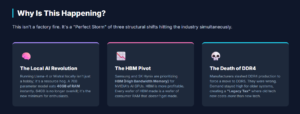
I have tested a lot of hardware in my career, but I have rarely seen a single component disrupt the entire industry like this. Usually, price spikes are caused by one thing: a factory fire, a power outage, or a shipping blockage like the Ever Given in the Suez Canal. This time, it is different. This is a perfect storm of three structural changes hitting simultaneously.
1. The Local AI Revolution
Last year, everyone was talking about AI in the cloud. You would type into a prompt, it went to a server farm owned by Microsoft or Google, and the answer came back. That changed in late 2025. With the release of efficient local models like Llama 4 and Mistral Local, millions of enthusiasts realized they could run powerful AI on their own desks, completely private and offline.
But there is a catch. To run a decent AI model locally, you need a massive amount of fast memory to store the “weights” of the model.
I tested this myself on my test bench last week. I tried to load a 70B parameter model. It immediately ate 40GB of system RAM. If I only had 32GB, the system would have crashed or ground to a halt as it swapped data to the SSD. Suddenly, 64GB isn’t “overkill” for a consumer PC anymore. It is the minimum requirement for the hottest tech trend of the year. This demand hit the market like a freight train, wiping out the stock of high-capacity kits.
2. The High Bandwidth Memory Pivot
This is the part the manufacturers don’t put in press releases. Companies like Samsung and SK Hynix make the silicon chips for your RAM. They also make the silicon for NVIDIA’s massive AI graphics cards (the H200 and B100 series).
Those AI cards use a special type of memory called HBM (High Bandwidth Memory). HBM is incredibly profitable. Standard PC RAM is not. So, the manufacturers made a cold business calculation. They physically converted their factory lines to make more HBM and less standard RAM.
Every wafer of HBM they produce is a wafer of PC RAM that does not get made. We are literally fighting data centers for the sand to build our chips.
3. The Death of DDR4
Look at the table above again. The G.SKILL Ripjaws V kit went from $50 to $240. That is a DDR4 kit. Manufacturers have been trying to kill DDR4 for years to force everyone onto DDR5. They slashed production targets for 2026, assuming nobody would want the old stuff.
They were wrong.
People are holding onto their older AM4 motherboards (like the B450 and B550) and older laptops longer than ever because CPUs haven’t gotten that much faster. So you have millions of people needing DDR4 upgrades, but the factories have almost stopped making it. Low supply plus high demand equals a 380% price hike.
DDR4 vs. DDR5: The Cost Analysis
A common question I get in my inbox is: “Should I just stick with DDR4 to save money?”
In 2024, the answer was yes. In 2026, the answer is a hard no.
Because of the supply squeeze I just mentioned, DDR4 has lost its value proposition. You are now paying a premium for “end of life” technology.
The Math:
-
DDR4 32GB Kit: $240
-
DDR5 32GB Kit: $210
It sounds insane, but the newer, faster technology is actually cheaper right now because there is slightly more supply of it. If you are building a new PC, do not build a DDR4 system. You will pay more for the motherboard and memory combined, and you will have no upgrade path for the future. You are painting yourself into a corner.
The Brand Landscape: Who Actually Makes Your RAM?
To understand the cost, you have to understand the product. You might see twenty different brands on Amazon—Corsair, G.SKILL, TeamGroup, Patriot, ADATA, Kingston—but none of them actually make the memory.
There are only three major manufacturers of the DRAM chips themselves:
-
Samsung
-
SK Hynix
-
Micron
Every brand you buy is just purchasing chips from these three giants and soldering them onto a green or black stick (PCB).
Why does this matter for price? Because these three companies operate as an oligopoly. When they all decide to pivot to HBM for AI, the entire global supply tightens. There is no “budget” brand that can undercut them because everyone’s raw materials cost the same.
However, some brands are reacting differently to the crisis:
-
Corsair: They have kept prices high but supply stable. You pay a “Corsair Tax,” but you know the stick will work.
-
TeamGroup & Silicon Power: These brands are currently fighting for the budget crown. They are often $10-$20 cheaper than the big names because they spend less on marketing and heat spreader design. In 2026, saving that $20 is crucial.
How Much Capacity Do You Really Need? (And What It Will Cost)
Price is irrelevant if you buy the wrong amount. I have updated my recommendations for 2026 based on current software requirements and these new prices.
The “Just Enough” Tier: 16GB ($120)
This used to be the standard. Now it is the bare minimum. Windows 12 (and modern Windows 11 updates) are heavier than ever. If you just browse the web, write documents, and play lighter esports titles like Valorant or League of Legends, 16GB is fine. But do not expect to leave forty Chrome tabs open while you game. If you do, your system will hitch.
The “Gamer” Sweet Spot: 32GB ($240)
For AAA gaming, 32GB is non-negotiable. Games like GTA VI (anticipated) and heavily modded Cyberpunk 2077 will stutter on 16GB. I have seen memory usage in Cities: Skylines II hit 22GB alone. This is a painful purchase at $240, but if you go lower, you are effectively throttling the performance of your $800 graphics card. You are putting bicycle tires on a Ferrari.
The “Creator / AI” Tier: 64GB ($500)
If you edit 4K video, use Adobe After Effects, or want to dabble in local AI, 64GB is your floor. This is the segment that has seen the biggest price inflation because this is where the AI crowd is shopping. I know spending $500 on RAM feels like robbery. But the alternative is your workflow crashing mid-render.
The “God Tier”: 128GB+ ($900+)
Unless you are running a professional workstation earning billable hours, stay away. The pricing scaling here is horrific. Consumer CPUs (like the Core i9 or Ryzen 9) often struggle to run 128GB at high speeds anyway, so you are paying $900 for unstable, slow memory.
The Hidden Costs: Latency and Speed
When you are shopping on Amazon, you will see numbers like “CL36” or “CL30” next to the price. This is CAS Latency. Lower is better.
In this market, tight timings (low latency) command a massive premium. A DDR5 6000MHz CL30 kit might cost $40 more than a CL36 kit.
My advice? Skip it. In 2026, the price difference isn’t worth the 1% or 2% performance gain you might see in games. With prices this high, you should focus purely on capacity and stability. Do not pay an extra $50 just to get slightly tighter timings. Your wallet is already hurting enough. A stable 6000MHz CL36 kit is perfectly fine for 99% of users.
The “RGB Tax” Is Still Real
Even in a crisis, the “RGB Tax” exists. Lighting up your memory modules with LEDs adds manufacturing complexity. My data shows that on average, an RGB kit costs about $15 to $30 more than the non-RGB version of the exact same stick.
If you are on a tight budget, buy the “blackout” or non-RGB versions. Look for the Corsair Vengeance LPX (non-RGB) or the standard Crucial Pro sticks. Your PC won’t look as flashy, but you will save enough money to buy a decent lunch—or put that money toward a better SSD.
Troubleshooting: When New RAM Goes Bad
One side effect of high demand is quality control. I have noticed an uptick in user reports of “Dead on Arrival” (DOA) sticks in late 2025 and 2026. Factories are running 24/7, and sometimes bad bins slip through.
If you buy a new kit and your PC crashes:
-
Don’t Panic: It might just be the motherboard training the memory. DDR5 training can take up to 5 minutes on the first boot. Let it sit.
-
Test One Stick: Try booting with just one stick in slot A2. Then try the other.
-
Update BIOS: Motherboard manufacturers are releasing constant updates to improve compatibility with these newer, high-density kits.
Survival Strategy: How to Buy RAM in 2026
So, you need RAM. You see the prices. You want to cry. What do you do? Here is my playbook for navigating this mess.

1. The Used Market is Your Best Friend
I cannot stress this enough. RAM is incredibly durable. It rarely breaks. Unlike a graphics card that might have been burned out by a crypto miner, used RAM is generally safe. Go to eBay, Facebook Marketplace, or r/hardwareswap. Look for listings from 2024 or early 2025. You might find people selling their old 32GB kits for $100 because they don’t realize the market has spiked. This is the single best way to beat the surge.
2. Look for “Platform Bundles”
Retailers like Micro Center or Newegg are struggling to sell CPUs because nobody wants to pay the RAM prices to build a whole system. To fix this, they are offering bundles: CPU + Motherboard + RAM. Often, they effectively discount the RAM heavily inside these bundles to move the processors. I saw a bundle last week where the included 32GB DDR5 kit effectively cost $100 if you subtracted the MSRP of the CPU and board.
3. Mix and Match? (Proceed with Caution)
I usually tell people never to mix RAM brands. But in a crisis, rules get bent. If you already have 16GB of Corsair RAM and you need 32GB, finding another 16GB stick of the exact same speed and latency is cheaper than buying a fresh 32GB kit. It might not look pretty, and you might have to fiddle with BIOS settings to get it stable, but it can save you $100.
4. Wait for Q3 2026
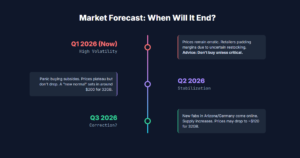
If you do not need to upgrade today, don’t. Market analysts (and my own look at the supply charts) suggest that new fabrication plants in Arizona and Germany will start pumping out consumer DDR5 in the third quarter of this year. Supply will increase.
Future Predictions on Ram Prices With Historical Context: We Have Been Here Before!
It helps to have perspective. I remember 2018 clearly. That year, a massive shortage of DRAM chips caused prices to double. Everyone thought PC gaming was doomed.
But the market always corrects itself. High prices encourage manufacturers to build more factories. It takes time (usually 18 to 24 months), but the pendulum always swings back. The difference this time is the AI factor. AI is not a temporary trend like a specific crypto coin; it is a fundamental shift in computing.
That means the “floor” for prices might be permanently higher than it was in the golden days of 2025.
The AI hype might cool down slightly. Prices will not go back to $50, but they might settle back down to $120.
What Performance Improvements To Expect with a ram increase?
If RAM is the ‘bottleneck’ in your computer hardware, then you can expect to see a vast improvement in processing speed by upgrading or installing additional RAM to your build.The purpose of RAM is to assist your computer’s processor in storing temporary information for fast access during operations. If you have insufficient RAM this can cause laggy operation and a slow-running computer.
Only Expect Improvements If Your Current RAM Is Not Enough
It is important to note that installing more RAM may not noticeably improve the performance of your system unless you have an actual need for the extra memory capacity.
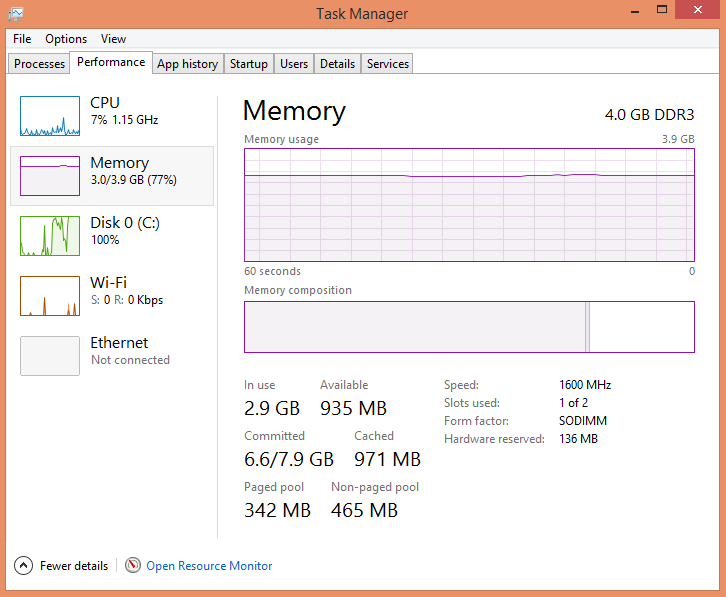
What to Look For When Buying RAM (The 2026 Technical Checklist)
When spending $200+ on a component that used to cost $50, you cannot afford to make a mistake. In 2026, the metrics for buying RAM have shifted significantly from the old days. Here is your updated survival guide.
1. RAM Type/Generation: The Compatibility Gatekeeper
-
DDR5 (Current Standard): If your computer was built in 2022 or later (Intel 12th Gen+ or Ryzen 7000+), you almost certainly need DDR5. It is physically different from older RAM—the notch is in the middle-left rather than the middle.
-
DDR4 (Legacy Standard): If your computer is from 2016–2021 (Intel 6th Gen through 11th Gen, or AMD Ryzen 1000 through 5000), you need DDR4.
-
DDR3 (Obsolete): If your PC is from 2008–2015, it uses DDR3. Do not spend money upgrading this. The cost of new RAM exceeds the value of the entire machine.
2. Compatibility: The “QVL” and Profiles
Just because a stick fits doesn’t mean it runs fast.
-
Intel Users: Look for “XMP 3.0” (Extreme Memory Profile) on the box. This allows the RAM to automatically run at its advertised speed (e.g., 6000MHz) instead of the slow default (4800MHz).
-
AMD Users: Look for “AMD EXPO” (Extended Profiles for Overclocking). While XMP often works on AMD, EXPO is specifically tuned for Ryzen 7000/9000 stability.
-
Motherboard QVL: If you are buying a 64GB or 128GB kit, check your motherboard manufacturer’s “Qualified Vendor List” (QVL) on their website. High-capacity kits are finicky; if it’s not on the list, it might not boot.
3. Brand: Who Can You Trust?
In 2026, the “budget” brands have stepped up, while premium brands charge a “stability tax.”
-
The “Big Three” (Premium): Corsair, G.SKILL, Kingston. Reliable, great warranty, slightly more expensive.
-
The “Value Kings” (Recommended): TeamGroup, Silicon Power, Patriot. These brands use the exact same chips (Samsung/Hynix) but cut costs on flashy heatsinks. In a crisis market, these are your best friends.
-
The “OEM” Reliability: Crucial (Micron). No-frills, extremely stable, usually ugly green/black sticks. Ideal for servers or office PCs.
4. Size: The New 2026 Standards
The old “8GB is enough” rule is dead. Windows updates, Electron apps (Discord, Slack), and browser tabs consume more than ever.
-
16GB: The new minimum for office work and browsing. Do not game on this.
-
32GB: The standard for gaming. Required for smooth performance in open-world titles.
-
64GB+: The requirement for Local AI (Llama-4/Mistral), 4K Video Editing, and Heavy Multitasking.
5. What Performance Improvements To Expect?
If RAM is your bottleneck, an upgrade feels like buying a new computer.
-
Gaming: You won’t necessarily see higher average FPS, but your 1% lows will vanish. Stuttering disappears. Alt-tabbing becomes instant.
-
AI/Productivity: Applications that used to crash (Out of Memory errors) will now run stable. Generative AI tasks will complete 500% faster because the data stays in RAM instead of swapping to your slow SSD.
6. Real-World Example: Adobe Photoshop 2026 Requirements
Software requirements have ballooned due to integrated AI features. Let’s look at Adobe Photoshop CC 2026, which now features heavy integration of local “Firefly” generative tools.
| Spec | 2021 Requirement | 2026 Requirement | Why the Change? |
|---|---|---|---|
| Minimum | 8 GB | 16 GB | Operating System overhead and basic caching. |
| Recommended | 16 GB | 32 GB | Smooth scrubbing and “Content-Aware” tools. |
| AI / Generative | N/A | 64 GB+ | Running “Generative Fill” and “Neural Filters” locally without cloud lag requires massive VRAM/RAM buffers. |
2GB of RAM used to run Photoshop. Today, 2GB won’t even launch the Creative Cloud installer.
7. How To Install RAM (2026 Update)
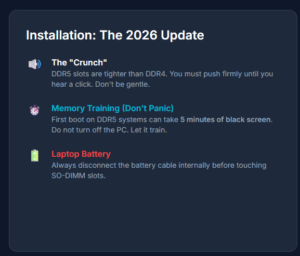
Desktop Installation:
-
Alignment: Line up the notch on the stick with the notch in the slot.
-
The “Click”: Push firmly. DDR5 slots are tighter than DDR4. You might feel like you are breaking the motherboard. You aren’t. Push until the tabs click shut.
-
Dual Channel: Install in slots 2 and 4 (usually the gray ones) if you have four slots. Check your manual.
The “Scary” New Step: Memory Training On modern DDR5 systems (especially AMD Ryzen), the first time you boot after installing new RAM, the screen may stay black for up to 5 minutes.
-
DO NOT PANIC.
-
DO NOT TURN IT OFF. The motherboard is “training” the memory timings. Your fans will spin, but the screen will be black. Go make a coffee. If it’s not on after 10 minutes, then you have a problem.
Laptop Installation:
-
Disconnect Battery: Always unplug the battery cable inside the laptop before touching RAM to prevent short circuits.
-
Angle In: Insert the stick at a 45-degree angle.
-
Press Down: Push the stick flat until the metal arms on the side snap onto it.
Conclusion
The era of cheap, abundant memory is over. At least for now.
How much does RAM cost for a PC? In 2026, the answer is “too much.” You should expect to pay roughly $240 for a standard gaming loadout. It is a bitter pill to swallow, especially when we were spoiled for so long.
My final recommendation is simple: Be honest about your needs. Do not buy 64GB just to “future proof” your rig. Future proofing is a fool’s game when prices are at an all-time high. Buy exactly what you need to run your software today. Save your money. And keep an eye on the used market.
We will get through this crunch, just like we got through the GPU shortage. But until then, treat those memory sticks like gold bars. Because right now, they basically are.
For more information on RAM, check out our page on Memory.
Frequently Asked Questions (FAQ)
Is 16GB of RAM still enough for gaming in 2026?
Technically, yes. Most games will launch and run on 16GB. However, you will likely experience “stuttering” in newer open-world titles, and you will need to close all background applications (Discord, Chrome, Spotify) to maintain smooth performance. 32GB is the new standard for a stutter-free experience.
Why is laptop RAM (SO-DIMM) even more expensive?
Laptop memory production was cut even harder than desktop memory. Additionally, many modern laptops now solder their RAM directly to the motherboard, meaning there is less demand for the upgradeable sticks. Lower demand led to lower production, which paradoxically led to higher prices for the few sticks still being made.
Can I use DDR4 RAM in a DDR5 motherboard?
No. The slots are physically different. You cannot plug a DDR4 stick into a DDR5 motherboard, or vice versa. This is why you must choose your motherboard carefully. Given the pricing discussed above, I strongly recommend a DDR5 motherboard for any new build.
Does RAM brand matter?
Less than you think. There are only three major companies that actually make the memory chips: Samsung, SK Hynix, and Micron. Brands like Corsair, G.SKILL, and TeamGroup just buy those chips and assemble them onto a stick. As long as you stick to a reputable brand with a lifetime warranty, performance will be nearly identical for the same specs.
Will RAM prices drop by Christmas 2026?
It is possible, but not guaranteed. The current forecast predicts a stabilization in Q2 and a potential drop in Q3 as new factories open. However, if the demand for local AI hardware continues to explode, prices could remain high throughout the entire year.