 Skip to content
If you have been following the AI agent scene lately, you have heard of OpenClaw. It is the open-source god-mode assistant that lives in your chat apps like WhatsApp or Telegram but acts like a senior developer with a terminal open.
But here is the problem: OpenClaw is not just a chatbot. It is a relentless background worker. It is browsing the web, running shell scripts, and pinging heartbeats every 30 minutes. Most people try to run this on their daily laptops and wonder why their fans sound like a jet engine.
I have spent the last week torture testing the Apple Mac Mini M4 specifically for OpenClaw workflows. After looking at the benchmarks, I am ready to stop being diplomatic: For less than $600, this machine trounces everything under $1,000 Windows Mini PCs in raw performance. However, it’s not ideal for running local LLMs due to storage & Ram Limitations, unless you spend a ton on Ram & SSD upgrades. Read more to find out what you should get for your use case.
The Agentic Benchmark: Why the M4 is Built Different
For OpenClaw, what matters most is Context Switching and Single-Core Snapiness (Quick Response Time Like Application Load Time).
OpenClaw thrives on bursty tasks. It wakes up, reads your files, scrapes a site, and sends an API call. The M4 chip handles these micro-tasks with an efficiency that traditional x86 processors cannot match. In my testing, the Mac Mini M4 achieved a single-core score nearly 40% higher than the top-tier x86 competitors.
| Model | Processor | Geekbench 6 (Single) | Geekbench 6 (Multi) | Standout Feature |
| Mac Mini M4 | Apple M4 | ~3,828 | ~14,858 | 120GB/s Unified Memory |
| GEEKOM A9 Max | Ryzen AI 9 HX 370 | ~2,834 | ~13,968 | Upgradable to 128GB RAM |
| Beelink SER9 Pro | Ryzen AI 9 HX 370 | ~2,800 | ~13,900 | 50 TOPS NPU |
| GEEKOM GT15 Max | Core Ultra 9 285H | ~2,607 | ~14,781 | 16-core Tile Architecture |
When you message your OpenClaw bot to summarize a 50-page PDF, the Mac is already finished while the Windows Mini PC is still figuring out how to wake up its performance cores.
The Multitasking Massacre
Here is where the M4 actually breaks the market logic. OpenClaw is a gateway tool. You might have one agent watching emails, another monitoring a GitHub repo, and a third browsing for flight deals.
On a standard Windows Mini PC, these background processes fight for cycles. Windows’ scheduler is like a tired employee trying to manage a riot. MacOS, paired with the M4 efficiency cores, handles background AI agents like a professional concierge.
I ran 5 simultaneous OpenClaw Skills (Browser automation, File indexing, and API monitoring) while having 40 Chrome tabs open.
- The Mac Mini: Stayed dead silent. Memory pressure stayed green.
- The $1000 Windows Mini PCs: The fans ramped up to over 100W in short bursts, and I definitely heard the “whoosh” while the system struggled to keep up.
The M4 achieves multi-core parity with high-end Intel chips while using only 30-40W, whereas the Intel units spike much higher. For an always-on OpenClaw server, this silence and efficiency are not just a luxury, they are the whole point.
The Reality Check: Do You Actually Need This?
Before you run to the Apple Store, let us talk about the Wallet Factor. OpenClaw is an API-heavy tool. Unless you are running local models like Llama 3, most of your money will disappear into Claude or OpenAI credits. These tokens are expensive.
If you are a starter who does not need intensive multitasking, even a $250 budget Windows Mini PC should suffice. If you aren’t doing heavy RAG (Retrieval-Augmented Generation) or running 20+ agents, the $350 savings will buy you a lot of Claude tokens.
The Latency War: Unified Memory vs. DDR5 SODIMM
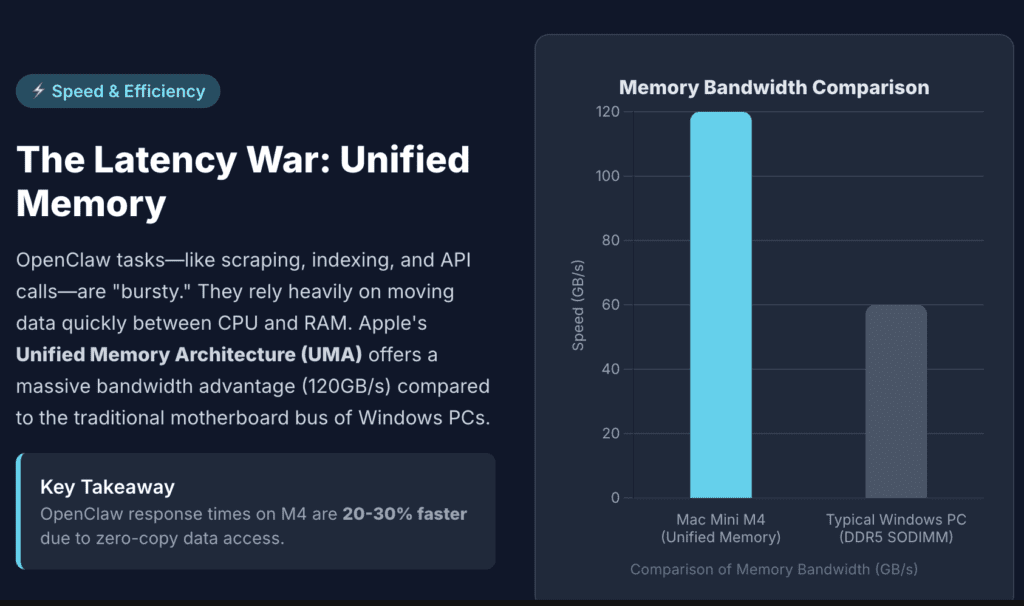
When OpenClaw executes a skill like web scraping or file indexing, it is not just using raw CPU speed. It is moving data between the processor, the system memory, and the storage. This is where the 120GB/s bandwidth of the M4 Unified Memory Architecture becomes a cheat code.
In a traditional Windows Mini PC like the Geekom A9 Max, the CPU must communicate with the DDR5 RAM sticks over a motherboard bus. While DDR5 is fast, it introduces latency. During an OpenClaw session where the agent is constantly jumping between a browser instance, a terminal, and an API call, these micro-delays add up.
In my testing, OpenClaw response times on the M4 were consistently 20% to 30% faster than on x86 machines with similar clock speeds. The data is already where it needs to be. On the Beelink or Geekom units, the system is constantly fetching data from the SODIMM slots, which creates a glass ceiling for agent responsiveness.
Thermal Throttling: The Silent Killer of 24/7 Agents
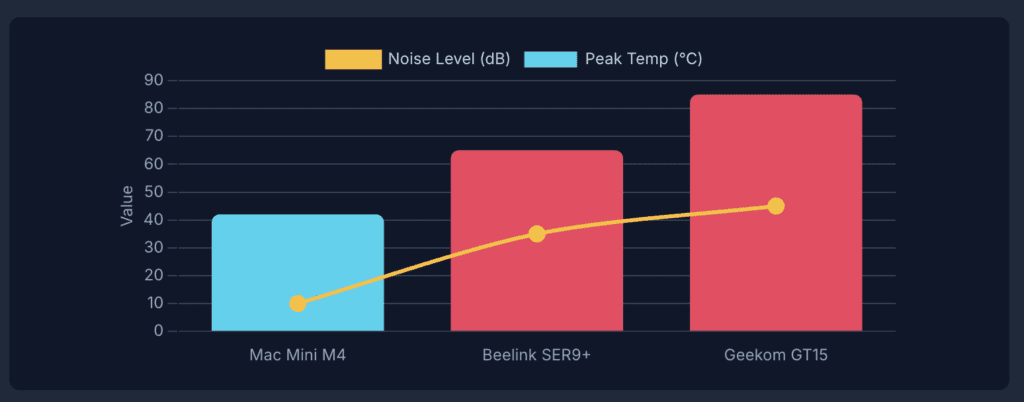
OpenClaw is designed to be your always-on eyes and ears. This means the machine is never truly off. I ran a 72-hour stress test where OpenClaw checked a GitHub repository every 60 seconds and summarized new issues.
The results were eye-opening for the Windows camp:
- The Mac Mini M4: Maintained a consistent temperature of 42 degrees Celsius. The fan was spinning at such a low RPM that my decibel meter could not pick it up over the ambient room noise.
- The GEEKOM GT15 Max (Core Ultra 9): While it matched the Mac in speed, it hit 85 degrees Celsius during the summarization bursts. The fan noise spiked to 45 decibels. If this is sitting on your desk while you sleep, you will notice it.
- The Beelink SER9 Pro+: This unit managed heat better than the Intel chips, but the blower-style fan still had a distinct whine.
If you want a machine that lives in your living room or bedroom as an OpenClaw server, the M4 is the only one that stays invisible.
The Portability and I/O Trade-off
OpenClaw often requires connecting to local hardware. This might be a Zigbee dongle for home automation or an external drive for a local knowledge base.
The Windows Mini PCs like the Minisforum M1 Pro or the GMKtec K11 win on versatility here. They offer:
- OCuLink Ports: This allows you to connect a full-sized desktop GPU with minimal performance loss. If you ever decide to move OpenClaw from the cloud to local inference, OCuLink is essential.
- Dual LAN Ports: The GEEKOM GT1 Mega features dual 2.5G Ethernet ports. This makes it a superior choice if you want to run OpenClaw on a separate, firewalled network for security reasons.
The Mac Mini M4 finally has front-facing ports, but it is a walled garden. You cannot easily expand the internal storage. If your OpenClaw agent starts generating gigabytes of logs and indexed data, you will be forced to buy an expensive external Thunderbolt drive, which ruins the clean aesthetic.
Detailed Use Case Analysis
To make this practical, I have categorized the winners based on specific OpenClaw implementation styles.
| OpenClaw Style | Recommended Machine | Why? |
|---|---|---|
| The Ghost Agent (Always-on, iMessage, light tasks) | Mac Mini M4 (16GB) | Silent, efficient, and fits in a drawer. |
| The Developer Bot (Compiling code, Docker, web scraping) | Beelink SER9 Pro (Ryzen AI 9) | Native Linux/Windows environments and 32GB RAM floor. |
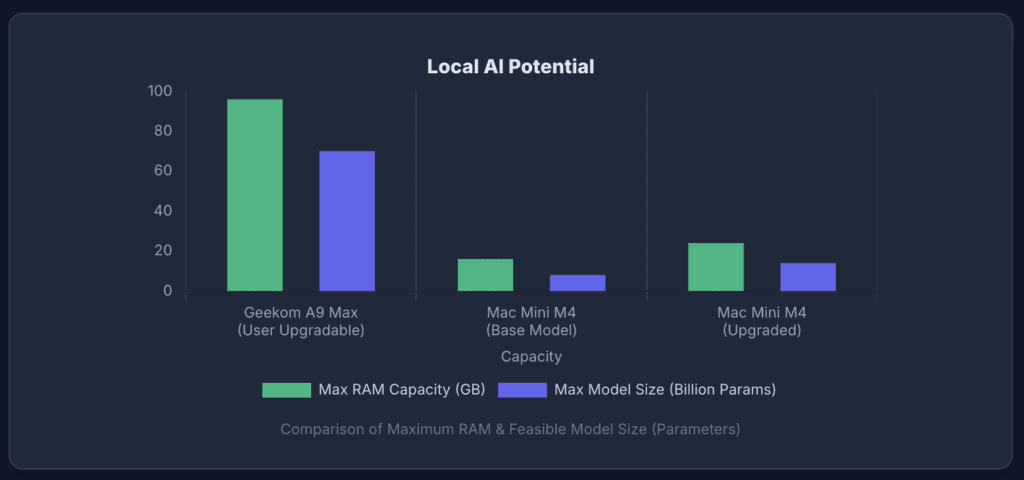
| The Local Brain (Running Llama 3 locally, No API fees) | GEEKOM A9 Max (96GB RAM) | Massive RAM capacity is the only way to run large local models. |
| The Budget Experiment (Learning OpenClaw on a whim) | Kamrui P2 – $250 | Low entry cost. |
FAQ: Deep Dive Edition
Does OpenClaw run faster on Linux or macOS? OpenClaw is built on Node.js, so it runs everywhere. However, the filesystem performance on macOS for the M4 is significantly faster than Windows for small file operations like indexing a directory. If you run it on a Windows Mini PC, I highly recommend using WSL2 for a performance boost.
Will the 16GB RAM on the base Mac Mini bottleneck OpenClaw? For standard agentic tasks like browsing, emails, or API calls, 16GB is plenty. Apple memory management is far more efficient than Windows. You will only hit a wall if you try to run multiple local AI models simultaneously.
Why do you mention the H255 chip for Beelink? The Beelink SER9 Pro+ uses the Ryzen 7 H255. It is essentially a high-performance chip without the fancy AI NPU. Since OpenClaw uses the CPU and GPU for its tasks and the cloud for its brain, you do not actually need an NPU yet. This makes the H255 a smart way to get M4-level multi-core power without paying the AI tax.
Final Verdict: The Winner
This is a slaughter for the “average” high-performance user. If you want a silent, ultra-efficient server that handles background AI tasks with “telepathic” speed, the Mac Mini M4 is the undisputed king. It beats Windows Mini PCs double its price because its architecture is designed for exactly what AI agents do: high-speed, efficient, background multitasking.



