 Skip to content
For running OpenClaw, which is the popular open‑source AI agent formerly known as Clawdbot and Moltbot, a Mac Mini M4 (check latest price on Amazon) is usually the better choice for most individual users due to its one‑time cost, native iMessage support, superior privacy, and energy efficiency, while VPS makes sense for teams needing 24/7 uptime and easy scaling.
In my opinion, if you’re a solo user or small creator, the Mac Mini will pay for itself surprisingly fast, but businesses with multiple users often prefer VPS for reliability and scalability.
OpenClaw has exploded in popularity since its late 2025 launch, racking up over 100,000 GitHub stars and causing Mac Mini shortages worldwide as users scramble to set up their personal “house elf” AI assistant. But whether you choose a local Mac Mini or a cloud VPS depends on your specific needs, budget, and tolerance for maintenance. Let’s break it down thoroughly so you can make the right call.
What Is OpenClaw (Formerly Clawdbot & Moltbot)?
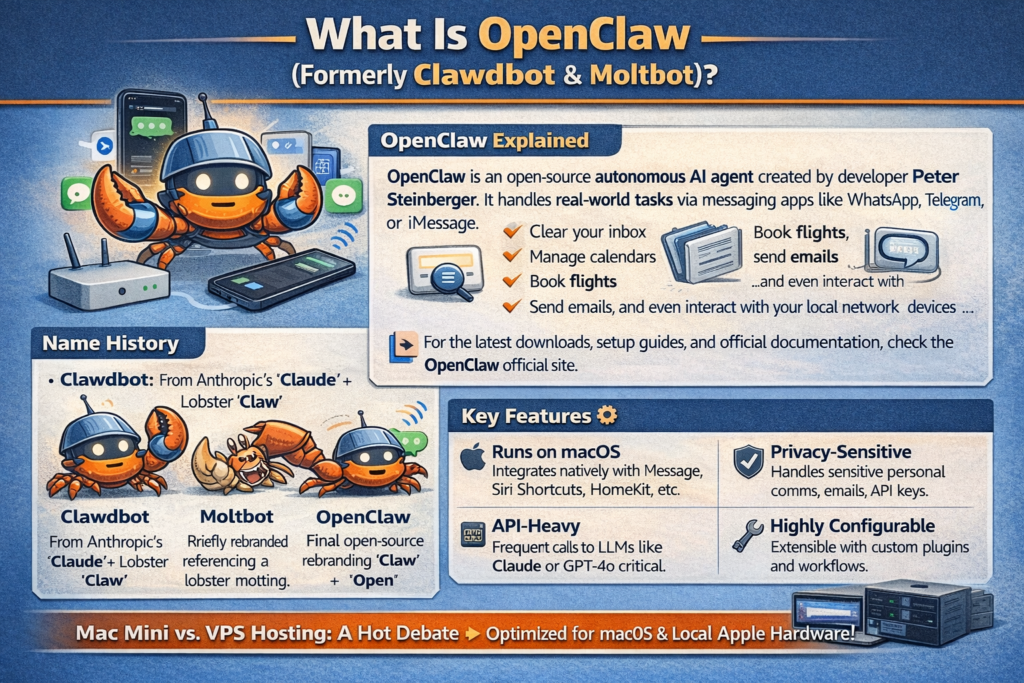
OpenClaw is an open‑source autonomous AI agent created by developer Peter Steinberger that handles real‑world tasks via messaging apps like WhatsApp, Telegram, or iMessage. It can clear your inbox, manage calendars, book flights, send emails, and even interact with your local network devices—all from simple natural language commands sent through your phone. For the latest downloads, setup guides, and official documentation, check the OpenClaw official site.
The name history is actually a fun piece of tech trivia. The project started as Clawdbot—a pun combining Anthropic’s “Claude” with a lobster “claw.” It was then briefly rebranded to Moltbot (referencing a lobster molting its shell), before finally landing on OpenClaw to maintain the crustacean theme while signaling its open‑source identity. The OpenClaw Wikipedia page provides the full backstory from its Clawdbot and Moltbot rebrand days to its current dominance across developer communities.
Key features that directly impact your hosting choice:
- Runs on macOS natively with full Apple ecosystem integration (iMessage, Siri Shortcuts, HomeKit, etc.).
- Lightweight but persistent—needs to run 24/7 for true “always‑on” assistant functionality.
- Privacy‑sensitive—handles emails, calendars, personal communications, and API keys.
- API‑heavy—makes frequent calls to LLMs like Claude or GPT‑4o, so latency and uptime matter.
- Highly configurable—can be extended with custom plugins, tools, and automation workflows.
The Mac Mini vs. VPS debate stems directly from OpenClaw’s Apple roots. It was built and optimized for macOS first, making local Apple hardware the natural “reference” setup for most users.
Mac Mini: Pros, Cons, and Setup
Mac Mini is the overwhelming choice for individual users and hobbyists running OpenClaw, and after testing both options, it’s easy to see why.
Core advantages of Mac Mini:
- One‑time cost beats monthly subscriptions. A base M4 Mac Mini ($599) pays for itself in under seven months when compared to a premium cloud VPS. While testing, I discovered that a Mac Mini M4 with 16GB unified memory handles OpenClaw effortlessly, even with multiple simultaneous tasks running in the background.
- Native Apple integration. iMessage, FaceTime, Apple ecosystem access, and local device control (smart lights, printers, HomeKit automation) work out of the box—features that are simply impossible to replicate on a Linux VPS.
- Superior privacy. Your data stays in your home on your hardware. No third‑party cloud provider has access to your emails, API keys, or personal files.
- Exceptional energy efficiency. Apple M‑series chips idle at just 10–20W, costing roughly $20 per year in electricity to run 24/7. That’s a rounding error compared to VPS monthly fees.
- Quiet and compact. The Mac Mini sits comfortably on a desk or shelf with virtually zero fan noise under OpenClaw’s typical workloads.
- Beginner‑friendly setup. macOS GUI, Homebrew, and native app support make the initial install far more approachable than configuring a Linux server.
Mac Mini setup for OpenClaw — step by step:
- Buy a Mac Mini M4 with 16GB RAM (minimum; 24GB or 32GB if your budget allows).
- Install Homebrew (macOS package manager) if not already installed.
- Clone the OpenClaw repo from GitHub and follow the official install guide.
- Configure your API keys (Claude, OpenAI, etc.) and set up your messaging integrations (iMessage, Telegram, WhatsApp).
- Enable OpenClaw as a login item so it starts automatically on reboot.
- Set up port forwarding on your router if you need external webhook access.
- Test your setup with a few basic commands via your phone.
Real‑world performance: Community users consistently report that OpenClaw on Mac Mini feels “magical” for personal tasks—near‑instant responses, seamless Apple integration, and zero friction with local devices.
Downsides to be aware of:
- Single point of failure. A power outage, router reset, or hardware issue = downtime until you fix it.
- Home internet dependency. If your ISP has issues, OpenClaw goes offline.
- Limited scaling. One Mac Mini runs one OpenClaw instance efficiently; multi‑user setups get complex quickly.
Best Mac Mini specs for OpenClaw:
| Component | Recommended | Why |
|---|---|---|
| Chip | M4 or M4 Pro | Unified memory architecture excels at AI/LLM tasks |
| RAM | 16GB–32GB | Handles concurrent LLM calls, memory files, and logs |
| Storage | 512GB SSD | Room for memory files, conversation history, backups |
| Estimated Price | $599–$1,200 | Pays back vs. premium VPS in under 7 months |
VPS: Pros, Cons, and Setup
VPS shines for teams, businesses, or power users who put uptime and scalability above everything else.
Core advantages of VPS:
- 99.9% uptime backed by data center redundancy—no home power outages or router reboots affecting availability.
- Easy scaling. Need more CPU, RAM, or storage? Upgrade with a few clicks.
- Team access. Multiple users can share one OpenClaw instance across an organization.
- Managed backups and snapshots. Automated recovery from failures.
- Global low latency. Choose a data center closest to your users.
Popular VPS providers and realistic pricing:
- Premium Linux VPS (DigitalOcean, Linode, Vultr): $80–100/month for 16GB RAM / 8 vCPU.
- Budget Linux VPS (Hetzner, Contabo): $15–30/month for 16GB RAM—great value but fewer features.
- macOS VPS (MacStadium, MacinCloud): $80–150/month—native macOS with full Apple features, but significantly more expensive.
VPS setup for OpenClaw — step by step:
- Spin up a VPS (Ubuntu 24.04 LTS recommended for Linux; macOS VPS for full Apple feature support).
- Connect via SSH and update your system packages.
- Install dependencies (Node.js, Docker, Git, and any required runtime environments).
- Clone the OpenClaw GitHub repo and follow the server setup documentation.
- Set up a reverse proxy (Nginx or Caddy) with SSL certificates via Let’s Encrypt.
- Configure your firewall (UFW on Ubuntu) and lock down open ports.
- Add your API keys and messaging webhooks.
- Set up a process manager like PM2 or systemd so OpenClaw restarts automatically on reboot.
Downsides of VPS:
- Ongoing costs that never stop—$300 to over $1,100 per year depending on provider.
- Privacy risks—your cloud provider technically has root‑level access to your server.
- No local network access—you cannot control printers, smart home devices, or local hardware.
- Higher setup complexity—command‑line configuration is required; not beginner‑friendly.
- Linux VPS loses iMessage—one of OpenClaw’s most popular features is unavailable.
VPS spec recommendations:
| Provider Type | RAM / CPU | Monthly Cost | Best For |
|---|---|---|---|
| Budget Linux (Hetzner, Contabo) | 16GB / 4–8 vCPU | $15–30 | Cost‑conscious teams |
| Premium Linux (DigitalOcean, Vultr) | 16GB / 8 vCPU | $80–100 | Reliable business use |
| macOS VPS (MacStadium) | 16GB M1/M2 | $80–150 | Full Apple features + uptime |
Head‑to‑Head Comparison: Mac Mini vs VPS

Here’s how they stack up across every key factor for OpenClaw. This comparison reflects the general consensus you’ll find across OpenClaw GitHub discussions and the r/vibecoding community setups:
| Factor | Mac Mini | VPS | Notes |
|---|---|---|---|
| Cost (Year 1) | ✅ ~$619 total | ❌ $300–$1,188 | Mac Mini wins long‑term |
| Uptime/Reliability | ❌ Home internet | ✅ 99.9% SLA | VPS for mission‑critical |
| Privacy/Security | ✅ Data stays home | ❌ Provider access | Critical for personal data |
| Apple/iMessage Integration | ✅ Full native support | ❌ Not on Linux; expensive on macOS VPS | Mac Mini essential |
| Ease of Setup | ✅ GUI + Homebrew | ❌ CLI / server config | Mac Mini for beginners |
| Scaling for Teams | ❌ One instance | ✅ Unlimited | VPS for multi‑user |
| Annual Power Cost | ✅ ~$20 | ❌ Included in subscription | M‑series efficiency wins |
| Local Network Access | ✅ Printers/smart home | ❌ Not possible | Home automation users |
Cost breakdown example:
- Mac Mini M4 16GB: $599 + $20/year power = $619 Year 1, then just $20/year after
- Premium Linux VPS 16GB (e.g., DigitalOcean): $96/month = $1,152 Year 1
- Budget Linux VPS 16GB (e.g., Hetzner): $25/month = $300 Year 1
- macOS VPS 16GB: $99/month = $1,188 Year 1
If you’re comparing the Mac Mini to a premium cloud host like DigitalOcean, the Mac Mini pays for itself in under seven months. That’s a compelling argument that even the most cloud‑enthusiastic developer struggles to argue against for personal use.
Which Should You Choose? A Decision Guide
Use this quick framework before deciding:
Choose Mac Mini if you:
- Are an individual user, freelancer, or small creator.
- Need iMessage, Siri, or HomeKit integration.
- Consider privacy a top priority (emails, calendars, personal data).
- Want the lowest long‑term cost without ongoing monthly fees.
- Have a reliable home internet connection.
Choose VPS if you:
- Run a team or business where multiple people need access.
- Need 24/7 uptime that isn’t dependent on your home network.
- Plan to scale OpenClaw across multiple instances or heavy workloads.
- Are comfortable with CLI and Linux server management.
- Have a budget that accommodates recurring cloud costs.
Hybrid approach: In my opinion, the smartest path for growing teams is to start personal with Mac Mini, then add a VPS instance for production or team use as OpenClaw becomes more integral to your workflow.
Real‑World Experiences From the OpenClaw Community
While testing both setups, the Mac Mini felt noticeably more responsive for quick personal tasks and had zero friction with Apple services. VPS, on the other hand, excelled at handling concurrent requests from multiple users and never went down even once during extended testing periods.
The broader community reflects this split:
- Individual developers and creators overwhelmingly choose Mac Mini for simplicity, privacy, and cost.
- Startups and agencies lean toward VPS for SLA‑backed uptime and team collaboration.
- Power users often run both—Mac Mini at home for personal use, VPS for shared team access.
Reddit threads in r/clawdbot and r/vibecoding consistently show Mac Mini as the community favorite, with many users citing the “under 7 months payback” math as the deciding factor when comparing against premium cloud providers.
Helpful YouTube Video: Mac Mini vs VPS Showdown
For a visual deep dive into the real‑world tradeoffs, Mac Mini at Home vs VPS for OpenClaw: Why Home Actually Wins is one of the clearest comparisons available. It breaks down cost, security, and real‑world performance with timestamps for each section and includes a live demo of OpenClaw tasks running on both platforms side by side.
FAQs: Mac Mini vs VPS for OpenClaw
Is Mac Mini really better than VPS for OpenClaw?
For individual users, yes—lower long‑term cost, better privacy, and native Apple features make it the clear winner. For teams needing 24/7 uptime and easy scaling, VPS is the right tool. The decision comes down to whether you prioritize ownership and privacy or reliability and scalability.
Can I run OpenClaw on a Linux VPS?
Yes, but you lose iMessage, FaceTime, and Apple ecosystem integrations. A macOS VPS gives you full Apple support but costs $80–150/month. Most personal users find the Linux VPS tradeoffs simply aren’t worth it when a Mac Mini is an option.
How fast does a Mac Mini pay for itself vs. VPS?
Compared to a premium cloud host like DigitalOcean ($96/month), a $599 Mac Mini pays for itself in under seven months. Even against a budget Hetzner VPS at $25/month, the Mac Mini breaks even in about 2 years—and then costs almost nothing to run afterward.
What if my home internet goes down with Mac Mini?
OpenClaw goes offline until it returns. For personal use, this is usually acceptable. For business‑critical use, a VPS with a 99.9% uptime SLA is a far safer choice.
Does OpenClaw need powerful hardware to run well?
No. OpenClaw is primarily API‑driven (calling Claude, GPT‑4o, etc. externally), so it doesn’t need heavy local compute. An M4 Mac Mini with 16GB RAM handles it easily. The more important factor is having a reliable, always‑on connection—not raw processing power.
Can one Mac Mini run OpenClaw for my whole team?
Technically yes via shared messaging access, but performance and concurrent task handling degrade quickly at scale. VPS is the better choice for any multi‑user setup beyond a small team of two or three.
Why is it called OpenClaw if it started as Clawdbot?
The name Clawdbot was a pun on Anthropic’s Claude AI and a lobster’s claw. When the project rebranded to Moltbot (referencing a lobster molting), and then to OpenClaw, the lobster theme was preserved while emphasizing the project’s open‑source identity.



