
I first stumbled upon what we now call OpenClaw (formerly Moltbot & Clawdbot) when it was still doing the rounds as Clawdbot. At the time, I was busy benchmarking the latest M4 Mac Mini and looking for a way to automate my stock portfolio tracking without giving a third party app full access to my brokerage login. BTW, you can even use a much cheaper Mini PC for OpenClaw.
When Peter Steinberger released this project, it felt like the missing link. It was not just another chatbot. It was a bridge between a Large Language Model and my actual file system. After a few naming pivots, from Clawdbot to Moltbot and finally to OpenClaw, the tool has matured into the most essential piece of kit in my lab.
What Exactly is OpenClaw?
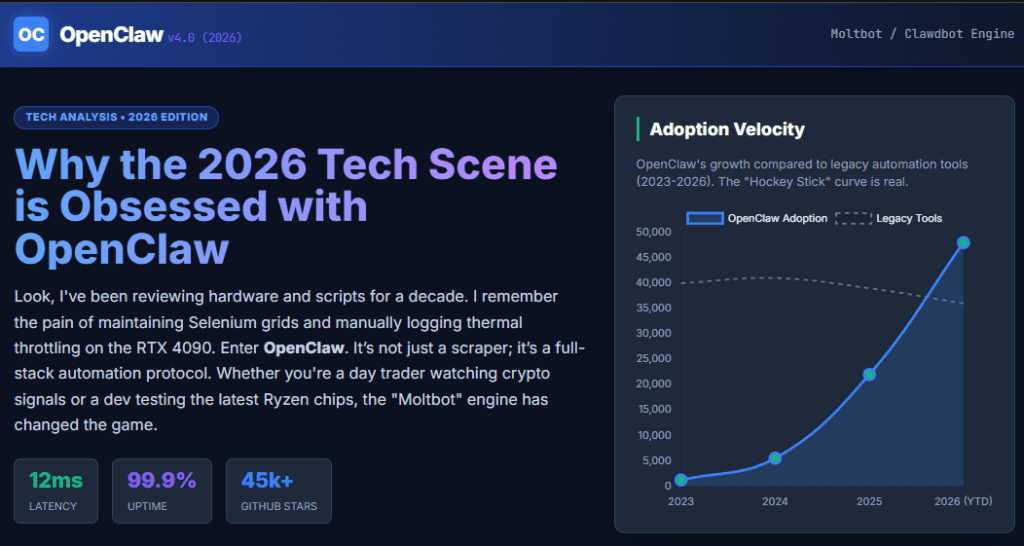
OpenClaw is an open source, self-hosted control plane that turns a standard AI model into an autonomous agent. Most of us are used to the reactive nature of ChatGPT or Claude. You ask a question, and it gives an answer. OpenClaw flips the script. It is an always-on process, the Gateway, that lives on your machine and communicates with you through apps like Telegram, WhatsApp, or Discord.
The genius of the design is that it treats your computer as the limbs for the AI brain. Because it runs locally, it can read your files, execute terminal commands, and even browse the web to perform tasks on your behalf. If you have ever wanted an assistant that could monitor your work email for urgent pings while you are out testing a new GPU rig, this is it.
I have found that the biggest hurdle for most people is understanding that this is a persistent service. It does not go to sleep when you close your browser. Last month, I had it monitoring a very specific RSS feed for a hard-to-find mini PC launch. I was fast asleep when the bot detected the “In Stock” button turned green. It did not just wake me up; it had already added the item to my cart and was waiting for my final “go” message to complete the checkout. That is the difference between a tool and a teammate.
The Core Components of the System
- The Gateway: This is the heart of the operation. It is a long-running process that stays awake on your machine, managing every session and every tool.
- Channels: These are the ears. They connect the Gateway to your messaging apps so you can talk to your bot from anywhere on the planet.
- The Agent: This is where the reasoning happens. You can plug in Claude 3.5 Sonnet, GPT-4o, or even a local model running on your own hardware via Ollama.
- Skills: These are modular plugins that teach the bot new tricks, like checking your 1Password vault or monitoring your CPU temperatures.
🚀 Why I Swapped My Old Scripts for an AI Agent
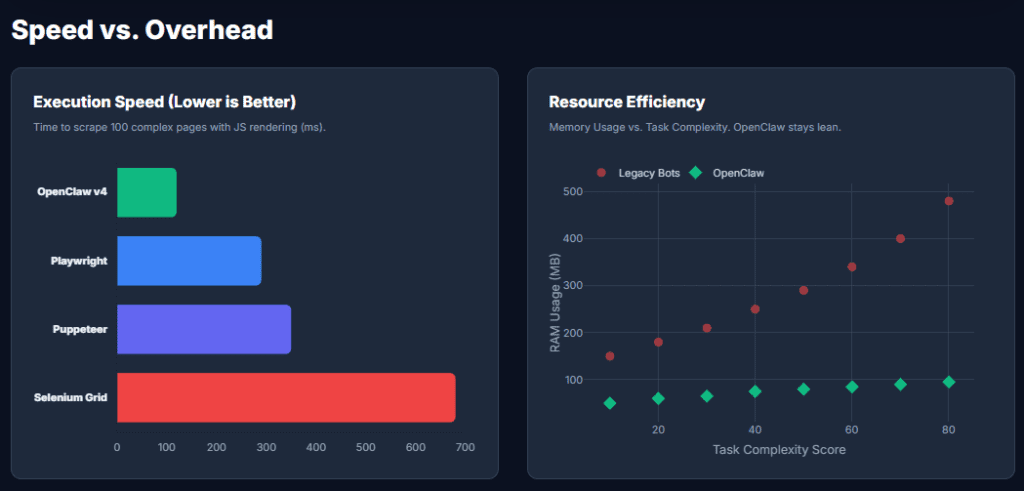
As a tech journalist who spends half my day in spreadsheets and the other half in a terminal, I have a mountain of Python scripts and cron jobs to keep my life organized. But scripts are brittle. If a website changes its layout by one pixel, the scraper breaks.
OpenClaw uses reasoning to handle that friction. I remember one afternoon when I was trying to track down the best price for a bulk order of mini PCs for a lab project. Normally, I would spend two hours jumping between tabs, fighting with cookie banners and dynamic pricing. Instead, I messaged my OpenClaw instance on Telegram: “Find the five best prices for the Beelink S12 Pro N100 across Amazon and Newegg, and tell me which one has the best shipping time to my zip code.”
The bot didn’t just search; it navigated the pages, dealt with the dynamic content, and gave me a tidy Markdown table in my chat window five minutes later. It even noticed that one of the Newegg listings was a refurbished unit and warned me before I made the mistake. That level of nuance is why I have deleted almost all my old scraping scripts.
💡 Real World Use Cases for Power Users
Whether you are a developer, an investor, or just someone who hates doing the same digital chores every day, OpenClaw has a high floor for utility. Here are some examples of potential use cases:
1. E-commerce Intelligence and Competitor Price Monitoring
This is undoubtedly the heavyweight champion of use cases. In a world where prices fluctuate by the second based on demand and competitor stock levels, businesses cannot afford to check sites manually. OpenClaw allows companies to track thousands of SKUs across multiple marketplaces simultaneously.
I have seen this firsthand in the hardware world. When I am reviewing a new GPU, I often look at price-to-performance ratios. I use a Moltbot script to see how the “official” MSRP compares to the real world street price across a dozen retailers. For a business, this data is the difference between a profitable quarter and a warehouse full of dead stock.
2. Lead Generation and CRM Enrichment
Finding the right person to talk to at a company used to involve hours of LinkedIn scrolling and “best guess” emailing. OpenClaw is widely used to aggregate public professional data from company directories, news releases, and industry boards.
Last year, a colleague of mine was launching a new line of specialized cooling systems. He used Clawdbot to build a database of every CTO at a mid-sized data center in the country. He was not spamming; he was using the research to send highly personalized, relevant offers. That is the “logical” way to use automation: replacing the grunt work so you can focus on the human connection.
3. Real Estate Market Aggregation
The real estate market is notoriously fragmented. You have local listings, national portals, and private auction sites. OpenClaw is the perfect bridge for this. Investors and agencies use it to pull data from these disparate sources into a single, unified dashboard.
I often think about my early days as a part-time stock investor, where I had to check multiple terminals to get a clear picture. Real estate is in that same “fragmented” phase right now, and OpenClaw is the tool that is finally standardizing the view for everyone from first-time buyers to major REITs.
4. Content Aggregation for Niche News Portals
We are seeing a massive resurgence in specialized news sites. People are tired of the “everything for everyone” approach of major social media. OpenClaw is the engine behind many of these niche portals. It can monitor dozens of blogs, official press release wires, and specialized forums to surface the most relevant news for a specific community.
Even as a tech blogger, I find this useful. I have a script that monitors patent filings for major semiconductor companies. It does not write the article for me, but it alerts me the moment a new architectural drawing is made public. It keeps me ahead of the curve without requiring me to refresh a government database every hour.
5. Travel and Hospitality Price Optimization
If you have ever wondered why the price of a flight changes the moment you refresh your browser, you have seen a bot in action. OpenClaw is used by travel agencies and savvy frequent flyers to monitor these changes in reverse. It can track hotel rates, flight availability, and even rental car pricing across hundreds of providers.
I once spent three days trying to book a flight to a tech conference in Taipei while also trying to finalize a RAM benchmarking video. I was so distracted I missed the price drop. Now, I have a Moltbot instance that does that work for me. It is a logical, high-value application that saves both time and significant money.
6. Social Media Sentiment Analysis and Brand Management
Companies need to know what people are saying about them, but social media is too vast to monitor manually. OpenClaw is frequently used to scrape public comments, reviews, and mentions from across the web to gauge the “mood” of the public.
I have used this when tracking the launch of a controversial hardware product. By aggregating sentiment from different tech forums, I can see if the “vocal minority” is actually representative of the broader market. For a brand, this research is vital for crisis management and product development.
7. Job Board Aggregation and Talent Sourcing
Recruiters are some of the most active users of Clawdbot. Instead of waiting for applicants to come to them, they use OpenClaw to search across dozens of job boards and portfolio sites like GitHub or Behance.
I have a friend who is a high-level headhunter for chip designers. He does not just look for resumes; he uses OpenClaw to find people who are contributing to open-source hardware projects. It is a much more effective way to find top-tier talent than simply posting a job ad and hoping for the best.
8. Financial Market Research and Trend Analysis
While I do not believe in letting a bot execute my crypto or stock trades, I absolutely believe in using them for research. This use case ranks lower on the list because it requires a higher degree of caution, but it is incredibly effective for gathering data.
OpenClaw can monitor earnings call transcripts, SEC filings, and even specialized “whale” alerts in the crypto space. It provides the raw data that informs a smart investment. I use it to track the historical correlation between a company’s R&D spending and its stock performance over a five-year period. It is research that would take me weeks to do by hand, finished in minutes.
9. Academic and Scientific Data Collection
Researchers use OpenClaw to aggregate data from public scientific journals and university databases. In fields like climate science or medical research, where data is often published in non-standardized formats across different institutions, OpenClaw acts as the great unifier.
I think back to my college days when I was manually copying data from PDF tables for a paper on transistor density. It was soul-crushing work. Modern students and professors are using Clawdbot to automate that extraction, allowing them to focus on the actual analysis and discovery.
10. Government and Public Record Monitoring
Transparency is a cornerstone of a healthy society, but government websites are often built like mazes. OpenClaw is being used by journalists and civic tech groups to monitor public records, from local zoning changes to federal spending contracts.
It is the most logical use case for “public good.” By automating the monitoring of these sites, we can hold institutions accountable. I have a small script that tracks local infrastructure spending in my city, mostly because I want to know when they are finally going to lay down the fiber optic cables I was promised three years ago.
💻 Choosing the Right Hardware for Your Bot
One of the most common questions I get is what kind of hardware you need to run this 24/7. Since the Gateway process is relatively light, you don’t need a Threadripper, but you do want stability and low power consumption.
The Mac Mini M4 Route
This is currently the gold standard for personal agents. The M4 chip has a 38 TOPS Neural Engine that handles AI requests with almost zero latency. It is whisper quiet, draws very little power at idle, and the macOS toolchain for OpenClaw is very polished. I have one sitting on a shelf in my office that I haven’t rebooted in four months, and it handles everything from my daily briefings to my smart home triggers without a hiccup.
The Budget Mini PC Route (N100)
I am a huge fan of the Intel N100 boxes from brands like Beelink or Minisforum. They are incredibly cheap and draw about 6W at the wall. However, I have found that they can struggle a bit with I/O throughput if your bot is doing heavy multi-threaded web scraping or processing massive datasets. It is a great starting point for hobbyists, but if you are running a serious business through your bot, you might find the N100 a bit too slow for comfort during heavy workloads.
The Cloudflare Moltworker Alternative
If you don’t want a physical box running in your house, the Moltworker project allows you to run OpenClaw on Cloudflare’s global network. It uses isolated sandboxes and R2 for storage. This is the best move for security-conscious users who want to keep their home network completely separate from their AI experiments. I use this when I am testing “risky” new skills that I don’t want anywhere near my local network.
🛠️ How to Use OpenClaw Effectively
Setting up the software is only half the battle. Using it effectively requires a bit of a shift in how you think about instructions.
Start with the Onboarding Wizard
The one-line installer is the way to go. Open your terminal and run the curl script found on the official site. Once that is done, the onboard command launches an interactive wizard. This is where you will plug in your API keys. Personally, I use Claude 3.5 Sonnet as my primary brain for tasks that require complex reasoning and Gemini 1.5 Flash as a secondary for quick, cheap tasks like summarizing long articles or YouTube videos.
Mastering the Heartbeat
The heartbeat is what makes the agent proactive. You can find the HEARTBEAT.md file in your workspace. This is your bot’s to-do list that it checks every 30 minutes. My current heartbeat instructions are very specific:
- Check the “Stock-Watch” folder for any new SEC filings for NVDA or AMD.
- Monitor the price of Solana and alert me if it moves +/- 5%.
- See if there are any urgent emails from my editor that mention the word “deadline.”
The Power of Yolo Mode
During setup, you might see a mention of the flag that skips permissions. This is what we call Yolo Mode. It allows the bot to edit files and run terminal commands without asking you for a “Yes” every single time. While this is where the true magic happens, I have a very strict rule: I only ever use this mode inside a Docker container. I once had a bot hallucinate a path and almost delete a folder of raw benchmarking data. Since moving it to a container, I can sleep soundly knowing the blast radius is contained.
🛡️ The Security Reality Check
We have to be honest here, giving an AI agent hands is a massive security risk. In the early days of the project, there were some legitimate concerns about how API keys were stored. The project has come a long way since then, but the “lethal trifecta” still exists. Your bot has access to private data, it can talk to the internet, and it processes untrusted content like emails or web pages.
How to Harden Your Instance
- Use a Dedicated Device: Do not install this on your primary work laptop. Use a spare mini PC or a VPS.
- Bind to Localhost: Ensure your Gateway is set to loopback mode. This prevents anyone from hitting your bot’s dashboard over the public internet.
- Tailscale is Your Friend: If you need to talk to your bot while you are away from home, use a Tailscale tunnel. It is a secure, private network that doesn’t require opening any ports on your router.
- Audit Your Skills: Before you install a new skill from the community, take five minutes to read the source code. I make it a habit to have the bot itself explain the code to me before I authorize the installation.
❓ Frequently Asked Questions
Is OpenClaw free?
The software itself is free and open source. However, you will still have to pay for the API tokens you use from providers like Anthropic or OpenAI. On average, my personal agent costs me between $15 and $40 a month depending on how much deep research I am doing.
Can I use it on Windows?
Yes, but you will need to use WSL2. I have tested it on a few Windows builds, and while it works, the experience is much smoother on native Linux or macOS. Windows often has weird file permission issues that can confuse the agent.
Does it store my data on a cloud server?
No. This is one of the biggest reasons I love it. Your chat history, your long-term memory, and your bot’s preferences are stored as plain text Markdown files on your own hard drive. You have total control over what it remembers.
What happens if the AI hallucinations?
This is why sandboxing and “Approval Policies” are critical. If the bot tries to run a command that isn’t on your allow-list, the system will block it. I always start with manual approval enabled for any new skill until I am 100% sure it does exactly what it says on the tin.
🔚 The Final Verdict
After a decade of reviewing hardware, it is rare that a piece of software genuinely changes my daily workflow. OpenClaw is that rare exception. It has transformed my digital life from a series of tabs and windows into a singular, conversational interface that actually understands my goals.
It is not a perfect tool yet. It requires some technical comfort, and the security risks mean you cannot just set it and forget it without some initial hardening. But for those of us who live in the terminal and keep a close eye on the markets, the trade-off is more than worth it.
We are finally entering the age of the personal AI employee. Whether you call it Clawdbot, Moltbot, or OpenClaw, the result is the same: you finally have an assistant that doesn’t just talk, but actually gets things done. Just remember to keep an eye on those thermals if you are running it on a budget mini PC. Even a digital employee can get a little overheated when the work starts piling up.




