 Skip to content
OpenClaw’s hardware requirements depend entirely on how you intend to run it — as a lightweight gateway connecting to cloud AI APIs, or as a fully local AI assistant running models directly on your machine. These two modes have dramatically different hardware needs, and confusing them is the most common mistake new users make when planning their setup.
What Is OpenClaw?
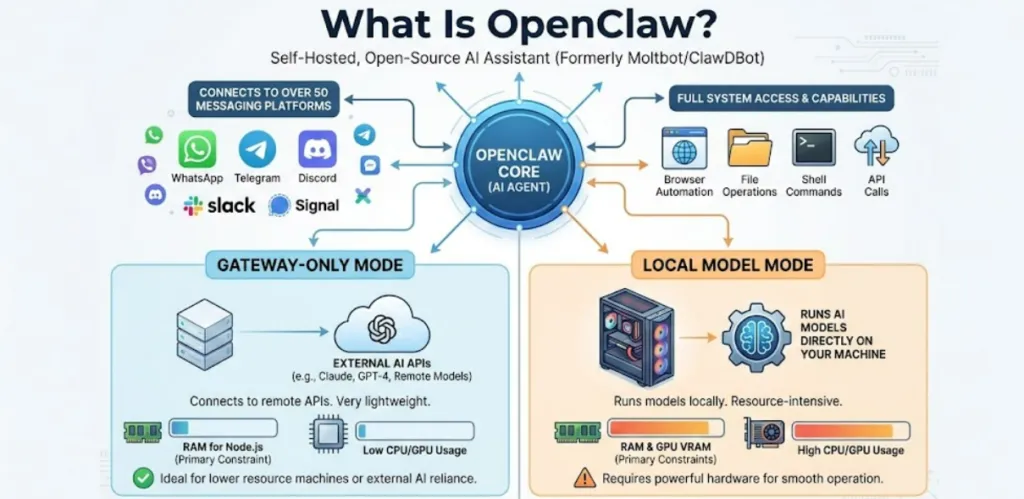
OpenClaw (formerly Moltbot/ClawDBot) is a self-hosted, open-source AI assistant that connects to over 50 messaging platforms — including WhatsApp, Telegram, Discord, Slack, and Signal — and gives an AI agent full access to your system: browser automation, file operations, shell commands, and API calls. Platformer’s hands-on OpenClaw review describes it as a genuinely powerful tool for technical teams, but one with a real hardware requirement that separates casual users from those trying to run local AI models.
The critical distinction is this:
- Gateway-only mode (OpenClaw connects to external APIs like Claude or GPT-4 remotely): Very lightweight — the bottleneck is RAM for Node.js, not GPU or CPU.
- Local model mode (OpenClaw runs AI models directly on your machine): Resource-intensive — RAM and GPU VRAM become the primary constraints.
Both modes are covered in this guide.
RAM Requirements: The Most Important Spec
RAM is the dominant factor in OpenClaw performance. As DigitalOcean’s OpenClaw deployment guide explains, when you under-spec memory you don’t get slow performance — you get “JavaScript heap out of memory” crashes and failed installations.
OpenClaw runs on Node.js, which uses the V8 JavaScript engine with a default heap memory limit of around 1.5–2GB on 64-bit systems. Exceed that ceiling and the gateway crashes instantly, not gradually.
RAM tiers at a glance:
| RAM | Experience | Best For |
|---|---|---|
| 1GB | Frustrating — crashes during installation | Testing only, not recommended |
| 2GB | Stable for basic use | Single-channel gateway (one bot), text workflows, API-connected mode |
| 4GB | Comfortable for real workflows | Multi-channel, browser automation, parallel agents |
| 16GB | Minimum for local AI models | Running Llama 3 8B or equivalent locally |
| 32GB | Recommended for local models | Larger context windows, 13B parameter models, smooth local inference |
| 64GB+ | High-end local model use | 70B+ parameter models, team deployments |
The official OpenClaw documentation lists 1GB as the technical minimum, but in practice this is only good for a 15-minute evaluation. The real minimum for productive use is 2GB, and the comfortable production tier is 4GB for gateway mode or 16–32GB for local model mode.
Full System Requirements
Official OpenClaw requirements (gateway/API mode)
| Spec | Minimum | Recommended | Comfortable |
|---|---|---|---|
| vCPU | 1 | 2 | 2+ |
| RAM | 1GB | 2GB | 4GB |
| Storage | 500MB | 2GB | 10GB+ |
| OS | Ubuntu 22.04+ / macOS | Ubuntu 24.04 | — |
| Node.js | 22+ | 22+ | 22+ |
| Docker | Optional | Optional | Recommended |
For local AI model execution (running models on-device)
| Spec | Minimum | Recommended |
|---|---|---|
| RAM | 16GB | 32GB |
| Storage | 20GB+ (model files) | 50GB+ |
| CPU | Modern multi-core (i5/Ryzen 5+) | i7/Ryzen 7 or Apple Silicon |
| GPU VRAM | 8GB (for 7B–8B models) | 16–24GB (for 13B–70B models) |
Windows users: OpenClaw does not run natively on Windows. You must install via WSL2 (Windows Subsystem for Linux). This adds approximately 15–30 minutes to the setup process and requires virtualization to be enabled in BIOS.
OS and Software Prerequisites
Before any hardware considerations, your system needs to meet these software requirements:
- Node.js 22 or higher — this is non-negotiable. OpenClaw will not run on earlier Node versions.
- macOS or Linux — natively supported. Linux (Ubuntu 22.04+) is the most common server deployment.
- Windows — supported via WSL2 only. Not recommended for production deployments due to the additional complexity layer.
- npm — comes with Node.js, used for installation.
- Docker — optional but recommended for cleaner deployments and easier updates.
GPU and VRAM: Only Relevant for Local Models
If you are running OpenClaw in gateway mode — connecting to Claude, GPT-4, Gemini, or other cloud APIs — you do not need a GPU. The gateway is pure Node.js I/O and spends most of its time waiting for API responses, not performing computation.
GPU requirements only apply when running local AI models directly on your machine:
GPU VRAM requirements by model size
| Model Size | Example Models | Minimum VRAM | Recommended VRAM |
|---|---|---|---|
| 7B–8B parameters | Llama 3 8B, Mistral 7B, Phi-3 | 8GB | 12GB |
| 13B parameters | Llama 2 13B, CodeLlama 13B | 16GB | 24GB |
| 30B–34B parameters | Mixtral variants | 24GB | 48GB |
| 70B+ parameters | Llama 3 70B, Qwen 72B | 48GB+ | 80GB+ |
As NVIDIA’s 2026 OpenClaw setup guide for RTX GPUs confirms, NVIDIA RTX GPUs are the best-supported option for local model inference thanks to CUDA acceleration, Tensor Cores, and compatibility with inference engines like Ollama and llama.cpp that OpenClaw uses under the hood. [^] NVIDIA recommends RTX GPUs for local inference, noting that the DGX Spark with 128GB unified memory is ideal for larger models.
For most practical local use, a GPU with 16GB VRAM (like an RTX 4080, RTX 4070 Ti Super, or RTX 3090) covers 7B–13B models comfortably. For a mini PC setup via OCuLink eGPU, the RTX 4090 with 24GB VRAM gives you comfortable 13B–30B performance.
CPU Requirements
CPU is the least critical component for OpenClaw in gateway mode. Because the gateway spends most of its time on I/O operations and waiting for API responses — not crunching numbers — even modest CPUs handle it well.
Gateway mode: 1–2 CPU cores handle OpenClaw comfortably. A budget VPS with 2 vCPUs is more than sufficient. More cores help when running multiple parallel channels or executing simultaneous tool operations, but CPU is rarely the bottleneck.
Local model mode: CPU matters more here — specifically for models running on CPU rather than GPU (via llama.cpp). Apple Silicon (M2, M3, M4) is particularly efficient for local inference thanks to unified memory architecture, where RAM and GPU memory are shared. An M4 Mac Mini with 16–32GB unified RAM is one of the most cost-effective local model platforms for OpenClaw in 2026.
Storage Requirements
Storage scales with your use case:
- Base installation: ~500MB
- Logs, caching, single channel: 2–5GB
- Multiple channels with media: 5–10GB
- Local AI models (each): 5–20GB per model (a 7B GGUF model is typically 4–8GB, a 13B model is 8–16GB)
- Heavy media processing: 10GB+
For gateway-only deployments, a 10GB SSD covers most users generously. For local model deployments, budget 50GB minimum to store one or two models with room for logs and caching. NVMe SSD is strongly preferred over HDD — model loading times from an HDD are noticeably slower.
The Swap Memory Warning
When RAM is tight, adding swap memory (using disk space as virtual RAM) seems like an easy fix. It prevents instant crashes when memory fills up — a 2GB swap file lets a 1GB system survive installation and basic operations.
But swap memory does not make OpenClaw run well. Reading from disk is dramatically slower than accessing RAM. Operations that should take milliseconds stretch to seconds. Use swap as an emergency buffer only — never as a substitute for adequate RAM. If your setup relies on swap for normal operation, upgrade your RAM allocation instead.
Deployment Options: VPS, Local Machine, or Mini PC?
Cloud VPS (recommended for most users)
For gateway-only mode connecting to cloud APIs, a VPS is the most practical and cost-effective deployment. You get 24/7 uptime without your personal machine running constantly.
- 2GB VPS: ~$12–15/month — suitable for light production use, single-channel bots
- 4GB VPS: ~$24–30/month — comfortable for multi-channel, browser automation, daily workflows
- 8GB+ VPS with GPU: Required for local model inference in the cloud
Recommended providers: Hetzner (best value in Europe), DigitalOcean (easiest setup), Oracle Cloud Free Tier (2 vCPU + 4GB RAM available free with account upgrade). DigitalOcean’s official OpenClaw one-click deployment recommends the s-2vcpu-4gb Droplet (4GB RAM) as the baseline for running OpenClaw effectively.
Local machine / mini PC
Running OpenClaw locally eliminates monthly VPS costs and keeps everything on your own hardware. The gateway goes down when your machine sleeps, so this works best for personal use rather than always-on deployments.
Following OpenClaw’s viral growth in early 2026, Mac Mini M4 sales surged — the combination of Apple Silicon’s efficient unified memory architecture, the $599 entry price (for the 16GB model), and macOS’s native support makes it a particularly compelling local OpenClaw host. The 16GB model handles Llama 3 8B well for single-user gateway use. On an upgraded M4 Mac Mini with 32GB unified memory (which costs closer to $999), OpenClaw with local Llama 3 8B delivers response times of 2–3 seconds — genuinely usable for daily workflows.
For Windows mini PC users, the WSL2 requirement adds complexity but works reliably on modern hardware. A mini PC with 16GB RAM, an NVMe SSD, and a dedicated GPU (via OCuLink or internal) covers both gateway and local model use cases well.
The cost math:
A base $599 Mac Mini (16GB) needs 120 months of operation to match the cost of a $5/month VPS. Mac Minis make financial sense for privacy-critical workflows, existing owners, or users who want local model capability. For everyone else, a VPS delivers better flexibility and no hardware obsolescence risk.
Step-by-Step: Choosing Your OpenClaw Hardware
Step 1: Decide gateway vs. local model mode
If you plan to connect OpenClaw to Claude, GPT-4, or Gemini via API, you need only 2–4GB RAM and no GPU. If you want to run AI models locally for full privacy and zero API costs, you need 16–32GB RAM and ideally a GPU with 8–24GB VRAM.
Step 2: Decide on deployment environment
- Always-on personal/team bot → VPS (2–4GB RAM, Linux)
- Privacy-critical or local-only workflows → Mini PC or Mac Mini
- Testing and development → Your existing machine (with WSL2 if Windows)
Step 3: Match RAM to your channel count
- 1 channel, basic tools → 2GB RAM minimum
- 2–3 channels, browser automation → 4GB RAM
- Multiple channels, media processing, parallel agents → 8GB+ RAM
- Local AI models → 16–32GB RAM
Step 4: Verify Node.js version
Check your Node.js version with node --version in terminal. If it returns anything below v22, upgrade before attempting installation. This is the single most common installation failure point.
Step 5: Allocate storage generously
For gateway mode: 10GB is comfortable. For local models: 50GB minimum. Always use an SSD — HDD storage causes painful model loading delays.
Performance Expectations by Hardware Tier
Budget VPS (2 vCPU, 2GB RAM, $12/month)
Gateway-only mode connecting to Claude or GPT-4 APIs. Single-channel (one Telegram or Discord bot). Basic text workflows, file operations, email summaries. Reliable for straightforward daily use. Browser automation possible but memory-constrained for complex tasks.
Mid-range VPS (4 vCPU, 4GB RAM, $24/month)
Multi-channel deployment (Telegram + Discord + WhatsApp simultaneously). Complex browser automation. Parallel agents. The sweet spot for team or power-user production deployments in gateway mode.
Mac Mini M4 / 16GB unified RAM ($599)
Local Llama 3 8B or Mistral 7B at comfortable speeds for single-user workflows. Gateway mode plus local fallback models. No monthly VPS cost. Best entry-level local model option for macOS users.
Mac Mini M4 / 32GB unified RAM (~$999)
Smooth Llama 3 8B inference at 2–3 second response times. Comfortable 13B model use. Best balance of performance, efficiency, and price for local OpenClaw power users.
PC / Mini PC with RTX 4080/4090 GPU (16–24GB VRAM)
Comfortable 13B–30B local model inference. Fast response times (1–2 seconds for 13B models). Full local operation with no API costs. Best performance for heavy local model use on Windows/Linux.
High-end server / DGX Spark (128GB memory)
Full 70B+ model inference with fast response times. Suitable for team deployments with concurrent users and maximum reasoning quality.
FAQ: OpenClaw Hardware and Specs
How much RAM do I need for OpenClaw?
For gateway mode (connecting to cloud APIs): 2GB is the real-world minimum for stable use, 4GB is recommended for comfortable production. For local AI model execution: 16GB is the minimum to run useful models like Llama 3 8B, and 32GB is recommended for larger models and better performance.
Can OpenClaw run on a Raspberry Pi?
The OpenClaw gateway is lightweight enough to technically run on a Raspberry Pi 4 with 4GB RAM in gateway-only mode. However, local model inference on a Raspberry Pi is impractically slow for most models. For always-on gateway bots connecting to cloud APIs, a Pi 4 or Pi 5 is a viable low-cost option.
Does OpenClaw need a GPU?
Only if you are running local AI models. Gateway mode connecting to Claude, GPT-4, or other cloud APIs requires no GPU whatsoever — it is pure Node.js I/O. For local models, a GPU with 8–24GB VRAM dramatically improves inference speed compared to CPU-only execution.
Can I run OpenClaw on Windows?
Not natively — OpenClaw requires macOS or Linux. Windows users must install via WSL2 (Windows Subsystem for Linux). This works but adds complexity and is not recommended for production deployments.
What local AI models does OpenClaw support?
OpenClaw supports any model compatible with Ollama or llama.cpp — including Llama 3 (8B, 70B), Mistral 7B, Phi-3, Qwen, and GPT4All models. Model selection depends on your hardware: 8B models need 16GB RAM, 13B models need 24–32GB, and 70B+ models require 64GB+ RAM or high-VRAM GPUs.
Is 1GB RAM enough for OpenClaw?
Technically, the official minimum is 1GB — but in practice, npm installation frequently fails at this tier, the Control UI crashes on load, and any browser automation triggers out-of-memory errors. 1GB is only suitable for a brief 15-minute evaluation. Use 2GB as your real minimum.
How much storage do I need for OpenClaw?
Gateway mode: 5–10GB is more than enough. Local model mode: budget 50GB minimum to store one or two models (7B GGUF models are 4–8GB each, 13B models are 8–16GB each) plus logs and caching.
What is the best hardware for running OpenClaw locally in 2026?
For the best combination of performance, efficiency, and value: an M4 Mac Mini with 32GB unified RAM (~$999) for local models up to 13B, or a Windows/Linux mini PC with an RTX 4080/4090 via OCuLink for maximum local model performance. For cloud API gateway-only use, a 4GB Linux VPS from Hetzner or DigitalOcean is the most cost-effective option.
Is the $599 Mac Mini M4 good enough for OpenClaw?
Yes — for gateway mode and Llama 3 8B local inference, the $599 M4 Mac Mini with 16GB unified RAM is excellent. For faster inference with 13B models or larger context windows, the 32GB configuration (~$999) is noticeably better and worth the upgrade if local model performance is a priority.
Final Thoughts
OpenClaw’s hardware requirements are genuinely modest in gateway mode — a $24/month 4GB VPS handles multi-channel production use comfortably, and the tool’s Node.js architecture means CPU is almost never the bottleneck. The complexity and cost jump only when you add local AI model execution, which requires serious RAM and ideally GPU VRAM.
The single most important rule: never run OpenClaw with less than 2GB RAM in production. The JavaScript heap limit will crash your deployment repeatedly at 1GB, and no amount of swap memory fully compensates. For a comprehensive video walkthrough of setting up OpenClaw from scratch — including hardware selection, installation on Linux and macOS, and connecting your first messaging channel — this YouTube tutorial on running OpenClaw on PC in 2026 covers the foundational setup process clearly.



