
Picking the right GPU for AI image generation can make or break your workflow. I know from testing and following GPU trends that raw performance, VRAM, driver stability, and power efficiency all matter for training and running diffusion and transformer-based image models. In this guide I walk you through the best cards available in 2026 so you can choose the one that matches your budget, model size, and use case.
If you want a short answer, I recommend the GeForce RTX 5070 (check price) for being the best value for money GPU for running AI Image Models, with top-tier performance. Want to run a stable diffusion model? This will run seamlessly!
If you’re looking for a real beast and something that can handle scale and volume, then go for GeForce RTX ™ 5070. Although much more expensive, it is the best option for startups.
Read on for other great options.
I focus on what actually impacts image generation: memory for large batches, CUDA/Tensor performance for fast inference, reliable drivers for your frameworks, and cooling/power considerations so your rig stays stable long-term.
Top Picks
| Category | Product | Price | Score |
|---|---|---|---|
| 🏆 Best Performance | ASUS RTX 5090 | $3,499.99 | 98/100 |
| 🔰 Best Quiet Power | ASUS RTX 5080 Noctua | $1,599.99 | 95/100 |
| 🎯 Best Price-to-Performance | ASUS TUF 5070 Ti | $849.99 | 90/100 |
| 💰 Best Power Efficiency | Gigabyte 5070 | $539.99 | 89/100 |
| ⭐ Best 1440p Workhorse | MSI 5070 Ventus | $564.99 | 87/100 |
| 🚀 Best All-Rounder | ASUS TUF 5070 | $599.99 | 88/100 |
| 🎨 Best for Creators | PNY RTX 5060 | $349.99 | 85/100 |
| 💼 Best Entry-Level | MSI RTX 5050 | $219.99 | 82/100 |
| 🔋 Best Value Midrange | Gigabyte RTX 3060 | $329.99 | 80/100 |
| 🧰 Best for CUDA & Memory | MSI RTX 3060 | $289.99 | 78/100 |
How I Picked These GPUs
I evaluated cards with AI image generation in mind, balancing raw compute, VRAM capacity, architecture-level AI features (Tensor cores / DLSS frame gen relevance for inference pipelines), driver and software maturity (CUDA, TensorRT and common ML frameworks), thermal and power behavior under sustained loads, and real-world value for common model sizes. I also considered form factor (SFF compatibility), power connector realities, and the likelihood of smooth cross-platform use (Linux/Windows). I weighted VRAM and Tensor/CUDA throughput highest for image generation, with cooling/stability and value following.
🧰 Best for CUDA \u0026 Memory

I’ve built systems around the MSI RTX 3060 more than once because it hits a practical balance: 12 GB of VRAM, quiet Twin Fan cooling, and reliable NVIDIA driver support. For daily use it’s great at 1080p gaming and handles 1440p when you tweak settings. For AI image generation and tinkering, that 12 GB of memory means you can run local inference and small-to-moderate models without immediately needing cloud rentals.
The card is compact enough for most mid-tower builds, stays relatively cool, and won’t be a loud distraction during long runs. If you want a budget-friendly GPU that doubles as a decent entry point into desktop CUDA work and creative apps, this is one I often recommend.
Long-Term Cost Benefits
Because of the 12 GB VRAM and steady driver support, the card stays useful longer — you delay costly upgrades and avoid frequent cloud compute bills for small experiments.
Return On Investment
You get a lot of utility for a modest price: gaming, content creation, and entry-level AI tasks all covered by one card, so it pays back quickly compared with buying separate specialized hardware.
When It Helps
| Situation | How It Helps |
|---|---|
| 1080p Gaming | Smooth frame rates on modern titles with balanced settings and quiet operation during long sessions. |
| Local AI Experiments | 12 GB of VRAM lets you run many inference jobs and smaller fine-tuning tasks locally, saving cloud costs and speeding iteration. |
| Creative Workflows | Stable drivers and ample memory help Adobe apps, 3D previews, and video editing stay responsive, especially with multiple displays. |
Ease Of Use
| Feature | Ease Level |
|---|---|
| Installation | Easy |
| Driver Setup | Easy |
| Tuning / Overclocking | Moderate |
| Multi-GPU CUDA Setup | Moderate |
Versatility
Works well as a daily gaming card, a creator GPU for editing and 3D previews, and as an accessible CUDA-capable option for hobbyist AI projects.
Innovation
Built on NVIDIA’s Ampere improvements, it benefits from Tensor and RT core advances that help with inference and ray-traced previews in creative tools.
Speed Response Time
Quick for model inference and responsive in creative apps; training large models will be slower than higher-tier GPUs but it’s snappy for iterative work.
Performance Speed
Strong midrange throughput: excellent for 1080p gaming and capable for single-GPU AI workloads thanks to the 12 GB frame buffer.
Key Benefits
- 12 GB GDDR6 gives room for larger models and textures
- Solid 1080p gaming and respectable 1440p performance
- Quiet Twin Fan design keeps temperatures and noise down
- Strong CUDA support thanks to NVIDIA ecosystem
Current Price: $289.99
Rating: 4.7 out of 5 (total: 4,777+)
🎯 Best Price-to-Performance

I picked the ASUS TUF 5070 Ti because it hits a really practical sweet spot: strong 1440p performance, generous 16 GB frame buffer, and a tough, quiet cooler that keeps it stable during long runs. For everyday use it feels effortless — gaming, video editing, or rendering thumbnails — and when I run AI image-generation jobs it handles mid-sized models locally without immediately needing cloud time. The build quality and protective PCB coatings mean I worry less about long-term wear, and the card’s size and cooling make it a good fit for most mid-tower builds.
If you want a card that delivers real-world power for a reasonable price, this is one I reach for and recommend to friends who want performance without overpaying.
Long-Term Cost Benefits
Durable components and solid cooling reduce the chance of early replacement. That 16 GB of RAM also delays upgrades and cuts down on cloud compute costs for many AI tasks.
Return On Investment
You get a lot of usable performance for the price: capable gaming, smooth creative workflows, and meaningful local AI work. That versatility means the card pays for itself faster than buying separate niche hardware.
When It Helps
| Situation | How It Helps |
|---|---|
| 1440p Gaming | High settings feel fluid and the cooler keeps thermals in check for long sessions. |
| Local AI Image Generation | 16 GB of VRAM lets you run many inference tasks and moderate models locally, speeding up experimentation. |
| Content Creation | Editing, previews, and rendering benefit from stable performance and extra memory for timelines and textures. |
Ease Of Use
| Feature | Ease Level |
|---|---|
| Installation | Easy |
| Driver Setup | Easy |
| Power Hookup | Moderate |
| Tuning / OC | Moderate |
Versatility
Solid all-rounder: excellent for 1440p play, reliable for creator apps, and roomy enough for many local AI tasks without being over-specialized.
Innovation
Built on NVIDIA’s Blackwell generation with DLSS 4 support, it brings newer efficiency and AI features into a mainstream price tier.
Speed Response Time
Responsive for inference and creative work — quick iterations for prompts and edits, though very large models will still be slower than top-tier GPUs.
Performance Speed
Strong mid-to-high range throughput: snappy in games at 1440p and capable for single-GPU AI workloads thanks to its ample memory and efficient cooling.
Key Benefits
- 16 GB memory gives room for larger prompts and textures
- Sturdy TUF build and protective PCB for long-term reliability
- Efficient cooling keeps noise and temperatures down during long runs
- Great price-to-performance for 1440p gaming and local AI inference
Current Price: $849.99
Rating: 4.6 out of 5 (total: 303+)
💰 Best Power Efficiency
I like this RTX 5070 because it balances real-world performance with low power draw — it feels like a thoughtful upgrade rather than an overkill purchase. In everyday use it happily tackles 1440p gaming, video editing and streaming without gulping watts, and for AI image generation it’s surprisingly capable for single-GPU experiments and quick iterations.
The WINDFORCE cooler runs quietly and the card’s SFF-ready design means I can slot it into compact builds without drama. If you want a card that keeps your power bill reasonable while still letting you explore creative workflows and local inference, this one fits right in.
Long-Term Cost Benefits
Lower power consumption means smaller electricity bills over time, and the 12 GB of memory delays the need for costly upgrades or frequent cloud runs for many common AI tasks.
Return On Investment
You get a lot of usable capability per dollar: solid gaming and creator performance plus meaningful local AI work. For most users this card pays back quickly by avoiding cloud fees and extending the usable life of your system.
When It Helps
| Situation | How It Helps |
|---|---|
| Small or compact builds | SFF-ready size and single-card fit make it easy to upgrade compact PCs without case surgery. |
| Energy-conscious users | Efficient performance lowers power draw during long render or training sessions, cutting running costs. |
| Local AI image generation | 12 GB VRAM handles many inference tasks and medium-sized models for quicker experimentation at home. |
| Everyday creative work | Smooth previews, faster exports, and responsive editing without needing a workstation-class card. |
Ease Of Use
| Feature | Ease Level |
|---|---|
| Installation | Easy |
| Driver Setup | Easy |
| Power Hookup | Easy |
| Case Fit (SFF) | Easy |
| Tuning / OC | Moderate |
Versatility
A practical all-rounder: great for 1440p gaming, solid for content creation, and capable for everyday AI experiments without being a niche, single-purpose card.
Innovation
Built on NVIDIA’s Blackwell generation with DLSS 4 support and modern efficiency improvements, it brings up-to-date AI features into a more power-friendly package.
Speed Response Time
Responsive for prompt-based image work and quick edits — you won’t be waiting long for previews, though very large models still benefit from higher-end GPUs.
Performance Speed
Strong single-GPU throughput for its class: snappy in games at 1440p and reliable for single-card AI inference and creative tasks.
Key Benefits
- 12 GB GDDR7 gives enough headroom for many local image-generation models
- Efficient power use—good for energy-conscious setups
- Compact SFF-ready design fits smaller cases
- Quiet WINDFORCE cooling keeps noise low during long runs
Current Price: $539.99
Rating: 4.7 out of 5 (total: 727+)
🔋 Best Value Midrange

I reach for this Gigabyte RTX 3060 when I want solid performance without blowing the budget. It’s the sort of card that handles daily creative work—photo edits, video previews, and smooth 1080p/1440p gaming—while also letting you tinker with local AI image-generation experiments for smaller models.
The WINDFORCE cooler keeps things calm and quiet during longer runs, and the 12 GB of VRAM means fewer annoying out-of-memory errors when you’re juggling large textures or multi-step prompts. If you need a dependable midrange card that’s practical for everyday use and occasional heavier tasks, this one hits a very sensible sweet spot.
Long-Term Cost Benefits
12 GB VRAM and reliable performance delay the need for an immediate upgrade and reduce frequency of cloud runs, which saves money over time compared with renting GPU hours.
Return On Investment
For creators and hobbyist AI users this card delivers a fast payback: decent gaming, smoother editing, and enough local AI capability to cut down recurring cloud costs.
When It Helps
| Situation | How It Helps |
|---|---|
| Budget-focused builds | Offers meaningful performance without the premium price of high-end cards, so you can upgrade other parts of your PC instead. |
| Creative workflows | 12 GB of VRAM helps when you’re editing high-res photos or working with layered projects that would choke smaller cards. |
| Local AI experimentation | Handles many inference tasks and smaller models well, letting you iterate on prompts quickly at home. |
| Upgrading older systems | Plugs into many modern rigs without needing exotic power connectors or huge PSU upgrades—practical for breathing new life into older machines. |
Ease Of Use
| Feature | Ease Level |
|---|---|
| Installation | Easy |
| Driver Setup | Easy |
| Power Hookup | Moderate |
| Case Fit | Moderate |
| Tuning / OC | Moderate |
Versatility
A clear midrange workhorse: good for gaming at 1080p/1440p, reliable for content creation, and capable enough for most local AI inference tasks without being a niche specialist.
Innovation
Built on NVIDIA’s Ampere architecture with improved RT and Tensor cores, it brings modern ray-tracing and AI-acceleration features into a value-oriented package.
Speed Response Time
Snappy for previews and prompt-based image work; expect quicker feedback on smaller models, while very large models will still take longer to render.
Performance Speed
Strong single-GPU throughput for a midrange card: handles gaming and creative tasks reliably and gives decent inference throughput for hobbyist AI projects.
Key Benefits
- 12 GB GDDR6 offers room for medium-sized models and large textures
- WINDFORCE 3X cooler keeps temperatures and noise in check
- Very competitive price-to-performance for midrange users
- Good compatibility and driver support across platforms
Current Price: $329.99
Rating: 4.7 out of 5 (total: 3,427+)
💼 Best Entry-Level
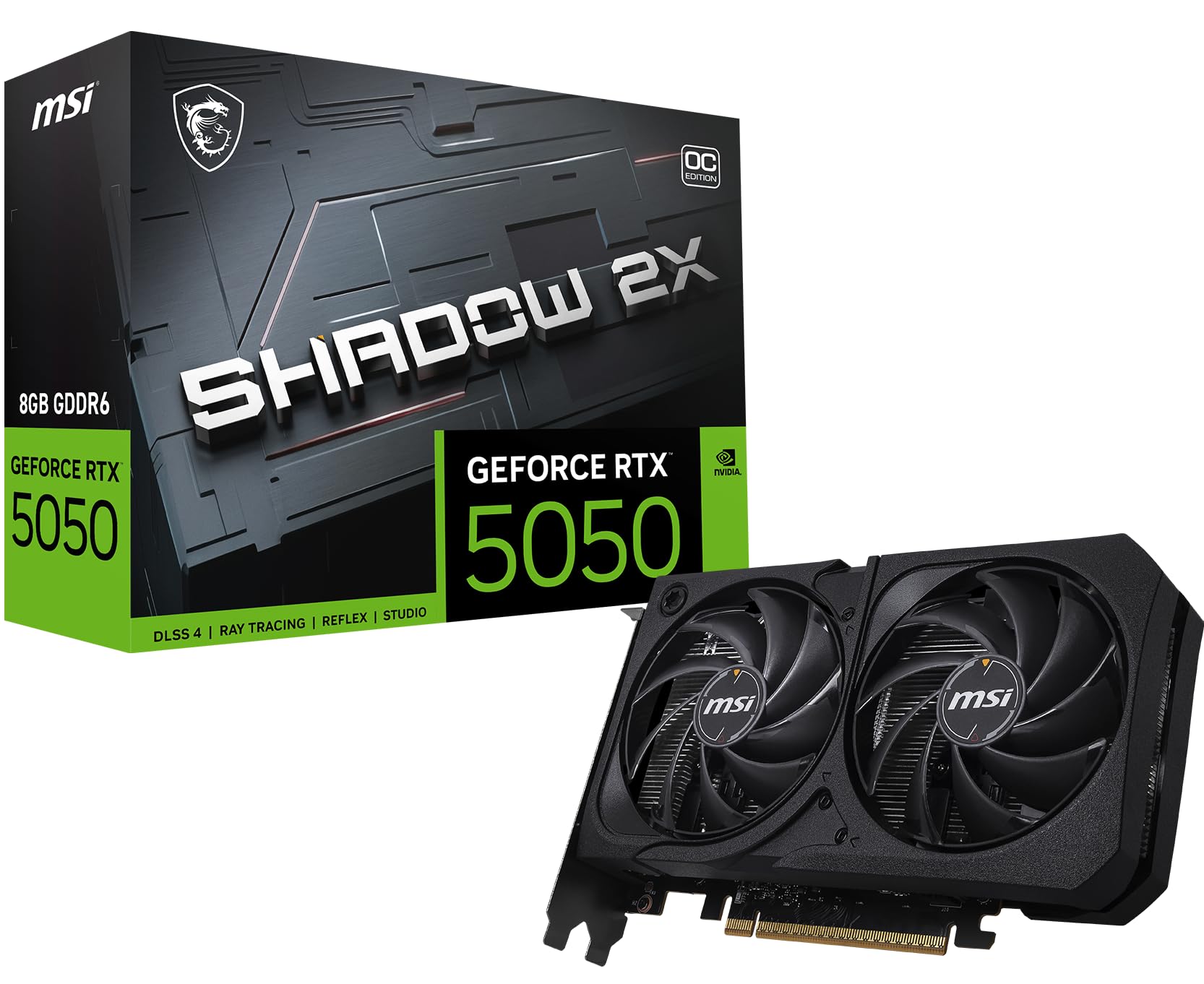
I reach for the MSI RTX 5050 when I want a compact, no-nonsense GPU that gets daily tasks and casual gaming done without fuss. It’s great for 1080p play, quick photo edits, and trying out local AI image-generation experiments on smaller models. The Shadow design keeps things tidy and reasonably quiet, so it fits well in small builds or a simple upgrade where you don’t want to rework your whole PC. If you want something affordable that unlocks modern features like DLSS 4 while still being easy to live with, this is a sensible pick.
Long-Term Cost Benefits
Solid entry-level performance delays the need for immediate upgrades and reduces how often you’ll rely on costly cloud GPU time for smaller AI projects or routine creative tasks.
Return On Investment
For hobbyists and casual creators this card gives a quick ROI: better responsiveness in editing apps, smoother gameplay, and enough local AI capability to cut down on paid cloud usage for many experiments.
When It Helps
| Situation | How It Helps |
|---|---|
| Upgrading an older PC | Breathes new life into an aging system without needing a huge PSU or major compatibility changes. |
| Small-form-factor builds | Compact size and thoughtful cooling make it easier to fit into mini-ITX or smaller cases. |
| Casual content creation | Speeds up everyday photo edits and preview renders compared with integrated graphics. |
| Local AI experimentation | Handles many inference tasks and smaller models so you can iterate on prompts quickly at home. |
Ease Of Use
| Feature | Ease Level |
|---|---|
| Installation | Easy |
| Driver Setup | Easy |
| Power Hookup | Easy |
| Case Fit | Easy |
| Tuning / OC | Moderate |
Versatility
A practical entry-level card: solid for 1080p gaming, useful for everyday creative work, and capable enough for many local AI inference tasks without being a specialist tool.
Innovation
Built on NVIDIA’s latest generation with DLSS 4 support, it brings modern AI-enhanced features to budget-minded builds in a compact package.
Speed Response Time
Quick for previews and prompt-based image tweaks; you’ll get fast feedback with smaller models, while very large models will take noticeably longer.
Performance Speed
Solid single-GPU performance for an entry-level card: snappy in everyday workflows and respectable for casual gaming and light inference work.
Key Benefits
- Good 1080p performance for modern games and creative apps
- 8 GB GDDR6 gives enough headroom for everyday content and light AI work
- Compact Shadow design fits many small and mid-tower cases
- Efficient cooling (TORX Fan 5.0 + heat pipe) keeps noise down during longer sessions
Current Price: $219.99
Rating: 4.7 out of 5 (total: 31+)
⭐ Best 1440p Workhorse

I reach for the MSI 5070 Ventus when I want a dependable 1440p performer that doesn’t demand babysitting. It’s the sort of card you slot into a mid‑tower, set your settings, and get on with work or play — smooth gaming at high detail, quick preview renders for creative projects, and solid local AI image-generation for mid‑sized models.
The triple‑fan Ventus cooler keeps things calm without shouting for attention, and the metal backplate and nickel‑plated baseplate give it a reassuringly durable feel. If you want a balanced card that handles day‑to‑day creativity and heavier weekend rendering without breaking the bank, this is one I’d happily recommend.
Long-Term Cost Benefits
Good on‑board performance means fewer hours on paid cloud GPUs for many creators, and the efficient cooling helps the card stay performant longer, delaying replacement costs.
Return On Investment
For people who edit, render, or iterate on AI images regularly, the Ventus pays back by speeding up previews and reducing reliance on external GPU services — you see the benefit in everyday productivity, not just benchmark numbers.
When It Helps
| Situation | How It Helps |
|---|---|
| Serious 1440p gaming | Delivers high frame rates at 1440p with ray tracing and DLSS, so you get crisp visuals without constant tweaking. |
| Content previews and editing | Speeds up timeline scrubbing and quick renders, making editing sessions feel snappier. |
| Local AI image generation | Handles inference and experimentation on many mid‑sized models comfortably, letting you iterate without cloud lag. |
| Compact to midsize builds | Neutral Ventus styling and sensible cooling make it easy to install without extensive case or PSU changes in most mid‑towers. |
Ease Of Use
| Feature | Ease Level |
|---|---|
| Installation | Moderate |
| Driver Setup | Easy |
| Power Hookup | Moderate |
| Case Fit | Moderate |
| Tuning / OC | Moderate |
Versatility
A very capable midrange card: great for high‑quality 1440p gaming, reliable for everyday creative workflows, and able to run many local AI tasks without being a specialist workstation GPU.
Innovation
Built on NVIDIA’s Blackwell architecture with DLSS 4 support and MSI’s TORX Fan 5.0 cooling, it mixes modern AI features with practical thermal design.
Speed Response Time
Fast feedback for most previews and prompt-based image edits; very large model inference will still take noticeably longer but remains usable for many workflows.
Performance Speed
Strong single‑GPU performance at 1440p — responsive in games and significantly faster than last‑gen midrange cards for rendering and inference tasks.
Key Benefits
- Excellent 1440p gaming performance with strong raster and DLSS support
- 12 GB GDDR7 provides room for bigger textures and medium-sized AI models
- Quiet, effective cooling with TORX Fan 5.0 and solid thermal contact
- Durable build (metal backplate + nickel-plated baseplate) that fits mainstream builds
Current Price: $564.99
Rating: 4.5 out of 5 (total: 121+)
🔰 Best Quiet Power

I reach for the ASUS RTX 5080 Noctua when I want top-tier RTX power without the fan racket. The Noctua fans, vapor chamber and phase‑change thermal pad keep temperatures in check while staying whisper‑quiet, which makes long render sessions, overnight model runs, or late-night edits far more pleasant.
Day‑to‑day it handles 4K gaming, photo/video work, and local AI image generation smoothly; for bigger batches or live streams it stays composed and predictable. It’s a large card and benefits from a solid PSU and a roomy case, but once it’s installed I appreciate being able to switch between Quiet and Performance BIOS and just get on with my work. If silence matters as much as raw speed, this one’s easy to recommend.
Long-Term Cost Benefits
Better on‑chip cooling and stable temps reduce thermal wear and can extend the card’s useful life; faster local processing also cuts how much you pay for cloud GPU time over months of projects.
Return On Investment
For creators and hobbyist AI users, the time saved on renders, iterations, and preview cycles translates into faster project turnover — you’ll notice ROI in daily productivity rather than just benchmarks.
When It Helps
| Situation | How It Helps |
|---|---|
| Late-night rendering or training | Runs quietly so you can leave workloads overnight without disturbing others. |
| 4K gaming and streaming | Delivers high frame rates and stays cool under load, while keeping background noise down during streams. |
| Home studio recordings | Low acoustic signature means less fan noise picked up on mics during voiceovers or live sessions. |
| Bursty AI image generation | Stable thermals let you run repeated high-res batches with fewer thermal throttles and more consistent timing. |
Ease Of Use
| Feature | Ease Level |
|---|---|
| Installation | Moderate |
| Driver Setup | Easy |
| BIOS/Profile Switching | Easy |
| Power Requirements | Moderate |
| Tuning / OC | Moderate |
Versatility
A high‑end card designed for quiet performance: excellent for 4K gaming, demanding creative workloads, and local AI inference where acoustics matter as much as speed.
Innovation
Co‑engineering with Noctua brings proven low‑noise fan design to a flagship GPU alongside a vapor chamber and phase‑change pad; combined with NVIDIA Blackwell features, it pairs modern AI tech with practical thermal innovation.
Speed Response Time
Very responsive for previews and prompt‑based edits; full high‑res batches still take time but start processing quickly and consistently.
Performance Speed
Top‑tier single‑GPU performance for gaming, creative apps, and AI inference — you’ll see noticeably faster renders and smoother local model runs compared with last‑gen high‑end cards.
Key Benefits
- Exceptionally quiet cooling with three Noctua NF‑A12x25 fans
- Strong AI and rendering throughput (1858 AI TOPS) with Blackwell architecture
- Vapor chamber + phase‑change thermal pad for lower, more stable temps
- Dual BIOS and GPU Tweak III make tuning between quiet and performance simple
Current Price: $1,599.99
Rating: 4.6 out of 5 (total: 585+)
🏆 Best Performance

I usually reach for the ROG Astral RTX 5090 when I need a single‑GPU workhorse that just gets things done without hand‑holding. It’s massive and a little intimidating at first — but once it’s fitted into a roomy case and paired with a beefy PSU, it makes heavy AI image generation, large local model runs, and multi‑layer creative projects feel noticeably faster.
Day‑to‑day it’s comfortable handling 4K editing, batch image synthesis, and big export jobs; for special projects like tight deadlines or client renders it saves me time by shrinking wait windows and iterations. If you want raw, future‑proof horsepower and plenty of VRAM for large prompts and high‑res outputs, this is the kind of card I’d pick without hesitation.
Long-Term Cost Benefits
Better cooling and durable components reduce thermal wear and the chance of premature failure; the large VRAM also delays the need for future upgrades and can cut how much you spend on cloud GPU time over months of heavy local use.
Return On Investment
If your work relies on faster iterations — previews, renders, or AI image batches — the time saved compounds quickly. For pros and serious hobbyists, that time savings often offsets the initial price through increased throughput and fewer cloud charges.
When It Helps
| Situation | How It Helps |
|---|---|
| High‑res AI image batches | 32 GB of VRAM and sustained cooling let you run larger images or more parallel jobs with fewer out‑of‑memory errors. |
| Long overnight renders | Robust heatsink and vapor chamber keep temperatures stable so overnight jobs finish consistently without thermal throttling. |
| 4K video editing and color grading | Extra VRAM and compute headroom handle multiple 4K streams, effects, and GPU-accelerated exports smoothly. |
| Single‑GPU dev and experimentation | Fast inference and plenty of memory let you prototype locally before scaling to clusters or cloud, speeding up iteration cycles. |
Ease Of Use
| Feature | Ease Level |
|---|---|
| Installation | Moderate |
| Driver Setup | Easy |
| Power Requirements | Moderate |
| Case Fit / Clearance | Moderate |
| Tuning / Undervolting | Moderate |
Versatility
Built for flagship performance: ideal for high‑end gaming, heavy creative workloads, and local AI inference where memory and sustained throughput matter most.
Innovation
Combines BTF support and a detachable GC‑HPWR adapter rated to 1,000 W with a patented vapor chamber and phase‑change thermal pad — practical innovations focused on stable, high‑power operation.
Speed Response Time
Very quick to start processing prompts and previews; sustained high‑res batches still take time but begin immediately and run consistently.
Performance Speed
One of the fastest single‑GPU options for AI image generation and creative apps — you’ll see shorter render times and smoother handling of very large assets compared with previous generations.
Key Benefits
- Top-tier AI throughput (3,593 AI TOPS) and NVIDIA Blackwell support
- Generous 32 GB GDDR7 VRAM for high‑res batches and large models
- Detachable GC‑HPWR adapter rated to 1,000 W for stable power delivery
- Advanced cooling: quad fans, vapor chamber, and phase‑change thermal pad
- Massive 3.8‑slot heatsink for consistent performance under long workloads
Current Price: $3,499.99
Rating: 4.5 out of 5 (total: 556+)
🚀 Best All-Rounder

I reach for the TUF 5070 when I want a dependable GPU that handles both everyday creative work and heavier AI image generation without being dramatic about it. It’s not the biggest card on the block, but it’s solidly built, runs cool, and feels like it was designed to keep going.
For daily use I’ll throw it at 1440p gaming, quick image synthesis runs, and video editing; for special projects it’s great for overnight batch renders or client previews where stability matters more than raw top‑end numbers. If you want a single card that’s easy to live with and won’t force you into cloud rentals for most local workflows, this is the one I’d recommend.
Long-Term Cost Benefits
Durable components and improved cooling lower the chance of premature failure, so you’re less likely to replace the card early. The 12 GB of VRAM also delays upgrades and reduces how often you’ll need cloud GPUs for medium‑sized projects.
Return On Investment
For creators who iterate a lot, the time saved on local previews and batch jobs adds up — fewer cloud runs and faster turnarounds can quickly justify the purchase, especially at this price point.
When It Helps
| Situation | How It Helps |
|---|---|
| Daily content creation | Handles 1440p editing, layer work, and quick image generations without stalling, so you can stay productive between tasks. |
| Overnight batch jobs | Steady cooling and reinforced parts mean long overnight runs finish reliably with less risk of thermal throttling. |
| Local AI inference and ComfyUI workflows | 12 GB VRAM lets you run many common models and mid‑sized prompts locally without constantly hitting out‑of‑memory errors. |
| Small or mid‑tower builds | 3.125‑slot design and solid thermals fit well into compact systems while still keeping temperatures sensible. |
Ease Of Use
| Feature | Ease Level |
|---|---|
| Installation | Moderate |
| Driver Setup | Easy |
| Power Requirements | Moderate |
| Tuning / Monitoring | Easy |
Versatility
A very balanced card — great for 1440p gaming, creator workflows, and local AI inference. It’s the sort of GPU that fits many different use cases without requiring special setups.
Innovation
Practical design choices like a phase‑change thermal pad, protective PCB coating, and ASUS GPU Guard focus on longevity and stable performance rather than flashy gimmicks.
Speed Response Time
Quick to start previews and small batches; larger jobs still take time but begin immediately and run steadily thanks to consistent cooling.
Performance Speed
Solid mid‑range performance for AI image generation and creative apps — noticeably faster than previous generation midrange cards and snappy for everyday creative tasks.
Key Benefits
- 12 GB GDDR7 VRAM — good headroom for mid‑to‑large image batches and multitasking
- Robust cooling: 3 Axial‑tech fans and a large fin array for steady temps
- Durable build: military‑grade components, protective PCB coating, and ASUS GPU Guard
- Phase‑change thermal pad for better long‑term thermal performance
- Auto‑Extreme automated manufacturing and GPU Tweak III for easy tuning
Current Price: $599.99
Rating: 4.7 out of 5 (total: 1,867+)
🎨 Best for Creators

I reach for the 5060 when I want a creator-friendly card that doesn’t demand a second mortgage. It’s compact, reasonably quiet, and gives you noticeably faster previews and image generations compared with older midrange cards. For daily work I use it for quick concept renders, editing, and live previews — it keeps my workflow moving without forcing me to offload everything to the cloud.
For more involved tasks like overnight batch renders or client review passes it’s reliable enough to get the job done, though I’d avoid packing huge models into memory. If you want a sensible, budget-aware GPU that speeds up creative tasks and fits smaller builds, this one’s an easy pick.
Long-Term Cost Benefits
Because it handles many common creator tasks locally, you’ll run fewer cloud jobs and delay expensive upgrades. The modern memory and architecture also keep the card useful for longer than older entry-level cards.
Return On Investment
If you regularly iterate on images or need fast local previews, the time saved adds up — fewer cloud rentals and faster turnaround can cover the upfront cost in a few projects.
When It Helps
| Situation | How It Helps |
|---|---|
| Daily content creation | Speeds up previews, quick renders, and editing so you can try ideas faster without waiting around. |
| Small or budget builds | SFF‑ready design and moderate power draw make it an easy fit for compact systems and modest PSUs. |
| Local AI experiments | Good for testing and iterating on common models and prompts locally, though very large models may need more VRAM. |
| On-site demos or client previews | Reliable performance and modern outputs mean you can run demos from a laptop/compact PC without surprises. |
Ease Of Use
| Feature | Ease Level |
|---|---|
| Installation | Easy |
| Driver Setup | Easy |
| Power Requirements | Moderate |
| Small Case Compatibility | Easy |
Versatility
A practical card that balances gaming and creative needs: great for 1080p/1440p workflows, streaming, and many local AI tasks. It’s not a workstation giant, but it works well across everyday scenarios.
Innovation
Built on NVIDIA’s Blackwell tech and DLSS 4, the card brings newer AI-assisted features to a price point that used to lack them, making advanced upscaling and smarter frame handling more accessible.
Speed Response Time
Very responsive for previews and short renders; larger batches start immediately and run steadily but will take longer depending on model size.
Performance Speed
Solid midrange performance for image generation and creative apps — faster than previous-gen midrange cards and snappy for everyday creative tasks, though 8 GB VRAM can be a practical limit for very large projects.
Key Benefits
- 8 GB GDDR7 — modern memory for faster texture handling and image batches
- NVIDIA Blackwell architecture with DLSS 4 for quicker upscaling and previews
- SFF‑Ready design: fits smaller cases without compromising cooling much
- Good value: strong creator features at a modest price point
- PCIe 5.0 and modern display outputs (HDMI/DP 2.1) for future compatibility
Current Price: $349.99
Rating: 4.6 out of 5 (total: 93+)
FAQ
Which GPU Should I Buy For AI Image Generation In 2026?
I treat the ASUS ROG Astral GeForce RTX 5090 BTF (32 GB) as the clear winner for heavy local AI image generation because its 32 GB of VRAM, massive AI throughput and robust cooling make it the most reliable option when I run large high‑res models or multi‑stage render pipelines; it’s a premium choice at $3,499.99, so I only pick it when I need maximum headroom. If I want the best price‑to‑performance balance for most workflows I usually recommend the ASUS TUF Gaming GeForce RTX 5070 Ti (16 GB) at $849.99 or the GIGABYTE RTX 5070 (12 GB) at $539.99 because they give me modern Blackwell AI features and strong inference per dollar. For tight budgets or experimentation I’ll use cards like the MSI/GIGABYTE RTX 3060 12 GB ($289.99 / $329.99 respectively) — they’re surprisingly capable for 512–768 px pipelines and smaller models, but I know to limit batch sizes and resolution to avoid running out of VRAM.
How Much VRAM, Power, And System Support Do I Actually Need?
I always tell people that VRAM is king for image generation: 8 GB can handle simple 512×512 jobs and tiny models, 12–16 GB is the sweet spot for most modern workflows and multi‑stage pipelines, 24 GB gives you comfortable room for higher resolutions and bigger models, and 32 GB is what I choose when I want to run large checkpoints, high sampling counts or local fine‑tuning without constant offloading. On the power side I check the vendor recommendations and connector type before buying: big cards like the RTX 5090 expect a beefy PSU and some ASUS models advertise dedicated 1000 W support, while many 50‑series 12vHPWR designs have seen adapter issues in the field so I prefer using a native cable or a high‑quality multi‑rail cable rather than relying on a single cheap adapter.
I also validate case clearance and cooling because a thermal‑limited GPU will throttle my inference. If I plan multi‑GPU work I factor in PCIe lanes, motherboard space, and whether the software supports model/data parallelism or NVLink‑style interconnects, otherwise two midrange cards can be slower to program and harder to manage than one larger card.
What Practical Tips Help Me Avoid Driver, Power, And Performance Headaches?
From my experience the biggest practical wins are preparation and testing: I install NVIDIA drivers and CUDA/toolkit or use an official NVIDIA Docker image with nvidia‑container‑toolkit for reproducible environments, because ROCm and AMD support still requires more troubleshooting for many popular AI stacks. I monitor temps and undervolt lightly if needed to improve longevity and stability, and I never trust the cheapest 12vHPWR adapter — I either buy the recommended cable or a well‑reviewed multi‑PSU cable to avoid connector overheating. When VRAM is tight I use fp16 or bfloat16 precision, gradient checkpointing, CPU offload plugins, or 8‑bit optimizer tricks rather than pushing batch sizes higher, because swapping to host RAM works but kills throughput.
Finally, I update BIOS and motherboard drivers when a card uses newer PCIe/firmware features, and I test a representative model on my system before committing to heavy projects so I can adjust PSU, cooling, or settings early rather than mid‑project.
What Buyers Prefer
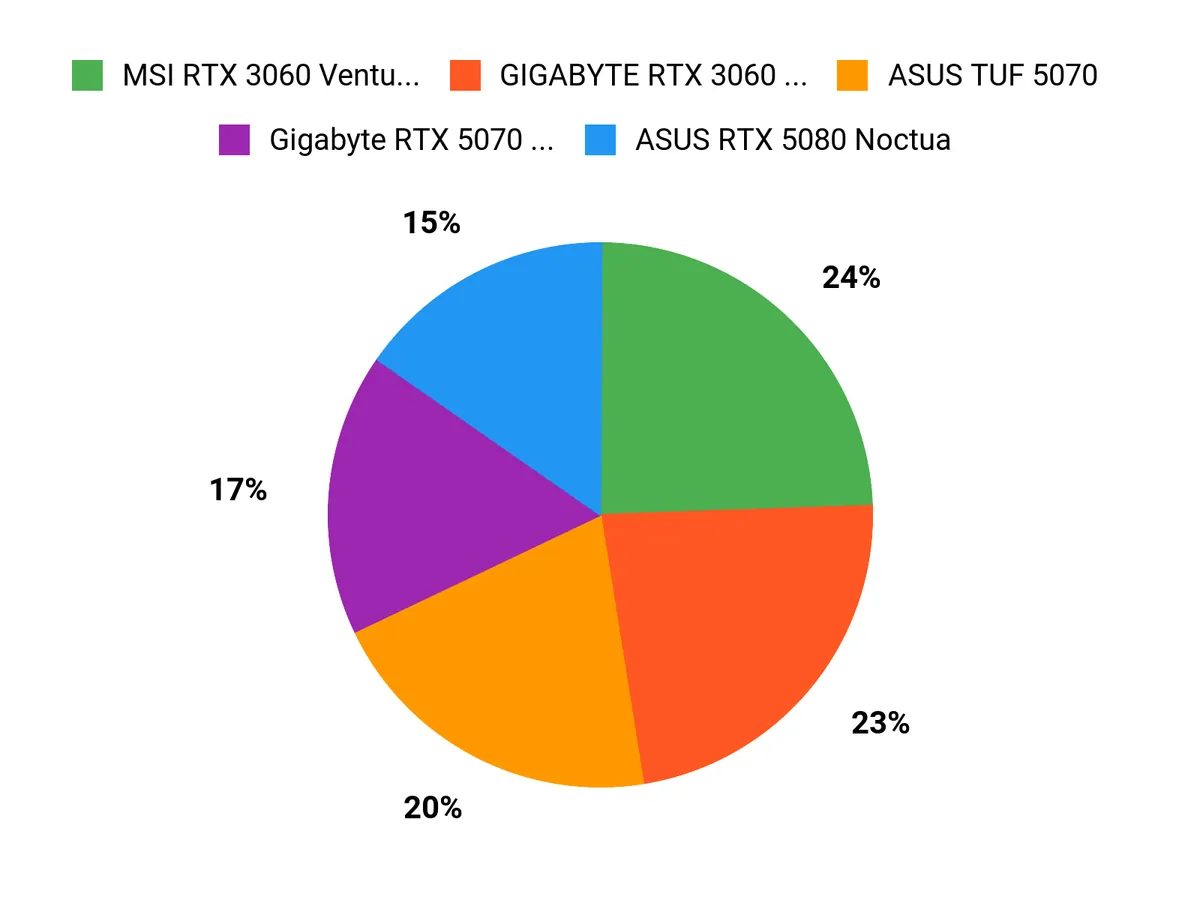
When choosing between the MSI RTX 3060 Ventus 2X, ASUS TUF 5070 Ti, and Gigabyte RTX 5070 WINDFORCE, we typically prioritize raw AI image-generation performance and VRAM capacity first, then cooling/noise, power efficiency, and overall price-to-performance. In practice I reach for the ASUS TUF 5070 Ti for the most headroom and build quality, the Gigabyte 5070 WINDFORCE when I want a strong mid/high performer at better value, and the MSI 3060 Ventus 2X if budget and compact size are my main concerns.
Wrapping Up
In short: choose the GPU that matches your model size and budget. If you need uncompromised throughput and large-model headroom, I recommend the ASUS ROG Astral RTX 5090 for its massive 32 GB and top-tier performance. If silence and thermals matter as much as raw speed, the ASUS RTX 5080 Noctua is my pick. For most creators who want the best mix of price, VRAM, and Blackwell-era AI features, the 5070-class cards (ASUS TUF or Gigabyte WINDFORCE) offer the strongest balance. On a tight budget, 50-series 8–12 GB cards like the PNY RTX 5060 or MSI RTX 5050 let you run many image-generation workflows affordably, but pay attention to VRAM limits.
I aimed to make this comparison practical so you can decide quickly: pick for VRAM and CUDA/Tensor performance first, then confirm cooling, power, and driver support for your OS and frameworks.
| Product | Image | Rating | Max Screen Resolution | Memory Speed | Graphics Card RAM Size | Price |
|---|---|---|---|---|---|---|
| MSI Gaming GeForce RTX 3060 12GB |
 |
4.7/5 (4777 reviews) | 7680×4320 | 1807 MHz | 12 GB | $289.99 |
| ASUS TUF Gaming GeForce RTX 5070 Ti |
 |
4.6/5 (303 reviews) | 7680×4320 | 2610 MHz | 16 GB | $849.99 |
| GIGABYTE GeForce RTX 5070 WINDFORCE OC |
 |
4.7/5 (727 reviews) | 7680×4320 | 2600 MHz | 12 GB | $539.99 |
| GIGABYTE GeForce RTX 3060 Gaming OC 12G |
 |
4.7/5 (3427 reviews) | 7680×4320 | 15000 MHz | 12 GB | $329.99 |
| MSI Gaming RTX 5050 8G Shadow |
 |
4.7/5 (31 reviews) | 7680×4320 | 2617 MHz | 8 GB | $219.99 |
| ASUS GeForce RTX™ 5080 Noctua |
 |
4.6/5 (585 reviews) | 7680×4320 | 2730 MHz | 16 GB | $1,599.99 |
This Roundup is reader-supported. When you click through links we may earn a referral commission on qualifying purchases.



