
I know you’re probably already aware of OpenClaw and are looking for the best laptops to host openclaw. But let’s very quickly discuss how we got here.
OpenClaw is one of those tools that makes you sit back and say, okay… this is different. I have tested plenty of AI products that sound impressive but fade after a week. OpenClaw might actually stay for good. Especially if it improves on the security front. Not because it’s flashy, but because it quietly becomes part of your digital workflow once you set it up right.
The promise is huge: You don’t have to be a billionnaire with data centres to have digital employees that do real work on your behalf!
At its simplest, OpenClaw is a self-hosted autonomous AI agent that runs on your own machine. You don’t open a website to use it. You message it on apps you already live in, and it can read local files, run commands, browse the web, and remember context over time. That’s the moment it stops feeling like a chatbot and starts feeling like a junior operator sitting next to you, waiting for the next task.
That power comes with credible risks. When an AI has access to your terminal and your messages, hardware quality and system stability suddenly matter a lot. Security concerns are real, especially if you rush the setup, but they’re manageable if you’re intentional about how and where you run OpenClaw.
I wrote this guide because choosing the right laptop for OpenClaw matters more than ever. I know the software has very quickly grown into a demanding platform that benefits from a mix of CPU speed, memory, reliable I/O and a screen you can actually work on for hours. My goal is to cut through specs and reviews so you can quickly find a machine that fits your workflow, whether you value raw performance, long battery life, or the best price-to-capability tradeoff.
Top Picks
| Category | Product | Price | Score |
|---|---|---|---|
| 🏆 Best Overall With Large Screen | HP 17 | $477.46 | 80/100 |
| 🚀 Best Apple Option at $1000 – Great Apple Security | MacBook Air | $1,093.71 | 95/100 |
| 💰 Best Budget Buy | Acer Aspire | $279.99 | 72/100 |
| 🔰 Best Touchscreen Workhorse | Dell Inspiron | $499.99 | 88/100 |
| 🎯 Best Storage Powerhouse | HP Pavilion | $549.99 | 76/100 |
| 🎨 Best For Creative Pros & Advanced Performance | MacBook Pro | $2,239.00 | 99/100 |
| ⚡ Best For Heavy Multitasking | Lenovo IdeaPad | $729.99 | 86/100 |
How I Picked These Laptops
I focused on the combination of hardware and real‑world usability that matters when running OpenClaw and related tools. I prioritized CPU performance, memory capacity and speed, and storage type because those directly affect model loading, simulations and multitasking. I also looked at display size and resolution, port selection for sensors and external drives, battery life for field work, and OS compatibility since OpenClaw users may prefer Windows, macOS or Linux. Finally, I weighed value and customer feedback to make sure each pick balances performance with reliability.
🏆 Best Large Screen Value
I reach for the HP 17 when I want a roomy screen and straight‑forward performance without overspending. The 17.3‑inch display makes multitasking feel natural—two windows side by side is effortless—and the lift hinge improves typing comfort during long sessions.
It isn’t a workstation for heavy rendering, but for document-heavy workflows, web tools and running OpenClaw in typical project sizes, it delivers reliable day‑to‑day performance. The design also leans into sustainability, which is a nice bonus if you care about materials.
Long-Term Savings
Upfront price is modest and the solid SSD plus energy certifications mean lower power use and fewer short‑term upgrades. I expect reasonable longevity for everyday OpenClaw work, so total cost of ownership stays manageable.
When It Helps
| Situation | How It Helps |
|---|---|
| Working From Home | The big screen and comfortable keyboard make long analysis sessions less tiring and let me keep reference material visible while I run OpenClaw. |
| Student Or Light Research | Affordable price and roomy display let you run multiple apps, draft reports and keep datasets accessible without constant tab switching. |
| Field Notes And Presentations | Battery life around typical full‑day use and quick charge mean you can take it to meetings or a client site and stay productive. |
| Budget-Conscious Teams | Gives teams a consistent, easy‑to‑manage hardware baseline that handles standard OpenClaw workloads without pushing budgets. |
Versatility
I find this model versatile for everyday tasks: it has a mix of USB‑A, USB‑C and HDMI for simple docking setups, and the integrated graphics handle visualizations and light image work when needed.
Practicality
It’s pragmatic rather than flashy. At about 4.58 pounds it’s not ultralight, but the lift‑hinge, clear screen and easy setup make it a practical daily driver for home or office use.
Energy
ENERGY STAR and EPEAT Gold certifications plus the fast‑charge capability help reduce energy costs and downtime. That’s useful if you work across locations or need quick top‑ups between sessions.
Performance
The Ryzen 5 7520U and LPDDR5 memory deliver peppy performance for multi‑tab work, scripting and moderate data tasks. It won’t replace a high‑end workstation, but I’ve found it snappy for common OpenClaw tasks.
Key Benefits
- Large 17.3″ display that improves productivity and reduces window juggling
- 16GB LPDDR5 and a 512GB NVMe SSD for responsive multitasking and fast boot
- Comfortable keyboard hinge and narrow bezels that enhance usability
- EPEAT Gold and ENERGY STAR certified with fast 0–50% charging in ~45 minutes
Current Price: $477.46
Rating: 4.4 (total: 422+)
🚀 Best Apple Experience
I reach for the MacBook Air when I want a laptop that just gets out of the way. The M4 chip makes multitasking feel instant, the 15.3‑inch Liquid Retina screen gives plenty of room for side‑by‑side windows, and the fanless design keeps things quiet.
It’s light enough to carry all day but capable enough to handle editing, data work and extended OpenClaw sessions if your projects aren’t extreme. The macOS ecosystem also smooths workflows if you use an iPhone or iPad alongside it.
Long-Term Savings
Its efficiency and durable build mean fewer replacements and lower energy use over time. For many users the MacBook Air delays the need to upgrade or buy extra accessories.
When It Helps
| Situation | How It Helps |
|---|---|
| Remote Work | Battery life and instant wake let me move between calls, notes and OpenClaw runs without hunting for a charger. |
| Creative Tasks | The bright, accurate display and M4 acceleration make photo edits and previews feel responsive and true to color. |
| Learning And Development | Students get a lightweight, reliable machine that handles coding, documents and video lectures with room to multitask. |
| On‑the‑Go Analysis | Compact size and MagSafe charging mean I can set up quickly at a café or client site and stay productive for hours. |
Versatility
I appreciate how it slots into different setups: two Thunderbolt/USB‑C ports for external drives or displays, easy pairing with Apple accessories, and solid support for common development and data tools.
Practicality
The Air is thin and light, with a comfortable keyboard and dependable trackpad. It’s not for heavy GPU rendering, but for daily OpenClaw workflows and general productivity it’s very practical.
Energy
The M4’s power profile and optimized macOS mean excellent battery endurance and low heat, which reduces energy draw during long sessions and keeps fan noise at zero.
Performance
For most OpenClaw use cases the M4 offers snappy performance, fast file handling and smooth multitasking. Very heavy simulations may still favor larger pro systems, but this Air covers the majority of real‑world workflows well.
Key Benefits
- M4 chip delivers fast app launches and smooth multitasking
- Large, color‑accurate Liquid Retina display ideal for layouts and visual work
- Long battery life and efficient fanless design for quiet use
- MagSafe charging and solid build quality that feels premium
Current Price: $1,093.71
Rating: 4.8 (total: 1,989+)
💰 Best Budget Buy
I recommend the Acer Aspire when you need a dependable laptop on a tight budget. It gives you a crisp 15.6‑inch FHD screen, a responsive DDR5 memory setup and a surprisingly light chassis for the price.
It’s not built for heavy rendering, but for writing, browsing, video calls and running moderate OpenClaw experiments it’s a practical choice. Expect to tinker a bit if you want more storage or prefer a different OS, but out of the box it gets basic work done quickly and keeps things simple.
Long-Term Savings
Lower upfront cost means less capital tied up, and the option to add storage later keeps upgrade costs down. For many users this stretches the usable life before a full replacement is needed.
When It Helps
| Situation | How It Helps |
|---|---|
| Students | Affordable price and a large readable screen let you run lectures, code editors and notes without sacrificing battery life or portability. |
| Remote Meetings | Built‑in webcam, clear display and enough battery to get through calls and presentations when you’re away from a desk. |
| Light Development & Data Work | 8GB DDR5 and an SSD make scripting and small datasets responsive; add a larger SSD later if you need more local space. |
| Travel And Casual Use | Reasonable weight and long battery life mean you can work on the go and handle streaming or light editing between stops. |
Versatility
It covers everyday setups well: plenty of USB ports, HDMI for an external monitor, and Wi‑Fi 6 for stable connections. It’s easy to pair with a dock or external storage if your workflow grows.
Practicality
Setup is straightforward and the keyboard and screen are comfortable for long sessions. Storage is the tight spot at 128GB, so I plan for external or upgraded SSD storage if I need larger datasets.
Energy
Battery life rated around 12.5 hours and efficient components keep energy use low. Many users note fast recharge behavior, which helps when you need a quick top‑up between meetings.
Performance
The Intel Core 3 N355 and DDR5 RAM handle everyday multitasking smoothly. It won’t replace a high‑end machine for heavy simulations, but for typical OpenClaw runs at modest scale it performs well.
Key Benefits
- Excellent price-to-feature ratio for students and light professionals
- 15.6″ FHD IPS screen that makes multi-window work easy
- Wi‑Fi 6 and multiple USB ports for solid connectivity
- Long battery life for day‑to‑day use and fast recovery between sessions
Current Price: $279.99
Rating: 4.4 (total: 485+)
🔰 Best Touchscreen Workhorse
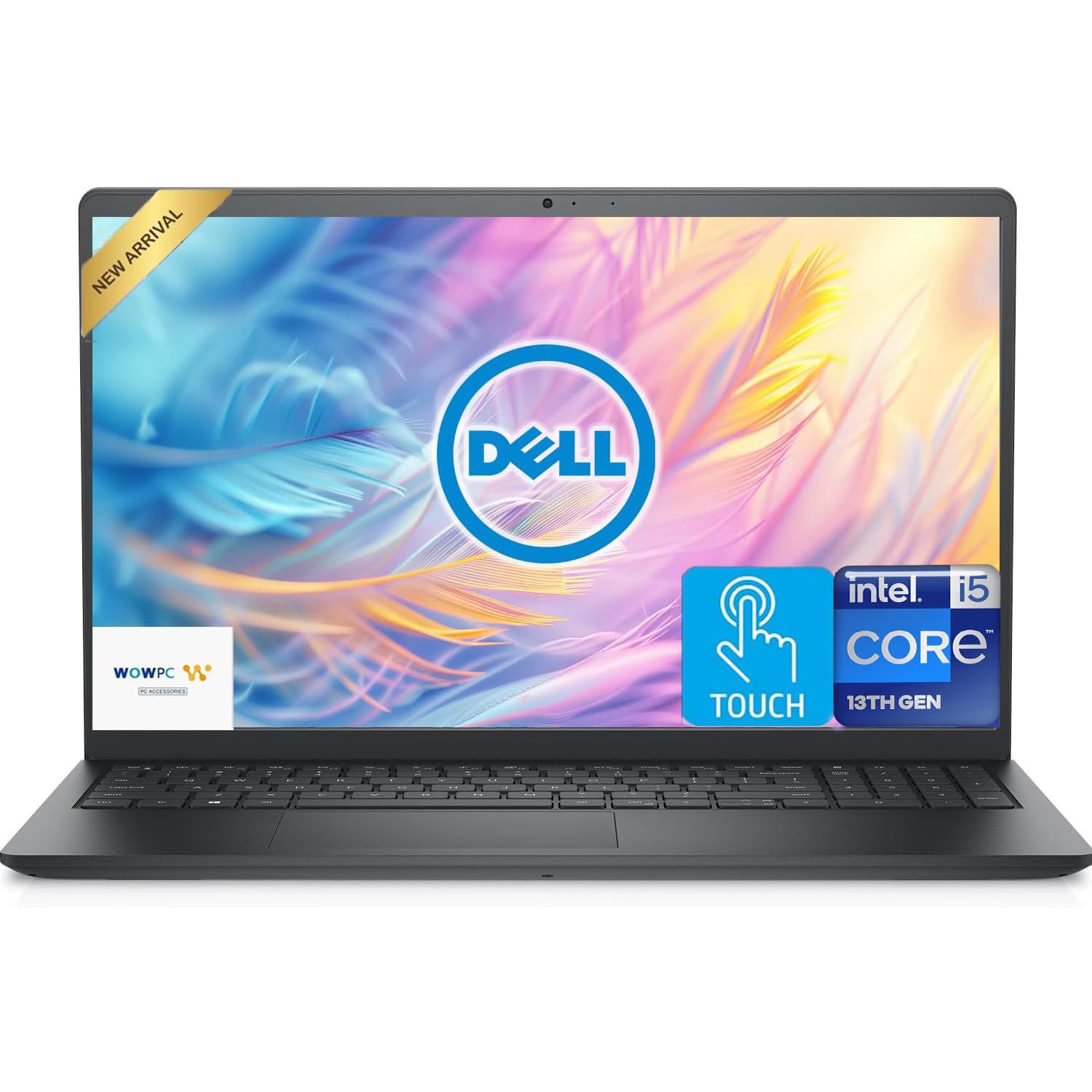
I reach for the Dell Inspiron when I want a practical machine that blends touch convenience with solid everyday performance. The 15.6‑inch FHD touchscreen makes quick edits and presentations feel natural, and the combo of a fast PCIe SSD plus external storage gives flexibility without hunting for dongles.
It handles multitasking, office suites and moderate OpenClaw workloads smoothly, and the port selection makes connecting monitors and external drives straightforward. Setup can be a little fussy if accounts and activations trip you up, but once it’s running it’s a dependable daily driver.
Long-Term Savings
The hybrid storage arrangement and common interface choices reduce the need for immediate upgrades. If you add external NVMe or a dock over time, the machine stays useful longer, keeping replacement costs down.
When It Helps
| Situation | How It Helps |
|---|---|
| Hybrid Office Work | Touchscreen plus a roomy display makes switching between spreadsheets, notes and OpenClaw visualizations faster and more natural during meetings. |
| Onsite Demos | Touch input and HDMI output let you show results to clients or colleagues without extra adapters, and the integrated webcam handles video calls. |
| Student Projects | Enough RAM and storage to run development tools, presentations and datasets for coursework while staying portable for campus life. |
| Edge Analysis And Light Modeling | Good single‑thread and multicore responsiveness for moderate OpenClaw runs and quick iteration on small to medium models. |
Versatility
This Inspiron adapts well: touchscreen, USB‑A and USB‑C, HDMI and an SD slot cover common needs, and Wi‑Fi 6 keeps remote connections stable when you’re moving between locations.
Practicality
At about 3.66 pounds it’s portable but not featherlight. The full‑size keyboard and anti‑glare display make long sessions comfortable, though you may run into initial Windows activation hiccups on some units.
Energy
Battery rated up to around 9 hours in light use; it’s fine for a day of meetings or study sessions, and reasonable power management keeps things cool during extended runs.
Performance
With a 13th Gen Core i5 and 12GB of RAM it handles multitasking and medium‑scale OpenClaw tasks smoothly. It’s not a high‑end workstation, but for most real‑world workflows it feels responsive.
Key Benefits
- Responsive 13th Gen Core i5 for snappy multitasking
- Touchscreen for intuitive interaction and quick navigation
- Generous effective storage with 256GB SSD plus 512GB external
- Good port selection including USB‑C, HDMI and SD card reader
Current Price: $499.99
Rating: 4.8 (total: 12+)
🎯 Best Storage Powerhouse
I pick the HP Pavilion when I want a machine that keeps my files close at hand. The 1TB SSD means I rarely worry about external drives during research or media projects, and 16GB of RAM keeps several apps open without slowing down.
The touchscreen and anti‑glare display are useful for quick edits and presentations, and the Type‑C/HDMI ports make connecting to monitors straightforward. It’s not a compact ultraportable, but for at‑home work, classes and local dataset handling it strikes a practical balance between storage and everyday performance.
Long-Term Savings
Large built‑in storage and solid memory reduce the need for immediate upgrades or external drives, stretching usable life and lowering replacement or accessory costs over time.
When It Helps
| Situation | How It Helps |
|---|---|
| Working With Large Local Datasets | The 1TB SSD keeps datasets and project files on hand, so I avoid constant transfers and can iterate faster during analysis. |
| Student Coursework | Plenty of storage for lectures, projects and media plus 16GB of RAM makes running multiple apps and browser tabs painless during study sessions. |
| Presentations And Client Demos | Touch input and HDMI output let me demo results quickly and mirror screens for groups without hunting for adapters. |
| Everyday Content Editing | A responsive setup for photo edits and slide work where local storage speeds up exporting and file management. |
Versatility
This Pavilion adapts to desktop‑style setups with external monitors and drives while remaining comfortable for occasional travel; the mix of ports and a roomy SSD covers most workflows without extra dongles.
Practicality
It’s a no‑nonsense laptop: comfortable keyboard, easy port access, and a design that handles a full day of tasks. At around 3.74 pounds it’s portable enough for campus or commuting.
Energy
Rated for up to 11 hours in lighter use, it gets through typical work or class days. Power management is solid for balancing performance with endurance during long sessions.
Performance
With an Intel Core processor and 16GB RAM it feels responsive for web work, coding, and moderate OpenClaw runs. It’s not a high‑end rendering machine, but it handles everyday and medium‑scale tasks reliably.
Key Benefits
- 1TB SSD gives plenty of local space for datasets, media and projects
- 16GB RAM keeps multitasking fluid when running OpenClaw and other tools
- Touchscreen plus anti‑glare display helps with presentations and quick edits
- Type‑C and HDMI ports simplify external displays and peripheral setup
Current Price: $549.99
Rating: 4.2 (total: 1,668+)
🎨 Best For Creative Pros
I reach for the MacBook Pro when I need a machine that can keep up with serious creative and analytical work. The 16.2‑inch XDR display gives me accurate colors and plenty of screen real estate, while the M4 Pro delivers consistently fast rendering, export and compile times.
It’s heavier than an ultralight laptop, but that tradeoff buys me performance, advanced connectivity and a battery that lasts through long editing or modeling sessions. For anyone doing frequent OpenClaw runs alongside photo, video or 3D work, this is the machine that removes bottlenecks and lets me iterate faster.
Long-Term Savings
High performance and future‑proof specs reduce the need for frequent upgrades; investing here often delays replacement and lowers long‑term accessory costs.
When It Helps
| Situation | How It Helps |
|---|---|
| Video Editing | Hardware‑accelerated media engines speed up exports and timeline scrubbing so I can iterate on edits more quickly. |
| 3D Modeling And Rendering | Strong CPU/GPU performance and ample unified memory cut down render times and let me work on larger scenes without swapping constantly. |
| Multi‑Monitor Workflows | Thunderbolt/HDMI support makes driving external displays easy, so I can spread code, visualizations and outputs across screens. |
| Heavy OpenClaw Simulations | The M4 Pro handles concurrent processes and data-heavy tasks with less slowdown, helping me run medium to large simulations more smoothly. |
Versatility
This MacBook Pro fits studio desks and travel bags alike: it’s equally at home driving external monitors, connecting fast storage, or running standalone for field work, making it easy to adapt as projects change.
Practicality
The keyboard, spacious trackpad and MagSafe charging make daily use comfortable and efficient. It’s not the lightest option, but the build and port selection simplify real workflows without constant dongle juggling.
Energy
Apple silicon balances high performance with low power draw, so the laptop stays cooler and uses less energy during sustained tasks compared with many high‑power Intel or AMD alternatives.
Performance
For creative pros and data users, the M4 Pro delivers immediate responsiveness: app launches, compiles and media exports finish faster, and multitasking across heavy apps feels fluid.
Key Benefits
- M4 Pro chip and 24GB unified memory for demanding creative and compute tasks
- Liquid Retina XDR display with excellent color accuracy for visual work
- 512GB SSD plus fast Thunderbolt ports for high‑speed external storage
- Long battery life and advanced cooling for extended, consistent performance
Current Price: $2,239.00
Rating: 4.7 (total: 631+)
⚡ Best For Heavy Multitasking
I reach for this Lenovo when I need a laptop that refuses to slow down under an overload of apps. With 40GB of RAM and a roomy 2TB SSD, it lets me run multiple virtual machines, IDEs and heavy browser sessions at once without constant swapping.
The 15.6″ FHD touchscreen and numeric keypad make data entry and quick edits easier, and Windows 11 Pro gives the management features I want. It’s not the lightest device, but for sustained multitasking and large local projects it’s a practical choice.
Long-Term Savings
High memory and generous internal storage reduce the need for near‑term upgrades and external drives, which lowers total costs over several years for power users.
When It Helps
| Situation | How It Helps |
|---|---|
| Running Multiple VMs | The large RAM pool makes spinning up several virtual machines practical, so I can test environments without constant memory juggling. |
| Data Analysis | Local 2TB storage and fast SSD reads speed up access to datasets and reduce wait time when iterating on models. |
| Software Development | Plenty of RAM and a capable CPU let me compile, run local servers and keep documentation and browsers open at the same time. |
| Presentations And Field Work | A full‑size screen, touchscreen and ample ports make it easy to demo results, connect to projectors and work on the go when needed. |
Versatility
I like that it covers desktop‑style setups and mobile needs: multiple USB ports, SD support, Windows 11 Pro and an included accessory set make it easy to adapt as projects evolve.
Practicality
It’s built for real work—comfortable keyboard, camera privacy shutter and a numeric pad. The tradeoff is weight around 4.6 pounds, so I usually use it in a bag with a dedicated laptop compartment.
Energy
Battery performance varies with workload; for heavy multitasking I keep a charger handy. For light tasks it can last through a few hours of mobile work.
Performance
The 10‑core i5 plus 40GB RAM and fast SSD deliver strong responsiveness for heavy multitasking, data work and medium‑scale simulations. It’s tuned for throughput rather than GPU‑heavy rendering.
Key Benefits
- 40GB RAM supports many concurrent apps and VMs without hitting swap
- 2TB SSD provides fast local storage for large datasets and projects
- 10‑core Intel i5 gives responsive single‑thread and multithread performance
- Touchscreen, numeric keypad and privacy shutter improve daily workflow
Current Price: $729.99
Rating: 4.4 (total: 159+)
FAQ
What Specs Matter Most For OpenClaw?
When I pick a laptop for OpenClaw I focus on three things: CPU speed, memory and storage. I recommend at least 16GB RAM and an NVMe SSD (512GB or larger) because swapping or slow storage kills iteration speed.
A modern multi‑core CPU helps with parallel tasks, while integrated GPUs are fine for many analyses but heavier simulations benefit from more powerful silicon like Apple’s M4 Pro or higher‑end Intel/AMD chips. I also check ports and cooling—Thunderbolt or USB‑C for fast external drives and a design that doesn’t throttle under load make a real difference in daily use.
Which Operating System Should I Choose?
I decide by workflow and compatibility. macOS on M‑series Macs is terrific for responsiveness and battery life and integrates well if you use iPhone or iPad, but verify OpenClaw support or available builds first. Windows machines give the widest driver and peripheral support and are easy to run if you need certain Windows‑only tools.
If you prefer Linux for reproducibility or server parity, many Windows laptops and some Macs can run Linux or a VM; I always check the OpenClaw docs and test a live USB or VM before committing.
How Do I Balance Budget And Upgradability?
I start with what I can’t live without and compromise elsewhere. If portability and battery matter, I’ll spend more on a MacBook Air ($1,093.71) or similar.
If budget is tight, a model like the Acer Aspire ($279.99) gives good everyday performance and I plan for an external NVMe later. For power users who want long life and fewer upgrades, investing in higher RAM and a bigger SSD up front—examples include the Lenovo IdeaPad ($729.99) or an HP with 512GB—usually pays off.
I also factor in warranty, repairability and whether I can add external storage or a dock to extend the machine over time.
What Buyers Prefer
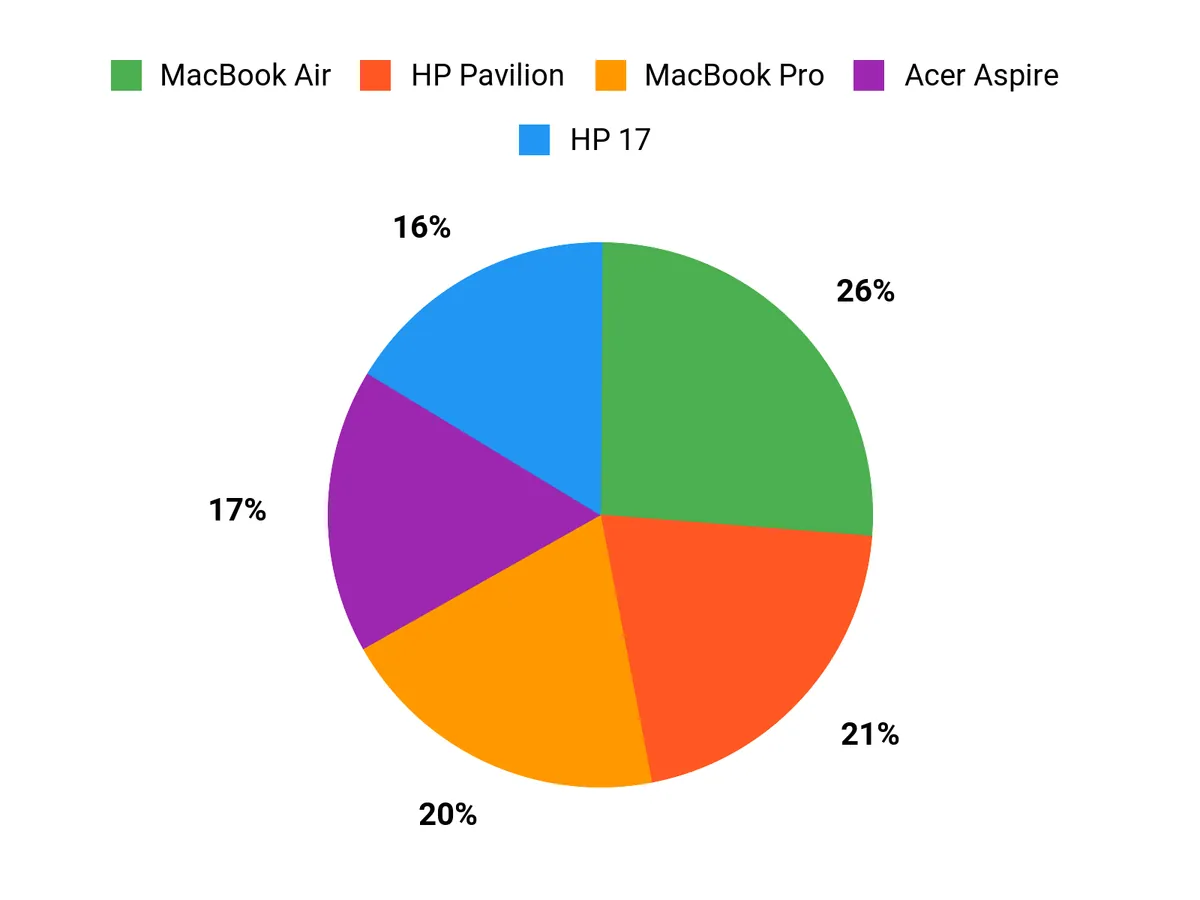
When choosing between the HP 17, MacBook Air and Acer Aspire, buyers usually weigh screen real estate and typing comfort (HP 17) against portability, battery life and macOS integration (MacBook Air) and pure affordability with basic performance (Acer Aspire). I find most people prioritize the single factor that matters to their workflow — either a large, easy‑to‑read display for multitasking, all‑day battery and seamless ecosystem, or the lowest upfront cost with upgrade options.
Wrapping Up
If I had to give a short roadmap, I’d say pick the MacBook Pro if you need the absolute best for heavy creative workloads and long-term headroom, and choose the MacBook Air if you want the best Apple balance of portability and power. The Dell Inspiron is my recommendation when you want a capable touchscreen workhorse without breaking the bank.
For a very budget‑minded OpenClaw user the Acer Aspire gives you essential performance at a low price, while the HP 17 is the value choice for a large readable display and comfortable typing. The Pavilion suits anyone who needs lots of local storage, and the Lenovo IdeaPad is ideal for multitasking and VM workloads. If you want help matching one of these to your specific OpenClaw setup, tell me your typical workloads and I’ll narrow it down further.
| Product Name | Image | Rating | Processor | RAM | Storage | Battery Life | Operating System | Price |
|---|---|---|---|---|---|---|---|---|
| HP 17.3 Inch Laptop |
 |
4.4/5 (422 reviews) | AMD Ryzen 5 7520U (up to 4.3 GHz) | 16 GB LPDDR5 | 512 GB PCIe NVMe M.2 SSD | Up to 7.15 hours | Windows 11 Home | $477.46 |
| Apple 2025 MacBook Air 15-inch |
 |
4.8/5 (N/A reviews) | Apple M4 chip | 16 GB Unified Memory | 256 GB SSD | Up to 18 hours | Mac OS | $1,093.71 |
| Acer Aspire Go 15 |
 |
4.4/5 (485 reviews) | Intel Core i3 N355 (up to 1.9 GHz) | 8 GB DDR5 | 128 GB UFS | Up to 12.5 hours | Windows 11 in S Mode | $279.99 |
| Dell Inspiron 15.6″ FHD Touchscreen Laptop |
 |
4.8/5 (12 reviews) | Intel Core i5-1334U (up to 4.60 GHz) | 12 GB DDR4 | 768 GB (256GB SSD + 512GB External) | Up to 9 hours | Windows 11 Home | $499.99 |
| HP Pavilion 15.6″ HD Touchscreen |
 |
4.2/5 (1,668 reviews) | Intel Core i3 Family (up to 4.1 GHz) | 16 GB DDR4 | 1 TB SSD | Up to 11 hours | Windows 11 Home | $549.99 |
| Apple 2024 MacBook Pro |
 |
4.7/5 (N/A reviews) | Apple M4 Pro (14-core CPU / 20-core GPU) | 24 GB Unified Memory | 512 GB SSD | Up to 24 hours | Mac OS | $2,239.00 |
| Lenovo IdeaPad 15.6″ FHD Touchscreen Laptop |
 |
4.4/5 (159 reviews) | Intel Core i5 (4.4 GHz) | 40 GB DDR4 | 2 TB SSD + 512 GB Docking Station | N/A | Windows 11 Pro | $729.99 |
This Roundup is reader-supported. When you click through links we may earn a referral commission on qualifying purchases.



