
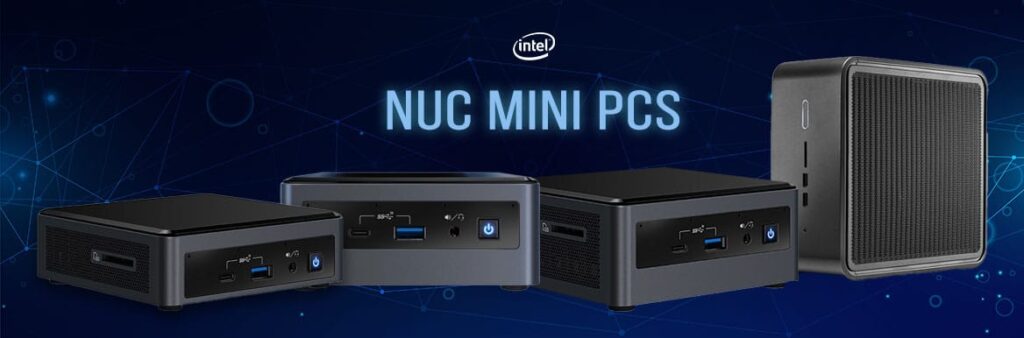
The main difference between a NUC and a mini PC is that “NUC” refers to a specific, ultra‑compact small‑form‑factor design (originally Intel’s Next Unit of Computing), while “mini PC” is a broad category that includes NUC‑style devices and many other small desktops with different sizes, cooling, and upgrade options. In my opinion, the key thing to remember is that every NUC is a mini PC, but not every mini PC is a NUC—and that distinction really matters for performance, noise, ports, and long‑term flexibility.
What Is a NUC vs a Mini PC?
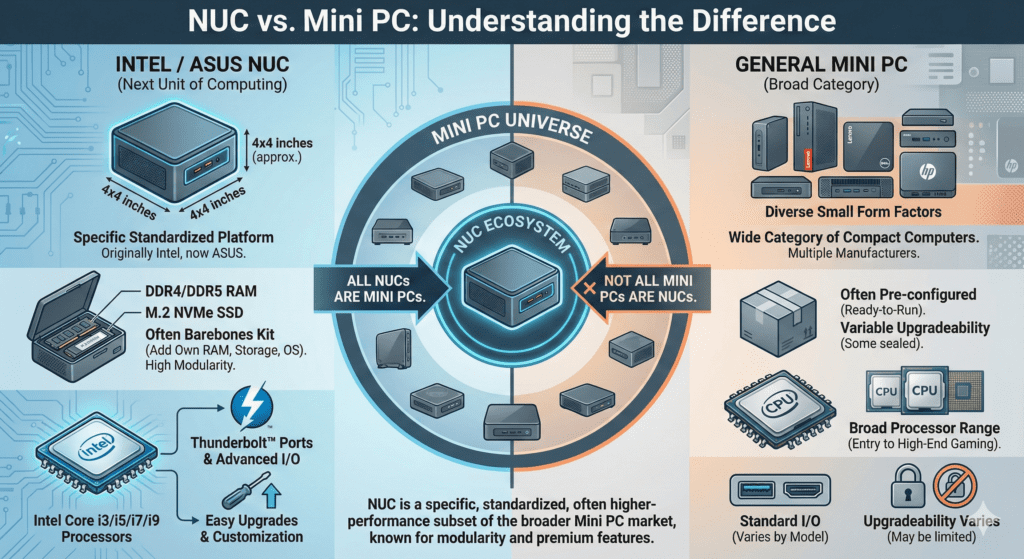
A NUC is a particular design language and standard for ultra‑small desktops, born from Intel’s “Next Unit of Computing” initiative, whereas mini PCs range from NUC‑sized boxes to larger small form factor systems with more cooling and sometimes full‑size GPUs.
Put simply:
- NUC = branded, ultra‑compact, tightly engineered small PC design.
- Mini PC = any small desktop, from NUC‑like boxes to chunkier, more configurable systems.
Before you pick one, you should look beyond size and think about your workload, noise tolerance, ports, upgrade plans, and budget. Those factors often matter more than the label on the box.
What Is a NUC?
A NUC (Next Unit of Computing) is a very small desktop PC design that focuses on compact size, low power consumption, and quiet operation.
Key characteristics of NUC‑style systems
- Very small footprint, often only a few inches on each side.
- Laptop‑class CPUs in most models to manage heat and power.
- Integrated graphics or laptop‑grade discrete GPUs in some high‑end variants.
- Limited internal expansion, typically just RAM and storage.
- Emphasis on quiet, efficient cooling and low power draw.
Originally this meant Intel’s direct production (which ended in 2023). Now, ASUS is the official manufacturer of the NUC line, producing NUC‑branded or NUC‑inspired systems that keep the same philosophy: tiny box, surprisingly capable hardware. For example, the Asus NUC 15 Pro+ shows how far these designs have come in balancing size and performance, as seen in PCMag’s comprehensive 2026 mini PC testing.
In my experience of testing these compact boxes, they shine when you need a powerful machine that literally disappears behind a monitor or under a TV.
What Is a Mini PC?
A mini PC is any small desktop computer that is smaller than a traditional tower, often designed to sit on your desk, mount behind a monitor, or tuck into a media cabinet.
Mini PC category is broader than NUC
When people say “mini PC,” they might be talking about:
- Ultra‑tiny NUC‑style systems.
- Slightly larger “book‑sized” PCs with better cooling.
- Small form factor desktops that can hold more drives or even a full‑length GPU.
- Specialized mini workstations, thin clients, or fanless industrial units.
Because the category is so broad, mini PCs can vary massively in:
- CPU class (mobile chips, desktop chips, sometimes ARM‑based chips).
- Graphics (integrated, laptop‑grade dGPU, or full desktop GPU).
- Noise and thermals.
- Upgradability (some soldered, some surprisingly modular).
If you want a sense of how wide this category really is, TechRadar’s 2026 mini PC guide compares everything from Mac mini‑style machines to more powerful Windows mini PCs aimed at creators and gamers.
So while NUC is a well‑defined family, mini PC is more like a spectrum. That’s great for choice, but it also means you need to read the spec sheet carefully.
Core Differences Between NUC and Mini PC
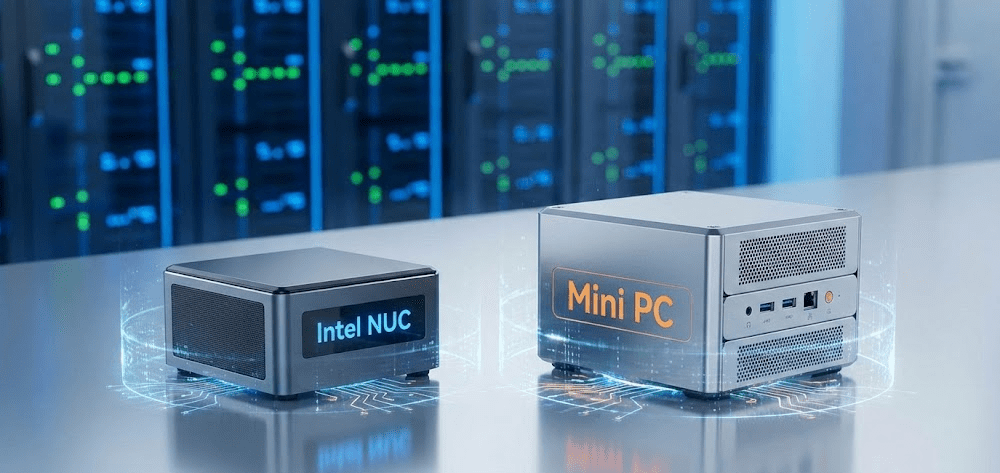
Size and form factor
- NUC: Typically the smallest style of mini PC, designed around a very tight footprint and low profile.
- Mini PC: Can be NUC‑sized, but can also be larger “sandwich” or “shoebox” designs that offer more room for cooling and components.
Practical tip:
If your priority is “it must fit behind my monitor or inside a cramped TV stand,” a NUC‑style box has a big advantage. Many units ship with VESA mounts, so you can attach them directly to the back of a display and forget they’re even there.
Performance and components
NUC systems usually use mobile‑class processors (similar to laptop chips) that balance performance with heat and power. Some high‑end NUCs or NUC‑style gaming boxes use more powerful chips and laptop‑grade GPUs, but they are still constrained by size.
Mini PCs in the broader sense might use:
- Mobile CPUs (like a NUC).
- Desktop CPUs, which generally offer more sustained performance.
- Special low‑power chips for ultra‑quiet, fanless units.
This means a larger mini PC might perform better under sustained loads like:
- Video editing and rendering.
- 3D modeling and CAD.
- Heavier multitasking with many apps and browser tabs.
From my testing, ultra‑compact systems are great for short spikes of performance, but if you render video or compile large projects for hours, the chunkier mini PCs with more cooling often stay faster and quieter under sustained load. That’s echoed in broader lab‑style roundups such as Tom’s Guide’s best mini PCs list, where the top picks for power users tend to be slightly larger boxes with more headroom.
Graphics capabilities
- NUC: Most models rely on integrated graphics, which are fine for office work, media playback, light photo editing and casual gaming. A few gaming‑oriented NUCs add laptop‑grade GPUs.
- Mini PC (general): Some models stay with integrated graphics, others add laptop‑grade GPUs, and the largest small‑form designs may support full‑size desktop GPUs.
If gaming or GPU‑accelerated workloads matter, mini PCs with discrete GPUs (even laptop‑class) are generally a better bet than most standard NUCs. That said, newer integrated GPUs have become surprisingly capable for 1080p light gaming and media, especially in modern Ryzen and Intel chips.
Upgradability and expansion
NUC‑style systems:
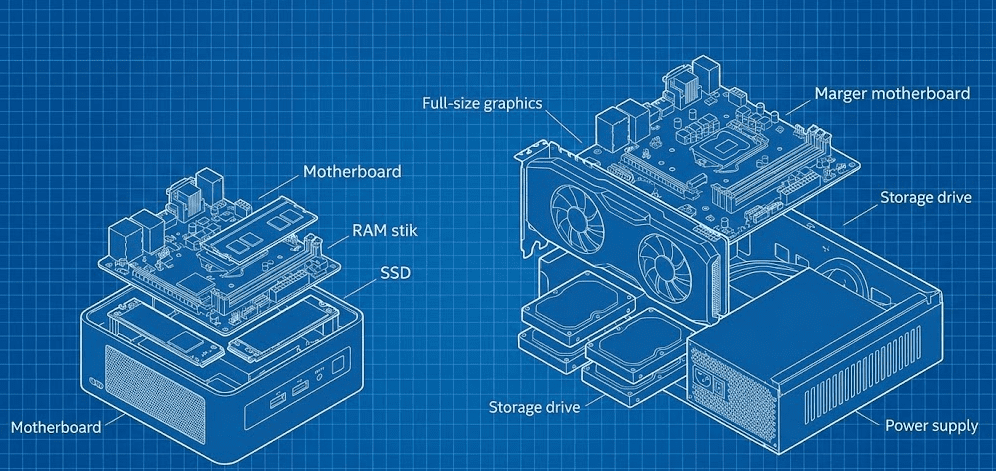
- Usually allow RAM and storage upgrades (SO‑DIMMs and M.2 SSDs).
- Rarely allow you to change the CPU or GPU.
- Have limited internal space for extra drives.
Mini PCs as a whole:
- Some are similar to NUCs (RAM + SSD upgradable).
- Others let you add 2.5‑inch drives, more M.2 slots, or even a full‑length GPU in larger cases.
- A few high‑end compact PCs are almost like tiny towers inside.
If you like to tinker, upgrade over time, or add more storage for media and projects, the more spacious mini PC designs offer far more flexibility. In my opinion, that flexibility is underrated—especially if you’re planning to keep one system over five or more years.
Ports and connectivity
Because NUCs are so small, port layouts are carefully chosen. You often get:
- Multiple USB ports (sometimes including USB‑C or Thunderbolt).
- HDMI and/or DisplayPort for multi‑monitor support.
- Ethernet and Wi‑Fi.
However, larger mini PCs may offer:
- Additional USB ports.
- More display outputs for 3–4 monitor setups.
- Extra audio options (line‑in, optical out, etc.).
- Dual Ethernet for specialized use cases.
For a simple home office, most NUCs are more than enough. For more complex setups—multiple external drives, audio interfaces, and three monitors—a slightly larger mini PC can be more convenient.
Noise, thermals, and power draw
- NUC: Designed for low power and quiet operation, often nearly silent at idle and under light load.
- Mini PC: Noise levels vary widely. Fanless models exist at the low‑power end, while gaming‑class small PCs can get loud under load.
If you care about a silent or near‑silent workspace, a NUC‑class machine or a low‑power fanless mini PC is ideal—as long as your workload matches the hardware. For high‑wattage CPUs and GPUs, expect more fan noise or look for designs with more volume and better airflow.
Price and value
Historically, NUCs carried a small “engineering premium” because they were tightly designed brand‑name systems. You were paying for:
- Compact, polished hardware.
- Efficient thermals.
- Brand support and firmware updates.
The broader mini PC market includes:
- Very cheap options built to a price.
- Mid‑range boxes that hit a sweet spot for home office users.
- High‑end compact PCs priced like serious workstations.
You’ll often find better raw specs per dollar from generic mini PCs, but NUC‑style boxes can justify their price if you value size, polish and proven reliability. While testing, I’ve seen some budget mini PCs cut corners on thermals or firmware, so it’s worth cross‑checking user reviews and roundups like PCMag’s best Windows mini PCs or TechRadar’s 2026 buyer’s guide before you buy.
NUC vs Mini PC: At‑a‑Glance Comparison
NUC vs Mini PC feature table
| Aspect | NUC‑Style Systems | General Mini PCs |
|---|---|---|
| Definition | Specific ultra‑small design standard (ASUS continuation) | Broad category of any small desktop |
| Size | Very compact, palm‑sized boxes | Ranges from tiny to small “shoebox” systems |
| CPU type | Mostly laptop‑class/mobile processors | Mobile, desktop, or low‑power chips |
| Graphics | Mostly integrated, some laptop‑grade GPUs | Integrated, laptop‑grade GPUs, sometimes full desktop GPUs |
| Upgradability | Typically RAM + storage only | Varies: some similar to NUC, others support more drives or GPUs |
| Ports | Good, but limited by size | Often more ports and more display outputs |
| Noise & thermals | Tuned for low noise and power | Varies from silent fanless to loud gaming boxes |
| Use cases | Office, media, light creative work, compact setups | Everything from thin clients to gaming and mini workstations |
| Price | Often mid‑range to premium for the size | Full spectrum from budget to high‑end |
| Best for | Minimal space, clean setups, plug‑and‑play simplicity | Customization, performance, specific workloads |
Which Is Better: NUC or Mini PC?
There is no single “better” option; it depends entirely on what you’re doing and what you care about.
Choose a NUC‑style system if:
- You have very limited space and want a tiny box that can hide behind a monitor or TV.
- Your workload is mostly office tasks, web browsing, streaming, and light creative work.
- You value low noise and low power usage.
- You don’t plan big internal upgrades—just maybe RAM or SSD in the future.
Choose a (larger) mini PC if:
- You need sustained performance for video editing, code compilation, or heavy multitasking.
- You want or need a discrete GPU for gaming or professional graphics workloads.
- You’d like more ports, multi‑drive storage, or easier upgrades.
- You’re okay with a slightly bigger box on or under your desk.
Based on my professional experience reviewing mini PCs over the years, most everyday users are perfectly happy with a NUC‑style system, but power users and gamers tend to be happier with a more robust mini PC that trades a bit of size for headroom and flexibility. If you’re specifically into content creation, you may also find it useful to cross‑check what dedicated reviewers highlight in focused guides like this YouTube roundup of “Best Mini PC for Video Editing 2026”, which puts several compact systems through real editing workloads.
Step‑by‑Step: How to Decide Between NUC and Mini PC
Use this simple process before buying.
Define your main use cases
Write down what you will actually do with the machine:
- Office and web only.
- Media server or home theater PC.
- Photo editing, design, or light video editing.
- Serious content creation or software development.
- Gaming (casual vs AAA titles).
If your list is mostly office, browsing and streaming, a NUC‑style system is usually enough. If you see “4K video editing, 3D rendering, modern gaming” on your list, lean toward a beefier mini PC.
Decide how much space you can really spare
Measure your available space:
- Behind your monitor.
- Under or inside your TV stand.
- On a narrow shelf or small desk.
If you truly only have space for a palm‑sized box with cables tucked out of sight, that’s NUC territory. If you have room for something the size of a small shoebox, you gain many more options in the mini PC world.
Clarify your performance and noise priorities
Ask yourself:
- Would I rather have more performance even if the fans ramp up?
- Or do I value silence over raw power?
NUC‑class systems are usually quieter but less capable under heavy, sustained workloads. Larger mini PCs can cool better and run higher‑power CPUs and GPUs, but they may get louder under load.
Plan your upgrades (or accept you won’t do any)
Realistically:
- Will you add more RAM later?
- Do you plan on adding extra storage drives?
- Would you ever want to swap in a more powerful GPU?
If the answer to all three is “no,” a simple NUC‑style system is fine. If you like to stretch a system over 5–7 years by upgrading storage or GPU, a more modular mini PC is a better long‑term investment.
Set a realistic budget
Compare:
- NUC‑style systems at your target spec.
- Similar‑spec mini PCs from other brands with slightly larger cases.
Sometimes the tiny form factor of a NUC costs extra. Sometimes, a larger mini PC gives you better performance per dollar but takes more space. In my opinion, it’s often worth paying a little more if you know the tiny size actually solves a real problem in your setup.
For a broader sense of what “good value” looks like at different price points and sizes, you can benchmark your shortlist against what reviewers recommend as top picks in roundups like PCMag’s best Windows mini PCs, TechRadar’s 2026 mini PC lineup, or Tom’s Guide’s current mini PC recommendations.
Real‑World Scenarios: NUC vs Mini PC
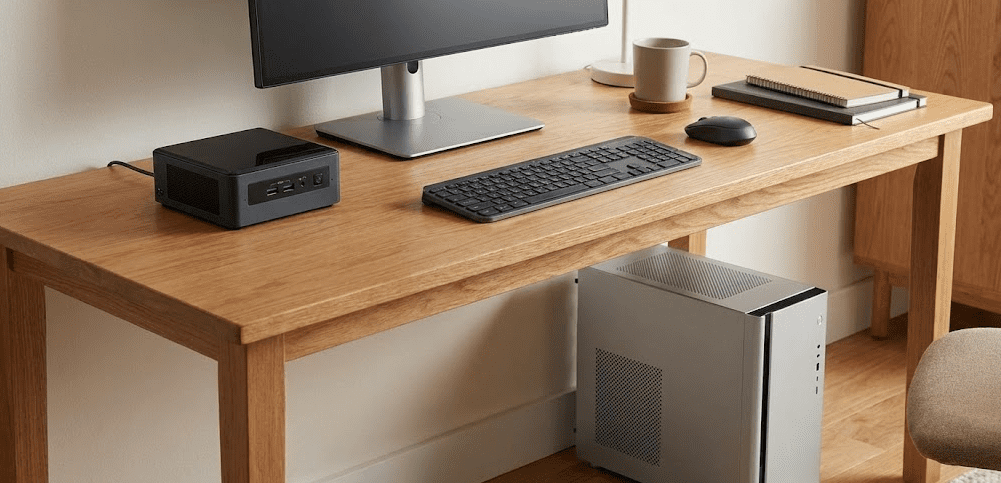
Home office and study
If your main tasks are documents, spreadsheets, video calls, and web:
- A NUC‑style box with a mid‑range mobile CPU and 16 GB RAM is ideal.
- It’s quiet, efficient, and can drive two monitors easily.
Only consider a bigger mini PC if you’re also gaming on the same machine or doing serious creative work.
Living room media center (HTPC)
For streaming, local media, and light emulation:
- NUC‑class systems are excellent: they’re tiny, low power, and easy to hide.
- Integrated graphics are usually enough for 4K video playback and common streaming apps.
A larger mini PC is only necessary if you want a combined media and gaming machine with a beefier GPU.
Content creation and development
Video editors, 3D artists, and developers who compile big codebases benefit from:
- Higher‑power CPUs (desktop‑class or high‑wattage mobile chips).
- Better cooling for sustained performance.
- More internal storage options for large projects.
That usually points to larger mini PCs or compact workstations, not the smallest NUCs. While testing, I’ve consistently seen chunkier mini PCs maintain higher clocks for longer in export and compile tasks, which lines up with what many pro‑focused guides highlight when they recommend “creator” or “workstation” mini PCs.
Gaming and hybrid setups
For casual or older games at modest settings:
- Some NUC‑style systems with newer integrated graphics can be fine at 1080p.
For modern AAA games and high refresh‑rate monitors:
- Look for mini PCs with discrete GPUs or consider a small but full‑featured gaming desktop.
NUC‑style gaming units do exist, but they have stricter thermal and power limits than larger systems. If you want something tiny but gaming‑capable, it’s worth checking recent tests in video roundups like the mini PC gaming and editing picks on YouTube to see actual frame rates and thermals before you decide.
FAQ: NUC vs Mini PC
Is a NUC the same as a mini PC?
No, a NUC is one type of mini PC, but not all mini PCs are NUCs. NUCs follow a specific ultra‑compact small‑form‑factor approach, while the mini PC category includes many other designs with different sizes and capabilities.
Which is better for everyday home and office use: NUC or mini PC?
For typical home and office work, a NUC‑style system is usually the better choice because it’s small, quiet, and powerful enough for documents, web, and streaming. However, if you want more ports, extra internal storage, or plan to push heavier workloads, a slightly larger mini PC might be more comfortable.
Which is better for gaming: NUC or mini PC?
A larger mini PC with a dedicated GPU is generally better for gaming, because it can handle more power and cooling. Some NUC‑style systems with strong integrated graphics or laptop‑grade GPUs can manage light or older games, but serious gamers are usually better served by a more capable mini PC or a compact gaming desktop.
Are NUCs and mini PCs upgradable?
Most NUCs and many mini PCs allow upgrades to RAM and storage, but they do not let you change the CPU and GPU easily. Larger mini PCs may offer more flexibility, such as extra drive bays or, in some designs, the ability to swap a desktop GPU. If long‑term upgradability is important, look for a larger, more modular mini PC.
Are NUCs more reliable than generic mini PCs?
NUC‑style systems, especially from established brands like ASUS, are usually well‑designed and tested for reliability, which is part of why they sometimes cost more. Generic mini PCs can also be reliable, but quality varies more by brand and model. In my opinion, it’s worth checking reviews and support policies, especially if this PC will be running mission‑critical tasks.
Do NUCs or mini PCs use less power than full‑size desktops?
Yes, both NUCs and mini PCs typically use significantly less power than traditional full‑tower desktops, especially models built around mobile‑class CPUs. NUC‑style systems are often the most efficient, which makes them attractive for always‑on tasks like home servers or media centers.
Can I use a NUC or mini PC with multiple monitors?
Yes, many NUC and mini PC models support two or more monitors, usually via HDMI, DisplayPort, or USB‑C. If you need three or four displays, you’ll have more choices among larger mini PCs and dedicated business or creator‑oriented models.
Is a NUC or mini PC better for a small apartment or dorm?
If your main concern is saving space and keeping things neat, a NUC‑style system is often the best choice. It’s easy to mount behind a monitor or tuck away in a small corner. But if your desk can accommodate something slightly larger, a mid‑sized mini PC can give you more performance and expandability without taking over the room.
Final Thoughts
Whether you go with a NUC‑style system or a more versatile mini PC, both categories deliver impressive power in impressively small packages. The real decision comes down to your space constraints, performance needs, and how much tinkering you plan to do down the road. In my years of hands‑on testing, I’ve seen these compact machines transform cramped home offices, living room setups, and even mobile workstations—but only when they match the user’s actual workflow.
Take a moment to map out your priorities using the step‑by‑step guide above, cross‑reference a few recent reviews, and you’ll land on the perfect fit. Your future self (and your desk space) will thank you.



