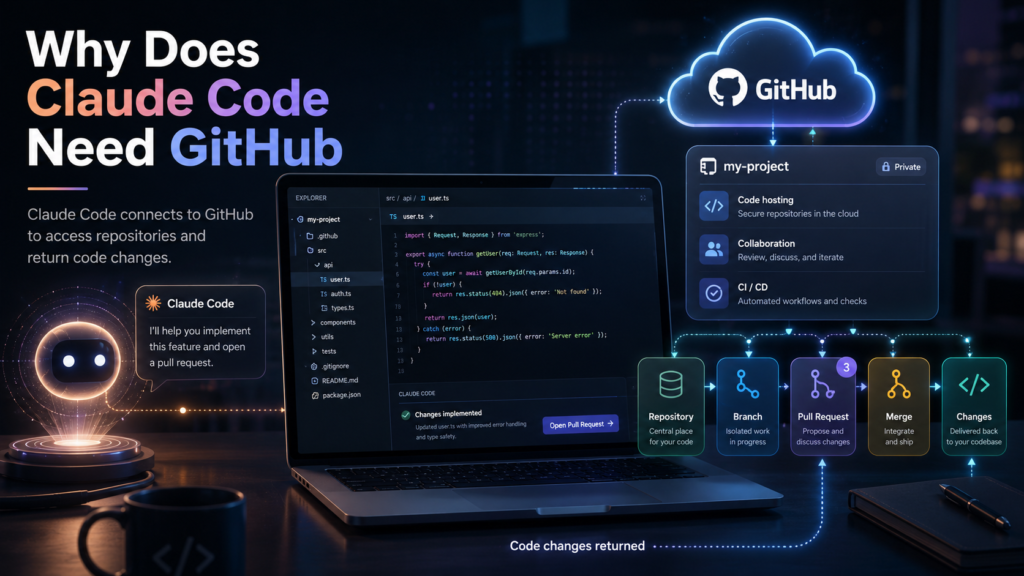
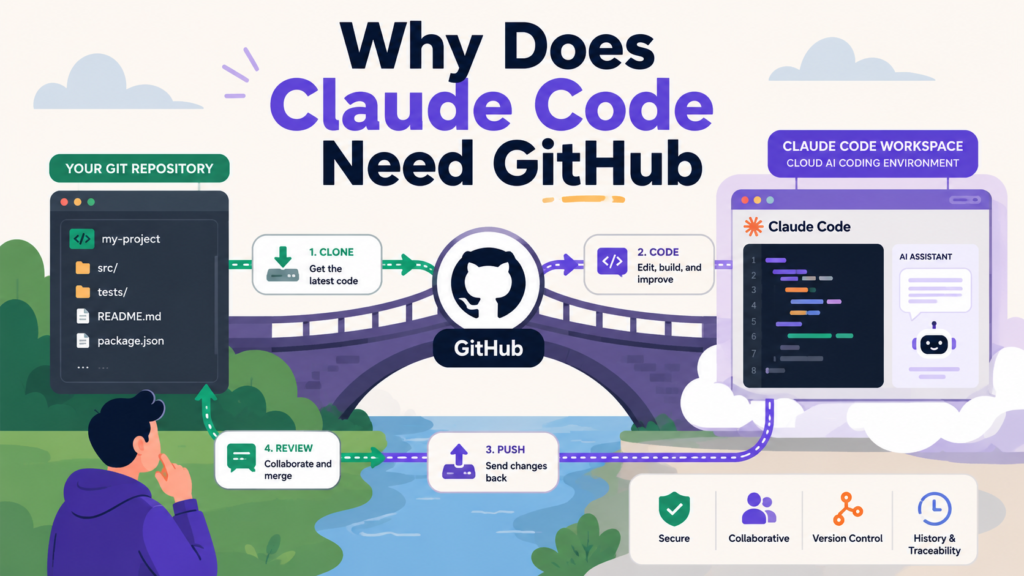
Claude Code needs GitHub primarily to clone your repository into a secure cloud environment, make changes in an isolated virtual machine, and push those changes back to a branch for you to review as a pull request. That said, the relationship between Claude Code and GitHub goes much deeper than just file storage, and understanding it fully will help you get the most out of one of the most powerful AI coding tools available right now.
Whether you are a solo developer trying out Claude Code for the first time or an engineering team looking to automate your workflow, this guide breaks down exactly why GitHub is part of the picture, what you can and cannot do without it, and how to make the most of the integration in 2026.
What Is Claude Code, and Why Does It Matter?
Claude Code is Anthropic’s terminal-native, agentic coding assistant. Unlike traditional AI coding tools that sit inside your IDE and offer autocomplete suggestions, Claude Code operates at a much higher level of autonomy. It can read your entire codebase, write and run code, execute shell commands, manage files, and interact with external services, all through natural language instructions.
As of 2026, SemiAnalysis projects that Claude Code will be responsible for over 20% of all daily commits by the end of the year, which gives you a sense of just how fast adoption is growing. This is not a niche developer toy anymore. It is becoming a core part of real engineering workflows.
Claude Code works in two main modes: locally in your terminal via the CLI, and remotely via the web interface at claude.ai/code. The GitHub requirement differs depending on which mode you are using, and that distinction is important to understand.
The Short Answer: Why Claude Code Needs GitHub
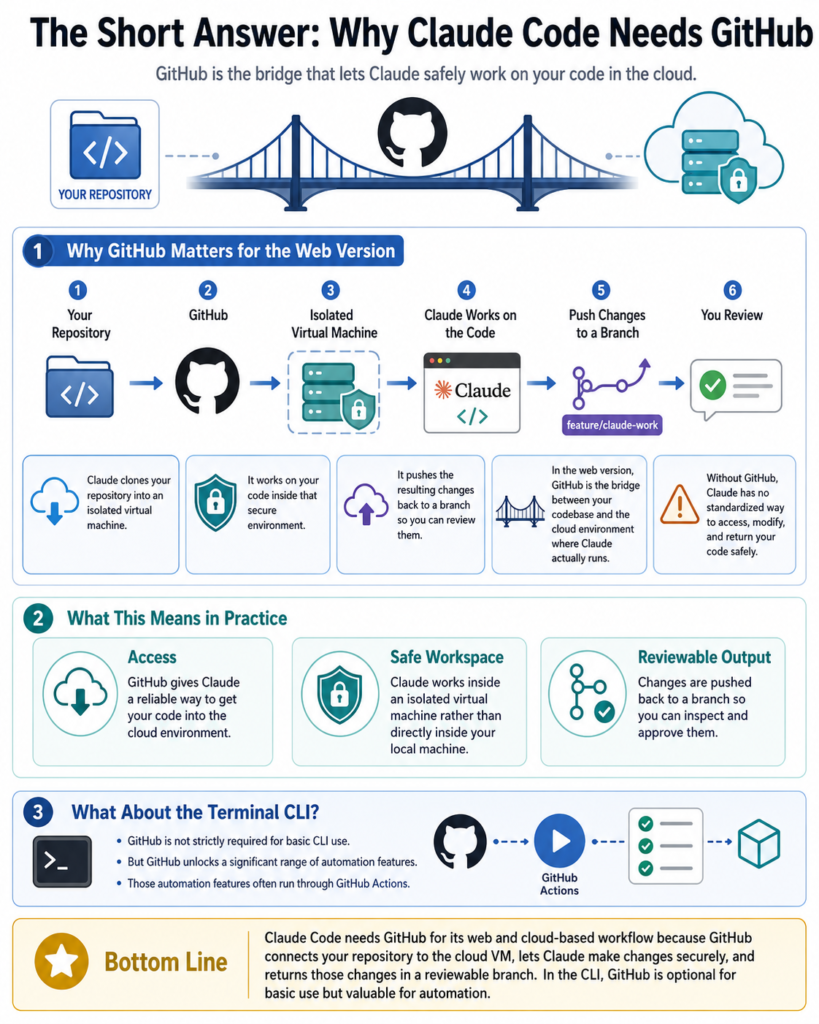
Claude Code needs GitHub for its web and cloud-based features because it has to clone your repository into an isolated virtual machine, work on your code in that secure environment, and then push the resulting changes back to a branch so you can review them.
In the web version, GitHub is the bridge between your codebase and the cloud environment where Claude actually runs. Without it, Claude has no standardized way to access, modify, and return your code safely. For the terminal-based CLI version, GitHub is not strictly required for basic use, but it unlocks a significant range of automation features through GitHub Actions.
How Claude Code Uses GitHub: A Step-by-Step Breakdown
Here is exactly what happens when you use Claude Code on the web with a GitHub repository:
-
You connect your GitHub account and select a repository from the Claude Code web interface at claude.ai/code
-
Claude clones the repository into an Anthropic-managed virtual machine, completely isolated from other sessions
-
The environment is configured with your code, dependencies, and any project context from your CLAUDE.md file
-
Claude executes the task, which might involve reading files, writing new code, running tests, fixing bugs, or refactoring
-
Changes are pushed to a new branch in your GitHub repository
-
You receive a notification and can review the changes, then create a pull request if everything looks good
This workflow is clean, safe, and reproducible. Every task runs in its own sandboxed environment, which means there is no risk of Claude Code accidentally modifying your local machine or overwriting something critical.
Can You Use Claude Code Without GitHub?
Yes, and this is something a lot of people do not realize. The GitHub requirement applies primarily to the web interface. Here is how each scenario breaks down:
Terminal CLI (Local Use): You can run Claude Code directly in your terminal from any project directory without connecting GitHub at all. Claude will read and modify your local files, run commands, and interact with your codebase just fine. GitHub is optional here.
Web Interface (Cloud Use): This is where GitHub becomes necessary in most cases. The web version needs a repository to clone. However, Anthropic did build a fallback: if you run claude --remote from a local repository that is not connected to GitHub, Claude Code will bundle your local repository, including its full history and uncommitted changes, and upload it directly to the cloud session. This fallback activates automatically.
GitHub Actions (Automation): If you want to trigger Claude Code from pull requests, issues, CI failures, or custom events, GitHub is required because the automation runs on GitHub’s infrastructure.
So the honest answer is: GitHub is required for the web version by default, optional for the CLI, and essential for the automation layer.
Pro Tip: If you want to use Claude Code on the web without a GitHub repository, use the
CCR_FORCE_BUNDLE=1environment variable to force Claude Code to bundle and upload your local repo even when GitHub access is available. This is great for private or offline projects you do not want hosted on GitHub.
Claude Code GitHub Actions: Where the Real Power Lives
One of the most exciting things about the Claude Code and GitHub integration is what it enables through GitHub Actions. This is where Claude Code stops being a coding assistant and starts becoming an autonomous team member.
According to the official Claude Code GitHub Actions documentation, you can trigger Claude Code to respond to a wide range of GitHub events automatically, including new pull requests, issue creation, CI failures, and custom conditions. All it takes is a simple @claude mention in a PR comment or issue, and Claude will jump in, analyze the situation, and take action.
In my experience working with agentic tools, this is the feature that tends to blow people away the first time they see it in action. You open a GitHub issue describing a bug, mention @claude, and within minutes there is a pull request ready for your review with the fix already implemented. That is not a demo trick. That is a real, production-ready workflow.
What Claude Code Can Do Inside GitHub Actions
-
Automatically review every pull request when it is opened or updated, posting specific, actionable feedback as inline comments
-
Triage new issues, identify duplicates, and suggest labels or assignments
-
Respond to CI failures by reading the error logs, diagnosing the problem, and pushing a fix
-
Generate pull requests directly from GitHub issues when tagged with
@claude -
Conduct security reviews on new code, flagging vulnerabilities like SQL injection or authentication bypasses
-
Write or update tests for newly added code automatically
Claude Code GitHub Integration: Feature Comparison
Here is a breakdown of what GitHub integration unlocks compared to using Claude Code without it:
Setting Up Claude Code with GitHub: Quick Setup Guide
Getting Claude Code connected to GitHub is straightforward. Here is the recommended approach:
Step 1: Open Claude Code in your terminal and run the /install-github-app command. This is the quickest method and walks you through the entire process automatically.
Step 2: Select your target repository or organization. You can give Claude Code access to all repositories or restrict it to specific ones.
Step 3: Add your authentication credentials to your repository secrets in GitHub. You will need either an ANTHROPIC_API_KEY for direct API authentication or a CLAUDE_CODE_OAUTH_TOKEN for OAuth-based authentication, available to Pro and Max plan users via claude setup-token.
Step 4: Copy the workflow YAML file from the official templates into your repository’s .github/workflows/ directory. Anthropic’s GitHub Action is now on a stable v1.0 release, so make sure your YAML file references uses: anthropics/claude-code-action@v1 rather than any older @beta tags that many outdated tutorials still point to. Using the @beta tag will route you to a deprecated version with a different configuration structure.
Step 5: Test the integration by opening a pull request or creating an issue and mentioning @claude in a comment.
Note that you must be a repository administrator to install the GitHub app and manage secrets. If you are working in an organization, you will also need permission to install GitHub Apps at the org level.
For a complete visual walkthrough, This step-by-step 2026 tutorial on YouTube covers the entire setup process from scratch and is a great resource if you prefer to follow along visually.
Why GitHub Specifically? Why Not GitLab or Bitbucket?
This is a fair question. Claude Code does support Git as a version control system broadly, meaning you can use Git commands locally with any hosting platform. However, the deep integration features like GitHub Actions triggers, automated PR creation, and the @claude mention system are all built specifically for GitHub.
That said, Claude Code can interact with GitLab and other platforms through the GitHub CLI or MCP (Model Context Protocol) servers, which allows it to manage issues, update project boards, and handle pull requests across different platforms. It is just not as seamlessly built-in as the native GitHub integration.
Anthropic has made it clear that GitHub is the primary integration target for 2026, and the recently announced general availability of Claude Code’s GitHub integration signals that this relationship is only going to deepen.
Claude Code in 2026: What’s New with GitHub
The GitHub integration has grown significantly since Claude Code’s early beta days. Here is what has changed and what is trending in 2026:
General Availability of GitHub Integration: Anthropic officially moved the GitHub Actions integration out of beta and into general availability. This came with a significantly simplified API structure, better templates, expanded trigger options, and the stable v1.0 action release.
Agent Teams Support in GitHub Actions
One of the most significant 2026 additions is official Agent Teams support. With the CLAUDE_CODE_EXPERIMENTAL_AGENT_TEAMS=1 environment variable enabled, a lead Claude instance can now coordinate multiple parallel Claude Code agents within a single GitHub Actions session. Rather than one agent working through a task sequentially, the team lead delegates work to multiple teammates that operate in parallel, share a task list, and communicate directly with each other. This means a single triggered workflow can assign code review, test writing, and security scanning to dedicated agents all running simultaneously, each with their own context window.
Code Review for Teams: Organizations on Team and Enterprise plans can now enable Claude Code’s code review feature organization-wide through the Organization settings panel, automatically applying it to selected repositories without per-repo configuration.
Automated CI Failure Resolution: One of the most practically useful new features is Claude Code’s ability to detect CI failures in GitHub Actions pipelines and automatically analyze the error logs, implement a fix, and push it to the branch. This alone has saved development teams hours of debugging time per week.
Common Questions About Claude Code and GitHub
Does Claude Code need GitHub to work at all?
No. Claude Code’s CLI works fully locally without any GitHub connection. GitHub is required for the web interface by default, but there is a bundle fallback for local repositories. GitHub is essential only if you want to use the automation and Actions features.
Is it safe to give Claude Code access to my GitHub repositories?
Claude Code runs on Anthropic-managed infrastructure in isolated virtual machines. Each session gets its own sandboxed environment, and Claude pushes changes to a new branch rather than directly to main, so you always have the opportunity to review before merging. You should still apply standard security practices, like limiting repository access to only what is needed and reviewing all pull requests before merging.
Can Claude Code push directly to the main branch?
By default, Claude Code pushes to a new branch and creates a pull request for your review. You are in control of what actually gets merged. Pushing directly to main is possible but not recommended and not the default behavior.
What GitHub plan do I need?
The basic GitHub integration works with free personal GitHub accounts. Organization-level features like the code review setup for teams require a Claude Team or Enterprise plan on the Anthropic side, plus appropriate admin permissions in your GitHub organization.
Does Claude Code work with GitHub Enterprise Server?
Yes. Anthropic has a specific setup guide for GitHub Enterprise Server (GHES) instances, which covers the additional configuration steps needed for self-hosted GitHub environments.
How does Claude Code handle private repositories?
Claude Code can access private repositories through OAuth authentication or API key authentication. The code is cloned into an isolated virtual machine and is not shared or used to train models. Always review Anthropic’s privacy policy and data handling documentation for the most current information before connecting sensitive repositories.
Can I use Claude Code with GitHub on mobile?
Yes. Because Claude Code on the web runs on cloud infrastructure and sessions persist across devices, you can start a task on your desktop and check the results from your phone. The GitHub integration makes this possible since the work happens in the cloud rather than on your local machine.
How do I enable Agent Teams in GitHub Actions?
Set the CLAUDE_CODE_EXPERIMENTAL_AGENT_TEAMS=1 environment variable either in your shell environment before launching Claude, or add it to your settings.json file under the env key for a persistent configuration. Agent Teams are disabled by default and must be explicitly enabled.
Claude Code vs GitHub Copilot: How GitHub Integration Differs
Since both tools involve GitHub, it is worth quickly addressing the comparison. BuildThisNow’s 2026 comparison puts it well: Claude Code interacts with GitHub through standard Git commands and agentic workflows, while GitHub Copilot is natively woven into the GitHub platform with deeper IDE integration, PR suggestions, and Copilot Workspace.
The tools serve different primary use cases. Many teams in 2026 are using both side by side, with Copilot handling moment-to-moment coding assistance and Claude Code taking on larger, more autonomous tasks like feature implementation, bug fixing, automated review, and Agent Teams coordination.
Bottom Line
Claude Code needs GitHub primarily because it is the infrastructure that makes cloud-based, autonomous coding sessions safe and reviewable. GitHub gives Claude Code a way to clone your code, work on it in isolation, and return the results cleanly through a branch and pull request workflow. For local CLI use, GitHub is optional. For the web interface and automation workflows, it is the engine that makes everything work. With stable v1.0 action support and official Agent Teams now available, if you are serious about using Claude Code in 2026, connecting it to GitHub is not just recommended — it is where most of the real power lives.