
OpenClaw Heartbeat is a built-in scheduling system that lets your AI agent wake up at regular intervals, check a task list, and take action proactively, without you having to send it a message first. It essentially turns a reactive chatbot into an always-on autonomous assistant.
But there’s a lot more to it than just a timer. Understanding how Heartbeat works under the hood can completely change how you set up and use OpenClaw, so let me walk you through the whole picture.
What Is OpenClaw?
Before diving into Heartbeat specifically, it helps to quickly understand what OpenClaw is. OpenClaw is a fast-growing AI agent harness that lets you deploy AI assistants that can work across messaging platforms like Telegram, WhatsApp, Slack, and even your terminal. Think of it as the infrastructure layer that lets you run, configure, and automate an AI agent the way you want, on your own schedule, connected to your own tools.
It supports multiple AI models, including Claude and other Anthropic models, and it has grown rapidly in early 2026 as one of the most flexible self-hosted agent frameworks available. What makes it stand out from simpler chatbot setups is its ability to run continuously and take initiative, and Heartbeat is the core feature that makes that possible.
What Is the OpenClaw Heartbeat Feature?
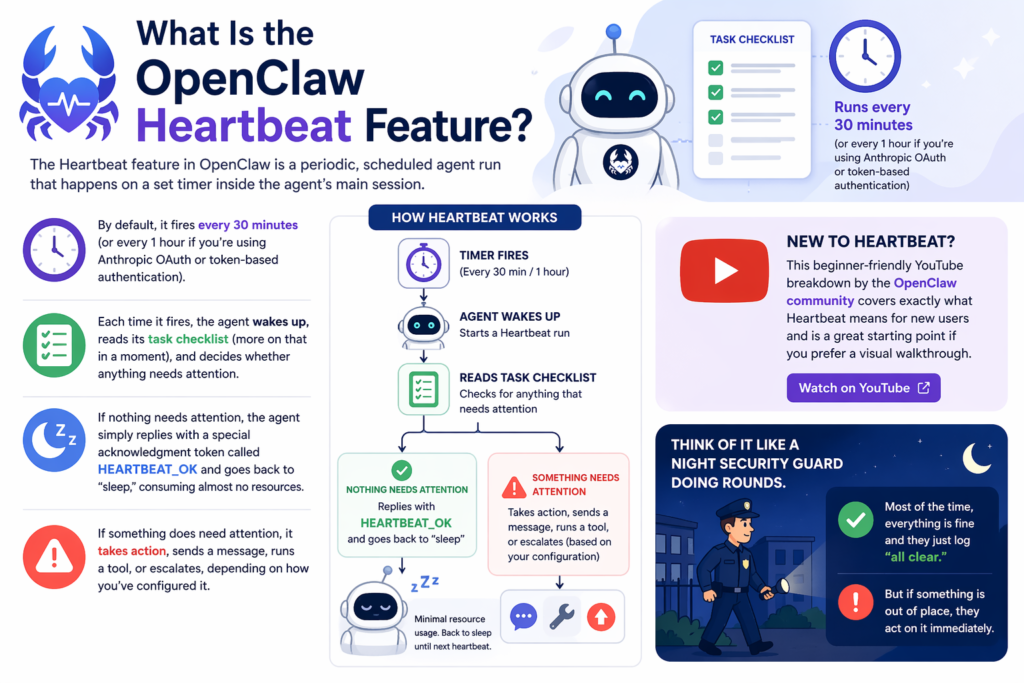
The Heartbeat feature in OpenClaw is a periodic, scheduled agent run that happens on a set timer inside the agent’s main session. By default, it fires every 30 minutes (or every 1 hour if you’re using Anthropic OAuth or token-based authentication). Each time it fires, the agent wakes up, reads its task checklist (more on that in a moment), and decides whether anything needs attention.
If nothing needs attention, the agent simply replies with a special acknowledgment token called HEARTBEAT_OK and goes back to “sleep,” consuming almost no resources. If something does need attention, it takes action, sends a message, runs a tool, or escalates, depending on how you’ve configured it.
This beginner-friendly YouTube breakdown by the OpenClaw community covers exactly what Heartbeat means for new users and is a great starting point if you prefer a visual walkthrough.
Think of it like a night security guard doing rounds. Most of the time, everything is fine and they just log “all clear.” But if something is out of place, they act on it immediately.
What Is HEARTBEAT.md?

At the center of the Heartbeat system is a simple file called HEARTBEAT.md. This is a Markdown file that lives in your agent’s workspace and acts as its “patrol checklist.” Every time a heartbeat fires, the agent reads this file to understand what to check, what to look for, and what to do if it finds something worth acting on.
You can think of HEARTBEAT.md as the instruction manual your agent follows while you’re not watching. If the file is empty or has nothing flagged, the agent replies HEARTBEAT_OK and does nothing further. If the file has active tasks, conditions to check, or prompts to respond to, the agent executes them.
A practical example: if you write “Check for new emails from priority contacts and send me a summary,” your agent will do exactly that every 30 minutes, even while you’re asleep. This is what makes OpenClaw genuinely autonomous rather than just reactive.
Pro Tip: Keep your HEARTBEAT.md file short and specific. A focused checklist of 3 to 5 items performs much better than a bloated instruction dump. The shorter the checklist, the lower the token cost per heartbeat run, which adds up significantly over time.
How Does the Heartbeat Response Contract Work?
OpenClaw has a defined response contract for every heartbeat run, and understanding it helps you configure things correctly.
Here is how it works: when a heartbeat fires, the agent must respond with one of two outcomes. Either it responds with HEARTBEAT_OK (meaning nothing needs attention), or it responds with an actual action or message. When OpenClaw sees HEARTBEAT_OK at the start or end of the reply, and the remaining content is under the configured character limit (default: 300 characters), the reply is silently dropped and nothing is sent to you. This is by design, so you are not spammed with “all clear” messages every 30 minutes.
This is an elegant system because it means you only hear from your agent when it actually has something to say.
Heartbeat vs. Cron: What’s the Difference?
A lot of people confuse Heartbeat with Cron, since both involve scheduling. But Adapt’s detailed breakdown of OpenClaw automation puts it clearly: Cron starts work, while Heartbeat keeps it going.
Cron is a time-based trigger that kicks off a brand new run at an exact scheduled moment. Heartbeat runs inside the agent’s existing session and is context-aware, meaning it can read recent conversation history and adapt its behavior accordingly. They serve different purposes and are often used together in a well-configured OpenClaw setup.
OpenClaw Heartbeat vs. Cron: Feature Comparison
In short: use Cron when you need something to happen at an exact time. Use Heartbeat when you want your agent to stay aware and proactive throughout the day.
Step-by-Step: How to Set Up OpenClaw Heartbeat
Getting started with Heartbeat is easier than most people expect. Here is a straightforward setup guide for beginners.
Step 1: Leave Heartbeat Enabled (It’s On by Default)
Heartbeat is enabled out of the box in OpenClaw. The default interval is 30 minutes for most setups, and 1 hour for Anthropic OAuth or token-based authentication. You do not need to do anything to turn it on.
Step 2: Create Your HEARTBEAT.md File
In your agent’s workspace directory, create a file called HEARTBEAT.md. This is your agent’s checklist. Write out simple, specific instructions for what your agent should check each time it wakes up. Keep it concise.
Step 3: Configure the Interval in config.json
Open your config.json file and set the heartbeat interval under agents.defaults.heartbeat. Make sure all property keys are wrapped in double quotes, as standard JSON requires it. Pasting unquoted keys will cause a JSON parse error and crash the OpenClaw gateway on startup. Here is the correct format:
"heartbeat": {

"every": "30m",

"target": "last",

"prompt": "Read HEARTBEAT.md. Follow it strictly. Reply HEARTBEAT_OK if nothing needs attention."

}
Step 4: Set Your Target Channel
Decide where heartbeat messages should go. The default is "target": "none", meaning any non-HEARTBEAT_OK responses go nowhere. Set it to "target": "last" to route responses to your most recent conversation, or specify a channel ID for Telegram, WhatsApp, Slack, etc.
Step 5: Enable Optional Advanced Features
Once basic setup is working, you can optionally enable:
-
Heartbeat reasoning delivery for transparency into the agent’s decision-making
-
Light context mode to reduce token costs by only loading HEARTBEAT.md instead of full workspace context
-
Isolated sessions to run each heartbeat in a fresh session without conversation history
-
Active hours restriction to prevent heartbeat runs during nighttime hours using your configured local timezone
Step 6: Test and Refine
Run your agent and monitor the first few heartbeat cycles. Check whether it is responding with HEARTBEAT_OK when appropriate, and taking action when your checklist conditions are met. Adjust your HEARTBEAT.md instructions based on what you observe.
Real-World Use Cases for OpenClaw Heartbeat

Understanding the theory is one thing, but seeing how people actually use Heartbeat in practice makes it much more tangible. Based on what the OpenClaw community has been doing in early 2026, here are some of the most popular applications.
Monitoring and Alerts
Many users configure Heartbeat to check for specific conditions, like new emails from important contacts, changes in a data source, or updates in a project management tool, and send an alert only when something relevant happens. This removes the need to constantly check things manually.
Human Check-ins
One of the more surprisingly useful setups involves configuring the agent to occasionally send a gentle “anything you need?” message during daytime hours, effectively making the AI feel more like a proactive assistant than a passive tool. OpenClaw even supports restricting this to active hours based on your local timezone, so it does not ping you at 3am.
Task Progress Tracking
If you have ongoing background tasks running, Heartbeat can periodically check their status and report back only when something changes or completes, rather than flooding you with constant updates.
System Health Checks
For developers and power users, Heartbeat is excellent for monitoring gateway health, API status, or service uptime on a regular cadence without building a separate monitoring pipeline.
OpenClaw Heartbeat in 2026: What’s New
The Heartbeat system has matured significantly since OpenClaw launched. As of early 2026, The official OpenClaw documentation reflects several refinements including improved session isolation options, better support for multi-account channel routing, and expanded model compatibility beyond just Anthropic’s Claude lineup.
The broader trend in 2026 is a clear shift toward truly agentic AI, where AI tools are expected to take initiative and operate continuously rather than waiting for user prompts. OpenClaw’s Heartbeat feature puts it at the front of this movement, offering a lightweight but powerful mechanism for autonomy that does not require a full agentic framework rebuild. More platforms are starting to adopt similar patterns, but OpenClaw’s implementation remains one of the most configurable and developer-friendly available today.
Common Heartbeat Configurations at a Glance
Frequently Asked Questions
What is OpenClaw Heartbeat in simple terms?
OpenClaw Heartbeat is a scheduling system that wakes your AI agent up at regular intervals to check a task list and take action if needed, without any input from you. It makes the agent proactive rather than purely reactive.
How often does OpenClaw Heartbeat run?
By default, Heartbeat runs every 30 minutes. If you are using Anthropic OAuth or token-based authentication, the default increases to every 60 minutes. You can customize this interval in your config.json file.
Does Heartbeat cost tokens every time it runs?
It depends on your setup. If the agent replies with HEARTBEAT_OK and there is nothing to act on, the cost is minimal. If the agent reads a long HEARTBEAT.md or has full conversation history enabled, the token cost increases. Using "lightContext": true is the best way to keep token usage low.
What happens if I don’t have a HEARTBEAT.md file?
If no HEARTBEAT.md file exists, the agent will run the heartbeat but typically just respond with HEARTBEAT_OK since there are no instructions to follow. It is strongly recommended to create the file with clear, concise instructions.
What is the difference between Heartbeat and Cron in OpenClaw?
Cron triggers a new run at an exact scheduled time, like a traditional job scheduler. Heartbeat runs inside the agent’s existing session and is context-aware, meaning it understands what has been happening in the conversation. They serve different purposes and can be used together.
Can I route Heartbeat messages to WhatsApp or Telegram?
Yes. You can set the "target" field in your heartbeat configuration to a specific channel ID, including WhatsApp, Telegram, Slack, or any other supported messaging platform.
What does HEARTBEAT_OK mean?
HEARTBEAT_OK is a special response token the agent sends when nothing requires attention during a heartbeat run. OpenClaw treats it as a silent acknowledgment and drops the reply if the remaining content is under the configured character limit (default: 300 characters).
Is Heartbeat enabled by default?
Yes, Heartbeat is enabled by default in OpenClaw. You do not need to manually activate it, though you can disable it by setting the interval to 0.
Bottom Line
OpenClaw Heartbeat is the feature that separates a basic AI chatbot from a genuinely autonomous agent. By running periodic check-ins, reading a simple instruction file, and only acting when something actually needs attention, it gives your agent continuous awareness without spamming you or draining resources. For anyone serious about getting real utility from OpenClaw, setting up a well-crafted HEARTBEAT.md is one of the highest-leverage things you can do.



