
OpenClaw memory works by writing plain Markdown files to your local filesystem. The agent only retains what gets saved to disk, using a two-tier system of daily logs and long-term memory files, backed by a hybrid vector and keyword search index for retrieval. But there is a lot more happening under the hood, and understanding the full system will completely change how you build and use agents.
What Makes OpenClaw Memory Different
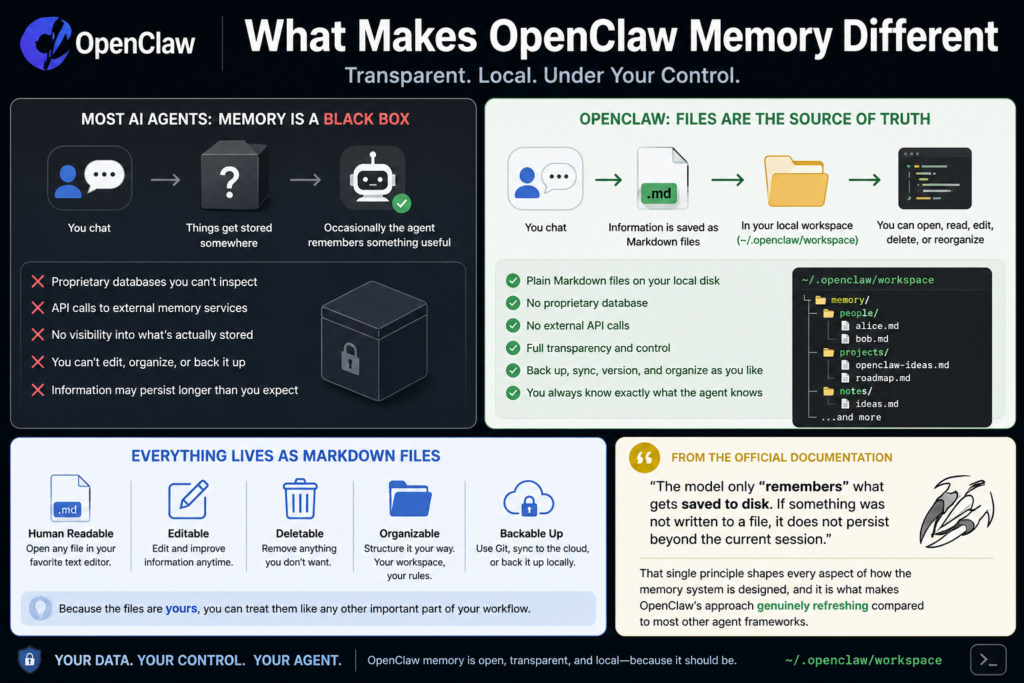
Most AI agents treat memory like a black box. You chat, things get stored somewhere, and occasionally the agent remembers something useful. OpenClaw takes a fundamentally different approach: files are the source of truth.
Every piece of information the agent retains lives as a plain Markdown file on your local disk, inside the agent’s workspace (default location: ~/.openclaw/workspace). You can open any of these files with a regular text editor, read them, edit them, delete them, or reorganize them however you like. There is no proprietary database, no API calls to an external memory service, and no mystery about what your agent actually knows.
According to the Official OpenClaw documentation, the model only “remembers” what gets saved to disk. If something was not written to a file, it does not persist beyond the current session. That single principle shapes every aspect of how the memory system is designed, and it is what makes OpenClaw’s approach genuinely refreshing compared to most other agent frameworks.
The Four Memory Layers Explained
OpenClaw’s memory architecture separates into four distinct layers, each serving a specific purpose. Understanding these layers is what separates users who get great long-term results from those whose agents feel confused and forgetful after extended sessions.
Bootstrap Files
These are the files that load automatically at the start of every session. They include MEMORY.md, USER.md, and SOUL.md. Think of these as the agent’s starting state before any conversation happens. The agent enters the session already knowing your preferences, its own personality rules, and all the long-term facts you have accumulated.
The Session Transcript
Every conversation is saved as a file on disk. When a new session starts, OpenClaw automatically saves the previous conversation to a timestamped file with a descriptive slug that the language model generates based on the session content. These session transcripts are indexed and fully searchable, so the agent can recall past conversations even from weeks or months ago.
The Context Window
This is the live, in-memory space where everything competes for attention. System prompt, workspace files, conversation history, tool calls, and tool results are all packed into a 200,000-token bucket. When it fills up, compaction fires, and this is where most “forgetting” happens. The pre-compaction flush system (covered in detail later) was built specifically to address this problem.
The Retrieval Index
A searchable layer using vector plus keyword search that sits beside your memory files. The agent can query it to pull relevant context from past sessions, even content that is not currently loaded in the active context window. This is what gives OpenClaw its ability to recall specific details from conversations that happened long ago.
This YouTube breakdown of OpenClaw’s four memory layers is one of the clearest walkthroughs available if you prefer a visual walkthrough of the architecture before diving deeper.
The Core Memory Files
MEMORY.md: Long-Term Memory
This is the most important file in the system. MEMORY.md holds durable facts, preferences, and decisions that should survive indefinitely. It loads at the start of every private DM session, which means anything written here is always in context when a session opens.
One important security detail worth knowing: MEMORY.md is only loaded in private sessions. It never loads in group contexts. This protects sensitive preferences and personal user data from leaking into shared environments.
The agent is expected to write to MEMORY.md deliberately, distilling what matters from conversation into structured, reusable notes rather than dumping everything in.
memory/YYYY-MM-DD.md: Daily Notes
Daily logs are append-only files that capture day-to-day activity, decisions, and running context. Today’s and yesterday’s notes are loaded automatically at the start of each session, giving the agent short-term continuity without bloating the context window with older history.
Over time, OpenClaw may notice behavioral patterns and promote them from daily notes into longer-term memory. If you consistently prefer Bash snippets over long theoretical explanations, for example, that pattern eventually gets distilled into MEMORY.md. This is not any kind of machine learning magic. It is simply accumulation plus curation, and in practice it makes the agent feel noticeably more personalized after a few weeks of use.
USER.md and SOUL.md
USER.md captures your preferences and working style, while SOUL.md stores the agent’s personality and behavior rules. These are more static than daily notes but are equally human-readable and fully editable. In my experience, spending a few minutes writing good content into SOUL.md upfront pays off significantly in terms of consistent agent behavior across sessions.
DREAMS.md: The Dream Diary
This optional file is used by the dreaming sweep system. The dreaming architecture has two review lanes:
-
Live dreaming works from the short-term dreaming store under
memory/.dreams/and is what the normal deep phase uses when deciding what can graduate intoMEMORY.md -
Grounded backfill reads historical daily notes as standalone day files and writes structured review output into
DREAMS.md
Grounded backfill is particularly useful when you want to replay older notes and inspect what the system considers durable memory, without manually editing MEMORY.md yourself.
How the Search and Retrieval System Works
Writing files to disk is only half the picture. For an agent to actually use that memory, it needs to find the right information quickly and accurately. OpenClaw handles this with a hybrid search architecture that combines two distinct retrieval methods running in parallel.
BM25 Keyword Search and Vector Search
The retrieval index uses SQLite as its database layer, storing text content, line ranges, and serialized embeddings for each indexed chunk. When a query comes in, the search layer runs two passes simultaneously and then merges the results.
Vector search uses embedding similarity to find semantically relevant content, even when the query wording differs significantly from how the memory was originally written. Based on a deep technical analysis of the OpenClaw memory architecture, vector search accounts for 70% of the final ranking weight, with BM25 keyword matching contributing the remaining 30%. This weighting means the system prioritizes meaning over exact word matching, which produces noticeably better retrieval results in real usage.
Embedding Providers
OpenClaw supports multiple embedding providers and auto-selects between them based on your configuration:
-
Local embeddings for cost-free, completely private use with no API calls
-
OpenAI’s embedding API for high-quality cloud-based embeddings
-
Google Gemini as an alternative cloud provider
This flexibility is one of the system’s stronger design choices. You can run the full memory system, including vector search and indexing, entirely offline without any internet dependency.
SHA-256 Hash Caching
To avoid redundant API calls and keep costs down, OpenClaw uses SHA-256 hash-based caching at the chunk level. If a piece of text has not changed since it was last indexed, the system skips re-embedding it entirely. This delta-based incremental sync approach scales well to large memory stores without driving up your embedding API costs.
Whenever a Markdown file changes, the file watcher detects the modification and re-indexes the changed content automatically, so the search index always stays current with your memory files.
The Auto-Compaction Problem (And How Memory Flush Solves It)
This is where most users run into problems, and it is the most technically important part of the OpenClaw memory system to genuinely understand before you start relying on the agent for serious work.
What Is Auto-Compaction?
When a session runs long enough that the context window approaches its limit, OpenClaw triggers a silent internal turn. The model is prompted to write anything important to disk before the context compacts. After compaction, the conversation history is summarized and the full message list is cleared to free up context space for the continuation of the session.
The trigger logic for this compaction follows this formula:
currentTokens >= contextWindow - reserveTokensFloor - softThresholdTokens
For a standard 200K context window, compaction fires when:
200,000 - 20,000 - 4,000 = 176,000 tokens
The Pre-Compaction Memory Flush
OpenClaw includes a built-in pre-compaction memory flush. To enable it, make sure your config.json file contains the following properly formatted JSON:
"memoryFlush": {

"enabled": true

}
This should be on by default in recent versions, but it is worth opening your config file and verifying it directly. When the token count crosses the soft threshold, OpenClaw injects a silent agentic turn that instructs the model to save important context to memory files before compaction proceeds. The user never sees this turn in the conversation.
The flush behavior follows a few specific rules:
-
It fires a
NO_REPLYresponse if there is nothing worth saving, keeping the experience clean -
Only one flush fires per compaction cycle to prevent repeated writes
-
It is skipped entirely in read-only sandbox mode where file write access is disabled
-
It gives the agent one final chance to extract insights before the context window resets
Without this flush, any important context that exists only in conversation history and has not yet been written to a file will be permanently lost during compaction. Enabling this feature is, in my experience testing long-running agent sessions, the single most impactful configuration change you can make to improve long-term memory reliability.
OpenClaw Memory File Structure
OpenClaw vs Traditional AI Memory Systems
Step-By-Step: How a Memory Gets Created and Retrieved

Step 1: Something worth remembering happens in conversation
The user shares a preference, makes a technical decision, or establishes an important fact during a session with the agent.
Step 2: The agent writes to a memory file
The agent writes the information to either memory/YYYY-MM-DD.md for short-term context, or directly to MEMORY.md for long-term storage. This file write is the only way information persists beyond the current session.
Step 3: The file watcher detects the change
OpenClaw’s built-in file watcher detects that a Markdown file has been modified and flags it for re-indexing.
Step 4: The index updates incrementally
The system computes embeddings only for new or changed chunks, using SHA-256 hashes to skip anything that has not changed. The SQLite database stores the updated text content, line ranges, and embeddings for the affected chunks.
Step 5: The user asks something relevant in a future session
In a new session days or weeks later, the user asks a question that relates to something stored in memory.
Step 6: Hybrid search runs in parallel
The agent queries the retrieval index. BM25 keyword search and vector search run simultaneously. Results are merged using the 70/30 weighting toward vector similarity.
Step 7: Relevant memory surfaces in context
The most relevant memory snippets are returned and injected into the agent’s active context, allowing it to give a personalized, context-aware response as if it has known you for months.
Pro Tip: The most common mistake new OpenClaw users make is assuming the agent will automatically remember something just because they mentioned it in conversation. If it was not explicitly written to a memory file, it will not survive compaction or a session restart. For anything truly critical such as project preferences, coding standards, recurring instructions, or important decisions, write it directly into
MEMORY.mdyourself rather than hoping the agent picks it up on its own. You can edit the file in any text editor, and it will be loaded into context at the very start of your next session.
The Plugin Slot Architecture
OpenClaw’s memory system is designed for extensibility. The plugin slot architecture is the intended extension point for adding persistent memory capabilities without having to fork or patch OpenClaw’s core internals.
This is how third-party memory systems like Mem0 and Cognee integrate with OpenClaw. The Mem0 technical guide to OpenClaw memory integration explains how these integrations change the system’s behavior across three key dimensions:
Accuracy over time: The default OpenClaw system appends facts to files. If a user switches from Python to TypeScript as their primary language, both facts end up stored side by side. A managed extraction pipeline like Mem0 replaces the old fact with the new one, so the memory store reflects what is currently true rather than a historical log of everything ever said.
Cross-session identity: Plugin-based memory can scope memories to specific user identities, enabling multi-user agent deployments where each person gets a fully separate, personalized memory store.
Structured extraction: Instead of relying entirely on the agent to decide what is worth writing, extraction pipelines can automatically parse conversations and write structured, queryable facts to the memory layer without any manual intervention.
The plugin system is what makes OpenClaw genuinely production-ready for teams and platforms, not just individual power users.
How Pattern-Based Memory Promotion Works
Beyond explicit memory writes, OpenClaw has a softer form of memory building that happens gradually over time. The system can observe patterns in your behavior across daily notes and promote consistent preferences into longer-term memory.
The mechanics are straightforward. If you keep rejecting long explanations and always ask for concise examples, the daily notes accumulate enough of these interactions that the dreaming system identifies it as a stable preference. That preference then gets distilled into MEMORY.md, and from that point forward it shapes every response without you having to re-state it.
This is not a learning algorithm in any deep technical sense. It is pattern detection through accumulation and curation. But in practice, it produces an agent that feels meaningfully more personalized after several weeks of consistent use, which is one of OpenClaw’s most compelling real-world advantages.
2026 Trends: Where OpenClaw Memory Is Heading
The file-first, local-first philosophy behind OpenClaw is increasingly becoming the preferred approach for serious agent developers in 2026, and several clear trends are shaping where the ecosystem is going.
Open-sourcing of the memory layer. The extraction of OpenClaw’s memory system into a standalone open-source library (memsearch, released by Zilliz, the company behind Milvus) signals growing demand for portable, transparent memory layers that are not locked to a single platform or provider. Developers want memory they can inspect, audit, and migrate.
Managed fact updating pipelines. The integration ecosystem around OpenClaw is maturing fast. The shift is moving from simple “store everything” approaches toward systems that actively maintain what is currently true, handling fact contradiction and updating rather than just appending new information indefinitely.
Local embedding as a first-class feature. With API costs and data privacy concerns growing across enterprise and consumer contexts, the ability to run a fully functional semantic memory system entirely on-device is becoming a real competitive differentiator. OpenClaw’s local embedding support positions it well for use cases where sending data to cloud APIs is either too expensive or not acceptable.
Knowledge graph integration. Tools like Cognee are experimenting with adding knowledge-graph recall on top of OpenClaw’s existing memory system, enabling structured relationship queries that go beyond what flat Markdown files and vector search alone can support. This is still early, but it points to where richer agent memory is heading.
FAQs: OpenClaw Memory
What is OpenClaw memory?
OpenClaw memory is a file-based persistence system that stores agent knowledge as plain Markdown files on your local filesystem. The agent only retains what gets written to disk, and those files are fully human-readable, editable, and version-controllable.
Where does OpenClaw store memory files?
Memory files are stored in the agent workspace directory, which defaults to ~/.openclaw/workspace. You can configure a different location if needed.
Does OpenClaw memory require an internet connection?
No. OpenClaw supports local embedding providers, which means the full memory system including vector search and indexing can run completely offline without any external API calls.
Why does my agent seem to forget things after long sessions?
This is almost always caused by context window compaction. When the session approaches 176,000 tokens in a 200K context window, conversation history gets compacted. Make sure your config.json has memoryFlush set to enabled: true. Content that was never written to a file is still lost even with the flush enabled, so writing important things to MEMORY.md proactively remains the most reliable approach.
Can I edit OpenClaw memory files manually?
Yes, and that is a core design feature. You can open any memory file in any text editor, make changes, and those changes are automatically detected and re-indexed on the next session start.
Is MEMORY.md loaded in group chats?
No. MEMORY.md is only loaded in private sessions to protect sensitive user data from being exposed in shared group contexts.
What is the DREAMS.md file used for?
DREAMS.md is an optional file used by the dreaming sweep system. It stores structured summaries from the dreaming process and grounded historical backfill entries for human review. It lets you inspect what the system considers durable memory without directly editing MEMORY.md.
How does OpenClaw decide what goes into MEMORY.md versus daily notes?
Short-term, session-specific context goes to daily notes. Durable facts and preferences that should persist long-term go to MEMORY.md. The agent makes this judgment call during normal operation, but you can also write to either file directly at any time.
What search method does OpenClaw use for memory retrieval?
A hybrid of BM25 keyword search and vector similarity search, run in parallel and merged at a 70/30 weighting in favor of vector search.
Can I use my own embedding model with OpenClaw?
Yes. OpenClaw supports local embedding models, OpenAI, and Google Gemini. The system auto-selects based on your configuration, and local models work entirely without internet access.
What happens if I delete a memory file?
The information is gone from the agent’s knowledge. The file watcher will detect the deletion and remove the corresponding entries from the search index on the next sync.
Does OpenClaw support multi-user memory?
The default system is single-user. Multi-user memory with separate scoped stores per user requires a plugin integration such as Mem0, which supports user-scoped memory management through the plugin slot architecture.
Bottom Line
OpenClaw’s memory system is one of the most transparent and developer-friendly approaches to AI agent persistence available today. The plain Markdown architecture means you always know exactly what your agent knows, and the hybrid search layer makes retrieval both fast and semantically accurate. The main thing to understand and fully internalize is this: if it is not written to a file, it does not persist. Once that concept clicks, the entire system becomes intuitive to work with, and the results over long-term agent use are genuinely impressive.



