I know how much a keyboard shapes my day whether I’m writing, gaming, or juggling emails. In this guide I walk you through the best wireless keyboards of 2026 so you can find the right balance of comfort, connectivity, and value without wading through specs alone. I focus on real benefits you’ll notice: longer battery life, reliable wireless links, and the typing feel that keeps you productive and comfortable.
Top Picks
|
Category |
Product |
Score |
|---|---|---|
|
💰 Best Value Combo |
82/100 |
|
|
🔋 Best Battery Life |
80/100 |
|
|
🎨 Most Stylish |
76/100 |
|
|
🏆 Best Premium |
92/100 |
|
|
🎮 Best For Customization |
90/100 |
|
|
🔰 Best Sleek Slim |
81/100 |
|
|
📱 Best For Mobile Devices |
78/100 |
|
|
🎧 Best Sound |
89/100 |
|
|
🧭 Best Compact |
88/100 |
|
|
✨ Best Aesthetic Mechanical |
95/100 |
Selection Criteria
When I compared keyboards I prioritized a few practical things that matter day to day: connection reliability (Bluetooth, 2.4 GHz dongle, or multi-mode), battery life, and the typing experience including key travel and noise. Build quality, extra features like backlighting or programmable keys, and platform compatibility were next, because a beautiful keyboard that doesn’t work with your setup or dies quickly won’t help you.
Finally I weighed price against what you actually get so the picks include sensible options for tight budgets and premium setups.
💰 Best Value Combo
I reach for the MK345 when I need a no-nonsense wireless setup that just works. It pairs through a tiny 2.4 GHz USB receiver, gives me a full-size keyboard with a palm rest and a comfortable right-handed mouse, and keeps noise low so I can focus.
It’s great for day-to-day typing, spreadsheets, and laptop desks where a reliable plug-and-play solution matters. If you want a simple, dependable combo that won’t demand extra drivers or fuss, this is the sort of device I’d recommend.
What People Say
I see common themes when people talk about the MK345: setup is straightforward and the wireless connection stays stable, even in busy rooms. Many users point out the comfort of the palm rest and the quiet key action, and they appreciate that it’s a straightforward, durable combo that doesn’t require extra software.
Overall Sentiment: Positive

Long-Term Value
Because it runs on standard replaceable batteries and includes on/off switches, the MK345 is inexpensive to maintain and simple to keep working for years. Parts are widely available and the one-year limited warranty gives added peace of mind.
Situational Benefits
|
Situation |
How It Helps |
|---|---|
|
Home Office |
Quiet keys and a palm rest reduce fatigue and distractions during long work sessions. |
|
Shared Workspace |
The plug-and-forget USB receiver avoids pairing conflicts and makes it easy to move between PCs. |
|
Basic Laptop Setup |
Adds a comfortable full-size layout and numeric keypad to a laptop for faster data entry and multitasking. |
|
Low-Maintenance Users |
Uses common batteries and simple on/off switches so upkeep is quick and predictable. |
Ease Of Use
|
Feature |
Ease Level |
|---|---|
|
Setup |
Easy |
|
Pairing |
Easy |
|
Battery Replacement |
Easy |
|
Daily Maintenance |
Easy |
Looks
The look is understated and office-friendly: matte black, low-profile keys and a subtle palm rest. It blends into most desks without drawing attention.
Innovation
This isn’t about flashy features; the MK345 focuses on reliable 2.4 GHz connectivity and battery-saving controls rather than cutting-edge extras.
Practicality
It’s a practical combo that covers common needs—full keyboard, mouse, simple wireless dongle, and broad OS support for everyday computing.
Comfort
I find the integrated palm rest and full-size layout comfortable for extended typing, and the quiet key action helps when I’m sharing space with others.
Key Benefits
- Reliable 2.4 GHz wireless connection with a tiny plug-and-forget USB receiver
- Full-size layout with integrated palm rest for longer typing sessions
- Quiet keys and mouse for shared or focused workspaces
- On/off switches to extend battery life and included batteries to get started
🔋 Best Battery Life
I keep the MK270 around for setups where I want fuss-free reliability and long runtimes. It uses a tiny USB receiver so pairing is quick, the compact mouse is easy to move between desks, and the multimedia keys are handy for day-to-day shortcuts. It’s a solid choice for home offices, classrooms, or anyone who values a keyboard that just keeps working without constant charging or re-pairing.
If you want straightforward functionality and minimal setup, this is the kind of combo I’d reach for.
What People Say
People often highlight how dependable the wireless connection is and how long the keyboard runs between battery changes. Users also point out the convenience of the tiny receiver, the usefulness of multimedia keys, and the compact mouse that travels easily with a laptop.
Overall Sentiment: Positive

Long-Term Value
With long battery life and simple replaceable batteries, the MK270 keeps ongoing costs low. There’s no need for frequent charging cables or replacement dongles, so it’s economical for classrooms or shared offices where devices see heavy daily use.
Situational Benefits
|
Situation |
How It Helps |
|---|---|
|
Classroom Use |
Durable, easy setup and long battery life reduce interruptions and tech support needs during lessons. |
|
Shared Office |
Plug-and-forget receiver avoids pairing conflicts and makes it simple to swap computers. |
|
Traveling With A Laptop |
Compact mouse and a receiver that fits into a laptop bag make it easy to use on the go. |
|
Low-Maintenance Users |
Long battery life and no required software keep upkeep minimal and predictable. |
Ease Of Use
|
Feature |
Ease Level |
|---|---|
|
Setup |
Easy |
|
Pairing |
Easy |
|
Multimedia Keys |
Intuitive |
|
Battery Replacement |
Easy |
Looks
It’s understated and functional: matte black, compact mouse, and a conventional layout that fits most desks without calling attention to itself.
Innovation
Rather than chasing new features, the MK270 refines basics—reliable 2.4 GHz wireless and long battery life—so innovation here is about dependable design over novelty.
Practicality
This combo focuses on practical daily use: broad compatibility, easy maintenance, and features like multimedia keys that actually get used in normal workflows.
Comfort
The keyboard layout is familiar and comfortable for extended typing, and the compact mouse offers a usable shape for general tasks, though it’s not a specialized ergonomic model.
Key Benefits
- Tiny plug-and-forget USB receiver for hassle-free pairing
- Long battery life suited to low-maintenance use
- Compact mouse paired with full keyboard layout and multimedia keys
- Simple plug-and-play setup that works across Windows systems
🎨 Most Stylish
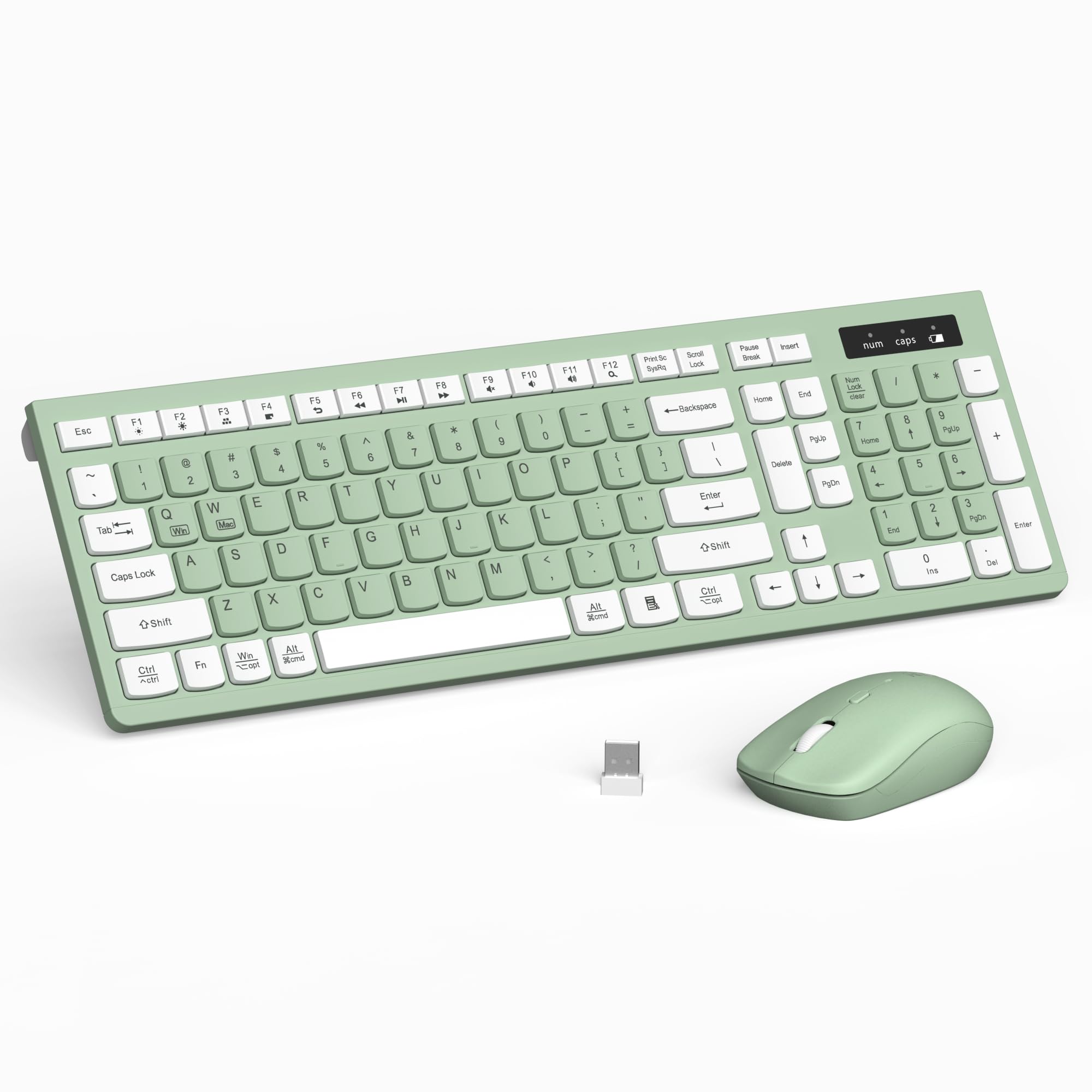
I reach for the RECCAZR when I want a keyboard that brightens my desk without fuss. Setup is just plug in the 2.4GHz receiver and it works, the keys feel soft and quiet, and the mouse tracks well for everyday tasks.
It’s a great pick for someone who wants a full-size layout and a splash of personality on a home desk or a casual workspace. If you care about looks but still need reliable, simple wireless performance, this combo hits that sweet spot.
What People Say
People commonly praise how fast and simple the setup is and how pleasing the keys feel for long typing sessions. The color options and lightweight build get frequent mentions for adding personality to a desk, and many note the mouse is responsive and reliable.
A few users remind others that it uses a USB receiver rather than Bluetooth, which matters if you only have USB-C ports.
Overall Sentiment: Positive

Long-Term Value
Low-maintenance parts and a simple wireless receiver mean replacement costs are minimal, and the spillproof design can reduce accidental damage over time.
Situational Benefits
|
Situation |
How It Helps |
|---|---|
|
Home Office |
Adds style and quiet keys so long work sessions feel more pleasant without distracting others. |
|
Student Desk |
Lightweight and portable enough to move between classes or study spots while still giving a full keyboard layout. |
|
Creative Workspace |
Bright color options help personalize a setup and make the desk feel more inspiring. |
|
Casual Shared Space |
Quiet operation and a spillproof surface keep interruptions and accidents to a minimum. |
Ease Of Use
|
Feature |
Ease Level |
|---|---|
|
Setup |
Easy |
|
Daily Use |
Easy |
|
Cleaning |
Easy |
|
Portability |
Easy |
Looks
The combo stands out with soft pastel and vibrant colors like avocado green, bringing a playful but tasteful touch to a desk while remaining functional.
Innovation
Instead of cutting-edge connectivity, this model focuses on practical refinements: a spillproof, lightweight shell and pleasing colorways that blend durability with style.
Practicality
A full QWERTY layout and a reliable USB receiver make it a practical choice for everyday computing, though users with only USB-C ports may need an adapter.
Comfort
Soft keycaps and a thoughtful key profile make typing comfortable for extended sessions, and the responsive mouse complements the keyboard for routine tasks.
Key Benefits
- Eye-catching color options that brighten a workspace
- Silent, smooth keys suited to shared or quiet environments
- Adjustable DPI mouse that pairs well with the keyboard for daily tasks
- Lightweight, spillproof design that’s easy to clean and move
🏆 Best Premium
I reach for the MX Keys S when I want a premium typing experience that blends comfort with productivity. The low-profile keys feel precise and quiet, the backlight reacts as my hands approach, and the rechargeable USB-C battery keeps it ready without constant swaps. I use it for long writing sessions, video calls, and when I want the convenience of quick Smart Actions to automate repetitive tasks.
For anyone who types a lot and values thoughtful software integration, this is a keyboard I’d recommend trying.
What People Say
Users frequently call out the comfortable low-profile key feel and the convenience of the adaptive backlighting. People also appreciate the Smart Actions and app-based customization that streamline workflows, plus the rechargeable battery that removes the hassle of frequent replacements.
Overall Sentiment: Positive

Long-Term Value
A built-in rechargeable battery and robust software customization reduce ongoing costs by cutting out disposable batteries and saving time through automation. Over years that can add up to meaningful savings for heavy users.
Situational Benefits
|
Situation |
How It Helps |
|---|---|
|
Remote Work |
Comfortable typing and smart backlighting make long days easier and reduce interruptions during calls. |
|
Creative Workflows |
Smart Actions let me trigger complex shortcuts with one keystroke, speeding repetitive edits or commands. |
|
Multi-Device Setups |
Bluetooth support and easy device switching let me move between laptop, tablet and phone without pairing headaches. |
|
Evening Sessions |
Proximity backlighting and quiet keys keep late-night typing from disturbing others while maintaining visibility. |
Ease Of Use
|
Feature |
Ease Level |
|---|---|
|
Setup |
Easy |
|
Pairing |
Easy |
|
Customization |
Moderate |
|
Charging |
Easy |
Looks
A minimalist graphite finish and low-profile silhouette give it a refined, professional look that fits tidy desks and creative setups alike.
Innovation
Smart Actions automation, proximity-activated backlighting, and a focus on low-profile switch tuning place practicality and workflow acceleration ahead of gimmicks.
Practicality
Strong cross-platform support, USB-C recharge, and thoughtful media and function keys make this a practical daily driver for professionals and power users.
Comfort
Sculpted, stable keys and a solid build help reduce fatigue during long typing sessions and feel reassuringly consistent under the fingers.
Key Benefits
- Low-profile keys tuned for fluid, precise typing and reduced fatigue
- Smart backlighting that senses hands and adapts to ambient light
- Programmable Smart Actions via Logi Options+ to speed repetitive work
- Rechargeable USB-C battery for long runtimes without disposable cells
- Broad OS compatibility including Windows, macOS, Linux, iOS and Android
🎮 Best For Customization
I turn to the F75 Pro when I want a compact keyboard that’s also highly moddable. The 75% layout saves desk space while still giving essential keys and a tactile knob for quick volume control. Hot-swappable switches mean I can experiment with different feels without buying a new board, and the multiple connection modes make it easy to move between PC, console, and mobile devices. It’s a good fit for gamers and creators who like to tweak sound, lighting and switches to match their setup.
What People Say
A lot of users praise the solid build and satisfying typing sound, and many highlight how the hot-swap feature makes customizing switches straightforward. People also mention the reliable connectivity across modes and the convenience of the volume knob and RGB for both gaming and everyday use.
Overall Sentiment: Positive

Long-Term Value
Being able to swap switches means you can refresh the keyboard’s feel without replacing the entire unit, and a rechargeable design reduces dependency on disposable batteries. The solid construction and included tools also help avoid small repair or replacement costs down the line.
Situational Benefits
|
Situation |
How It Helps |
|---|---|
|
Gaming Sessions |
Low-latency 2.4GHz mode and responsive switches give a reliable feel for fast inputs and macros. |
|
Custom Builds |
Hot-swap sockets and extra switches let me tailor key feel and sound without soldering. |
|
Small Desks |
The 75% layout frees up space for a mouse and accessories while keeping important keys accessible. |
|
Content Creation |
RGB and a tactile knob offer quick visual cues and hands-on control for editing or streaming. |
Ease Of Use
|
Feature |
Ease Level |
|---|---|
|
Setup |
Easy |
|
Mode Switching |
Easy |
|
Hot-Swapping |
Moderate |
|
Lighting Controls |
Moderate |
Looks
The RGB lighting, compact silhouette and a functional knob give it a modern, customizable look that fits both minimalist and colorful setups.
Innovation
Combining hot-swappable mechanical sockets with three connectivity modes and a pre-lubed switch option centers practical customization rather than gimmicks.
Practicality
It ships with useful extras like a keycap/switch puller and spare switches, supports multiple devices, and has a water-repellent coating that adds everyday resilience.
Comfort
Pre-lubed Reaper switches and a stable, slightly weighted build make typing feel smooth and controlled, which helps during long games or editing sessions.
Key Benefits
- Hot-swappable sockets for easy switch customization
- Multiple connectivity modes (2.4GHz, Bluetooth 5.0, USB-C)
- RGB backlighting and dedicated knob for quick control
- Pre-lubed switches for a smoother out-of-box typing feel
- Compact 75% layout that preserves key functionality while saving space
🔰 Best Sleek Slim
I like the Arteck for tidy desks where space and style matter. It’s a full-size layout in a surprisingly slim stainless steel body, so you get a numeric keypad without a bulky profile.
The rechargeable battery is convenient — I tend to forget to charge for months — and the low-profile keys make typing feel modern and unobtrusive. It works well for everyday office tasks, browser work, and living-room setups where a sleek, durable keyboard looks at home, and it’s one I recommend when you want durability without a heavy footprint.
What People Say
People often mention the long-lasting rechargeable battery and how the keyboard feels both light and sturdy thanks to the metal construction. Many note the low-profile keys are comfortable for long typing sessions and that setup is painless with the included USB receiver. A few users point out the minimalist design is a big reason they chose it.
Overall Sentiment: Positive

Long-Term Value
The rechargeable battery and durable stainless steel build reduce the need for replacements, and the included USB receiver keeps the setup simple so long-term maintenance is minimal.
Situational Benefits
|
Situation |
How It Helps |
|---|---|
|
Slim Desks |
Gives a full keyboard and numeric keypad without eating desk space, leaving room for a larger mouse or monitor stand. |
|
Shared Workspaces |
Durable stainless steel surface handles frequent use and looks professional in communal areas. |
|
Living Room Setup |
Low-profile keys and a sleek metal finish blend into TV consoles and smart-TV rigs without feeling out of place. |
|
Frequent Typing |
Quiet, low-profile keys reduce finger fatigue during long documents or spreadsheets. |
Ease Of Use
|
Feature |
Ease Level |
|---|---|
|
Setup |
Easy |
|
Charging |
Easy |
|
Daily Use |
Easy |
|
Cleaning |
Easy |
Looks
The brushed stainless finish and low profile give it a refined, modern look that suits both minimalist and professional setups.
Innovation
Innovation here is practical: combining a metal chassis with a long-life rechargeable battery and low-profile keys creates a refined, long-lasting everyday keyboard rather than chasing flashy features.
Practicality
Broad OS compatibility and a straightforward USB receiver make this a practical pick for people who want reliability and simple maintenance without extra software.
Comfort
Flat, low-profile keys and a stable stainless base deliver a comfortable, consistent typing surface that’s easy on the hands during extended sessions.
Key Benefits
- Ultra-slim stainless steel chassis that feels sturdy and premium
- Built-in rechargeable battery that lasts a long time between charges
- Full-size layout with numeric keypad in a compact profile
- Low-profile keys for quiet, low-fatigue typing
- Includes USB receiver for simple plug-and-play wireless
📱 Best For Mobile Devices
I reach for the Soueto RGB when I want a colorful, practical keyboard that works across devices like tablets, smart TVs and laptops. The integrated phone and tablet holder keeps my screen propped during video calls or reference work, while the RGB lighting and multimedia hotkeys make media playback and casual gaming more fun.
Setup is straightforward with the USB-A receiver and the rechargeable battery means I can skip swapping disposables. For anyone using tablets or phones alongside a laptop, this feels like a purpose-built, fuss-free option.
What People Say
Users often mention how easy it is to get going and how the built-in holder actually makes a difference for multitasking. The RGB lighting and hotkeys get frequent praise for adding useful flair, and people appreciate the rechargeable design and responsive keys. A small number of users note the USB-A receiver requirement when using newer USB-C–only devices.
Overall Sentiment: Positive

Long-Term Value
A rechargeable battery and a durable plastic build help lower ongoing costs by avoiding disposable batteries and reducing the need for early replacements, especially if you use multiple devices regularly.
Situational Benefits
|
Situation |
How It Helps |
|---|---|
|
Tablet Or Phone Work |
The integrated stand keeps reference material and calls visible while you type on a full keyboard. |
|
Living Room Media |
RGB lighting and hotkeys make controlling a smart TV or media center easier from the couch. |
|
Casual Gaming |
Tactile keys and adjustable responsiveness suit short gaming sessions without needing a dedicated gaming rig. |
|
Content Creation On Mobile |
The holder and hotkeys speed workflows when editing or posting from a tablet or phone. |
Ease Of Use
|
Feature |
Ease Level |
|---|---|
|
Setup |
Easy |
|
Lighting Controls |
Easy |
|
Mode Switching |
Easy |
|
Charging |
Easy |
Looks
Bright RGB zones and a clean black chassis give it a playful yet modern look that livens up a desk or living-room setup.
Innovation
Combines practical extras like a device holder, colorful backlighting and rechargeable power in one package geared toward mobile and multi-screen users.
Practicality
Works well for mixed-device setups and media control; the USB-A receiver is reliable but may require an adapter for newer USB-C–only machines.
Comfort
Tactile keys with a slightly raised profile make typing satisfying and reduce fatigue during longer sessions compared with ultra-flat membranes.
Key Benefits
- Integrated phone/tablet holder keeps devices in view while you work
- 7-color RGB backlighting for visibility and desk personality
- Rechargeable battery removes frequent battery swaps
- Multimedia hotkeys and tactile keys that suit both typing and casual gaming
- USB-A 2.4G receiver for simple plug-and-play wireless
🎧 Best Sound
I reach for the K745 when I want a mechanical keyboard that sings without being distracting. The gasket mount and noise-dampening layers give a smooth, subdued sound profile that still feels tactile and satisfying under heavy typing or during gaming. It supports 2.4GHz, Bluetooth and USB-C, so I can switch between systems easily, and the hot-swap sockets let me try different switches without soldering.
Between the RGB lighting, solid build, and spare parts in the box, it works well for both daily work and dedicated gaming sessions, and it’s a great pick if you care about sound and customization.
What People Say
Common feedback centers on the keyboard’s sound and feel — many users appreciate the smooth, less-clacky mechanical profile and the satisfying typing experience. People also highlight the ease of switching connectivity modes and the value of hot-swap capability and included tools for customization.
The RGB and color options get regular mentions for improving desk aesthetics.
Overall Sentiment: Positive

Long-Term Value
Hot-swappable sockets and included spare switches mean you can refresh the typing feel without replacing the whole keyboard, and the sturdy construction plus noise-dampening materials reduce the chance of early wear. Those factors combine to lower replacement and upgrade costs over time.
Situational Benefits
|
Situation |
How It Helps |
|---|---|
|
Competitive Gaming |
2.4GHz mode provides low-latency input while noise dampening keeps sound controlled during long matches. |
|
Late-Night Work |
Quiet mechanical profile reduces disturbance for others while keeping tactile feedback for fast typing. |
|
Custom Builds |
Hot-swap sockets and spare switches let me experiment with switch types without extra tools or soldering. |
|
Streamer Setup |
RGB and see-through keycaps add visual flair and the extra hotkeys simplify media or scene control. |
Ease Of Use
|
Feature |
Ease Level |
|---|---|
|
Setup |
Easy |
|
Mode Switching |
Easy |
|
Hot-Swapping |
Moderate |
|
Lighting Control |
Easy |
Looks
RGB lighting, round PBT keycaps and themed color options give it a playful yet refined look that complements both colorful and minimalist setups.
Innovation
The blend of gasket mounting, five-layer damping and hot-swap convenience focuses innovation on sound quality and user customization rather than gimmicks.
Practicality
It balances daily practicality and gamer features: robust connectivity options, included tools and spare parts, and water-resistant elements that help it survive everyday use.
Comfort
The slightly weighted chassis and tuned switches create a comfortable, stable typing surface that reduces fatigue during prolonged sessions.
Key Benefits
- Creamy, quiet mechanical sound thanks to gasket design and noise-dampening layers
- Hot-swap sockets let you change switches without soldering
- Multi-mode connectivity (2.4GHz, Bluetooth, USB-C) for flexible device use
- See-through round PBT keycaps and RGB for pleasing aesthetics and visibility
- Includes spare switches and puller tools for easy maintenance
🧭 Best Compact
I reach for the K673 when I want a compact board that still feels premium. The 75% layout frees desk space while keeping important keys, the dedicated knob gives quick tactile control, and the multi-mode connectivity means I can switch between PC, console or phone without fuss.
The gasket mount and layered damping make typing smooth and surprisingly quiet, so it works well for late-night sessions or shared spaces. If you want a small footprint without giving up customization and solid build quality, this is a keyboard I’d pick.
What People Say
People frequently mention how easy the K673 is to set up and how satisfying the typing sound feels compared with louder mechanical boards. Reviewers also praise the compact footprint and the convenience of spare switches and the knob, and many call out the flexible connectivity and solid battery behaviour for daily use.
Overall Sentiment: Positive

Long-Term Value
Hot-swappable sockets and included spare parts let you refresh the board’s feel without buying a new keyboard, and durable construction plus power-saving modes reduce the likelihood of early replacements, lowering long-term ownership costs.
Situational Benefits
|
Situation |
How It Helps |
|---|---|
|
Small Desks |
The 75% layout saves space for a larger mouse or additional gear while keeping essential keys accessible. |
|
Late-Night Use |
Noise-dampening and tuned switches keep typing quiet so you don’t disturb others. |
|
Custom Builds |
Hot-swap sockets and spare switches make it easy to experiment with different switch types. |
|
Multi-Device Setup |
Three connectivity modes let you move between devices quickly without re-pairing each time. |
Ease Of Use
|
Feature |
Ease Level |
|---|---|
|
Setup |
Easy |
|
Mode Switching |
Easy |
|
Hot-Swapping |
Moderate |
|
Knob Control |
Easy |
Looks
A compact silhouette with RGB accents and themed colorways gives it a modern, customizable look that suits both minimalist and colorful desks.
Innovation
Combines gasket mounting, five-layer damping and hot-swap convenience to focus on sound quality and user customization rather than flashy extras.
Practicality
Wired and wireless modes, included tools and spare switches, plus solid battery management make it a practical choice for everyday gaming and productivity.
Comfort
Tuned switches, gasket stability and a slightly weighted chassis create a comfortable typing surface that reduces fatigue during long sessions.
Key Benefits
- Compact 75% layout that saves desk space while retaining key functionality
- Gasket mount and five-layer damping deliver a creamy, low-noise feel
- Hot-swap sockets for easy switch experimentation and upgrades
- Multiple connectivity modes (2.4GHz, Bluetooth, USB-C) for flexible use
- Dedicated knob control for immediate volume and media adjustments
✨ Best Aesthetic Mechanical
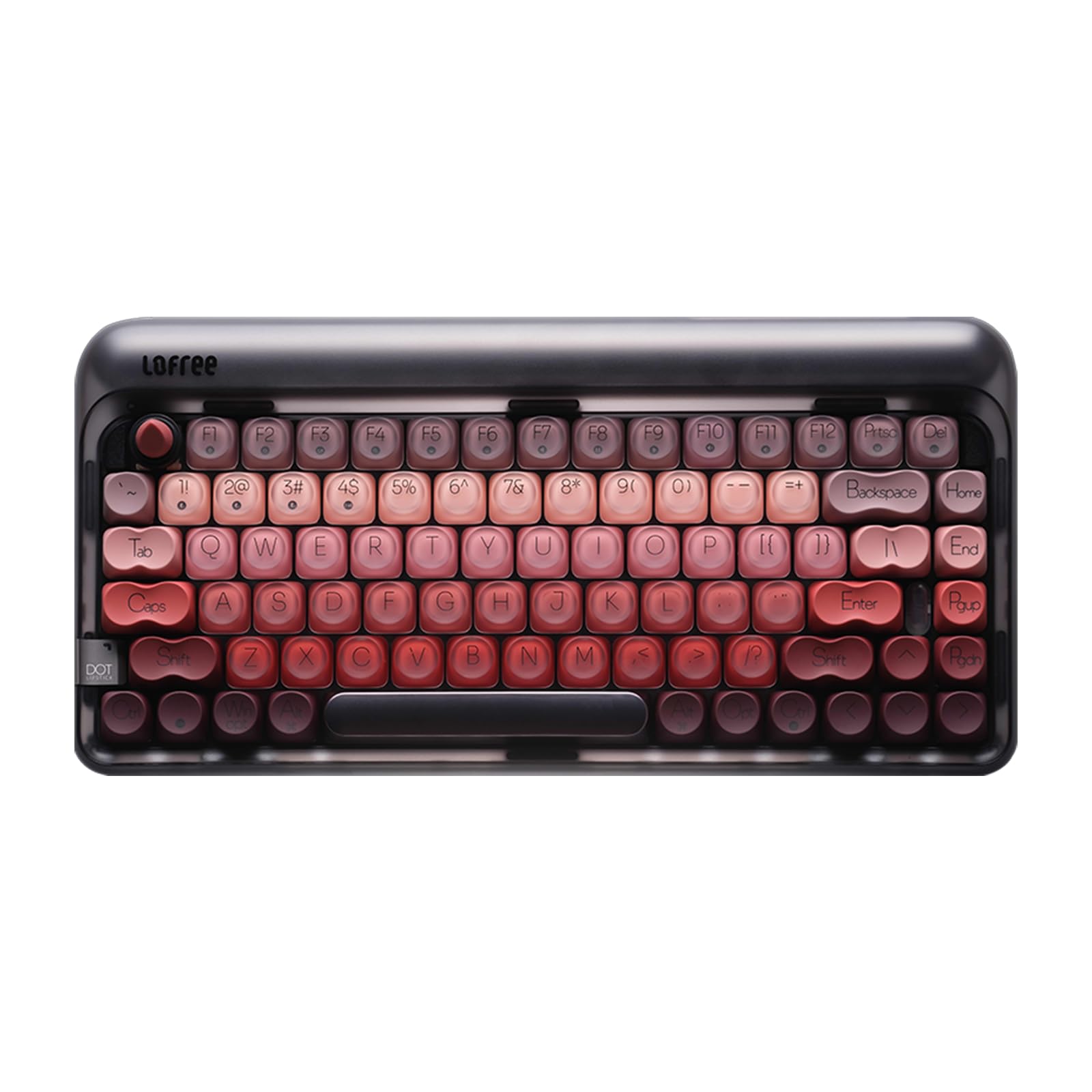
I reach for the LOFREE DOT when I want a keyboard that looks as good as it types. Its compact 84-key layout keeps my desk tidy while the gasket-mounted chassis and hot‑swappable switches deliver a smooth, tactile feel.
The single-color backlight and refined silhouette suit both home offices and creative desks, and the multiple connection modes make it easy to move between laptop and tablet. If you value style and a satisfying mechanical experience in a compact package, this is a keyboard I’d consider.
What People Say
People commonly praise the LOFREE DOT for its distinctive look and pleasant typing sensation, noting that the gasket mount softens the mechanical sound. Users also appreciate the hot-swap feature and the convenience of multiple connectivity options. Many mention the rechargeable battery and compact footprint as reasons the keyboard fits well into both work and creative spaces.
Overall Sentiment: Positive

Long-Term Value
Hot-swappable switches let you refresh or tune the feel over time without buying a new board, and the rechargeable battery cuts down on disposable cells. Durable materials and included spare parts or tools can reduce replacement frequency and upkeep costs.
Situational Benefits
|
Situation |
How It Helps |
|---|---|
|
Compact Desks |
The 84-key layout frees up surface area for a larger mouse or accessories while keeping essential keys handy. |
|
Creative Workstations |
The refined aesthetic and stable typing feel make it easy to focus while keeping a visually pleasing setup. |
|
Multi-Device Use |
Bluetooth and RF modes let me switch between devices without reconfiguring, so I can move from laptop to tablet quickly. |
|
Customization Projects |
Hot-swap sockets let me experiment with different switches to fine-tune sound and feel without soldering. |
Ease Of Use
|
Feature |
Ease Level |
|---|---|
|
Setup |
Easy |
|
Pairing |
Easy |
|
Hot-Swapping |
Moderate |
|
Charging |
Easy |
Looks
A lipstick-inspired profile and minimalist backlight give it an elegant, collectible look that elevates any desk without being flashy.
Innovation
The LOFREE DOT blends a nostalgic, design-forward aesthetic with modern hot-swap and multi-mode connectivity, focusing innovation on feel and style rather than gimmicks.
Practicality
Despite its emphasis on design, it remains practical: solid connectivity options, a rechargeable battery and a compact layout make it suitable for daily typing and mobile setups.
Comfort
Gasket mounting and well-tuned linear switches produce a cushioned, consistent keypress that reduces fatigue during long sessions and feels nicely stable under the hands.
Key Benefits
- Compact 84-key layout that saves desk space without sacrificing essential keys
- Gasket design and hot-swappable sockets for a smooth, customizable typing feel
- Rechargeable battery and multi-mode connectivity (Bluetooth, RF, USB-C)
- Refined aesthetic with a clean single-color backlight suited to stylish setups
- Includes necessary accessories like a 2.4G receiver and cleaning brush
FAQ
How Do I Choose Between Bluetooth And 2.4 GHz?
I look at how I use my devices. Bluetooth is great for multi-device pairing and fewer dongles when I swap between a laptop, tablet and phone, while a 2.4 GHz USB receiver typically offers more consistent, lower-latency performance for gaming or fast typing.
If my laptop only has USB-C ports I plan for a small adapter to use dongle-based sets, and I also keep in mind that some systems require a receiver or wired connection to enter passwords at boot.
How Long Will The Battery Last And How Do I Maintain It?
Battery life depends on whether the keyboard is rechargeable or uses replaceable cells and how many features you run, like backlighting. I favor keyboards with an rechargeable USB-C option or an easy on/off switch and sleep mode so I can extend time between charges; dimming the lighting and turning the board off when not in use are simple ways I stretch life further.
For replaceable-battery models I keep a couple of spares handy and store the USB receiver on the keyboard when I travel.
Do I Need A Mechanical Keyboard Or Will A Membrane Do?
I ask myself how much typing and what kind of feel I want: mechanical switches deliver a satisfying, customizable tactile response and are easy to mod if you like tinkering, while membrane or scissor-style low-profile keys are quieter and often more comfortable for long, uninterrupted typing. If I want customization like hot-swapping switches, dedicated knobs, or a particular sound profile I choose mechanical, but for shared spaces or simple, comfortable daily use a membrane-style layout often does the job with less fuss.
Wrapping Up
I chose this set of keyboards to cover real needs: combos for budget and office use, slim and rechargeable models for minimalist desks, compact and gasket designs for gamers, and premium mechanical and low-profile options for power users. If you want simple, reliable typing on a budget pick a USB dongle combo; if you spend hours typing choose a premium low-profile or hot-swappable mechanical for comfort and customization. Before buying I recommend checking compatibility with your OS and ports, and considering whether you need RGB/backlight, multi-device pairing, or a dongle for low-latency use.
| Product Name | Image | Connectivity Technology | Special Highlights | Battery Life |
|---|---|---|---|---|
| Logitech MK345 Wireless Keyboard and Mouse Combo |
 |
2.4 GHz Wireless USB Receiver |
|
2 AA Batteries (included) – Lasts up to 3 years. |
| Logitech MK270 Wireless Keyboard and Mouse Combo |
 |
Advanced 2.4 GHz Wireless |
|
3 AA Batteries (included) – Lasts up to 24 months. |
| Wireless Keyboard and Mouse Combo (Avocado Green) |
 |
USB Receiver |
|
2 AA Batteries required (not included) – Average usage time varies. |
| Logitech MX Keys S Wireless Keyboard |
 |
Bluetooth, USB-C Receiver |
|
1500 mAh – Up to 10 days with backlight. |
| AULA F75 Pro Wireless Mechanical Keyboard |
 |
2.4GHz Wireless, BT5.0, USB-C |
|
Rechargeable – Lasting approximately 30 hours on a full charge. |
| Arteck 2.4G Wireless Keyboard |
 |
USB Wireless |
|
Built-in rechargeable battery – Lasts up to 6 months on a full charge. |
| Soueto Wireless Keyboard with 7-Color RGB Backlit |
 |
USB-A Receiver |
|
Rechargeable – Lasts about 10 days on a single charge. |
| Redragon K745 PRO Wireless Gasket RGB Gaming Keyboard |
 |
2.4GHz, BT, USB-C |
|
Battery powered – Up to 50 hours of usage with RGB off. |
| Redragon K673 PRO Wireless Gasket RGB Gaming Keyboard |
 |
2.4GHz, BT, USB-C |
|
Battery powered – Lasts approximately 60 hours with RGB on. |
| LOFREE DOT Lipstick Wireless Mechanical Keyboard |
 |
Bluetooth, RF, USB-C |
|
Rechargeable – Lasts up to 200 hours without backlight. |
This Roundup is reader-supported. When you click through links we may earn a referral commission on qualifying purchases.