I know choosing a mechanical keyboard for a Mac can feel overwhelming because macOS expectations, wireless pairing and keyboard layout quirks matter as much as switches and sound. I put this guide together so you can skip endless searching and find a keyboard that actually improves your typing, multitasking and desk setup. Whether you want a buttery, quiet board for late-night work, a wireless 75% layout that pairs easily with a MacBook, or a knob and display for creative workflows, I explain what matters and point you to the best options for different needs.
Top Picks
| Category | Product | Score |
|---|---|---|
| 🏆 Best Overall | Epomaker F75 | 94/100 |
| ⭐ Best With Screen For Battery & Other Info. | SOLAKAKA A99 | 91/100 |
| 💰 Best Budget | Kisnt KN85 | 90/100 |
| 🎯 Best For Serious Typists (like Coders & Programmers) | RK S98 | 92/100 |
| 🔰 Best For Mac Users | AULA F75 | 92/100 |
| 🚀 Best For Overall Appeal & Performance (But Expensive!). Ideal for Creators. | LOFREE Dot | 96/100 |
| 💼 Best With Number Pad | AULA S99 | 84/100 |
| 🎨 Best Design | Redragon K745 | 92/100 |
| 🔊 Best Sound | RK R98 | 90/100 |
| ⚡ Best Value Wired | Redragon K668 | 88/100 |
How I Picked These Keyboards
I focused on the things that matter on a Mac: reliable Bluetooth and multi-device switching, proper Mac key mapping or easy remapping, and solid macOS compatibility with or without vendor software. I also weighed build quality, switch feel and sound profile, battery life for wireless boards, hot‑swappability for future upgrades, and extras like knobs or displays that actually improve workflows.
Price and real-world value were important, so I balanced premium features against affordable options to recommend choices for different budgets and use cases.
I like this board because it packs thoughtful features into a compact 75% layout. The volume knob and dedicated controls make quick adjustments painless, and the pre-lubed linear switches give a smooth, muted feel that suits both late-night typing and light gaming. Connectivity is flexible: I can use USB-C when I want zero latency, switch to 2.4GHz for stable wireless at my desk, or pair over Bluetooth for my laptop or tablet. The build feels solid and weighted, so it stays put while I type, and the hot-swappable sockets mean I can experiment with different switches without a soldering iron.
If you want a neat, versatile Mac-friendly board that’s ready to customize, this one hits that sweet spot.
Long-Term Savings
Because the switches are hot-swappable and the keycaps are durable PBT, I can refresh feel or replace parts instead of buying a whole new keyboard. Rechargeable power and repairable components reduce waste over time.
When It Helps
| Situation | How It Helps |
|---|---|
| Remote Work | I switch between my MacBook and tablet via Bluetooth and keep the desk on 2.4GHz, so meetings and typing feel seamless without constant re-pairing. |
| Tight Desk Spaces | The 75% layout frees up room while keeping essential keys, so I get a compact footprint without losing productivity. |
| Creative Sessions | The knob lets me scrub audio or adjust volume on the fly, which I use when editing or previewing tracks. |
| Switch Experimenting | Because the switches are hot-swappable, I can try different switch types and tune the sound and feel without buying multiple keyboards. |
Ease Of Use
| Feature | Ease Level |
|---|---|
| Initial Setup | Easy |
| Device Switching | Easy |
| Custom Key Mapping | Moderate |
| Changing Switches | Moderate |
Look And Feel
The F75 blends a modern, low-profile look with RGB accents and a minimalist knob. The side-printed PBT caps and subtle weight give it a premium presence that fits both clean workstations and colorful gamer setups.
Customization Options
| Feature | Customization Level |
|---|---|
| Switch Swapping | High |
| RGB Lighting | High |
| Programmable Keys | Moderate |
| Keycap Replacement | High |
Problem Solving
This keyboard addresses common annoyances: it keeps a compact footprint without sacrificing controls, reduces desk clutter with reliable wireless modes, and avoids permanent choices by letting me swap switches and keycaps as my preferences evolve.
Responsiveness
Wired USB-C gives immediate response for low-latency tasks, while 2.4GHz provides a snappy wireless experience at the desk and Bluetooth trades a tiny bit of responsiveness for convenience.
Key Benefits
- Tri-mode connectivity for USB-C, 2.4GHz or Bluetooth
- Hot-swappable switches so I can swap switches easily
- Volume knob for fast, tactile control
- Pre-lubed linear switches for a smooth, quiet feel
- PBT keycaps and a solid, weighted build
I keep coming back to this keyboard when I want a compact board that still feels full-featured. The tiny TFT screen and knob add real convenience for quick info and volume control, and the pre-lubed cream switches give a smooth, satisfying feel straight out of the box.
I use USB-C when I need absolute responsiveness, 2.4GHz for a reliable desk connection, and Bluetooth for when I work on my laptop on the couch. For day-to-day typing, editing and light gaming it hits a nice balance between convenience and customization, and it’s easy to recommend if you want a versatile 75% board that’s ready to tinker with.
Long-Term Savings
Because the switches are hot-swappable and the keyboard ships with spare parts and a detachable cable, I can refresh switches or keycaps instead of replacing the whole board. That modularity tends to save money over time and extends the keyboard’s useful life.
When It Helps
| Situation | How It Helps |
|---|---|
| Hybrid Work | I pair with my MacBook over Bluetooth for meetings and keep a 2.4GHz dongle at my desk so switching between locations is seamless. |
| Content Creation | The knob and screen let me control media and see simple readouts while editing without reaching for the mouse or opening extra apps. |
| Small Desks | The 75% footprint frees up space for a trackpad or sketch tablet while still keeping arrow keys and a compact cluster of function keys. |
| Modding And Tinkering | Hot-swappable sockets make it easy to test different switch types and sound profiles without soldering, so I can tailor the feel over time. |
Ease Of Use
| Feature | Ease Level |
|---|---|
| Initial Setup | Easy |
| Switching Between Devices | Easy |
| Customizing TFT Widgets | Moderate |
| Swapping Switches | Moderate |
Look And Feel
The black‑gradient finish, bright RGB and compact silhouette give the board a modern, premium vibe that fits both minimalist and colorful setups. The screen adds a playful, useful focal point.
Customization
| Feature | Customization Level |
|---|---|
| Switch Swapping | High |
| TFT Display Content | High |
| RGB Lighting Effects | High |
| Key Remapping | Moderate |
Problem Solving
This keyboard solves the common trade-off between small size and functionality by keeping essential keys plus a knob and screen, and it removes the fear of making permanent choices because switches and keys are easy to change.
Responsiveness
USB-C provides the lowest latency for gaming or fast typing, 2.4GHz is nearly as responsive for desk use, and Bluetooth is perfectly fine for casual writing and mobile work with a slight trade-off in immediacy.
Key Benefits
- Built-in TFT screen and knob for quick controls and info
- Tri-mode connectivity for flexible device use
- Hot-swappable pre-lubed switches ready to swap or upgrade
- Rich RGB customization for personal desk aesthetics
- Compact 75% layout that keeps essential keys without wasting space
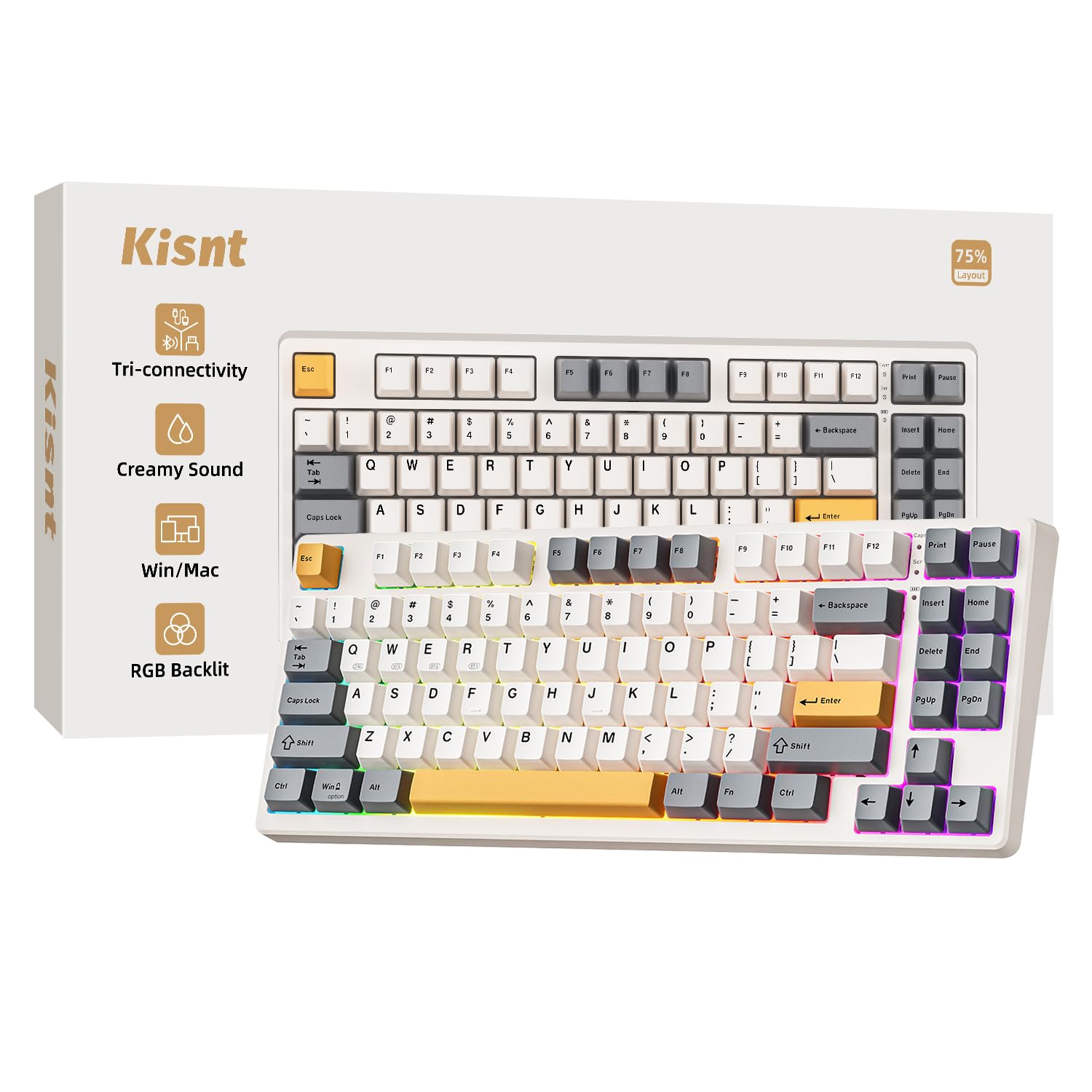
I keep the KN85 on my shortlist when I want a compact board with a friendly vibe. The retro beige finish softens a setup while the pre-lubed linear switches deliver a creamy, quiet feel that’s great for long typing sessions.
Tri-mode connectivity makes it easy to hop between my MacBook, tablet and a desktop dongle without fuss, and the hot-swappable sockets let me experiment with different switches as my tastes change. It’s small enough to free up desk space but still keeps important keys, so I reach for it for writing, light gaming and when I need a portable mechanical keyboard that won’t fight me.
Long-Term Savings
Because the KN85 is built for swapping switches and keycaps, I can refresh the board’s feel or repair worn parts instead of replacing the whole keyboard, which stretches its lifespan and lowers replacement costs over time.
When It Helps
| Situation | How It Helps |
|---|---|
| Hybrid Work | I pair it with my laptop over Bluetooth for meetings, then switch to the 2.4GHz dongle at my desk for a rock‑steady connection during focused work. |
| On-The-Go | Its compact size and USB-C option mean I can tuck it in my bag and connect to a tablet or laptop without carrying a bulky board. |
| Small Desks | The 75% footprint frees up room for a trackpad or notebooks while still keeping arrow keys and commonly used functions handy. |
| Switch Tinkering | Hot-swap capability makes it simple to test different switches and find the sound and feel I prefer without buying extra tools. |
Ease Of Use
| Feature | Ease Level |
|---|---|
| Initial Setup | Easy |
| Pairing Devices | Easy |
| Programming Keys | Moderate |
| Changing Switches | Moderate |
Look And Feel
The retro beige color and compact silhouette give the KN85 a nostalgic, minimalist look that blends nicely with neutral or warm desk themes, while RGB adds a modern touch when I want it.
Customization
| Feature | Customization Level |
|---|---|
| Switch Swapping | High |
| RGB Lighting | High |
| Key Remapping | Moderate |
| Keycap Replacement | High |
Problem Solving
The KN85 tackles common annoyances like noisy, bulky keyboards and complicated multi-device setups by offering a compact, quiet typing experience and straightforward connectivity across my devices.
Responsiveness
USB-C wired mode gives immediate responsiveness for fast typing or gaming, 2.4GHz is nearly as snappy for desk use, and Bluetooth trades a small amount of immediacy for convenience when I’m mobile.
Key Benefits
- Tri-mode connectivity for easy switching between devices
- Pre-lubed linear switches for a smooth, quiet typing feel
- Hot-swappable sockets so I can change switches without soldering
- Compact 75% layout that saves desk space but keeps essentials
- RGB backlighting and programmable keys for personal tweaks
I reach for the S98 when I want a larger compact board that still feels roomy. The smart display and knob are genuinely useful for quick info and media adjustments, and the cream switches have a smooth, satisfying feel that works for long typing sessions and casual gaming.
It pairs easily with a laptop or tablet and I keep a 2.4GHz dongle at my desk for a rock‑steady connection. The top‑mount design and extra keys give a slightly more traditional layout while keeping the footprint smaller than a full size board, so it’s handy for editing, multitasking and desktop setups that need a bit more key real estate.
Long-Term Savings
Because the S98 supports hot‑swapping and comes with replaceable components, I can refresh switches or keycaps instead of replacing the whole board, which helps stretch its useful life and reduces long‑term replacement costs.
When It Helps
| Situation | How It Helps |
|---|---|
| Multitasking | The extra keys and knob let me keep shortcuts and media controls under my fingers so I can jump between apps without hunting menus. |
| Content Editing | I use the knob to scrub audio or adjust volume while editing, and the display shows simple info so I stay focused in my timeline. |
| Shared Desk | The multiple connectivity modes make it easy to switch between someone else’s laptop and my Mac without unplugging anything. |
| Quiet Environments | The creamy linear switches deliver a softer sound profile that’s less likely to distract nearby coworkers. |
Ease Of Use
| Feature | Ease Level |
|---|---|
| Initial Setup | Easy |
| Switching Devices | Easy |
| Customizing With Software | Moderate |
| Changing Switches | Moderate |
Look And Feel
The clay green color and top‑mount profile give the S98 a distinctive, slightly retro character that still reads modern thanks to RGB lighting and the small display, so it fits both colorful and understated setups.
Customization
| Feature | Customization Level |
|---|---|
| Switch Swapping | High |
| Smart Display Widgets | High |
| RGB Lighting | High |
| Key Remapping | Moderate |
Problem Solving
This board solves the trade‑off between compactness and functionality by offering extra keys and convenient controls in a smaller footprint, while hot‑swappability removes the worry of making a permanent switch choice.
Responsiveness
USB‑C wired mode offers immediate responsiveness for rapid typing or gaming, 2.4GHz is nearly as snappy for desk use, and Bluetooth provides convenient mobility with a small trade‑off in immediacy.
Key Benefits
- Smart display and knob for quick controls and glanceable info
- Top‑mount 96% layout that balances compactness with extra keys
- Hot‑swappable switches so I can swap switches without soldering
- Tri‑mode connectivity for flexible device pairing
- Cream switches that offer a smooth, pleasant typing sound and feel
I reach for the S99 when I want a full‑feature board that still feels approachable. It gives me a real number pad for spreadsheets, a tactile media knob for quick volume tweaks, and round, comfortable keys that make long typing stretches less tiring.
Tri‑mode connectivity means I can keep it paired to my MacBook over Bluetooth, use the 2.4GHz dongle at my desk, or plug in via USB‑C when I want a wired connection. It’s not a boutique enthusiast board, but it balances everyday comfort, useful extras and easy setup in a way that suits both work and casual gaming.
Long-Term Savings
Built with commonly replaceable parts and programmable functions, the S99 can adapt as needs change. Repairing or reprogramming avoids replacing the whole board, which stretches its useful life.
When It Helps
| Situation | How It Helps |
|---|---|
| Office Work | The number pad and programmable hotkeys speed up data entry and shortcuts so I stay efficient in spreadsheets and documents. |
| Remote Meetings | I keep it on Bluetooth for quick laptop pairing and use the knob to mute or lower volume without fumbling through menus. |
| Casual Gaming | The responsive layout and extra keys give me easy access to macros and media controls while I play. |
| Shared Desk | Multiple connectivity modes make switching between another person’s PC and my Mac smooth and hassle‑free. |
Ease Of Use
| Feature | Ease Level |
|---|---|
| Initial Setup | Easy |
| Device Switching | Easy |
| Programming Keys | Moderate |
| Using Media Knob | Very Easy |
Look And Feel
The clay green and subtle RGB create a distinctive, warm look that stands out without being loud; round caps add a friendly, retro touch that fits many desk styles.
Customization
| Feature | Customization Level |
|---|---|
| Key Remapping | Moderate |
| RGB Lighting | High |
| Macro Keys | Moderate |
| Switch Replacement | Moderate |
Problem Solving
The S99 solves the need for a comfortable full‑size layout in tighter spaces and streamlines common tasks with its knob and programmable keys, reducing the number of steps to control audio or launch shortcuts.
Responsiveness
USB‑C wired mode delivers the quickest response for fast typing and gaming, 2.4GHz is reliable for desk use, and Bluetooth provides convenience with a slight responsiveness trade‑off.
Key Benefits
- Full 99‑key layout with dedicated number pad
- Tri‑mode connectivity for flexible device use
- Media knob and hotkeys for instant controls
- Rechargeable with programmable keys for shortcuts
- Ergonomic round keycaps that feel comfortable over long sessions
I reach for this combo when I want a simple, cheerful setup that just works. The keyboard feels comfortable for long data entry sessions, the number pad is handy for spreadsheets, and the mouse pairs instantly with the same USB receiver so I don’t have to juggle connections. The keys are pleasantly quiet and the mouse has soft clicks that don’t distract colleagues.
It’s aimed at straightforward office and home use rather than advanced customization, and Mac users should expect basic typing and mouse functions via the USB dongle without platform‑specific extras.
Long-Term Savings
The combo approach means I get both keyboard and mouse in one package and replaceable batteries keep maintenance simple. Durable keycaps and a replaceable mouse extend usable life so I avoid frequent upgrades.
When It Helps
| Situation | How It Helps |
|---|---|
| Office Work | The number pad and comfortable keys speed up data entry and reduce hand strain during long spreadsheets. |
| Shared Spaces | Quiet keys and soft mouse clicks help keep noise to a minimum when others are nearby. |
| Basic Home Setup | Plug the dongle into a laptop or desktop and you have a complete input setup without extra pairing steps. |
| Student Use | The simple, durable design stands up to daily note taking and the included mouse covers common tasks without fuss. |
Ease Of Use
| Feature | Ease Level |
|---|---|
| Initial Setup | Very Easy |
| Switching Devices | Easy |
| Battery Replacement | Easy |
| Custom Programming | Limited |
Look And Feel
The milk‑tea colorway and rounded keys give a friendly, retro‑modern look that brightens a desk without being overpowering, and the compact full‑size footprint reads tidy and approachable.
Customization
| Feature | Customization Level |
|---|---|
| Key Remapping | Low |
| Lighting | None |
| Macro Support | None |
| Physical Mods | Low |
Problem Solving
This combo solves the need for an affordable, easy‑to‑set‑up input solution that reduces clutter and delivers a comfortable typing experience without extra configuration.
Responsiveness
The 2.4GHz USB receiver delivers snappy, reliable input for typing and everyday tasks, with negligible lag for regular office work.
Key Benefits
- Full 104‑key layout with dedicated number pad for spreadsheets
- Plug‑and‑play USB receiver that pairs keyboard and mouse together
- Ergonomic key shapes for comfortable long typing sessions
- Quiet key and mouse clicks suitable for shared spaces
- Matching mouse included so I don’t need separate peripherals
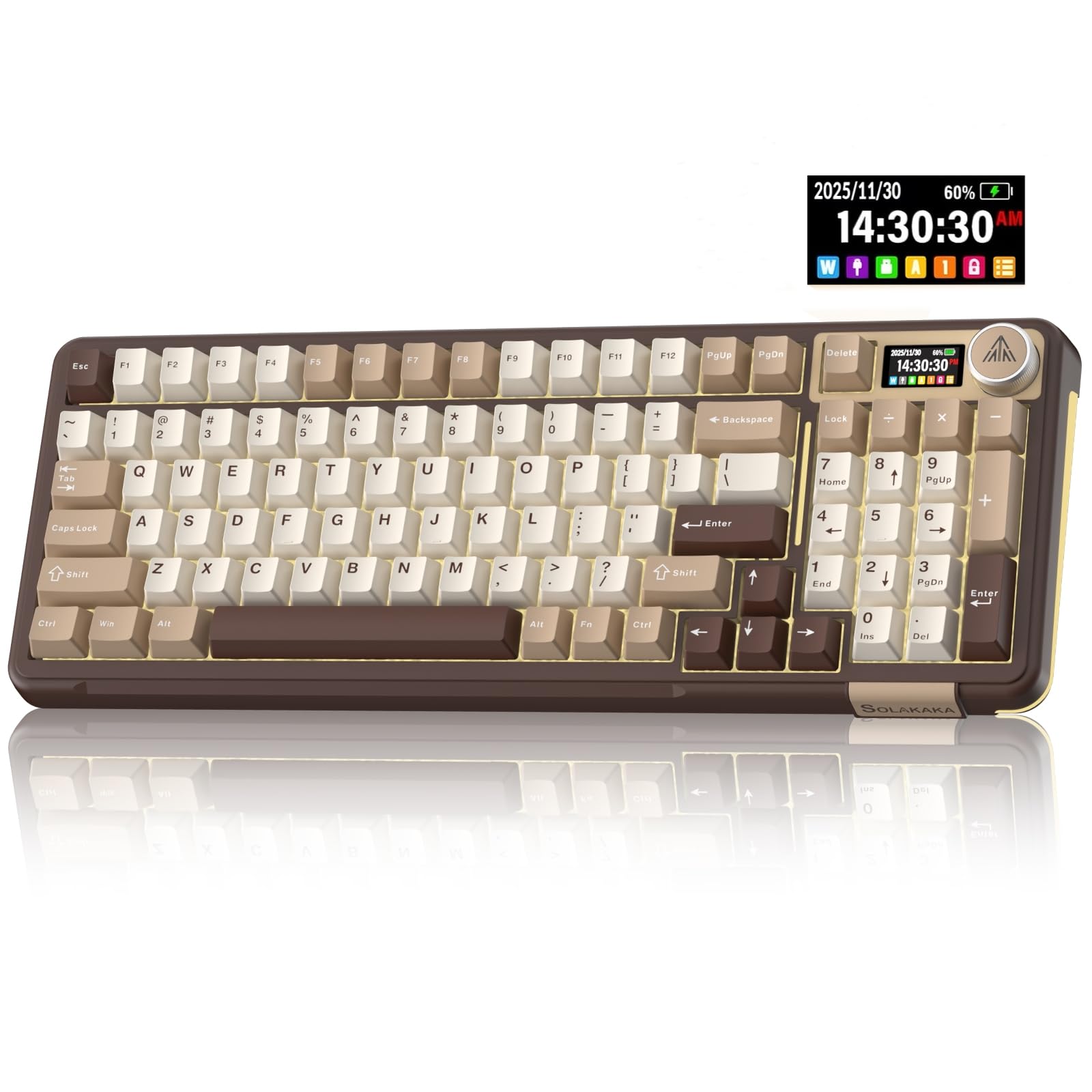
I often reach for the A99 when I want a keyboard that feels refined without being fussy. The small LCD and metal knob give me quick info and tactile control while I work, and the gasket mount softens each keystroke for a more relaxed typing experience.
It connects over USB‑C for wired work, 2.4GHz at my desk for a stable link, or Bluetooth when I’m mobile. The hot‑swappable layout means I can try new switches as my preferences change, and the RGB and gasket finish make it a satisfying board for both long writing sessions and occasional gaming.
If you want a comfortable, feature‑rich 97‑key option that’s ready to customize, this one fits that role well.
Long-Term Savings
Hot‑swappability and replaceable keycaps mean I can refresh feel or repair parts rather than replace the whole board, so it stays useful as my needs evolve.
When It Helps
| Situation | How It Helps |
|---|---|
| Editing And Media | The knob lets me adjust volume or scrub timelines without switching tools, and the screen displays simple stats so I stay focused in my editor. |
| Hybrid Setups | I use Bluetooth for laptop work and switch to 2.4GHz at my desk for a reliable connection during longer sessions. |
| Quiet Workspaces | The gasket mount and linear switches produce a gentler, less abrasive sound that’s easier on colleagues and family. |
| Modding Hobbyists | Hot‑swappable switches and spare components let me experiment with different feels and tones without soldering. |
Ease Of Use
| Feature | Ease Level |
|---|---|
| Initial Setup | Easy |
| Switching Connection Modes | Easy |
| Customizing Screen Widgets | Moderate |
| Swapping Switches | Moderate |
Look And Feel
The milk‑coffee brown color and understated RGB give the A99 a warm, textured look that pairs well with wooden desks and neutral setups, while the metal knob adds a tasteful, tactile accent.
Customization
| Feature | Customization Level |
|---|---|
| Switch Swapping | High |
| LCD Content | High |
| RGB Lighting | High |
| Key Remapping | Moderate |
Problem Solving
The A99 solves the need for a refined, compact keyboard that still offers useful controls and room to customize, reducing the friction of switching workflows and making long typing sessions more comfortable.
Responsiveness
USB‑C wired mode gives immediate response for fast typing and gaming, 2.4GHz is nearly as responsive for desktop use, and Bluetooth offers convenient mobility with a modest responsiveness trade‑off.
Key Benefits
- Built‑in LCD and metal knob for quick controls and glanceable info
- Gasket structure for a softer, more cushioned typing feel
- Hot‑swappable sockets so I can change switches without tools
- Tri‑mode connectivity for flexible use across devices
- RGB lighting and programmable keys for personal setups

I reach for the R98 when I want a sturdy, no-nonsense board that still feels special. The 96% layout keeps a compact footprint while preserving a number pad and dedicated media controls, and the volume knob is one of those small comforts I use every day. The gasket mount softens typing into a pleasant, less-fatiguing experience and the pre‑lubed linear switches deliver a smooth, buttery feel straight away.
It’s a corded board, so setup is literally plug-and-play on a Mac with USB‑C, and the solid build keeps it from sliding around during heavy typing. If you want a dependable, feature-rich wired keyboard that’s comfortable for long sessions and easy to mod later, the R98 is a reliable choice.
Long-Term Savings
Hot‑swappability and replaceable keycaps mean I can upgrade switches or refresh caps instead of replacing the whole keyboard, which stretches its useful life and keeps costs down over time.
When It Helps
| Situation | How It Helps |
|---|---|
| Heavy Typing | The gasket mount and pre‑lubed switches reduce impact and fatigue, making long documents and coding sessions more comfortable. |
| Multimedia Work | The knob and media keys let me adjust audio or mute quickly while working in editors or streaming content. |
| Small Desks | The 96% layout saves desk space compared with full‑size boards while still keeping a numeric pad for spreadsheets. |
| Modding And Upgrades | Hot‑swappable sockets and spare switches in the box make experimenting with different feels straightforward. |
Ease Of Use
| Feature | Ease Level |
|---|---|
| Initial Setup | Very Easy |
| Daily Use | Easy |
| Key Remapping | Moderate |
| Changing Switches | Moderate |
Look And Feel
The R98’s clean black finish, subtle RGB and solid aluminum accents give it a premium, understated look that fits professional and gamer desks alike.
Customization
| Feature | Customization Level |
|---|---|
| Switch Swapping | High |
| Keycap Replacement | High |
| RGB Effects | High |
| Software Remapping | Moderate |
Problem Solving
The R98 addresses the balance between desk space and functionality by offering extra keys and media controls in a compact frame, while hot‑swappability removes the need to commit to a single switch type.
Responsiveness
As a wired USB‑C keyboard, it delivers immediate, consistent response ideal for fast typing and gaming without any wireless latency concerns.
Key Benefits
- Compact 96% layout with number pad and media controls
- Gasket mount for softer, more comfortable typing
- Hot‑swappable, pre‑lubed linear switches for smooth feel
- Volume knob for quick, tactile audio control
- Durable MDA‑profile PBT keycaps and solid build

I reach for the K668 when I want a full‑size, no‑drama mechanical keyboard that still feels substantial. It’s a straightforward wired board with hot‑swap sockets so I can change switches without committing, and it ships with an extra keycap set so I can tweak the look quickly.
The sound‑absorbing foam and ergonomic layout tame the noise and make long typing sessions nicer. For Mac users who prefer a wired connection, plugging it in via USB‑C gives a reliable, latency‑free experience and lets you use native macOS shortcuts without extra pairing steps. It’s a solid pick if you want durability and customization without a steep learning curve.
Long-Term Savings
Because the K668 supports hot‑swapping and comes with extra keycaps, I can refresh switches or replace worn caps instead of buying a new board. That modularity helps it stay useful over multiple upgrades.
When It Helps
| Situation | How It Helps |
|---|---|
| Office Work | The quieter sound profile and comfortable key action keep me focused during long spreadsheets and documents. |
| Gaming Sessions | Wired USB‑C provides consistent response and the ergonomic layout puts frequently used keys within easy reach. |
| Desk Aesthetics | Two keycap sets let me switch looks quickly if I want a muted or colorful setup depending on the mood. |
| Beginner Modding | Hot‑swap sockets and included extras mean I can try new switches without special tools or a steep learning curve. |
Ease Of Use
| Feature | Ease Level |
|---|---|
| Initial Setup | Very Easy |
| Switch Replacement | Moderate |
| Lighting Modes | Easy |
| Key Remapping | Moderate |
Look And Feel
The Gemini Eclipse colorway and mixed keycap options give the board a modern, playful look that feels at home on both minimalist and vibrant desks.
Customization
| Feature | Customization Level |
|---|---|
| Switch Swapping | High |
| Keycap Sets | High |
| RGB Lighting | Moderate |
| Software Remapping | Moderate |
Problem Solving
This board solves the need for a sturdy, customizable full‑size keyboard without forcing you into complex mods. It reduces desk noise, gives clear tactile feedback, and makes tries with new switches low‑commitment.
Responsiveness
Being a wired USB‑C keyboard, it delivers immediate, consistent input ideal for fast typing and gaming, with no wireless lag to worry about.
Key Benefits
- Full 108‑key layout with dedicated function and hotkey support
- Hot‑swappable sockets so I can swap switches without soldering
- Two sets of keycaps for quick aesthetic changes
- Sound‑absorbing foam for a quieter, more pleasant typing profile
- USB‑C wired connection for reliable, low‑latency use

I reach for the K745 when I want a full‑size board that keeps noise down and still feels lively. The gasket design and multi‑layer dampening give typing a soft, cushioned quality that reduces fatigue during long sessions, while the round PBT caps add a distinctive look and comfortable surface.
Tri‑mode connectivity makes it easy to switch between my desktop dongle, laptop via Bluetooth and a wired session when I need absolute responsiveness. The extra hotkeys and hot‑swap sockets mean I can tailor the layout and try different switches without committing, so it’s a flexible choice for both focused work and weekend gaming.
Long-Term Savings
Hot‑swappability and durable PBT keycaps let me refresh switches or replace caps instead of buying a new board. That modular approach keeps the keyboard useful through upgrades and small repairs.
When It Helps
| Situation | How It Helps |
|---|---|
| Quiet Home Office | Noise dampening and the gasket mount reduce key noise so I can type for hours without disturbing others. |
| Gaming Sessions | USB‑C wired mode offers consistent responsiveness, while 2.4GHz gives low‑latency wireless at my desk. |
| Aesthetic Setups | Round PBT keycaps and RGB lighting let me match the board to a pastel or vibrant desk theme. |
| Trying New Switches | Hot‑swap sockets make it simple to experiment with different switches and sound profiles without extra tools. |
Ease Of Use
| Feature | Ease Level |
|---|---|
| Initial Setup | Very Easy |
| Switching Connection Modes | Easy |
| Lighting Controls | Easy |
| Switch Replacement | Moderate |
Look And Feel
The Charming Purple colorway and see‑through round PBT caps give the K745 a playful, modern look that stands out without being gaudy; RGB adds flexible accents to suit different moods.
Customization
| Feature | Customization Level |
|---|---|
| Switch Swapping | High |
| Keycap Replacement | High |
| RGB Lighting | High |
| Macro/Hotkey Programming | Moderate |
Problem Solving
This keyboard removes the common trade‑offs between a noisy mechanical feel and a comfortable, usable desk layout by combining dampening, a full keyset and easy modding options, so I don’t have to choose between comfort and capability.
Responsiveness
USB‑C provides instant, stable input for fast typing and gaming. 2.4GHz is the best wireless option for low latency at a desk, while Bluetooth offers convenience for casual use with a small responsiveness trade‑off.
Key Benefits
- Gasket design with 5‑layer noise dampening for a quieter, softer typing feel
- Tri‑mode connectivity (2.4GHz, Bluetooth, USB‑C) for easy device switching
- Hot‑swappable sockets so I can change switches without soldering
- See‑through round PBT keycaps for a unique look and comfortable surface
- Full 108‑key layout plus extra hotkeys for productivity and macros
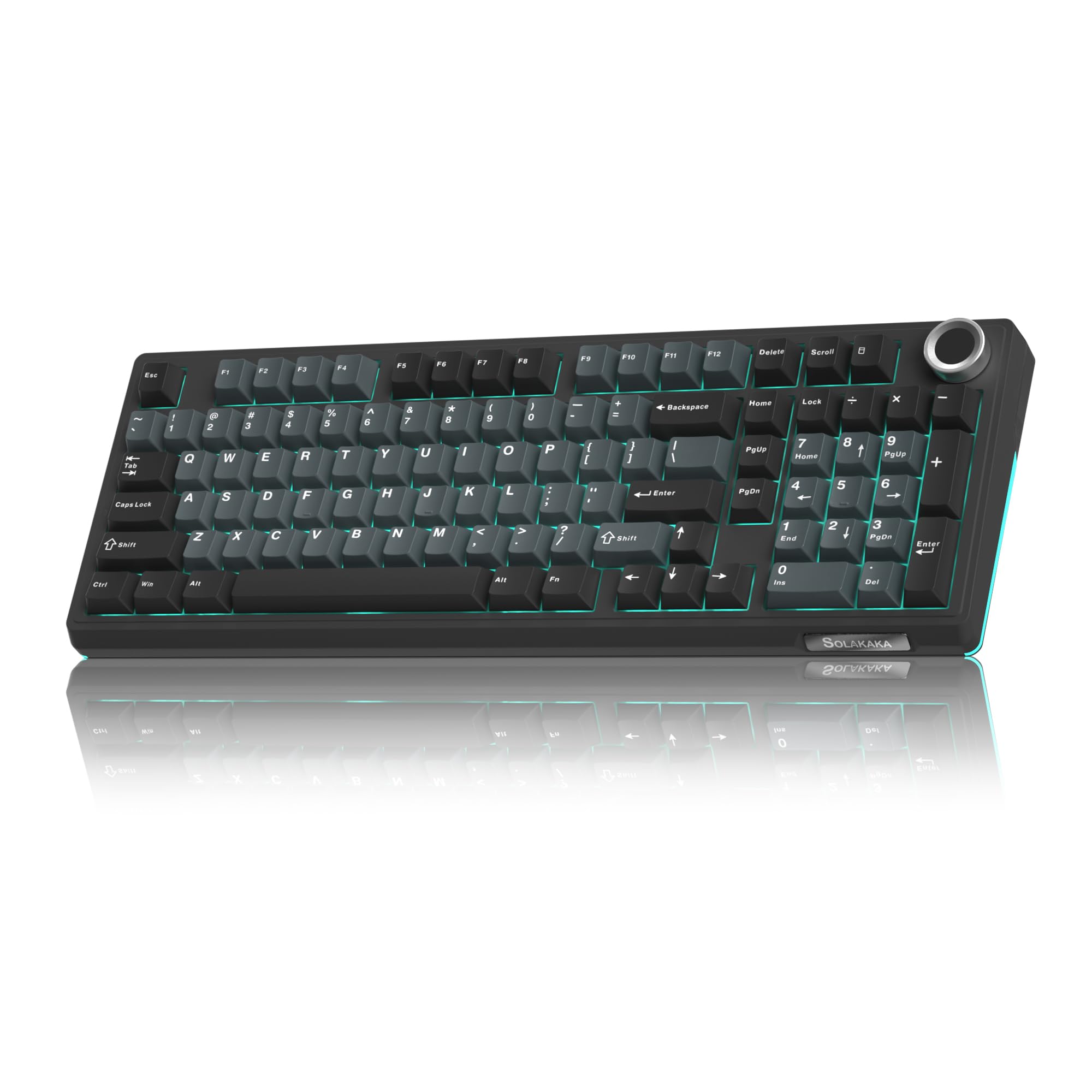
I turn to the KI99 when I want a quiet, full‑feature compact board that still feels premium. The gasket mount and pre‑lubed quiet switches give a cushioned, low‑profile sound that’s easy to live with in shared spaces. The metal knob is solid and handy for volume or quick adjustments, and tri‑mode connectivity means I can use USB‑C for a wired session, 2.4GHz at my desk or Bluetooth on the go.
Hot‑swappable sockets let me experiment with different switches without soldering, so it grows with my preferences. Mac users should get core functionality over USB‑C or Bluetooth, though advanced vendor software may be Windows‑focused.
Long-Term Savings
Hot‑swappability and durable components mean I can refresh switches or replace caps instead of buying a new keyboard, so the board can evolve with my needs and avoid early replacement.
When It Helps
| Situation | How It Helps |
|---|---|
| Shared Workspaces | The quiet switches and gasket mount keep key noise low so I don’t disturb coworkers during long typing sessions. |
| Mobile Use | Bluetooth pairing makes it simple to type on a laptop or tablet in cafés or meeting rooms without carrying extra cables. |
| Content Editing | The metal knob gives quick access to volume and scrubbing controls so I can stay focused in editors. |
| Modding And Tuning | Hot‑swap sockets let me try different switch types and sound profiles without soldering, so I can dial in exactly what I like. |
Ease Of Use
| Feature | Ease Level |
|---|---|
| Initial Setup | Easy |
| Switching Connection Modes | Easy |
| Using The Knob | Very Easy |
| Swapping Switches | Moderate |
Look And Feel
The black‑blue finish is sleek and modern, and the gasket profile plus subtle RGB create a refined, understated look that complements both minimal and colorful desks.
Customization
| Feature | Customization Level |
|---|---|
| Switch Swapping | High |
| RGB Lighting | High |
| Key Remapping | Moderate |
| Knob Functions | Moderate |
Problem Solving
The KI99 tackles common trade‑offs by offering a compact footprint without noisy switches, giving me both portability and a pleasant desktop typing experience while allowing future upgrades via hot‑swap.
Responsiveness
USB‑C wired mode delivers the most immediate response for demanding tasks, 2.4GHz offers near‑wired performance at the desk, and Bluetooth provides convenience with a small responsiveness trade‑off.
Key Benefits
- Gasket structure and pre‑lubed quiet switches for a soft, muted typing profile
- Metal knob for easy tactile volume and media control
- Hot‑swappable sockets so I can change switches without tools
- Tri‑mode connectivity for flexible use across devices
- RGB lighting and programmable options for personal setup
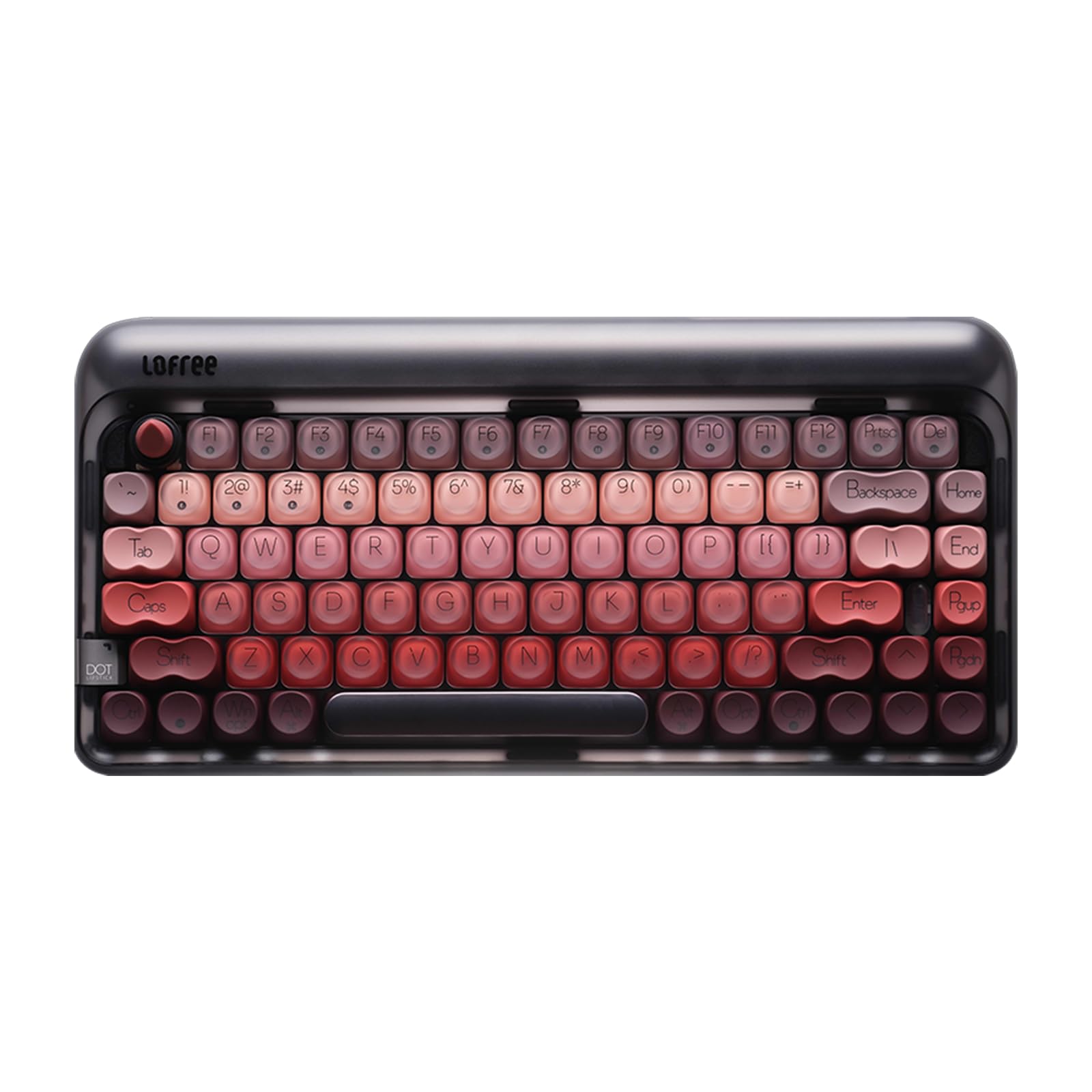
I reach for the LOFREE Dot when I want a compact board that feels elegant on a small desk. The 84‑key layout saves space but keeps the keys I use most, and the gasket mount softens each press into a comfortable, slightly cushioned experience. It charges up and pairs easily over Bluetooth or the included RF receiver, and USB‑C gives me a wired option when I need it.
The single‑color backlight is simple and tasteful rather than flashy, so it fits a tidy Mac setup. For writing, light editing and carrying between home and a café, this board blends portability with a premium, tactile feel.
Long-Term Savings
Because the Dot supports hot‑swapping and uses durable components, I can refresh switches or replace keycaps instead of buying a new board, which stretches its useful life and reduces waste.
When It Helps
| Situation | How It Helps |
|---|---|
| Mobile Work | Its compact size and rechargeable battery make it easy to slip into a bag and use with a laptop or tablet on the move. |
| Small Desks | The 84‑key footprint frees space for a trackpad or notebook while keeping the most important keys accessible. |
| Quiet Environments | Gasket mounting and linear switches produce a muted, pleasant sound that’s less likely to bother others nearby. |
| Simple Setups | Tri‑mode connectivity means I can pair to a Mac over Bluetooth and keep an RF dongle for a desktop without extra adapters. |
Ease Of Use
| Feature | Ease Level |
|---|---|
| Initial Setup | Easy |
| Switching Connection Modes | Easy |
| Charging | Easy |
| Swapping Switches | Moderate |
Look And Feel
The Dot’s compact silhouette and refined finish bring a vintage‑modern vibe, with a clean white backlight that complements neutral Mac workstations and adds a subtle focal point without being loud.
Customization
| Feature | Customization Level |
|---|---|
| Switch Swapping | High |
| Lighting | Low |
| Keycap Replacement | Moderate |
| Key Remapping | Moderate |
Problem Solving
The LOFREE Dot addresses cramped workspaces and noisy typing by offering a small, quieter mechanical board that’s easy to carry and simple to integrate into a Mac setup, while hot‑swappability prevents early obsolescence.
Responsiveness
USB‑C wired mode delivers immediate response for fast typing, the RF receiver provides near‑wired stability at a desk, and Bluetooth gives convenient mobility with a modest responsiveness trade‑off.
Key Benefits
- Compact 84‑key layout that saves desk space while retaining essential keys
- Gasket design for a softer, more comfortable typing feel
- Hot‑swappable switches so I can change feel without soldering
- Rechargeable battery with multiple connection modes for flexibility
- Subtle white backlight and refined styling that suit minimalist setups
FAQ
Will a Mechanical Keyboard Work Smoothly With My Mac?
Yes — for everyday typing and most shortcuts a mechanical keyboard will work just fine with a Mac over USB‑C or Bluetooth. I make sure the vendor notes macOS support for any extra features because some configuration apps are Windows‑only; when that happens I use a macOS remapper like Karabiner‑Elements to swap keys and get a proper Command/Option layout. If you rely on vendor software for macros or OLED screens, double‑check compatibility before you buy, but basic typing, media keys and connectivity almost always work out of the box.
Which Switch Type And Layout Should I Choose For Mac Use?
I pick switches based on where and when I type: linear switches feel smooth and are great for quiet, fast typing, tactile switches give a bit more feedback if I want precision, and quieter pre‑lubed or silent switches are better in shared spaces. For layout, a 75% or 96% board is my sweet spot because it keeps arrow keys and essential functions while saving desk room; choose a full‑size board if you do heavy spreadsheet work and need a number pad. If you like to experiment, prioritize a hot‑swappable board so you can try different switches without soldering.
Is Wireless Reliable Enough For Typing And Light Gaming?
Wireless has come a long way and is perfectly fine for typing and casual gaming, but the connection mode matters. I use USB‑C for the absolute lowest latency, keep a 2.4GHz dongle at my desk for nearly wired performance while staying wireless, and reserve Bluetooth for quick laptop or tablet pairing on the go.
For longer sessions I turn down RGB or use wired mode to save battery life, and I keep a spare dongle or a wired cable handy if I need guaranteed responsiveness.
Wrapping Up
If you want one do-it-all option that handles Mac workflows and looks modern, I recommend the Epomaker F75 for its display, hot-swap support and macOS-friendly connectivity. If you want a premium, design-forward board with superb feel and finish, the LOFREE Dot is the pick to consider. For tight budgets or a simple wired replacement, the Redragon K668 gives great value.
I also highlight AULA and RK models when you need a knob, extra keys or a full numeric pad. Ultimately the right keyboard depends on how you work: prioritize wireless stability and Mac mapping for daily Mac use, pick gasket or hot-swappable builds if you like to mod switches later, and choose the sound profile that keeps you happy during long typing sessions.
| Product Name | Image | Key Highlights | Connectivity |
|---|---|---|---|
| AULA F75 Pro Wireless Mechanical Keyboard |
 |
|
|
| EPOMAKER X Aula F75 MAX Wireless Mechanical Keyboard |
 |
|
|
| Kisnt KN85 Wireless Mechanical Gaming Keyboard |
 |
|
|
| RK ROYAL KLUDGE S98 Mechanical Keyboard |
 |
|
|
| AULA 99 Key Keyboard |
 |
|
|
| MOFII Wireless Keyboard and Mouse Combo |
 |
|
|
This Roundup is reader-supported. When you click through links we may earn a referral commission on qualifying purchases.