
OpenClaw does not technically require a Mac Mini to run, but the Mac Mini M4 is the undisputed go-to hardware for it in 2026. Its always-on reliability, near-zero power draw (3 to 4 watts at idle), completely silent operation, smooth macOS setup experience, Apple Silicon Neural Engine, and exclusive native iMessage integration make it the closest thing to a perfect dedicated AI appliance available today. For $599, it turns into a personal AI server that never sleeps and costs less than $20 a year to run.
Edit: 5th May,2026: M1A Pro is on a limited time discount, and we’ve already sent a price alert to subcribers. If you can afford it, you should definitely consider this newly launched Mini PC — ACEMAGIC M1A Pro (Check Price Here).
In short, this PC would let you run multiple local LLMs (free LLM calls), substantially reducing your AI credit costs. Often by $1000s of dollars for a week of heavy/full-time usage. Don’t buy it if you don’t have a commerical use-case, because then it would be an overkill! OpenClaw can easily run on a cheaper machine! And runs exceptionally well on the $500-600 Mac Mini.
Now let’s get back to our topic..
If you have spent any time in developer or AI communities lately, you have probably noticed a strange trend: people talking about rushing to buy a Mac Mini specifically to run an AI agent called OpenClaw. Forums are full of posts about it. YouTube videos are racking up hundreds of thousands of views. Developers, freelancers, and content creators who had no intention of buying new hardware suddenly have a Mac Mini on its way.
It is not hype for the sake of hype. There are real, concrete technical reasons why the Mac Mini and OpenClaw are considered an almost perfect pairing in 2026. This article breaks all of them down.
What Is OpenClaw, Exactly?
OpenClaw (formerly known as Clawdbot and Moltbot) is an open-source AI agent that runs locally on your machine and lives inside your favorite chat apps. Think of it as a personal AI assistant that does not just chat back at you but actually does things. It can run shell commands, control your browser, read and write files, manage your calendar, send emails, and trigger web automations, all activated by a simple text message from your phone.
DigitalOcean’s complete breakdown of OpenClaw describes it well: it functions as a local gateway that gives AI models direct access to your files and system through a secure sandbox, maintains persistent memory stored as local Markdown documents, and connects to over 50 third-party integrations including smart home hardware, productivity suites, and messaging platforms.
Crucially, OpenClaw is not a language model itself. It connects to external models like Claude, GPT-4o, or locally run open-source models via API, then uses what are called “AgentSkills” to actually take action. There are over 100 preconfigured skills available, from file system management to web automation to code execution. The AI does the thinking, and OpenClaw does the doing.
Why this matters for hardware: Because OpenClaw is designed to run persistently in the background 24 hours a day, 7 days a week, the machine it lives on needs to be reliable, efficient, and always on. That requirement eliminates most conventional hardware choices almost immediately and points directly at the Mac Mini.
Why the Mac Mini Became OpenClaw’s Default Home
The Mac Mini did not become the recommended OpenClaw hardware by accident. It earned that position by checking every single box a persistent, always-on AI agent demands. Here is a detailed look at why.
Always-On, 24/7 Operation
OpenClaw’s most powerful features are the ones that work while you are not at your desk. Scheduled automations, email monitoring, CRM updates, customer inquiry responses, and webhook triggers all require the host machine to be continuously running. The moment your OpenClaw host goes offline, all automations stop firing.
Most consumer hardware simply is not designed for this. Laptops are meant to be closed and put to sleep. Gaming desktops are meant to be shut down at the end of the day. The Mac Mini, by contrast, is a compact desktop that stays plugged in and runs indefinitely without issue. It has no battery to degrade from continuous charging. It does not overheat under light loads. It just sits there, quietly, always on.
This is one of the biggest practical reasons the OpenClaw community converged on the Mac Mini so quickly. As This in-depth YouTube walkthrough on running OpenClaw on the Mac Mini M4 demonstrates, the machine is specifically suited to operate 24/7 without overheating, which is its single biggest hardware advantage over almost everything else at this price point.
Extreme Power Efficiency
Running a machine all day, every day, costs money. Not a fortune in isolation, but it adds up, and it is a real consideration when setting up a dedicated AI appliance.
The Mac Mini M4 idles at just 3 to 4 watts. Under heavy CPU load it peaks at around 40 to 45 watts, which is still remarkably low for what it delivers. In real-world OpenClaw usage, where the machine is mostly waiting for triggers and occasionally processing API calls, actual power consumption averages well under 10 watts. That translates to an annual electricity cost of less than $20 at typical US rates. Most Windows Mini PCs idle at 8 to 15 watts, and traditional desktops are nowhere close.
Over a two or three-year period, that efficiency gap between the Mac Mini and most Windows-based alternatives compounds into a meaningful real-world cost difference, especially if you are running multiple agent instances simultaneously.
Silent Operation
This one sounds minor until you actually live with the alternative. Running a machine 24/7 in your home office or bedroom means coexisting with whatever noise it produces. Most consumer PCs, even the quiet ones, have fans that spin up under load and create a constant low-level hum.
The Mac Mini M4 is completely silent at idle and under light workloads. The fan only engages under sustained CPU stress, which is genuinely rare during typical OpenClaw operation in cloud API mode. If your Mac Mini is tucked behind a monitor or sitting on a shelf, you will forget it is even on. That matters more than most people expect when setting up a machine meant to run around the clock.
macOS: The Smoothest Platform for OpenClaw
OpenClaw was built for Unix-like environments. Its installer script, file permissions model, and startup service behavior all assume a Unix foundation. macOS provides exactly that, with the added benefit of being polished enough for mainstream users who are not Linux experts.
On a fresh Mac Mini, getting from zero to a running OpenClaw instance takes under 20 minutes. Install Homebrew, install Node.js, clone the repository, run npm install, configure your .env file with API keys, and you are live. The process works reliably the first time without needing to troubleshoot dependency conflicts or permission errors.
Windows users, by contrast, typically need to set up WSL (Windows Subsystem for Linux) before the OpenClaw installer will even run properly. WSL works, but it adds meaningful setup complexity and introduces occasional compatibility quirks. Linux matches macOS for smoothness once the OS is configured, but getting to a properly configured Linux environment is its own project for less technical users.
The Apple Silicon Neural Engine
Every Apple Silicon Mac since the M1 includes a dedicated Neural Engine, and in the M4 it is a 16-core unit capable of delivering significant AI-specific compute acceleration. The Neural Engine is specifically designed for the matrix multiplications that power modern large language models. When OpenClaw connects to a local model running through Ollama or Apple’s MLX framework, the computational heavy lifting goes to dedicated silicon rather than stealing cycles from the main CPU.
The practical result is that local model inference on Apple Silicon runs faster and more efficiently than on comparably priced x86 hardware, particularly for quantized 7B and 8B parameter models. Responses feel snappy rather than sluggish, which matters for an autonomous agent that needs to reason through multi-step plans in real time. If inference is too slow, the agent’s reasoning loop breaks down and leads to timeouts and errors in task execution.
Unified Memory Architecture
This is the technical edge that makes Apple Silicon genuinely different from traditional PC architecture for AI workloads. On a conventional PC, memory is split between system RAM (used by the CPU) and VRAM (used by the GPU). Running local language models on a conventional PC means loading model weights into VRAM, which is capped at whatever your GPU physically carries, typically 8GB to 24GB on consumer graphics cards.
Apple Silicon uses Unified Memory Architecture (UMA), where a single high-bandwidth memory pool is shared across the CPU, GPU, and Neural Engine. On the Mac Mini M4, that pool runs at 120 GB/s of memory bandwidth. A 16GB Mac Mini has the full 16GB available to the model, the operating system, OpenClaw, and your other processes simultaneously, without the VRAM bottleneck that hamstrings most consumer PC setups. On the 24GB Mac Mini, you can comfortably run a quantized 13B model while keeping everything else open.
Native iMessage Integration
This is the feature that genuinely has no equivalent on any non-Apple hardware. Because OpenClaw’s gateway runs on macOS, your AI agent can send and receive messages through your actual iCloud account via the native Messages app. You can text your AI agent using the same blue bubble interface you use for friends and family, complete with attachments, reactions, and full conversation continuity.
On Windows or Linux, you can connect OpenClaw to Telegram, Discord, Slack, or WhatsApp. Those are all solid options. But iMessage integration is macOS-exclusive, and for users deep in the Apple ecosystem it is a genuine differentiator. Your personal AI assistant becomes just another contact in your iPhone.
The Full Picture: Mac Mini vs The Competition
Ugreen’s detailed cost and performance breakdown puts the hardware differences in clear perspective: the 16GB Mac Mini M4 runs OpenClaw smoothly for cloud API use and handles smaller local models like Llama 3.1 8B, while the 24GB configuration unlocks comfortable performance for 13B models and above.
For most users running OpenClaw as a dedicated always-on assistant, the Mac Mini M4 wins this comparison without much debate. The main case for a Windows Mini PC is for users who specifically want to run very large local models (30B+) and are comfortable with Linux. For everyone else, the Mac Mini is the cleaner, quieter, more efficient choice.
What Mac Mini Specs Do You Actually Need for OpenClaw?
Not all Mac Mini configurations are created equal for OpenClaw, and getting the right one matters for your budget and use case.
Based on my experience testing different OpenClaw configurations, the $999 24GB model is the sweet spot for most serious users. It handles cloud API workflows effortlessly and is capable enough to run quantized 13B models locally with good response speeds. The $599 base model is a legitimate starting point if you plan to stay entirely in cloud API mode, but if your budget stretches to 24GB RAM, it is worth the upgrade.
Step-by-Step: Getting OpenClaw Running on Your Mac Mini
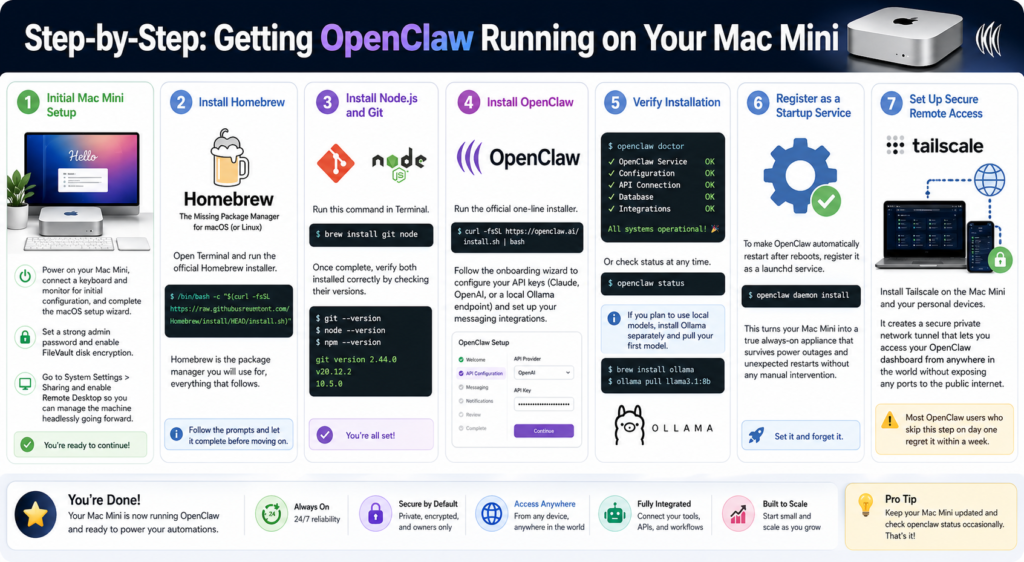
Getting OpenClaw up and running on a fresh Mac Mini is genuinely straightforward. Here is the full process from start to finish.
Step 1: Initial Mac Mini Setup
Power on your Mac Mini, connect a keyboard and monitor for initial configuration, and complete the macOS setup wizard. Set a strong admin password and enable FileVault disk encryption. Once through setup, go to System Settings and enable Remote Desktop under Sharing so you can manage the machine headlessly going forward.
Step 2: Install Homebrew
Open Terminal and run the official Homebrew installer. Homebrew is the package manager you will use for everything that follows. Follow the prompts and let it complete before moving on.
Step 3: Install Node.js and Git
Run brew install git node in Terminal. Once complete, verify both installed correctly by checking their versions.
Step 4: Install OpenClaw
Run the official one-line installer: curl -fsSL https://openclaw.ai/install.sh | bash
Follow the onboarding wizard to configure your API keys (Claude, OpenAI, or a local Ollama endpoint) and set up your messaging integrations.
Step 5: Verify Installation
Run openclaw doctor or openclaw status to confirm everything is working. If you plan to use local models, install Ollama separately and pull your first model using the appropriate CLI command.
Step 6: Register as a Startup Service
To make OpenClaw automatically restart after reboots, register it as a launchd service by running openclaw daemon install. This turns your Mac Mini into a true always-on appliance that survives power outages and unexpected restarts without any manual intervention.
Step 7: Set Up Secure Remote Access
Install Tailscale on the Mac Mini and your personal devices. It creates a secure private network tunnel that lets you access your OpenClaw dashboard from anywhere in the world without exposing any ports to the public internet. Most OpenClaw users who skip this step on day one regret it within a week.
Pro Tip: Before you give OpenClaw access to anything on your Mac Mini, create a separate guest user account specifically for the OpenClaw process and keep your personal account as the admin. Running OpenClaw in its own sandboxed account means that even if a task goes sideways or a rogue script executes something unexpected, it cannot touch your personal files, credentials, or system settings. This is the principle of least privilege, it takes about five minutes to configure, and it is hands-down the most important security step you can take before deploying OpenClaw on any machine.
2026 Trends: Where OpenClaw and the Mac Mini Are Headed
The OpenClaw and Mac Mini story is still developing fast, and several major trends in 2026 are shaping what comes next.
Apple Silicon Efficiency Is Defining the Always-On AI Category
The 3 to 4 watts at idle figure is not just an impressive spec. It is redefining what a personal AI appliance can look like. Running a capable AI agent server for less than $20 a year in electricity makes dedicated AI hardware a realistic option for individuals and small businesses who would previously have considered cloud subscriptions their only option.
Local-First AI Is Growing Faster Than Cloud API Adoption
OpenClaw’s development roadmap in 2026 is pushing hard toward local model support, better on-device AgentSkills, and reduced dependence on paid API tokens. As models like Llama 3, Qwen, and Mistral continue to improve in quality while shrinking in size, running a capable AI agent entirely locally on a 24GB Mac Mini is becoming increasingly practical. The hybrid approach, using free local models for routine background tasks and paid cloud models only for complex reasoning, is already one of the most popular configurations in the community.
The M5 Mac Mini Is on the Horizon
Apple has confirmed that the next-generation Mac Mini powered by the M5 chip will enter production in 2026 at a new manufacturing facility in Houston, Texas. Early reports suggest the M5 refresh will include a redesigned Neural Engine with a focus on agentic AI workflows and potentially larger unified memory tiers. For 90% of OpenClaw users today, the M4 is an excellent buy right now. If you specifically need 128GB or more of unified memory for research-scale local models, it may be worth tracking M5 availability before committing to a purchase.
Security Awareness Is Growing Alongside Adoption
As OpenClaw goes mainstream, the security community is paying more attention to the risks of giving an AI agent file system access and shell execution permissions. macOS’s Unix permission model, sandbox options, and built-in security features are increasingly cited as advantages over running OpenClaw on a Windows machine with full admin access. Sandboxing your OpenClaw instance is quickly becoming community best practice rather than an optional extra.
Frequently Asked Questions
Does OpenClaw require a Mac Mini to run?
No, OpenClaw does not technically require a Mac Mini. It runs on macOS, Linux, and Windows via WSL. However, the Mac Mini M4 is consistently the most recommended hardware in 2026 because of its combination of always-on efficiency, silent operation, smooth macOS setup, and native iMessage integration.
Why do people specifically recommend the Mac Mini for OpenClaw?
The Mac Mini offers a unique combination of features that are ideal for OpenClaw: 24/7 always-on reliability, 3 to 4 watts of idle power consumption (less than $20 per year to run), completely silent operation at light load, native macOS Unix environment for smooth setup under 20 minutes, Apple Silicon Neural Engine for fast local model inference, and exclusive native iMessage integration.
Can I run OpenClaw on my existing MacBook instead?
Yes, and it works well for cloud API workflows. The main limitation is that a MacBook is designed to sleep when closed, which disrupts scheduled automations and webhook-triggered tasks. For reliable 24/7 agent operation, a dedicated always-on desktop like the Mac Mini is the better practical choice.
How much does it cost to run a Mac Mini as an OpenClaw server 24/7?
At 3 to 4 watts at idle, a Mac Mini M4 running OpenClaw around the clock costs roughly $3 to $5 per month in electricity at typical US rates, coming out to less than $20 per year. It is one of the most economical always-on AI server options available at any price point.
What RAM do I need in a Mac Mini for OpenClaw?
For cloud API mode only, 16GB is comfortable. For running local 7B to 8B models alongside OpenClaw, 16GB is the minimum with 24GB preferred. For 13B to 24B models, 24GB is the practical floor. For 30B+ models, the M4 Pro with 32GB to 64GB is needed.
Can Windows Mini PCs run OpenClaw better than a Mac Mini?
For local model inference specifically with very large models (30B+), high-RAM Windows Mini PCs running Linux with 64GB to 96GB of upgradeable DDR5 RAM can outperform the base Mac Mini M4. For ease of setup, power efficiency, silent operation, and iMessage integration, the Mac Mini is the better choice for most users.
Is iMessage integration with OpenClaw actually useful in practice?
For users already in the Apple ecosystem, it is one of the most compelling features of the whole setup. Being able to text your AI agent through the standard iPhone Messages app rather than a separate Telegram or Discord account makes the interaction feel native and personal. It is a macOS-exclusive capability that no Windows or Linux setup can replicate.
What is the best Mac Mini configuration for OpenClaw in 2026?
For most users, the 24GB RAM, 512GB SSD model at $999 is the recommended sweet spot. It handles cloud API workflows without limitations and runs 13B local models comfortably. The $599 base model is a solid entry point for users who will stay in cloud API mode.
Should I wait for the M5 Mac Mini before buying?
If you need the machine now and will primarily use cloud API mode or 7B to 13B local models, the M4 Mac Mini is an excellent purchase today. If you specifically need 128GB of unified memory for large-scale local inference, monitoring M5 availability is reasonable. For the majority of OpenClaw users, waiting is not worth it given the productivity gains available right now.
Can OpenClaw run on a Linux mini PC instead of a Mac Mini?
Yes, and Linux is arguably the smoothest OpenClaw platform from a pure technical standpoint. The installer works natively, startup service configuration is clean, and resource efficiency is excellent. The trade-offs are the lack of iMessage integration and the additional setup effort for less technical users compared to macOS.
Bottom Line
The Mac Mini M4 earned its reputation as the default OpenClaw hardware in 2026 through genuine technical merit. It is quiet, efficient, always-on, and the only machine on the market that gives you native iMessage integration with your AI agent. At $599 for the base model and under $20 per year in electricity, PCBuildAdvisor’s 2026 platform comparison confirms it as the best overall choice for most OpenClaw users, delivering the right balance of setup simplicity, silent always-on operation, and Apple Silicon efficiency at a price that is hard to argue with.
If your specific goal is running very large local models on a tight budget and you are comfortable with Linux, a high-RAM Windows Mini PC is worth a serious look. But for the vast majority of people who want a personal AI appliance that works reliably around the clock with minimal fuss, the Mac Mini earns every bit of the praise it has been getting.



