I know how much a keyboard shapes my gaming and typing experience, so I focused this roundup on options that deliver real performance, feel, and long‑term value in mid 2026. Whether you care most about wireless freedom, hot‑swappability, a compact layout, or a satisfying acoustic profile, I picked boards that solve those priorities so you can spend less time deciding and more time playing.
Top Picks
| Category | Product | Score |
|---|---|---|
| 💰 Best Budget | Redragon K671 | 86/100 |
| 🚀 Best Wireless | AULA F75 | 92/100 |
| ⭐ Best Tactile | Logitech G413 | 91/100 |
| 🏆 Best 96% Layout | ASUS Strix II | 94/100 |
| 🔰 Best For Modding | Redragon K668 | 90/100 |
| 💼 Best With Display | RK S98 | 89/100 |
| 🔊 Best Clicky | Redragon K580 | 90/100 |
| 🎛️ Best Gasket | Redragon K719 | 91/100 |
| 🎨 Best For Performance With Style! | SOLAKAKA KI99 | 95/100 |
| 🎧 Best Sound | MCHOSE UT98 | 93/100 |
How I Picked These Keyboards
I evaluated each keyboard by balancing real-world factors I care about: tactile feel and switch quality, connectivity options and latency, build and keycap materials, hot‑swap or customization potential, and price versus features. I also weighed battery life and software stability for wireless boards, layout choices for desk space and workflow, and the overall acoustic profile since sound matters when you share space. My goal was to surface boards that excel in one or two meaningful ways so you can match a clear strength to your priorities.
💰 Best Budget
I picked the Redragon K671 because it gives the core mechanical experience without fuss. It feels solid on the desk, the linear red-style switches are smooth for gaming and everyday typing, and the double-shot PBT keycaps stand up to heavy use.
The RGB lighting is easy to cycle through and the hot-swappable sockets mean I can experiment with different switches down the line. For someone who wants a reliable mechanical entry point that I can tinker with, this one hits the sweet spot.
Long-Term Cost Benefits
Because the board uses durable PBT keycaps and supports hot-swapping, I can replace switches or keycaps as they wear instead of replacing the whole keyboard, which helps it stay useful for years.
When It Helps
| Situation | How It Helps |
|---|---|
| Daily Work And Typing | The linear switches provide smooth, consistent keypresses that make long typing sessions less fatiguing and more predictable. |
| Casual And Competitive Gaming | A wired setup keeps input latency steady and anti-ghosting helps during fast key combos, so I don’t miss critical inputs. |
| Modding Or Switch Testing | Hot-swappable sockets let me try different switches and keycaps without tools beyond a puller, so I can refine feel and sound over time. |
Ease Of Use
| Feature | Ease Level |
|---|---|
| Out-of-box Setup | Easy |
| Lighting Modes | Easy |
| Switch Swapping | Moderate |
| Cleaning And Maintenance | Easy |
Versatility
I use this keyboard for both work and play. The wired-only design limits laptop portability, but the compatibility with common OSes and the hot-swap capability make it flexible for different setups.
Aesthetic Appeal
The rainbow RGB theme lights keys without excessive haloing, and the black ABS body with double-shot PBT caps gives a clean, gamer-friendly look that blends into most setups.
Comfort
The standard key spacing and ambidextrous layout feel familiar right away. The linear switches are gentle on fingers for long sessions, and the keyboard’s weight keeps it stable under heavy typing.
Customization Options
| Feature | Customization Level |
|---|---|
| Backlight Modes | High |
| Key Remapping / Macros | Medium |
| Switch Choice (Hot-Swap) | High |
Key Benefits
- I can swap switches without soldering thanks to hot-swap sockets
- I get durable double-shot PBT keycaps that resist shine
- I enjoy multiple RGB modes for a personalized desk vibe
- Wired connection gives me consistent, low-latency input
🚀 Best Wireless
I reach for the AULA F75 when I want a compact board that doesn’t compromise on connectivity. It feels weighty and well-built, the knob adds a tactile way to control volume or media, and switching between 2.4GHz, Bluetooth 5.0 and wired USB-C is painless.
The pre-lubed Reaper switches are smooth out of the box, and the side-printed PBT caps look classy while resisting shine. For daily work, late-night gaming, or quick on-the-go sessions with a laptop or tablet, it balances portability and performance in a way that fits most setups.
If I want wireless convenience without losing responsiveness, this is the one I grab.
Long-Term Cost Benefits
Because it’s hot-swappable and built with durable PBT keycaps, I can refresh switches or caps as they wear instead of replacing the whole keyboard, so it stays useful for years.
When It Helps
| Situation | How It Helps |
|---|---|
| Desk-Based Work | Bluetooth or wired modes keep my workflow steady, while the knob makes quick audio adjustments simple during calls or focus sessions. |
| Gaming Sessions | The 2.4GHz wireless mode minimizes latency and the compact 75% layout leaves more mouse space without sacrificing essential keys. |
| Travel And Multi-Device Use | Fast Bluetooth pairing and USB-C wired mode let me hop between laptop, phone or tablet without fuss, so I pack light and stay productive. |
Ease Of Use
| Feature | Ease Level |
|---|---|
| Out-of-Box Setup | Easy |
| Mode Switching | Easy |
| Knob Controls | Easy |
| Switch Swapping | Moderate |
Versatility
This board adapts to many roles: a compact daily driver at my desk, a responsive wireless option for casual gaming, and a portable companion for remote work. The hot-swap feature extends its usefulness across different typing preferences.
Aesthetic Appeal
The PBT side-printed keycaps and subtle RGB give it a refined look that fits a minimalist setup or a colorful gaming rig, and the knob adds a premium touch without being flashy.
Comfort
The 75% layout keeps keys close and ergonomic, and the pre-lubed linear switches reduce scratchiness so long typing sessions feel smoother and less tiring on my fingers.
Customization Options
| Feature | Customization Level |
|---|---|
| Backlight Modes | High |
| Key Remapping | Medium |
| Switch Choice (Hot-Swap) | High |
| Knob Function Assignment | Medium |
Key Benefits
- Reliable tri-mode connectivity for stable wireless or wired use
- Hot-swappable switches let me change feel without soldering
- Knob provides quick, tactile control for volume and media
- Pre-lubed switches and PBT keycaps improve feel and longevity
⭐ Best Tactile
I reach for the Logitech G413 when I want a straightforward, no-nonsense mechanical board that prioritizes feel over flash. The tactile switches give a clear, responsive bump that helps me time inputs during games and keeps typing satisfying during long work sessions.
The aluminum top adds stability so the board doesn’t flex while I type, and the single-color backlight is easy on the eyes. It’s a great pick if you want a reliable daily driver for both focused work and competitive play without hunting through menus or gimmicks.
Long-Term Cost Benefits
Built from sturdy materials and using durable PBT keycaps, this board tends to stay usable longer, and reliable wired connectivity reduces the chance of wireless-related replacements or troubleshooting.
When It Helps
| Situation | How It Helps |
|---|---|
| Late-Night Work | The modest white backlight and quieter tactile switches let me type without drawing attention or disturbing others nearby. |
| Competitive Gaming | Wired USB connection and tactile feedback help me land precise keystrokes when milliseconds matter. |
| Office Or Shared Spaces | The design is professional and understated, so it fits a desk at work while still offering mechanical performance. |
Ease Of Use
| Feature | Ease Level |
|---|---|
| Out‑of‑Box Setup | Easy |
| Lighting Controls | Easy |
| Media Shortcuts | Easy |
| Macro Programming | Moderate |
Versatility
This full-size layout suits gamers who need a numpad and multimedia keys, while the straightforward feature set makes it equally useful for office tasks and creative work.
Aesthetic Appeal
The brushed-aluminum top and clean white backlight give it a refined, minimalist look that pairs well with both professional and gaming setups.
Comfort
Keys have a satisfying tactile bump without being overly loud, and the keyboard’s weight keeps it steady, which makes long typing sessions feel more comfortable and consistent.
Customization Options
| Feature | Customization Level |
|---|---|
| Backlight Brightness | Medium |
| Function Key Shortcuts | Medium |
| Keycap Replacement | High |
Key Benefits
- Tactile switches provide clear feedback for precise inputs
- Aluminum top case boosts stability and durability
- PBT keycaps resist shine and hold up to heavy use
- Simple, distraction-free lighting keeps focus on the game
🏆 Best 96% Layout
I appreciate the Strix II 96 because it packs almost everything I want from a full-size keyboard into a much smaller footprint. The 96% layout keeps the numpad and important keys close but frees up mouse space, and the ROG SpeedNova wireless feels responsive when I go wireless.
The pre-lubed Snow linear switches are butter-smooth right away, and the PBT keycaps and solid construction make the board feel premium. The software can be a little fiddly at times, so I usually set profiles I like and leave them be, but for daily typing, streaming, or competitive matches this board gives me the responsiveness and compactness I need.
Long-Term Cost Benefits
The hot-swap sockets and durable PBT keycaps mean I can refresh switches or caps as preferences change, avoiding full replacements and extending the keyboard’s useful life.
When It Helps
| Situation | How It Helps |
|---|---|
| Tight Desk Spaces | The compact 96% layout frees up mouse room without sacrificing keys I rely on, so gaming and multitasking feel less cramped. |
| Wireless Gaming | The 2.4GHz mode keeps latency low, so I can play untethered without noticeable input lag. |
| Switch Exploration | Hot-swap capability lets me try different switches and tune the feel without soldering or buying a new board. |
Ease Of Use
| Feature | Ease Level |
|---|---|
| Out-of-Box Setup | Easy |
| Mode Switching (Wired/Wireless/Bluetooth) | Easy |
| Software Customization | Moderate |
| Switch Swapping | Moderate |
Versatility
This board works well as a daily driver, a compact competitive keyboard, or a centerpiece for a multi-device desk thanks to tri-mode connectivity and broad compatibility.
Aesthetic Appeal
Subtle RGB and a clean black finish give it a premium look that blends into both sleek work setups and RGB-heavy gaming rigs.
Comfort
Keys are nicely sloped and the pre-lubed linear switches feel smooth under the fingers, which keeps long typing and gaming sessions comfortable and consistent.
Customization Options
| Feature | Customization Level |
|---|---|
| RGB Lighting | High |
| Key Remapping / Macros | High |
| Switch Choice (Hot-Swap) | High |
| Onboard Profiles | Medium |
Key Benefits
- Compact 96% layout preserves full-key functionality while saving desk space
- Tri-mode connectivity offers wired, 2.4GHz or Bluetooth depending on the situation
- Hot-swappable pre-lubed Snow linear switches deliver smooth, consistent feel
- PBT keycaps and sturdy build improve longevity and desk stability
🔰 Best For Modding
I reach for the K668 when I want a keyboard that’s ready to be personalized. It arrives with two sets of keycaps and a hot-swap socket so I can try different switches without soldering, and the included foam helps tame hollow case noise.
The RGB is easy to cycle through, the board has reassuring weight, and the detachable USB-C cable keeps things tidy. It’s a great base if you like swapping switches, trying new caps, or simply building a setup that feels uniquely yours.
Long-Term Cost Benefits
Because I can replace switches or keycaps incrementally, I refresh the keyboard over time instead of buying new hardware, which stretches its useful life and keeps my setup feeling current.
When It Helps
| Situation | How It Helps |
|---|---|
| Trying Custom Switches | Hot-swap sockets let me test different switch types quickly, so I can dial in sound and feel without commitment. |
| Building Aesthetic Setups | Two keycap sets and RGB let me change looks for streams, seasonal desk refreshes, or matching peripherals. |
| Everyday Gaming And Typing | The combination of linear red-style switches and foam dampening gives a smoother, less-fatiguing typing experience for long sessions. |
Ease Of Use
| Feature | Ease Level |
|---|---|
| Out‑of‑Box Setup | Easy |
| Switch Swapping | Moderate |
| Keycap Replacement | Easy |
| Lighting Modes | Easy |
Versatility
I use this as a daily driver and a modding platform; it’s best on a desk due to its wired design, but the hot-swap and extra caps make it adaptable for different typing and gaming preferences.
Aesthetic Appeal
Mixed-color keycaps and RGB lighting create punchy visual options, and the board’s design balances gamer flair with a clean profile that fits most setups.
Comfort
Keys feel smooth and consistent thanks to the linear switches and internal foam; the board’s weight keeps it steady so I don’t need to fight movement during intense sessions.
Customization Options
| Feature | Customization Level |
|---|---|
| Switch Choice (Hot-Swap) | High |
| Keycap Sets | High |
| RGB Lighting Modes | High |
| Macro Remapping | Medium |
Key Benefits
- Hot-swappable sockets let me change switches quickly without tools
- Two sets of keycaps give instant visual variety and replacement options
- Sound-absorbing foam reduces ping and makes typing feel firmer
- USB-C connectivity and solid weight keep the board stable on my desk
💼 Best With Display
I keep the RK S98 on my desk when I want something that blends personality with practicality. The little display gives quick status info and a fun visual touch, and the knob makes adjusting volume or media effortless. It’s pleasantly compact but keeps important keys close, and the multi‑mode wireless options mean I can move between PC, laptop or tablet without a fuss. The switches have a creamy sound that’s satisfying for long typing sessions, and hot‑swap support lets me experiment with feel over time.
It’s a solid pick if you want a keyboard that looks alive on your desk and adapts to different tasks.
Long-Term Cost Benefits
Because the board supports hot‑swap switches and uses replaceable components, I can refresh switches or caps as they age or my preferences change instead of buying a new keyboard.
When It Helps
| Situation | How It Helps |
|---|---|
| Streaming Or Content Creation | The display shows simple alerts and the knob handles quick audio tweaks so I don’t need to alt‑tab during a stream. |
| Multi‑Device Work | Bluetooth and 2.4GHz modes let me move between laptop and tablet fast, keeping a consistent typing experience across devices. |
| Switch Experimentation | Hot‑swap sockets make testing different switches easy, so I can fine‑tune sound and feel without specialized tools. |
Ease Of Use
| Feature | Ease Level |
|---|---|
| Out‑of‑Box Setup | Easy |
| Display & Knob Controls | Easy |
| Mode Switching (BT/2.4G/USB‑C) | Easy |
| Switch Swapping | Moderate |
Versatility
This keyboard handles everything from focused work to casual gaming and streaming. Its wireless options and compact footprint make it useful at home, in a small office, or as a portable piece of a multi‑device setup.
Aesthetic Appeal
The clay green/cream styling and the active display give the board personality without being overbearing. RGB and customizable widgets let me match it to the rest of my setup.
Comfort
Keys are lightly springy and the linear switches feel smooth; the layout keeps hands close and the keyboard’s weight and padding reduce hollow‑case noise for a more pleasant typing experience.
Customization Options
| Feature | Customization Level |
|---|---|
| Switch Choice (Hot‑Swap) | High |
| Onboard Display Widgets | Medium |
| Per‑Key RGB / Lighting | High |
| Key Remapping / Macros | Medium |
Key Benefits
- Integrated smart display and knob for at‑a‑glance info and quick control
- Tri‑mode connectivity so I can switch devices without reconnecting constantly
- Hot‑swappable switches let me change the tactile profile without soldering
- Compact 98‑key layout saves desk space while keeping essential keys
🔊 Best Clicky
I turn to the K580 when I want unmistakable, tactile feedback and quick access to media controls. The clicky blue-style switches give each keystroke a satisfying snap that helps me type precisely and know when a key registered. The dedicated media keys and onboard macro recording make it simple to set up shortcuts for streaming or productivity without diving into software, and the hot-swap socket means I can experiment with other switches down the line. It’s a solid, full-size desk keyboard that feels substantial under heavy use and makes everyday tasks and fast-paced games feel distinct.
Long-Term Cost Benefits
Hot-swap support and replaceable keycaps mean I can refresh switches or caps as they wear or tastes change, which keeps the keyboard useful longer without needing a full replacement.
When It Helps
| Situation | How It Helps |
|---|---|
| Fast Competitive Play | The clicky switches give audible confirmation of presses so I can trust inputs during intense moments without second guessing. |
| Streaming Or Content Creation | Dedicated media keys and onboard macros let me control audio and scene changes quickly without leaving the game or app. |
| Switch Exploration And Modding | Hot-swap sockets make it easy to try different switches and tune the board’s sound and feel without special tools. |
Ease Of Use
| Feature | Ease Level |
|---|---|
| Out‑of‑Box Setup | Easy |
| Onboard Macro Recording | Moderate |
| Switch Swapping | Moderate |
| Lighting Modes | Easy |
Versatility
This is best as a dedicated desk keyboard for gamers and typists who love audible feedback. The full layout, programmable keys and hot-swap support make it useful for gaming, streaming setups and day-to-day productivity.
Aesthetic Appeal
RGB lighting and a clean design pair well with both colorful gaming rigs and more restrained setups. The aluminum plate adds a premium visual touch while keeping the profile familiar.
Comfort
The clicky switches are rewarding for short bursts of typing and gaming, and the keyboard’s weight keeps it stable. For very long typing days some people prefer quieter switches, but the K580 feels responsive and consistent.
Customization Options
| Feature | Customization Level |
|---|---|
| Switch Choice (Hot‑Swap) | High |
| Onboard Macros | High |
| Per‑Key RGB / Lighting | High |
| Keycap Replacement | High |
Key Benefits
- Clear, audible click for precise tactile feedback
- Onboard macro recording and dedicated media keys for quick control
- Hot‑swappable socket lets me swap switches without soldering
- Sturdy build with aluminum plate for desk stability
🎛️ Best Gasket
I keep the K719 within reach when I want a keyboard that feels premium without being fussy. The gasket mount softens keystrokes so typing is quieter and more pleasant, and the little TFT hype screen plus knob add useful flair that I actually use for media and quick info.
It pairs easily with laptops and tablets via Bluetooth or 2.4GHz, and the build feels solid enough to sit on a busy desk. For everyday work, streaming, and long gaming sessions where I want reduced ping and less case buzz, this board strikes a nice balance between comfort and personality.
Long-Term Cost Benefits
Because the keyboard supports hot‑swap switches and uses replaceable components, I can refresh switches or keycaps as they age or my preferences shift instead of replacing the entire unit.
When It Helps
| Situation | How It Helps |
|---|---|
| Shared Or Quiet Spaces | The gasket design and dampening layers lower keystroke noise so I can type without drawing attention or disturbing others nearby. |
| Streaming Or Content Work | The TFT display offers glanceable info and the knob handles quick audio or scene adjustments without alt‑tabbing. |
| Multi‑Device Setups | Bluetooth and 2.4GHz modes let me jump from PC to laptop or tablet without constant re-pairing, keeping workflow smooth. |
Ease Of Use
| Feature | Ease Level |
|---|---|
| Out‑of‑Box Setup | Easy |
| Mode Switching (BT/2.4G/USB‑C) | Easy |
| Display & Knob Controls | Easy |
| Switch Swapping | Moderate |
Versatility
This board adapts to office work, creative tasks, and gaming. Its wireless options and compact 95‑key layout make it useful across desks and devices, while hot-swap support lets it evolve with my preferences.
Aesthetic Appeal
The jade cloud colorway and the tiny TFT display give character without being overbearing; RGB lighting complements the look and can be dialed down for a subtle setup.
Comfort
The gasket mount creates a softer, more cushioned typing surface and the custom linear switch feels smooth under my fingers, which keeps long sessions comfortable and less fatiguing.
Customization Options
| Feature | Customization Level |
|---|---|
| Switch Choice (Hot‑Swap) | High |
| Display Widgets | Medium |
| Per‑Key RGB / Lighting | High |
| Key Remapping / Macros | Medium |
Key Benefits
- Gasket mounting and five layers of dampening reduce hollow case noise and smooth out the feel
- Integrated TFT display and knob give quick access to media and system info
- Tri‑mode connectivity makes switching between devices painless
- Hot‑swappable support lets me change switches without soldering
🎨 Best Style
I like the KI99 when I want a keyboard that sounds and looks distinct. The gradient finish and metal knob give it personality, while tri‑mode wireless means I can hop between my laptop and gaming PC without fuss.
The pre‑lubed switches feel smooth from the start and the hot‑swap capability makes it easy to tweak sound or feel later. It’s a great pick for someone who values a polished desk presence and wants a keyboard that performs across work and play.
Long-Term Cost Benefits
Because the keyboard is hot‑swappable and built with replaceable parts, I can refresh switches or keycaps over time instead of replacing the whole board, which keeps it useful as my preferences evolve.
When It Helps
| Situation | How It Helps |
|---|---|
| Multi‑Device Workflow | Bluetooth and 2.4GHz modes let me jump between laptop, tablet and PC with minimal reconfiguration, so I keep momentum without reconnect hassles. |
| Stylish Desk Setups | The gradient finish and subtle RGB make the keyboard a focal point that complements a curated desk aesthetic. |
| Switch Hunting | Hot‑swap capability makes it simple to try different switches to tune sound and feel without soldering or buying another board. |
Ease Of Use
| Feature | Ease Level |
|---|---|
| Out‑of‑Box Setup | Easy |
| Wireless Pairing | Easy |
| Mode Switching (2.4G/BT/USB‑C) | Easy |
| Switch Swapping | Moderate |
Versatility
This board works well for creative tasks, everyday typing and casual gaming. Its wireless options and hot‑swap flexibility let it adapt to different setups and preferences.
Aesthetic Appeal
The gradient black finish and tasteful RGB give it a premium look that stands out without screaming for attention; the metal knob adds a refined touch.
Comfort
Keys feel smooth thanks to pre‑lubed switches and the slightly compact layout keeps hands comfortable for long sessions, while build stability reduces wobble.
Customization Options
| Feature | Customization Level |
|---|---|
| Switch Choice (Hot‑Swap) | High |
| RGB Lighting | High |
| Knob Assignment | Medium |
| Key Remapping | Medium |
Key Benefits
- Striking gradient aesthetic and metal knob add personality to my setup
- Tri‑mode connectivity lets me switch devices quickly
- Pre‑lubed linear switches deliver smooth, consistent keypresses out of the box
- Hot‑swappable sockets allow easy experimentation with switches
🎧 Best Sound
I pick the UT98 when sound quality matters as much as feel. The gasket structure and pre‑lubed linear switches deliver a creamy, full‑bodied typing tone that makes long sessions enjoyable, and the RGB looks great without overpowering the desk.
Tri‑mode connectivity and a rechargeable battery mean I can jump between PC, laptop and console, while the knob and display add tangible controls that I actually use. It feels solid and polished out of the box, and because it supports hot‑swap switches and key remapping, it’s easy to tune the board to my preferred sound and response over time.
Long-Term Cost Benefits
Hot‑swap capability and replaceable parts mean I can refresh switches or keycaps as they age instead of replacing the whole board, and a rechargeable battery avoids recurring disposable costs.
When It Helps
| Situation | How It Helps |
|---|---|
| Long Typing Sessions | The cushioned gasket mount and pre‑lubed switches reduce fatigue and make typing quieter and more pleasant for extended work. |
| Casual And Competitive Gaming | 2.4GHz wireless mode keeps latency low while the tactile consistency helps with rapid, repeatable keypresses. |
| Streaming And Content Creation | The display and knob let me adjust audio and monitor simple stats without alt‑tabbing, which keeps streams smooth. |
| Multi‑Device Setups | Bluetooth and wireless receiver options let me switch between laptop, phone and console with minimal fuss. |
Ease Of Use
| Feature | Ease Level |
|---|---|
| Out‑of‑Box Setup | Easy |
| Wireless Pairing | Easy |
| Knob & Display Controls | Easy |
| Switch Swapping | Moderate |
Versatility
This keyboard works as a daily driver, a portable gaming companion and a mini studio tool for creators; its connectivity and hot‑swap support let it adapt to different workflows and preferences.
Aesthetic Appeal
The Retro Icy styling and bright, well‑saturated RGB give it a playful yet refined look; the knob and subtle display add a premium touch that stands out on the desk.
Comfort
Pre‑lubed linear switches and a gasket mount create a smooth, cushioned press that feels gentle on the fingers, making long sessions less tiring and more satisfying.
Customization Options
| Feature | Customization Level |
|---|---|
| RGB Lighting | High |
| Switch Choice (Hot‑Swap) | High |
| Knob Assignment | Medium |
| Display Key Customization | High |
Key Benefits
- Creamy, well‑damped sound profile thanks to gasket structure and pre‑lubed switches
- Tri‑mode wireless and USB‑C give flexible connectivity for multiple devices
- Knob and customizable display keys offer quick, tactile control
- Hot‑swappable sockets let me change switches to dial in tone and feel
FAQ
How Do I Choose The Right Switch For Gaming And Typing?
I usually start by deciding whether I want smoother rapid presses or pronounced feedback. If I want consistent, fast keypresses for FPS play I lean toward linear switches; for a clear tactile bump that helps with timing I pick tactile switches; if I like audible confirmation I consider clicky switches.
If the keyboard is hot‑swappable, I test different types over a few sessions to see what actually fits my hands and habits. Also pay attention to actuation force and pre‑lubed options, since those affect feel and noise without any mods.
Is Wireless Reliable Enough For Competitive Play?
I treat wireless like a tool with tradeoffs: modern tri‑mode boards often include Bluetooth for convenience and a 2.4GHz dongle that offers near‑wired responsiveness, so I use 2.4GHz or wired for competitive matches and Bluetooth for casual use. Keeping the keyboard charged and the dongle unobstructed helps reliability, and I make a habit of updating firmware and using the vendor’s recommended mode for low latency.
What Maintenance And Troubleshooting Should I Expect?
I clean keycaps and the case periodically with a soft brush and remove caps for deeper cleaning when needed, using a puller that often comes in the box. For persistent issues like missed or double keystrokes I check for software or driver conflicts, try a different USB port or receiver, and look for firmware updates; if the problem persists on a hot‑swappable board I can replace the affected switch instead of the whole keyboard. I also back up custom macros or profiles so I can restore them after updates or resets.
Wrapping Up
I picked this set of keyboards to cover distinct needs: if you want the lowest price that still gives mechanical switches and hot‑swap, the Redragon K671 stands out. If wireless tri‑mode and a knob are essential, the AULA F75 and ASUS Strix II 96 deliver excellent connectivity and responsiveness. For a no‑nonsense, high‑quality tactile experience the Logitech G413 is reliably solid, while boards like the SOLAKAKA KI99 and MCHOSE UT98 shine for style and acoustic performance respectively.
I recommend matching the board to your primary need—value, wireless freedom, compact layout, typing sound, or modding potential—and you’ll end up with a device that actually improves play and productivity.
| Product Name | Image | Connectivity | Switch Type | Dimensions (L x W x H) |
|---|---|---|---|---|
| Redragon Mechanical Gaming Keyboard |
 |
Wired | Linear | N/A |
| AULA F75 Pro Wireless Mechanical Keyboard |
 |
2.4GHz Wireless, BT5.0, USB-C | Linear | 12.7″L x 5.64″W x 1.7″H |
| Logitech G413 SE Full-Size Mechanical Gaming Keyboard |
 |
USB 2.0 | Tactile | 17.13″L x 1.97″W x 1.43″H |
| ASUS ROG Strix Scope II 96 Wireless Mechanical Keyboard |
 |
Wired, Wireless | Linear | 14.84″L x 5.16″W x 1.57″H |
| Redragon K668 RGB Gaming Keyboard |
 |
USB-C | Linear | 17.3″L x 4.7″W x 1.5″H |
| RK ROYAL KLUDGE S98 Mechanical Keyboard |
 |
Bluetooth, RF, USB-C | Linear | 16.14″L x 5.51″W x 1.65″H |
| Redragon K580 VATA RGB Keyboard |
 |
USB-C | Clicky | 15.75″L x 5.91″W x 0.98″H |
| Redragon K719 Wireless Gasket Gaming Keyboard |
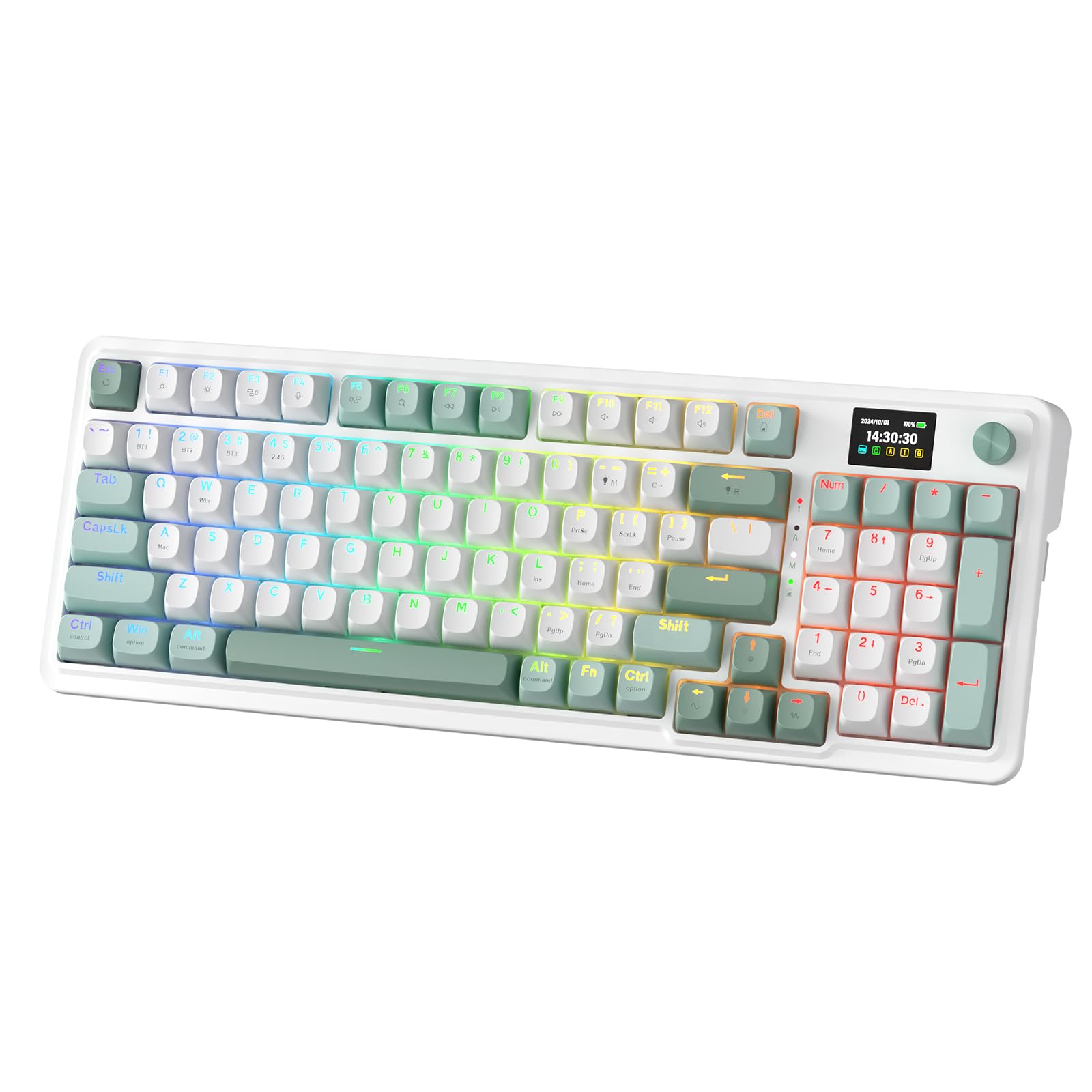 |
USB-C, Bluetooth, 2.4GHz | Custom Linear | N/A |
| SOLAKAKA KI99 Pro Wireless Mechanical Keyboard |
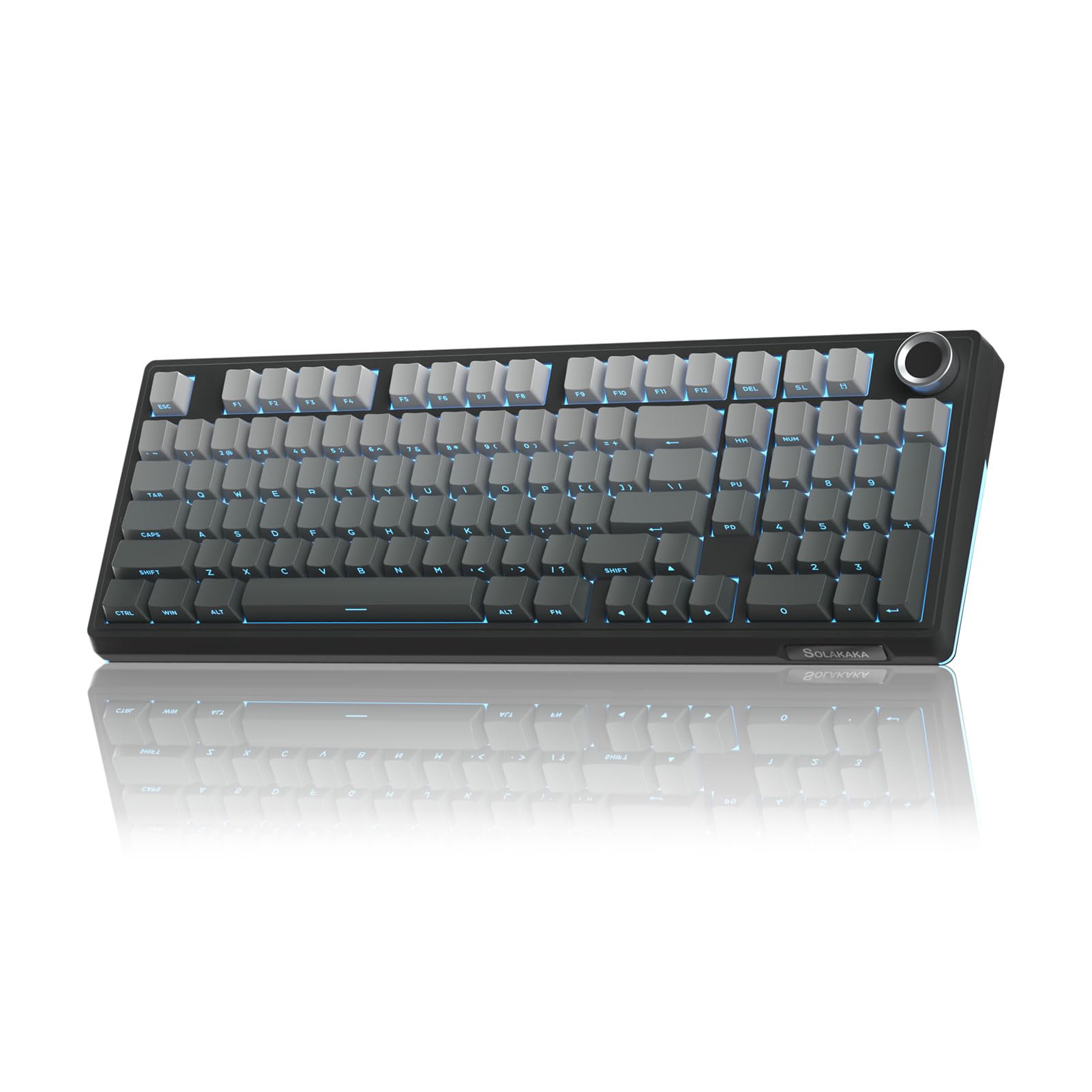 |
2.4GHz Wireless, BT, USB-C | Linear | N/A |
| MCHOSE UT98 Wireless Mechanical Keyboard |
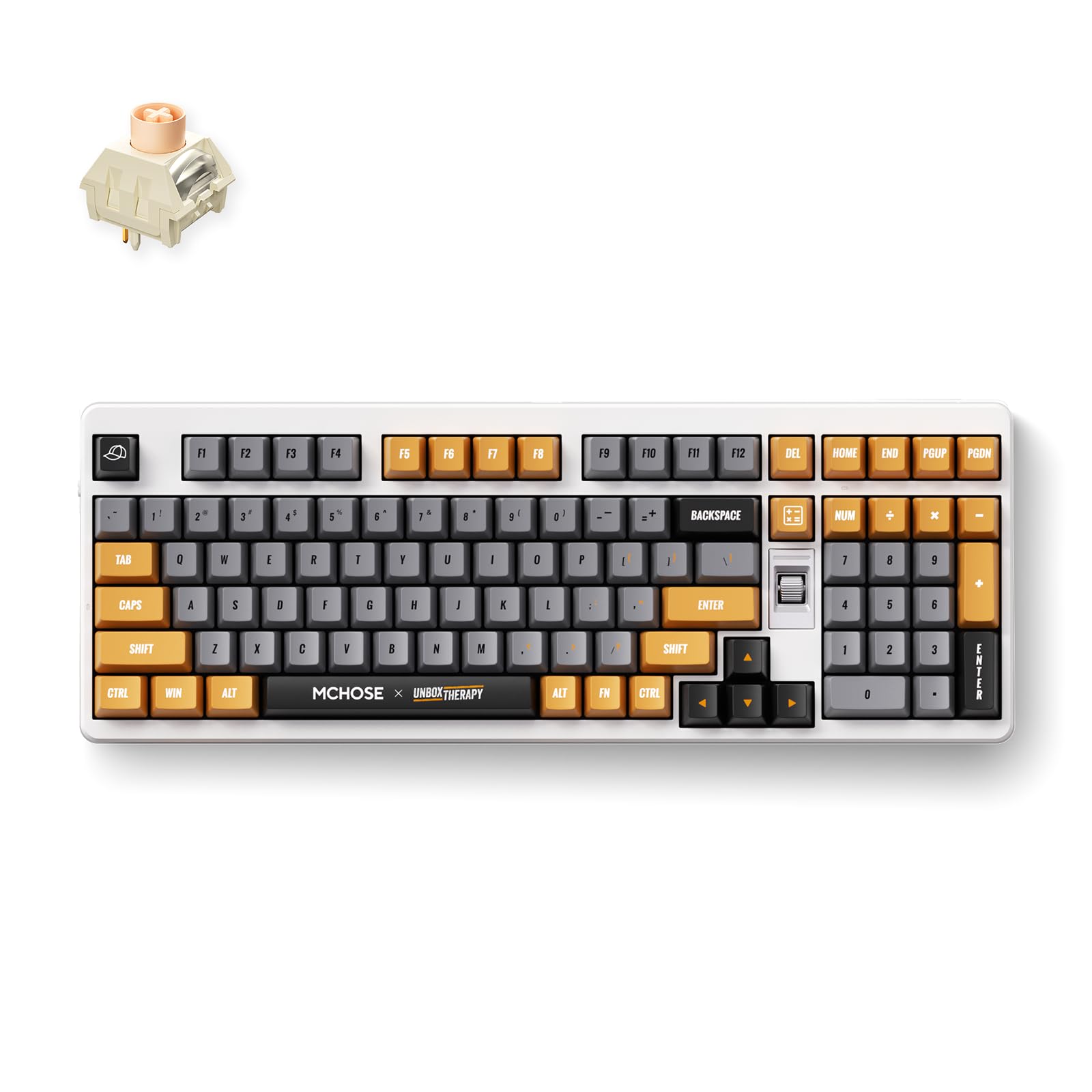 |
2.4GHz Wireless, BT5.0, USB-C | Linear | 15″L x 5″W x 2″H |
This Roundup is reader-supported. When you click through links we may earn a referral commission on qualifying purchases.