
Yes, OpenClaw can use GitHub Copilot. It supports GitHub Copilot as a native model provider, meaning you can power your OpenClaw agent with premium AI models like GPT-4o, Claude Opus, and Gemini Pro, all through your existing Copilot subscription, without juggling separate API keys for each provider. But before you dive in, there are a few important things to understand about how it works, which method suits your setup best, and what the real costs look like at scale.
What Is OpenClaw?
OpenClaw is an open-source, self-hosted AI agent framework that has taken the developer community by storm in 2026. Originally launched in late 2025 under the name “Clawdbot,” it went through a brief and chaotic rename to “Moltbot” before settling on its current name. Despite that rocky start, the project exploded in popularity, reaching over 335,000 GitHub stars in just 60 days, which is one of the fastest growth trajectories ever seen for an open-source AI tool.
At its core, OpenClaw is not just a coding assistant. It is an orchestration layer. You can connect it to messaging apps like Telegram, WhatsApp, and Discord, and have it execute shell commands, read and write files, manage Git repositories, and interact with GitHub, all in the background while you focus on other things. When paired with GitHub Copilot as its model backend, it becomes a remarkably powerful and cost-efficient agentic coding setup.
What Is GitHub Copilot?
GitHub Copilot is Microsoft’s AI-powered developer assistant and currently holds the largest market share of any AI coding tool, at around 42% as of early 2026. It is deeply integrated into VS Code and other IDEs, and its subscription plans give users access to a rotating catalog of frontier AI models including GPT-4o, Claude Sonnet, Claude Opus, and Gemini 2.5 Pro, all under a single monthly fee.
What makes Copilot particularly attractive for OpenClaw users is the pricing. At $10 per month for the Pro tier, you get 300 premium model requests. The Pro+ tier at $39 per month expands that to 1,500 premium requests. Compared to paying for each model’s API separately, this is a significantly better deal for light to moderate agentic usage.
The Two Ways OpenClaw Uses GitHub Copilot
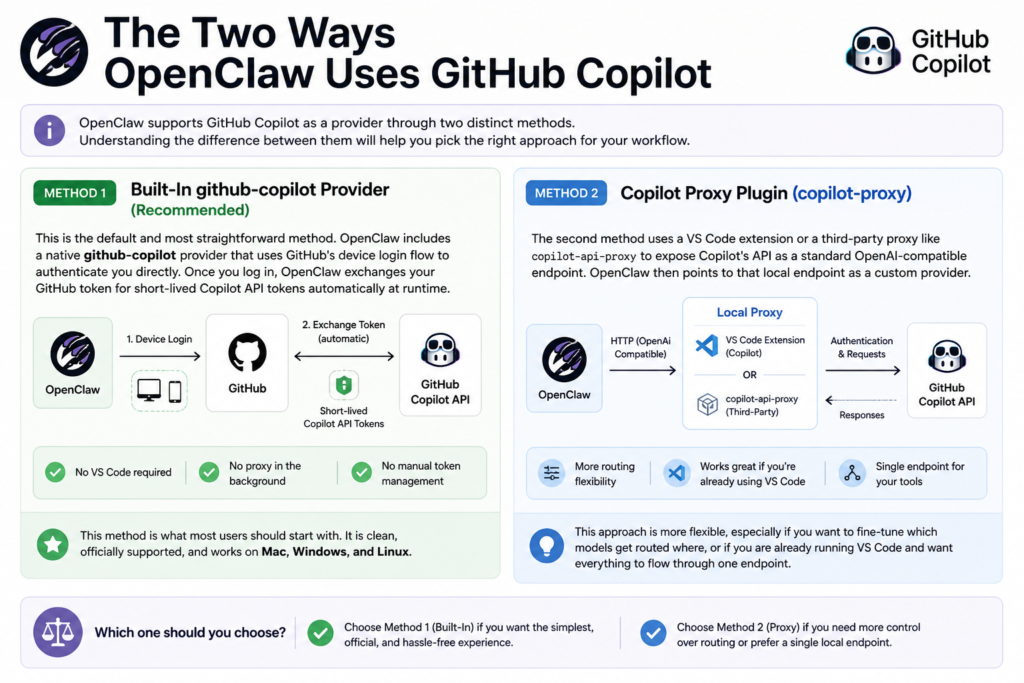
OpenClaw supports GitHub Copilot as a provider through two distinct methods. Understanding the difference between them will help you pick the right approach for your workflow.
Method 1: Built-In github-copilot Provider (Recommended)
This is the default and most straightforward method. OpenClaw includes a native github-copilot provider that uses GitHub’s device login flow to authenticate you directly. Once you log in, OpenClaw exchanges your GitHub token for short-lived Copilot API tokens automatically at runtime. No VS Code required, no proxy running in the background, and no manual token management.
This method is what most users should start with. It is clean, officially supported, and works on Mac, Windows, and Linux.
Method 2: Copilot Proxy Plugin (copilot-proxy)
The second method uses a VS Code extension or a third-party proxy like copilot-api-proxy to expose Copilot’s API as a standard OpenAI-compatible endpoint. OpenClaw then points to that local endpoint as a custom provider. This approach is more flexible, especially if you want to fine-tune which models get routed where, or if you are already running VS Code and want everything to flow through one endpoint.
Pro Tip: If you are running OpenClaw headlessly on a server or in a CI/CD environment, the built-in
github-copilotprovider is your best bet. The proxy method works great for local development setups where VS Code is already open, but it adds an extra dependency that can break if VS Code closes or restarts.
GitHub Copilot Plans vs. OpenClaw Use Cases
Here is a practical breakdown of which Copilot plan makes sense depending on how heavily you plan to use OpenClaw.
Keep in mind that every request routed through OpenClaw using a premium model (Claude Opus, GPT-4o, Gemini 2.5 Pro, etc.) counts against your monthly quota. Lighter models like GPT-4o mini and Claude Haiku are available on the unlimited tier, making them ideal for monitoring tasks, quick checks, or worker agents in a multi-agent pipeline.
Step-by-Step: Setting Up OpenClaw with GitHub Copilot
This walkthrough covers the built-in provider method, which the Official OpenClaw documentation recommends as the default path.
Step 1: Install Node.js 22+
OpenClaw requires Node.js version 22 or higher. This requirement was updated in early 2026 to support OpenClaw’s modern background daemon architecture and enhanced file watchers. Check your current version with node -v and update if needed via the official Node.js website or a version manager like nvm. Installing with Node 20 or below will cause the installation to fail.
Step 2: Install OpenClaw
Run the following commands in your terminal:
npm install -g openclaw
Or clone the repo directly if you prefer to build from source:
git clone https://github.com/openclaw/openclaw.git

cd openclaw

npm install
Step 3: Run the OpenClaw Setup
Launch the interactive setup wizard:
openclaw
When prompted for a model provider, select Copilot from the list.
Step 4: Choose Your Copilot Auth Method
You will be asked to choose between GitHub device login (OAuth) and a custom proxy. For most users, select GitHub Copilot (GitHub device login).
Step 5: Authenticate via Device Flow
OpenClaw will display a one-time device code and a URL. Visit https://github.com/login/device in your browser, enter the code, and authorize the app. Keep your terminal open until the process completes.
Step 6: Set Your Default Model
After authentication, OpenClaw will prompt you to choose a default model. You can set it manually using:
openclaw models set github-copilot/claude-opus-4.7
Or choose from the full list of available models with:
openclaw models list --all
Step 7: Start Using OpenClaw
That is it. Your OpenClaw agent is now running with GitHub Copilot as its backend. You can connect it to Telegram, WhatsApp, or any other supported channel and start delegating tasks.
Available Models Through Copilot in OpenClaw
One of the biggest advantages of using the Copilot provider is the sheer breadth of models it unlocks under a single subscription. Based on the current model catalog, here is what is available:
This is a significant value-add. Without Copilot, accessing Claude Opus, GPT-5, and Gemini 2.5 Pro separately through direct API keys would cost substantially more per month, especially with heavy agentic usage.
How OpenClaw + Copilot Compares to Other AI Coding Setups
If you are weighing OpenClaw with Copilot against standalone tools, here is an honest side-by-side view. In my experience testing these tools, the right choice really comes down to whether you want an IDE-first experience or an orchestration-first one.
For developers who already pay for GitHub Copilot and want to get more out of that subscription, OpenClaw is a genuinely compelling add-on. You are not paying for a new service; you are unlocking an entirely new use case from something you already own. This AI-Assisted Coding Tutorial covering OpenClaw, GitHub Copilot, and Claude Code is a great practical walkthrough if you want to see it all in action before setting it up yourself.
Does Using OpenClaw with Copilot Count Against Your Quota?

Yes, it does. This is one of the most important things to understand before you start. When OpenClaw routes requests through the github-copilot provider, it draws from your plan’s premium request allocation the same way the VS Code extension does. There is no separate pool for OpenClaw usage.
For light to moderate use, the Pro tier’s 300 monthly requests is usually enough. However, if you are running multi-agent workflows, launching several subagents in parallel, or doing long autonomous coding sessions, you can burn through that quota quickly. A Reddit user noted that running 13 subagents simultaneously hit rate limits fast. The Pro+ tier at $39 per month with 1,500 requests is much more comfortable for heavy agentic workloads.
Lighter models like Claude Haiku and Gemini Flash are not subject to the same premium limits and are great candidates for monitoring agents, quick file checks, or administrative subtasks within a larger workflow.
Security Considerations
Because OpenClaw has full shell access to your machine, security is not an afterthought. Here are the key things to keep in mind when running it with Copilot:
-
Never expose your OpenClaw port to the open internet. Use SSH tunneling or a private network tool like Tailscale to keep access locked down.
-
GitHub Copilot Business and Enterprise plans include IP indemnity and do not use your code for model training by default. The Free and Pro plans have different data usage policies, so review those before using OpenClaw with sensitive codebases.
-
Audit your shell commands regularly. OpenClaw can execute system-level commands, so it is worth reviewing logs and restricting its working directory to specific project folders if possible.
-
Token expiry is handled automatically by the built-in provider, but if you are using the proxy method, make sure your tokens are rotated and stored securely, not hardcoded in config files.
2026 Trends: Where OpenClaw and Copilot Are Heading
The trajectory for both tools in 2026 points firmly toward deeper integration and more autonomous workflows. GitHub’s official Copilot documentation and product updates have been expanding the Copilot API’s capabilities, with new model additions and improved token management that directly benefit OpenClaw’s provider integration.
On the OpenClaw side, the community is actively pushing for non-interactive setup options, which would allow Copilot authentication via environment variables instead of the device flow. This is a critical feature for CI/CD pipelines and containerized deployments where interactive logins are not possible.
Looking further ahead, the broader trend is toward federated multi-agent systems where OpenClaw acts as an orchestration hub, routing tasks to the most appropriate model based on complexity, cost, and context window requirements. Using Claude Haiku for lightweight monitoring while calling Claude Opus only for heavy reasoning tasks is already a popular pattern, and tooling around this is getting better every month.
Frequently Asked Questions
Can I use OpenClaw with a free GitHub Copilot account?
Yes, but with limitations. The free Copilot tier includes 50 premium requests per month. For basic experimentation, this works fine. For any real agentic workflow, you will want at least the Pro tier.
Do I need VS Code installed to use OpenClaw with Copilot?
No. The built-in github-copilot provider works entirely independently of VS Code. The VS Code proxy method is an alternative, not a requirement.
What happens if I exceed my Copilot premium request limit?
OpenClaw will hit API rate limit errors from the Copilot backend. You will need to either wait for your quota to reset, switch to unlimited-tier models like Gemini Flash or Claude Haiku, or upgrade your Copilot plan.
Can OpenClaw use local models if I run out of Copilot requests?
Yes. One of OpenClaw’s strengths is its model-agnostic design. You can configure Ollama as a fallback provider and have OpenClaw automatically route to local models when Copilot rate limits are hit.
Is the Copilot proxy method safe to use?
The community-maintained proxies like copilot-api-proxy are widely used and generally reliable, but they are not officially supported by GitHub. Use them with an understanding that they operate in a gray area of Copilot’s terms of service. The built-in provider is always the safer, officially endorsed path.
Can I use multiple models in one OpenClaw session?
Yes. You can configure OpenClaw to use different models for different agents within a single session. A common setup is GPT-4.1 for the initiator agent and Claude Opus for deep research subtasks, all running through the same Copilot provider.
Does OpenClaw support PAT (Personal Access Token) auth for Copilot?
As of early 2026, the built-in provider only supports OAuth tokens obtained via the interactive device flow. A feature request for PAT-based non-interactive auth is open on the GitHub repo, so this may change in future releases.
Bottom Line
OpenClaw works excellently with GitHub Copilot, and for developers already paying for a Copilot subscription, it is one of the most cost-efficient ways to run a capable AI agent. The built-in provider makes setup genuinely easy, the model selection is impressive, and the ability to delegate coding tasks through Telegram or WhatsApp while away from your desk is the kind of workflow upgrade that actually sticks. Just keep an eye on your premium request usage, and consider Pro+ if you plan to run intensive multi-agent workflows.



