
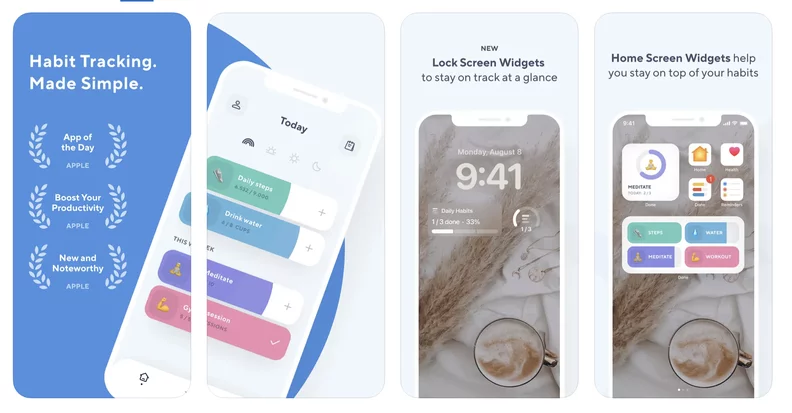
The best habit tracker apps for ADHD in mid 2026 are Tiimo, Habitica, Focus Bear, Finch, and TickTick. Each one tackles a different ADHD challenge, from time blindness and task paralysis to low motivation and routine building. But the “best” one really depends on what kind of support your brain actually needs, so read on before you pick one.
Managing habits when you have ADHD is genuinely hard. It is not a matter of laziness or lack of willpower. The ADHD brain struggles with executive function, dopamine regulation, and working memory, which means standard habit trackers with plain checkboxes and streak counters often fall flat within a week. The apps that actually work for ADHD brains are built differently. They use gamification, visual cues, AI scheduling, and gentle accountability to make habit-building feel achievable rather than exhausting.
Having spent a good amount of time testing and researching productivity tools for neurodivergent users, I can say that mid 2026 is one of the best times to be looking for an ADHD-friendly habit tracker. The category has matured significantly, and the gap between generic habit apps and genuinely ADHD-informed ones has never been clearer.
Why Regular Habit Trackers Fail ADHD Brains
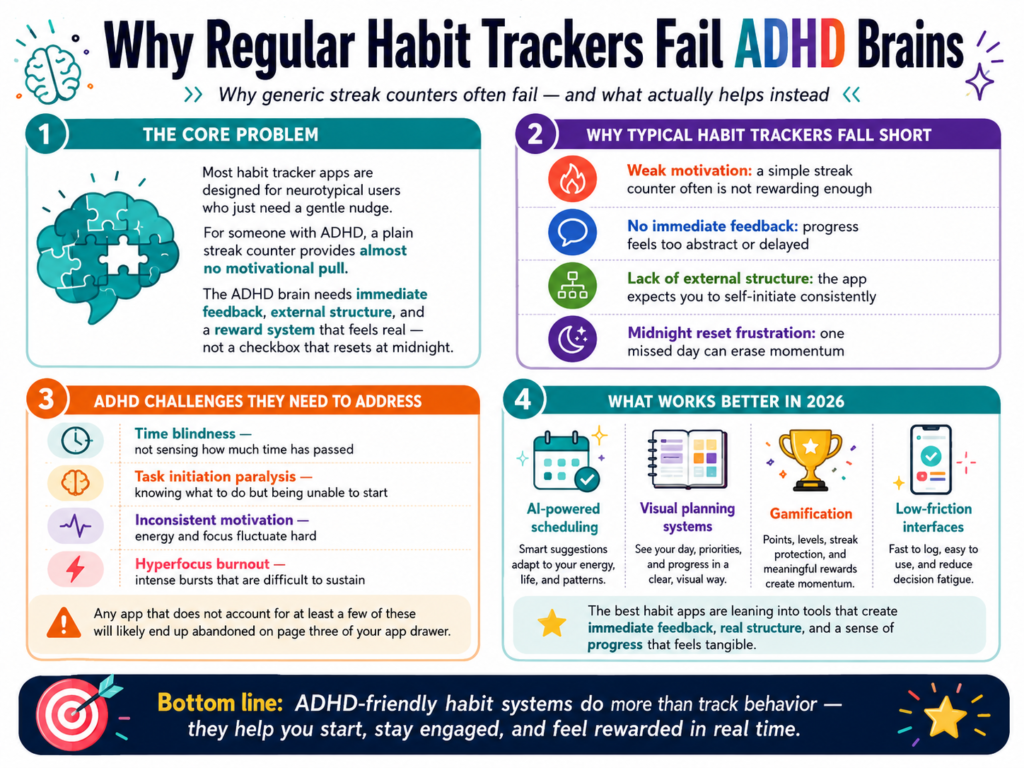
Most habit tracker apps are designed for neurotypical users who just need a gentle nudge. For someone with ADHD, a plain streak counter provides almost no motivational pull. The ADHD brain needs immediate feedback, external structure, and a reward system that feels real, not a checkbox that resets at midnight.
The core ADHD challenges that habit trackers need to address include time blindness (not sensing how much time has passed), task initiation paralysis (knowing what to do but being unable to start), inconsistent motivation, and hyperfocus that burns out quickly. Any app that does not account for at least a few of these will likely end up abandoned on page three of your app drawer.
The best apps in 2026 are leaning into AI-powered scheduling, visual planning systems, gamification, and low-friction interfaces to solve exactly these problems. Let us get into the specific apps.
The Best Habit Tracker Apps For ADHD in Mid 2026
1. Tiimo: Best for Visual Planning and Time Blindness
Tiimo is the standout recommendation for anyone whose biggest ADHD challenge is time blindness. It won Apple’s iPhone App of the Year for 2025 and it is easy to see why. The app uses icon-based visual schedules with countdown timers that make time feel tangible and real rather than abstract.
Business Insider’s hands-on review of Tiimo describes it as an “AI-powered visual planner marketed toward neurodivergent brains,” combining a smart AI chatbot assistant with daily planning tools. In 2026, Tiimo added deeper AI suggestions that help you plan your day without overwhelming you with choices. The interface is clean, colorful, and distraction-free, which matters a lot for ADHD users who get overwhelmed by cluttered screens.
The free plan gives you limited routines, while the Pro plan runs about $10 per month. It is available on iOS and Android. For anyone who has ever lost track of an entire afternoon because they could not “feel” time passing, Tiimo is genuinely worth trying.
Best for: Visual thinkers, people with time blindness, autistic or ADHD users who benefit from structured daily routines.
2. Habitica: Best for Gamification and Dopamine Rewards
Habitica is one of the oldest names in this space, and it remains one of the most effective for ADHD users specifically because of how it handles motivation. The app turns your real-life habits, daily tasks, and to-do list into a retro RPG game. You build a character, gain experience points for completing tasks, lose health points for missing habits, hatch pets, join parties, and go on quests, all tied directly to your real productivity.
What makes this work for ADHD is the instant feedback loop. Every time you tap a completed habit, your character gains XP and gold immediately. That split-second dopamine hit is what keeps people coming back, especially those whose brains are chronically under-stimulated by ordinary reward systems. Habitica keeps appearing in ADHD communities as the one tracker people actually stick with long term, and the data backs that up.
The base app is free, with a subscription option for cosmetic upgrades. One thing to be aware of: Habitica’s interface can feel busy, and some ADHD users find the initial setup overwhelming. Give it a few days to click.
Best for: People who have abandoned every other habit tracker within a week, gamers, anyone who responds well to external rewards and competition.
3. Focus Bear: Best Dedicated ADHD Productivity App
Focus Bear was built from the ground up by founder Jeremy Nagel, based on his own lived experience with AuDHD. It is less of a traditional habit tracker and more of a full productivity companion that blocks distractions, guides morning routines, and uses AI to notice when you drift off task and nudge you back. Jeremy is currently pursuing his PhD at Monash University to formally evaluate the app’s effectiveness in clinical trials, giving it a level of scientific grounding that most productivity apps lack.
The morning routine builder is one of its standout features. It walks you through each step of your morning with individual timers, turning an overwhelming sequence of tasks into a simple guided experience. During work sessions, it blocks distracting websites and apps across all your devices automatically. If you try to open a shopping site while you are supposed to be working, Focus Bear’s AI will catch it and redirect you.
When you first download Focus Bear, you get a 7-day free trial of all Pro features. Once that trial ends, the app reverts to a basic free tier rather than locking you out entirely, so you can still get meaningful value from it before committing to a paid plan. The full Pro subscription is available on Mac, Windows, iOS, and Android. For people with severe ADHD who need active intervention rather than passive tracking, it is hard to beat.
Best for: Adults with ADHD who need aggressive distraction blocking, morning routine support, and AI-powered accountability.
4. Finch: Best for Mental Health and Gentle Accountability
Finch takes a completely different approach. Instead of gamifying productivity or blocking your phone, it asks you to care for a virtual pet bird. You complete real-life self-care goals and habits to help your bird grow, travel the world, and thrive. It sounds simple, and it is, which is exactly the point.
For people whose ADHD comes bundled with anxiety, depression, or burnout, the high-pressure streak systems and punitive mechanics of some habit apps can make things worse. Finch is gentle by design. There is no punishment for missing a day. There is no aggressive notification spam. The emotional attachment to your bird provides a low-stress motivational pull that many neurodivergent users respond to better than competition or gamification.
Finch is free to download with an optional premium tier. It is widely used in ADHD and mental health communities, and many users specifically cite it as easier to stick with than clinical productivity tools.
Best for: People who find high-pressure apps anxiety-inducing, those managing both ADHD and mental health challenges, beginners who want to start small.
5. TickTick: Best All-in-One ADHD Productivity Hub
TickTick is not a habit tracker in the pure sense, but it earns its place on this list because it is one of the best tools for reducing the “app-hopping” problem that plagues ADHD users. It combines a to-do list, calendar, habit tracker, Pomodoro focus timer, and Eisenhower matrix all in one place. Fewer apps means fewer places to forget things.
The habit tracking inside TickTick is solid without being overwhelming. You can set recurring habits, view streak data, and get reminders, all within the same app you are already using to manage your tasks and schedule. For someone with ADHD who constantly loses track of which app contains which information, this consolidation is genuinely valuable.
TickTick has a generous free plan and a premium tier for around $3 per month. It is cross-platform across iOS, Android, Mac, Windows, and web.
Best for: People who want fewer apps, those who need task management and habit tracking in one place, users who keep falling off the habit-tracking wagon due to context switching.
6. Lunatask: Best for Privacy and All-in-One Neurodivergent Support
Lunatask is one of the lesser-known apps on this list but deserves more attention. It combines a to-do list, habit tracker, mood journal, Pomodoro timer, notebook, and calendar in a single encrypted app. The encryption angle matters for users who want privacy, which is increasingly rare in productivity software.
The interface is unconventional and takes a short adjustment period, but once it clicks, many users find it becomes their most-used daily tool. It is especially well-suited for neurodivergent users because the all-in-one design reduces the mental load of switching between separate apps for separate functions.
Lunatask offers a free tier and a paid plan for full features. It is available on iOS, Android, Mac, and Windows.
Best for: Privacy-conscious users, people who want everything in one encrypted app, those who benefit from mood and habit correlation tracking.
ADHD Habit Tracker App Comparison Table
What Features Should An ADHD Habit Tracker Have?
Not every habit app is worth your time, especially when your attention is already a limited resource. Here is what to look for when evaluating any ADHD habit tracker:
Low friction check-ins. If it takes more than two taps to log a habit, you will stop logging it. The best apps make completion feel effortless and instant.
Immediate positive feedback. The ADHD brain needs a reward signal right now, not at the end of a 30-day streak. Look for XP points, animations, sounds, or any kind of instant acknowledgment.
Gentle recovery from missed days. Apps that punish you heavily for breaking streaks are counterproductive for ADHD users. Missing a day should not feel catastrophic. Look for apps with streak repair options or no-punishment systems.
Visual cues and countdown timers. Abstract time is nearly meaningless to an ADHD brain. Apps that show time visually, whether through countdown clocks, progress bars, or color-coded schedules, are dramatically more effective.
Reminders that actually work. Standard push notifications are easy to dismiss. Look for apps that offer escalating reminders, widget-based nudges, or routine-linked alerts that are harder to ignore.
Minimal cognitive overload. Ironically, some productivity apps create more stress than they solve. A clean, focused interface matters. If the app itself feels overwhelming, it will never become a habit.
Step-by-Step: How to Actually Start Using a Habit Tracker With ADHD
Starting strong is half the battle. Here is a practical approach based on what actually works for ADHD brains:
-
Pick ONE app and commit to it for two weeks. App-shopping is a dopamine trap. Choose one from this list and stick with it long enough to get past the setup friction.
-
Start with just two or three habits maximum. Starting with ten habits feels exciting and fails immediately. Start small, earn the right to add more.
-
Attach each habit to something you already do. This is called habit stacking. “After I make coffee, I open the app” is far more reliable than “I will remember to check my habits at 8am.”
-
Set up your home screen widget immediately. Out of sight is out of mind for ADHD. Put your habit tracker widget on your phone’s main home screen so it is the first thing you see.
-
Use the gamification or pet features if the app has them. Do not skip these as “silly.” They exist specifically because the ADHD brain responds to these reward signals.
-
Give yourself grace for missed days. One missed day does not erase your progress. Get back to it the next day without judgment.
-
Review your streaks or stats once a week. A quick five-minute weekly review of what you completed helps reinforce the behavior and gives you a dopamine boost from seeing your own progress.
Pro Tip: If you have been burned by habit trackers before, the problem probably was not your discipline. It was the app. Most habit trackers are built for neurotypical brains with consistent motivation. Try Finch if you need a pressure-free start, or Habitica if you need the gamification hook. Either way, start with no more than two habits for the first two weeks. Consistency beats ambition every time.
2026 Trends in ADHD Habit Tracking
The biggest shift in 2026 is the integration of AI into habit tracking. Apps like Tiimo and Focus Bear are now using AI to dynamically reschedule tasks when you fall behind, suggest optimal times for specific habits based on your past behavior, and gently intervene when you go off track. This is a huge deal for ADHD users who often struggle with rigid schedules that break the moment one thing goes wrong.
There is also a growing focus on neurodivergent-first design. More developers are building ADHD considerations in from day one rather than adding them as afterthoughts. This means cleaner interfaces, less punitive mechanics, and better integration with tools like Apple Health and Google Calendar.
ADDitude Magazine’s ongoing coverage of ADHD technology highlights how the most effective digital tools for ADHD now go beyond simple reminders and focus on building genuine behavioral patterns over time. The best apps in 2026 are the ones that work with the ADHD brain rather than fighting against it.
For a deeper look at how visual planning and gamification specifically support ADHD habit building, this Tiimo App Review 2026 on YouTube does a thorough job of walking through exactly how visual scheduling reduces cognitive load for neurodivergent users.
Frequently Asked Questions
What is the best habit tracker for ADHD adults in 2026?
Tiimo is the top overall pick for most ADHD adults in 2026 thanks to its visual planning, AI integration, and time blindness support. Habitica is the best choice if gamification is what keeps you motivated. Focus Bear is the strongest option for people who need active distraction blocking alongside habit tracking.
Do habit tracker apps actually help with ADHD?
Yes, but only the right ones. Generic habit apps with plain streak counters rarely work long-term for ADHD brains. Apps designed around immediate feedback, visual cues, and low-friction check-ins have a much stronger track record in the ADHD community.
Is Habitica good for ADHD?
Habitica is one of the most consistently recommended apps in ADHD communities specifically because of its instant reward system. The RPG mechanics provide the kind of immediate dopamine feedback that the ADHD brain responds to. The setup takes some effort, but once it is running, it is one of the stickiest habit tools available.
Is Finch app good for ADHD?
Finch is excellent for people whose ADHD comes with anxiety or depression. Its zero-punishment design and virtual pet mechanic create a low-stress form of accountability. It is not the most powerful habit tracker in terms of features, but for gentle habit building, it is hard to beat.
What is the best free habit tracker for ADHD?
Habitica offers the best free experience for ADHD users. The core functionality, including RPG mechanics, habit tracking, and community features, is fully available on the free plan. TickTick also has a strong free tier that covers habits, tasks, and focus timers.
How many habits should someone with ADHD track at once?
Start with two or three maximum. The temptation to track ten things at once is real, but it almost always leads to abandonment. Building the habit of using the app itself is the first and most important habit. Add more only after you have been consistent for two to four weeks.
Does TickTick work for ADHD?
TickTick works well for ADHD users who struggle with app-hopping between separate tools. By consolidating tasks, habits, a calendar, and a focus timer in one place, it reduces the mental overhead of managing your day. The habit features are not as deep as a dedicated tracker, but for most users they are more than enough. According to Flown’s 2026 roundup of ADHD apps, TickTick’s strength lies specifically in reducing the context-switching that causes so many ADHD users to lose track of their routines.
What should I look for in an ADHD habit tracker?
Look for low-friction check-ins, immediate visual feedback, gentle recovery from missed days, widget support, and a clean interface that does not create cognitive overload. Bonus points for gamification, AI scheduling, and integration with your calendar.
Bottom Line
The best ADHD habit tracker in mid 2026 is the one you will actually use, which means matching the app to your specific challenges. Tiimo for time blindness. Habitica for gamification. Focus Bear for active distraction blocking, with a free basic tier to get started. Finch for gentle, low-pressure habit building. TickTick if you want everything in one place. Start with two habits, put your widget on the home screen, and give it two full weeks before deciding if it works for you.



