

Claude Code keeps crashing because of a handful of well-documented issues: oversized project log files, memory leaks in certain versions, Node.js misconfiguration, WSL environment problems, and authentication errors. The good news is that almost every crash scenario has a clear, fixable cause, and this guide walks you through all of them with actionable tips that actually work.
That said, before you start tweaking settings or reinstalling everything, there are a few things worth understanding about how Claude Code manages memory and session data. Getting that context first will save you a lot of time and frustration.
What Is Claude Code and Why Does It Crash?
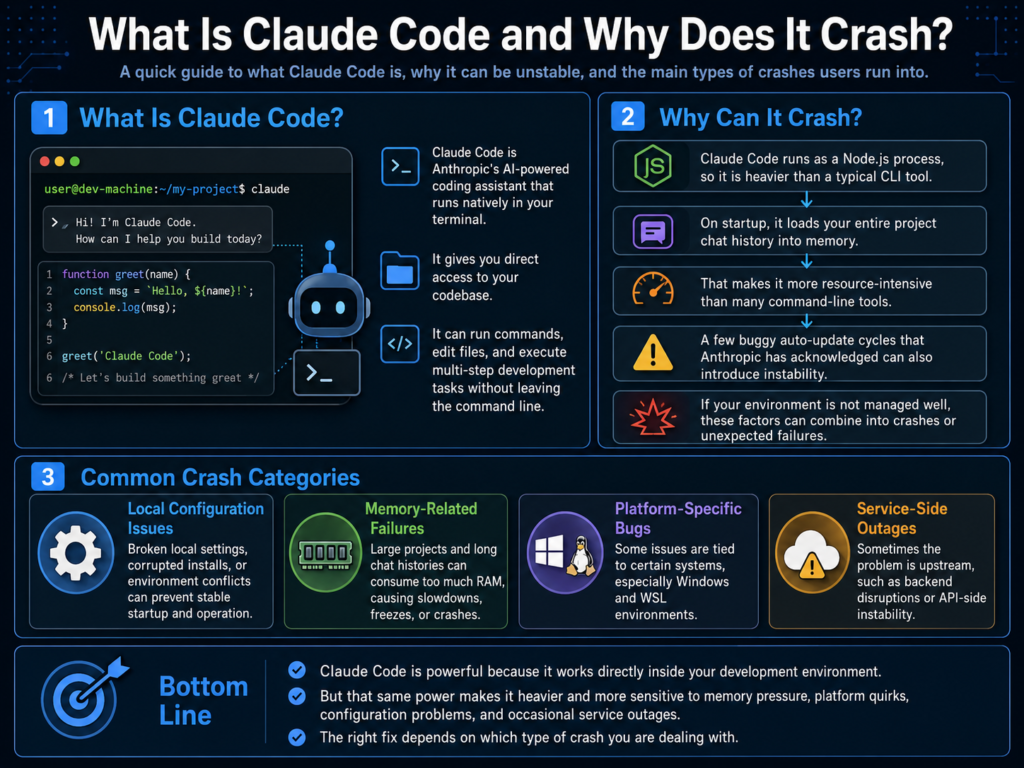
Claude Code is Anthropic’s AI-powered coding assistant that runs natively in your terminal. It gives you direct access to your codebase, can run commands, edit files, and execute multi-step development tasks without you ever leaving the command line.
Because it runs as a Node.js process and loads your entire project chat history into memory on startup, it is more resource-intensive than a typical CLI tool. Pair that with a few buggy auto-update cycles that Anthropic has acknowledged, and you have a recipe for instability if you are not managing your environment properly.
The crashes generally fall into a few categories: local configuration issues, memory-related failures, platform-specific bugs (especially on Windows/WSL), and service-side outages. The fix depends on which one you are dealing with, and this guide covers all of them.
Quick Answer: Why Does Claude Code Keep Crashing?
The most common reasons Claude Code crashes are:
-
Oversized
.jsonlproject log files consuming too much memory on startup -
Memory leaks in specific Claude Code versions (notably v2.1.71)
-
Node.js version incompatibility (requires Node 18.0 or higher)
-
WSL environment misconfiguration on Windows
-
Corrupted settings or malformed JSON in config files
-
Auto-update bugs that modify file permissions unexpectedly
-
Running out of API credits or hitting rate limits
Now let us get into the actual fixes.
10 Excellent Tips to Fix Claude Code Crashing

Tip 1: Delete Oversized Project Log Files
This is the single most common reason Claude Code crashes on startup, and it is also the easiest fix to overlook.
Claude Code stores project chat history as .jsonl files inside ~/.claude/projects/. The problem is that it loads the entire chat history for your current project into memory every time it launches. If that file has grown to several hundred megabytes or even a few gigabytes, the process either crashes immediately or drags your system to a near halt.
A developer on LinkedIn documented exactly this issue: Claude crashed on startup with an opaque error, and the root cause turned out to be a single multi-GB log file in the projects folder. Deleting it brought Claude Code back online immediately, no reinstall required.
Run this command to find any oversized log files:
find ~/.claude/projects -name "*.jsonl" -size +200MReview what comes up and delete any files that are bloated. If you are working on an active project and do not want to lose context, use the /compact command inside Claude Code before your next long session. This compresses conversation history significantly.
Tip 2: Check for Known Memory Leak Versions and Pin a Stable Build
Not all crashes are your fault. Claude Code has shipped versions with confirmed, acknowledged memory leaks.
Version v2.1.71 is the primary culprit for the most damaging 2026 memory leak incident, tracked under GitHub Issue #32546. This version caused unbounded ArrayBuffer growth tied to zombie Python processes and Opus 4.6 API streaming, where undici HTTP response body buffers were not being properly released after each stream. While the JavaScript heap remained relatively stable at around 77 to 126MB, the external native ArrayBuffer allocations climbed without limit until the system exhausted its available RAM. Another well-documented memory leak appeared earlier in v1.0.81, causing unbounded memory growth across macOS, Linux, and Windows.
If you are on a recently auto-updated version and things suddenly became unstable, version pinning is your friend. You can disable auto-updates and roll back to a stable build using:
export CLAUDE_CODE_DISABLE_AUTOUPDATE=1

npm uninstall -g @anthropic-ai/claude-code

npm install -g @anthropic-ai/claude-code@[stable-version]
You can also monitor memory in real time by using the /heapdump command inside Claude Code and watching the arrayBuffers field. If it is climbing without bound, you are dealing with a memory leak.
💡 Pro Tip: Before updating Claude Code to any new version, check the r/ClaudeCode subreddit or the official GitHub issues page first. The community usually surfaces memory leak reports within hours of a bad release. Five minutes of checking can save you hours of debugging.
Tip 3: Run the Built-In Diagnostics First
Before you dig into any complex fix, always run the built-in /doctor command. It is the fastest way to identify what is actually broken.
Important: /doctor is a slash command, which means it runs inside an active Claude Code interactive session, not as a standalone terminal command. If you type claude doctor in your terminal without quotes, Claude Code will interpret “doctor” as your opening prompt and start a coding session about doctors. To use it correctly, you have two options:
Option A: Start Claude Code first, then type the slash command inside the session:
/doctorOption B: Pass the slash command directly from your terminal using quotes:
claude "/doctor"This command checks for installation and version issues, auto-update status, malformed settings JSON, MCP configuration errors, keybinding conflicts, context warnings, and plugin loading problems. The /doctor command is designed to be your first 30-second triage step, and many teams treat it as a mandatory starting point before doing anything else.
If /doctor flags a specific issue, fix that first before trying anything else. It often catches the highest-probability culprits immediately, like an invalid settings file or a misconfigured MCP server.
Tip 4: Fix Node.js Version Issues
Claude Code requires Node.js 18.0 or higher. If you are running an older version, expect unstable behavior, failed installations, or crashes that appear completely unrelated to Node.js at first glance.
On Windows with WSL, this is especially common because the default Node.js version in some Linux distributions is significantly outdated. Installing Node.js through your Linux distribution’s package manager can also produce version conflicts. The recommended approach for WSL users is to install Node.js via NVM (Node Version Manager), which gives you full control over which version is active.
nvm install --lts

nvm use --lts
Verify your Node version at any time with node -v. If it shows anything below 18.x, that is a likely crash contributor. This step-by-step WSL setup guide on YouTube walks through the full installation process including Node.js, Git, and Claude Code authentication if you want a visual walkthrough.
Tip 5: Set a Node.js Heap Memory Limit
Even on a healthy version of Claude Code, working with large codebases or running long sessions can push the Node.js process past its default memory limit. By default, Node.js has a heap size limit that can be as low as 1.5GB on some systems, which is not a lot for a tool loading large project contexts.
You can launch Claude Code with an explicit heap limit to prevent out-of-memory crashes:
NODE_OPTIONS="--max-old-space-size=4096" claudeThis sets a 4GB heap limit. If your system has the RAM to support it, you can increase this further. This is particularly useful if you are working on large monorepos or projects with extensive conversation histories that you have not yet compacted.
Tip 6: Fix WSL Freezing and Crashing on Windows
Windows users running Claude Code through WSL (Windows Subsystem for Linux) face a specific set of stability issues that are different from macOS and native Linux. Crashes in WSL environments are commonly caused by path resolution errors, incorrect /etc/wsl.conf configuration, and missing environment variables.
A frequently confirmed fix for WSL freezing is to add the following line to your ~/.bashrc or ~/.zshrc:
export USERPROFILE=$(wslpath -u $(pwsh.exe -NoLogo -NoProfile -Command 'Write-Output ${env:USERPROFILE}'))Then run source ~/.bashrc to apply the change immediately. Additionally, ensure your /etc/wsl.conf is correctly formatted and restart WSL completely via PowerShell:
wsl --shutdownIf you are dealing with persistent instability on Windows, the most reliable workaround reported by the community is running Claude Code inside a Docker container, which sidesteps most of the filesystem and stability challenges tied to WSL2 entirely.
Tip 7: Repair Authentication and Re-Authenticate
Authentication failures can cause Claude Code to behave erratically, throw unexpected errors, or crash mid-session in ways that look like something else entirely.
If Claude Code is using a stale session token or your API key has been rotated, the tool may fail silently or crash without a clear error message. On macOS, authentication can break because of issues writing to the system Keychain.
Important: /logout is a slash command just like /doctor. Do not type claude logout in your terminal bare, as Claude Code will treat “logout” as a prompt. Use it correctly with one of these two methods:
Option A: Inside an active Claude Code session, type:
/logoutOption B: Pass it from the terminal using quotes:
claude "/logout"After logging out, relaunch Claude Code with claude to trigger a fresh browser-based OAuth login.
If you are using an API key rather than browser-based OAuth, Claude Code relies entirely on the ANTHROPIC_API_KEY environment variable. There is no built-in config command for setting credentials. To update your API key, add or update this line in your shell profile (~/.zshrc or ~/.bashrc):
export ANTHROPIC_API_KEY=your_new_api_key_hereThen apply the change immediately:
source ~/.zshrcIf you are a Claude Pro or Max subscriber using browser-based OAuth and need to set a token manually instead, use the OAuth token environment variable:
export CLAUDE_CODE_OAUTH_TOKEN=your_oauth_token_hereYou can verify which authentication method is currently active at any time by running /status inside a Claude Code session.
For macOS users, if re-authenticating does not resolve the issue, remove the stored credential from Keychain entirely using the Keychain Access app and let Claude Code create a fresh token on next login.
Tip 8: Clear and Compact Context Regularly
Context overload is one of the most underappreciated causes of Claude Code instability. The tool loads full project conversation history into memory, and if that context gets unwieldy, sessions slow down, responses degrade, and in extreme cases the process can crash.
The /clear command resets the context window entirely, starting your session fresh. The /compact command is a smarter option that compresses the conversation history into a summary while retaining essential context, similar to summarizing your notes instead of throwing them away.
As a general best practice, use /compact at natural breakpoints in your workflow, especially before switching to a new task or feature. This video on fixing Claude Code session issues does an excellent job explaining how to manage context intentionally so sessions stay stable and focused.
Tip 9: Set Up a Proper CLAUDE.md File
One of the less obvious causes of Claude Code behaving unpredictably, degrading mid-session, or repeatedly failing to complete tasks is simply that it lacks the project context it needs to operate well.
The CLAUDE.md file is loaded into every Claude Code session automatically and serves as a persistent briefing for the AI. Without it, Claude Code has to rediscover your project structure, tech stack, and conventions from scratch every session, which wastes context window space and increases the chance of errors that cascade into session instability.
A good CLAUDE.md should include your project overview and tech stack, key build and test commands, project structure notes, and any critical rules like “never commit secrets” or specific framework constraints. Keep it under 300 lines. The shorter and more targeted it is, the more effectively it loads into context without bloating the session.
For a deep dive on how to structure this file properly, Buildcamp’s 2026 CLAUDE.md guide is one of the most thorough resources available and aligns closely with official Anthropic recommendations.
Tip 10: Handle Rate Limits Without Crashing Your Workflow
Rate limits do not cause Claude Code to crash in the traditional sense, but they do cause it to stop mid-task and throw errors that many users mistake for bugs or crashes. Understanding how the limits work helps you avoid them and recover from them faster.
Claude Pro users have rolling per-session usage limits that reset every 5 hours, with a separate weekly limit on top. Claude Max subscribers get significantly higher throughput. When you hit a rate limit, the fastest options are to use /compact to reduce your token footprint, switch to a lighter model like Sonnet instead of Opus for routine tasks, or wait for the per-minute limit to reset, which typically takes 5 to 15 minutes.
If you are hitting rate limits regularly during heavy coding sessions, switching to pay-as-you-go API billing via the Anthropic Console gives you more predictable access without the session caps. Set your ANTHROPIC_API_KEY in your shell profile as described in Tip 7 and you are no longer subject to the subscription tier limits.
Claude Code Crash Causes: Quick Reference Table
Step-by-Step: What to Do When Claude Code Crashes

Step 1: Check Anthropic’s service status page before doing anything. Some failures are platform-side outages, not local problems. No point debugging a working machine.
Step 2: Start a Claude Code session and run /doctor (or run claude "/doctor" from your terminal). Read every line of the output and fix the first flagged issue before moving on.
Step 3: Check your .jsonl log file sizes using find ~/.claude/projects -name "*.jsonl" -size +200M. Delete anything large.
Step 4: Verify your Node.js version with node -v. If it is below 18.x, update immediately via NVM.
Step 5: Check your Claude Code version against known buggy releases, especially v2.1.71. If you recently auto-updated and things broke, pin a stable version.
Step 6: Run /logout inside a Claude Code session (or claude "/logout" from the terminal) to clear stale session tokens. Relaunch Claude Code to trigger a fresh login.
Step 7: If you are using API key authentication, verify ANTHROPIC_API_KEY is correctly set in your ~/.zshrc or ~/.bashrc. Run /status inside a session to confirm which auth method is active.
Step 8: Launch with a higher memory heap using NODE_OPTIONS="--max-old-space-size=4096" claude to rule out memory ceiling issues.
Step 9: If you are on Windows/WSL, apply the USERPROFILE fix in your shell config and restart WSL completely.
Step 10: If nothing works, use /bug inside Claude Code to report the issue to Anthropic with full diagnostic context automatically included.
2026 Trends: What Is Changing With Claude Code Stability
Claude Code has evolved rapidly through late 2025 and into 2026, and Anthropic has been actively addressing stability. The v2.1.49 update earlier this year specifically targeted memory leak fixes and brought measurable stability improvements. Anthropic also published a transparency postmortem in April 2026 addressing quality regression reports, which shows the team is taking reliability seriously.
From a best practices standpoint, the community has shifted toward using Docker containers for Windows users instead of relying on WSL2, treating CLAUDE.md as a foundational project file rather than an afterthought, and using plan mode more deliberately before executing complex multi-file changes. These practices reduce crash frequency and improve session consistency significantly.
The trend in 2026 is also moving toward more granular model selection: using Haiku for quick edits, Sonnet for standard development work, and reserving Opus only for architecturally complex decisions. This approach not only reduces costs but lowers the likelihood of hitting rate limits that disrupt your workflow.
FAQs: Claude Code Crashing
Why does Claude Code crash immediately on startup?
The most common cause is an oversized .jsonl project log file in ~/.claude/projects/. Claude Code tries to load the full project history into memory on startup, and a multi-gigabyte file can crash the process before it ever opens. Find and delete any files over 200MB in that directory.
Does reinstalling Claude Code fix crash issues?
Usually not, at least not on its own. Most crashes are caused by configuration issues, oversized log files, or version-specific bugs that a fresh install will not resolve if the underlying data or environment stays the same. Run /doctor and check your log files before reinstalling.
Is Claude Code crashing more common on Windows?
Yes. Windows users, especially those running Claude Code through WSL, experience a higher rate of instability due to filesystem path issues, permission handling differences, and WSL configuration edge cases. Running Claude Code inside a Docker container on Windows is the most stable approach if you keep hitting WSL-specific issues.
What is the /compact command and how does it help?
/compact compresses your current conversation history into a summarized form, freeing up context window space without losing the essential thread of your session. It is particularly helpful before switching tasks and is one of the most effective ways to prevent memory-related slowdowns and crashes in long sessions.
Can a bad CLAUDE.md file cause crashes?
Indirectly, yes. A bloated or poorly structured CLAUDE.md wastes context window space on every session, which can contribute to degraded performance and errors over time. Keep your CLAUDE.md under 300 lines and focused on truly project-specific information.
What Node.js version does Claude Code require?
Claude Code requires Node.js 18.0 or higher. Running it on an older version can cause install failures and unexpected crashes. Always use NVM to manage Node.js versions, especially on WSL.
How do I set my Anthropic API key for Claude Code?
Claude Code uses the ANTHROPIC_API_KEY environment variable for API key authentication. Add export ANTHROPIC_API_KEY=your_key_here to your ~/.zshrc or ~/.bashrc and run source ~/.zshrc to apply it. If you are a Pro or Max subscriber using OAuth, you can set export CLAUDE_CODE_OAUTH_TOKEN=your_token instead. Run /status inside a session to confirm which method is active.
How do I report a Claude Code bug to Anthropic?
Use the /bug command inside Claude Code. It automatically includes your session diagnostics, error context, and reproduction details when it submits the report, making it far more useful than a manual GitHub issue.
Bottom Line
Claude Code is a powerful tool but it does require some environment hygiene to stay stable. In my experience, the vast majority of crashes trace back to just two things: oversized project log files and running a version with a known memory leak. Clean those up first, run /doctor inside your session, and you will resolve most issues before they become a real headache. The tips above cover every major crash scenario in one place so you do not have to piece together fixes from a dozen forum threads.



