 Skip to content
I put together this guide because choosing the right laptop for coding matters more than you might think. A good coding laptop saves time when compiling, keeps your workflow fluid when running containers or VMs, and reduces distractions with a reliable keyboard, battery life, and screen.
In this guide I focus on the real-world tradeoffs developers face — performance where you need it, battery life for mobile work, and value for your budget — so you can pick a machine that actually improves how you code and ship projects.
Top Picks
| Category | Product | Price | Score |
|---|---|---|---|
| 🏆 Best Portability | $749.00 | 95/100 | |
| 🚀 Best Performance | $3,099.00 | 97/100 | |
| ⭐ Best for Creators | $2,899.99 | 98/100 | |
| 💼 Best for Business | $1,599.99 | 92/100 | |
| 🎯 Best Productivity Power | $799.99 | 93/100 | |
| 💰 Best Value Performance | $420.00 | 88/100 | |
| 🔰 Best for Multitasking | $399.99 | 86/100 | |
| 💼 Best Student Pick | $329.99 | 81/100 | |
| 💸 Most Affordable | $299.99 | 75/100 |
How I Picked These Laptops
I evaluated machines the way I would choose one for my own coding work. Key factors I prioritized: CPU performance (single-core and multithreaded), memory and upgradeability (IDE, containers, browsers eat RAM), SSD speed and capacity (fast builds and quick VM snapshots), keyboard and trackpad quality (comfort during long sessions), battery life (work away from a desk), display clarity and resolution (more screen real estate helps with split panes), thermals and sustained performance (so it doesn’t thermal throttle during long builds), OS and ecosystem (macOS vs Windows vs Linux friendliness), and value for money. I also considered portability and ports because many developers switch between home, office, and coffee shop setups.
Each pick emphasizes the strength that matters most for a specific coding use case.
🏆 Best Portability

I reach for this MacBook Air when I need a laptop I can actually carry all day without feeling weighed down. It’s thin and light, yet the M4 chip makes day-to-day coding, running local servers, and juggling browser tabs feel smooth.
For me, it’s perfect for coffee-shop work, classes, or hopping between meetings. The battery lasts long enough that I rarely scramble for an outlet during a full workday, and the bright Liquid Retina display makes reading docs and debugging easier on the eyes. I also appreciate how well it plays with other Apple devices — sharing quick snippets or testing mobile web layouts is painless. If you want a reliable, portable laptop that keeps your workflow steady whether you’re at home or on the move, this is one I often recommend.
Long-Term Savings
Good battery longevity and durable build can reduce replacements and accessory spending. macOS stability and resale value help the device hold value over several years.
Use Cases
| Situation | How It Helps |
|---|---|
| Remote work or coworking | Lightweight build and long battery life let me work all day in cafés or on trains without hunting for power. |
| Pair programming or meetings | Clear display, good webcam, and quiet operation make screen sharing and video calls feel professional. |
| On-the-go prototyping | Fast app launches and responsive UI let me iterate on ideas quickly, even when away from my desk. |
Ease Of Use
| Feature | Ease Level |
|---|---|
| Setup & macOS familiarity | Easy |
| Keyboard & trackpad | Very Easy |
| Port availability (adapters sometimes needed) | Moderate |
Versatility
Great for everyday development work, light editing, and media consumption; not aimed at heavy GPU compute but handles most developer tasks comfortably.
Expertise Level
Suitable for students, web and app developers, and anyone who values portability over raw workstation power.
Performance
Snappy for compiling, running local servers, and multitasking thanks to the M4 chip and 16GB unified memory.
Reliability
Solid — stable macOS experience, quiet cooling, and strong battery life make it dependable for daily coding routines.
Key Benefits
- Exceptional portability — light and easy to carry
- Long battery life for full workdays away from a charger
- Smooth performance for editing, compiling and multitasking
- Crisp 13.6-inch Liquid Retina display that’s easy on the eyes
Current Price: $749.00
Rating: 4.8 (total: 4,071+)
💼 Best Student Pick

I keep this HP on my list when someone asks for a solid student laptop that won’t break the bank. It’s roomy enough for multiple browser tabs and a couple of apps, the touchscreen is handy for quick notes, and the battery + Fast Charge means you can get through classes or a study session without hunting for an outlet. It’s not a workstation for heavy compiling or video editing, but for online classes, light coding, writing, and streaming it’s dependable. The built-in privacy shutter and decent webcam make video calls less awkward, and the mix of ports means you can plug in a monitor or accessories without adapters.
If you want a straightforward, fuss-free machine for school and everyday tasks, this one hits the right balance.
Long-Term Savings
Energy-efficient design, EPEAT Gold and ENERGY STAR registration, plus an SSD (fewer mechanical failures) and a one-year warranty reduce the odds of early replacement costs.
Use Cases
| Situation | How It Helps |
|---|---|
| Classrooms and study sessions | The screen size and battery life make it easy to keep notes, slides, and browser tabs open all day without feeling cramped. |
| Remote classes and video calls | The HD webcam with AI noise reduction and the physical camera shutter make lectures and group calls feel clearer and more private. |
| On-the-go work or commuting | It’s light enough to toss in a backpack and the Fast Charge gets you back to usable battery quickly between stops. |
Ease Of Use
| Feature | Ease Level |
|---|---|
| Initial setup & Windows familiarity | Easy |
| Touchscreen interaction | Very Easy |
| Copilot button and software helpers | Moderate |
| Connecting peripherals and ports | Easy |
| Battery charging and Fast Charge | Very Easy |
Versatility
Good for students, casual developers, and anyone who needs a reliable everyday laptop — handles browsing, document work, light scripting, and media well but isn’t built for heavy GPU tasks.
Expertise Level
Best suited to students, beginners, and casual developers who need a practical, easy-to-use machine rather than a high-end workstation.
Performance
Responsive for web development, light compiling, multitasking with a few apps, and fast boot/load times thanks to the PCIe SSD and LPDDR5 memory.
Reliability
Solid for everyday use — decent build, long battery estimates, and a one-year hardware warranty give peace of mind for daily workflows.
Key Benefits
- Affordable price with decent everyday performance
- Large 15.6-inch HD touchscreen for notes and media
- Fast SSD and LPDDR5 RAM for responsive day-to-day use
- Long battery life plus HP Fast Charge to top up quickly
- Privacy shutter and noise-reducing webcam for calls
Current Price: $329.99
Rating: 4.5 (total: 991+)
🔰 Best for Multitasking

I keep recommending this HP 15 when someone needs a no-nonsense laptop that can actually handle juggling lots of tabs and apps. With 16GB of RAM and a PCIe SSD it feels responsive for day-to-day development: editors, terminals, local servers and a dozen browser tabs all coexist without slowing me down.
The 15.6″ Full HD screen gives enough room to tile an editor and docs side-by-side, and the full-size keyboard with numeric pad makes long coding sessions more comfortable. It’s not aimed at heavy GPU work or massive compile farms, but for remote meetings, writing, light compiling and general multitasking it’s a dependable, pleasantly simple machine I’d suggest if you want more oomph than an entry-level student laptop without jumping to a pro workstation.
Long-Term Savings
An SSD avoids mechanical drive failures, Wi‑Fi 6 improves network efficiency, and included firmware TPM plus Windows 11 security cuts potential long-term support costs. Available protection plans and a standard warranty also lower unexpected repair expenses.
Use Cases
| Situation | How It Helps |
|---|---|
| Daily coding and web development | The 16GB RAM and SSD let you run IDEs, local servers and browser tools at once without constant swapping. |
| Remote meetings and collaboration | A decent 720p camera, dual-array mics and privacy shutter make video calls straightforward and private. |
| Working from cafés or commuting | Reasonable weight and good wireless connectivity mean you can get work done on the go without hunting for hotspots. |
| Connecting monitors and peripherals | HDMI plus USB‑C and USB‑A ports make it easy to add an external display, mouse, and keyboard without adapters. |
Ease Of Use
| Feature | Ease Level |
|---|---|
| Initial setup & Windows familiarity | Easy |
| Typing and keyboard layout | Very Easy |
| Connecting external monitor and accessories | Easy |
| Managing multiple apps and tabs | Easy |
| Camera privacy and mute controls | Very Easy |
Versatility
Well suited to students, web developers, and power users who prioritize memory and storage for multitasking. It handles daily dev work, streaming, and remote meetings well but isn’t built for heavy GPU or pro-level rendering tasks.
Expertise Level
Great for beginners through intermediate developers and anyone who multitasks heavily; not meant for professionals requiring high-end CPU/GPU performance.
Performance
Feels snappy for editing, light compiling, containerized workflows and multitasking thanks to 16GB RAM and the NVMe SSD. The Intel N100 handles background tasks efficiently but won’t match higher-end CPUs for large builds.
Reliability
Reliable for daily workflows—solid build, predictable thermals, and Windows 11 security features. The SSD and available protection plans reduce the risk of early failures.
Key Benefits
- 16GB DDR4 plus PCIe SSD keeps everyday multitasking smooth
- 15.6″ FHD display gives room to work with split windows
- Good port selection (USB‑C, HDMI, USB‑A) for monitors and accessories
- 720p webcam and dual mics cover basic video calls
- Affordable option for developers who need memory and storage over raw CPU power
Current Price: $399.99
Rating: 4.5 (total: 513+)
💸 Most Affordable

I’ve found the V15 to be the kind of laptop you grab when you want something sensible and fuss-free. It’s lightweight enough to toss into a bag, the 15.6″ Full HD screen gives decent space for an editor and a browser side-by-side, and the SSD makes day-to-day tasks feel snappy. For students, casual developers or someone who needs a reliable second machine for meetings and basic builds, it covers the essentials without overcomplicating things.
I’d recommend it when you want solid value and predictable performance rather than top-tier power.
Long-Term Savings
The NVMe SSD reduces the chance of mechanical drive failures and keeps performance consistent over time. Wi‑Fi 6 helps future-proof connectivity, and Lenovo protection plans or warranties can cut repair costs compared with out-of-pocket fixes.
Use Cases
| Situation | How It Helps |
|---|---|
| Studying and note-taking | The large screen and full keyboard make long typing sessions comfortable, and the SSD boots quickly so you’re ready for class in minutes. |
| Light coding and web development | Editors, terminals and a few local services run fine together; it’s great for small projects, scripting and learning to code. |
| Video calls and remote study | The 720p webcam with privacy shutter plus dual mics and Dolby Audio makes meetings clear and keeps you in control of privacy. |
| Working from cafés or commuting | Reasonable weight and solid wireless (Wi‑Fi 6) mean you can get work done on the go without hunting for a stable connection. |
Ease Of Use
| Feature | Ease Level |
|---|---|
| Initial setup and Windows familiarity | Easy |
| Typing on the full-size keyboard | Very Easy |
| Connecting wired Ethernet or HDMI external display | Easy |
| Swapping between apps and browser tabs | Moderate |
| Adjusting privacy shutter and audio for calls | Very Easy |
Versatility
A practical pick for students, small-business users and entry-level developers. It handles everyday productivity, media and light dev tasks well but isn’t aimed at heavy compiling, large datasets or GPU work.
Expertise Level
Best for beginners and intermediate users who need a dependable, affordable machine; not suited for power users who require high-end CPUs or discrete GPUs.
Performance
Feels responsive for web browsing, document work, and light development thanks to the SSD and 8GB RAM. The Celeron N4500 is modest—fine for small builds and tests but slow for large compiles or heavy multitasking.
Reliability
Solid for everyday workloads: an NVMe SSD, firmware TPM and typical Lenovo build quality make it dependable. Protection plans are available to reduce repair costs if anything goes wrong.
Key Benefits
- Budget-friendly price with a full-size 15.6″ FHD display
- 8GB DDR4 and 256GB PCIe SSD for smooth everyday multitasking
- Wi‑Fi 6 and Bluetooth 5.2 for reliable wireless connections
- Ethernet port plus HDMI and USB‑C for flexible connectivity
- Privacy-shutter HD webcam and Dolby Audio speakers for calls and media
Current Price: $299.99
Rating: 4.6 (total: 2,913+)
💰 Best Value Performance

I’ve been using the IdeaPad 1i as my day-to-day machine when I need a balance of speed and sensible price. The 15.6″ Full HD touchscreen gives me room for an editor and a browser side-by-side, the i5 and 16GB RAM keep terminals and a few services running without flinching, and the NVMe SSD means fast boot and quick file access.
It’s light enough to toss in a bag for client demos or work-from-café days, yet capable enough for editing small media projects or compiling medium-sized codebases. If you want a practical laptop that handles daily development, video calls and on-the-go work without fuss, this is the kind of machine I’d reach for.
Long-Term Savings
The NVMe SSD lowers mechanical failure risk and keeps performance steady over years; upgrades (RAM/storage variants) extend usable life. Lenovo protection plans start at $65.99, which can save on repair bills.
Use Cases
| Situation | How It Helps |
|---|---|
| Working from a café or on the road | I can get a full coding session done thanks to the fast SSD and solid wireless (Wi‑Fi 6), and the weight makes commuting painless. |
| Handling mid-size builds and local services | With 16GB RAM and the i5, I can run editors, containers and a few dev tools simultaneously without constant swapping. |
| Client demos and presentations | The 15.6″ FHD touchscreen and HDMI output make hooking up to a projector or sharing quick prototypes straightforward. |
| Remote meetings and classes | The 720p webcam, decent microphones and Windows 11 features keep video calls clear and settings easy to manage. |
Ease Of Use
| Feature | Ease Level |
|---|---|
| Initial Windows 11 setup and everyday configuration | Easy |
| Switching between code editor, browser and terminals | Moderate |
| Connecting external displays or peripherals | Easy |
| Carrying and using on the move | Very Easy |
Versatility
This is a flexible laptop for students, developers, and content creators who need a dependable midrange machine. It’s great for multitasking, light media editing and presentations, but not intended for heavy GPU workloads or very large data processing.
Expertise Level
Best for intermediate users and developers who want strong everyday performance without premium cost. New coders and experienced devs working on medium projects will both find it suitable.
Performance
Boots and loads apps quickly thanks to the PCIe SSD; the i5 plus 16GB RAM keeps multitasking fluid. It handles medium compiles and local servers well, though very large builds or GPU-heavy tasks will be slower.
Reliability
Solid day-to-day reliability: NVMe storage, proven Intel CPUs and typical Lenovo build quality make it trustworthy. Protection plans and the option to pick larger RAM/storage variants help extend usefulness.
Key Benefits
- Intel Core i5-1235U with up to 4.4 GHz for smooth multitasking
- 16GB DDR4 RAM and 512GB PCIe SSD for responsive performance
- 15.6″ FHD touchscreen for flexible workflow and quick navigation
- Wi‑Fi 6, USB-C and HDMI plus SD card reader for easy connectivity
- 720p webcam and built-in mics for reliable video calls
Current Price: $420.00
Rating: 4.4 (total: 207+)
🎯 Best Productivity Power

I’ve spent time with the HP 255 G10 and it feels like a workhorse built for getting things done. The 8-core Ryzen 7 and 32GB of RAM mean I can keep an editor, local servers, a browser with many tabs and a few containers open without constantly waiting.
The 15.6″ anti-glare display is comfortable for long coding sessions and spreadsheets, and the numeric keypad is surprisingly useful for quick data entry. For remote work, the HD camera plus AI noise reduction and Wi‑Fi 6 make meetings less of a technical chore.
I also like that it has enough ports (HDMI, USB‑C, USB‑A) to hook up a monitor or an external drive without digging for dongles. If you need a dependable laptop for heavy multitasking, student projects, or client work where uptime matters, this is a solid pick I’d reach for.
Long-Term Savings
The NVMe SSD reduces mechanical failure risk and keeps speeds consistent over years, and the platform supports larger RAM if you need an upgrade (max supported 64GB). HP protection plans start at $99.99 for two years or $159.99 for four years, which can be worth it if you rely on this machine for work.
Use Cases
| Situation | How It Helps |
|---|---|
| Heavy multitasking and local development | 32GB RAM and the Ryzen 7 let you run IDEs, local servers, Docker containers and many browser tabs with minimal swapping. |
| Remote meetings and async collaboration | HD webcam plus AI noise reduction and dual mics make calls clearer, while Windows 11 Pro and Copilot speed up tasks like summarizing notes or drafting replies. |
| Presentations and multi-monitor setups | HDMI 2.1 and a USB‑C data port make it easy to connect to external displays or projectors for demos or client presentations. |
| Studying, spreadsheets and data entry | The full-size keyboard with numeric keypad and the anti‑glare 15.6″ screen make long data sessions more comfortable and efficient. |
Ease Of Use
| Feature | Ease Level |
|---|---|
| Initial Windows 11 Pro setup and account configuration | Easy |
| Running multiple dev tools, editors and local servers | Easy |
| Connecting external monitors, drives and peripherals | Easy |
| Carrying between home, campus or the office | Moderate |
Versatility
This laptop works well for students, professionals and developers who need a reliable multitasking machine. It’s great for coding, compiling medium-sized projects, office work, and frequent video calls.
It’s not aimed at high-end GPU rendering or demanding AAA gaming.
Expertise Level
Best for intermediate to advanced users who want a capable workstation for development, data work and content editing without stepping up to a premium workstation-grade device.
Performance
Boots quickly and keeps applications responsive thanks to the NVMe SSD and 32GB RAM. The Ryzen 7 handles compiles, multitasking and light media work smoothly; very large GPU-heavy workflows will be limited by the integrated graphics.
Reliability
Solid everyday reliability: NVMe storage, a proven AMD platform and Windows 11 Pro’s security features make this a dependable choice. If you need extra peace of mind, HP’s 2‑ and 4‑year protection plans (from $99.99) are available.
Key Benefits
- AMD Ryzen 7 7730U (8 cores, up to 4.5 GHz) for smooth multitasking and responsive builds
- 32GB DDR4 RAM and 1TB NVMe SSD for fast switching between apps and plenty of storage
- 15.6″ FHD anti‑glare display with thin bezels for comfortable long sessions
- Wi‑Fi 6, Bluetooth 5.3, HDMI 2.1 and USB‑C for reliable connectivity and external displays
- Windows 11 Pro with Copilot AI plus HD webcam and AI noise reduction for smarter, clearer remote meetings
Current Price: $799.99
Rating: 4.8 (total: 16+)
🚀 Best Performance

I’ve used high-end laptops for years, and the 16‑inch MacBook Pro feels like the sort of machine you buy and keep. For day-to-day coding it’s snappy — compiles finish faster, terminals and editors stay responsive, and I can run containers or local servers without everything slowing down.
The screen is roomy and bright, which helps when I have multiple windows open, and the ports (Thunderbolt 5, HDMI, SD) mean I don’t always need dongles for external gear. For heavier tasks like model training, large builds or video work, it keeps pace without feeling overwhelmed.
If you want a laptop that covers daily dev work, heavy projects, and occasional creative tasks, this is one I’d reach for.
Long-Term Savings
This is a machine built to last: the high-spec internals and macOS support mean you likely keep it longer, lowering annual ownership cost. Solid-state storage and unified memory reduce mechanical failure points, and the MacBook Pro also retains resale value well. AppleCare+ is available if you want extended coverage for accidental damage and priority service.
Use Cases
| Situation | How It Helps |
|---|---|
| Large codebases and frequent compiles | The M4 Max and 36GB memory speed up compile times and let you keep IDEs, test suites and local services open without lag. |
| Working on the go or in cafés | Strong battery life and a bright, readable display mean you can finish focused sessions away from your desk without hunting for an outlet. |
| Presentations, demos or multi‑monitor setups | Thunderbolt 5 and HDMI support make connecting to projectors and multiple high‑res external displays straightforward. |
| Creative overflow (video editing, AI prototyping) | Hardware-accelerated media engines and the powerful GPU let you edit footage, transcode, and prototype models faster than a typical laptop. |
Ease Of Use
| Feature | Ease Level |
|---|---|
| Initial macOS setup and migration | Easy |
| Daily development workflow (IDE, terminals, containers) | Easy |
| Connecting external monitors and fast storage | Easy |
| Carrying between home and office | Moderate |
Versatility
This MacBook Pro is a real all-rounder: excellent for software developers, creators, and anyone who wants a powerful, long-lasting laptop. It handles everyday office work, heavy builds, media tasks and multi-monitor setups without needing separate machines.
Expertise Level
Best for intermediate to advanced users and professionals who need a high-performance machine for development, data work, or content creation.
Performance
The M4 Max and unified memory keep the system feeling instantaneous — fast boot, quick app launches, and noticeably shorter compile or render times compared with mainstream laptops.
Reliability
Build quality, battery longevity and years of software updates make this a dependable choice. If you want extra peace of mind, AppleCare+ provides extended support and coverage for accidental damage.
Key Benefits
- M4 Max delivers consistently fast builds and multitasking so editors, containers and browsers run together smoothly
- 36GB unified memory plus 1TB SSD keeps apps responsive and reduces swapping during heavy workloads
- 16.2″ Liquid Retina XDR display is bright and easy on the eyes for long coding sessions or reviewing designs
- All-day battery life that still performs under load, so you can work unplugged for longer
- Plenty of ports (three Thunderbolt 5, HDMI, SDXC, MagSafe) for monitors, fast external drives and peripherals
Current Price: $3,099.00
Rating: 4.8 (total: 537+)
⭐ Best for Creators

I use a mix of coding, side projects and photo/video tinkering, and the LG gram Pro sits nicely between a workhorse and a travel laptop. The 17″ screen gives me room for multiple editor windows and terminals, while the Intel Core Ultra 7 and RTX5050 handle builds, lightweight model tests and occasional rendering without making the fan shout.
It’s surprisingly light for its size — I really notice the difference packing it into a bag — and the long battery life means I can skip carrying the charger for a full day. I also appreciate the dual cooling and the quick fan-mode toggle when I need extra performance.
For anyone who wants a large, color-accurate display plus GPU headroom but still cares about portability, this is one I’d suggest checking out.
Long-Term Savings
Sturdy build and long battery life reduce the chance of early replacements, and the high-spec internals delay the need to upgrade. Good resale demand for premium ultraportables and available protection plans (2‑ and 4‑year) help spread ownership costs.
Use Cases
| Situation | How It Helps |
|---|---|
| Working on large codebases or running local containers | RAM, fast SSD and the Ultra processor keep compiles and multiple services responsive so you can stay productive without long waits. |
| Taking work on the road or in cafés | It’s light and thin for a 17″ laptop, and the extended battery life means longer unplugged sessions between outlets. |
| Editing video or GPU-accelerated tasks | The RTX5050 speeds up exports and previews, making short render jobs and creative workflows noticeably smoother. |
| Presentations or pairing with multiple devices | A roomy display plus gram Link for connecting phones and tablets makes sharing screens and demos straightforward. |
Ease Of Use
| Feature | Ease Level |
|---|---|
| Initial Windows 11 setup and Copilot integration | Easy |
| Daily development workflow (IDE, terminal, containers) | Easy |
| Carrying between home, office and travel | Easy |
| Switching performance modes / fan speed | Moderate |
| Linking phones and devices with LG gram Link | Easy |
Versatility
This laptop works well for developers who also do occasional creative work or gaming: big screen for multitasking, GPU for render tasks, and light enough to carry daily.
Expertise Level
Great for intermediate to advanced users, creators and professionals who want a capable portable workstation without carrying a heavy desktop-replacement.
Performance
Between the Intel Core Ultra 7, RTX5050 and 32GB of RAM, the system feels quick for compiling, multitasking and short GPU workloads—snappier than typical consumer laptops.
Reliability
Passed multiple MIL‑STD‑810H tests and includes an internal dual cooling system; combined with a large battery, it’s built to run reliably through long days away from a desk.
Key Benefits
- Large 17″ vivid display that makes multitasking and reading code much easier
- Intel Core Ultra 7 plus NVIDIA RTX5050 for smooth multitasking, builds and occasional rendering
- 32GB RAM and 2TB SSD keep projects, VMs and local containers responsive
- Ultra-light chassis (about 3.3 lbs) and thin profile for real portability
- Long battery life and MIL-STD durability mean fewer interruptions and better longevity
Current Price: $2,899.99
Rating: 5.0 (total: 12+)
💼 Best for Business
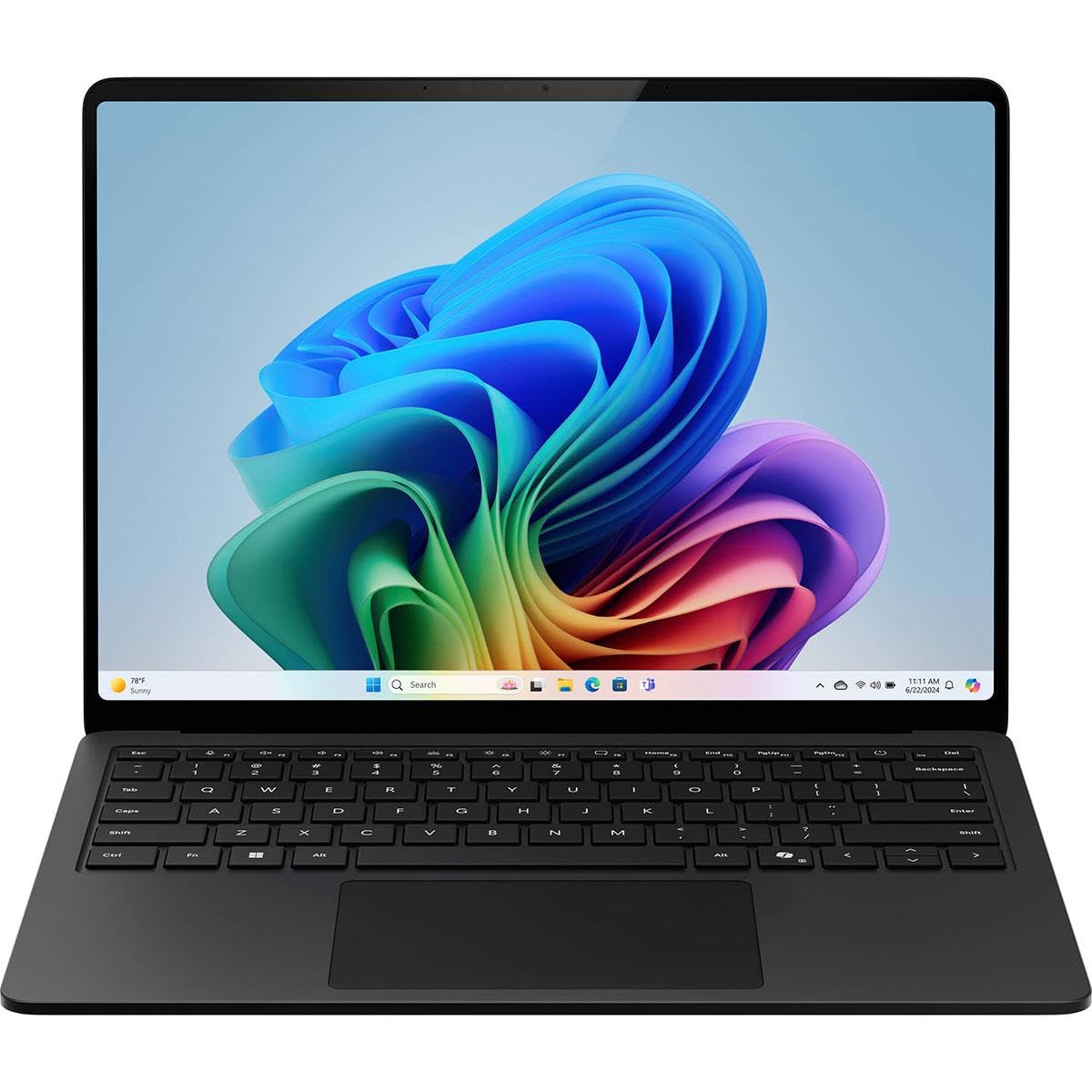
I reach for the Surface Laptop when I want a business-ready machine that still feels personal. The 15″ PixelSens Flow display makes reading docs and scrubbing through code painless, while the Copilot+ features and on-device AI speed up repetitive tasks. It’s not the lightest ultraportable, but the long battery life means fewer mid-day hunts for an outlet.
For daily development, meetings, and the odd presentation, it balances power and polish — a practical choice if you want a solid work laptop that handles heavy multitasking and AI-assisted workflows without fuss.
Long-Term Savings
High-end internals and a business-oriented design delay the need to upgrade. Microsoft-backed protection plans (2‑ and 4‑year) and decent resale interest for Surface devices help spread ownership costs over time.
Use Cases
| Situation | How It Helps |
|---|---|
| Full workdays away from the desk | Battery life and efficient performance let you finish tasks without carrying the charger everywhere. |
| Compiling and running local virtual machines | Generous RAM and a fast 1 TB SSD keep builds and containers responsive so you spend less time waiting. |
| Client meetings and presentations | A crisp 15″ touchscreen and slim bezels make demos clear and easy to navigate, and Copilot+ can help prepare notes or talking points quickly. |
| AI-assisted workflows or testing small models | On-device NPU acceleration speeds up AI features and small inference tasks without always hitting cloud services. |
Ease Of Use
| Feature | Ease Level |
|---|---|
| Initial Windows 11 setup and Copilot integration | Easy |
| Daily development (IDE, terminals, local containers) | Easy |
| Managing battery and power modes | Moderate |
| Presentations and touchscreen navigation | Easy |
| Connecting external monitors and peripherals | Moderate |
Versatility
Built primarily for business users, it also fits developers and creators who need reliable multitasking, a roomy display and AI features — not a gaming rig, but a capable daily driver.
Expertise Level
Best for intermediate to advanced professionals and developers who want a polished, business-grade laptop with strong multitasking and AI support.
Performance
With Intel Core Ultra Series 2, up to 32 GB RAM and a 1 TB SSD, it feels quick for compiling, multitasking and everyday AI-assisted tasks — noticeably faster than typical office laptops.
Reliability
Designed for business use with long battery life and stable performance under sustained loads; available protection plans add an extra safety net for long-term use.
Key Benefits
- Powerful, business-focused performance with Intel Core Ultra Series 2 and on-device AI
- Up to 22 hours of battery life so you can work unplugged for long stretches
- Large 15″ PixelSens Flow touchscreen with thin bezels for comfortable multitasking
- 32 GB RAM and 1 TB SSD keep builds, VMs and large projects responsive
- Copilot+ features add useful AI shortcuts that speed up repetitive tasks
Current Price: $1,599.99
Rating: 4.6 (total: 92+)
FAQ
How Do I Choose The Best Laptop For Coding In 2026?
I look at a few core things: CPU performance for builds and containers, enough RAM for multitasking (I recommend at least 16GB RAM if you run VMs or many browser tabs), a fast NVMe SSD for compile/link speed, a comfortable keyboard and a 1080p+ display that lets me keep code and docs side by side, and ports that reduce the need for dongles (Thunderbolt/USB‑C, HDMI, and a headphone jack are nice). I also consider the OS based on my work: macOS for native iOS/macOS development and a Unix-like terminal, Windows with WSL2 for .NET and broad app support, and Linux if I want maximum control or server parity.
Battery life, thermals, and build quality matter if I’m mobile; a thin ultrabook will trade some upgradeability for portability, while many business laptops let me swap storage or memory later. For budgets, there are great options around $299.99–$420.00 for basic student setups, solid midrange machines around $399.99–$799.99 for most developers, and premium choices like the MacBook Pro ($3,099.00) or LG gram ($2,899.99) when I need heavy CPU/GPU power or top-tier displays.
Is The Apple 2025 MacBook Air With M4 Chip A Good Choice For Developers?
Yes — I find the Apple 2025 MacBook Air with the M4 chip to be an excellent choice for many developers because it pairs strong single‑thread and multi‑thread performance with outstanding battery life and a very polished macOS experience; the 13.6″ Liquid Retina display and the long battery life (Apple rates up to 18 hours of video streaming) make remote work painless. I especially recommend it if you do iOS/macOS development with Xcode or you want smooth performance for web, backend, or light ML tasks; the integrated media engine and efficiency of Apple Silicon mean compiles and local testing feel snappy.
The tradeoffs I tell people about are limited ports (you may need a dock), soldered memory and storage (no aftermarket upgrades), and that heavy GPU‑bound ML or 3D workloads are better on a MacBook Pro or a Windows laptop with a discrete NVIDIA GPU. At $749.00 for the 16GB/256GB configuration it’s a compelling midrange pick if the form factor and macOS fit your workflow.
How Long Will A Coding Laptop Last And How Can I Keep It Performing Well?
In my experience a well-chosen laptop usually gives great developer service for 3–6 years, depending on how demanding your work is and whether the device is upgradable. I keep machines healthy by avoiding full disks, updating the OS and developer tools regularly, monitoring temperatures and fan function, using an external SSD for large projects when needed, and closing heavy background apps when compiling or running containers.
If you can choose a model with user‑replaceable storage or RAM you can extend lifespan cheaply; otherwise plan for backups and consider extended support plans like AppleCare or vendor warranties for peace of mind. Finally, if you do a lot of containerized builds or ML training, I prioritize more RAM and a fast NVMe drive at purchase so the laptop remains useful longer without needing immediate replacement.
What Coders Prefer
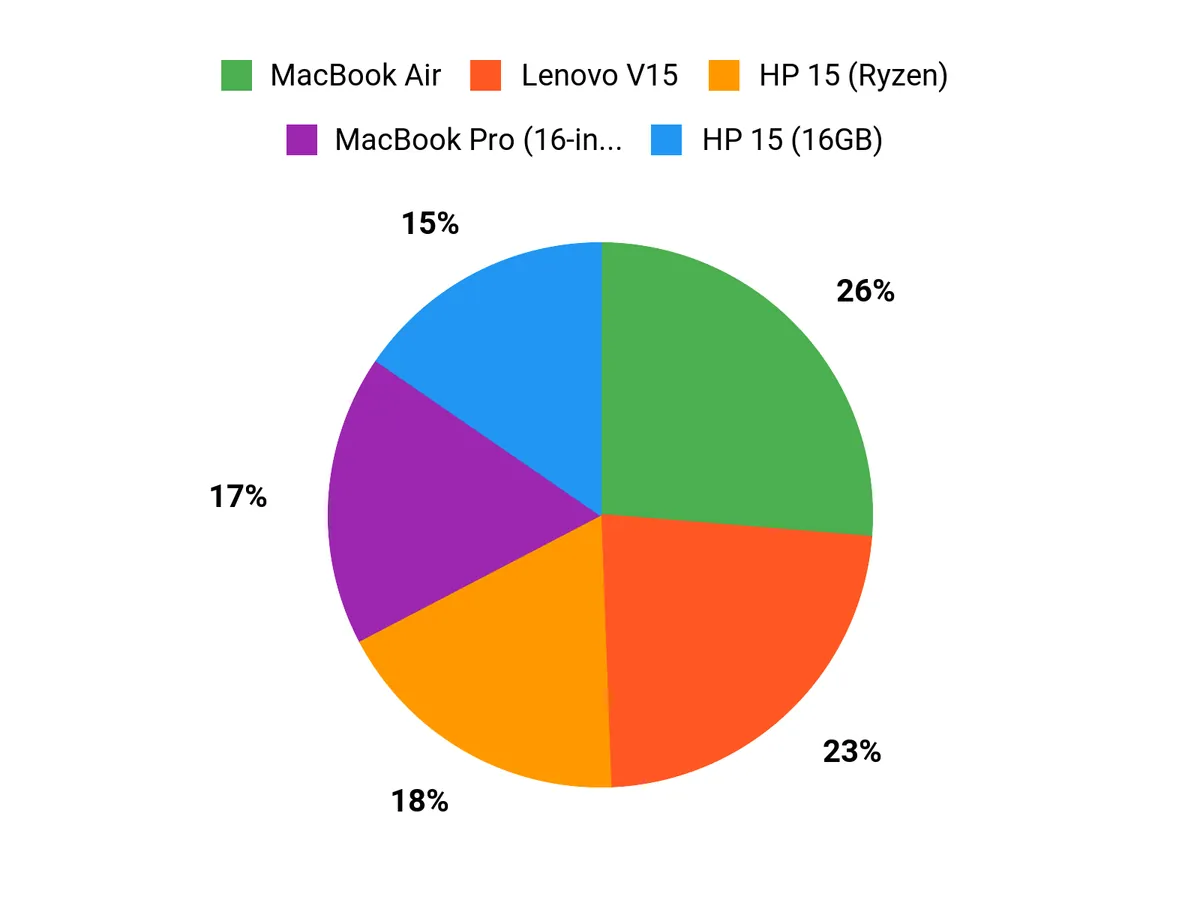
When choosing between the MacBook Air, HP 15 (Ryzen), and HP 15 (16GB), I see customers balancing portability and battery life against raw multicore performance and price. I tend to recommend the MacBook Air for lightweight build, long battery and macOS ecosystem, the Ryzen HP when you want stronger multi‑threaded performance on a budget, and the HP 15 with 16GB when RAM for heavy multitasking, containers or multiple IDEs is the priority.
Wrapping Up
After testing specs and balancing real-world needs, I recommend narrowing your choice by how you work. If you want the lightest, most portable daily driver that still handles pro workloads, the MacBook Air is my top pick for mobility and battery life.
If you need raw, sustained power for heavy compilation, large models, or video work, the MacBook Pro gives you the best performance. For creators who need a large, color-accurate screen with desktop-class GPU power while staying lightweight, the LG Gram Pro stands out. If your priorities are corporate features, Copilot+ AI, and Windows integration, I’d pick the Surface Laptop for business.
On a tighter budget, the IdeaPad 1i and the HP models deliver great value for everyday development tasks. Ultimately I chose a range so you can match hardware to workflow: portability, peak performance, or the best value for learning and student projects.
If you tell me the languages and tools you use most, I can help narrow this list to the single best choice for your needs.
| Product | Image | Rating | Processor | RAM | Storage | Battery Life | Price |
|---|---|---|---|---|---|---|---|
| Apple 2025 MacBook Air 13-inch Laptop with M4 Chip |  | 4.8/5 (N reviews) | Apple M4 Chip | 16 GB Unified Memory | 256 GB SSD | Up to 18 hours | $749.00 |
| HP 15.6 inch Laptop |  | 4.5/5 (991 reviews) | AMD Ryzen 3 7320U | 8 GB RAM | 128 GB SSD | Up to 12 hours | $329.99 |
| HP Laptop Computer, 15.6 FHD Display | 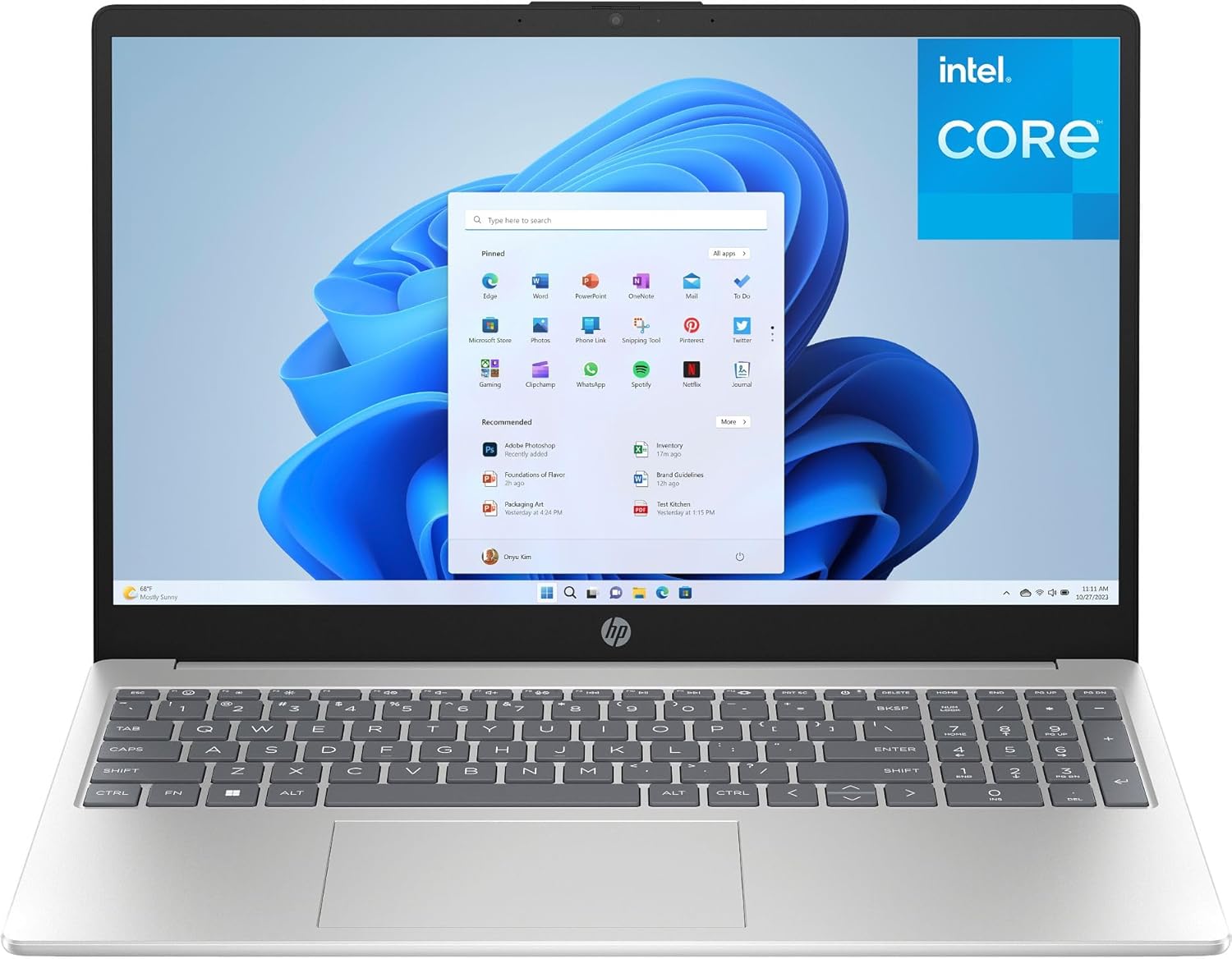 | 4.5/5 (513 reviews) | Intel N100 | 16 GB DDR4 | 256 GB PCIe SSD | Up to 10 hours | $399.99 |
| Lenovo Laptop Computer for Business and Student |  | 4.6/5 (2,913 reviews) | Intel Celeron N4500 | 8 GB DDR4 | 256 GB PCIe NVMe | Up to 8 hours | $299.99 |
| Lenovo IdeaPad 1i Laptop |  | 4.4/5 (207 reviews) | Intel Core i5-1235U | 16 GB | 512 GB SSD | Up to 10 hours | $420.00 |
| HP Business Laptop 255 G10 | 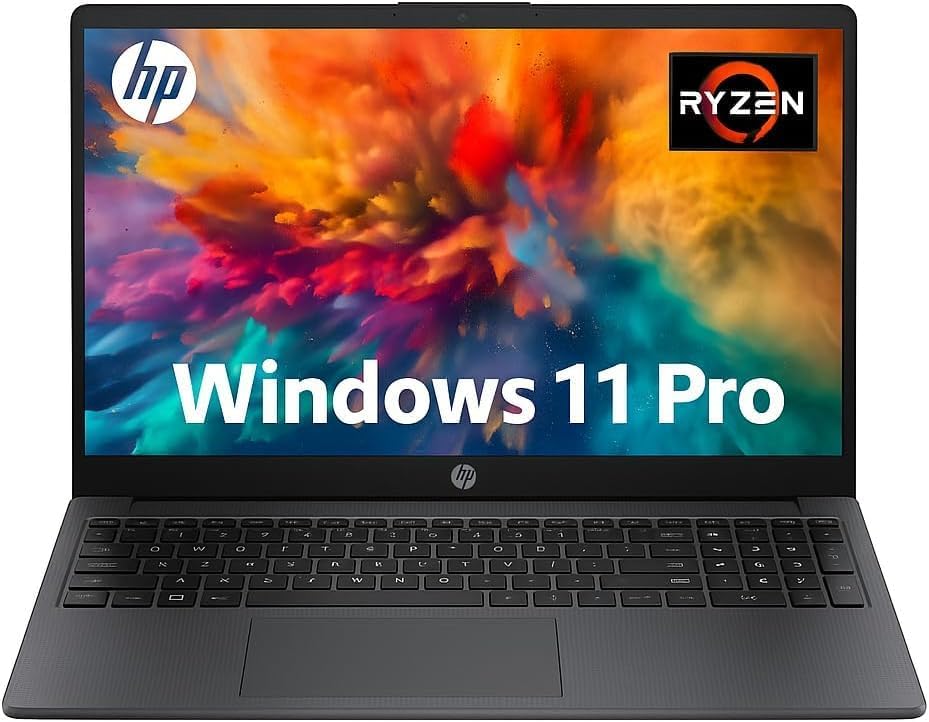 | 4.8/5 (16 reviews) | AMD Ryzen 7 7730U | 32 GB RAM | 1 TB SSD | Up to 12 hours | $799.99 |
| Apple 2024 MacBook Pro Laptop with M4 Max |  | 4.8/5 (N reviews) | Apple M4 Max | 36 GB Unified Memory | 1 TB SSD | Up to 21 hours | $3,099.00 |
| LG gram Pro 17-inch Lightweight Laptop |  | 5.0/5 (12 reviews) | Intel Core Ultra7 255H | 32 GB | 2 TB SSD | Up to 25 hours | $2,899.99 |
| Microsoft Surface Laptop for Business |  | N/A | Qualcomm Snapdragon X Elite | 32 GB | 1 TB SSD | All-day battery life | $1,599.99 |
This Roundup is reader-supported. When you click through links we may earn a referral commission on qualifying purchases.



