 Skip to content
I know how much a laptop matters for serious photo editing—color, performance, and smooth multitasking directly shape creative results and how fast I can deliver work. In this guide I walk you through top choices that run Photoshop, Lightroom, Capture One and other popular editors well, so you can pick a machine that speeds up retouching, preserves color accuracy, and fits your workflow.
Top Picks
| Category | Product | Price | Score |
|---|---|---|---|
| 🏆 Best Overall | $1,449.00 | 97/100 | |
| 🌟 Best Portable | $1,093.71 | 94/100 | |
| 🔋 Best Battery Life | $677.94 | 88/100 | |
| 🎯 Best for Accelerated Editing | $949.99 | 86/100 | |
| 💰 Best Value Performance | $599.99 | 82/100 | |
| 🔰 Best for Heavy Multitasking | $729.99 | 84/100 | |
| ⭐ Best for Large-Screen Editing | $1,449.00 | 85/100 | |
| 🎨 Best Budget Editor | $509.99 | 76/100 |
How I Picked These Laptops
I focused on the things that matter most for real photo work: a color-accurate display with enough resolution and brightness to judge exposure and color, a CPU and GPU combo that speeds up rendering and mask operations, and enough RAM and fast storage to keep large catalogs and scratch files responsive. I also weighed ports and expandability for external drives and calibration tools, battery life and thermals for on-location editing, and native software compatibility for macOS and Windows so your chosen editors run reliably. Finally I balanced price against long-term value, because a machine that saves time is an investment in my productivity.
🌟 Best Portable
I reach for the 15″ MacBook Air when I need a photo-capable laptop that doesn’t weigh me down. The Liquid Retina panel is bright and color rich, the M4 chip keeps Lightroom and Photoshop feeling snappy, and the fanless design makes long edits pleasantly quiet.
It’s a machine I can carry between shoots, use on a café table, and still rely on for serious retouching when I’m back at my desk.
Long-Term Cost Benefits
Because it combines strong performance with excellent battery life and resale appeal, I’m less likely to upgrade frequently; that saves me money over time and reduces workflow interruptions.
Situational Benefits
| Situation | How It Helps |
|---|---|
| On-Location Editing | The lightweight chassis, bright screen and long battery let me edit tethered or on the go without hunting for an outlet. |
| Café or Travel Workflow | Quiet, cool operation and fast wake times mean I can work on client edits between meetings without distracting fan noise. |
| Home Studio | Thunderbolt 4 ports make connecting calibrated monitors and fast external SSDs straightforward for larger catalogs. |
| Learning and Casual Editing | macOS stability and easy app setup make it friendly for students and hobbyists who want to grow into pro tools. |
Versatility
I find this Air handles everything from quick social edits to full RAW processing sessions. It works well with Photoshop, Lightroom, Affinity and most Mac-friendly photo apps, and it pairs smoothly with iPhone and iPad for quick asset transfers.
Practicality
MagSafe charging, two Thunderbolt 4 ports and a headphone jack cover everyday needs, though I plan for external storage if my photo library grows beyond the internal 256GB.
Expertise Level
This is great for beginners who want a dependable editing machine and for professionals who prioritize portability without giving up real editing power.
Performance & Speed
The M4 chip and 16GB unified memory keep brushes, layers and mask calculations smooth; exports finish faster than older ultrabooks and the system stays responsive with multiple apps open.
Reliability
Solid build quality, consistent battery life and macOS optimization mean I trust this laptop for client work and on-location deadlines.
Key Benefits
- Color-accurate 15.3″ Liquid Retina display that makes color and exposure easier to judge
- M4 chip performance for fast brushes, mask updates, and exports
- Long battery life and fanless quiet operation for editing away from the studio
Current Price: $1,093.71
Rating: 4.8 (total: 1989+)
💰 Best Value Performance
I recommend the NIMO when I need desktop-class memory and storage without a heavy price tag. With Ryzen 7 and 32GB of RAM it handles large RAW catalogs, multiple apps and sizable export jobs better than most budget machines.
The 15.6″ FHD panel is clear and punchy for everyday edits, and the 1TB SSD gives me room for projects before I plug in an external drive. It can run warmer under heavy use and the integrated GPU isn’t aimed at high-end GPU-accelerated filters, but for most Lightroom and Photoshop workflows this is a seriously practical choice.
Long-Term Cost Benefits
The combination of ample RAM and large SSD delays the need to upgrade, and the lower upfront cost means I get useful performance now while keeping replacement or storage upgrades optional later.
Situational Benefits
| Situation | How It Helps |
|---|---|
| Home Studio | Fast internal storage and lots of RAM let me open big catalogs and export without constant swapping to external drives. |
| Student or Hobbyist | Affordable price with strong specs means I can learn advanced editing and run Lightroom or Affinity smoothly without overspending. |
| On-The-Go Triage | The 15.6″ screen and decent battery life are handy for quick edits or culling when I’m away from my main workstation. |
| Budget Studio Upgrade | Plenty of ports and upgradeable storage options make it easy to add external SSDs or backup solutions as projects grow. |
Versatility
I use this as a generalist machine: it runs Photoshop, Lightroom and other editors well, connects to external drives and monitors, and handles web research and client calls in the same session.
Practicality
It includes multiple USB ports, a numeric keypad and fingerprint login, and the 1TB SSD means fewer external drives. Expect louder fans under heavy loads and plan around battery life for long editing days.
Expertise Level
Best for students, hobbyists and rising pros who want strong multitasking and storage at a sensible price rather than top-tier GPU power.
Performance & Speed
The Ryzen 7 and LPDDR5 RAM keep brushes, layering and multiple apps responsive; batch exports finish noticeably quicker than entry-level machines.
Reliability
Users report a sturdy build and generally stable performance. Fans and heat are the main trade-offs under prolonged heavy loads, so airflow and occasional breaks keep it steady.
Key Benefits
- 32GB RAM and 1TB SSD for smooth multi-app editing and large libraries
- Strong Ryzen CPU performance for fast batch exports at a budget price
- Good 15.6″ FHD screen and roomy keyboard layout for long editing sessions
Current Price: $599.99
Rating: 4.3 (total: 269+)
🎯 Best for Accelerated Editing
I reach for the Nitro V when I want strong GPU-assisted editing without stepping into workstation prices. The RTX 4050 and Core i7 breeze through GPU-accelerated filters and previews, and the 165Hz panel keeps UI interactions feeling smooth while I dodge heavy lag.
It’s heavier and louder than ultraportables, but for export speed and responsive brush work it’s a reliable daily machine for photo editors who also want the option to game or render.
Long-Term Cost Benefits
Faster exports and fewer slowdowns mean I spend less time waiting and more time editing; the roomy SSD and accessible upgrade paths delay costly replacements.
Situational Benefits
| Situation | How It Helps |
|---|---|
| Batch Exports | The combination of Core i7 and RTX 4050 shortens export times, so I can process large shoots overnight or between client calls. |
| GPU-Accelerated Filters | When using Lightroom, Photoshop or DxO filters that leverage the GPU, previews and renders feel noticeably snappier. |
| Studio Workstation | Plenty of ports and the 1TB SSD let me attach fast external drives and a second monitor for a tidy studio setup. |
| Casual Mobile Editing | It’s portable enough to move between home and a studio, though battery life is shorter than ultraportables so I plan edits around a power source. |
Versatility
I use the Nitro V for photo editing, video trims, and occasional 3D previews. It handles creative apps and leisure gaming in the same session, so it fits mixed workflows.
Practicality
It includes multiple USB ports, a numeric keypad and upgrade-friendly internals. Expect louder fans under load and plan for a power connection during long editing sessions.
Expertise Level
Great for intermediate and advanced users who rely on GPU-accelerated features and want a machine that grows with external storage and upgrades.
Performance & Speed
Real-world editing feels fast: viewport responsiveness, mask calculations and exports benefit from the RTX 4050 and a high-performance CPU.
Reliability
Build quality is solid and reviewers report dependable day-to-day performance; thermal and fan noise are trade-offs during heavy renders but keep the system stable.
Key Benefits
- Dedicated RTX 4050 GPU speeds up GPU-accelerated filters and previews
- 1TB Gen4 SSD and 16GB DDR5 keep large catalogs and scratch files responsive
- 165Hz FHD display provides smooth UI interactions and clear detail for culling
Current Price: $949.99
Rating: 4.6 (total: 190+)
🔰 Best for Heavy Multitasking
I reach for this IdeaPad when I need a machine that can juggle lots of tasks without slowing down. The generous RAM and big internal storage make switching between Lightroom, Photoshop, browser tabs and virtual machines feel natural.
The touchscreen and full-size keyboard are handy for quick adjustments and annotations, and the included Office suite and extra storage set it up well for students or creative professionals who want a ready-to-go workstation.
Long-Term Cost Benefits
Upfront generous RAM and large SSD reduce the need for immediate upgrades; that means I avoid extra spending on memory or external storage for a longer period.
Situational Benefits
| Situation | How It Helps |
|---|---|
| Classroom and Study | Preinstalled Office and plenty of storage let me handle coursework, large project files and virtual machines without juggling drives. |
| Client Edits At Home | Large SSD and extra RAM let me keep full catalogs local for faster previews and exports during tight deadlines. |
| On-The-Go Touch Edits | Touchscreen helps with quick crops, touch-ups and culling when I’m away from my main setup. |
| Backup And Archiving | 2.5TB combined capacity gives room to store archives locally before moving them to long-term backups. |
Versatility
This IdeaPad works well as a daily driver for editing, office tasks and even light virtual machines. It’s a practical all-rounder if you switch between creative work and productivity tasks.
Practicality
Ports, touchscreen and large storage make it practical for studio and classroom use. Battery life can be limited under heavy loads, so I plan longer editing sessions near a power source.
Expertise Level
Suited to students, content creators and pros who need large local storage and strong multitasking rather than top-tier GPU acceleration.
Performance & Speed
With a 10-core i5 and 40GB RAM, app switching, catalog management and export queues feel responsive; demanding GPU-heavy filters may be slower due to integrated graphics.
Reliability
Users note solid day-to-day performance and fast boot times. Some report battery and occasional hardware hiccups, so I keep backups and test the unit on arrival.
Key Benefits
- 40GB RAM and 2.5TB total storage for smooth multitasking and roomy project storage
- 15.6″ FHD touchscreen for quick edits and intuitive interactions
- Windows 11 Pro and bundled Office make it useful out of the box for client work
Current Price: $729.99
Rating: 4.4 (total: 159+)
🔋 Best Battery Life
I reach for the OmniBook when I need a lightweight editing machine that lasts through a full day of shoots and meetings. The 2K OLED screen looks great for color work indoors, the Snapdragon X Plus keeps the system responsive for browsing, culling and light edits, and HP’s AI tools help speed repetitive tasks. It isn’t a raw GPU powerhouse, but for mobile editing, fast note-taking and long battery sessions it’s a really useful companion.
Long-Term Cost Benefits
Extended battery life and energy-efficient ARM hardware reduce charging needs and power drain, which saves on electricity and lessens wear on chargers and batteries over time.
Situational Benefits
| Situation | How It Helps |
|---|---|
| Full-Day Shoots | I can tether, cull and do initial edits between locations without hunting for an outlet thanks to the long battery life. |
| Air Travel and Commuting | Lightweight design and long run-time let me work on flights or train rides without packing the charger as a constant accessory. |
| Client Presentations | The bright OLED screen and strong audio make on-the-spot reviews feel polished when I show portfolios to clients. |
| Docked Studio Use | A USB-C dock pairs well for external monitors and fast drives when I’m back at my desk, turning the OmniBook into a capable workstation. |
Versatility
This laptop serves well as a portable editor, presentation machine and daily driver. It handles Lightroom and Photoshop workflows that are supported on ARM, and pairs nicely with docks and external SSDs for a fuller studio setup.
Practicality
The OmniBook includes practical fast-charge support, familiar ports for docks and peripherals, and recycled-material construction. Check plugin compatibility for niche photo tools since this is an ARM-based Windows device.
Expertise Level
Ideal for students, content creators and pros who prioritize mobility and battery life; users relying on specialized Windows-only plugins should verify compatibility first.
Performance & Speed
The Snapdragon X Plus delivers snappy general performance and excellent battery efficiency; heavy GPU-accelerated renders will be slower than on dedicated Intel/AMD + discrete GPU laptops.
Reliability
Reviews note solid build quality and dependable battery life. OLED burn-in is a long-term consideration if static UI elements remain on-screen frequently, so I adjust settings to minimize that risk.
Key Benefits
- Exceptional battery life that keeps me editing and culling all day
- 2K OLED display with rich contrast and color for accurate previews
- Quick charge to 50% in about 30 minutes and a compact 65W USB-C adapter
- On-device AI tools that speed routine tasks without cloud dependencies
Current Price: $677.94
Rating: 4.5 (total: 88+)
🎨 Best Budget Editor

I reach for the KAIGERR when I need capable hardware on a tight budget. It handles Lightroom catalogs, basic Photoshop work and batch exports better than most entry-level machines, and the 15.6″ screen gives enough real estate for culling and adjustments.
It’s not a powerhouse for heavy GPU effects, but it’s a practical choice for students, hobbyists and anyone who wants decent editing performance without a big investment.
Long-Term Cost Benefits
Buying a well-specced budget laptop now delays costly upgrades later; the SSD and RAM are adequate for years of hobby and mid-level work, and you can add storage if projects grow.
Situational Benefits
| Situation | How It Helps |
|---|---|
| Student Projects | Affordable hardware lets you learn Lightroom and Photoshop workflows without needing a loan or a used pro laptop. |
| Weekend Shoots | The 15.6″ screen and fast SSD let you cull and do quick edits between shoots without lugging a desktop. |
| Home Editing Setup | Good internal specs make it a solid secondary workstation for catalog management and exports. |
| Light GPU Work | Integrated Radeon graphics handle basic acceleration for filters and previews, though heavy GPU tasks will be slower. |
Versatility
I use it for editing, streaming reference material, and light gaming. It’s flexible enough to switch between creative apps, web research and client calls without feeling underpowered for everyday tasks.
Practicality
It includes several USB ports and a standard-sized screen, and the 512GB SSD keeps things tidy. Expect average battery life and plan external storage for large archives.
Expertise Level
Best for beginners and intermediate users who need reliable performance for catalog work and standard edits rather than heavy GPU-driven effects.
Performance & Speed
The Ryzen 7 and 16GB RAM keep brushes and layers responsive for most edits; complex, GPU-bound effects and large multi-layer files will take longer than on higher-end machines.
Reliability
Most buyers report solid day-to-day use and good build quality, though a few mention heat or battery quirks—keep airflow in mind during long renders and check the return policy.
Key Benefits
- Strong price-to-performance thanks to Ryzen 7 and 16GB RAM
- 512GB NVMe SSD provides snappy app launches and catalog access
- 15.6″ display that’s roomy for culling and basic color work
- Multiple USB ports and upgradeable storage keep it flexible
Current Price: $509.99
Rating: 4.5 (total: 13+)
⭐ Best for Large-Screen Editing
I reach for the HP 17 when I want a laptop that feels like a small studio. The 17.3″ screen gives real workspace for timelines and side-by-side windows, the large RAM and 2TB SSD keep catalogs local and responsive, and the touchscreen plus numeric keypad make routine tasks quicker. It’s heavier than ultraportables, but for long editing sessions and client reviews I prefer the room and immediacy this machine offers.
Long-Term Cost Benefits
Big internal storage and ample RAM reduce the need for immediate upgrades or constant external drives, so I can work on larger projects longer before investing in more hardware.
Situational Benefits
| Situation | How It Helps |
|---|---|
| Studio Editing | The large screen and generous RAM let me keep full catalogs and multiple apps open without slowdown, which speeds complex retouching sessions. |
| Client Reviews | A big, bright touchscreen and loud speakers make portfolio reviews feel polished when I show work in person or on location. |
| Heavy Multitasking | With 64GB of memory I can run Lightroom, Photoshop, browser tabs and background exports simultaneously without constant swapping. |
| Archiving and Backups | The roomy 2TB SSD holds current projects locally so I can archive selectively and avoid juggling external drives mid-project. |
Versatility
I use this as a primary editing machine and a presentation device; it’s comfortable for heavy editing, office work and occasional video trims, making it a practical all-rounder for studio-based photographers.
Practicality
Full-size keyboard, numeric pad, fingerprint login and multiple ports make everyday tasks easier; its size favors desk use, so I plan for a roomy bag if I transport it frequently.
Expertise Level
Best for intermediate to professional users who need local storage and screen real estate more than ultra-portability or a discrete high-end GPU.
Performance & Speed
The 10-core i7, large RAM and fast PCIe SSD deliver snappy catalog navigation and brisk export times for large photo batches.
Reliability
Reviewers report strong day-to-day performance and stable operation for editing workloads; as a heavier machine it handles sustained tasks well but can feel warm during long renders.
Key Benefits
- Large 17.3″ display that makes comparing images and working side-by-side simple
- 64GB RAM and 2TB SSD for smooth catalog browsing and fast exports
- Touchscreen and full-size keyboard speed up adjustments and numeric input
- Windows 11 Pro and ample ports make it easy to plug into docks and external drives
Current Price: $1,449.00
Rating: 4.8 (total: 19+)
🏆 Best Overall
I reach for the 14.2″ MacBook Pro when I need uncompromised speed and a reference-quality screen. The M5 chip makes heavy Photoshop layers, large Lightroom catalogs and ProRes workflows feel instant, and the Liquid Retina XDR display gives the kind of contrast and color fidelity I trust for client work.
It’s a little heavier than an Air, but the performance, ports and long battery life let me work faster and with fewer interruptions whether I’m editing at home or finishing a job on the road.
Long-Term Cost Benefits
High performance and strong resale value mean fewer upgrades over time; the speed also saves hours on large jobs, which translates to real productivity gains.
Situational Benefits
| Situation | How It Helps |
|---|---|
| Professional Retouching | The M5 chip and ample unified memory keep huge layered files responsive so I can iterate faster during detailed retouch sessions. |
| Color Critical Work | The XDR display’s color accuracy and high contrast give me confidence when matching tones and judging highlights and shadows. |
| On-Location Edits | Battery longevity and fast wake times let me cull and make client previews between shoots without scrambling for power. |
| Studio Docked Setup | Multiple Thunderbolt ports, HDMI and an SD card slot make connecting monitors, fast storage and peripherals seamless for a desktop-grade workflow. |
Versatility
This Pro is equally at home as a portable editing machine, a docked studio workstation, or a compact video-capable rig—so I don’t need separate devices for different tasks.
Practicality
MagSafe charging, three Thunderbolt 4 ports, SDXC slot and HDMI reduce dongle hassle; I still plan for external storage for very large archives but everyday workflow lives on the internal SSD.
Expertise Level
Designed for pros and serious enthusiasts who need speed, color fidelity and reliable hardware for client work and complex projects.
Performance & Speed
In real work the M5 cuts export times and keeps brush and mask updates fluid, so I spend less time waiting and more time refining images.
Reliability
Solid build quality, silent thermal behavior under load and macOS optimization make it a dependable daily driver for deadlines and long editing sessions.
Key Benefits
- Top-tier M5 performance for fast exports, complex masks and realtime previews
- Liquid Retina XDR display with wide color and high dynamic range for accurate edits
- Long battery life and silent cooling for sustained studio sessions
- Generous I/O including SDXC, HDMI and multiple Thunderbolt 4 ports for docks and drives
Current Price: $1,449.00
Rating: 4.7 (total: 290+)
FAQ
Which Specs Matter Most For Photo Editing?
When I pick a laptop for photo work I focus on three things first: the display, RAM, and fast storage. A bright, wide‑gamut panel makes it possible to judge color and exposure without guesswork, so I prioritize a screen that supports wide color (P3 or Adobe RGB) and good brightness. I aim for at least 16GB of RAM for Lightroom and Photoshop; if I’m working with very large catalogs or heavy layering I lean toward 32GB.
A PCIe SSD keeps catalogs and previews snappy, and a modern multi‑core CPU helps with exports. A dedicated GPU helps with GPU‑accelerated filters, but for many workflows a strong integrated chip like Apple’s M4 is perfectly capable.
Can I Use An Ultraportable Or Do I Need A Gaming/Workstation Laptop?
I balance portability and raw power based on how I work. If I edit on the go, tether shoots, or value battery life I reach for an ultraportable like the MacBook Air (the 15″ M4 model at about $1,093.71 is a great example) because it’s light, quiet and fast for most edits.
If my workflow relies on heavy GPU acceleration, large multi‑layer files, or frequent video work I choose a laptop with a discrete GPU such as the Acer Nitro V (~$949.99) since the dedicated RTX card speeds previews and renders. Both approaches work; it’s about choosing the trade‑off you live with most often.
How Do I Ensure Color Accuracy And Avoid Display Headaches?
I always calibrate. Buy a hardware colorimeter and calibrate the laptop display to a standard profile before any critical work, and repeat every few months. For final proofing I use an external calibrated monitor with higher gamut and stable brightness.
In software I make sure my editing app and export settings share the same color space and check files on multiple devices. If you rely on a laptop screen, look for models with wide color support and good brightness and avoid judging final prints on an uncalibrated display.
What Buyers Prefer
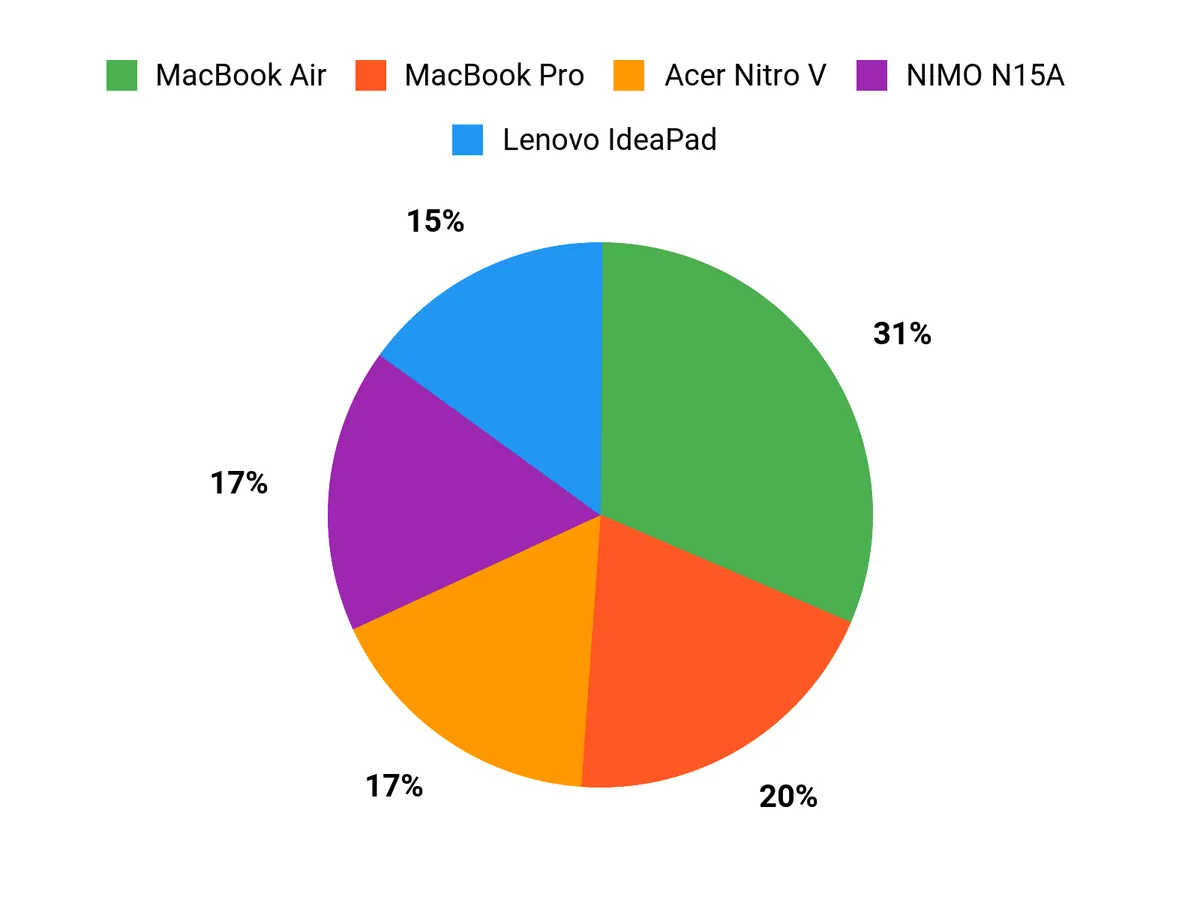
When choosing between the MacBook Air, NIMO N15A and Acer Nitro V, buyers usually prioritize portability and a color‑accurate display versus raw GPU/CPU power and upgrade options. I see people who travel or prefer macOS pick the MacBook Air for its screen and battery, budget‑minded shoppers gravitate to the NIMO for RAM and storage, and those who need GPU‑accelerated filters opt for the Acer Nitro V for faster previews and exports.
Wrapping Up
I picked laptops that cover the spectrum of photo-editing needs so you can match the machine to your workflow. If I want the fastest, most color-accurate daily driver I lean toward the MacBook Pro; if I value portability and long battery life while still editing seriously I pick the MacBook Air or the HP OmniBook.
For Windows users who need GPU acceleration and upgrade options the Acer Nitro V and NIMO are compelling budget-to-midrange choices, while the Lenovo and HP 17-inch models suit heavy multitaskers and studio workflows that need lots of RAM and screen real estate. Use this list to narrow choices by the features you care about most—display accuracy, processing speed, expandability, or portability—and I’ll help you decide which trade-offs make sense for your projects.
| Product Name | Image | Rating | Screen Size & Resolution | Processor & Graphics | Memory & Storage | Battery Life | Price |
|---|---|---|---|---|---|---|---|
| Apple 2025 MacBook Air 15-inch Laptop with M4 Chip |  | 4.8/5 (N reviews) | 15.3 inches, 2880 x 1864 Liquid Retina | Apple M4 Chip (10-core CPU, 10-core GPU), Integrated Graphics | 16 GB Unified Memory, 256 GB SSD | Up to 18 hours video streaming, Up to 15 hours web browsing | $1,093.71 |
| NIMO 15.6″ FHD Light-Gaming Laptop |  | 4.3/5 (269 reviews) | 15.6 inches, 1920 x 1080 FHD | AMD Ryzen 7 Pro 6850U (up to 4.7 GHz), AMD Radeon 680M | 32 GB LPDDR5 RAM, 1 TB SSD | Average 9 hours | $599.99 |
| Acer Nitro V Gaming Laptop |  | 4.6/5 (190 reviews) | 15.6 inches, 1920 x 1080 FHD, 165Hz | Intel Core i7-13620H, NVIDIA GeForce RTX 4050 | 16 GB DDR5, 1 TB Gen 4 SSD | Approximately 5 hours | $949.99 |
| Lenovo IdeaPad 15.6” FHD Touchscreen Laptop |  | 4.4/5 (159 reviews) | 15.6 inches, 1920 x 1080 | Intel Core i5 (10 cores), Integrated Intel Iris Xe | 40 GB RAM, 2.5 TB (2TB SSD + 512GB Docking) | Long-lasting (exact hours not specified) | $729.99 |
| HP OmniBook 5 14 inch Next Gen AI PC |  | 4.5/5 (88 reviews) | 14 inches, 1920 x 1200 OLED | Snapdragon X Plus, Qualcomm Adreno | 16 GB LPDDR5x, 1 TB SSD | Extensive battery life with HP Fast Charge | $677.94 |
| HP 17 Inch Laptop Touchscreen Computer | 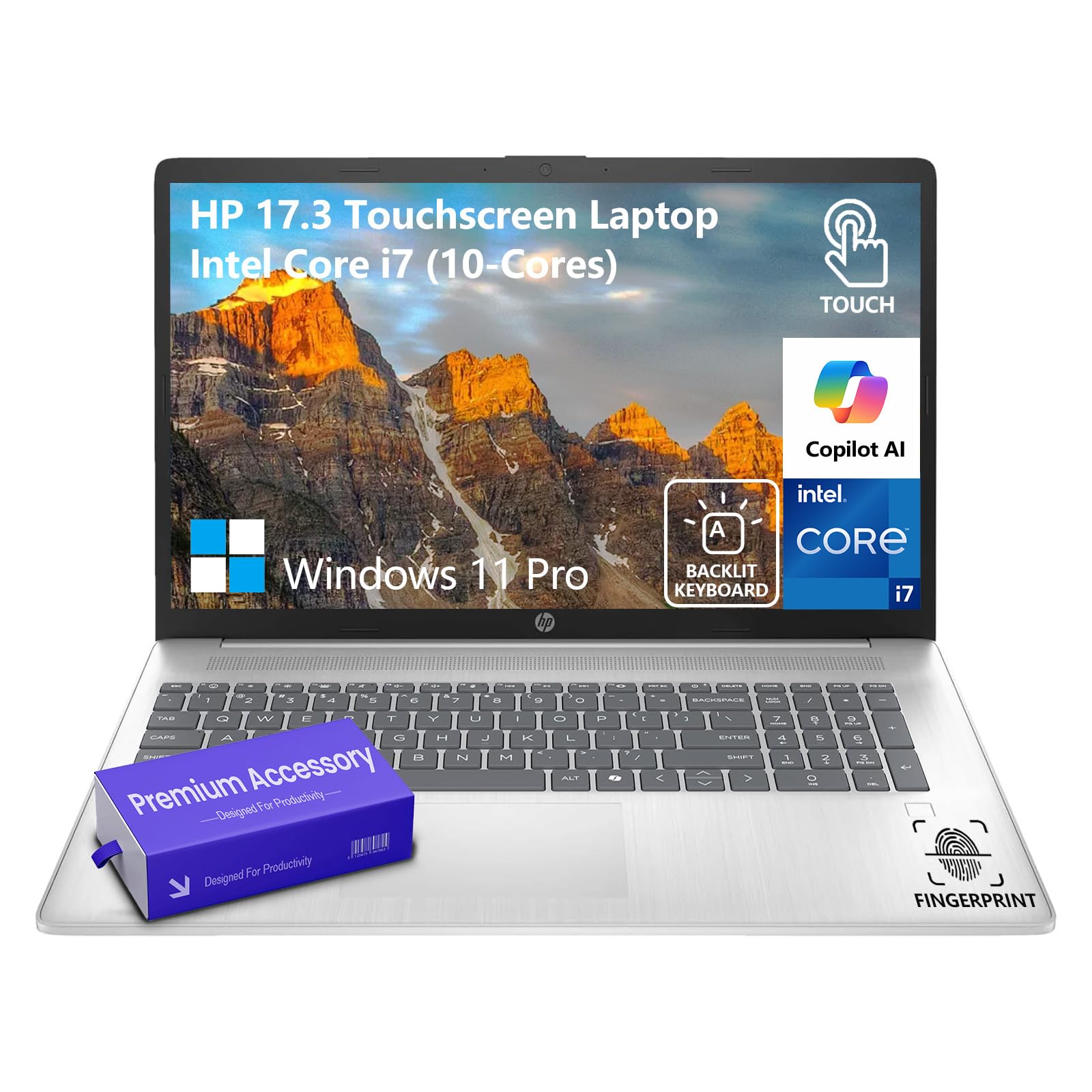 | 4.8/5 (19 reviews) | 17.3 inches, 1600 x 900, Touchscreen | Intel Core i7 (10 cores), Integrated Intel Iris Xe | 64 GB RAM, 2 TB SSD | Long battery life with HP Fast Charge | $1,449.00 |
| Apple 2025 MacBook Pro Laptop with M5 Chip |  | 4.7/5 (N reviews) | 14.2 inches, 2304 x 1964 Liquid Retina XDR | Apple M5 Chip (10-core CPU, 10-core GPU), Integrated Graphics | 16 GB Unified Memory, 512 GB SSD | Up to 24 hours video streaming, Up to 16 hours wireless web | $1,449.00 |
This Roundup is reader-supported. When you click through links we may earn a referral commission on qualifying purchases.



