
Yes, OpenClaw can make phone calls. The cleanest way to enable this in 2026 is through the official @openclaw/voice-call plugin, which natively supports Twilio, Telnyx, and Plivo out of the box. The plugin handles webhooks, outbound notifications, and full-duplex real-time voice automatically, so you are not building a custom integration from scratch.
What Is OpenClaw and Why Does Phone Calling Matter?
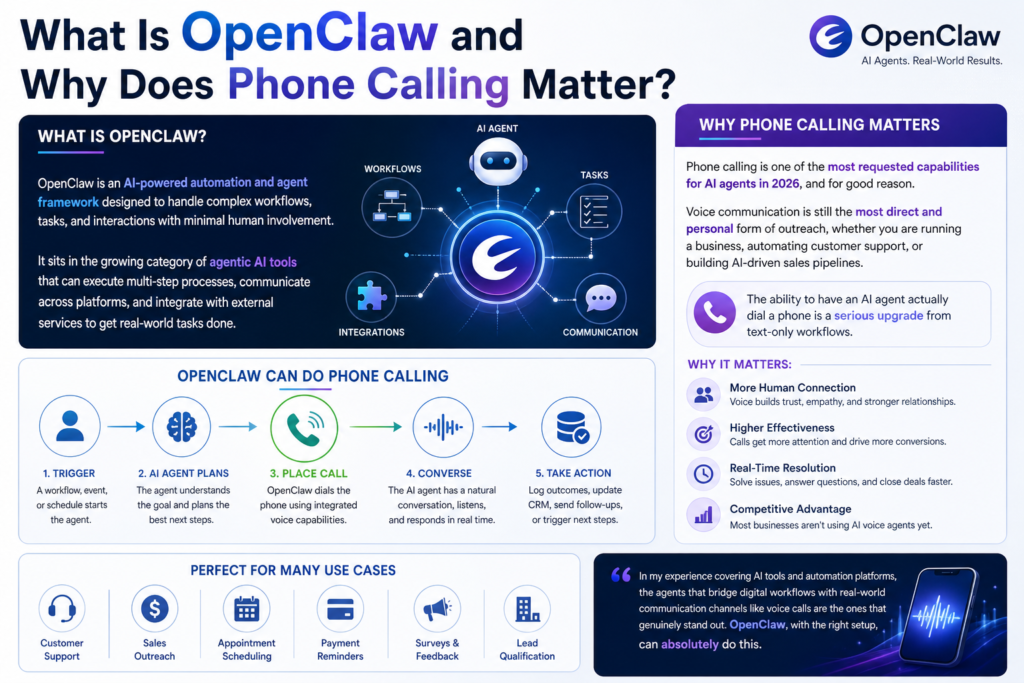
OpenClaw is an AI-powered automation and agent framework designed to handle complex workflows, tasks, and interactions with minimal human involvement. It sits in the growing category of agentic AI tools that can execute multi-step processes, communicate across platforms, and integrate with external services to get real-world tasks done.
Phone calling is one of the most requested capabilities for AI agents in 2026, and for good reason. Voice communication is still the most direct and personal form of outreach, whether you are running a business, automating customer support, or building AI-driven sales pipelines. The ability to have an AI agent actually dial a phone is a serious upgrade from text-only workflows.
In my experience covering AI tools and automation platforms, the agents that bridge digital workflows with real-world communication channels like voice calls are the ones that genuinely stand out. OpenClaw, with the right setup, can absolutely do this.
How OpenClaw Phone Calling Actually Works
OpenClaw does not come with a native phone carrier or SIM infrastructure. What it does have is the official @openclaw/voice-call plugin, which runs directly inside the Gateway process and connects to your chosen telephony provider through a clean, pre-built integration layer.
When a call trigger is activated inside OpenClaw, whether that is a scheduled task, a user command, or an automated workflow condition, the voice-call plugin handles the entire call lifecycle. It manages the outbound notification, the webhook handshake with your telephony provider, and the audio stream back into OpenClaw for processing. The result is a seamless loop where OpenClaw can speak, listen, respond, and take action, all within a single automated flow.
This architecture is intentional. By packaging everything into a dedicated plugin that runs inside the Gateway, OpenClaw keeps the setup simple while still supporting multiple providers and advanced voice modes depending on how you want to deploy it.
What Is Twilio and Why Is It the Go-To Choice?

Twilio is one of the most widely used cloud communications platforms in the world. It provides APIs for voice calls, SMS, video, and more, and it is trusted by companies ranging from small startups to Fortune 500 enterprises.
For OpenClaw integrations, Twilio is the most commonly used service because of its robust voice API, excellent documentation, global reach, and reliable uptime. You can use Twilio to place outbound calls, receive inbound calls, run text-to-speech responses, handle call routing, record conversations, and run real-time transcription.
As Twilio’s official Voice API documentation explains, the platform supports programmable voice calls with full control over call logic, making it a natural fit for AI agent integrations like OpenClaw. That said, Telnyx and Plivo are both natively supported by the official plugin as well, and are worth considering depending on your budget and regional needs.
Step-by-Step: How to Set Up OpenClaw Phone Calling With the Official Plugin
This is the correct 2026 setup workflow using the official @openclaw/voice-call plugin. This replaces any older approach that required manually scripting TwiML responses or building a custom API integration layer.
Step 1: Install the Official Plugin
Open your terminal and run the following command inside your OpenClaw project directory:
openclaw plugins install @openclaw/voice-callThis installs the plugin directly into your OpenClaw environment. The plugin runs inside the Gateway process and manages all provider communication natively.
Step 2: Configure Your Provider Credentials
Open your OpenClaw config.json file and add your telephony provider credentials under the plugin configuration section. The block you are looking for is:
plugins.entries.voice-call.configInside this section, you will add your Twilio (or Telnyx/Plivo) Account SID, Auth Token, the fromNumber you want to use as your caller ID, and a publicly reachable webhook URL that Twilio can reach when a call connects.
Step 3: Restart the OpenClaw Gateway
After saving your config.json changes, restart the OpenClaw Gateway to load the plugin with your new configuration. The plugin will initialize on startup and register the webhook listener automatically.
Step 4: Run the Built-In Diagnostic Tool
Use the built-in setup verification command to confirm that your credentials are valid and your webhook URL is properly exposed:
openclaw voicecall setupThis diagnostic tool checks your API credentials, tests the webhook endpoint reachability, and flags any configuration issues before you attempt a live call.
Step 5: Run a Smoke Test
Once the diagnostic passes, run a smoke test to verify the full live integration end to end:
openclaw voicecall smoke --to "+15555550123" --yesReplace the number with a phone number you control. If the call connects and the voice output plays correctly, your setup is complete and production-ready.
Pro Tip: The @openclaw/voice-call plugin gives you two distinct modes for handling voice during a call, and choosing the right one matters. TwiML polling is the simpler approach and works well for lightweight deployments and community projects like clawphone. It does introduce a couple of seconds of latency between responses since each exchange requires a round-trip webhook request. For production use cases where conversational fluidity matters, switch to WebSocket-based Twilio Media Streams. This mode streams audio in real time over a persistent WebSocket connection, enabling full-duplex voice with near-zero latency. When paired with an external STT/TTS service like OpenAI’s voice API or ElevenLabs, the result is a call experience that is genuinely indistinguishable from speaking with a human agent.
Supported Telephony Providers at a Glance
The official @openclaw/voice-call plugin natively supports three providers out of the box. Here is how they compare for common use cases:
For most developers and teams starting fresh in 2026, Twilio remains the easiest to get running quickly due to its documentation depth and community support. Telnyx is worth a serious look if call volume is high and cost per minute matters. Plivo sits in a solid middle ground for international coverage at competitive rates.
What Can OpenClaw Actually Do During a Phone Call?

Once the plugin is live, OpenClaw is not just a passive dialer. It becomes an active voice agent with a real range of capabilities depending on how you configure it.
Outbound Calling: OpenClaw can initiate calls on a schedule, in response to a trigger, or as part of a multi-step workflow. This covers appointment reminders, lead follow-ups, customer notifications, and more.
Inbound Call Handling: With the webhook correctly configured, OpenClaw can also receive incoming calls and route them, respond to them, or log them for later processing.
Text-to-Speech Output: OpenClaw converts generated text into spoken voice during a call using either the provider’s built-in TTS engine or an external AI voice service. Voice quality in 2026 is dramatically better than older robotic TTS, particularly when using ElevenLabs or OpenAI’s voice models.
Real-Time Speech Recognition: Spoken responses from the caller can be transcribed and fed back into OpenClaw for processing, enabling dynamic two-way conversations rather than one-way broadcasts.
Full-Duplex Voice via Media Streams: With WebSocket-based Media Streams enabled, OpenClaw can handle true simultaneous two-way audio for fluid, natural conversations with no perceptible lag.
Call Recording and Transcription: Calls can be recorded and transcribed automatically, with the transcript passed to other parts of your OpenClaw workflow for tagging, analysis, or follow-up actions.
Conditional Branching: OpenClaw can execute different workflow paths based on what happens during the call, creating genuinely intelligent voice agents rather than basic autodialers.
Real-World Use Cases for OpenClaw Phone Calling
The combination of OpenClaw’s agent capabilities and a natively integrated telephony provider unlocks some genuinely powerful applications across industries.
Automated Appointment Reminders: Healthcare providers, salons, and service businesses can use OpenClaw to automatically call patients or clients with appointment reminders, reducing no-shows without any manual effort.
AI Sales Outreach: Sales teams can configure OpenClaw to handle initial outbound prospecting calls, qualify leads based on spoken responses, and hand off warm prospects to human reps.
Customer Support First Line: OpenClaw can answer inbound support calls, collect issue details, check account information, and either resolve the issue or route the call to the appropriate team.
Emergency Notifications: Organizations can trigger mass outbound calls through OpenClaw in emergency situations, delivering dynamically generated messages to large contact lists quickly.
Survey and Feedback Collection: Businesses can automate post-purchase or post-service surveys via phone, with OpenClaw managing the conversation flow and logging all responses for analysis.
Common Issues and How to Fix Them
Even with a clean plugin setup, a few issues tend to surface when first going live. Here are the most common ones and how to handle them.
Webhook Not Reachable: If the diagnostic step flags your webhook as unreachable, your server is likely not publicly exposed. Use a tunneling tool like ngrok during development to expose your local server, and ensure your production environment has a valid HTTPS URL.
Config.json Formatting Errors: A single misplaced comma or bracket in config.json will prevent the plugin from loading. Always validate your JSON file after editing, either with a linter or an online JSON validator.
Authentication Failures: Double-check that your Account SID and Auth Token are copied correctly from your provider’s dashboard. Even one wrong character will cause all API requests to reject silently.
Smoke Test Call Not Connecting: If the smoke test fails to connect, run the diagnostic tool again and check the output carefully. The most common cause is either a credential error or a webhook that is reachable but returning an unexpected response.
High Latency in Conversations: If you are using TwiML polling mode and finding the back-and-forth too slow for your use case, this is expected behavior. Switch to Media Streams mode for real-time WebSocket-based audio instead.
OpenClaw Voice Calling in 2026: What’s New and What to Watch
The landscape for AI voice agents has shifted significantly in 2026, and a few things are worth keeping in mind as you build on OpenClaw.
Real-time AI voice models have gotten dramatically better. Integrations between agent platforms and services like ElevenLabs and OpenAI’s voice API mean that the voice coming through an OpenClaw-powered call can sound genuinely natural and expressive rather than synthetic.
The introduction of native WebSocket Media Streams support in the @openclaw/voice-call plugin is one of the most significant additions for anyone building conversational AI. It essentially closes the gap between AI phone agents and real human calls in terms of responsiveness and tone.
There is also growing regulatory attention around AI phone calls in 2026. Several US states now require that AI-generated callers identify themselves as automated at the start of every call. If you are deploying OpenClaw for any customer-facing calling use case, your workflow must include a clear, upfront disclosure statement. This is not optional and non-compliance carries real legal risk.
Tom’s Hardware’s coverage of AI automation tools does a solid job of contextualizing how these voice agent systems are being deployed in real production environments and is worth a read for the bigger picture.
Frequently Asked Questions
Does OpenClaw have built-in phone calling?
Yes, through the official @openclaw/voice-call plugin, OpenClaw has a native, first-party solution for phone calling. It is not built into the core application by default, but it installs in a single terminal command and handles the full integration automatically.
Which telephony providers does the official plugin support?
The @openclaw/voice-call plugin natively supports Twilio, Telnyx, and Plivo out of the box. Other providers can be integrated via custom API setups but will not have the same plug-and-play experience.
Is Twilio free to use with OpenClaw?
Twilio offers a free trial with credits, but ongoing usage is billed on a pay-per-minute basis. Pricing varies by country and call type. For most small to mid-scale use cases, the cost is very manageable.
Can OpenClaw receive inbound calls, not just make outbound ones?
Yes. With the webhook correctly configured in your provider’s dashboard, OpenClaw can handle inbound calls and route or respond to them using the same plugin and workflow logic.
What is the difference between TwiML polling and Media Streams?
TwiML polling works by sending webhook requests back and forth for each step of the call. It is simple and works well for lightweight use cases but introduces a few seconds of latency. Media Streams uses a persistent WebSocket connection to stream audio in real time, enabling full-duplex, near-zero-latency voice conversations ideal for production AI agents.
Is it legal to use AI to make phone calls?
It depends on your jurisdiction and use case. In the US, TCPA regulations apply, and as of 2026 several states explicitly require AI callers to disclose their automated nature at the start of every call. Always consult legal guidance before deploying AI calling at scale.
Do I need deep coding experience to set this up?
Not necessarily. The plugin install and config.json setup is straightforward for anyone comfortable with terminal commands and JSON files. The built-in diagnostic and smoke test tools make verification easy. This Twilio Voice quickstart guide is also a helpful reference for understanding the telephony side of the integration.
How good is the voice quality on OpenClaw calls?
With Media Streams enabled and an AI voice service like ElevenLabs or OpenAI’s voice API feeding the audio, call quality in 2026 is remarkably natural. The robotic TTS of a few years ago is largely a thing of the past for serious deployments.
Bottom Line
OpenClaw is a genuinely capable voice agent platform in 2026, and getting it making phone calls is easier than ever thanks to the official @openclaw/voice-call plugin. Install it, configure your provider credentials in config.json, verify with the built-in diagnostic, and you are live. Whether you go with TwiML polling for a lightweight setup or Media Streams for a full real-time conversational experience, the foundation is solid. For a great visual overview of exactly what this capability unlocks in practice, check out OpenClaw Can Now Make Phone Calls For You which does an excellent job of showing the real-world impact of this feature before you dive into the technical setup.



