 Skip to content

You can technically put a laptop in checked baggage, but it is strongly discouraged by airlines, the TSA, and the FAA — and in some cases, lithium battery rules make it a genuine safety and compliance risk. The safest, simplest answer is: always carry your laptop on the plane in your carry-on bag. However, there are important nuances, rules, and practical tips every traveler should know before heading to the airport in 2026.
The Short Answer: Checked Bag or Carry-On?
The FAA officially recommends that all devices containing lithium-ion batteries — including laptops — be kept in the cabin rather than in checked baggage. The reason is straightforward: if a lithium battery catches fire in the cargo hold, crew members cannot access it or respond. In the cabin, flight attendants can intervene immediately.
Most laptops sold today contain lithium-ion batteries, which means the FAA’s guidance applies to virtually every consumer laptop on the market.
That said, the rules break down into three clear categories:
- Laptop with battery installed in checked baggage: Technically permitted by the FAA if the device is completely powered off, but strongly discouraged and some airlines prohibit it outright.
- Spare (uninstalled) lithium batteries in checked baggage: Completely prohibited — no exceptions. Spare batteries must always travel in carry-on.
- Laptop in carry-on: Recommended by every major regulatory body and airline. This is always the right choice.
Why You Should Never Check a Laptop If You Can Avoid It
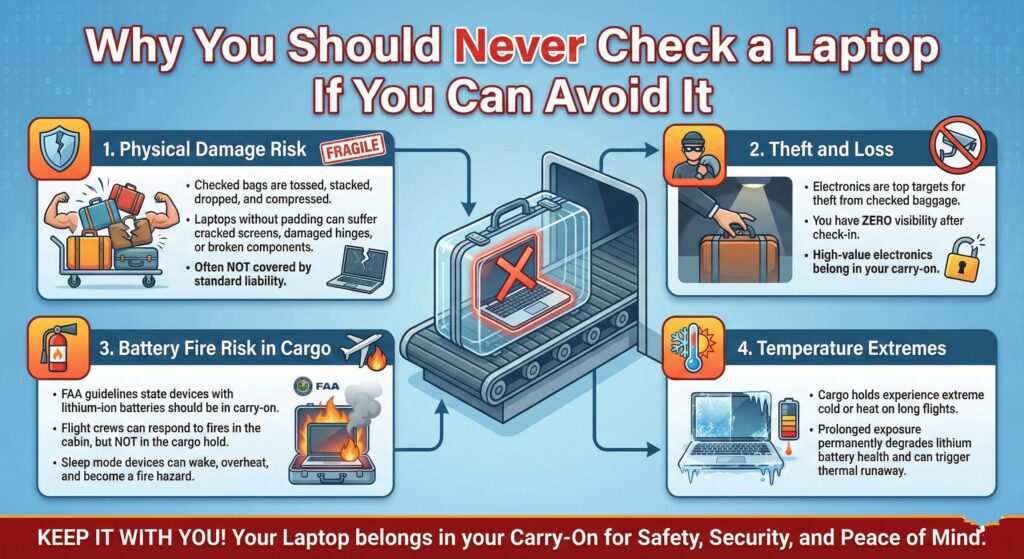
Even setting aside battery rules, there are several strong practical reasons to keep your laptop out of checked luggage.
Physical damage risk
Checked bags are tossed, stacked, dropped, and compressed in cargo holds. A laptop without protective padding in checked luggage can easily suffer cracked screens, damaged hinges, or broken internal components — damage that often isn’t covered by standard baggage liability.
Theft and loss
Electronics are among the most commonly stolen items from checked baggage worldwide. Unlike a phone in your pocket or a laptop in your carry-on, you have zero visibility over your checked bag from the moment you hand it over until the carousel. High-value electronics belong with you.
Battery fire risk in cargo
The FAA’s PackSafe guidelines are explicit: devices with lithium-ion batteries should be in carry-on baggage because flight crews are trained to respond to lithium battery fires in the cabin. In the cargo hold, that response is not possible. A laptop left in checked baggage in sleep mode can wake up, generate heat, and — in rare but real cases — become a fire hazard.
Temperature extremes
Cargo holds can reach extreme temperatures during long-haul flights. Prolonged exposure to cold or heat can permanently degrade lithium battery health and, in severe cases, trigger thermal runaway.
TSA Rules for Laptops in Carry-On Bags

Getting your laptop through TSA security in your carry-on is simple, but there are specific procedures to follow to avoid delays. As Insurte’s 2026 TSA laptop rules guide explains, the standard rule is to remove your laptop from your bag and place it in a separate bin on the conveyor belt for X-ray screening — though this is changing at some airports.
Standard TSA laptop screening procedure
- Remove your laptop from your bag and place it flat in its own dedicated bin.
- Do not leave it inside a sleeve, backpack, or padded case during screening.
- Power banks and tablets may also require separate bins — check signage at your specific checkpoint.
- Keep your laptop charged — TSA agents may ask you to power it on to verify it is a functional device.
New CT scanner rollout in 2026
The TSA is progressively rolling out advanced 3D CT scanners at major US airports. These give agents a full three-dimensional view inside bags, which means at airports equipped with these machines, you may not be required to remove your laptop from your bag at all. However, until CT scanners are universal, assume you will need to remove it. Always follow the instructions of the agents and signage at your specific checkpoint.
Airline-by-Airline Rules: What Major Carriers Say
Individual airlines can set rules that go beyond the FAA’s baseline guidelines. Here is a quick overview of major carrier policies.
Laptop rules by airline
| Airline | Laptop in Checked Bag | Laptop in Carry-On | Spare Batteries in Checked Bag |
|---|---|---|---|
| American Airlines | Allowed (powered off) but discouraged | ✅ Recommended | ❌ Prohibited |
| Delta Air Lines | Allowed (powered off) but discouraged | ✅ Recommended | ❌ Prohibited |
| United Airlines | Allowed (powered off) but discouraged | ✅ Recommended | ❌ Prohibited |
| Southwest Airlines | Allowed (powered off) but discouraged | ✅ Recommended | ❌ Prohibited |
| Most international carriers | Varies — check before flying | ✅ Recommended | ❌ Prohibited |
The universal rule across every major carrier: spare batteries — not installed in a device — are never allowed in checked baggage and must be in your carry-on.
FAA Lithium Battery Limits You Need to Know
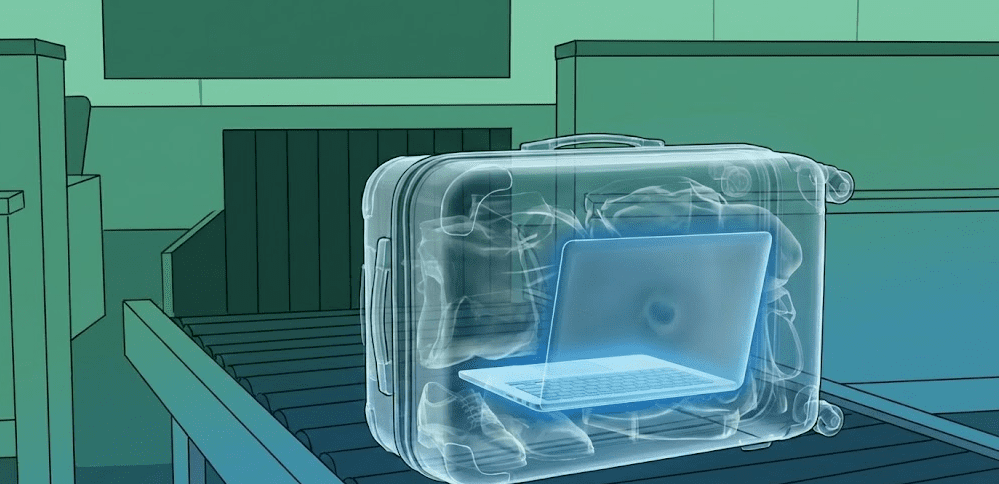
The FAA sets the hard limits on battery capacity for air travel. These apply regardless of which airline you fly.
FAA lithium-ion battery rules for laptops
- Under 100 Wh: Allowed in carry-on freely. Most standard consumer laptops (MacBook Pro, Dell XPS, HP OmniBook) fall comfortably in this range.
- 100 Wh to 160 Wh: Allowed in carry-on with airline approval. Some larger gaming laptops and high-capacity batteries fall here.
- Over 160 Wh: Prohibited on all passenger aircraft — carry-on or checked.
Most laptops have batteries between 45 Wh and 100 Wh, so the majority of travelers don’t need to worry about these limits. You can find your laptop’s battery capacity on the battery label itself or in the manufacturer’s spec sheet.
As EcoFlow’s 2026 portable battery airline rules guide notes, the specific rules vary by carrier for anything between 100–160 Wh, so calling your airline ahead of time is the safest approach if you’re traveling with a high-capacity device or spare battery.
Step-by-Step: How to Travel With Your Laptop Stress-Free
Step 1: Always pack your laptop in your carry-on
This is the single most important step. Use a dedicated padded laptop compartment in a backpack or laptop bag. Never wrap it loosely in clothing inside a checked suitcase.
Step 2: Check your battery capacity before flying internationally
Find the Wh rating on your laptop battery (usually printed on the battery or in system settings). If it’s under 100 Wh, you’re fine everywhere. If it’s 100–160 Wh, contact your airline 48 hours before departure to confirm approval.
Step 3: Pack spare batteries in carry-on only
If you carry a spare laptop battery, a USB-C power bank, or any other standalone lithium battery — these must go in your carry-on. No exceptions.
Step 4: Keep your laptop charged and accessible
A dead laptop may be flagged for additional screening. Keep it charged to at least 20%, and make sure it powers on quickly so TSA can verify it if asked.
Step 5: Prepare for security screening
Place your laptop in a separate bin — not inside a bag or sleeve. Remove it before you approach the conveyor belt to avoid holding up the line. Wear slip-on shoes, place your bag in a bin, and have your laptop out and ready.
Step 6: If you absolutely must check a laptop
If there is no alternative and you must check a laptop:
- Power it completely off — not sleep mode, fully off.
- Wrap it in padded clothing or a protective case.
- Remove any detachable batteries and carry them with you.
- Consider travel insurance that covers electronics.
- Lock the bag and use a TSA-approved lock.
International Travel: Additional Considerations
Flying internationally introduces additional layers of rules beyond TSA and FAA guidelines.
UK and EU rules
The UK Civil Aviation Authority (CAA) and EU aviation authorities follow similar lithium battery guidelines to the FAA. Laptops are strongly recommended in carry-on, and spare batteries are prohibited from checked baggage. Some European carriers are more strict about enforcing this than US carriers.
Middle East and Asia routes
Certain routes and airports have historically implemented electronics bans or additional screening for devices larger than a smartphone. While the broad US-originating laptop ban of 2017 was lifted, specific security situations can change. Always check your airline’s current policy for your specific route when traveling internationally.
Always check your airline 48 hours before flying
Policies can and do change, particularly for international routes. A quick check of your airline’s prohibited items page before you fly is always worth doing.
Pro Tips for Traveling With a Laptop
Use a dedicated laptop travel bag
Laptop backpacks and messenger bags with rigid padded compartments protect against the knocks and bumps of busy airport travel. This matters even in the overhead bin, where bags can shift and compress during flight.
Back up before you fly
Regardless of where you pack your laptop, back up your data to cloud storage or an external drive before any flight. Equipment can be lost, damaged, or delayed regardless of how careful you are.
Label your laptop
Add a business card or label inside your laptop bag with your name and phone number. If it gets separated from you during security or at the gate, this dramatically improves the chance of recovery.
Consider travel insurance
Standard airline liability for electronics is limited — legally capped at $4,700 for all checked baggage combined on US domestic flights (updated by the DOT in 2025), and roughly $2,000 on many international routes under the Montreal Convention. Travel insurance policies with electronics coverage give you proper protection for high-value devices if the airline’s payout won’t come close to covering your gear.
Use a laptop lock at layovers
During long layovers, a Kensington-style cable lock attached to a fixed object in a lounge provides a basic deterrent if you need to step away briefly.
FAQ: Laptops on Planes
Can I put my laptop in my checked bag?
Technically yes, but it is strongly discouraged by the FAA, TSA, and virtually every airline. The risk of damage, theft, and lithium battery fire in the cargo hold makes checked baggage a poor choice for any laptop. Always carry it in your carry-on if at all possible.
Do I have to take my laptop out at airport security?
In most US airports, yes — place your laptop in a separate bin for X-ray screening. However, airports equipped with newer 3D CT scanners may not require this. Follow the instructions at your specific checkpoint and watch for signage.
Can lithium batteries go in checked baggage?
Spare (uninstalled) lithium batteries are always prohibited in checked baggage — no exceptions. Lithium batteries installed inside a device (like inside your laptop) can technically go in checked baggage if the device is fully powered off, but this is strongly discouraged by the FAA and most airlines.
What size laptop battery is allowed on a plane?
Under 100 Wh — freely allowed in carry-on. Between 100–160 Wh — allowed in carry-on with airline approval. Over 160 Wh — prohibited on all passenger aircraft. Most consumer laptops fall well under 100 Wh.
Can TSA make me turn on my laptop?
Yes — TSA agents can ask you to power on your laptop or other electronic devices to verify they are functional. Keep your battery charged to at least 20% to avoid delays or additional screening.
What if my carry-on is gate-checked?
If your carry-on is gate-checked at the last moment due to overhead bin space, remove your laptop and any spare batteries from the bag before handing it over. These must stay with you in the cabin — no exceptions.
Are gaming laptops with large batteries allowed on planes?
Most gaming laptops have batteries in the 80–99 Wh range and are fine in carry-on without special approval. Some models with larger 100–160 Wh batteries require airline approval in advance. Check the Wh rating printed on your battery label before flying.
Can I use my laptop during a flight?
Yes — once the crew announces that electronic devices are permitted (typically after takeoff), laptops can be used in flight mode. Many airlines also offer in-seat power outlets or USB charging ports for in-flight use.
Final Thoughts
The answer is simple: your laptop belongs in your carry-on, every time. The combination of FAA safety guidance, airline policies, theft risk, damage risk, and basic common sense all point to the same conclusion — keep your laptop with you in the cabin.
If you follow the TSA screening steps, pack your spare batteries in your carry-on, and verify your battery capacity before international trips, traveling with a laptop is genuinely hassle-free in 2026. For a practical visual walkthrough of what TSA is flagging and confiscating from electronics in 2026 — including laptops left in sleep mode in checked bags — this YouTube breakdown of TSA electronics confiscations in 2026 is a useful watch before your next trip.



