 Skip to content
Yes — mini PCs do experience Bluetooth latency, but this is a Bluetooth technology issue, not a mini PC-specific problem. Every Windows PC, laptop, or mini PC using Bluetooth audio will encounter some degree of latency. The real question is how much latency to expect, which scenarios it actually matters in, and what you can do to minimize it on your specific mini PC setup.
Understanding Bluetooth Latency: The Root Cause
Bluetooth latency exists because wireless audio transmission takes time — the signal must be encoded, transmitted wirelessly, received, decoded, and played back. This process introduces a delay measured in milliseconds (ms) between when audio is triggered on your PC and when you actually hear it through your Bluetooth device.
The amount of latency depends on four key factors:
- Bluetooth version: Newer versions (5.0, 5.2, 5.3, 5.4) have improved bandwidth and connection stability but don’t eliminate latency on their own.
- Audio codec: This is the single biggest variable. The codec determines how audio is compressed and transmitted wirelessly — and different codecs have dramatically different latency profiles.
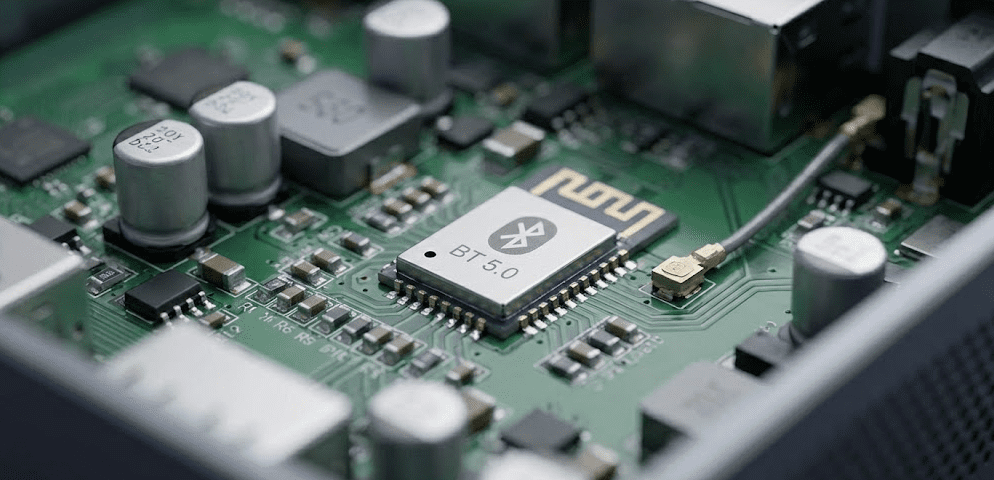
- Your Bluetooth hardware: The quality of the Bluetooth chip inside your mini PC matters. Most modern mini PCs use Intel Wi-Fi/Bluetooth combo cards (like the Intel AX200, AX210, or BE200) which are among the most reliable on the market.
- Interference and distance: Other 2.4GHz devices (Wi-Fi routers, microwaves, cordless phones) can increase latency and cause dropouts.
How Much Bluetooth Latency Should You Expect?
Latency varies significantly depending on the audio codec being used. Here is a realistic breakdown based on real-world measurements in 2026:
Bluetooth latency by codec
| Codec | Typical Latency | Quality | Support |
|---|---|---|---|
| SBC | 150–300ms | Good | Universal fallback |
| AAC | 120–180ms | Very Good | Modern Windows 11 default |
| aptX | 40–70ms | Excellent | Qualcomm-supported devices |
| aptX Low Latency | ~32ms | Excellent | Qualcomm-supported devices |
| aptX Adaptive | 50–80ms (high quality) / ~30ms (low latency mode) | Outstanding | Newer Qualcomm headsets |
| LDAC | 200–400ms | Audiophile (prioritizes quality over latency) | Sony and compatible devices |
| LC3 / Bluetooth LE Audio | ~20–30ms | Excellent | BT 5.2+ devices, Windows 11 24H2+ |
The default codec on most Windows 11 mini PCs when connecting to modern earbuds is AAC (or SBC for older and budget headsets), which delivers 120–300ms of latency. This is noticeable in gaming and video watching. Upgrading to aptX Adaptive or LE Audio — if both your mini PC’s Bluetooth chip and your headset support it — can bring latency down to 20–70ms, a level most people find imperceptible in everyday use.
Does Bluetooth Latency Actually Matter? It Depends on Your Use Case
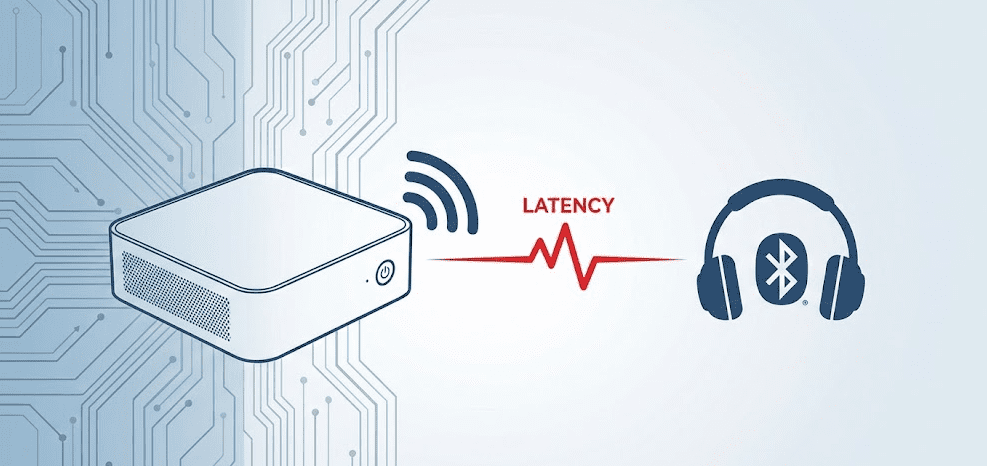
Bluetooth latency is not equally important for every use case. Here is an honest breakdown:
Casual music listening
At 120–300ms, Bluetooth latency is completely irrelevant for music. You’re not watching anything on screen — there’s no audio-to-visual sync to worry about. Latency only becomes a problem when you need audio to match something you see.
Watching videos and movies
At 120–300ms (AAC/SBC), Bluetooth audio can feel slightly out of sync with lip movements, particularly in close-up dialogue scenes. Most video players — VLC, MPC-HC, Potplayer — allow you to manually offset the audio track to compensate. Many users set a -150ms to -250ms audio delay offset as a one-time fix. With aptX or aptX Low Latency (32–70ms), sync issues essentially disappear.
Gaming
This is where Bluetooth latency is most problematic. 200–300ms of audio lag in a fast-paced game means hearing gunshots, footsteps, and explosions noticeably after they happen — a real competitive and immersion disadvantage. As Tom’s Hardware forum discussions confirm, SBC/AAC-level Bluetooth latency in gaming is genuinely noticeable to the point of being distracting for many players. For gaming, wired headphones or aptX Low Latency / LE Audio Bluetooth are strongly recommended.
Music production and recording
Bluetooth audio is simply not suitable for music production. Even 30ms of latency creates monitoring issues when recording — wired studio monitors or headphones are the only correct answer for this use case.
Video calls (Zoom, Teams, Google Meet)
Bluetooth latency for your own voice monitoring is irrelevant in calls — the other person hears you without delay. Latency only affects how you hear incoming audio, and at 120–250ms, most people adapt quickly and don’t find it disruptive for conversational use.
Mini PC Bluetooth Hardware: What’s Inside?
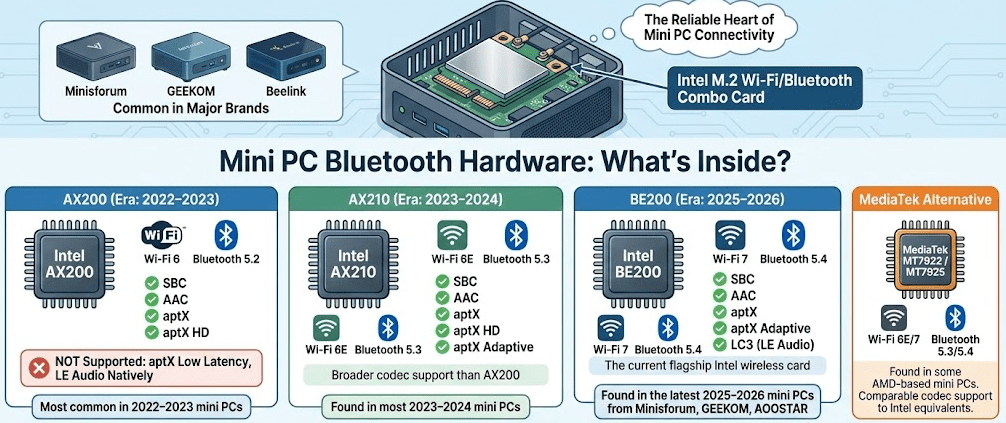
Most modern mini PCs from Minisforum, GEEKOM, Beelink, and other major brands ship with Intel Wi-Fi/Bluetooth combo M.2 cards. These are among the most reliable Bluetooth implementations available on Windows hardware. Here is what the most common chipsets support:
Intel AX200 (Wi-Fi 6, Bluetooth 5.2)
- Supports: SBC, AAC, aptX, aptX HD
- Does not support aptX Low Latency or LE Audio natively
- Most common in 2022–2023 era mini PCs
Intel AX210 (Wi-Fi 6E, Bluetooth 5.3)
- Supports: SBC, AAC, aptX, aptX HD, aptX Adaptive
- Broader codec support than AX200
- Found in most 2023–2024 mini PCs
Intel BE200 (Wi-Fi 7, Bluetooth 5.4)
- Supports: SBC, AAC, aptX, aptX Adaptive, LC3 (LE Audio)
- The current flagship Intel wireless card
- Found in the latest 2025–2026 mini PCs from Minisforum, GEEKOM, and AOOSTAR
MediaTek MT7922 / MT7925
- Found in some AMD-based mini PCs
- Supports Wi-Fi 6E/7 and Bluetooth 5.3/5.4
- Comparable codec support to Intel equivalents
As RTINGS.com’s Bluetooth headphone connectivity testing demonstrates, the codec chain — not just the source device — determines real-world latency. Both your mini PC’s Bluetooth chip and your headset must support the same codec for it to be used; otherwise, Windows falls back to AAC or SBC.
Step-by-Step: How to Reduce Bluetooth Latency on Your Mini PC
Step 1: Update your Bluetooth drivers
Outdated Bluetooth drivers are one of the most common causes of excessive latency on Windows mini PCs.
- Open Device Manager (Win + X > Device Manager)
- Expand the Bluetooth section
- Right-click your Bluetooth adapter > Update driver > Search automatically
- Alternatively, visit your mini PC manufacturer’s support page and download the latest Intel or MediaTek wireless driver package directly
Step 2: Check which codec Windows is using
Windows doesn’t make this easy to see by default. The clearest method:
- Right-click the sound icon in the taskbar > Open Sound Settings
- Under Output, select your Bluetooth device > Device properties
- Note the audio format listed
For granular codec control, install Bluetooth Audio Receiver (free from the Microsoft Store) or use the Bluetooth Tweaker utility to see and force specific codecs.
Step 3: Force aptX or aptX Adaptive if supported
If your mini PC’s Bluetooth card and your headset both support aptX or aptX Adaptive, ensure Windows is using it:
- Ensure your Bluetooth drivers are fully updated (Intel driver packages enable aptX support)
- In Sound Settings, check if additional format options appear for your device
- Some headsets require you to select “Hands-Free AG Audio” service and disable it — leaving only “Stereo” — to prevent Windows defaulting to lower-quality HFP mode
Step 4: Disable audio enhancements
Windows audio enhancements add processing that increases latency.
- Right-click the sound icon > Sound Settings > Your Bluetooth device > Device properties > Additional device properties
- Go to the Enhancements tab > Check “Disable all enhancements”
- Apply and test
Step 5: Reduce 2.4GHz interference
Bluetooth operates on the 2.4GHz band — the same as older Wi-Fi routers and many household devices. Interference increases latency and causes dropouts.
- Switch your Wi-Fi connection to 5GHz or 6GHz (most modern mini PCs support Wi-Fi 6/6E/7 with dedicated bands)
- Keep Bluetooth devices within 10 metres with no obstructions
- Move away from microwaves, cordless phones, and baby monitors when using Bluetooth
Step 6: Keep Bluetooth devices charged
Low battery levels on wireless headphones and peripherals are a documented cause of increased latency and connection instability. Keep your Bluetooth devices above 30% charge during extended use.
Step 7: Use a USB Bluetooth audio transmitter for codec upgrades (advanced)
If your mini PC’s built-in Bluetooth card doesn’t support the low-latency codecs you need, do not buy a generic Bluetooth dongle — standard USB Bluetooth adapters won’t solve the codec problem. Instead, buy a dedicated USB Bluetooth Audio Transmitter like the Creative BT-W5 or Sennheiser BTD 600. These specialized dongles bypass the Windows Bluetooth stack entirely and handle aptX Adaptive or aptX Low Latency encoding right on the USB stick itself — guaranteeing a low-latency connection regardless of what internal Bluetooth card your mini PC has.
The Codec Chain Problem: Why Both Devices Must Match
This is the most important concept for anyone trying to minimize Bluetooth latency and it’s frequently misunderstood.
Bluetooth audio codecs only activate when both devices in the connection support the same codec. If your mini PC’s Bluetooth card supports aptX Adaptive but your headset only supports AAC, Windows will use AAC — the common denominator — regardless of what your card can do.
Before buying Bluetooth headphones or speakers for use with your mini PC, check:
- What codecs your mini PC’s Bluetooth card supports (check the Intel or MediaTek spec sheet for your card model)
- What codecs your target headset or speaker supports (listed in the product specs)
- That at least one low-latency codec — aptX, aptX Low Latency, aptX Adaptive, or LC3/LE Audio — appears on both lists
LE Audio and Windows 11 24H2: The Latency Game-Changer
One of the most significant Bluetooth developments for mini PC users is Microsoft’s rollout of native LE Audio support in the Windows 11 24H2 update. This update introduced “Super Wideband Stereo” LE Audio support, enabling the LC3 codec (~20–30ms latency) on compatible hardware natively within Windows — no third-party tools required.
To take advantage of LE Audio on your mini PC, you need:
- Windows 11 24H2 or later (Settings > Windows Update)
- A mini PC with a Bluetooth 5.2+ card that supports LE Audio (Intel BE200 or newer)
- A headset or speaker with LE Audio / LC3 support
As more headsets launch with LE Audio support through 2026, this will become the most practical path to near-wire-quality latency (~20ms) on a Windows mini PC without any workarounds.
Wired vs Bluetooth: When to Just Use a Cable
No matter how well you optimize Bluetooth on your mini PC, wired audio will always have lower latency. Here is the honest comparison:
| Connection Type | Typical Latency | Best For |
|---|---|---|
| Wired 3.5mm / USB | <10ms | Gaming, production, precision audio |
| LC3 / LE Audio (BT 5.2+ / Win 11 24H2) | ~20–30ms | Everyday use on newer hardware |
| aptX Low Latency BT | ~32ms | Everyday use, casual gaming |
| aptX / aptX Adaptive | 40–80ms | Music, video, light gaming |
| AAC | 120–180ms | Default on modern Windows 11 + earbuds |
| SBC | 150–300ms | Older/budget headsets, universal fallback |
The practical takeaway: for competitive gaming, music production, or any scenario where precise audio sync matters, use a wired connection. For music, casual gaming, video calls, and everyday productivity, a well-configured aptX Adaptive or LE Audio Bluetooth connection on a modern mini PC is genuinely excellent.
FAQ: Mini PC Bluetooth Latency
Do mini PCs have more Bluetooth latency than laptops or desktops?
No — Bluetooth latency on a mini PC is identical to any other Windows PC using the same Bluetooth hardware and codec. The latency is determined by the Bluetooth chip, codec, and headset — not the form factor of the computer.
Why is my Bluetooth audio out of sync with video on my mini PC?
This is typically AAC or SBC codec latency (120–300ms). Fix it by offsetting the audio delay in your video player (VLC: Tools > Track Synchronization > Audio track synchronization: set to -150ms to -250ms), or upgrade to aptX/aptX Low Latency headphones and ensure your mini PC’s Bluetooth card supports the same codec.
Does Bluetooth 5.0 or 5.3 reduce latency?
Newer Bluetooth versions improve connection stability, range, and bandwidth — but the audio codec remains the primary determinant of latency. Bluetooth 5.2 introduced LE Audio with the LC3 codec (~20–30ms latency), which is a genuine improvement, particularly with Windows 11 24H2’s native LE Audio support. Simply having Bluetooth 5.0 or 5.3 doesn’t automatically lower latency without matching codec support on both ends.
Is Bluetooth latency bad for gaming on a mini PC?
With AAC or SBC (default), yes — 120–300ms is noticeable in fast-paced games. With aptX Low Latency (~32ms) or LE Audio LC3 (~20–30ms), gaming over Bluetooth is significantly more comfortable. For competitive gaming, wired headphones remain the gold standard.
What Bluetooth codec should I use for the lowest latency on Windows?
In order of lowest to highest latency: LC3/LE Audio (~20–30ms), aptX Low Latency (~32ms), aptX Adaptive (~30–80ms depending on mode), aptX (~40–70ms), AAC (~120–180ms), SBC (~150–300ms). Use the lowest latency codec that both your mini PC and your headset support.
Can I add better Bluetooth to my mini PC?
Yes — you have two options. If you are comfortable opening your mini PC, you can swap the internal M.2 Wi-Fi/Bluetooth card for a modern Intel BE200 chip to get native Bluetooth 5.4 and LE Audio support. If you want a plug-and-play solution, buy a dedicated USB Audio Transmitter like the Creative BT-W5 or Sennheiser BTD 600, which forces high-end codecs like aptX Adaptive regardless of what internal Bluetooth card your mini PC has.
Does disabling audio enhancements in Windows reduce Bluetooth latency?
Yes — Windows audio enhancements add DSP processing that increases latency. Disabling them in Sound Settings > Device Properties > Enhancements is one of the first and most effective software fixes for reducing Bluetooth audio delay.
Why does my Bluetooth latency get worse when Wi-Fi is active?
Bluetooth and Wi-Fi both use the 2.4GHz band, and they can interfere with each other. Switching your Wi-Fi connection to 5GHz or 6GHz on your mini PC removes this interference, often improving Bluetooth stability and reducing latency noticeably.
Final Thoughts
Bluetooth latency on a mini PC is real — but it is manageable, and for most everyday use cases it is a non-issue with the right setup. The default AAC codec on Windows 11 gives you 120–180ms of delay with modern earbuds, which matters for gaming and precise video sync but is irrelevant for music. Upgrading to aptX Adaptive or LE Audio brings latency to levels most people find completely acceptable even for casual gaming.
Modern mini PCs with Intel AX210 or BE200 wireless cards have excellent Bluetooth hardware foundations, and Windows 11 24H2’s native LE Audio support makes the low-latency LC3 codec accessible without any workarounds on compatible hardware. As Asurion’s 2026 Bluetooth audio delay guide confirms, most Bluetooth latency issues on Windows PCs are solvable with updated drivers, correct codec selection, and interference reduction. For a practical walkthrough of fixing Bluetooth sound delay in Windows settings, this YouTube guide to fixing Bluetooth sound delay on PC covers the key steps clearly and efficiently.



