
No, OpenClaw does not require a GPU. The framework itself is a lightweight Node.js application that runs on virtually any modern computer, including a basic laptop or a $5-per-month cloud VPS, with no GPU needed whatsoever. However, if you want to run local AI language models alongside it instead of relying on paid cloud APIs, a dedicated GPU with sufficient VRAM becomes very important and will transform your experience from frustratingly slow to genuinely fast and practical.
That said, the full picture is more nuanced than a simple yes or no. Your hardware needs depend entirely on how you plan to use OpenClaw, and there are some smart middle-ground options in 2026 that are worth knowing about before you spend any money.
What Is OpenClaw?

OpenClaw (formerly known as Clawdbot and Moltbot) is an open-source, local-first AI agent framework that allows large language models to interact directly with your computer. Think of it as an intelligent orchestration layer that connects an AI brain to your files, apps, calendar, inbox, and local environment, enabling it to reason, plan, and take multi-step actions on your behalf.
Some of the most popular use cases include using it as a personal secretary that manages your schedule and drafts email replies, a proactive project manager that follows up on tasks autonomously, and a research assistant that combines internet searches with context from your local files. It became one of the fastest-growing tools in the local AI space in early 2026 because of how flexible and privacy-focused it is compared to purely cloud-based alternatives.
The reason the GPU question gets complicated is that OpenClaw is not itself an AI model. It is an orchestration framework. The actual “thinking” is done by a large language model (LLM), which can either run on your local hardware or connect to a remote cloud service like OpenAI or Anthropic. That choice is what determines whether you need a GPU at all.
OpenClaw’s Actual System Requirements
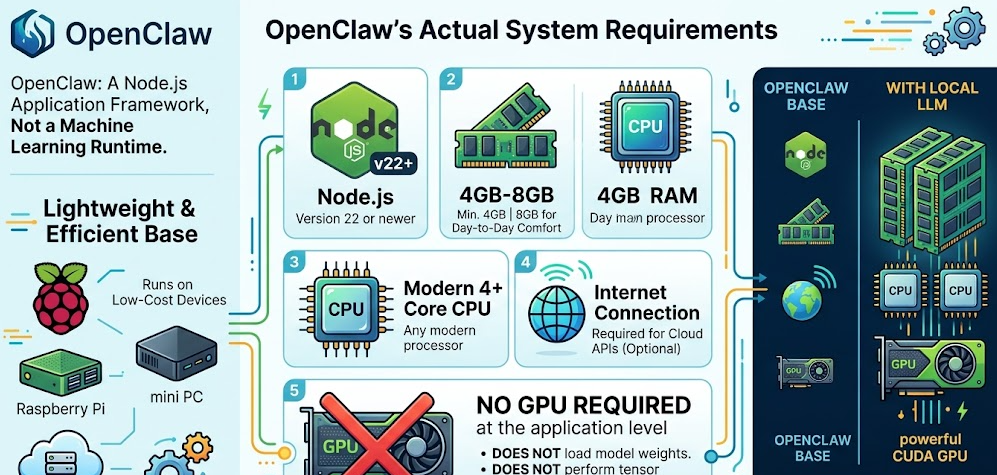
Before getting into the GPU debate, it helps to understand what OpenClaw actually needs to run. The base requirements are impressively minimal.
Minimum Requirements to Install and Run OpenClaw:
-
Node.js version 22 or newer
-
4GB RAM minimum (8GB is more comfortable for day-to-day use)
-
Any modern CPU with at least 4 cores
-
An internet connection if you plan to use cloud APIs
-
No GPU required at the application level
That really is all you need to install and run the OpenClaw framework. It is a Node.js application, not a machine learning runtime. It does not load model weights, it does not perform tensor computations, and it does not require CUDA. Plenty of users run it on Raspberry Pi boards, cheap mini PCs, and low-cost cloud servers without any issue.
The resource requirements only increase significantly when you bring a local LLM into the equation, which is where everything changes.
The Core Question: Cloud API vs. Local LLM Mode
The single biggest factor that determines whether you need a GPU is whether you want your AI model running locally on your machine or remotely through a cloud API.
Cloud API Mode (No GPU Required)
If you connect OpenClaw to an external provider like OpenAI’s GPT series, Anthropic’s Claude, or Google Gemini, all the heavy computation happens on their servers. Your computer is simply sending text prompts and receiving responses. In this setup, a GPU is completely unnecessary. A basic laptop, a mini PC, or even a cloud VPS with 2 to 4GB of RAM handles it without breaking a sweat.
The tradeoff is that you pay per token, and your personal data passes through a third-party server. For privacy-conscious users, or anyone running high-volume continuous workflows, these costs and privacy concerns can add up fast.
Local LLM Mode (GPU Strongly Recommended)
If you want to run a local model through inference tools like Ollama or LM Studio instead, the picture changes significantly. Local LLMs need to load their full model weights into memory, and the speed at which they generate tokens is directly tied to your GPU’s VRAM capacity and memory bandwidth.
Running local models without a GPU is technically possible using your CPU and system RAM, but performance drops sharply. CPU-only inference typically produces around 1 to 15 tokens per second depending on your hardware and model size. For an AI agent handling complex, multi-step reasoning tasks, that kind of speed makes the experience genuinely frustrating to use in real time.
Running OpenClaw Without a GPU: What to Realistically Expect
Let’s be honest about what the no-GPU experience actually looks like, because depending on your situation, it may be more usable than you expect.
CPU-Only Local Inference
If you have a powerful modern CPU and at least 32GB of RAM, you can run smaller quantized models at workable speeds. A 4-bit quantized 7B model on a high-end Ryzen 9 or Intel Core i9 processor will generate roughly 5 to 15 tokens per second, which is acceptable for non-time-sensitive background tasks. Anything beyond about 13B parameters at Q4 quantization will either fail to load entirely or grind along at 1 to 2 tokens per second.
This approach works well for experimentation, learning the OpenClaw ecosystem, or running lightweight tasks where response latency does not matter much. It is not a practical setup for real-time agentic workflows or anything involving multi-agent pipelines.
NPU-Powered Systems: The 2026 Middle Ground
One of the most important hardware developments for OpenClaw users in 2026 is the mainstream arrival of dedicated Neural Processing Units (NPUs) in consumer processors. Chips like the AMD Ryzen AI 9 HX 370, found in many current mini PCs and laptops, include an NPU capable of handling AI inference tasks independently of the CPU. This lets you run small to mid-size local models far more efficiently than a pure CPU setup, without needing a discrete GPU at all.
Apple Silicon Macs deserve a mention here too. The unified memory architecture of M-series chips means the GPU and CPU share the same memory pool. An M2 Pro or M3 Max with 32GB or more of unified memory is a legitimately capable local inference machine, running models that would require expensive multi-GPU PC setups to match.
The Cloud-Hybrid Workaround
A clever approach gaining traction in the OpenClaw community in 2026 is running the OpenClaw framework on a lightweight local machine or VPS while pointing it to a remote Ollama instance on a more powerful GPU machine over a private network tunnel like ZeroTier. You get low-cost orchestration hardware running 24/7 with full local privacy and good inference speeds, without the power draw and noise of a GPU-equipped machine running all day.
Running OpenClaw With a GPU: Why It Makes Such a Difference
When you add a dedicated GPU, the performance improvement is immediate and dramatic. NVIDIA’s official OpenClaw RTX setup guide explains that RTX GPUs deliver the best performance for this kind of workflow thanks to Tensor Cores that accelerate AI operations, combined with full CUDA support for tools like Ollama and llama.cpp. Having tested this kind of setup personally, I can confirm the jump from CPU-only inference to even a mid-range RTX 4060 is night-and-day in day-to-day use.
VRAM is the single most important specification to focus on. More VRAM means larger models, faster generation, and more headroom for longer context windows, which matter a lot for complex agentic reasoning chains.
Practical VRAM Tiers for OpenClaw:
-
6 to 8GB VRAM: Handles small 4B models like Qwen 3.5 4B or Nemotron Nano at 4-bit quantization. Workable for basic tasks, limited for complex reasoning.
-
12GB VRAM: Covers 7B to 9B models like Qwen 3.5 9B comfortably at Q4. The practical sweet spot for most single-user OpenClaw setups.
-
16GB VRAM: Clean performance with 13B to 20B models like gpt-oss 20B. Gives good headroom for extended context windows and multi-skill configurations.
-
24GB VRAM: RTX 4090 territory. Handles up to 27B models at Q4 without issue. Near-ideal for power users and small teams.
-
48GB and above: Multi-GPU configurations or specialized hardware. Opens the door to 70B+ models and large-scale agentic pipelines.
GPU Comparison Table for OpenClaw Local LLMs
Tokens per second figures are approximate and vary based on model architecture, quantization level, system RAM, and concurrent workloads. Note: The GT 1030 4GB uses DDR4 system memory rather than dedicated GDDR, which is the primary reason for its very limited performance in AI inference workloads. The DGX Spark’s value is not raw single-model token speed but its ability to load and run 120B+ parameter models that no other single consumer device can hold.
Step-by-Step: Setting Up OpenClaw With a Local GPU
If you have decided to go the local GPU route, here is exactly how to get OpenClaw running with a local LLM on an NVIDIA GPU. This covers the standard Windows with WSL2 path, which is what most users follow. For a visual step-by-step walkthrough, This YouTube guide to running OpenClaw on a local GPU is one of the clearest tutorials available and walks through every step from WSL installation to testing real coding tasks.
Step 1: Verify Your Prerequisites
Before anything else, confirm you have the following:
-
Windows 10 or 11 with WSL2 installed, or a native Linux environment
-
An NVIDIA GPU with up-to-date drivers and CUDA support
-
At least 16GB of system RAM (32GB recommended for smooth multi-skill setups)
-
Node.js version 22 or newer
Step 2: Install Your Local Model Backend
Ollama and LM Studio are the two recommended backends for running local models with OpenClaw. LM Studio is generally recommended for raw performance since it uses llama.cpp under the hood. Ollama offers a cleaner developer experience.
To install Ollama in WSL, run:
curl -fsSL https://ollama.com/install.sh | sh
To install LM Studio, run:
curl -fsSL https://lmstudio.ai/install.sh | bash
Step 3: Pull a Model That Fits Your VRAM
NVIDIA’s own model recommendations based on GPU memory:
-
6-8GB GPUs:
ollama pull qwen3.5:4bor Nemotron Nano 4B -
12-16GB GPUs:
ollama pull qwen2.5:9bor gpt-oss 20B -
24-48GB GPUs:
ollama pull qwen3.5:27b -
96-128GB GPUs: Nemotron Super or Qwen 3.5 122B
Step 4: Set Context Window to 32K or Higher
OpenClaw benefits significantly from a larger context window for its agentic reasoning chains. When loading your model, set context length:
In Ollama: ollama run your-model-name /set parameter num_ctx 32768
In LM Studio: lms load model-name --context-length 32768
Step 5: Install OpenClaw
In your WSL terminal, run:
curl -fsSL https://openclaw.ai/install.sh | bash
Follow the setup prompts. When asked for a model provider, skip the cloud API option and select your local backend (Ollama or LM Studio).
Step 6: Confirm GPU Passthrough
Run nvidia-smi in your WSL terminal. You should see your GPU listed and, once a model is loaded through Ollama or LM Studio, you will see VRAM allocated to confirm the GPU is handling inference.
Step 7: Access the Dashboard and Test
OpenClaw will provide a local URL with an access token after installation. Open it in your browser, start a conversation, and ask it something. If you get a fast response, everything is working. You can verify which model it is using by typing /model in the chat interface, and switch models at any time.
Pro Tip: One thing I have found makes a big difference is keeping VRAM as clear as possible during OpenClaw sessions. Close any games, avoid running other GPU workloads, and only enable the OpenClaw skills you actually need. NVIDIA specifically recommends this approach because it lets the inference backend access the maximum available VRAM, which means you can load a larger and more capable model. On a 12GB card, following this habit can be the difference between comfortably running a 9B model versus being stuck with a 4B one.
AMD and Apple Silicon: Non-NVIDIA Options in 2026
NVIDIA is the default recommendation for local AI inference because of its mature CUDA ecosystem, but it is far from your only option. AMD’s official guide to running OpenClaw locally on Ryzen AI Max+ processors and Radeon GPUs confirms full support for AMD hardware, with detailed setup instructions for both discrete Radeon cards and the Ryzen AI Max+ NPU-equipped processors.
AMD Radeon GPUs use ROCm instead of CUDA. ROCm support has matured considerably in 2026, but you will still encounter more setup friction and slightly slower inference speeds compared to a same-tier NVIDIA card in most benchmarks. That said, the RX 7900 XTX with 24GB of VRAM is a genuinely strong card for local LLM workloads, and for users already in the AMD ecosystem it is absolutely worth considering.
Apple Silicon is a compelling alternative for an entirely different reason. The unified memory architecture on M-series chips means the GPU and CPU share the same physical memory pool, so an M3 Max with 48GB of unified memory can run 27B parameter models that would need a dual-GPU PC setup to match. The per-watt efficiency is exceptional. The limitation is cost, lack of CUDA, and the closed ecosystem. For Mac users already invested in Apple hardware, running OpenClaw with local LLMs is a first-class experience.
OpenClaw Hardware Requirements: Quick Reference Table
2026 Trends Changing the GPU Equation
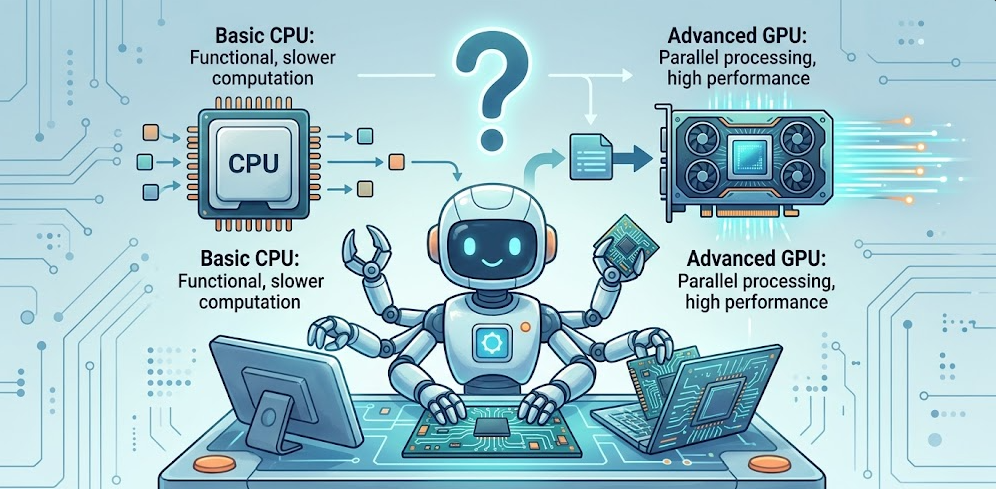
The GPU question for OpenClaw in 2026 looks meaningfully different from even a year ago. Several trends are actively reshaping what you need and what you can realistically achieve.
NVIDIA’s RTX 5000 Series and NVFP4
The RTX 50 series arrived with significant AI performance improvements. The new NVFP4 instruction set delivers approximately 35% better LLM inference performance over the previous generation, and creative AI tasks run up to three times faster. For OpenClaw users, this means the RTX 5060 Ti 16GB is now genuinely competitive with the RTX 4090 for most 7B to 20B model use cases, at a fraction of the power draw and price. In my opinion, the 5060 Ti 16GB is the most interesting GPU launch for local AI users in years. Its combination of GDDR7 bandwidth, 16GB of VRAM, and the NVFP4 instruction set in a 180W package is a genuinely impressive value proposition.
NVIDIA DGX Spark: Capacity Over Raw Speed
The DGX Spark is the wildcard of 2026 for serious OpenClaw deployments. Built on the ARM-based Grace Blackwell Superchip with 128GB of LPDDR5x unified memory and approximately 276 GB/s of memory bandwidth, it enables models in the 70B to 122B parameter range to run fully in memory on a single compact machine. That is its defining advantage. It is not a throughput monster for small models, but it is the only consumer-adjacent device that can hold and run something like a 120B parameter model without splitting across multiple systems. For professionals and small teams who need that kind of model scale locally, nothing else comes close at this price point.
Quantization Improvements Lowering the Barrier
Model quantization technology has advanced rapidly. The minimum usable VRAM for running functional local LLMs with OpenClaw has dropped significantly in early 2026 compared to even six months ago. Better compression techniques mean you can now run capable models on hardware that would have been considered insufficient a year ago. This is opening the door to a much wider audience of users with mid-range hardware.
NPU Integration Reaching Mainstream Consumers
With the Copilot+ PC standard pushing NPU-equipped hardware into the mainstream market, 2026 is realistically the first year NPU-assisted inference becomes a viable alternative for everyday OpenClaw users who do not want or cannot afford a discrete GPU. It is not as fast as a dedicated GPU for large models, but for small to medium local models it bridges the gap meaningfully. If you are shopping for a new laptop or mini PC and plan to use OpenClaw locally, prioritizing an NPU-capable processor is a smart move.
Free Cloud Model Options
Another route worth mentioning is the growing availability of free or very low-cost cloud model APIs in 2026. Services like NVIDIA’s Moonshot API and browser-session reuse approaches allow some users to run OpenClaw effectively without any local GPU and without paying per-token rates. For casual users who just want to explore what OpenClaw can do before committing to hardware, these options lower the entry barrier significantly.
Frequently Asked Questions
Does OpenClaw itself require a GPU to install?
No. OpenClaw is a Node.js application that installs and runs without a GPU. The GPU requirement only applies if you want to run a local AI model on your machine rather than connecting to a cloud API.
What happens if I run a local model on OpenClaw with no GPU?
You can still run local models using your CPU and system RAM, but generation speeds drop to roughly 1 to 15 tokens per second depending on your CPU and the model size. This is workable for light or background use but becomes frustratingly slow for complex multi-step agentic tasks that require rapid reasoning.
How much VRAM do I need for a good OpenClaw local LLM experience?
For a comfortable everyday experience with 7B to 9B models at 4-bit quantization, aim for at least 12GB of VRAM. 8GB is the practical minimum for small 4B models. If you plan to run 13B to 20B models, 16GB of VRAM is the realistic baseline, and 24GB gives you proper headroom for the most demanding single-GPU setups.
Can I use an AMD GPU with OpenClaw?
Yes, fully supported. AMD Radeon GPUs work through ROCm, and AMD’s Ryzen AI Max+ processors with integrated NPUs are also a strong hardware option for OpenClaw. Performance is generally slightly behind comparable NVIDIA setups due to the maturity gap between ROCm and CUDA, but AMD hardware handles the workflows well.
Can OpenClaw run well on an Apple Mac without a discrete GPU?
Yes, and in many cases very well. Apple M-series unified memory means the CPU and GPU share the same RAM pool, making chips like the M2 Pro and M3 Max genuinely capable for local inference. An M3 Max with 48GB of unified memory is one of the strongest single-chip local LLM machines available in 2026, especially in terms of power efficiency.
What is the best budget GPU for OpenClaw in 2026?
For the best combination of value and real-world capability, PC Build Advisor’s dedicated GPU guide for OpenClaw local LLMs identifies the RTX 5060 8GB GDDR7 as the top value pick at around $370. For users who want more headroom, the RTX 5060 Ti 16GB at $800 is the best single-GPU option for local LLM inference in 2026 without entering workstation pricing territory.
Is it better to use cloud APIs or a local GPU for OpenClaw?
It depends on your priorities. Cloud APIs provide access to larger, more capable models with no hardware investment, but they cost money per token and require sending your data to third-party servers. A local GPU setup gives you full data privacy, zero recurring inference costs, and offline capability, but requires upfront hardware spending and some technical setup time. For most beginners, starting with a cloud API and moving to local inference once comfortable is the practical path.
Can I run OpenClaw on a VPS without any GPU?
Absolutely. If you are using cloud APIs, a VPS with 2 to 4GB of RAM running the OpenClaw orchestration layer is a completely valid and popular configuration. It provides 24/7 uptime without any local hardware requirements. Some advanced users combine a no-GPU VPS for OpenClaw with a remote GPU machine running Ollama, connected via a private network tunnel.
Does OpenClaw support multi-GPU setups for larger models?
Yes. Through underlying inference frameworks like llama.cpp and Ollama, which both support multi-GPU configurations, OpenClaw can leverage multiple GPUs for models that exceed single-card VRAM limits. This is relevant primarily for users targeting 70B+ parameter models that do not fit into a single consumer GPU.
What Node.js version does OpenClaw require?
As of 2026, OpenClaw requires Node.js version 22 or newer. This is the first thing worth checking before installation, as older Node.js versions will cause compatibility issues during setup.
Bottom Line
OpenClaw does not require a GPU to run, but a GPU fundamentally transforms what you can do with it. If connecting to cloud APIs suits your needs, you can run the full OpenClaw framework on practically any modern computer or VPS with no GPU at all. If you want the privacy, cost savings, and offline capability of a local LLM, then 12GB of VRAM is the practical minimum for a smooth experience in 2026, with 16GB being the more comfortable baseline. The RTX 5060 Ti 16GB is the standout recommendation for most users this year, while the RTX 3060 12GB remains the best value pick for anyone on a tighter budget. And if you are eyeing the DGX Spark, go in knowing its superpower is running enormous 120B+ models in full, not blazing through small model tokens at high speed.


