
The best OpenClaw skills in 2026 cover five core areas: productivity (Notion, Linear, calendar management), communication (AgentMail, Telegram automation), browser automation (Playwright MCP, Playwright Scraper), research and data (web scraping, competitor analysis), and security (SecureClaw). Skills are installed from ClawHub, OpenClaw’s official skill registry, which now hosts over 13,000 community-built tools. The curated Awesome OpenClaw Skills collection on GitHub further filters these down to 5,400+ verified, categorized skills worth trusting. This guide walks through the best ones by category, how to install them, and the real-world automations people are building with them right now.
What Are OpenClaw Skills and How Do They Work?
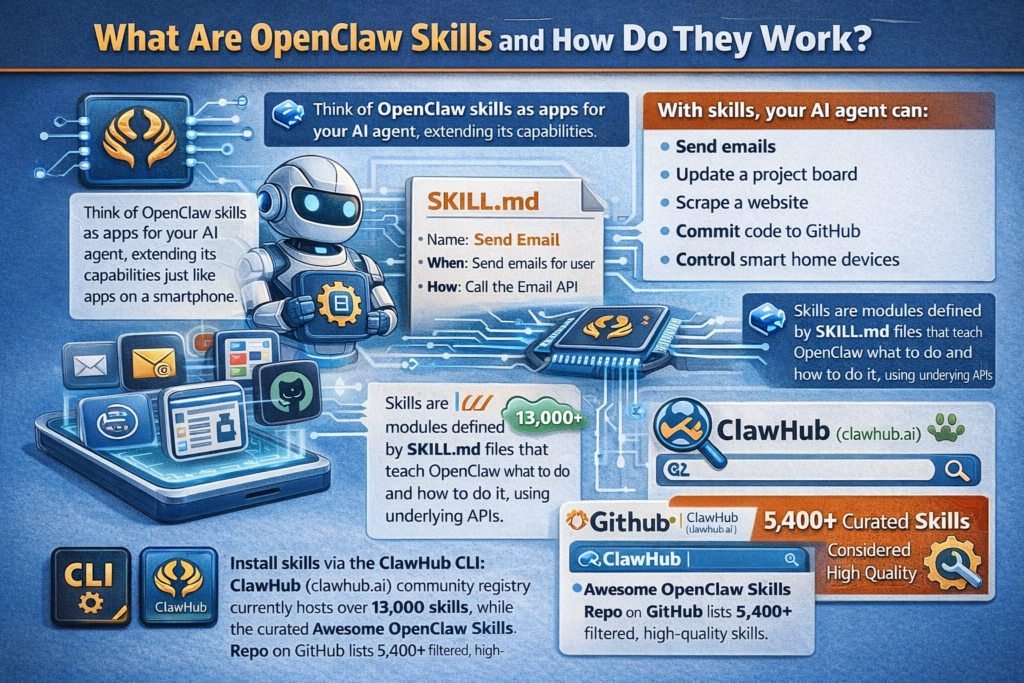
OpenClaw skills are modular capability packages that extend what your AI agent can do. Think of them the way you think of apps on a smartphone: OpenClaw itself is the operating system, and skills are the apps you install to add specific functionality. Without skills, your OpenClaw agent can have conversations and reason through problems. With skills, it can actually do things, including sending emails, updating a project board, scraping a website, committing code to GitHub, or controlling smart home devices.
Each skill is defined by a SKILL.md file, a Markdown-formatted specification that tells OpenClaw what the skill does, when to use it, and how to call its underlying functions or APIs. When your agent processes a request, it reads a streamlined manifest of all installed skills and decides which one to invoke based on context. As DigitalOcean’s developer guide to OpenClaw skills explains, this modular approach keeps agent logic clean and flexible while making it easy to extend capabilities without rewriting core architecture.
Skills are installed from ClawHub (clawhub.ai), OpenClaw’s official community registry, using the ClawHub CLI. As of late February 2026, ClawHub hosts over 13,000 community-built skills, and the curated Awesome OpenClaw Skills GitHub repository maintained by VoltAgent provides a filtered, categorized list of 5,400+ skills considered high quality and safe enough to recommend.
How to Install OpenClaw Skills
Before diving into the best skills, here is the basic installation process so you can follow along and install as you read.
Installing from ClawHub
The standard installation method uses the ClawHub CLI:
textclawhub install [skill-name]
For example, to install the Linear project management skill:
textclawhub install linear
Installing from a GitHub repository directly
You can also install any skill by pasting its GitHub repository URL directly into an OpenClaw chat message. OpenClaw will recognize the URL and handle the installation automatically.
Checking installed skills
To see all currently installed skills on your OpenClaw instance:
textopenclaw skills list
Skill storage locations
Skills are stored in one of three locations depending on scope:
- Workspace skills in your project’s skills folder, for project-specific use
- Managed skills in the shared ~/.openclaw/skills/ directory, available across all agents on that machine
- Bundled skills that ship with OpenClaw by default
Most users will work primarily with managed skills for everyday automations.
Pro Tip: Before installing any skill from ClawHub, check the author’s GitHub profile and look at the skill’s source code in the repository. Cisco’s AI security research team has found instances of data exfiltration and prompt injection in unvetted third-party skills. Stick to skills from the Awesome OpenClaw Skills curated list or authors with established GitHub histories, especially for skills that touch email, files, or credentials.
Best OpenClaw Skills by Category

Productivity and Knowledge Management
Notion
The Notion skill is one of the most downloaded in the entire ClawHub registry and for good reason. It gives your OpenClaw agent full read and write access to your Notion workspace, meaning you can ask it to create pages, update databases, log research notes, append meeting summaries, and organize content, all without touching the Notion interface yourself.
Install with:
textclawhub install notion
Real-world use: Set up OpenClaw to automatically create a new Notion page for each meeting, populated with the agenda, attendees, and a summary generated from your calendar event.
Obsidian Direct
For users who live inside Obsidian as their personal knowledge base, Obsidian Direct is transformative. It enables fuzzy search across your entire vault, automatic folder detection, and tag management. Your agent can query your notes as a knowledge base and pull context from years of accumulated writing when answering questions.
Install with:
textclawhub install obsidian-direct
Real-world use: Ask OpenClaw to research a topic and automatically cross-reference your existing Obsidian notes before responding, giving you answers grounded in your own thinking rather than just the internet.
Linear
Linear is the project management tool of choice for most software teams in 2026, and the Linear skill gives OpenClaw full GraphQL-based read and write access. Your agent can create issues, update statuses, assign tasks, query project cycles, and generate weekly summaries without you switching between apps.
Install with:
textclawhub install linear
Real-world use: At the end of each day, ask OpenClaw to summarize all Linear issues updated in the last 24 hours and post the summary to your Telegram.
Monday
If your team runs on Monday.com rather than Linear, the Monday skill offers equivalent functionality: creating items, updating boards, managing task statuses, and generating project reports. It has accumulated over 2,500 downloads on ClawHub, making it one of the more widely adopted project management integrations.
Install with:
textclawhub install monday
Browser Automation and Web Scraping
Playwright MCP
Playwright MCP is arguably one of the most powerful skills available for OpenClaw. It gives your agent the ability to control a real browser: navigate to websites, click buttons, fill out forms, extract content, take screenshots, and handle login flows. It is the backbone of most serious web automation setups.
Install with:
textclawhub install playwright-mcp
Real-world use: Have OpenClaw log into your company’s internal dashboard every morning, extract key metrics, format them into a report, and send it to your Telegram.
Playwright Scraper
Where Playwright MCP is a general browser controller, Playwright Scraper is specifically optimized for web scraping on sites with aggressive bot detection measures. It has been tested on complex, JavaScript-heavy websites and can bypass many common anti-scraping systems.
Install with:
textclawhub install playwright-scraper
Real-world use: Set up weekly competitor monitoring that scrapes pricing pages, product listings, and blog updates from competitor websites and formats the changes into a structured digest.
AgentBrowser
AgentBrowser is a lighter-weight alternative to Playwright for simple browsing tasks. It handles navigation, page reading, and content extraction without the overhead of a full Playwright browser instance. It is faster and more efficient for straightforward research tasks where full browser automation is not needed.
Communication and Messaging
AgentMail
AgentMail is OpenClaw’s dedicated email infrastructure skill, providing full agent-native email capabilities including sending, reading, replying, searching, and organizing messages. It works with standard email protocols and integrates cleanly with the rest of your OpenClaw workflow.
Install with:
textclawhub install agentmail
Real-world use: Configure OpenClaw to triage your inbox every morning, summarize important emails, draft replies for your review, and flag anything requiring urgent attention, all delivered as a single Telegram briefing.
Important note: Given the Meta inbox incident of February 2026, where Summer Yue had her entire inbox wiped by her OpenClaw agent due to compaction, always configure explicit approval requirements for any email skill that has delete, send, or move permissions. Never rely on natural language instructions alone for destructive email actions.
Automation Workflows
The Automation Workflows skill is a meta-skill that helps your agent design and execute multi-step automation chains across different tools. It identifies repetitive patterns in your requests and sets up trigger-action workflows, essentially teaching your agent to create automations on your behalf rather than requiring you to specify each step manually.
Install with:
textclawhub install automation-workflows
Research and Data
ClawRouter
ClawRouter is one of the most financially impactful skills you can install if you are running OpenClaw at scale. It intelligently routes tasks to the most cost-appropriate AI model rather than sending everything to a premium model like Claude or GPT-4. Simple tasks get routed to cheaper models, while complex reasoning tasks stay on premium models. Community members report cost reductions of approximately 70% after installing ClawRouter.
Real-world use: Run ClawRouter as a background skill on all your automations to dramatically reduce your monthly API costs without sacrificing quality on tasks that actually need it.
SuperData Transcript Extractor
SuperData pulls transcripts from YouTube videos, podcasts, and social media clips and formats them into clean, searchable text. It integrates naturally with Notion or Obsidian to automatically store and organize extracted content. Content creators and researchers use it to build large transcript libraries that OpenClaw can then query as a knowledge base.
Real-world use: Set up a daily automation that extracts transcripts from your favorite YouTube channels, summarizes the key points, and logs them into a Notion database for your agent to reference.
Coding and Development
Claude Code Integration
OpenClaw’s Claude Code skill gives your agent the ability to write, review, debug, and execute code directly. It integrates with your local development environment and can handle code reviews, generate test cases, write documentation from function signatures, and triage GitHub issues.
Real-world use: Connect OpenClaw to your GitHub repository and have it automatically perform a first-pass code review on every new pull request, flagging style violations, potential bugs, and security issues before human reviewers look at the code.
Deploy on Render
The Render deployment skill allows OpenClaw to deploy and manage applications on Render directly from a chat command. For solo developers and small teams, this means your agent can handle routine deployment tasks without you touching the Render dashboard.
Install with:
textclawhub install deploy-on-render
Decision Trees
The Decision Trees skill gives your agent a structured framework for working through complex, multi-step decisions. Rather than reasoning through branching choices in a single context window, it breaks decisions into explicit tree structures, improving consistency and reducing errors in complex analytical tasks.
Security
SecureClaw
SecureClaw is the most important security-focused skill and plugin in the OpenClaw ecosystem. Released in February 2026, it integrates into OpenClaw’s plugin system and provides automated security auditing and hardening functions for your entire OpenClaw setup.
As Help Net Security’s coverage of SecureClaw notes, the team optimized SecureClaw’s skill specification to approximately 1,150 tokens, a deliberate design choice that ensures the security instructions actually get followed by the model without consuming so much context that they crowd out your agent’s actual work.
What SecureClaw does:
- Audits your installed skills for unsafe patterns
- Flags skills requesting excessive system permissions
- Monitors for prompt injection attempts in incoming messages
- Hardens your gateway configuration automatically
- Generates a security report on demand
Install with:
textclawhub install secureclaw
After installing SecureClaw, run a full audit with:
textopenclaw security audit --deep
Top OpenClaw Automations People Are Running in 2026
Based on a survey of over 100 active OpenClaw users compiled by TLDL, here is how real users are deploying these skills in production right now.
| Automation | Skills Used | Time Saved Per Week | Adoption |
|---|---|---|---|
| Social media post generation from RSS | Typefully, AgentBrowser | 10+ hours | 35% of users |
| Daily news digest to Telegram or Slack | Playwright Scraper, AgentMail | 3 to 5 hours | 28% of users |
| Meeting notes and action item emails | AgentMail, Calendar skill | 2 to 3 hours | 20% of users |
| PR code review automation | Claude Code, GitHub skill | 4 to 6 hours | 15% of users |
| CRM update from sales call transcripts | AgentMail, Salesforce skill | 15 to 20 min per call | 12% of users |
| Competitor pricing and news monitoring | Playwright Scraper, Notion | 5 to 8 hours | 18% of users |
| Invoice data extraction to accounting | AgentMail, OCR skill | 3 to 4 hours | 10% of users |
| Support ticket triage and routing | Automation Workflows | 6 to 10 hours | 8% of users |
The Awesome OpenClaw Skills Collection: What It Is and Why It Matters
The Awesome OpenClaw Skills repository on GitHub maintained by VoltAgent is one of the most valuable resources for any OpenClaw user. While ClawHub’s official registry now hosts over 13,000 skills, the quality and safety of those skills varies enormously. The Awesome collection curates 5,400+ skills that have been filtered and categorized by the community, providing a significantly safer starting point than browsing ClawHub directly.
The collection organizes skills into the following categories:
- Images and video generation
- Notes and knowledge management
- Data analysis and research
- AI model access and switching
- Communication and messaging platforms
- Smart home and IoT control
- App and web automation
- DevOps and cloud deployment
- Business operations and CRM
Each entry in the collection includes the install command, a brief description, and where relevant, notes about permissions or security considerations. If you are just starting to build out your OpenClaw skill set, this repository is the right place to begin rather than browsing the raw ClawHub registry.
How to Build a Custom OpenClaw Skill
If no existing skill does exactly what you need, building your own is more accessible than it sounds. OpenClaw’s SKILL.md format is straightforward Markdown, and most custom skills can be created without writing any code if the underlying action can be expressed as an API call.
Step 1: Create a SKILL.md file
Create a new Markdown file named SKILL.md. This file defines the skill’s name, description, when the agent should use it, and what tools or APIs it calls.
Step 2: Define the skill metadata
At the top of the file, specify the skill name, a plain-language description, and trigger conditions. The description is critical because OpenClaw’s model reads this to decide when to invoke the skill.
Step 3: Specify the tools
Define each tool the skill exposes, including the function name, parameters, and what it returns. For API-based skills, this typically means specifying the endpoint, required headers, and expected response format.
Step 4: Place the skill in the right directory
For personal use across all your agents, place the skill folder in ~/.openclaw/skills/. For project-specific use, place it in your workspace skills directory.
Step 5: Verify the skill loaded
Run openclaw skills list to confirm your skill appears. Then test it with a natural language request in your OpenClaw chat that should trigger it.
Step 6: Publish to ClawHub (optional)
If you want to share the skill publicly, authenticate with GitHub OAuth and run:
textclawhub publish ./my-skill/
The community publishing workflow makes your skill available to all ClawHub users immediately after submission.
Skill Categories at a Glance
| Category | Top Skills | Best For |
|---|---|---|
| Productivity | Notion, Linear, Monday, Obsidian Direct | Knowledge workers, managers |
| Browser automation | Playwright MCP, Playwright Scraper, AgentBrowser | Researchers, marketers |
| Communication | AgentMail, Telegram automation | Anyone managing high email or message volume |
| Research and data | Competitor analysis, SuperData, ClawRouter | Analysts, content creators, investors |
| Coding | Claude Code, Deploy on Render, GitHub | Developers, solo founders |
| Security | SecureClaw, Crawsecure | All users (non-optional) |
| Smart home and IoT | UniFi, Home Assistant skills | Home automation enthusiasts |
| AI model access | Model switching, Claude Code | Power users managing API costs |
2026 Trends in the OpenClaw Skills Ecosystem
The skills ecosystem has evolved quickly since OpenClaw went viral in January 2026, and a few trends are shaping where it goes next.
Security vetting is becoming a community priority. Following Cisco’s findings about data exfiltration in unvetted ClawHub skills, the community has responded with tools like SecureClaw, the Awesome OpenClaw Skills curated list, and growing discussion around formal skill verification standards. This is a maturing ecosystem, but it is still early, so personal due diligence remains essential.
MCP-based skills are dominating. The Model Context Protocol (MCP) standard, originally developed by Anthropic, has become the dominant architecture for OpenClaw skills that interact with external services. Playwright MCP is the clearest example, and most new professional-grade skills being published in 2026 are built on MCP patterns.
Cost optimization skills are surging. As more users run OpenClaw at scale with multiple automations, API costs have become a real concern. ClawRouter and similar model-switching skills have become some of the most discussed tools in the community, reflecting the shift from hobbyist experimentation to production-scale deployment.
Business operations skills are growing fastest. While content automation remains the most widely adopted use case, the fastest-growing skill category in early 2026 is business operations: CRM integrations, invoice processing, support ticket triage, and sales call transcription. This reflects OpenClaw moving from individual power users toward small business adoption.
For a hands-on look at seven specific skills that experienced OpenClaw users are running to multiply their output, This in-depth breakdown of OpenClaw skills for business automation on YouTube is one of the most practical walkthroughs available, covering Notion, Linear, Typefully, and several more with real workflow demonstrations.
Frequently Asked Questions
What are OpenClaw skills?
OpenClaw skills are modular capability packages that extend what your AI agent can do. Each skill is defined by a SKILL.md specification file and can be installed from ClawHub, OpenClaw’s official skill registry. Skills cover everything from email management and web scraping to code reviews, smart home control, and project management.
Where do I find OpenClaw skills?
Skills are available on ClawHub (clawhub.ai), OpenClaw’s official community registry, which hosts over 13,000 skills. For a safer, curated selection, the Awesome OpenClaw Skills repository on GitHub provides 5,400+ filtered and categorized skills with community vetting.
How do I install an OpenClaw skill?
Use the ClawHub CLI command: clawhub install [skill-name]. You can also install skills by pasting a GitHub repository URL directly into an OpenClaw chat message, and OpenClaw will handle the installation automatically.
Are OpenClaw skills safe to install?
Not all of them. Cisco’s AI security research team found instances of data exfiltration and prompt injection in unvetted third-party skills on ClawHub. Always check the skill author’s GitHub history, review the source code before installing, and prioritize skills from the Awesome OpenClaw Skills curated collection. Install SecureClaw to add automated auditing to your setup.
What is the difference between a skill and a plugin in OpenClaw?
Skills are agent-level capability modules defined in SKILL.md files that tell the agent when and how to perform specific tasks. Plugins operate at a lower level, integrating into OpenClaw’s core runtime to modify or extend its base behavior. SecureClaw, for example, operates as both a skill (for on-demand auditing) and a plugin (for continuous runtime security monitoring).
What is ClawHub?
ClawHub is the official OpenClaw skills registry and marketplace. It provides a CLI tool for locally installing, searching, and publishing skills, as well as a web interface for browsing the catalog. As of late February 2026, it hosts over 13,000 community-built skills.
What is the best OpenClaw skill for productivity?
For most users, the Notion skill delivers the highest daily productivity return because it integrates with one of the most widely used knowledge management tools and enables a wide range of automations. Linear is the top choice for software teams managing project workflows.
Can I build my own OpenClaw skill?
Yes. Custom skills are created using a SKILL.md Markdown file that defines the skill’s name, description, trigger conditions, and the tools or API calls it exposes. No coding is required for simple API-based skills. Completed skills can optionally be published to ClawHub for the community to use.
What is the ClawRouter skill and should I install it?
ClawRouter is a cost optimization skill that intelligently routes OpenClaw tasks to the most cost-appropriate AI model rather than always using a premium model. Community members report API cost reductions of approximately 70% after installing it. If you run multiple automations, it is highly recommended.
What is the Awesome OpenClaw Skills collection?
It is a community-curated GitHub repository maintained by VoltAgent that filters and categorizes 5,400+ skills from ClawHub’s full registry. It exists because the raw ClawHub catalog of 13,000+ skills includes many of varying quality and safety. The Awesome collection is the safest and most organized starting point for building your skill set.
Bottom Line
OpenClaw’s skills ecosystem has matured rapidly in early 2026, and the gap between a basic installation and a fully automated personal AI assistant is now mostly a matter of knowing which skills to install. For most users, the highest-impact starting stack is Notion or Obsidian Direct for knowledge management, Playwright MCP for browser automation, AgentMail for email handling, ClawRouter for cost optimization, and SecureClaw as a non-optional security foundation. From there, the right skills depend entirely on your workflow: developers will reach for Claude Code and GitHub integrations, content creators will want Typefully and SuperData, and business users will find the most value in CRM, calendar, and communication skills. Use the Awesome OpenClaw Skills collection as your installation guide, verify everything before you install it, and expand your stack incrementally rather than all at once.



