
I know how confusing buying a laptop for graphic design can be in 2026. Between screen quality, GPU and CPU power, RAM, and platform-specific software support, the wrong choice can slow your workflow and cost you time.
In this guide I focus on the machines that matter for design work so you get smooth editing, accurate color, and reliable performance whether you’re on macOS or Windows. My goal is to help you pick a laptop that actually improves how you work, not just one that looks good on paper.
Top Picks
|
Category |
Product |
Price |
Score |
|---|---|---|---|
|
🏆 Best Overall |
$999.00 |
97/100 |
|
|
🎨 Best for Creators |
$1,789.70 |
93/100 |
|
|
🔰 Best AI Productivity |
$549.99 |
88/100 |
|
|
⭐ Best Midrange Performance |
$624.99 |
85/100 |
|
|
💰 Best Budget Power |
$649.99 |
82/100 |
How I Picked These Laptops
I evaluated machines based on the things that actually affect day-to-day design work: display fidelity and resolution, CPU and GPU performance for rendering and acceleration, RAM and storage for multitasking and large files, and connectivity for external displays and peripherals. I also weighed battery life and portability for on-the-go work and platform compatibility for popular design apps. Finally, I cross-checked specs with real-user feedback so the picks reflect both laboratory strengths and real workflows.
💰 Best Budget Power
I see the Nitro V as a sensible pick when you want real GPU power without spending a premium. It ships with an RTX 4050 and a 15.6-inch 165Hz panel that make both gaming and GPU-accelerated creative tasks feel snappy, and the 512GB Gen4 SSD helps with fast project loads. For daily design work it handles photo edits and moderate video timelines well, and for special occasions like client presentations the bright display and responsive keyboard make it easy to share work.
I recommend budgeting for a RAM upgrade if you plan to multitask large files frequently, but at $649.99 this is a strong value for designers on a budget.
What People Say
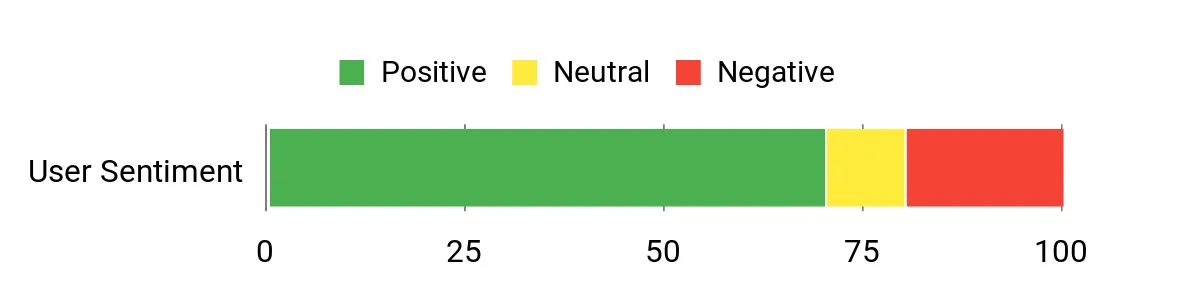
I’ve noticed users appreciate the Nitro V for offering strong graphics performance and a bright, high-refresh display at a sensible price. People often mention real-world speed for games and GPU-accelerated tasks, while common critiques focus on loud fans, occasional stutters, and the need to upgrade the stock 8GB RAM for heavier multitasking.
Overall Sentiment: Positive
Long-Term Value
Buying a laptop with a capable dedicated GPU and a Gen4 SSD can extend usable life for creative work, since those components delay the need to replace the whole machine. Upgrading RAM is a modest one-time cost that significantly improves longevity for design workloads.
Situational Benefits
|
Situation |
How It Helps |
|---|---|
|
Budget-Conscious Designers |
Delivers capable GPU performance and a fast SSD at a sub-$700 price, letting you prioritize upgrades later. |
|
On-the-Go Presentations |
Bright 15.6″ FHD 165Hz screen and responsive keyboard make client walkthroughs and demos feel polished. |
|
GPU-Accelerated Tasks |
RTX 4050 speeds up rendering and effects, so previews and exports complete faster than integrated graphics. |
Versatility
The Nitro V is primarily a gaming laptop, but I find it versatile enough for photo editing, light video work, and everyday productivity. It handles a range of creative apps on Windows and provides enough ports to hook up external drives and displays.
Aesthetic Appeal
It has a glossy, modern look in black that reads as professional yet slightly aggressive. The backlit keyboard and compact 15.6-inch chassis make it feel like a step up from basic budget laptops.
Performance
CPU and GPU together let the Nitro V run most creative tasks smoothly, especially when projects leverage GPU acceleration. You may see hiccups at the highest settings or with very large files unless you add more RAM.
Reliability
Acer has a track record of durable budget machines and this model feels solid for its class, though some users report noisy fans and occasional stutters which suggest thermal tuning and software updates can affect experience.
Collaboration
Wi‑Fi 6 and four USB 3.0 ports make it easy to share files and connect peripherals during collaborative sessions. Windows compatibility ensures broad support for design software used in teams.
Key Benefits
- Dedicated RTX 4050 GPU for GPU-accelerated rendering and effects
- 165Hz FHD IPS display for smooth visuals and responsive editing
- Good out-of-the-box value with fast Gen4 SSD and upgrade potential
Current Price: $649.99
Rating: 4.5 (total: 206+)
🏆 Best Overall
I reach for the MacBook Air when I need a laptop that just disappears into my workflow. The M4 delivers smooth multitasking and fast exports for photo and light video work, while the 15.3-inch Liquid Retina screen gives me the color depth and brightness I want for layout and retouching.
Daily tasks, client calls, and long editing sessions are easier because the battery lasts and the machine stays silent. If you value color accuracy, portability, and a system that accelerates creative apps, this is the one I recommend for most designers.
What People Say
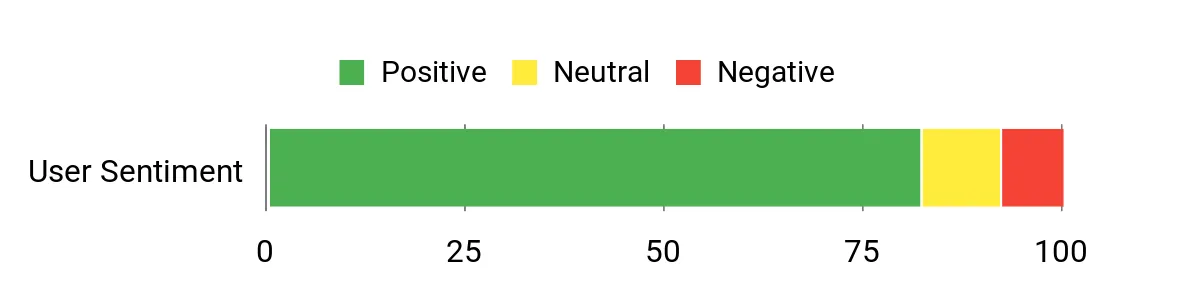
Most users praise the MacBook Air for its snappy performance, beautiful 15.3-inch display, and long battery life that keeps them productive all day. People also highlight the smooth integration of Apple Intelligence features and the build quality, while a minority mention the higher price and the adjustment to macOS if they’re switching from Windows.
Overall Sentiment: Positive
Long-Term Value
The efficient M4 silicon and robust build help the MacBook Air stay useful for years, reducing replacement cycles. Good battery life and strong resale value also make it a cost-effective choice over the long run.
Situational Benefits
|
Situation |
How It Helps |
|---|---|
|
On-the-Go Design |
Lightweight chassis and long battery life let you edit and present without hunting for outlets. |
|
Color-Critical Work |
Liquid Retina with wide color support gives reliable color accuracy for print and digital projects. |
|
Multitasking and Exports |
M4 performance keeps complex layers and export jobs moving without bogging down other tasks. |
Versatility
This is a strong all-around machine for designers who move between photo editing, layout work, and client calls. It’s less focused on raw GPU-heavy 3D rendering but excels for most 2D and video workflows.
Aesthetic Appeal
The Sky Blue finish and slim profile feel modern and professional, so it looks appropriate in both studio and client-facing settings.
Performance
M4 brings fast single-thread and multi-thread performance, smooth UI responsiveness, and hardware-accelerated media workflows that shave time off common creative tasks.
Reliability
Apple’s thermally efficient design and optimized software typically translate to long-term reliability and consistent performance across macOS updates.
Collaboration
Two Thunderbolt 4 ports, MagSafe charging, a quality webcam with Center Stage, and seamless macOS sharing tools make collaboration and remote review straightforward.
Key Benefits
- Outstanding Liquid Retina display with P3 color for accurate edits
- M4 chip delivers fast, efficient performance for creative apps
- Long battery life and fanless operation for quiet, mobile work
Current Price: $999.00
Rating: 4.8 (total: 2431+)
🔰 Best AI Productivity
I see the Aspire 16 as a fresh take for designers who want long battery life and built-in AI helpers without a heavy price tag. The 16-inch touch display and Snapdragon X platform make everyday tasks feel responsive, and the Copilot+ features help speed research, notes, and quick edits.
For daily work it’s great for photo editing, layout checks, and client notes, and for travel or long sessions the battery life is a real advantage. If your workflow depends on specific Windows-native binaries, check compatibility first, but for most creative students and mobile designers this is a smart, efficient choice.
What People Say
Customers commonly praise the Aspire 16 for its speed, vivid display, and excellent battery life, especially when used in eco or balanced modes. Reviewers appreciate the keyboard quality and responsive touchscreen, while a few note that certain enterprise or legacy Windows apps may need extra setup on the Snapdragon platform.
Overall Sentiment: Positive

Long-Term Value
Energy-efficient ARM-style silicon and solid battery life reduce daily charging and can lower operating costs over the device’s lifetime. The robust baseline specs also mean fewer immediate upgrades are needed for typical design tasks.
Situational Benefits
|
Situation |
How It Helps |
|---|---|
|
Student And Study Use |
Lightweight design, long battery life, and touch input make note-taking, presentations, and editing assignments convenient on campus. |
|
Travel And Remote Work |
Extended battery life and quick wake times keep you productive during flights and long sessions away from outlets. |
|
Quick Edits And Ideation |
Copilot+ features and a responsive touchscreen let you sketch ideas, retrieve references, and generate notes faster than digging through folders. |
Versatility
This laptop works well across editing, layout, and presentation tasks; it’s less aimed at heavy 3D rendering but covers most 2D and light video workflows with ease.
Aesthetic Appeal
The clean gray chassis and minimal design read as modern and professional, suitable for studio or classroom settings.
Performance
The Snapdragon X platform delivers snappy responsiveness for daily apps and AI-assisted tasks, though some heavy legacy Windows applications may be slower or require compatibility checks.
Reliability
Users report stable everyday performance and good battery longevity; occasional compatibility edge cases with certain enterprise software are the main caveat.
Collaboration
Wi‑Fi 7, multiple USB ports, and a vivid touch display make sharing files, joining calls, and annotating designs during remote reviews straightforward.
Key Benefits
- Long battery life for full-day use and travel
- Integrated Copilot+ AI features that speed routine tasks
- 16″ touch display with 120Hz for smooth, accurate interaction
Current Price: $549.99
Rating: 4.6 (total: 102+)
⭐ Best Midrange Performance
I think of the Victus as a dependable midrange workhorse that balances graphics power and everyday usability. The RTX 4050 and 16GB of RAM let it handle photo editing, GPU-accelerated effects, and moderate video timelines without needing a top-tier budget. The 144Hz panel makes UI work and scrolling feel responsive when I’m moving through large files, and features like fingerprint login and the option to use Ethernet and Wi‑Fi together are surprisingly handy during client sessions. If you need a machine that can game on the side while staying productive for design tasks, this is a sensible pick at its price point.
What People Say
Users frequently point to the Victus as a great value for the hardware it delivers, praising the smooth performance in games and creative apps and the straightforward setup. Common positives include the fingerprint reader and the convenient network features, while people sometimes mention the screen could be brighter and that Windows 11 behavior around sleep and security can feel intrusive.
Overall Sentiment: Positive

Long-Term Value
Having a dedicated GPU and decent RAM means the Victus will stay capable for longer before you need a full replacement. Upgrading storage or RAM later is relatively affordable, which helps spread the total cost over more years.
Situational Benefits
|
Situation |
How It Helps |
|---|---|
|
Student And Learning |
Offers enough power for coursework, light editing, and multitasking while remaining affordable for learners. |
|
Hybrid Work And Play |
Handles design tasks during the day and modern games in the evening, so you don’t need two machines. |
|
Client Reviews And Demos |
Responsive display and decent graphics make presentations and on-the-fly edits feel professional. |
Versatility
The Victus sits between a gaming laptop and a creative workstation: strong for 2D and light 3D work, comfortable for long editing sessions, and equally at home running modern games after hours.
Aesthetic Appeal
The Mica Silver finish and clean lines keep it looking professional rather than overtly gaming‑centric, which I appreciate when I bring it to client meetings.
Performance
With the Core i5-13420H and RTX 4050, day-to-day responsiveness and export times are good for its class; very heavy 3D or top-tier AAA settings will push it, but most designers won’t need that level.
Reliability
Build quality feels solid for a midrange model and users report dependable daily use; occasional software annoyances around sleep or system updates are the most common gripes.
Collaboration
Wi‑Fi 6, multiple USB ports, and the fingerprint sensor make sharing, signing in, and joining remote reviews quick and simple, and the dual-network feature can help keep connections stable during collaborative sessions.
Key Benefits
- Dedicated RTX 4050 GPU for faster previews and GPU-accelerated effects
- 144Hz FHD display that keeps the interface and playback feeling smooth
- 16GB RAM and 512GB SSD provide good multitasking and storage out of the box
Current Price: $624.99
Rating: 4.5 (total: 245+)
🎨 Best for Creators
I reach for the Zenbook Duo when I need a portable workspace that feels like two monitors in one device. The dual 14-inch OLED panels give me room for timelines and reference material without hauling a second display, and the detachable keyboard makes it comfortable to switch between drafting and presentation modes.
With the Core Ultra 9, 32GB of RAM and a 1TB SSD it chews through multitasking, audio projects, and video edits while staying surprisingly quiet and efficient. At $1,789.70 it’s an investment, but for designers who value screen real estate and a streamlined workflow, it often pays for itself in saved time.
What People Say
Buyers frequently praise the Zenbook Duo for its innovative dual OLED displays and the tangible productivity boost they provide. Reviews often highlight the fast performance, generous memory, and useful detachable keyboard, while a small number of users note minor software or warranty quirks tied to importing or pen configuration.
Overall Sentiment: Positive

Long-Term Value
Premium internal components and a unique dual-screen design extend the machine’s practical life for creative work, reducing the need for an external monitor purchase and delaying full replacement costs.
Situational Benefits
|
Situation |
How It Helps |
|---|---|
|
Multitasking And Layout Work |
Dual screens let you keep your main canvas on one panel and assets, palettes, or references on the other, speeding layout and compositing tasks. |
|
Audio And Video Production |
Extra screen space and 32GB RAM let you run DAWs and timelines side by side, reducing window juggling during edits and mixes. |
|
Client Presentations |
Detachable keyboard and bright OLED panels make on-the-fly demos and annotations feel polished and easy to share. |
Versatility
This is a creator-first machine that adapts well between design, editing, and productivity work. It’s less focused on heavy 3D rendering but covers almost every 2D and mixed-media workflow with room to spare.
Aesthetic Appeal
The Inkwell Gray finish and slim profile read as premium and professional, and the unique dual-screen layout makes a clear visual statement in client-facing settings.
Performance
The Intel Core Ultra 9, AI boost features, 32GB LPDDR5x RAM and PCIe 4.0 SSD deliver snappy app switching, fast exports, and smooth multitasking even with demanding creative suites.
Reliability
Build quality feels solid and reviewers report consistent day-to-day performance and good battery life; a few users mention firmware or regional warranty limitations as occasional annoyances.
Collaboration
Touchscreens, pen input, and a detachable keyboard make remote reviews and live annotation straightforward, while Wi‑Fi 6 and standard Windows sharing tools keep file transfers and screen sharing simple.
Key Benefits
- Two 14″ OLED touchscreens expand workspace and improve multitasking
- High-end Core Ultra 9 performance with 32GB RAM and 1TB SSD
- Detachable keyboard, pen support, and long battery life for mobile workflows
Current Price: $1,789.70
Rating: 4.5 (total: 239+)
FAQ
Do I Need a Dedicated GPU?
It depends on the work I do. For photo editing, layout, and most 2D tasks an integrated GPU or Apple M4 handles things smoothly, but if I’m doing heavy 3D, GPU-accelerated effects, or long video renders a dedicated card like the RTX 4050 found in the Acer Nitro V or HP Victus makes a noticeable difference.
I also keep in mind that a dedicated GPU can mean louder fans and shorter battery life, so I balance raw performance with portability when choosing a machine.
How Much RAM and Storage Should I Buy?
I aim for at least 16GB of RAM for modern design work and bump to 32GB if I work with large files or many apps at once. For storage, 512GB SSD is workable for photos and small video projects, but I prefer 1TB when I’m editing longer timelines or keeping project files locally; otherwise a fast external SSD is a solid supplement. If a laptop lets me upgrade RAM later I factor that into the purchase, and if memory is soldered I choose the higher configuration up front.
Mac Or Windows For Graphic Design?
I pick the platform that matches my software and collaboration needs. macOS with M4 is excellent for color-critical work, long battery life, and a quiet studio experience, while Windows machines give more choices for dedicated GPUs, dual-screen setups, and configurable ports.
I also check compatibility for any specialized plugins or company VPN tools—for example, ARM-based Windows devices sometimes need extra checks—so matching platform to my workflow and teammates usually guides my decision.
What Customers Prefer
When choosing between the Acer Nitro V, MacBook Air and Acer Aspire 16, customers usually prioritize whether they need dedicated GPU power and upgradeability, color-accurate displays and a smooth macOS ecosystem, or long battery life with built-in AI productivity features. I suggest deciding which of those matters most to your workflow—rendering and upgrades, quiet color-critical work, or all-day mobile productivity—because that usually makes the choice straightforward.

Wrapping Up
My clear recommendation for most graphic designers is the MacBook Air 15-inch with M4 because it combines an excellent Liquid Retina display, long battery life, and system-level accelerations that smooth creative tasks. If you prioritize screen real estate and true multitasking, the ASUS Zenbook Duo’s dual OLED displays are uniquely productive for layout work and asset management.
For designers who want strong battery life and integrated AI features at a lower price, the Acer Aspire 16 AI is a smart, efficient pick. If you need dedicated GPU power in a midrange package, the HP Victus balances memory and graphics well.
Finally, when raw GPU-for-dollar matters and you want a capable machine that can also game, the Acer Nitro V offers solid RTX 4050 performance at a budget-friendly price. I picked these so you can match the machine to how you design, whether that means color-accurate edits, multitasking, mobility, or raw rendering power.
| Product Name | Image | Rating | Price | Processor | RAM & Storage | Graphics |
|---|---|---|---|---|---|---|
| Acer Nitro V Gaming Laptop |
 |
4.5/5 (206 reviews) | $649.99 | Intel Core i5-13420H, 2.1 GHz | 8GB DDR5, 512GB SSD | NVIDIA GeForce RTX 4050, 6GB |
| Apple 2025 MacBook Air 15-inch |
 |
4.8/5 (N/A) | $999.00 | Apple M4 | 16GB Unified Memory, 256GB SSD | Integrated |
| Acer Aspire 16 AI Copilot+ PC |
 |
4.6/5 (102 reviews) | $549.99 | Snapdragon X, 3 GHz | 16GB LPDDR5X, 512GB SSD | Integrate Qualcomm Adreno GPU |
| HP Victus 15.6 inch Gaming Laptop |
 |
4.5/5 (245 reviews) | $624.99 | Intel Core i5-13420H, 1.9 GHz | 16GB DDR4, 512GB SSD | NVIDIA GeForce RTX 4050, 6GB |
| ASUS Zenbook Duo Laptop |
 |
4.5/5 (239 reviews) | $1,789.70 | Intel Core Ultra 9 285H, 5.4 GHz | 32GB LPDDR5X, 1TB SSD | Intel Arc Graphics |
This Roundup is reader-supported. When you click through links we may earn a referral commission on qualifying purchases.



