
I know choosing the right machine for 3D printing and CAD work can feel overwhelming, so I put together this guide to make the search easier. The right laptop speeds up slicing and modeling, reduces frustrating waits, and helps you iterate designs faster. Whether you need raw GPU power for complex visualizations, a high-core CPU for simulation and slicing, or a portable machine for on-site tweaks, this guide highlights the laptops that balance performance, thermals, and value for the Best Laptops for 3D Printing.
Top Picks
|
Category |
Product |
Price |
Score |
|---|---|---|---|
|
🏆 Best Overall |
$2,399.99 |
98/100 |
|
|
🚀 Best for Heavy CAD |
$1,599.00 |
96/100 |
|
|
🔰 Best Desktop Replacement |
$3,599.99 |
95/100 |
|
|
⭐ Best Mac Option |
$1,549.00 |
94/100 |
|
|
💰 Best Value |
$949.99 |
88/100 |
|
|
🔎 Best Display for Modeling |
$1,194.09 |
85/100 |
|
|
💼 Best Large-Screen Workhorse |
$630.63 |
80/100 |
How I Chose These Laptops
I focused on the specs that matter most for 3D printing workflows: multicore CPU performance for slicing and simulation, a capable GPU for viewport rendering and accelerated previews, at least 16 GB of RAM for comfortable multitasking, and fast NVMe storage to reduce load times. I also checked thermals and build quality because sustained workloads can throttle performance, and I weighed portability, battery life, and price to match different use cases.
Finally, I considered software compatibility and common user feedback to surface machines that deliver consistent, real-world results.
💰 Best Value
I like the Nitro V because it gives strong GPU and CPU performance without blowing the budget, which makes it a sensible pick among the Best Laptops for 3D Printing. It handles slicing, viewport previews, and moderate CAD work smoothly, and the 15.6″ 165Hz screen keeps the model view responsive.
For everyday tasks it’s snappy, and for longer, heavier sessions I recommend staying plugged in to avoid throttling from the average battery life.
Long-Term Value
Choosing a value-oriented machine like this reduces upfront cost while still giving upgrade paths and durable components, which lowers replacement frequency and keeps total ownership reasonable over several years.
Situational Benefits
|
Situation |
How It Helps |
|---|---|
|
Slicing Large Models |
The i7 CPU and 16GB RAM speed up slicing jobs so I spend less time waiting between iterations. |
|
On-Site Troubleshooting |
Lightweight enough to bring to a maker space and has plenty of USB ports for connecting printers and accessories. |
|
Budget-Conscious Builds |
Offers near-gaming performance at a price that frees budget for better printers or materials. |
Versatility
It’s primarily a gaming laptop, but I find it versatile for 3D work, streaming, and everyday use. It’s not a convertible, so its strength is raw performance rather than tablet-style flexibility.
Compatibility
|
Platform |
Compatibility Level |
|---|---|
|
Windows 11 |
Excellent |
|
Popular CAD/Slicer Apps (Fusion 360, Cura, PrusaSlicer) |
Very Good |
|
macOS |
Not Compatible |
Practicality
The Nitro V balances ports, performance, and price. The battery life is modest at around 5 hours, so I plan around plugging in for long sessions.
The backlit keyboard and multiple USB ports make it practical for workshop setups.
Expertise Level
Great for hobbyists and prosumers who need capable hardware without paying premium workstation prices.
Performance
Strong for viewport rendering and moderate GPU-accelerated tasks; complex simulations on very large assemblies may benefit from higher-end RTX or desktop-class hardware.
Key Benefits
- Dedicated RTX 4050 GPU for faster viewport rendering and GPU-accelerated previews
- 16GB DDR5 and 1TB Gen4 SSD for quick load times and comfortable multitasking
- Good thermal behavior for sustained workloads compared with entry-level gaming laptops
Current Price: $949.99
Rating: 4.6/5 (total: 190+)
💼 Best Large-Screen Workhorse
When I look at the Best Laptops for 3D Printing, the HP 17.3 stands out for anyone who wants a big, comfortable workspace. The large 17.3″ FHD screen makes inspecting models and arranging multiple windows easier, and the lift-hinge gives a nicer typing angle for long modeling sessions. It’s not a workstation-class GPU machine, but for slicing, basic CAD, and managing print jobs it’s a dependable, roomy option that also keeps sustainability in mind with recycled plastics.
Long-Term Value
Choosing a large-screen laptop like this can reduce the need for a separate external monitor or docking setup, saving on extra peripherals over time while providing a comfortable single-device workflow.
Situational Benefits
|
Situation |
How It Helps |
|---|---|
|
Working With Multiple Windows |
The bigger screen lets me have a slicer, reference images, and a browser open side-by-side without crowding the workspace. |
|
Classroom Or Client Demos |
The large display makes it easier to show prints and progress to a group, and the built-in speakers and webcam cover basic presentation needs. |
|
Home Workshop Use |
Plenty of ports and a comfortable keyboard make it easy to connect printers and peripherals while staying productive for extended sessions. |
Versatility
This is a practical, all-around laptop: great for office work, 3D printing prep, streaming, and light photo editing. It’s less ideal for heavy GPU rendering but solid for most maker workflows.
Compatibility
|
Platform |
Compatibility Level |
|---|---|
|
Windows 11 |
Excellent |
|
Common CAD/Slicer Apps (Fusion 360, Cura, PrusaSlicer) |
Very Good |
|
macOS |
Not Supported |
Practicality
The HP’s mix of screen real estate, port selection, and respectable battery life makes it practical for makers who value a spacious view and everyday usability over extreme performance.
Expertise Level
Best for hobbyists, students, and prosumers who need a roomy display and reliable day-to-day performance without investing in a high-end workstation.
Performance
Good for slicing and general CAD, thanks to the Core i5 and ample RAM; very large assemblies or GPU-accelerated rendering will be noticeably slower than dedicated gaming or workstation laptops.
Key Benefits
- Large 17.3″ FHD display for clearer model previews and multitasking
- Generous RAM and SSD capacity for smoother multitasking and faster loads
- Lift-hinge keyboard improves comfort during long editing or slicing sessions
Current Price: $630.63
Rating: 4.4/5 (total: 439+)
🚀 Best for Heavy CAD
I turn to the MSI Katana when I need near-desktop speed for large assemblies and GPU-accelerated previews. Its Core i9 and RTX 5070 make model navigation and complex viewport rendering feel instant, and 32GB of RAM keeps multiple tools and slicers open without hiccups.
The fast QHD panel helps me spot fine details while the improved cooling keeps performance steady during long slicing or render jobs. Battery life is short, so I usually plan for plugged-in sessions, but if raw speed for tasks that define the Best Laptops for 3D Printing is your priority, this one earns its keep.
Long-Term Value
Investing in higher-end components now reduces the chance you’ll need an upgrade soon; strong performance and solid build quality help preserve resale value and keep your workflow efficient over several years.
Situational Benefits
|
Situation |
How It Helps |
|---|---|
|
Rendering Detailed Models |
The RTX 5070 accelerates GPU-based rendering and viewport previews, cutting iteration time when I test textures or lighting. |
|
Running Multiple Tools |
32GB RAM lets me keep a slicer, CAD app, browser, and reference files open without swapping or slowdowns. |
|
Extended Work Sessions |
Cooler Boost 5 reduces thermal throttling so performance stays closer to peak during long slices or simulations. |
Versatility
This laptop is geared toward performance tasks but still handles daily use, streaming, and content creation well. It’s not a convertible, so its versatility is about raw power rather than form-factor flexibility.
Compatibility
|
Platform |
Compatibility Level |
|---|---|
|
Windows 11 |
Excellent |
|
Common CAD/Slicer Apps (Fusion 360, SolidWorks, Cura, PrusaSlicer) |
Very Good |
|
Linux (Community Support) |
Moderate |
Practicality
The Katana packs plenty of ports and a crisp display so it slots into a workshop or desktop setup easily, but its weight and short battery mean it’s best as a performance-first portable rather than an all-day travel laptop.
Expertise Level
Best for advanced hobbyists and professionals who need high performance for complex models and GPU-accelerated tasks.
Performance
Excellent for viewport interaction, GPU rendering, and heavy multitasking; very large simulations may still benefit from a full desktop workstation, but day-to-day 3D printing workflows will feel much faster.
Key Benefits
- Top-tier CPU and GPU combination for fast slicing, rendering, and viewport performance
- 32GB DDR5 and 1TB NVMe SSD mean smooth multitasking and quick project loads
- Effective thermal system for consistent speeds during long workloads
Current Price: $1,599.00
Rating: 4.3/5 (total: 241+)
🏆 Best Overall
I picked the ROG Strix G16 as my Best Laptops for 3D Printing recommendation because it balances raw power with a display that actually helps me see fine model details. The Core Ultra 9 and RTX 5070 Ti make navigating dense assemblies and GPU-accelerated previews feel immediate, while 32GB of RAM and a 1TB PCIe 4.0 SSD keep files and tools responsive. The 16:10, 2.5K 240Hz Nebula panel is surprisingly handy for spotting surface issues and arranging multiple windows.
It’s a heavier, performance-first machine, so I plan around plugging in for long sessions, but for speed, visual clarity, and consistent thermal behavior it’s the laptop I reach for when I want the least friction between design and print.
Long-Term Value
Buying higher-tier components up front means fewer upgrades later and a longer useful life for demanding 3D workflows, which lowers total cost of ownership over several years.
Situational Benefits
|
Situation |
How It Helps |
|---|---|
|
Inspecting Complex Models |
The sharp 2.5K panel and high refresh rate make it easier to spot geometry issues and pan around detailed parts smoothly. |
|
GPU-Accelerated Rendering |
The RTX 5070 Ti shortens preview and render times so I can iterate textures, lighting, and supports faster. |
|
Multi-Tool Workflows |
32GB RAM lets me keep a CAD app, slicer, browser, and reference files open without swapping or slowdowns. |
Versatility
It’s excellent for 3D design, rendering, and content creation while also being a top gaming machine. The trade-off is weight and battery life, so versatility is about capability rather than portability.
Compatibility
|
Platform |
Compatibility Level |
|---|---|
|
Windows 11 |
Excellent |
|
Common CAD/Slicer Apps (Fusion 360, SolidWorks, Cura, PrusaSlicer) |
Very Good |
|
Linux (Community Support) |
Moderate |
Practicality
Plenty of ports, upgrade-friendly memory, and a robust cooling system make it easy to integrate into a workshop or desk setup. Expect to keep the charger handy during heavy sessions.
Expertise Level
Geared toward advanced hobbyists and professionals who need fast iteration and GPU-accelerated workflows.
Performance
Top-tier for viewport interaction, GPU rendering, and heavy multitasking; real-world slicing and previews are noticeably faster than mid-range machines.
Key Benefits
- Powerful CPU/GPU combo for fast slicing, viewport rendering, and GPU-accelerated previews
- 32GB DDR5 and PCIe 4.0 1TB SSD for smooth multitasking and quick project loads
- High-resolution 16:10 2.5K 240Hz display that makes it easier to inspect fine model details
Current Price: $2,399.99
Rating: 4.4/5 (total: 518+)
🔎 Best Display for Modeling
I recommend this when display quality matters as much as performance. In my experience with the Best Laptops for 3D Printing, the Galaxy Book5 360’s AMOLED screen makes it much easier to spot surface defects, check texture maps, and compare color references. The 2-in-1 hinge and lightweight chassis mean I can use it as a tablet for sketching ideas, then flip it into laptop mode for slicing and file management.
It won’t replace a workstation for heavy GPU renders, but for color-accurate previews, portability, and long battery life it’s a strong, flexible choice.
Long-Term Value
Choosing a premium display device reduces the need for a separate color-accurate monitor and keeps your setup simpler; the mobility and solid build also extend usable life before replacement is needed.
Situational Benefits
|
Situation |
How It Helps |
|---|---|
|
Color-Critical Modeling |
The AMOLED display shows richer colors and deeper contrast, so I can judge textures and finishes on screen more reliably before printing. |
|
Mobile Prototyping |
Its lightweight design and long battery let me review models and tweak prints from a maker space or client site without hunting for an outlet. |
|
Touch-Based Sketching |
Tablet mode makes it simple to mark up screenshots, sketch adjustments, or annotate reference images right next to the model. |
Versatility
This laptop bridges creative and practical workflows: excellent for visual checks, presentations, and light-to-moderate 3D work while doubling as a portable media and productivity device.
Compatibility
|
Platform |
Compatibility Level |
|---|---|
|
Windows 11 |
Excellent |
|
Common CAD/Slicer Apps (Fusion 360, Cura, PrusaSlicer) |
Very Good |
|
macOS |
Not Supported |
Practicality
Plenty of RAM and a responsive SSD keep project files moving smoothly, and the 360° hinge plus touchscreen add useful flexibility when I’m juggling reference images, slicers, and notes on a small desk or lap.
Expertise Level
Best for students, designers, and hobbyists who prioritize display accuracy and portability over raw workstation render power.
Performance
Good for slicing, previewing, and everyday CAD tasks; the integrated Intel ARC GPU can handle some accelerated previews but heavy GPU renders will be slower than on dedicated gaming or workstation laptops.
Key Benefits
- High-contrast FHD AMOLED panel for accurate colors and crisp detail
- 2-in-1 touchscreen with 360° hinge adds tablet-style sketching and review
- Long battery life and light weight make it easy to work away from the desk
Current Price: $1,194.09
Rating: 4.4/5 (total: 300+)
🔰 Best Desktop Replacement
When I think about the Best Laptops for 3D Printing that truly replace a desktop, the Alienware Area-51 is the obvious pick. Its 18″ display and desktop-class RTX 5080 GPU make it easy to inspect huge assemblies and run GPU-accelerated previews without feeling held back.
The chassis is bulky and heavy, so it’s not for daily commuters, but if your work needs brute force for renders, simulations, or very large models, this laptop behaves more like a workstation you can move when necessary.
Long-Term Value
Paying more up front buys workstation-level parts that delay obsolescence, reduce upgrade frequency, and keep project turnaround times short, which spreads cost over years of productive use.
Situational Benefits
|
Situation |
How It Helps |
|---|---|
|
Rendering Full Assemblies |
The powerful GPU and high-core CPU shorten render and preview times so I can iterate faster on supports, orientations, and textures. |
|
Large-Scale Prototyping |
The big screen and high resolution make it easier to review fit and finish on complex parts without hooking up an external monitor. |
|
On-Location Work Where Power Is Needed |
If I need desktop-level performance at a client site or lab, this laptop brings that performance without shipping a full desktop. |
Versatility
This is focused on maximum performance and expandability rather than portability. It’s versatile for heavy 3D workflows, content creation, and any task that benefits from a large screen and high compute headroom.
Compatibility
|
Platform |
Compatibility Level |
|---|---|
|
Windows 11 |
Excellent |
|
Common CAD/Slicer Apps (Fusion 360, SolidWorks, Blender, Cura) |
Very Good |
|
Linux (Community Support) |
Moderate |
Practicality
Expect excellent thermal control and lots of ports, but plan for the weight and size. Battery life is limited for this class, so it’s most practical when used near power for long sessions.
Expertise Level
Best suited to professionals and power users who need near-desktop performance for large simulations, complex assemblies, and heavy GPU tasks.
Performance
Top-tier performance for viewport interaction, GPU rendering, and simulations; real-world tasks that would bog down lesser laptops finish noticeably faster here.
Key Benefits
- Desktop-class CPU and RTX 5080 GPU for extremely fast rendering and simulations
- Large 18″ high-resolution screen that helps spot fine geometry and layout issues
- Generous 2 TB SSD and 32 GB DDR5 RAM for big projects and quick load times
Current Price: $3,599.99
Rating: 4.2/5 (total: 50+)
⭐ Best Mac Option
I recommend this MacBook when you want a compact, efficient machine that still handles serious 3D work. In the list of Best Laptops for 3D Printing it stands out for its snappy performance, long battery life, and an excellent display that makes inspecting small details easy. It’s especially nice if you prefer macOS tools or need a quiet, portable system for sketching, slicing, and previewing models on the go. For heavy GPU-only renders some Windows workstations will be faster, but for balanced, day-to-day 3D workflows this is a dependable pick.
Long-Term Value
The MacBook’s efficient silicon and solid build quality mean fewer upgrades over time, so higher upfront cost is offset by a longer useful lifespan and lower maintenance needs.
Situational Benefits
|
Situation |
How It Helps |
|---|---|
|
On-the-Go Prototyping |
Long battery life and lightweight build let me check and tweak models between meetings or at a makerspace without hunting for an outlet. |
|
Color and Detail Checks |
The XDR display helps me spot tiny surface defects and evaluate finishes before I commit to printing. |
|
Multitool Workflows |
Smooth performance with multiple apps open means I can run a slicer, a CAD app, and reference files simultaneously without slowdown. |
Versatility
This MacBook handles design, slicing, photo editing, and general productivity very well, making it a great all-rounder for creatives who also manage 3D printing tasks.
Compatibility
|
Platform |
Compatibility Level |
|---|---|
|
macOS |
Excellent |
|
Common CAD/Slicer Apps (Fusion 360, Cura, PrusaSlicer) |
Very Good |
|
Windows-Only Tools (SolidWorks, some plugins) |
Limited (workarounds required) |
Practicality
The MacBook is easy to carry between workspaces, boots quickly, and stays quiet under moderate loads. If you rely on Windows-only CAD tools, plan for virtualization or a separate machine.
Expertise Level
Great for designers, students, and prosumers who value portability, display quality, and efficient performance for everyday 3D printing workflows.
Performance
Very fast for modeling, slicing, and multi-app workflows thanks to the M5’s balanced cores and unified memory. GPU-heavy workstation renders may still favor discrete RTX-class machines.
Key Benefits
- M5 chip delivers fast single- and multi-core performance for modeling and slicing
- Liquid Retina XDR display reveals fine geometry and accurate color for previews
- Excellent battery life and lightweight design make it easy to work away from the desk
Current Price: $1,549.00
Rating: 4.7/5 (total: 254+)
FAQ
What Specs Matter Most When Choosing a Laptop for 3D Printing?
When I pick a laptop for 3D printing I prioritize a balanced combo: a strong CPU for slicing and simulations, a dedicated GPU for smooth viewport rendering, at least 16 GB RAM, and an NVMe SSD for fast file loads. For most users a midrange to high-end laptop in the $1,000–$2,500 range will cover most workflows; lower-cost machines can work for simple models but slow down on large assemblies.
I also check thermals and port selection since sustained workloads can cause throttling and you’ll want USB and display outputs for printers and external monitors.
Are Gaming Laptops Good For 3D Printing Or Should I Buy A Workstation?
I usually recommend gaming laptops as a strong value for the Best Laptops for 3D Printing because they pair powerful CPUs and RTX-class GPUs at competitive prices; they handle viewport acceleration and many GPU-accelerated renderers well. Workstations offer certified drivers and sometimes ECC memory that help with enterprise CAD and specific software like some SolidWorks configurations, so I’d pick a workstation if your tools require certified support. For most hobbyists and prosumers a gaming laptop gives the best balance of price and real-world performance.
How Important Is Portability And Battery Life For 3D Workflows?
I weigh portability against raw power based on where I work. If I’m frequently at a makerspace or client site I lean toward lighter machines with long battery life and accurate displays so I can review models on the go; devices like 2-in-1s or efficient ultraportables work well.
If my priority is fast slicing, rendering, and sustained performance I accept a heavier laptop with short battery life and plan to work plugged in. A quick rule I use: choose portability when you value mobility and choose thermal headroom when speed and long sessions matter.
What Buyers Prefer
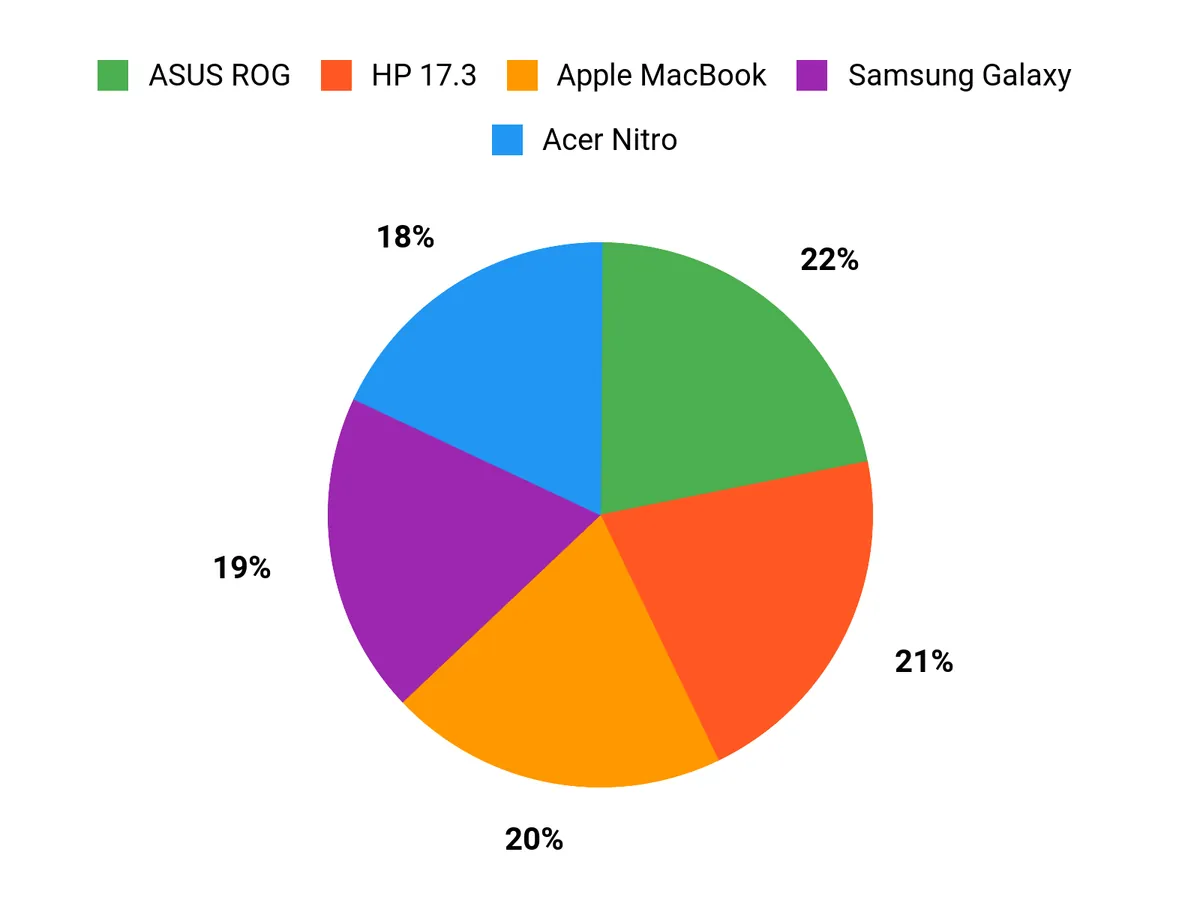
I find buyers choosing between these models based on clear trade-offs: value-seekers gravitate to the Acer Nitro for solid RTX 4050 performance at about $949.99, those who want a roomy workspace prefer the HP 17.3 for its large 17.3 display, and power users pick the MSI Katana when raw CPU and GPU speed matters most. When I help people shop the Best Laptops for 3D Printing they usually decide whether portability and price beat a bigger screen or uncompromising performance.
Wrapping Up
If I had to sum up the list, the right pick depends on how heavy your 3D printing and modeling workload is. The ASUS ROG Strix G16 and MSI Katana deliver the best raw performance for complex CAD scenes and fast slicing, while the Alienware Area-51 is for users who want maximum desktop-class power in a portable chassis.
The Apple MacBook Pro M5 is a strong alternative for users who prefer macOS and excellent single-chip efficiency. For budget-conscious builders, the Acer Nitro offers a surprisingly capable balance of GPU and CPU power, and the Samsung Galaxy Book5 360 is great if you value a color-accurate display and long battery life in a 2-in-1 form factor. The HP 17.3 gives you a large workspace at a modest price. I recommend matching your choice to your typical project size, software ecosystem, and whether portability or raw thermal headroom matters most.
| Product Name | Image | Rating | Processor | Graphics Card | Battery Life | Price |
|---|---|---|---|---|---|---|
| Acer Nitro V Gaming Laptop |
 |
4.6/5 (190 reviews) | Intel Core i7-13620H (2.4 GHz) | NVIDIA GeForce RTX 4050 (6 GB Dedicated) | Average: 5 hours | $949.99 |
| HP 17.3 inch Laptop |
 |
4.4/5 (439 reviews) | Intel Core i5-1334U (4.6 GHz) | Intel Iris Xe Graphics (Integrated) | Average: 8 hours | $630.63 |
| MSI Katana 15 HX |
 |
4.3/5 (241 reviews) | Intel Core i9-14900HX (1.6 GHz) | NVIDIA Geforce RTX 5070 (8 GB Dedicated) | Average: 2 hours | $1,599.00 |
| ASUS ROG Strix G16 |
 |
4.4/5 (518 reviews) | Intel Core Ultra 9 275HX (5.4 GHz) | NVIDIA GeForce RTX 5070 Ti (32 GB Dedicated) | Not specified | $2,399.99 |
| Samsung Galaxy Book5 360 |
 |
4.4/5 (300 reviews) | Intel Core Ultra 7 (2.2 GHz) | Intel ARC 140V (Integrated) | Average: 31 hours | $1,194.09 |
| Alienware 18 Area-51 |
 |
4.2/5 (50 reviews) | Intel Core Ultra 9 275HX (2.1 GHz) | NVIDIA GeForce RTX 5080 (16 GB Dedicated) | Not specified | $3,599.99 |
| Apple MacBook Pro 2025 |
 |
4.7/5 (Not specified) | Apple M5 chip (10-core CPU) | Integrated | Up to 24 hours video streaming | $1,549.00 |
This Roundup is reader-supported. When you click through links we may earn a referral commission on qualifying purchases.



