
OpenClaw and Kimi Claw are not competing products in the traditional sense — they share the same underlying OpenClaw framework. The real difference is where and how they run. OpenClaw is a self-hosted agent you install and manage on your own hardware, giving you full data control, full model choice, and zero platform dependency at the cost of technical setup time. Kimi Claw is Moonshot AI’s managed, cloud-based implementation of the same OpenClaw framework, running 24/7 in the browser on kimi.com, powered exclusively by the Kimi K2.5 model, and requiring no technical setup whatsoever. Choosing between them is fundamentally a decision about control versus convenience.
This comparison matters because the two options look deceptively similar on the surface. Both give you an AI agent with persistent memory, 5,000+ ClawHub skills, tool calling, web search, file operations, and a messaging channel interface. But the experience of using them, the cost structure, the privacy model, the hardware requirements, and the ceiling of what you can do are dramatically different. Understanding those differences precisely — not in marketing terms but in practical terms — is what this guide is built around.
What Each Product Actually Is
Before comparing features line by line, it is important to establish exactly what you are dealing with in each case, because the naming causes genuine confusion.
OpenClaw (Self-Hosted) is the open-source agent framework originally discussed throughout this series. You install it on your own machine (or a VPS), connect it to any compatible LLM provider of your choosing (Anthropic, xAI, Ollama, Cohere, etc.), configure your tools and skill permissions, and run the gateway yourself. It is free software. Your monthly cost is purely your LLM API charges plus any server costs if you run it on a VPS rather than your personal machine. You are responsible for setup, maintenance, updates, and troubleshooting.
Kimi Claw is Moonshot AI’s product, launched on February 14, 2026, that takes the same OpenClaw framework and hosts it entirely in Moonshot AI’s cloud infrastructure inside the kimi.com web interface. As VP-Land’s launch coverage describes it, Kimi Claw is a browser-native implementation of OpenClaw that removes the technical setup typically required to run an autonomous agent, allowing users to deploy a persistent, 24/7 AI agent with a single click directly from their browser, powered by Moonshot AI’s Kimi K2.5 model and integrated with real-time Pro-Grade Search. Kimi Claw is a subscription product. Moonshot AI runs the infrastructure, updates the software, and manages the model. You just use it.
The important clarification: When people ask “is Kimi Claw better than OpenClaw?” they are really asking whether a managed, hosted version of a tool is better than self-hosting the same tool. The answer is entirely context-dependent and comes down to your technical comfort, privacy requirements, budget, and how much flexibility you need.
The Core Model: What Each Uses Under the Hood
This is the most structurally important difference and the one most comparisons gloss over.
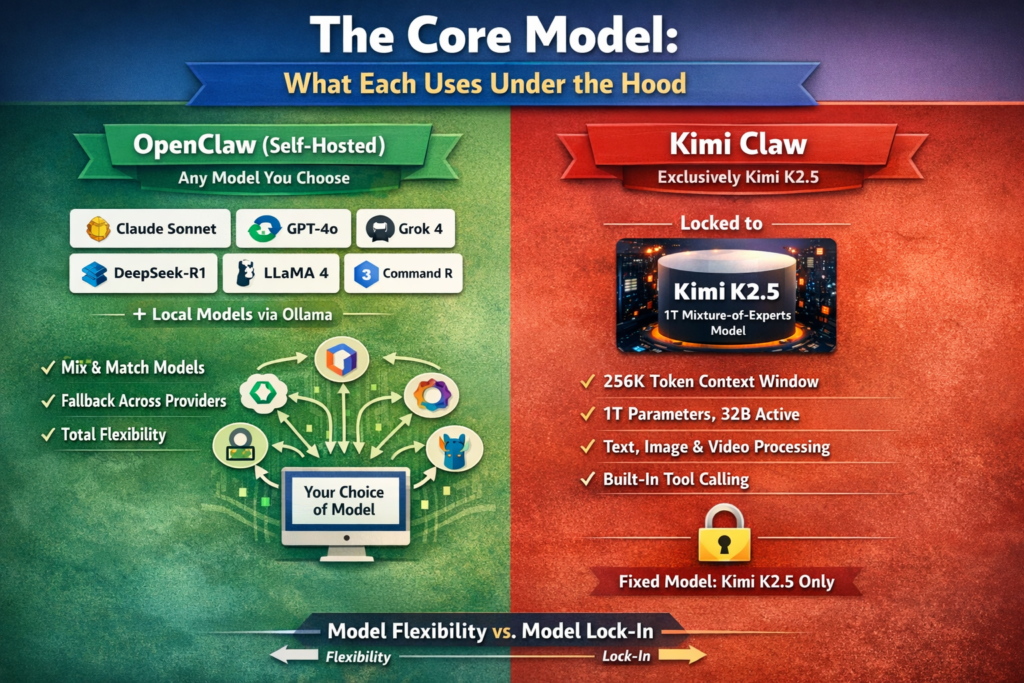
OpenClaw (Self-Hosted): Any model you choose
Self-hosted OpenClaw is model-agnostic. You can connect it to Claude Sonnet, GPT-4o, Grok 4, DeepSeek-R1, Llama 4, Command R, Kimi K2.5 via the Moonshot API, or any local model through Ollama. You can run different models for different agents, build fallback chains across providers, and swap models without reinstalling anything. The framework does not care what model powers it.
Kimi Claw: Exclusively Kimi K2.5
Kimi Claw is locked to Moonshot AI’s Kimi K2.5 model. This is not a minor constraint — it is the central architectural decision of the product. Kimi K2.5 is a 1-trillion-parameter Mixture-of-Experts model that activates approximately 32 billion parameters per request, giving it strong performance at lower computational cost. Its key specifications:
-
Context window: 256,000 tokens (exceeds GPT-4o’s 128K and Claude’s 200K)
-
Architecture: Mixture-of-Experts (MoE), 1T total parameters, 32B active
-
Native capabilities: Text, image, and video processing natively
-
Tool calling: Native function calling built into the model
Kimi K2.5 is genuinely capable — its 256K context window is one of the largest available in any managed product, and its multimodal support (text, image, video) is a real advantage for certain workflows. But the point stands: if you need GPT-4o’s creative writing quality, Claude’s instruction precision, Grok’s X/Twitter search capabilities, or DeepSeek’s budget pricing, Kimi Claw cannot provide those because it cannot change its model.
Setup and Technical Requirements
This is the area where the difference is most stark and most immediately felt by new users.
OpenClaw (Self-Hosted):
Getting self-hosted OpenClaw running from scratch takes 20 to 60 minutes depending on your technical background. You need to:
-
Install Node.js or use NPM
-
Install OpenClaw via
npm install -g openclaw@latest -
Configure a JSON file with your provider API keys and model settings
-
Start and manage the gateway process
-
Set up a messaging channel integration (Telegram, WhatsApp, Discord, etc.)
-
Troubleshoot any issues yourself when they arise
If you run it on a VPS rather than your local machine, you additionally need to provision a server, configure SSH access, manage daemon processes, and handle uptime monitoring. A commonly cited r/kimi experience describes the typical VPS-hosted OpenClaw journey: two weeks of gradual progress punctuated by random failures, time spent editing config files and restarting the gateway instead of actually using the agent, and a genuine sense of relief upon switching to a managed solution. This is a real experience shared by a significant portion of OpenClaw’s user base.
Kimi Claw:
Setup is a single click. Open kimi.com, navigate to Kimi Claw, create or link an agent. The infrastructure is Moonshot AI’s. The model is already configured. The skills are pre-loaded. Updates happen automatically in the background. There is no terminal involved unless you specifically want to use the CLI-style control option for advanced tasks. From account creation to running first agent task: under two minutes.
Features: What Each Actually Includes
Both platforms share the core OpenClaw feature set. Here is a complete breakdown of what is shared, what OpenClaw adds through self-hosted flexibility, and what Kimi Claw adds through its managed platform.
Shared Features (both platforms):
-
Access to the full 5,000+ ClawHub skill library
-
Persistent cross-session memory (SOUL.md and knowledge files)
-
Multi-step autonomous agent loops with tool calling
-
File read, write, edit, and execute permissions
-
Web search and real-time data fetching
-
Messaging channel integration (Telegram, WhatsApp, Discord, Signal)
-
Cron-based scheduled task automation
-
Deep Research skill combining web and file operations
What Self-Hosted OpenClaw Adds:
-
Full model freedom (Claude, GPT-4o, Grok, DeepSeek, Llama 4, Command R, local models)
-
Per-agent model routing and fallback chains across providers
-
Complete local data sovereignty — no data leaves your machine
-
Arbitrary Python and shell script integration
-
Custom Modelfiles and system prompt engineering at the infrastructure level
-
No monthly platform subscription — you pay only for API tokens used
-
No vendor lock-in to any single AI company’s infrastructure or pricing changes
-
HIPAA and GDPR compliance possible because data stays on your hardware
-
Full gateway log access for debugging and auditing
What Kimi Claw Adds:
-
Zero setup and zero maintenance
-
40GB cloud storage for agent memory, files, and outputs
-
24/7 operation without needing a personal machine running or a VPS
-
Automatic software updates with no manual intervention
-
Kimi K2.5’s native multimodal capabilities (image and video processing)
-
Pro-Grade Search with structured real-time data from sources including Yahoo Finance
-
Browser-native interface — no terminal, no SSH, no config files required
-
Accessible from any device via browser tab — not tied to one machine
Pricing: A Detailed Side-by-Side
Cost is where the comparison becomes genuinely nuanced because the two products have fundamentally different billing structures.
Self-Hosted OpenClaw Costs:
The software itself is free. Your costs are:
The key advantage is that costs scale linearly with actual usage. Light users pay almost nothing. The key disadvantage is unpredictability: a runaway agent loop or higher-than-expected usage can produce a surprise bill if you do not set spending caps.
Kimi Claw Costs:
Kimi Claw operates on a subscription model with consumption-based credits. As confirmed by r/kimi’s March 2026 plan change announcement, Kimi recently moved from per-feature allowances to a universal credits system shared across all features (Agent, Kimi Code, Kimi Claw, image generation, and more), with consumption-based pricing where simple tasks cost fewer credits and complex tasks cost more.
Important note: The subscription price covers platform access and a credit allocation. Kimi explicitly states that API usage fees are separate from membership fees if you use the API directly rather than the web platform.
Cost reality comparison:
-
For light personal use, self-hosted OpenClaw wins significantly on cost: $1 to $5/month in API fees versus $19/month for Kimi Claw’s entry tier.
-
For moderate users who value their time, the comparison is close: $10 to $25/month in API fees (plus VPS if not running locally) versus $19/month for Kimi Claw with zero maintenance overhead.
-
For heavy users, self-hosted OpenClaw can become cheaper than Kimi Claw’s higher tiers at $99 to $199/month, especially if you use budget models like DeepSeek or local Ollama models.
Privacy and Data Sovereignty
This dimension has the clearest winner, and which platform wins depends entirely on your requirements.
OpenClaw (Self-Hosted): Maximum privacy
Your prompts, tool outputs, file contents, agent memory, conversation history, and all intermediate reasoning happen entirely on hardware you control. Nothing is sent to any third party except your chosen LLM API provider (and if you use local Ollama models, even that is eliminated). Self-hosted OpenClaw is the correct choice for:
-
HIPAA-regulated healthcare data
-
GDPR-regulated European personal data
-
Legal or financial documents with confidentiality requirements
-
Proprietary business intelligence and internal data
-
Any workflow where you cannot legally or ethically allow data to leave your infrastructure
Kimi Claw: Cloud storage with standard security
Your agent memory, files, task outputs, and conversation history are stored in Moonshot AI’s cloud infrastructure (40GB per account). Moonshot AI is a Chinese AI company, and its data residency and legal jurisdiction considerations matter for enterprise compliance contexts. As the OpenClaw vs Kimi Claw comparison on LinkStart AI notes, while Kimi Claw offers strong security measures for typical consumer and small business use, it stores data in the cloud and may not satisfy strict privacy or compliance requirements for sensitive organizational data.
For personal productivity workflows, marketing automation, research assistance, and general business tasks with non-sensitive data, Kimi Claw’s cloud storage is a non-issue. For regulated industries or workflows handling sensitive personal or proprietary data, self-hosted OpenClaw is the only appropriate choice.
Performance: Model Quality and Speed
Context window: Kimi K2.5’s 256K context window is larger than what most self-hosted OpenClaw users run by default (typically 32K to 64K with Ollama, or up to 200K with Claude). If you specifically need to process very large documents within a single agent turn, Kimi K2.5 has a practical advantage over mid-tier self-hosted setups. However, self-hosted OpenClaw with Grok 4 Fast provides a 2-million-token context window, far exceeding Kimi K2.5’s 256K for users who specifically need maximum context.
Multimodal capabilities: Kimi K2.5 natively processes images and video inline within agent tasks. Most self-hosted OpenClaw setups require separate tool configurations to handle image and video inputs. For workflows that involve analyzing screenshots, processing document scans, or interpreting video content, Kimi Claw has a practical out-of-the-box advantage.
Pro-Grade Search: Kimi Claw’s integrated Pro-Grade Search fetches live structured data from financial sources including Yahoo Finance and news APIs directly into the agent’s reasoning. This is comparable to enabling xAI’s Responses API in self-hosted OpenClaw (which provides web_search and x_search), but Kimi Claw’s financial data sourcing is more specialized.
Speed: Both platforms’ speed depends primarily on the underlying model’s inference time. Kimi K2.5’s MoE architecture (32B active parameters from 1T total) gives it a speed advantage over dense models of similar total size, making it responsive for real-time agent interactions.
Model ceiling: Self-hosted OpenClaw can use Claude Sonnet, GPT-4o, and Grok 4 — frontier models that currently outperform Kimi K2.5 on general reasoning and instruction-following benchmarks. For workflows where you need the absolute highest quality reasoning, self-hosted OpenClaw connected to a frontier model outperforms Kimi Claw’s locked K2.5.
Control, Customization, and Extensibility
Self-Hosted OpenClaw: Maximum control at every layer. You can write custom Python skills, modify the gateway configuration at any depth, create arbitrary shell integrations, set per-agent model routing with complex fallback chains, inject custom system prompts at the infrastructure level, and access the full gateway logs for debugging. There is no ceiling imposed by a product team’s design decisions.
Kimi Claw: The product is well-designed but the control surface is deliberately simplified. Community testing documented on r/clawdbot found that Kimi Claw offers a CLI-style control option for advanced users, but lacks the granular execution transparency of self-hosted OpenClaw — notably, it does not display the same level of “what exactly are you doing right now?” process detail that experienced OpenClaw users rely on for debugging complex multi-step tasks. For most users, the polish and simplicity of Kimi Claw’s interface is a significant advantage. For power users who need to inspect and modify agent behavior at a granular level, self-hosted OpenClaw provides meaningfully more control.
Uptime and Reliability
Self-Hosted OpenClaw: Your agent runs as long as your machine or VPS is running. On a personal laptop, the agent stops when the laptop sleeps or loses power. On a VPS or home server, you need to configure the process as a daemon and manage its uptime yourself. Updates require manual intervention (npm install -g openclaw@latest followed by a gateway restart). If something breaks, you fix it.
Kimi Claw: Moonshot AI runs the infrastructure. The agent runs 24/7 in the cloud without any involvement from you. Updates deploy automatically. There is no machine to keep running, no daemon to restart, no VPS to monitor. For scheduled automation tasks (daily news briefings, overnight research runs, cron-based workflows), Kimi Claw has a clear practical advantage because it genuinely runs continuously without any maintenance from the user.
Full Side-by-Side Comparison
Who Each Platform Is Actually For
Choose Self-Hosted OpenClaw if:
-
You handle sensitive, regulated, or confidential data (HIPAA, GDPR, internal IP)
-
You need a specific model that is not Kimi K2.5 — GPT-4o for creative quality, Grok for X/Twitter data, Claude for precise instructions, or local models for zero cloud dependency
-
You already have a VPS, home server, or always-on machine and are comfortable with terminal-based configuration
-
Your monthly agent usage is light and you want to keep costs below $5 to $10/month
-
You need full debugging access, custom Python skills, or per-agent model routing across multiple providers
-
Compliance requirements prohibit sending data to third-party cloud services
-
You want to avoid any vendor lock-in to a single AI company’s infrastructure
Choose Kimi Claw if:
-
You want an AI agent running today without spending time on technical setup
-
Your workflows involve image or video analysis that you want natively supported without additional configuration
-
24/7 always-on operation matters to you and you do not want to maintain a server
-
Your use cases involve research, scheduling, web data, and general productivity without sensitive data requirements
-
You want the 40GB cloud storage for persistent agent memory and file outputs across sessions
-
Kimi K2.5’s 256K context window and multimodal capabilities are a good fit for your specific workflows
-
You value automatic updates and zero maintenance overhead over maximum control
The hybrid path: Several community members use both. Self-hosted OpenClaw handles private or compliance-sensitive workflows and cases where specific models are needed. Kimi Claw handles convenience-oriented tasks, scheduled automation, and anything that benefits from its always-on cloud infrastructure and multimodal capabilities. Because both run the same OpenClaw framework and the same ClawHub skill ecosystem, moving between them as needed is straightforward.
Common Questions
Is Kimi Claw just a hosted version of OpenClaw?
Essentially, yes. Kimi Claw is Moonshot AI’s managed cloud deployment of the OpenClaw framework, running on kimi.com with Kimi K2.5 as the fixed underlying model. The core agent behavior, skill system, and ClawHub library are the same. What differs is where it runs, who maintains it, which model powers it, and how you interact with it.
Can I use my own API keys with Kimi Claw (BYOC)?
Kimi Claw includes BYOC (Bring Your Own Credentials) support for connecting external services and APIs within skills. However, this refers to credentials for third-party services your agent calls, not for swapping the underlying LLM. The model remains Kimi K2.5 regardless of BYOC settings.
Is Kimi K2.5 good enough for serious agent workflows?
For most everyday automation tasks — web research, email drafting, data analysis, scheduling, file processing — Kimi K2.5 is genuinely capable. Its 256K context window and native multimodal support are real advantages over many alternatives. Where it lags is in tasks requiring frontier-level reasoning quality or specific model characteristics (like Grok’s X search or DeepSeek’s extreme cost efficiency).
Is self-hosted OpenClaw free?
The software is free. You pay only for the LLM API tokens you consume and, if applicable, your VPS or server costs. For light personal use on a local machine with a budget model like Mistral or Command R, the monthly cost can be under $5. For heavy production workloads with frontier models, costs scale into the tens or hundreds of dollars monthly.
Can I migrate my OpenClaw skills and memory to Kimi Claw?
Because both use the same ClawHub skill registry, installed skills transfer conceptually, though the managed platform environment may handle specific tool permissions differently. Agent memory (SOUL.md files, knowledge bases) can be manually imported into Kimi Claw’s cloud storage. There is no automated migration tool between self-hosted and Kimi Claw as of early 2026.
Which is better for beginners?
Kimi Claw, without question. Zero setup, no config files, no terminal. For someone who wants an AI agent running today without learning infrastructure management, Kimi Claw is the only reasonable starting point. Self-hosted OpenClaw rewards users who invest time in understanding the configuration, but that investment is not trivial.
Does Kimi Claw support all 5,000+ ClawHub skills?
Yes. The same ClawHub skill library available to self-hosted OpenClaw is available in Kimi Claw. The key difference is that Kimi Claw comes with many skills pre-loaded (hot-topic tracking, stock analysis, image generation, and more), whereas self-hosted OpenClaw requires manual skill installation.
Is the $19/month Moderato tier enough for Kimi Claw?
Kimi Claw beta access during the initial launch required the Allegretto tier ($39/month). As of the March 2026 plan restructuring, Kimi operates on universal consumption-based credits, so what each tier covers for Kimi Claw specifically depends on how heavily you use the agent. Light-to-moderate personal use likely fits within the $19 Moderato tier; heavy automated workflow users should expect to be on the $39 or higher tier.
Bottom Line
OpenClaw and Kimi Claw represent two completely different philosophies for running the same underlying agent framework: maximum control versus maximum convenience. Neither is objectively superior — the right choice depends entirely on your technical comfort, privacy requirements, budget structure, and how much you value flexibility versus simplicity.
If you handle sensitive data, need a specific model, or want to keep costs as low as possible at scale, self-hosted OpenClaw is the correct choice. If you want an AI agent running today with no terminal involved, persistent 24/7 cloud operation, and native multimodal support without any maintenance burden, Kimi Claw is the faster and more practical path.
This YouTube breakdown of Kimi Claw versus the $150/month VPS hosting cost of self-hosted OpenClaw walks through the real-world cost and setup tradeoffs from a practitioner’s perspective, showing exactly what Kimi Claw eliminates from the self-hosted workflow and where the managed platform falls short for power users.



