
Yes, OpenClaw does support video processing through a growing set of native tools, skills, and third-party integrations. As of 2026, OpenClaw’s video generation and editing capabilities have expanded significantly, with at least 14 supported provider backends and a rich skills registry covering everything from text-to-video generation to automated editing pipelines. But picking the right tool for your specific use case takes a bit more thought, so let me walk you through the best options available right now.
What Is OpenClaw and Why Does It Matter for Video?
If you haven’t heard of OpenClaw yet, here’s the quick version. OpenClaw is an open-source AI agent platform that acts as a local gateway, giving AI models direct access to your files, scripts, browsers, and third-party integrations through a secure sandbox environment. Think of it less like a traditional video editor and more like an intelligent automation layer that sits on top of your existing tools and supercharges them.
What makes OpenClaw particularly interesting for video creators is that it bridges AI models with real production workflows. It can write prompts, generate footage, stitch clips, manage files, and even upload finished videos, all without you manually touching a timeline. In my time exploring AI agent workflows, I have to say OpenClaw’s video ecosystem has matured faster than I expected, especially in the first quarter of 2026.
The platform now supports 14 video generation provider backends, and ClawHub, the official OpenClaw Skills Registry, currently hosts over 13,700 skills with a dedicated image and video generation category that keeps expanding every week.
How OpenClaw Handles Video Processing
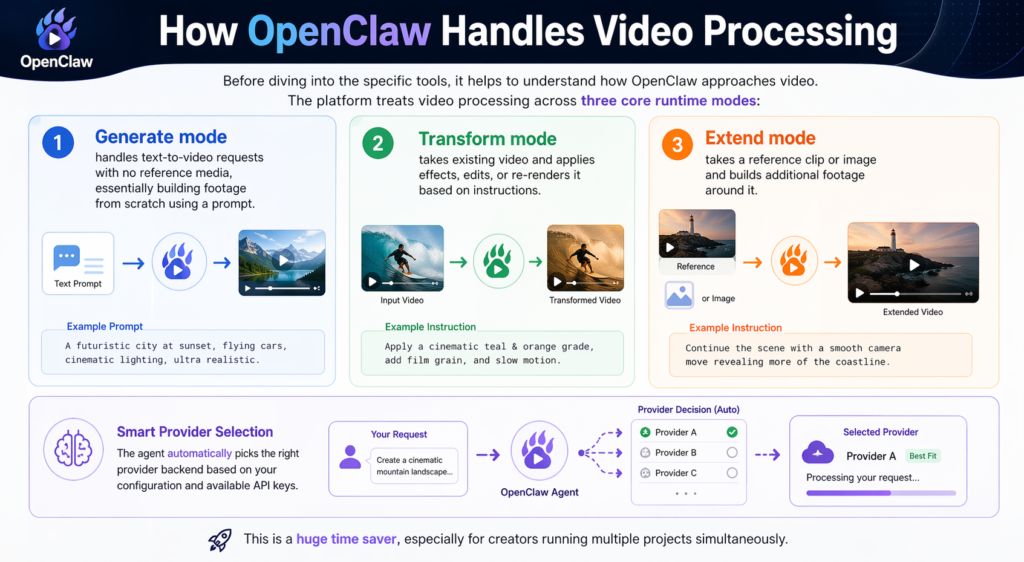
Before diving into the specific tools, it helps to understand how OpenClaw approaches video. The platform treats video processing across three core runtime modes:
Generate mode handles text-to-video requests with no reference media, essentially building footage from scratch using a prompt.
Transform mode takes existing video and applies effects, edits, or re-renders it based on instructions.
Extend mode takes a reference clip or image and builds additional footage around it.
The agent automatically picks the right provider backend based on your configuration and available API keys. This is a huge time saver, especially for creators running multiple projects simultaneously.
OpenClaw’s official video generation documentation confirms that the video_generate tool appears automatically in your agent once at least one video-generation provider is configured, making the setup relatively painless.
The 5 Best OpenClaw Tools for Video Processing in 2026
1. OpenClaw Native Video Generate Tool
This is the foundation of OpenClaw’s video processing capability and the obvious starting point. The native video_generate tool is built directly into the OpenClaw agent framework and connects to 14 different provider backends including Google’s VEO 3.1, RunwayML, and other leading text-to-video models.
What makes this powerful is the automation layer. You do not just generate a single clip. You can instruct OpenClaw to decide what to create, write the prompts, generate the images or clips, stitch everything together, and upload the final video, all in one automated pipeline. A creator on Reddit recently documented automating 100 property videos this way with zero manual editing work, cutting what would typically cost $500 or more per video down to a 10-minute setup.
The tool works best when you have a clear content framework or script. Feed OpenClaw a voice note or brief, and it extracts the hook concept, target audience, and content structure automatically before passing those parameters to the generation model.
Best for: Content creators, real estate marketers, social media teams, anyone needing bulk video output.
2. NemoVideo + OpenClaw Integration
NemoVideo is one of the strongest third-party integrations in the OpenClaw video ecosystem right now, and NemoVideo’s 2026 creative automation guide does an excellent job of explaining exactly what this combination unlocks. The pairing splits the workload cleanly: OpenClaw handles all the file management, pipeline orchestration, and automation logic, while NemoVideo handles the actual creative cutting and platform optimization.
In practice, this means NemoVideo can map your footage against proven high-retention content frameworks (hook, retention, payoff) automatically. It identifies your strongest takes through automated script analysis, removes filler words, and adjusts pacing without you scrubbing through a timeline manually.
The standout feature for 2026 is bulk platform-native variant generation. You shoot once, and the integration automatically reframes your 16:9 master edit into vertical 9:16 for Shorts and Reels, adjusts pacing per platform algorithm, and exports all versions in a single click. For anyone managing content across multiple platforms, this alone is a massive productivity unlock.
Best for: YouTube creators, social media managers, content agencies scaling output across platforms.
Pro Tip: When using NemoVideo with OpenClaw, set up your content framework template once as a persistent OpenClaw memory file. This way, every new video project automatically inherits your brand’s pacing, hook style, and platform preferences without reconfiguring from scratch each time.
3. Kling Video Skill (via the Skills Registry)
Kling is currently the community’s preferred skill for video creation inside OpenClaw, consistently recommended across Reddit threads and community guides. It is available through ClawHub and the VoltAgent curated registry, and it installs quickly in batch alongside other visual skills including Nano Banana 2, which is the official name for Google’s Gemini 3.1 Flash Image model, giving you immediate enterprise-grade image generation power paired with Kling’s video output.
Kling specializes in high-quality AI video generation with strong motion consistency, which has been a weakness of many competing tools. Where other models tend to produce flickering or inconsistent movement between frames, Kling maintains much smoother motion across longer clip durations. As of early 2026, it supports both image-to-video and text-to-video inputs natively within the OpenClaw agent environment.
The community guide on Reddit for adding visual and video skills to OpenClaw specifically calls out Kling as the top pick for video, pairing it with Nano Banana 2 (Google Gemini 3.1 Flash Image) for a complete visual production setup within OpenClaw. Installation takes a few minutes, and the skill integrates directly into your existing agent workflow without needing separate API configuration beyond your provider key.
Best for: Creators prioritizing visual quality and motion consistency in generated video content.
4. MLT Framework via Kdenlive Integration
This one is for the more technically inclined creators and developers. MLT (Media Lovin’ Toolkit) is the rendering engine that powers Kdenlive, one of the most capable open-source non-linear video editors available. The exciting development in early 2026 is that OpenClaw agents can now be set up to direct MLT for rendering, layer merging, transition application, and related processing tasks programmatically.
What this means practically is that you get the power of a full professional editor’s rendering engine, but controlled through natural language instructions or automated scripts via OpenClaw. You describe what you want, OpenClaw translates that into MLT operations, and the framework executes the render. This is particularly useful for creators with complex multi-layer projects that go beyond what pure AI generation tools can handle.
The setup is more involved than the plug-and-play skills above. Kdenlive needs to be installed and configured, and you need to understand the basic MLT command structure for OpenClaw to interact with it reliably. But for editors who want automation without giving up precision control over their timeline, this combination is genuinely impressive.
Best for: Experienced video editors, developers building automated video pipelines, production studios.
5. Python-Based Template Automation via OpenClaw Scripts
The fifth category worth highlighting is not a single tool but a workflow pattern that has been gaining real traction in the OpenClaw community throughout 2026. Using Python scripts managed and executed by OpenClaw, creators are building fully automated video editing pipelines based on pre-configured templates.
The approach works like this: you define a video template in Python using libraries like MoviePy, FFmpeg-Python, or similar, then OpenClaw manages the execution, file handling, and output organization automatically. A community m
ember in the OpenClaw Facebook group described this as the most scalable approach for creators who need consistent branded video output at volume, since the template handles all the repetitive structural decisions and OpenClaw handles running the actual process.
This beginner-friendly OpenClaw tutorial on YouTube walks through how to set up automated video creation workflows including this kind of scripted approach, and it is a solid starting point if you want to see the process in action before committing to building your own pipeline.
Best for: Developers, tech-savvy creators, agencies needing templated branded video at scale.
OpenClaw Video Tools Comparison Table
Step-by-Step: Getting Started with OpenClaw Video Processing
Step 1: Install and Configure OpenClaw
Set up OpenClaw on a VPS or local machine. The one-click install options via Hostinger or Bluehost are the easiest entry points for beginners. Configure your API keys for your preferred AI providers.
Step 2: Access the Skills Registry
Navigate to ClawHub, the official OpenClaw Skills Registry, which hosts over 13,700 skills. For a more curated experience, browse the highly recommended VoltAgent awesome-openclaw-skills repository on GitHub, which filters the registry down to the best spam-free, duplicate-free video tools. Filter by the image-and-video-generation category to browse your options.
Step 3: Install Your Chosen Video Skills
Install skills in batches where possible. For most creators, starting with Kling for video generation plus Nano Banana 2 (Google’s Gemini 3.1 Flash Image model) for images gives you a complete visual production foundation quickly and without a complicated setup process.
Step 4: Configure Your Video Generation Model
In your agent settings, set agents.defaults.videoGenerationModel to your preferred provider. This ensures the video_generate tool appears in your available agent tools automatically.
Step 5: Build Your First Automated Pipeline
Start with a simple text-to-video workflow. Provide a brief or script to your OpenClaw agent, let it generate the content, and review the output. From there, you can layer in more complex automations like platform variant generation or templated outputs.
Step 6: Iterate and Optimize
Save your best-performing prompts, frameworks, and settings as persistent memory files in OpenClaw. This builds up a personalized workflow over time that gets faster and more consistent with every project.
2026 Trends in OpenClaw Video Processing
The OpenClaw video ecosystem is evolving fast. Here are the trends shaping how creators are using it right now:
AI-directed rendering is replacing manual timelines. More creators are moving away from traditional NLE editors and letting OpenClaw orchestrate the entire render process through API-connected backends.
Bulk video automation is becoming mainstream. What started as an advanced developer workflow (like the 100 property videos example) is now accessible to non-technical creators through improved skills and templates.
Platform-native optimization is now a baseline expectation. Tools that do not automatically reformat and pace content per platform are being left behind. Creators expect one source file to become five platform-ready variants automatically.
Local model support is growing. OpenClaw’s support for local models via Ollama means privacy-conscious creators can run significant portions of their video workflow entirely on-device without sending footage to external APIs.
VPS-hosted agent workflows are replacing desktop tools. Running OpenClaw on a VPS means your video automation pipeline runs 24/7 without being tied to your local machine, which is a significant workflow shift for high-volume creators.
Frequently Asked Questions
Does OpenClaw have built-in video editing tools?
OpenClaw itself is an AI agent framework rather than a traditional video editor. It provides a video_generate tool natively and connects to 14 external provider backends for video generation. For editing, it works best when paired with integrations like NemoVideo, Kling skills, or programmatic tools like MLT and FFmpeg-Python.
Is OpenClaw free to use for video processing?
OpenClaw itself is open-source and free. However, most video generation providers it connects to (like Google VEO 3.1 or RunwayML) charge based on API usage. The Python template automation approach using open-source libraries like MoviePy and FFmpeg-Python is effectively free beyond compute costs.
What is the best OpenClaw tool for a beginner video creator?
The Kling Video Skill is the easiest entry point. It installs quickly through ClawHub or the VoltAgent curated list, integrates directly into your OpenClaw agent, and produces high-quality results without complex configuration. Pair it with Nano Banana 2 (Google Gemini 3.1 Flash Image) for image generation and NemoVideo for platform-specific output and you have a powerful beginner-friendly setup.
Can OpenClaw edit existing videos or only generate new ones?
Both. OpenClaw’s video processing supports generate mode (creating new footage from text), transform mode (editing or re-rendering existing video), and extend mode (adding footage around an existing reference clip or image).
How does OpenClaw compare to traditional video editing software?
Traditional editors like Premiere Pro or DaVinci Resolve give you precise manual control over every edit. OpenClaw trades that precision for automation and scale. It is not trying to replace a skilled human editor for a high-end production. What it does exceptionally well is handle repetitive, volume-driven video tasks that would otherwise consume hours of manual work.
Can I run OpenClaw video workflows without coding knowledge?
Yes, for the simpler tools like Kling and NemoVideo. Skills install with a few clicks, and the agent handles prompting and generation through natural language. The more advanced options like Python template automation and MLT integration do require technical knowledge.
Is OpenClaw suitable for professional video production?
It depends on the type of production. For content marketing, social media, real estate, e-commerce, and bulk output scenarios, OpenClaw-powered workflows are genuinely production-ready in 2026. For broadcast-quality narrative filmmaking or color-graded commercial work, it is better used as a pre-production and rough-cut automation layer rather than a replacement for professional post-production.
Bottom Line:
OpenClaw has quietly become one of the more capable AI agent platforms for video processing in 2026, especially for creators who need to produce content at scale. The native video generate tool, Kling skill, and NemoVideo integration cover most use cases out of the box, while the MLT and Python automation options give technical users serious professional-grade control. If you have not explored what OpenClaw can do for your video workflow yet, now is a genuinely good time to start.



